Ni One Page Inventory Management System For WooCommerce

Ni One Page Inventory Management System For WooCommerce
Description
Ni One Page Inventory Management System For WooCommerce puts your whole stock workflow on one screen. Receive stock with purchase orders, track suppliers and purchase prices, keep stock per warehouse or store location, and edit stock, prices and SKUs for every product and variation without opening each product.
It is built for WooCommerce shops that buy stock from suppliers: retail stores, small warehouses, wholesalers and anyone who has outgrown updating stock one product at a time.
Purchase orders that update WooCommerce stock
- Create a purchase order (PO) for several products at once, including product variations.
- Record the purchase date, PO number, supplier, stock location, status and notes.
- Enter the quantity and purchase price per product; the line total is calculated for you.
- Saving the purchase order adds the quantity to the WooCommerce stock of each product and turns on “Manage stock” for it.
Purchase price history
Know what you paid last time before you reorder. For any product you can view every previous purchase with its date, supplier, quantity and purchase price, filtered by date range.
Multi-location inventory (warehouses and stores)
- Create as many stock locations as you need, with address and contact details.
- Every purchase order is received into a location.
- The Stock Center shows purchased, sold and balance quantity per product and location, with filters for product name, SKU and location.
- Choose an online sales location in Settings: products sold in your WooCommerce store are deducted from that location’s balance. Works with the classic checkout and the Cart & Checkout blocks.
Bulk product and stock editing
- Simple products and variations are listed together in one fast table.
- Edit the product name, SKU, regular price, sale price, stock quantity, “Manage stock”, backorders and “Sold individually” from a popup, without leaving the list.
- Filter by product name, SKU, A–Z, “Manage stock” and “Allow backorders”, with Ajax search and pagination.
- Choose how many products to show per page under Screen Options.
Supplier management
The plugin adds a Ni Supplier user role. Add your suppliers as users and pick them on each purchase order. You can choose a different supplier role in Settings.
Inventory and sales dashboard
See your store at a glance:
- Total, yearly, monthly, weekly and yesterday’s sales with order counts.
- Today’s orders, sales, products sold, discounts and tax.
- Low in stock, out of stock and most stocked product counts.
- Recent orders, sales by order status and payment gateway, yearly sales, and your top customers and countries.
Compatibility
- Compatible with WooCommerce High-Performance Order Storage (HPOS).
- Compatible with the WooCommerce Cart & Checkout blocks.
- Tested with WordPress 7.1 and WooCommerce 11.2.
Key features
- Purchase orders that increase WooCommerce stock
- Supplier user role and supplier on every purchase order
- Purchase price history per product
- Multiple stock locations (warehouses, stores, branches)
- Online sales location for WooCommerce orders
- Stock Center: purchased, sold and balance stock per location
- Bulk edit of stock, price, sale price, SKU and product name
- Simple and variable products (each variation listed)
- Search by product name, SKU or first letter
- Sales and stock dashboard
- HPOS and block checkout compatible
Quick start video
Support, feedback and custom development
We welcome suggestions and new report ideas. Email us at support@naziinfotech.com. We can also customize this plugin for your store.
Disclaimer
This plugin is provided without warranty. The author is not responsible for any harm or wrongdoing this plugin may cause; users are fully responsible for their own use.
Installation
- In your WordPress admin go to Plugins > Add New Plugin and search for “Ni One Page Inventory Management”, or upload the plugin zip file.
- Activate the plugin. WooCommerce must be installed and active.
- Open Ni Inventory > Location and create at least one stock location.
- Open Ni Inventory > Settings and choose the supplier user role and the online sales location.
- Go to Ni Inventory > Product List, select products and click Add Stock to create your first purchase order.
Screenshots

Inventory dashboard with sales, customer and stock summary.
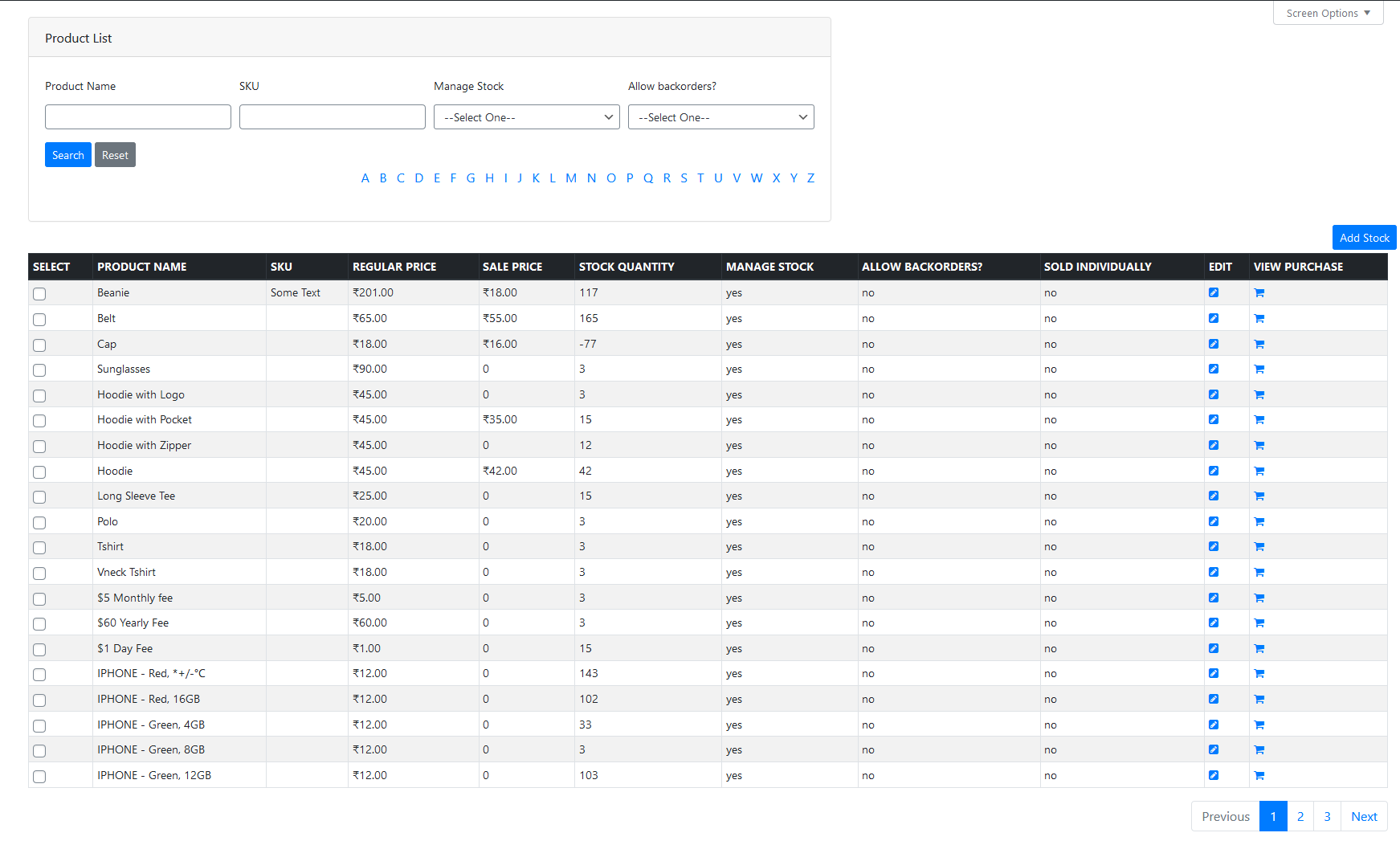
Product list: bulk stock view with add stock, purchase history and edit product.

Create a purchase order with supplier, location and purchase price.

Purchase price history for a product, filtered by date range.
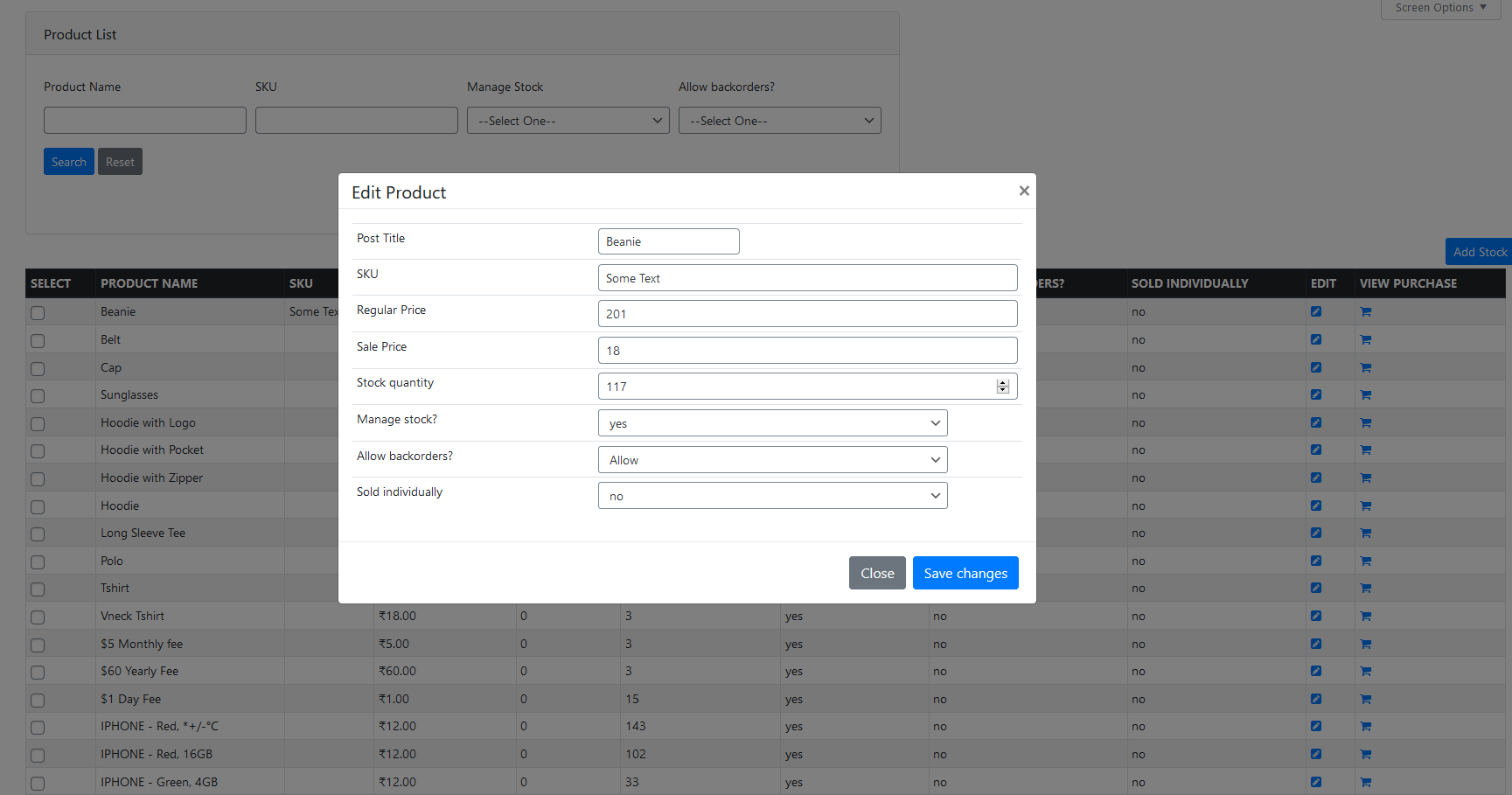
Edit product name, SKU, price and stock from a popup.

Choose the number of products shown per page.

Stock Center: purchased, sold and balance stock per location.
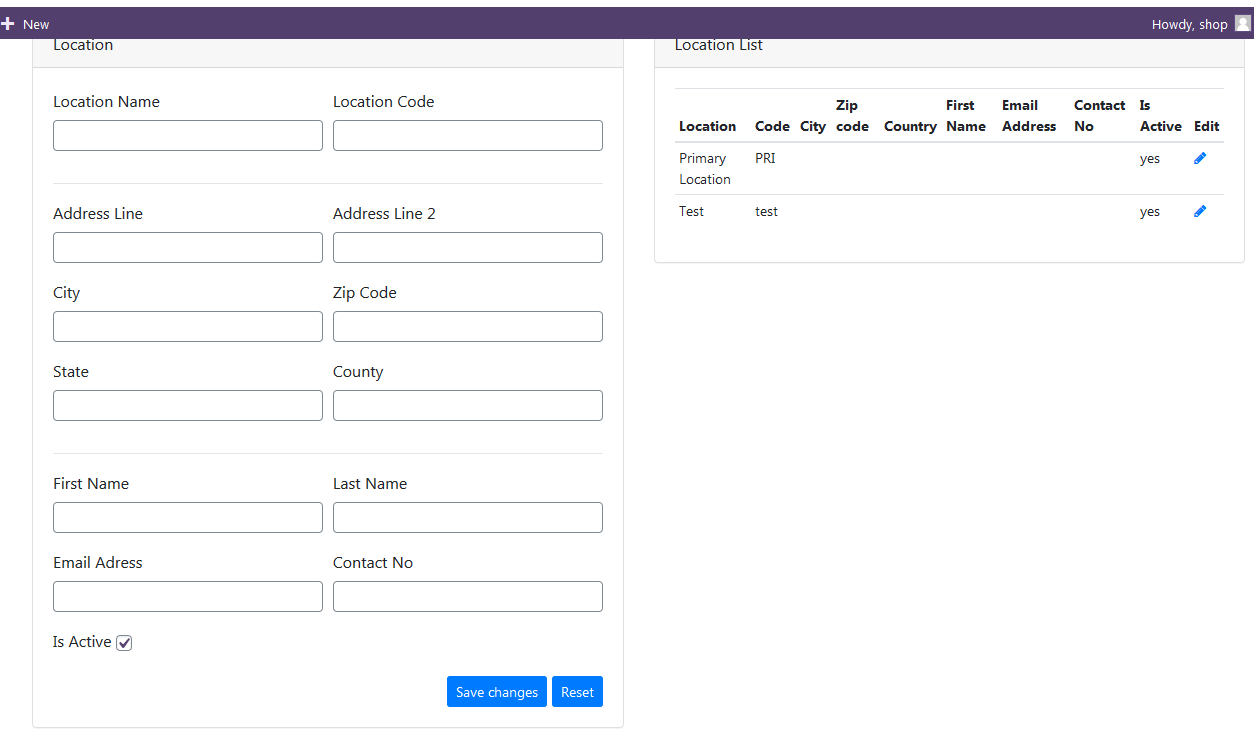
Manage stock locations (warehouses and stores).

Settings: supplier role and online sales location.
Faq
Yes. Every variation is listed as its own row, so you can buy, edit and track stock for each variation.
Yes. When you save a purchase order, the purchased quantity is added to the product’s WooCommerce stock quantity and “Manage stock” is turned on for that product.
Yes. The plugin tracks purchased, sold and balance quantity per location in the Stock Center. WooCommerce itself still keeps one total stock quantity per product, so your storefront shows the combined stock.
The online sales location you choose in Ni Inventory > Settings. Orders from the classic checkout and the block checkout are both deducted from that location.
Yes. The plugin declares HPOS compatibility and its dashboard reads orders from whichever order storage your store uses.
Create a WordPress user with the Ni Supplier role (or the role you selected in Settings). The user then appears in the supplier list on purchase orders.
Yes. On the Product List page, click the edit icon on any product or variation to change its name, SKU, regular price, sale price and stock quantity.
Deleting the plugin from the Plugins screen removes its settings and its purchase order, location stock and purchase history tables. Your WooCommerce products and their stock quantities are not changed.
Use the support tab on this page or email support@naziinfotech.com.
Yes. We can customize the plugin to your requirements. Email us with the details.
Reviews
Changelog
version 1.1.5 -18-October-2026
- Added: Addons page (Ni Inventory > Addons) listing our Pro plugins and our free WordPress.org plugins, with search and one-click Install / Activate
- Fixed: Products that were out of stock now switch to “In stock” when a purchase order adds stock
- Fixed: Edit product now saves through WooCommerce, so price changes update the shop price and stock changes update the stock status
- Fixed: Edit product popup showed the wrong “Allow backorders” value, so saving could switch a product to allow backorders
- Fixed: Edit product shows an error (e.g. duplicate SKU) instead of failing silently
- Security: Admin ajax requests now require a valid nonce and the “manage_options” capability
- Security: All database queries that use search, filter and ID values are now parameterized
- Security: Escaped request values printed in the pagination form
version 1.1.4 -17-October-2026
- Added: Compatible With WooCommerce High-Performance Order Storage (HPOS)
- Added: Online sales location stock is now reduced for orders placed with the Cart & Checkout blocks
- Fixed: Online sales location stock is no longer reduced twice when a checkout is retried
- Fixed: Dashboard “Most Stocked” count
- Improved: Redesigned admin interface (dashboard, product list, stock center, location, settings and popups)
- Improved: Dashboard order status, payment gateway and yearly sales now show as breakdown bars (the pie charts never loaded)
- Improved: Removed the remote Google Fonts request; the plugin now uses the WordPress admin font
- Tested: Compatible With WooCommerce 11.2
- Tested: Compatible With WordPress 7.1
version 1.1.3 -17-December-2023
- Tested: Compatible With WooCommerce 8.4.0
- Tested: Compatible With WordPress 6.4.2
version 1.1.2 -19-February-2023
- Tested: Compatible With WooCommerce 7.4.0
- Tested: Compatible With WordPress 6.1.1
version 1.1.1 -07-August-2022
- Tested: Compatible With WooCommerce 6.7.0
- Tested: Compatible With WordPress 6.0.1
version 1.1.0 -07-August-2022
- Tested: Compatible With WooCommerce 6.7.0
- Tested: Compatible With WordPress 6.0.1
version 1.0.9 -08-September-2021
- Tested: Compatible With WooCommerce 5.6.0
- Tested: Compatible With WordPress 5.8
version 1.0.7 -08-July-2021
- Tested: Compatible With WooCommerce 5.4.1
- Tested: Compatible With WordPress 5.7.2
version 1.0.7 -19-January-2021
- Tested: Compatible With WooCommerce 4.9.0
- Tested: Compatible With WordPress 5.6
version 1.0.6 -16-August-2020
- Tested: Compatible With WooCommerce 4.3.3
- Tested: Compatible With WordPress 5.5
version 1.0.5 -13-June-2020
- Tested: Compatible With WordPress 5.4.2
- Added: New UI
- BugFix: Internal bugfix
version 1.0.4 – 25-April-2020
- BugFix: Internal bugfix
version 1.0.3 – 04-April-2020
- Added: Added banner image
version 1.0.2 – 03-April-2020
- Fix: fix internal security issue
version 1.0.1 – 02-April-2020
- Fix: fix internal issue
version 1.0 – 20-March-2020
- Initial release