Ninhle AI Sales Assistant – AI Chatbot for WooCommerce

Ninhle AI Sales Assistant – AI Chatbot for WooCommerce
Description
Turn shopper questions into orders. Ninhle AI Sales Assistant is an AI chatbot and shopping assistant for WooCommerce. It answers from your real catalog, adds products to the cart right in the chat, tracks orders, and shows you why shoppers ask but don’t buy.
Shoppers ask the same things all day: Is it in stock? Does it come in M? How long is shipping? Where is my order? When nobody answers, many of them leave. Unlike a generic ecommerce chatbot that only knows what it was trained on, this WooCommerce chatbot answers from live lookups against your store, and says so when it does not know.
Get started in three steps
- Connect an AI provider. Paste your own API key from OpenAI, Anthropic (Claude) or Google (Gemini), or use the AI connection built into WordPress 7.0 and later. You pay the provider directly. Or start in local-only mode with no key at all.
- Sync your catalog. One click, or
wp ninhle-ai-sales-assistant sync-products, and the assistant knows your products, prices and stock. - Go live. The chat appears on your store with your name, logo, colour and suggested questions.
Add to cart in the chat
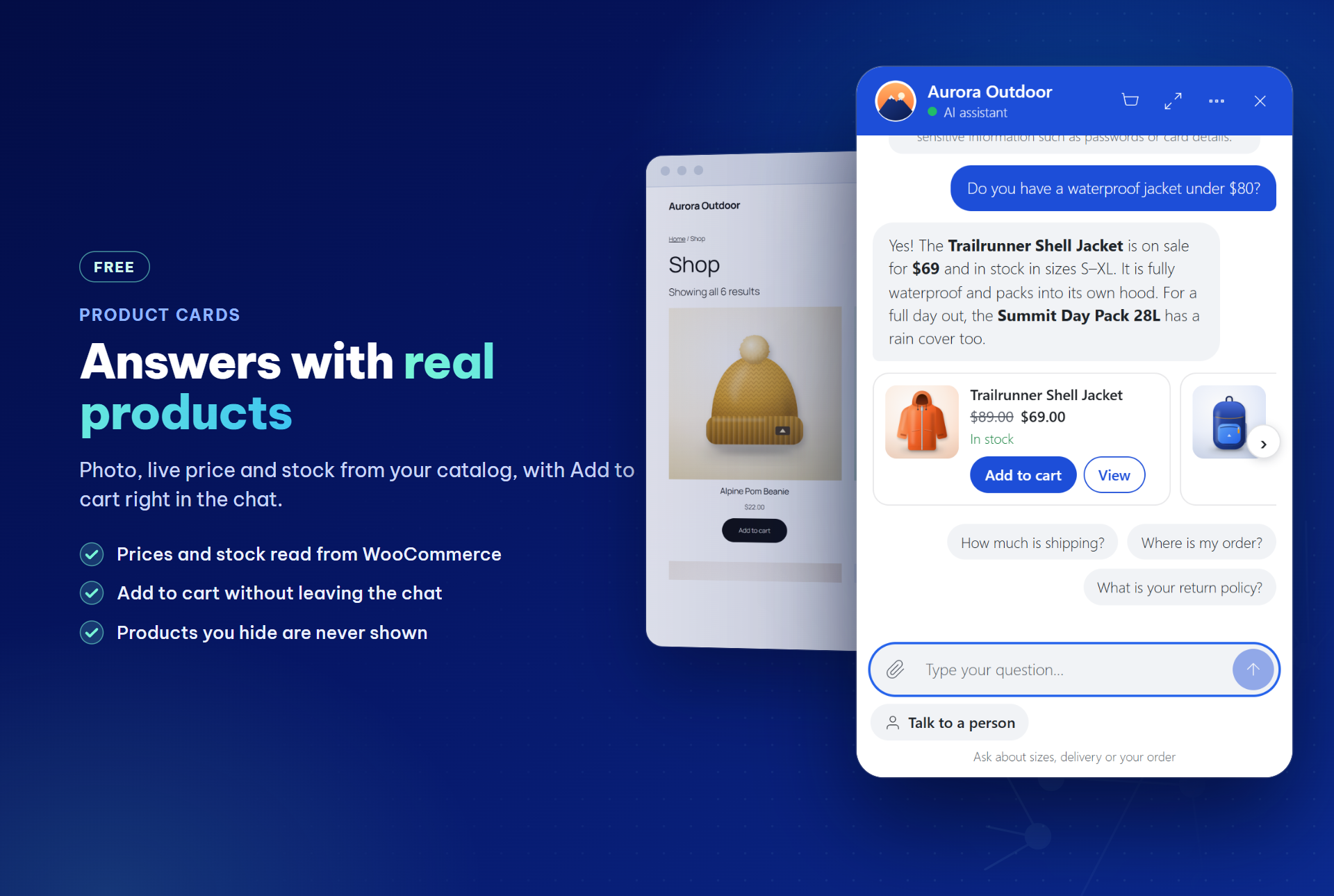
Product answers come with product cards: photo, current price, stock and rating, read from WooCommerce when the reply is shown. Shoppers tap Add to cart without leaving the chat. WooCommerce updates the cart in the shopper’s own browser, so your prices, stock rules and discounts apply as usual, and a cart view in the chat leads to Checkout.
In the free version, products with options link to the product page. The Starter plan lets shoppers pick options, change quantities and apply the discount codes you allow, right on the card.
Answers from your real catalog
Product facts come from your WooCommerce store: prices, stock, product details, store policies and your own pages. When a search finds nothing, the assistant suggests the nearest categories and asks one question instead of guessing. It never invents prices or stock, and products you hide from the catalog are never shown.
Order tracking in the chat
“Where is my order?” gets an order card in the chat: status, items, total and tracking number with a Track link (from WooCommerce Shipment Tracking, Advanced Shipment Tracking or an order field you choose). Logged-in customers see their recent orders straight away; guests give the order number with the email or phone number used for it. Without that proof, nothing is revealed.
Replies in the shopper’s language
The assistant detects the language of each message (15 languages, without an AI call) and answers in it, keeping product names, prices and order numbers exactly as in your store. You can keep every reply in your store’s language instead.
Sales Insights: why shoppers don’t buy
The Sales Insights tab lists the questions the assistant could not answer, grouped and ranked; type your answer there and the assistant uses it from the next reply. It also shows what shoppers searched for but could not find, and which products they wanted while out of stock. Contact details are hidden.
In the Starter plan, an AI labels each night why finished chats did not lead to an order (price, shipping, size, stock, missing information and more), with quotes, and a weekly summary can be emailed to you.
A person is one tap away
“Talk to a person” is always visible, and the assistant hands off complaints, explicit requests and questions your store data cannot answer. Your team replies from the Inbox in WP Admin, and a badge on the minimized chat button shows new replies. In the Starter plan, the Inbox shows a customer card for logged-in customers and those who proved an order: orders, total spent, last order and recent products.
See the orders the chatbot helped close
The AI Value & Performance tab shows what the AI cost, how many orders followed a chat and how conversations ended, each with its sample size, from the day you install. Leads left in the chat stay in your own database and export to CSV.
Ready for AI agents (MCP)
On WordPress 6.9 and later, turn on “AI agents” in Settings to register read-only abilities with the WordPress Abilities API: search products, product details and store policies. The MCP Adapter plugin can offer them to MCP clients. Only published, visible products and your store policies are shared, never orders, carts or customer data. Off by default, limited to 60 requests per hour per IP address.
Your key, your data, no per-conversation fee
Use your own OpenAI, Anthropic Claude or Google Gemini API key and pay the provider directly, or use the AI provider connected in WordPress 7.0+ (Settings > Connectors). There is no middleman server and no per-chat fee from us. Greetings, store policies, cart questions and order status are answered from store data without an AI call when the store has the answer, and AI replies run in the background so a slow provider does not hold up your pages.
Everything in the free WooCommerce chatbot
- Bring your own key: Anthropic Claude, OpenAI or Google Gemini, or the AI connection in WordPress 7.0+.
- Product cards and add to cart in the chat, with a cart view.
- Order tracking: order cards with tracking numbers; “my orders” for logged-in customers.
- Replies in the shopper’s language or always in your store’s language.
- Sales Insights: unanswered questions, searches with no result and out-of-stock demand.
- Store tools: product search and details, order status for the order’s owner, digital downloads, store policies and site content.
- Sales playbook and rules: persona, qualifying questions, objection handling, closing and keyword rules.
- Lead capture in the chat, stored in your database and exportable to CSV.
- Human handoff and Inbox: a clear status for visitors, a new-replies badge, take over and hand back, an optional webhook.
- AI Value & Performance: AI cost per request, AI-assisted orders and conversation outcomes.
- Formatted answers: lists, tables, links and product images.
- Voice input (optional, off by default).
- Your brand: name, logo, colour, font and suggested questions, with a live preview.
- Local-only mode: answers from store data without any AI provider.
- Ready for AI agents (WordPress 6.9+, off by default).
- Light, private and translation-ready: the chat loads only when needed; personal-data export and erasure; HPOS and Cart and Checkout blocks supported.
Optional paid plans
Ninhle AI Sales Assistant is free to install and use. Optional paid plans add extra code to the
plugin; nothing in the free version is locked or time-limited.
Starter — options, quantities and allowed discount codes on product cards in the chat;
nightly AI labels of why shoppers did not buy, with a weekly email summary; a customer card in
the Inbox; product variations with per-variation add-to-cart links; Telegram notifications for
new leads and handoffs; a sales dashboard; cached answers for repeated questions; and the
revenue of orders that followed a chat, per currency, on the AI Value & Performance tab.
Pro — everything in Starter, plus coupon validation, automatic failover to a
second AI provider, daily and monthly AI budget caps, rule-based lead scoring with
advanced analytics, price-output verification, and signed HMAC-SHA256 webhooks
for n8n, Make, Zapier and CRMs.
AI usage is never included: OpenAI, Anthropic and Google bill you directly for
your own API key, on every plan including Free.
External services
The plugin connects to the services below. Except for the AI provider you configure,
each one is used only when you turn the related setting on.
AI provider (the one you configure) — receives the visitor’s chat messages, recent
conversation history, your sales playbook and business information, and product data from
your own store, each time a visitor sends a message. Nothing is sent in local-only mode.
If you choose “WordPress AI connection” (WordPress 7.0+), the same data goes through WordPress
to the provider you connected in Settings > Connectors, under that provider’s terms.
- Anthropic (Claude) — https://www.anthropic.com/legal/privacy — https://www.anthropic.com/legal/consumer-terms
- OpenAI — https://openai.com/policies/privacy-policy — https://openai.com/policies/terms-of-use
- Google (Gemini) — https://policies.google.com/privacy — https://ai.google.dev/gemini-api/terms
Sales Insights AI labeling (Starter plan only, optional, off by default) — the free
version contains no code for this. If you turn it on, once a night the text of finished chats
that did not lead to an order is sent to your AI provider, with email addresses and phone
numbers replaced by placeholders, so the AI can label why the shopper did not buy. A monthly
spending limit you set stops the job.
Link reading (optional, off by default) — when you enable “Let the bot read links
customers send”, a URL a visitor pastes into the chat is sent to r.jina.ai to fetch its
text (https://jina.ai/legal/). YouTube links are read from youtube.com instead, to get the
video title and public transcript (https://policies.google.com/privacy,
https://www.youtube.com/t/terms). Leave this off if visitors might paste private links.
Google Fonts (optional) — only if you pick a Google font for the widget in the
settings. Visitors’ browsers then load that font from fonts.googleapis.com
(https://policies.google.com/privacy). The default font loads nothing from Google.
Voice input (optional, off by default) — only if you turn on “Let visitors speak their
message”. The microphone button uses the speech recognition built into the visitor’s own browser
(Web Speech API). Depending on the browser, the audio may be sent to the browser maker’s speech
recognition service, for example Google for Chrome (https://policies.google.com/privacy), Apple
for Safari (https://www.apple.com/legal/privacy/) or Microsoft for Edge
(https://privacy.microsoft.com/privacystatement). The plugin never receives, records or stores
audio; it only receives the text the visitor chooses to send.
Handoff webhook (optional) — only if you enter a webhook URL. On a handoff the plugin
sends the conversation ID, contact ID and handoff level to that URL, which you control.
Telegram (paid plans only, optional) — the free version contains no Telegram code. In
the Starter and Pro plans, if you enter a Telegram bot token and chat ID, new leads (name,
email, phone) and handoff requests (priority, issue, summary, conversation number) are sent
to api.telegram.org (https://telegram.org/privacy, https://telegram.org/tos).
Automation webhooks (Pro plan only, optional) — the free version contains no code for
this. In Pro, if you enter a webhook URL, lead and handoff events are posted to that URL,
which you control, signed with your secret.
Freemius (licensing, upgrades and affiliate program) — the plugin bundles the Freemius
SDK. Nothing is sent to Freemius from your storefront. The plugin contacts Freemius only
when an administrator does one of the following:
- Opts in to usage data: the WordPress user’s name and email, site URL and title, WordPress,
PHP and plugin versions, site language, and whether the plugin is active or uninstalled.
The list of plugins and themes is sent only if that permission is left on. - Opens the Upgrade (pricing) page, starts a trial, buys a plan or activates a license. With
an active license, the paid version then checks Freemius for updates and license status. - Opens the Affiliation page in the plugin menu: the affiliate program terms are loaded from
Freemius. - Submits the affiliate application form: the name, email, PayPal email, website domains and
promotion details entered in the form are sent to Freemius. If the site is not connected
to Freemius yet, it is connected with the email entered, with usage tracking off. - Clicks “Contact Us”: the Freemius contact form opens in a new browser tab.
Freemius terms: https://freemius.com/terms/ — privacy policy: https://freemius.com/privacy/ —
affiliate program terms: https://freemius.com/plugin/39395/ninhle-ai-sales-assistant/legal/affiliate-program/
Security
API keys are stored server-side and never sent to the browser; the settings screen
shows only a masked value. Every provider call is made from your server through the
WordPress REST API.
Database queries use $wpdb->prepare(). Every REST route declares a real
permission_callback, and the endpoints the AI uses as tools are internal-only –
they cannot be reached from outside the site. Visitor sessions use hashed tokens
and chat messages are rate limited per session. When a background AI reply is started
through a loopback request, that request is signed and expires after 60 seconds.
The plugin server never changes a shopper’s cart: “Add to cart” in the chat calls
the WooCommerce Store API from the shopper’s own browser. The AI can only propose
products that come from your catalog, and the card always reads the current price
and stock from WooCommerce.
Chat messages are rendered as DOM elements rather than injected HTML, and only
http and https links are ever made clickable, so content returned by the AI cannot
inject markup.
Please report security issues privately to the author rather than in a public forum.
Privacy
Conversations, contacts and leads are stored in your own WordPress database. The
plugin registers with Tools > Export Personal Data and Tools > Erase Personal Data,
so you can answer data-subject requests from WordPress itself. Message attachments
are purged on a configurable retention schedule. No data is sent anywhere except the
services listed under External services.
To count orders that followed a chat, the conversation number is saved in the
visitor’s WooCommerce shopping session when the assistant shows products or the
visitor clicks a product or cart link in the chat. An order placed within the
attribution window you choose (24 hours by default) is linked to that conversation.
The link, and the visitor’s answer to “Did this answer your question?”, are included
in the personal-data export and removed by the eraser. The plugin adds a suggested
paragraph about this to Settings > Privacy.
Sales Insights stores the questions the assistant could not answer, with email addresses
and phone numbers hidden, and in the Starter plan the reason a chat did not lead to an
order with a short quote. When a logged-in customer chats, or a customer proves they own
an order, the conversation records that account or order number, so your team can see
the customer card (Starter plan). The language of each conversation is stored to reply in
it. All of this is included in the personal-data export and removed by the eraser.
In the visitor’s browser, the chat keeps its session token and, for the new-replies badge,
the conversation number, the last message seen and when it was seen (localStorage). No
message text is stored there.
Installation
- Install from Plugins > Add New, or upload the plugin ZIP, then activate.
- Go to Ninhle AI Sales > Settings and enter an API key for your chosen AI provider (or choose local-only mode).
- Fill in the Business information and review the Sales playbook.
- Click “Sync products now” (or run
wp ninhle-ai-sales-assistant sync-products) so the bot knows your catalog.
Screenshots
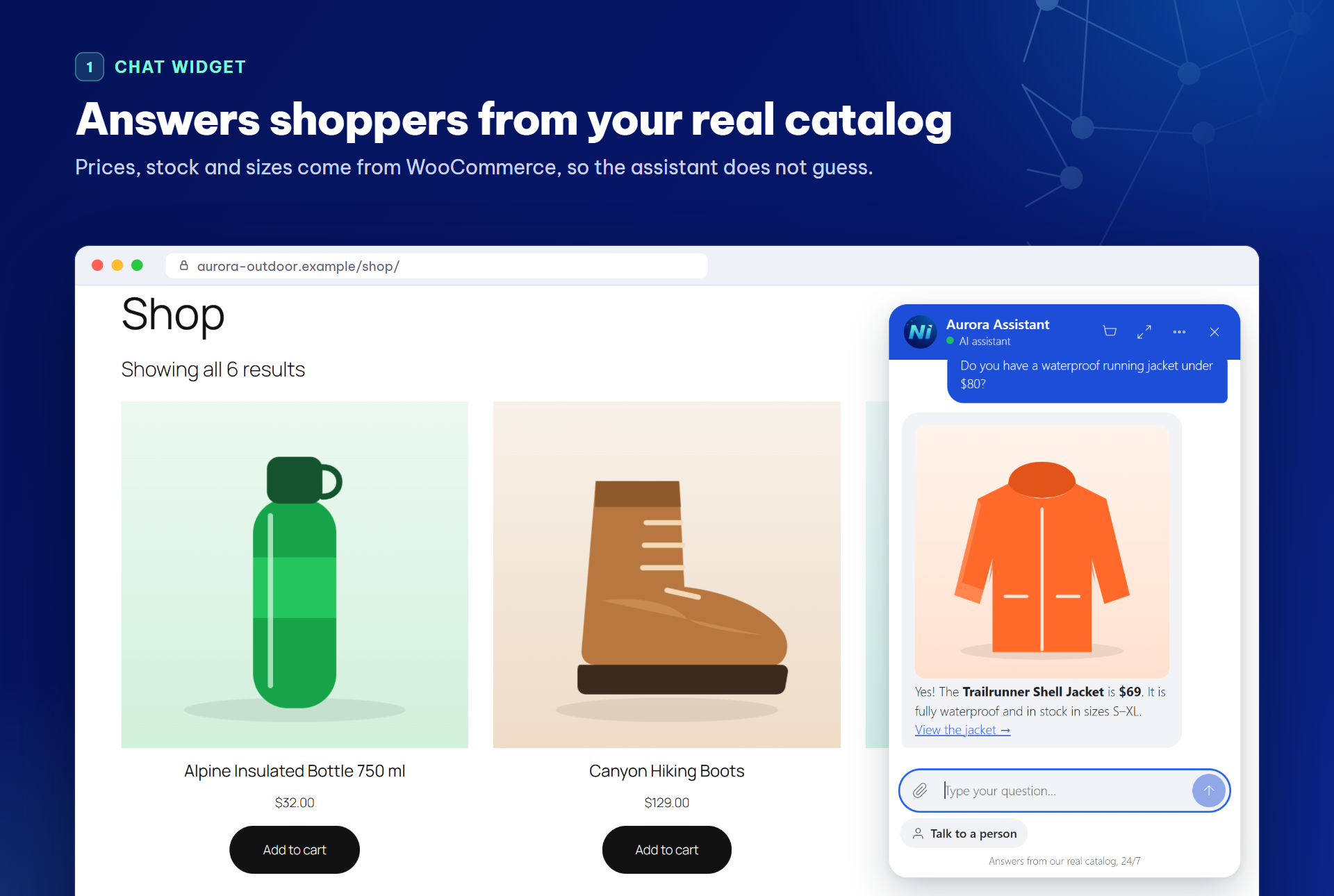
The AI chatbot on a WooCommerce shop page, answering a price, stock and size question from the real catalog.
AI Value & Performance: what the assistant cost, how many orders followed a chat and how conversations ended, each with its sample size.

Inbox: every chatbot conversation with its status; take over from the bot and reply as a person.
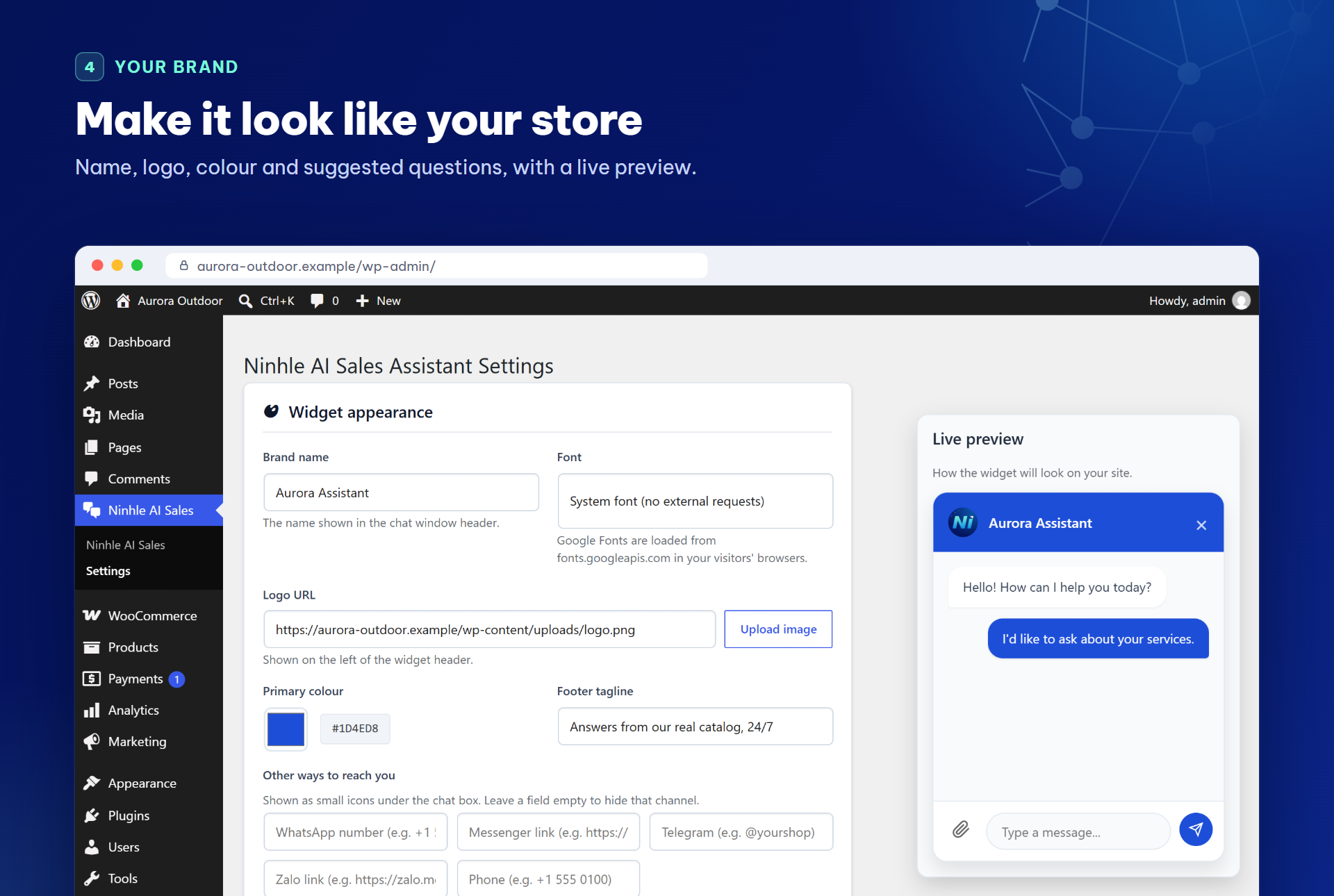
Settings: brand name, logo, colour, footer tagline and suggested questions, with a live preview.
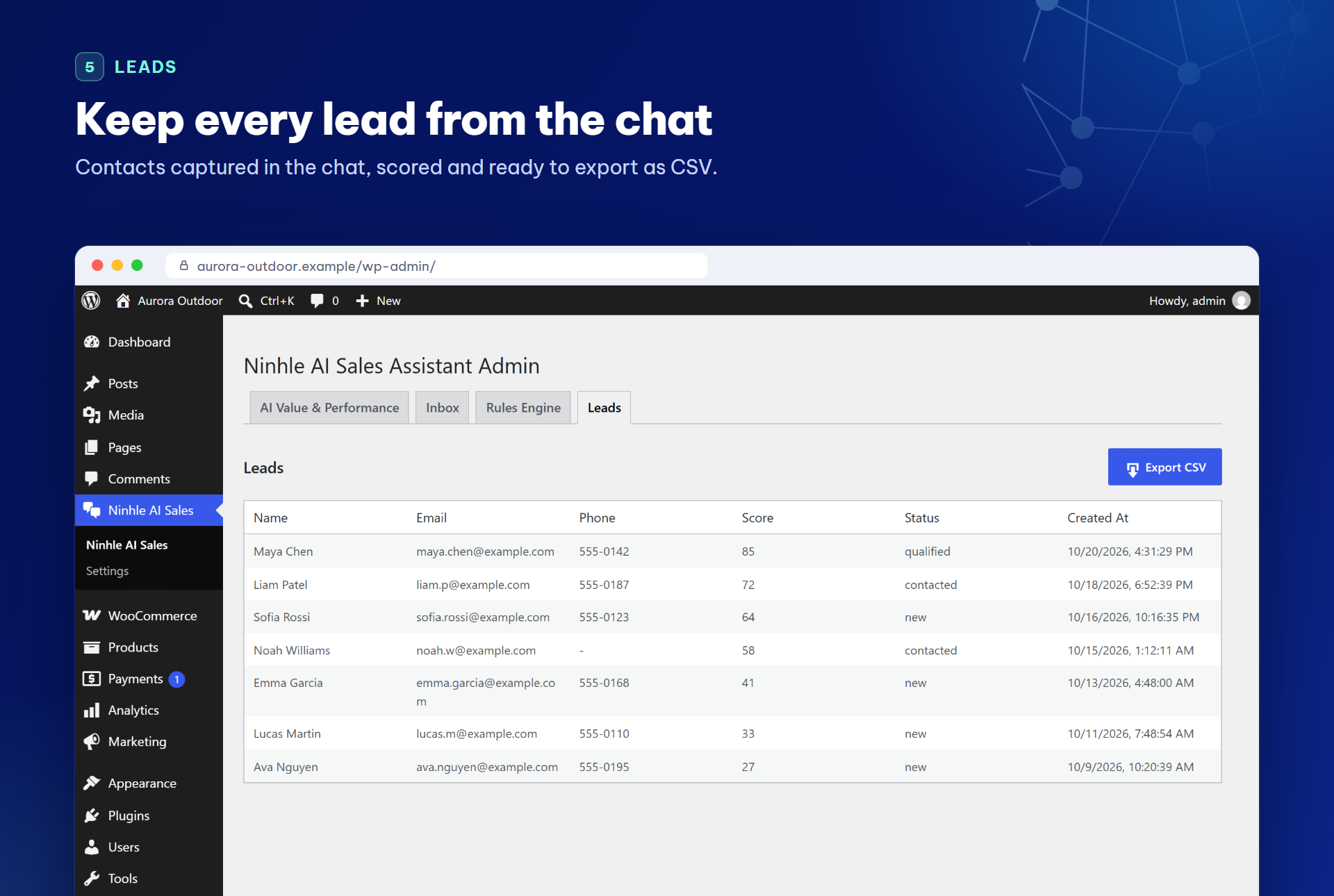
Leads captured in the chat, with score and status, ready to export as CSV.
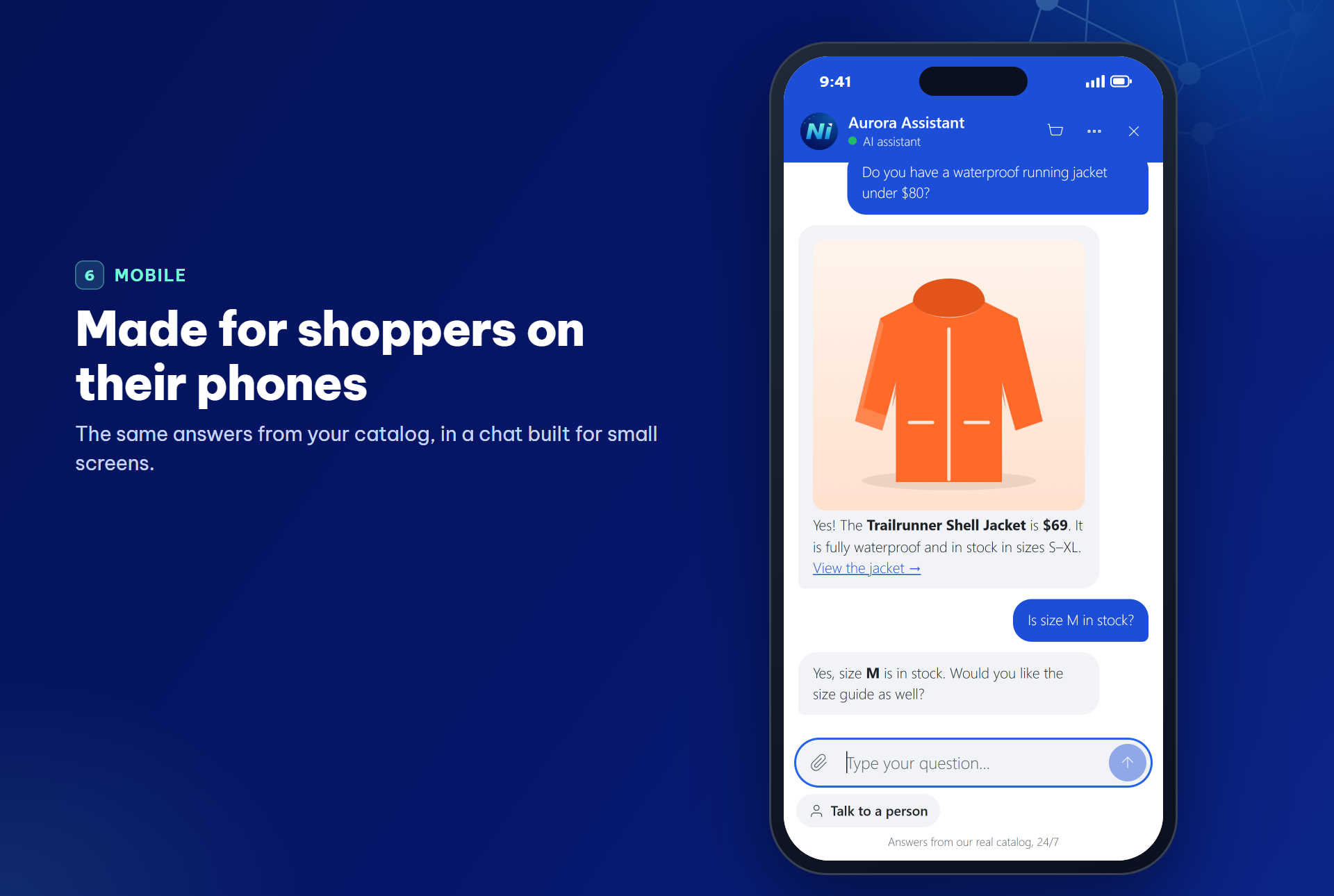
The chat on a phone.
Faq
Yes. The free version is complete and has no time limit or message cap from us. You pay only your
AI provider for your own API key, or use local-only mode with no key at all.
Yes. Product answers show cards with an Add to cart button, and the cart is updated by WooCommerce
in the shopper’s browser, so your prices, stock and cart rules apply. In the free version, products
with options link to the product page; the Starter plan lets shoppers choose options and quantities
on the card. Nothing is added until the shopper taps the button.
Yes. The assistant shows an order card with the status, items and tracking number. Logged-in
customers can ask for their recent orders. Guests give the order number together with the email
address or phone number used for the order; without that proof the assistant reveals nothing.
Yes, by default on new installs. It detects the language of each message and answers in it. Sites
upgraded from an earlier version keep replying in the store’s language until you change “Reply
language” in Settings.
Anthropic Claude, OpenAI and Google Gemini, with your own API key for each. On WordPress 7.0 and
later you can also use the AI provider connected in Settings > Connectors. You choose the
provider and can switch at any time.
The questions shoppers asked that the assistant could not answer, grouped and ranked, what they
searched for but could not find, and which products they wanted while out of stock. You can add
an answer from the same screen. The Starter plan adds the reasons chats did not lead to an order and a
weekly email summary.
Yes, if you allow it. On WordPress 6.9 and later, turn on “AI agents” in Settings: the plugin
registers read-only abilities for product search, product details and store policies. With the
MCP Adapter plugin, MCP clients can use them. Orders, carts and customer data are never shared.
Yes. It searches your synced WooCommerce catalog, recommends products that match what the shopper
asked for and shows them as cards. It only recommends products that exist in your store.
To use an AI provider, yes: you supply your own API key from Anthropic, OpenAI or Google
and are billed directly by that provider. Local-only mode needs no key.
It depends on the provider and model you choose, and you pay the provider directly. In our test
of 60 conversations on a real store with version 2.6.0, GPT-4o mini cost about US$0.0009 per
conversation and Gemini 3.8 Flash about US$0.015. The AI Value & Performance tab shows what your
own store actually spent.
Yes. Local-only mode answers greetings, store policies, cart and order questions from your store
data without calling any AI provider. Add a key later when you want full conversations.
The chat button is small. The chat window, product cards, cart view and voice input load only
when they are needed, and AI replies run in the background after a message is sent. While the
chat is minimized after a recent conversation, it checks for new replies every 25 seconds, only
while the browser tab is visible. Nothing is loaded from third-party servers unless you pick a
Google font.
No. Conversations, contacts and leads stay in your own WordPress database. Messages go only to
the AI provider you configure, and the other services listed under External services are used
only when you turn them on.
The chat and lead capture work on any WordPress site. Product search, product cards, catalog
grounding and order lookup require WooCommerce.
No. Product facts come from lookups against your store, and product cards read the current price
and stock from WooCommerce when the reply is shown. If the catalog has not been synced, the bot
is told to say so and offer a handoff instead of guessing.
An order placed within your attribution window (24 hours, 72 hours or 7 days) after the
customer received an answer with products from your store, or clicked a product or cart link
in the chat, or added a product to the cart from the chat. Each order is counted once.
Cancelled, failed and fully refunded orders are left out, and partial refunds are deducted.
AI-assisted does not mean the AI was the only reason for the order.
No. Paid plans add separate code; the free version contains no locked or trial-limited features.
The files in assets/dist are built with Vite from the human-readable source shipped in the
plugin under src/JS (admin screens and chat widget). To rebuild them, run npm ci and then
npm run build in the plugin folder; the build configuration is in vite.config.ts and
package.json.
Reviews
Changelog
2.6.0
- Added: add to cart in the chat. Product answers show cards with photo, current price, stock and rating, read from WooCommerce when the reply is shown. Simple products have an Add to cart button that uses the WooCommerce Store API in the shopper’s browser; the plugin server never changes the cart. A cart view in the chat shows the items, subtotal and Checkout.
- Added: order tracking cards in the chat, with status, date, items, total and tracking number with a Track link (WooCommerce Shipment Tracking, Advanced Shipment Tracking or an order field you choose in Settings). Logged-in customers can ask for their recent orders without giving an email address.
- Added: Sales Insights tab: questions the assistant could not answer, grouped and ranked, with “Add answer” to teach the assistant; searches with no matching product; products wanted while out of stock. Email addresses and phone numbers are hidden.
- Added: replies in the shopper’s language (15 languages detected without an AI call). New installs reply in the customer’s language; upgraded sites keep the store’s language until you change “Reply language” in Settings.
- Added (Starter): choose options and quantities on product cards, remove items and apply discount codes you allow; the assistant can prepare the card with the shopper’s choice.
- Added (Starter): nightly AI labels of why chats did not lead to an order, with quotes, a monthly spending limit and an optional weekly email summary.
- Added (Starter): a customer card in the Inbox for logged-in customers and customers who proved an order: order count, total spent, last order and recent products. Shown only to users who can view WooCommerce orders.
- Added: a badge on the chat button when a reply arrives while the chat is minimized.
- Added: “WordPress AI connection” as an AI provider on WordPress 7.0 and later (Settings > Connectors).
- Added: optional read-only abilities for AI agents (WordPress Abilities API, WordPress 6.9+): product search, product details and store policies. Off by default.
- Added: after a week of use, once the assistant has answered at least 10 conversations or helped with an order, administrators are asked on the plugin screens whether they would leave a review on WordPress.org, with “Maybe later” and “Don’t ask again”. At most three times, never within a day of an AI error, and it can be turned off with a filter.
- Changed: AI replies now run in the background after a message is sent, instead of inside the visitor’s next request. At most 2 replies run at the same time by default. The chat checks for replies often right after a message and less often while idle.
- Changed: product search also finds products when the shopper’s words are in a different order or include extra words.
- Changed: the plugin is now named “Ninhle AI Sales Assistant – AI Chatbot for WooCommerce”.
- Fixed: products hidden from the catalog could still be recommended.
- Fixed: a product on sale for 0 was quoted at its regular price, and a sale scheduled for later was quoted before it started.
- Fixed: questions that mention payment (for example “Do you have a plugin for QR payments?”) were answered with the checkout link.
- Fixed: logged-in customers were treated as guests in the chat, so their account could not be used to look up their orders.
- Fixed: with Google Gemini, a saved model that Google no longer offers to new API keys made every reply fail. The plugin now falls back to the current Gemini Flash model and logs a reminder to update the setting.
- Fixed: Gemini could return an empty reply when its thinking used up the answer length.
- Fixed: with LiteSpeed Cache, the cart shown in the chat could be served from the page cache and look empty or out of date.
- Fixed: when the AI provider was slow, the visitor could be told the assistant was still looking and then get no answer.
2.5.0
- Added: optional voice input, off by default (“Let visitors speak their message” in Settings). Visitors tap the microphone and the browser turns their speech into text in the message box; they check it and send it themselves. The plugin never receives or stores audio. Shown only on HTTPS pages in browsers with speech recognition (not Firefox). Clear messages if the microphone is blocked, missing or not understood; typing always works.
- Fixed: assistant replies no longer show raw formatting characters such as
**or-. Bold text, lists, tables, links and product images now display properly in the chat. - Fixed: product images could show as broken when the original file had been deleted from the server. The plugin now uses a resized copy that still exists, hides any image that cannot load, and loads same-site images over https on https pages.
- Fixed: clicks on site-relative links in the chat are now counted for AI-assisted orders.
- Changed: the chat window loads only when a visitor is about to open it, so pages load less JavaScript up front.
- Changed: the Inbox shows readable statuses and senders, and the Rules Engine describes each rule in plain words instead of JSON.
2.4.1
- Added: an Affiliation page in the plugin menu, for administrators, to apply for the Ninhle AI affiliate program: 30% commission on new sales and renewals, with a 45-day cookie. The program terms are loaded from Freemius when you open the page.
- Added: an “Earn 30% commission” link on the Settings page, shown only to administrators. The automatic affiliate notice of the Freemius SDK is turned off.
- Changed: the External services section of this readme lists every case in which the plugin contacts Freemius.
2.4.0
- Added: AI Value & Performance tab – AI cost recorded per request with the provider’s usage and a dated price table, AI-assisted orders, and conversation outcomes (confirmed resolved, probably resolved, handed off, unresolved or unknown) with sample sizes. Figures start on the day you upgrade; older data is not backfilled.
- Added: “Talk to a person” button in the chat widget. It hands the conversation to your team without calling the AI, and pressing it again does not create a second handoff.
- Added: the widget shows a real status (AI assistant, waiting for a team member, a team member is helping you) and a short progress line while the assistant looks up products or orders.
- Added: a “Did this answer your question?” prompt inside the chat, at most once per conversation, which visitors can skip.
- Added: a line telling visitors they are chatting with an AI assistant, on by default and editable.
- Added: WhatsApp and Telegram links next to Messenger, Zalo and phone; an option to hide the chat on the checkout page.
- Changed: redesigned chat widget – simpler header, secondary actions in a “…” menu, no borders, text colour chosen for contrast on your brand colour, full screen on phones, keyboard support (Escape closes and returns focus).
- Changed: on cart and checkout pages the chat button moves out of the way of the place-order button on phones.
- Changed: revenue of AI-assisted orders is now part of the Starter plan.
- Changed: the settings screen shows the model each provider actually uses and an estimated cost per conversation, and warns when a saved model has been retired.
- Changed: Gemini replies count the model’s thinking tokens in the recorded cost, as Google bills them.
- Changed: browser pop-ups (alert and confirm) in the admin screens and the widget are replaced by in-page messages.
- Removed: Thinking mode and the prompt generator (“create prompt”) in the chat widget. Their settings are kept but no longer used.
- Fixed: the assistant’s internal reasoning could appear in replies, the inbox and data exports; it is now removed before anything is saved, and older messages are cleaned when they are read.
- Fixed: handoffs were counted only while a conversation was waiting for staff, so taking over or handing back made them disappear from the statistics.
- Fixed: automation rules created in the Rules screen never ran.
- Fixed: OpenAI errors (wrong or expired key, used-up quota, server errors) were treated as an empty answer, so the backup provider was never tried and nothing was logged. They are now reported as errors and the next provider in the chain answers.
- Fixed: when the AI provider returned an empty answer, the visitor received no reply at all; they now get a short message asking them to rephrase.
- Fixed: when every AI provider failed, the reply said the visitor had been passed to a colleague without doing so; it now says the assistant is briefly unavailable and points to “Talk to a person”.
- Fixed: migration steps from earlier versions could not be recorded because their names were too long.
- Fixed: the sample business details added at install (opening hours, cash on delivery, delivery times, 7-day returns) were given to shoppers as if they were the store’s own terms, even after the field was cleared. New installs start with this field empty, unchanged sample text is no longer used, and Settings asks you to enter your real details. Until then the assistant offers to check with your team instead of stating terms.
- Fixed: “Restore default playbook” also replaced your business information with the sample text.
- Fixed: product search results given to the assistant now state your store currency, so it no longer guesses one (for example “$” in a VND store), and product summaries use your currency format instead of always “đ”.
- Fixed: products with variations (size, colour) had no price in the assistant’s product list, so it could not quote a price and price searches skipped them. The assistant now sees the price range and quotes a “from” price unless it has checked the chosen option.
- Fixed: with “Delete data on uninstall” turned on, two plugin options were left in the database.
- Fixed: on sites with WooCommerce, scheduling the plugin’s background tasks could log a “translation loading triggered too early” notice.
2.3.0
- Added: WordPress personal-data export and erasure cover every table the plugin creates.
- Added: declared compatibility with WooCommerce HPOS and the Cart/Checkout blocks.
- Changed: the chat widget is one continuous white card (header, messages and composer) and fits narrow phone screens.
- Changed: the widget uses the system font by default and loads Google Fonts only if you pick a Google font in the settings.
- Changed: a chat session is created only when a visitor opens the chat, not on every page view. Returning visitors are no longer rate-limited, so visitors on shared mobile or office networks keep the chat button.
- Fixed: on phones, the chat button could sit off-screen when the theme has content wider than the screen (for example a news ticker).
- Fixed: automation rules could not be saved because the rules table was missing two columns; existing sites are repaired automatically.
- Fixed: deleting an automation rule reported an error even though the rule was deleted.
- Changed: the plugin is now named Ninhle AI Sales Assistant for WooCommerce.
- Fixed: inline scripts attached to the admin and widget bundles were dropped when the bundles were loaded as ES modules.
- Changed: Telegram notifications, product variations, coupon validation, provider failover, budget caps and the sales dashboard now ship only in the paid plans, as separate code.
- Changed: translations come from translate.wordpress.org; the plugin no longer bundles its own translation files.
- Fixed: handoff replies are now translatable instead of always Vietnamese.
- Fixed: on/off settings saved as “on” were read back as “off”, so link reading, the prompt creator and the adaptive playbook never ran when enabled.
- Fixed: the assistant could stop replying after looking up products or other tools.
- Fixed: the assistant now reads PDF files customers attach, and reliably looks at attached images when using OpenAI.
- Fixed: when link reading is on, files a customer uploads are no longer sent to the link-reading service.
- Fixed: AI cost was recorded as zero when no model was chosen in the settings; the default model is now used for cost estimates.
- Fixed: Gemini failed when the model field was left empty.
- Fixed: attached files were never removed from conversations that were not closed, and deleting or clearing a conversation left its files on the server. Files sent in the chat are now deleted after the retention period, and immediately when their conversation is deleted or cleared.
- Fixed: file uploads no longer require the PHP fileinfo extension.
- Security: attachment paths are validated before files are read for the AI provider.
- Changed: if processing a message fails unexpectedly, the visitor gets an apology instead of no reply.
- Added: customers can paste an image (for example a screenshot) straight into the chat box.
- Fixed: suggested follow-up questions sometimes appeared as raw “[SUGGESTIONS]” text instead of buttons.
- Fixed: the response cache no longer stores answers that contain prices or stock status.
- Security: YouTube caption downloads only go to youtube.com over HTTPS.
- Changed: the free version no longer shows settings for features that exist only in the paid plans.
- Fixed: the leads CSV export downloaded as escaped text instead of a spreadsheet; it now opens correctly in Excel, including accented names.
- Changed: licensing and upgrade notices appear only on the plugin’s own admin pages.
- Fixed: when coupon checking is not available, the assistant no longer tells customers a code is invalid; it asks them to enter it at checkout.
- Security: chat responses are never stored by page caches (for example LiteSpeed Cache or a host CDN). A cached response could be served without a valid chat session, and visitors could miss the assistant’s reply.
- Fixed: with Google Gemini or Anthropic Claude, product and order lookups could fail and the internal lookup command could appear in the chat.
- Fixed: the default Gemini and Claude models had been retired by Google and Anthropic. The plugin now defaults to current models and ignores retired model names saved by earlier versions.
- Changed: the default chat widget name is “Shop Assistant”; set your own name in the settings.
- Added: the assistant knows the current date and time in your store’s timezone (Settings > General), so it can tell customers the date and take it into account for opening hours, delivery times and promotion end dates.
2.2.0
- Added: three-tier licensing – Free, Starter and Pro – with Pro inheriting all Starter features.
- Added: premium code moved to a separate directory so the Free build genuinely excludes it rather than hiding it.
- Added: safe fallbacks so the Free build runs with no paid code present at all.
- Changed: minimum WordPress raised to 6.3.
2.1.0
- Changed: the admin interface is now English throughout; Vietnamese ships as a translation.
- Changed: default widget tagline and policy fallbacks are English and brand-neutral.
- Fixed: the Rules screen was calling REST helpers that did not exist, so every action on that tab failed.
2.0.0
- Added: Freemius SDK for optional paid plans, supporting annual subscriptions and lifetime licenses.