Notification Master – Real-Time WordPress Notifications With Email, SMS, Webhooks & More
Notification Master – Real-Time WordPress Notifications With Email, SMS, Webhooks & More
Description
Transform Your WordPress Site with Professional Notification Management
Notification Master is the most comprehensive WordPress notification plugin designed to dramatically increase user engagement and site activity. Whether you’re running a blog, eCommerce store, or community site, our plugin ensures your users never miss important updates through intelligent, automated notifications.
Why Choose Notification Master?
✅ 12+ Notification Channels – Reach users everywhere they are
✅ Real-Time Browser Push Notifications – Instant alerts even when users aren’t on your site
✅ Advanced Automation – Set up once, notify forever
✅ Personalized Messages – Dynamic content with smart merge tags
✅ Zero Coding Required – User-friendly interface for all skill levels
✅ Mobile Optimized – Perfect notifications on any device
🎥 Watch Our Complete Setup Tutorial
Learn how to maximize your WordPress notifications in under 10 minutes:
🚀 Key Features & Notification Channels
Web Push Notifications (Browser Notifications)
- Send instant browser alerts to subscribers even when they’re not on your website
- Works on desktop and mobile browsers (Chrome, Firefox, Safari, Edge)
- Customizable notification appearance with your site branding
- Smart subscription management with floating buttons
- Welcome messages for new subscribers
Email Notification System
- Rich HTML email templates with WordPress Classic Editor
- Multiple recipient management (roles, individual users, custom addresses)
- Email exclusion options for targeted messaging
- Test email functionality before sending
- Background processing for improved performance
Social Media & Communication Integrations
- Discord Notifications – Keep your community updated instantly
- Slack Integration – Team notifications and updates
- WhatsApp Notifications – Direct messaging to users
- Facebook Page Updates – Automatic social media posting
- Twitter/X Integration – Auto-tweet important updates
- Instagram Auto-Posting – Visual content automation
Advanced Automation & Workflows
- Zapier Integration – Connect with 5000+ apps and services
- Make (Integromat) – Advanced workflow automation
- Webhook Support – Custom integrations and API connections
- Twilio SMS – Text message notifications
- Conditional Logic – Smart notification rules
📋 Complete Trigger System – Never Miss Important Events
Content Management Triggers
- New Post Published – Alert subscribers about fresh content
- Post Updates – Notify about content changes
- Comment Activity – New comments, approvals, replies
- Media Management – File uploads, updates, deletions
- Draft & Review Process – Editorial workflow notifications
User Activity Triggers
- User Registration – Welcome new members
- Profile Updates – Account changes
- Login/Logout Activity – Security and engagement tracking
- User Management – Administrative notifications
WordPress System Triggers
- Plugin Management – Installation, activation, updates
- Theme Changes – New themes, switches, updates
- Taxonomy Management – Categories, tags, custom taxonomies
- Privacy Compliance – GDPR data export/erasure notifications
WooCommerce Integration (eCommerce Notifications)
- Order status changes and updates
- New customer registrations
- Product inventory alerts
- Payment confirmations
- Shipping notifications
🏷️ Smart Personalization with Merge Tags
Create highly personalized notifications using our extensive merge tag system:
Content Tags:
* {{post.title}} – Dynamic post titles
* {{post.content}} – Excerpt or full content
* {{post_author.nickname}} – Author information
* {{post.permalink}} – Direct links to content
User Tags:
* {{user.email}} – User email addresses
* {{user.display_name}} – Display names
* {{user.role}} – User roles and permissions
System Tags:
* {{general.blogname}} – Your website name
* {{general.current_time}} – Current date and time
Advanced Custom Fields (ACF) Support:
* Custom field values for personalized content
* Dynamic product information
* User meta data integration
📚 Comprehensive Documentation & Support
Access our complete knowledge base for detailed setup guides:
- Quick Start Guide – Get up and running in minutes
- Channel Configuration – Detailed integration setup
- Trigger Reference – Complete trigger documentation
- Web Push Setup – Browser notification configuration
- Email Templates – Email design and customization
- Social Media Integration – Complete social setup guides
- WooCommerce Notifications – eCommerce-specific triggers
- API & Webhooks – Advanced integrations
Installation
Automatic Installation (Recommended)
- Login to your WordPress admin dashboard
- Navigate to Plugins > Add New
- Search for “Notification Master”
- Click “Install Now” and then “Activate”
Manual Installation
- Download the plugin ZIP file
- Upload to
/wp-content/plugins/notification-masterdirectory - Activate through the WordPress ‘Plugins’ menu
Screenshots
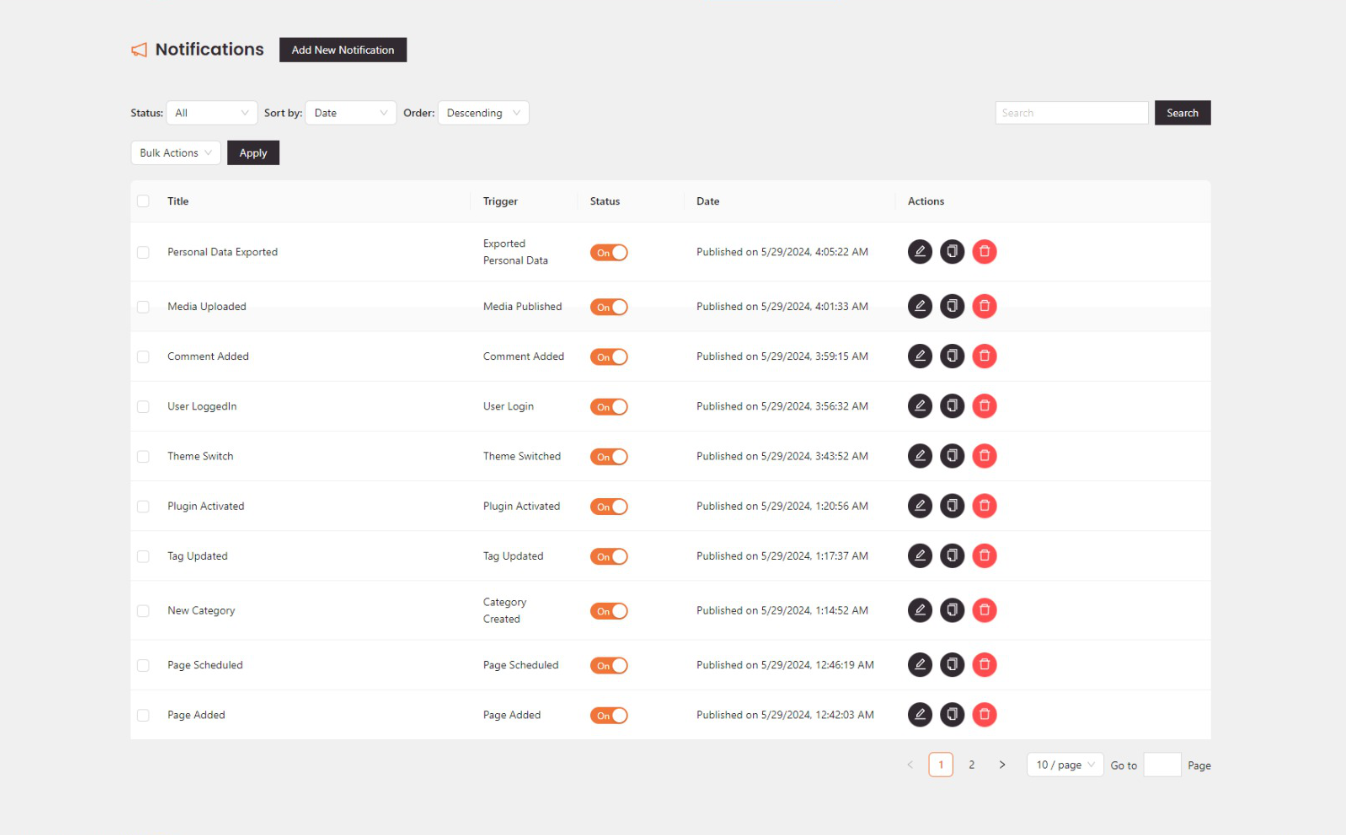
Notification Master - Notifications Dashboard

Notification Master - Notification Configuration

Notification Master - Integration Settings

Notification Master - Merge Tags Selection
Faq
Notification Master offers the most comprehensive channel support (12+ integrations), advanced personalization with merge tags, and professional features like conditional logic, background processing, and responsive design optimization.
Yes! You can configure multiple notification channels for each trigger. For example, send a web push notification AND an email AND a Discord message when a new post is published.
Absolutely! Our web push notifications work perfectly on both desktop and mobile browsers, including Chrome, Firefox, Safari, and Edge.
Notification Master doesn’t impose artificial limits. However, some third-party services (like email providers or SMS services) may have their own rate limits.
Yes! You can customize web push notification appearance, email templates with HTML, and personalize all content using our extensive merge tag system.
Yes! We have dedicated WooCommerce triggers for order updates, customer registration, inventory alerts, and more eCommerce-specific events.
Absolutely! We provide test functionality for all notification types, so you can verify appearance and content before activating.
Yes! We include privacy triggers for personal data export/erasure and respect user subscription preferences and unsubscribe options.
Reviews
Great plugin – love the Instagram and WhatsApp features!
By 
We’ve been using Notification Master for a while and really like it. The new Instagram feature is great — we can post from our site easily. We also use the Twilio integration to send WhatsApp messages, and it works perfectly. Everything is easy to set up and just works. Thanks to the team!
Great job
By 
I have tried the plugin and I really liked it, especially the feature that allows sending notifications through multiple channels. This was exactly what I needed. Great work.
Unexpected awesome
By 
I usually don't write many comments, but I have to for this one because I didn't expect it to work as well as it did. It exceeded my expectations, and I can't wait for the pro version, just one word: awesome
Changelog
1.6.8
- Added: Review notice for users to leave a rating and review the plugin.
1.6.7
- Added: Changed admin notice text.
1.6.6
- Fixed: Plugin Title issue.
1.6.5
- Added: Smart auto-delete system for failed web push subscriptions to maintain clean subscriber lists and improve delivery rates.
- Added: Configurable failure threshold setting (1-50 attempts) before automatic subscription removal.
- Added: Success tracking that resets failure count when notifications are delivered successfully.
- Added: Automatic cleanup of old failed subscriptions with daily maintenance task.
- Enhanced: Web push notification reliability with intelligent subscription management.
- Enhanced: Database performance with new indexes for subscription status and failure tracking.
1.6.4
- Fixed: Small bug in readme.txt file.
1.6.3
- Enhanced: Fully optimized the responsive design of all settings pages for better mobile usability.
1.6.2
- Added: WhatsApp integration for sending notifications to WhatsApp.
1.6.1
- Added: ACF (Advanced Custom Fields) integration for sending notifications based on ACF fields.
1.6.0
- Added: Instagram integration for auto posting to Instagram.
1.5.0
- Added: Added twilio integration for sending SMS and WhatsApp notifications.
- Fixed: WooCommerce triggers option not working in some cases.
1.4.12
- Added: Responsive positioning for the floating button. Now you can change the button’s position based on the device type (Desktop, Mobile, etc.).
- Added: Option to customize the floating button animation color.
- Fixed: Text alignment in the normal button; now properly centered.
1.4.11
- Fixed: Notification connections save issue.
1.4.10
- Fixed: Web push welcome message in auto mode.
- Fixed: Web push welcome message disable option not working.
1.4.9
- Added: Web push floating button hide on devices option.
- Added: Responsive options for web push floating button positions (top, right, bottom, left).
- Added: Welcome message for web push notifications.
- Enhanced: Users can now send web push notifications to all subscribers or specific users.
1.4.8
- Fixed: Resolved an issue where the email notification content, including HTML formatting, was not saved or displayed correctly.
1.4.7
- Enhanced: The background processing for notifications.
- Fixed: Resolved a privacy issue where email notifications displayed all recipients’ email addresses.
1.4.6
- Added: WordPress Classic Editor for email notifications, enabling users to add rich content, images, and more.
- Added: Test email notifications feature to verify email formatting and content.
- Added: Conditional logic for notifications, allowing users to send notifications based on specific conditions.
- Fixed: Post Updated trigger not working in some cases.
1.4.5
- Added: Push notifications floating button option.
- Added: Customization options for push notifications floating button and normal button.
- Added: Allow users to unsubscribe from push notifications.
1.4.4
- Added: Help links for the integrations.
- Improved: Integration settings UI.
1.4.3
- Improved: Dashboard and settings page UI.
- Fixed: Delete logs by selected IDs not working.
1.4.2
- Fixed: Web push keys generation not working in some cases.
- Fixed: Email notification email address not saved.
1.4.1
- Fixed: Web push notifications not working in some cases.
1.4.0
- Added: Web push notifications subscriptions management.
1.3.3
- Fixed: Some plugin trigger merge tags not working.
- Improved: Code Improvements.
1.3.2
- Fixed: Changelog issue.
1.3.1
- Fixed: WooCommerce product triggers conflict with custom post type triggers.
- Added: Current time and date merge tags for notifications.
1.3.0
- Added: WebPush notifications Feature.
- Improved: Settings page.
1.2.1
- Improved: Enhanced the dashboard navigation bar styling.
1.2.0
- Improved: Email notifications now support multiple recipients, allowing selection based on user roles, individual users, custom email addresses, or merge tags.
- Improved: Added the ability to exclude email addresses from notifications, with options to exclude based on user roles, individual users, custom email addresses, or merge tags.
1.1.4
- Feature: Added the ability to delete logs by selected IDs.
- Feature: Added the ability to delete notification logs by selected IDs.
1.1.3
- Fixed: Issue when updating notifications.
1.1.2
- Added: Background processing for notifications to improve performance.
1.1.1
- Fixed: Some Admin UI issues
1.1.0
- Added: Facebook integration
- Added: Twitter integration
- Added: Zapier integration
- Added: Slack integration
- Added: Make (formerly Integromat) integration
- Added: WooCommerce triggers
1.0.1
- Added: Support for WordPress 6.6
- Added: Documentation links
1.0.0
- Initial release