Activity Guard – Security Scanner, Activity Log, IP Blocking & Audit Trail
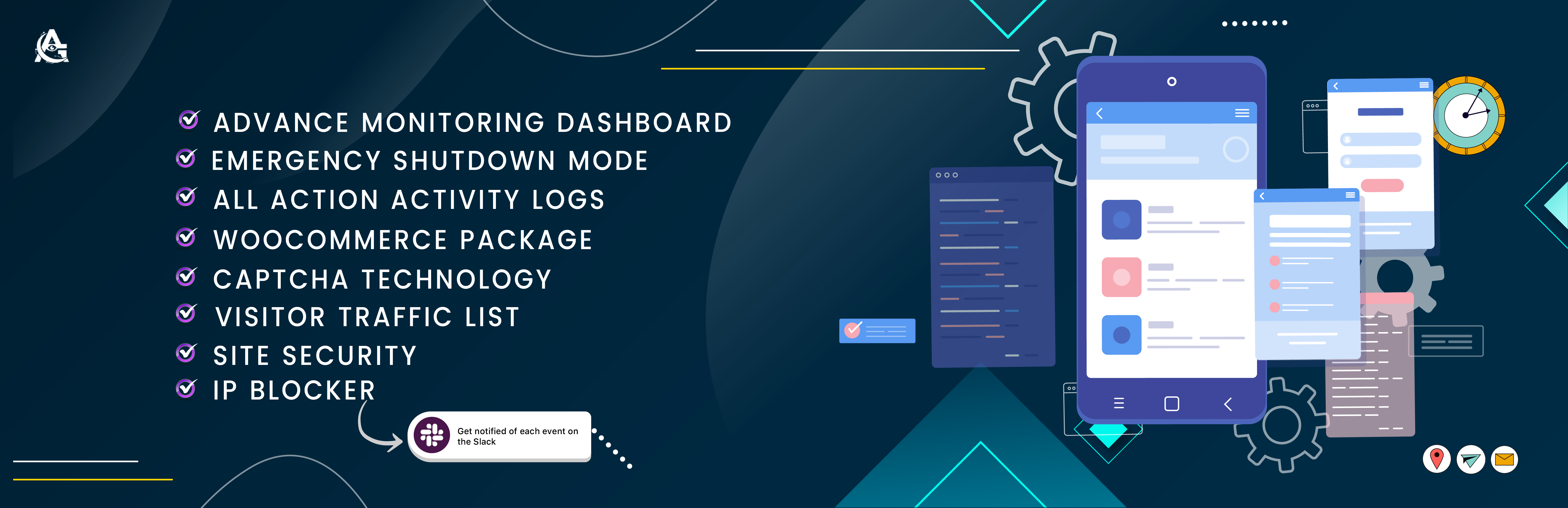
Activity Guard – Security Scanner, Activity Log, IP Blocking & Audit Trail
Description
Activity Guard is the all-in-one user activity log, comprehensive audit trail, IP blocking security firewall, multi-database vulnerability scanner, and WooCommerce analytics suite. Built specifically for WordPress store owners, agencies, developers, and security-minded administrators, Activity Guard monitors 100+ system and user activity events, actively blocks brute force attackers with bot probes, and dispatches real-time Slack notifications, Telegram alerts, and email updates the second an incident occurs.
While traditional activity log plugins stop at basic record-keeping, and security scanners charge recurring subscription fees for webhook alerts while ignoring e-commerce metrics, Activity Guard unifies user activity tracking, active IP blocking defense, vulnerability scanning, and abandoned cart revenue recovery into one lightning-fast, React-powered administrative panel—completely free.
Activity Guard Website | Documentation & Setup Guides | Support | Priority Support
Why Choose Activity Guard for User Activity & Security?
- Complete User Activity Audit Trail: Track every click, publish, edit, user login, deletion, privilege change, and file update with usernames, roles, IP addresses, and exact timestamps.
- Visual Content & File Diff Viewer: Inspect side-by-side and inline line diffs for post revisions, page updates, and theme or plugin code edits.
- Intelligent IP Blocking Firewall: Block abusive IPs manually, by CIDR subnet, or via automated triggers for failed logins, 404 scanning, and rate-limiting floods.
- Proactive Vulnerability Scanner: Scan all installed plugins, active themes, and core files against live NVD (NIST CVEs), WPVulnerability.net, and WPAzleen threat intelligence feeds.
- WordPress Core File Integrity Checker: Compare your core files directly against official WordPress.org checksums and inspect modified files with built-in diff viewing.
- Active User Session Manager & Kill Switch: Monitor all active login sessions in real time, terminate suspicious sessions with one click, or lock out compromised users.
- Two-Factor Authentication (2FA TOTP) & Login OTP: Enforce standards-based TOTP 2FA (Google Authenticator, Authy) or email-based One-Time Passwords with customizable email templates.
- Country & Geo-IP Blocking: Restrict or whitelist access based on visitor country for login/admin pages or your entire site, with built-in search engine crawler bypass.
- WooCommerce Revenue & Cart Abandonment Analytics: Track orders, coupons, and low stock while recovering lost revenue with integrated abandoned cart analytics.
- Real-Time Slack Notifications & Telegram Alerts: Deliver formatted notification cards to Slack channels (with user/group @mentions), Telegram chats, or email inboxes.
- Live In-Dashboard Activity Stream: Stay aware with floating admin toast alerts, top admin toolbar security badges, and an executive dashboard widget.
- One-Click Emergency Shutdown: Instantly terminate all active sessions site-wide and lock down login access exclusively to designated Super Admins during suspected attacks.
Complete Feature Breakdown
1. User Activity Log & Audit Trail
- Authentication Tracking: Records successful logins, logouts, failed login attempts (with user agent, IP address, and timestamp), password resets, and account password changes.
- User & Role Escalation Logging: Tracks new user registrations, profile updates, account deletions, and critical role changes (e.g., subscriber elevated to administrator).
- Content & Publishing History: Tracks posts, pages, and custom post types (CPTs) across creation, draft saves, updates, trash, untrash, and permanent deletion.
- Visual Content Diff Viewer: See exactly what text, code, or metadata changed between revisions with clean visual diff comparisons.
- Plugin & Theme Lifecycle: Logs installations, activations, deactivations, updates (including the exact username who initiated the update), and deletions.
- Theme File & Template Monitoring: Tracks modifications made to theme files, template assignments, and stylesheet updates.
- Menu & Widget Monitoring: Records creation, restructuring, and deletion of navigation menus and sidebar widgets.
- Site Settings & Options Audit: Logs modifications to core WordPress settings (
wp_options), permalinks, reading settings, and site health notices. - Outgoing Email Delivery Log: Audits every email dispatched by
wp_mail(), capturing recipients, subjects, timestamps, and delivery statuses. - Form Submission Tracking: Tracks submissions and captures leads from Contact Form 7 (CF7) and SimpleForm / FormFlow.
- Categorized Tag Pills & Severity Badging: Quickly scan events labeled by Category (Security, Users, Content, System) and Severity (Critical, Warning, Info, Secure).
- Search, Filter & Bulk Management: Filter logs by role, user, severity, event type, or date range (today, yesterday, this week, this month, or all-time). Delete individual or bulk entries in one click.
- Export Audit Logs: Export your audit logs to CSV or JSON format for compliance audits, security reporting, or client delivery.
- Custom Retention Schedule: Choose how long to retain logs (1, 7, 14, 30, 60, 90, 180, or 365 days) with automated database pruning to keep your database lean.
2. Pro Security Suite & IP Blocking Firewall
- Active User Session Manager: Monitor every logged-in user in real time, view IP addresses and browsers, and terminate active sessions instantly.
- User Lockout Mechanism: Lock out compromised accounts for 10 minutes, 1 hour, 24 hours, or permanently until manual review.
- Two-Factor Authentication (2FA TOTP): Secure login credentials with TOTP 2FA compatible with Google Authenticator, Authy, Microsoft Authenticator, and 1Password. Generates downloadable emergency backup codes.
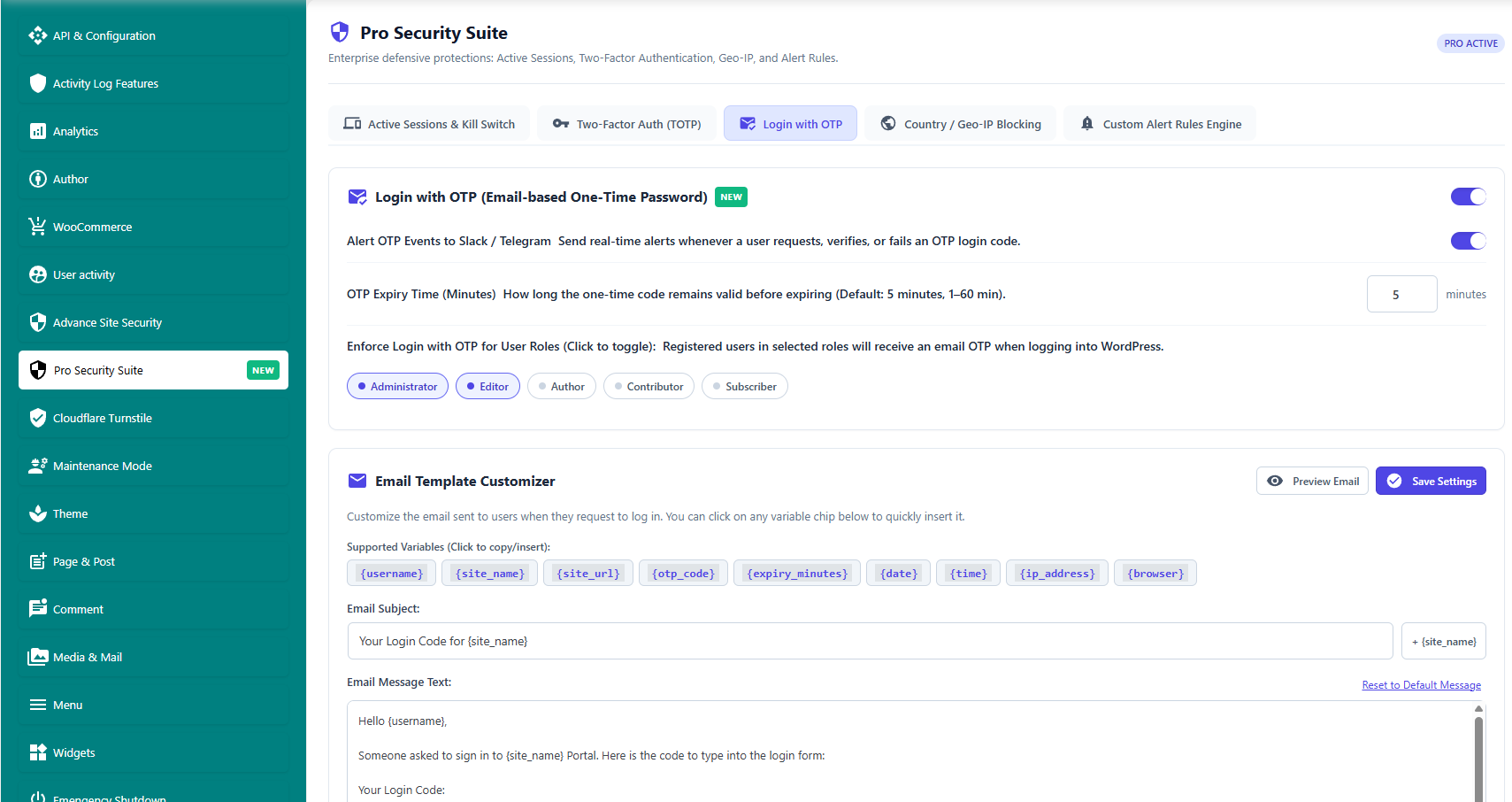
- Email-Based Login OTP (One-Time Password): Send a temporary verification code to the user’s email address upon login. Includes customizable email templates and expiry windows.
- Country & Geo-IP Blocking: Restrict or whitelist access based on visitor country. Scope blocking to login/admin pages only or the entire front-end, with automatic bypass for search engine bots.
- Custom Alert Rules Engine: Build custom alert rules based on events (e.g., administrator login), time windows (e.g., after-hours between 8 PM and 7 AM), frequency thresholds, and custom Slack mentions (
@channel,@here). - Intelligent IP Blocker: Block malicious visitors by specific IP, CIDR subnet (e.g.,
192.168.1.0/24), or automated behavioral triggers. - Brute Force Protection & Rate Limiting: Automatically block IPs after repeated failed login attempts or excessive requests per minute (>200 req/min).
- 404 Error Probing Defense: Detect and ban bot scrapers scanning for vulnerable URLs and non-existent scripts.
- Suspicious Request Inspection: Detect SQL injection, malicious query strings, and exploit payloads in incoming HTTP requests.
- Cloudflare Turnstile Bot Defense: Seamlessly integrate Cloudflare Turnstile on WordPress Login, Registration, Lost Password, Comment forms, and WooCommerce checkout.
- Rename Login URL: Obfuscate
/wp-login.phpwith a custom login slug (e.g.,/secure-portal) and redirect unauthorized visitors to a 404 page or custom URL. - Prevent User Enumeration: Block author scan queries (such as
/?author=1) that reveal administrative usernames. - Obfuscate Login Errors: Replace descriptive login errors with generic notices so attackers cannot deduce valid usernames.
- Force Strong Passwords: Require all users (or specific roles) to configure high-entropy passwords.
- TOR & Bad Bot Shield: Block exit nodes from the TOR network and ban automated vulnerability scanner user agents.
- HTTP Security Headers Layer: Automatically enforce headers including
X-Content-Type-Options,X-Frame-Options,X-XSS-Protection, andReferrer-Policy. - Conceal WordPress Version: Remove the WordPress version number from HTTP headers, generator meta tags, and script query strings.
- Disable File Editing: Lock down the built-in WordPress theme and plugin code editors (
DISALLOW_FILE_EDIT). - XML-RPC Protection: Disable or restrict the XML-RPC interface to stop pingback amplification and brute force attacks.
- Domain Reputation & Blocklist Monitor: Periodically scan your site’s domain against major security blocklists to protect email deliverability and SEO rankings.
- Emergency Shutdown (Kill Switch): With one click, instantly terminate all active sessions site-wide, locking down admin access exclusively to designated Super Admins.
3. Deep Vulnerability Scanner & Core Integrity Checker
- Multi-Source Vulnerability Intelligence: Cross-checks installed plugins and themes against the National Vulnerability Database (NVD / NIST CVEs), WPVulnerability.net, and the WPAzleen private threat feed.
- Abandoned & Outdated Plugin Audit: Identifies plugins that haven’t been updated in over a year, plugins incompatible with your WordPress version, or plugins with low ratings and install counts.
- WordPress Core File Integrity Verification: Validates every core file against official WordPress.org release checksums. Flags modified, added, or missing files.
- File Integrity Line Diff Viewer: View side-by-side differences within modified core, theme, or plugin files to spot injected malware or unauthorized edits.
- WordPress Hardening Audit: Inspects file permissions (
wp-config.php,.htaccess,/wp-content/), database prefix safety, security salts, and PHP error reporting. - Exclusions Manager: Exclude specific directories, file patterns, or PHP functions from scan routines.
- Automated Scan Notifications: Send automated Slack alerts whenever vulnerabilities or checksum mismatches are discovered.
4. WooCommerce Activity Log & Abandoned Cart Analytics
- Real-Time E-Commerce Event Alerts: Get notified the second an order is placed, marked paid, cancelled, or refunded.
- Inventory & Stock Monitoring: Receive immediate warnings when products hit low-stock thresholds or run completely out of stock.
- Coupon & Discount Tracking: Monitor coupon creation, modification, and customer redemptions in real time.
- Product Catalog Changes: Track price modifications, title adjustments, inventory updates, and new product publications.
- Customer Data Changes: Track customer profile updates, billing address changes, and shipping address modifications.
- Abandoned Cart Tracker & Analytics: Log incomplete checkouts, track items left in carts, and monitor cart drop-offs before checkout completion.
- Recovery Rate & Potential Revenue: Visual dashboard displaying recoverable revenue, checkout conversion drop-off rates, and cart recovery analytics.
- Visual Sales Analytics: Interactive Recharts dashboard displaying gross sales, net revenue, average order value (AOV), total order count, and top-selling products.
5. Real-Time Slack Notifications & Integrations
- Slack Incoming Webhooks: Route notifications to your Slack workspace with support for dedicated channels, custom webhook URLs, and user/group
@mentions. - Slack Attachment Cards: Notifications feature color-coded severity bars, event titles, user avatars, IP addresses, timestamps, and direct administrative links.
- Telegram Bot Integration: Deliver instant alerts to individual chats or team channels using your Telegram Bot Token and Chat ID.
- Granular Event Subscriptions: Selectively choose which events send alerts to Slack, Telegram, or Email.
- Custom Message Templates: Customize notification copy using dynamic placeholders like
{username},{ip_address},{site_url},{plugin_name}, and{event_type}. - Admin Floating Toast Stream: Experience real-time live activity toasts right inside the WordPress admin bar and dashboard, complete with sound alerts and adjustable intervals.
- Admin Bar Security Badge: Keep a constant eye on site security status with a badge counter in the top WordPress admin toolbar.
- Dashboard Security Widget: View overall security score, recent activity feeds, and blocked threats directly on your main WordPress dashboard.
6. Admin, Developer & Maintenance Tools
- Maintenance Mode with Lead Capture: Put your site under maintenance with stylish templates while capturing prospective visitor leads with a built-in contact form.
- PHP Debug Log Viewer: View
wp-content/debug.logentries directly inside the admin panel with real-time fatal error notifications. - WP-Cron Job Monitor: Detect scheduled background processes, recurring task creation, and cron failures.
- Site Downtime & Uptime Monitor: Monitor website responsiveness and receive alerts on HTTP error codes and downtime events.
- Access Control & Permissions: Restrict Activity Guard configuration to specific Super Administrators or allowed roles.
- Read-Only Log Viewers: Grant specific roles (e.g., Editors or Junior Admins) read-only access to audit logs without exposing configuration settings.
- Stealth Mode (Hide Plugin): Hide Activity Guard from the WordPress plugins list to prevent tampering by unauthorized users.
How to Use Activity Guard
1. Quick Setup with the Onboarding Wizard
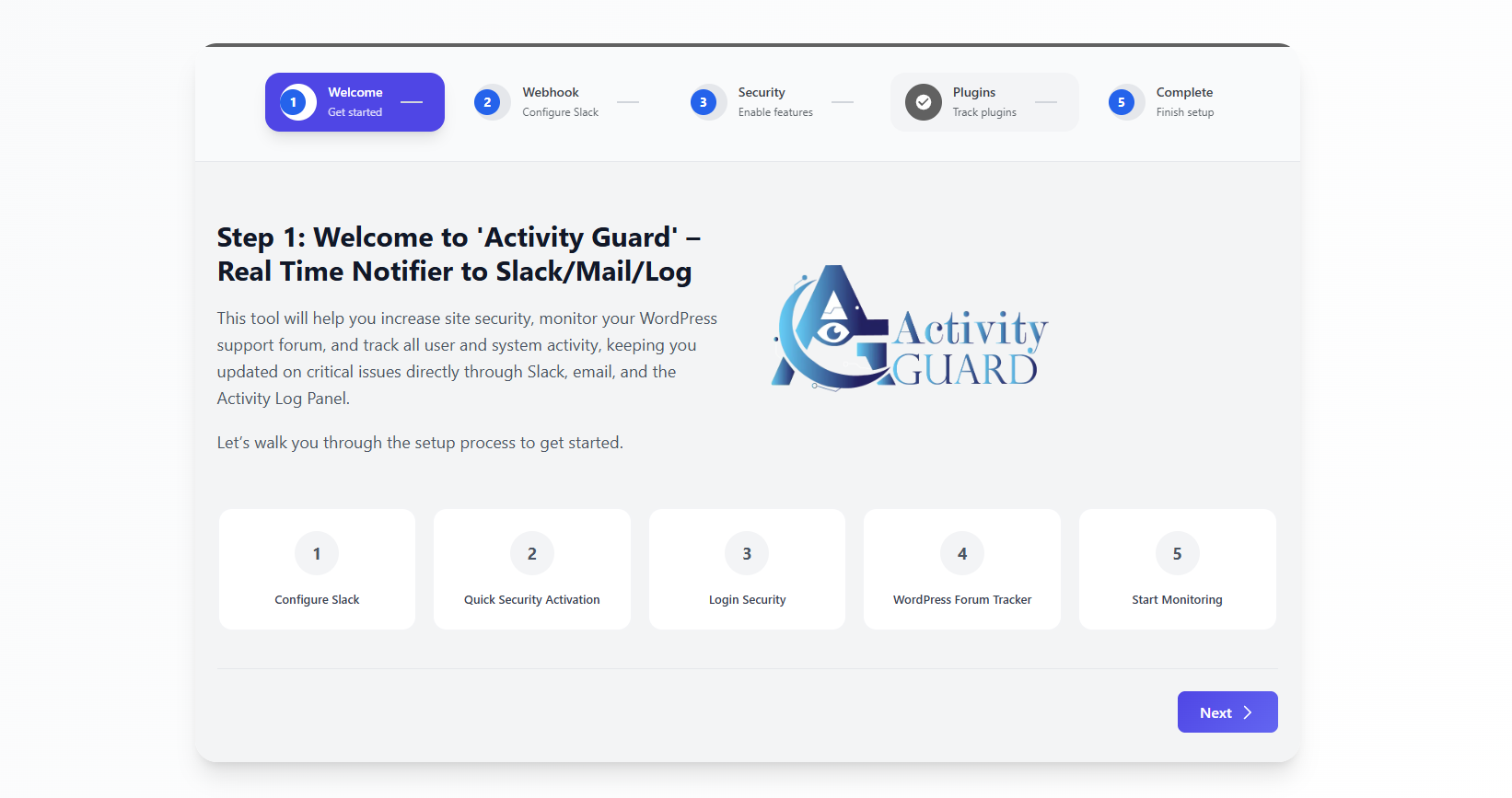
- Upon activating Activity Guard, you will be greeted by the 5-Step Setup Wizard.
- Step 1: Review the quick video introduction and overview.
- Step 2: Paste your Slack incoming webhook URL and enter an alert email address. Click Send Test Notification to verify connectivity.
- Step 3: Enable recommended presets for user activity, core security, theme monitoring, and WooCommerce tracking with a single click.
- Step 4: Review recommended security tools and integrations.
- Step 5: Finish the wizard to launch your real-time security dashboard.
2. Viewing, Filtering & Exporting Audit Logs
- Navigate to Activity Guard > Activity Log from your WordPress sidebar.
- Use the top filter bar to narrow logs by Severity (Critical, Warning, Info, Secure), User Role (Administrator, Editor, etc.), User Name, Event Category, or Date Range (Today, Yesterday, Week, Month, All-Time).
- Click the View Diff button next to any content or code modification to open the visual line comparison modal.
- To block a malicious IP address directly from the log, click the Block IP button in that row.
- Click Export Logs in the upper right to download your filtered audit log as a CSV or JSON file.
3. Setting Up Slack Notifications
- In your Slack workspace, go to your apps configuration and create an Incoming Webhook.
- Copy the Webhook URL (format:
https://hooks.slack.com/services/...). - In WordPress, go to Activity Guard > Configuration > API & Configuration.
- Paste the URL into the Global Slack Webhook field and click Send Test Notification.
- To route specific notifications to different channels or notify specific staff members, navigate to the respective tabs (WooCommerce, Site Security, Author, Theme, Pages & Posts) and enter custom channels or
@mentions(e.g.,@developeror@channel).
4. Setting Up Telegram Notifications
- Open Telegram and search for
@BotFatherto create a new bot and obtain your Bot Token. - Start a conversation with your bot or add it to your team channel, then retrieve your Chat ID (using
@userinfobotor bot updates). - In WordPress, navigate to Activity Guard > Configuration > API & Configuration > Telegram.
- Enter your Bot Token and Chat ID, toggle Telegram notifications on, and click Test Telegram Notification.
5. Managing Active User Sessions & Kill Switch
- Go to Activity Guard > Configuration > Pro Security Suite > Active Sessions.
- View all currently active user sessions, device types, IP addresses, and login times.
- To terminate a suspicious session, click Terminate Session to log that user out immediately.
- To lock an account temporarily, click Lock User and specify the lockout duration (e.g., 60 minutes or 24 hours).
- In an active emergency or site compromise, navigate to the Emergency Shutdown tab and click Activate Emergency Shutdown to disconnect all logged-in sessions site-wide.
6. Enabling Two-Factor Authentication (2FA) & Login OTP
- 2FA TOTP: Go to Pro Security Suite > Two Factor Auth. Enable 2FA, choose enforced user roles (e.g., Administrator), scan the QR code with your authenticator app (Google Authenticator, Authy, etc.), and enter the 6-digit verification code. Download your emergency recovery codes.
- Email Login OTP: Go to Pro Security Suite > Login OTP. Enable OTP, set the code expiration time (e.g., 5 minutes), and customize your email subject and body template with dynamic tags. Test the template preview before saving.
7. Setting Up Country & Geo-IP Blocking
- Navigate to Pro Security Suite > Geo-IP Blocking.
- Toggle the module on and choose your mode: Blacklist (block selected countries) or Whitelist (allow only selected countries).
- Set the scope: choose between Login & Admin Pages Only or Entire Site.
- Search and select countries from the dropdown list.
- Add your own administrative IP to the Whitelisted IPs list to ensure you never get locked out.
8. Running a Security & Vulnerability Scan
- Go to Activity Guard > Security Scanner.
- Click Start Comprehensive Scan.
- Activity Guard will scan your installed plugins, active themes, and WordPress core files against official CVE databases and …
Installation
- Log into your WordPress admin dashboard and navigate to Plugins > Add New.
- Search for
Activity Guardornotifier-to-slack. - Click Install Now, then click Activate.
- The automated Setup Wizard will launch immediately to guide you through initial Slack webhook configuration and security presets.
- Alternatively, navigate to Activity Guard > Configuration at any time to customize event subscriptions, security firewalls, scanners, and WooCommerce analytics.
Screenshots
Executive Security Dashboard: Real-time overview of security health score, blocked threats, daily login activity, and system metrics.

Comprehensive Activity Log: Searchable and filterable audit trail featuring category pills, severity badges, and one-click IP blocking.

Visual Content & Code Diff Viewer: Side-by-side revision inspector highlighting additions and deletions in posts and PHP files.

Pro Security Suite: Active user session manager, user lockout controls, 2FA TOTP configuration, and email Login OTP settings.

Geo-IP & Country Blocker: Blacklist or whitelist visitor countries with bot crawler exceptions and custom blocked pages.

CVE Vulnerability Scanner: Scan results showing vulnerable, outdated, and abandoned plugins with severity ratings and remediation guidance.
WordPress Core File Integrity: Checksum verification table highlighting modified, missing, or unauthorized core files.

WooCommerce Analytics & Cart Recovery: Real-time revenue charts, order status tracking, and abandoned cart drop-off recovery analytics.

Slack & Telegram Notification Settings: Webhook configuration interface with channel routing, test alerts, and dynamic placeholder tags.

Slack Alert Example: Rich Slack attachment card showing event type, username, IP address, severity color, and direct link.

Onboarding Setup Wizard: 5-step guided wizard for effortless webhook setup and security configuration.

Faq
Activity Guard is an all-in-one WordPress user activity log, audit trail, security firewall, CVE vulnerability scanner, and WooCommerce analytics plugin. It records over 100 WordPress events and delivers real-time notifications to Slack, Telegram, and Email.
Activity Guard is one of the only WordPress activity log plugins with native Slack incoming webhook integration and Telegram bot alerts built directly into the free version. While alternative plugins gate webhook alerts behind expensive annual licenses, Activity Guard allows you to route alerts to specific Slack channels, tag team members with @mentions, and customize message templates at zero cost.
WP Activity Log (by Melapress) is a well-known event logger with broad event coverage. However, critical features such as real-time Slack notifications, SMS/email alerts, search filters, and active session management sit behind their expensive premium tiers. Furthermore, WP Activity Log does not include an IP security firewall, a CVE vulnerability scanner, or WooCommerce abandoned cart recovery. Activity Guard provides comprehensive audit logging, free Slack/Telegram alerts, active session management, an IP security firewall with Emergency Shutdown, and WooCommerce cart recovery analytics out of the box at zero cost.
Yes. Activity Log Pro includes severity-tagged events and login flood monitoring in its free version, but puts Slack notifications and webhook routing behind its premium “Log Channels” license. Activity Guard includes Slack and Telegram alerts, an IP firewall with Emergency Shutdown, a multi-database CVE vulnerability scanner, and WooCommerce analytics with abandoned cart recovery all in the free version.
Simple History and Stream are clean, lightweight activity loggers, but they are limited strictly to in-dashboard logging with basic email alerts. Neither plugin offers real-time Slack incoming webhooks, Telegram alerts, an IP security firewall, brute force protection, CVE vulnerability scanning, or WooCommerce cart recovery analytics. Activity Guard delivers an enterprise audit trail combined with real-time multi-channel alerting and active threat defense.
Aryo’s Activity Log is a lightweight, beginner-friendly logger with basic email notifications. Activity Guard covers the same fundamental user activity logging plus real-time Slack and Telegram alerts, an active session manager, an IP firewall, a CVE vulnerability scanner, and WooCommerce abandoned cart analytics with recovery rate tracking.
Both plugins can send WordPress activity alerts to Slack. However, Logtivity is a hosted external SaaS that requires connecting your site to their paid cloud service with an API key, tailored primarily for agencies managing multi-site fleets. Activity Guard runs 100% standalone and self-hosted on your own WordPress server without third-party cloud accounts, and includes a built-in IP firewall, CVE vulnerability scanner, and WooCommerce analytics that Logtivity lacks.
Yes. CleanTalk Security, Wordfence, and Sucuri are focused primarily on Web Application Firewall (WAF) filtering and file malware scanning. They are not comprehensive user audit logs—they do not track page and post edits with visual diffs, user role changes, theme/plugin updates with user attribution, widget edits, or WooCommerce customer activity. Activity Guard works seamlessly alongside malware scanners by handling the complete user audit trail, real-time Slack/Telegram notifications, and WooCommerce abandoned cart recovery.
Activity Guard includes built-in abandoned cart and incomplete checkout analytics showing dropped-off customers, cart contents, total lost revenue, and recovery potential. While dedicated cart recovery plugins focus on automated email marketing sequences, Activity Guard gives store owners real-time visibility into lost checkouts, inventory drops, order statuses, and coupon usage without requiring heavy additional plugins.
Activity Guard includes a complete IP firewall layer allowing you to block individual IPs, CIDR subnets (e.g., 192.168.1.0/24), or entire countries via Geo-IP lookup. You can also activate automatic behavioral blocking rules that ban IPs after repeated failed login attempts, 404 URL probing, rate-limiting violations (>200 req/min), or suspicious SQL injection queries.
The scanner examines all installed plugins, active themes, and core WordPress files against official CVE databases (NVD / NIST, WPVulnerability.net, and WPAzleen private threat intelligence). It flags known CVEs, outdated plugin versions, abandoned plugins, and core file checksum mismatches. It also includes an inline Line Diff Viewer to inspect modifications inside files.
Activity Guard records logins, logouts, failed login attempts, user profile updates, role changes, user registrations and deletions, post/page/CPT edits (with visual diffs), media uploads/deletions, plugin/theme activations and updates, menu/widget changes, settings updates, outgoing emails, contact form submissions, PHP fatal errors, and WooCommerce transactions.
Emergency Shutdown is a one-click emergency kill switch. If you detect a breach in progress, clicking Emergency Shutdown instantly terminates every active session on your website and locks the login screen down exclusively to designated Super Administrators.
Yes! Unlike other plugins that gate webhook routing behind expensive premium licenses, Activity Guard includes complete Slack webhook integration with channel routing and @mentions completely free.
Yes! Activity Guard includes a built-in Visual Diff Viewer that highlights exact line-by-line additions, deletions, and modifications in post content and PHP files.
Yes. Activity Guard tracks incomplete checkouts, displays lost revenue amounts, calculates cart recovery rates, and logs individual abandoned cart items so you can recover lost sales.
Yes. Activity Guard runs locally on your server and does not transmit personal visitor data to third parties. Log retention schedules can be configured to automatically delete audit logs after a set period (e.g., 30 or 60 days) to comply with data privacy regulations.
Yes. You can export filtered or complete audit logs in CSV or JSON format with a single click.
No. Activity Guard is built with performance as a top priority. Audit logs are written to an indexed, dedicated custom database table to keep the core wp_posts and wp_options tables clean. Scripts and React assets are loaded asynchronously only within the administrative dashboard.
Yes. Activity Guard supports standard WordPress multisite network installations.
Community support is available on the WordPress.org Support Forum. Priority direct support is available at wpazleen.com/support/.
Reviews
Just works!
By 
Does what it says it will, and was easy to set up. I wish more plugins were this straight forward!
Essential Plugin for Real-Time Security & Monitoring
By 
Activity Guard is a powerful, easy-to-use plugin for real-time activity tracking and site security. Love the instant Slack/email alerts, detailed logs, and built-in vulnerability scans. A must-have for keeping WordPress and WooCommerce sites safe and monitored!
Very useful plugin for site maintenance.
By 
I was seeking for a plugin that would make site maintenance easier for me, and here it is. Looking forward to the forthcoming features.
Original idea and super useful plugin!
By 
Excellent plugin and easy to setup thanks for the video.
Changelog
3.14.2 – 22 October 2026
- 🛡️ Improvement: SDK updated and performance Improved
3.14.1 – 08 October 2026
- 🛠️ Improvement: Integrated Security Feature Checks into the Scanner.
- 🐛 Fix: Resolved rare fatal error on specific PHP configurations.
- ⚡ Performance: Optimized database query indexing for activity log retrieval.
3.14.0 – 07 October 2026
- 🌟 New: Login with OTP (Email-based One-Time Password) with customizable templates.
- 🛡️ Improvement: Enhanced suspicious activity detection engine and threat classification.
- 🚨 Improvement: Enhanced Emergency Shutdown remote activation and session revocation.
For older entries, see the changelog.txt file in the plugin repository.