Lead Capture Chat

Lead Capture Chat
Description
Lead generation chat widget for WordPress with a floating contact form and built-in lead management.
No third-party services. No monthly SaaS fees. No data leaves your server.
🚀 PRO Features Preview
🎥 Watch the PRO Demo Video
🔥 Upgrade to WP LeadChat Pro
✅ Free Features
- Floating chat widget – animated slide-up popup triggered by a fixed button in the corner of every page
- Inline shortcode – embed the form anywhere with
[npleadchat] - Leads dashboard – view, search, sort, and manage all leads from WP Admin NP Lead chatbot
- Basic settings – enable or disable the floating widget and edit the main widget messages
- Basic email notifications – send a simple admin email whenever a new lead is captured
- Lead source page – see which page each lead came from
- Honeypot spam protection – lightweight hidden-field protection with no external service
- Spam rate limiting – configurable cooldown plus duplicate submission protection
- Bulk actions – select and delete multiple leads at once
- Search & sort – find leads by name, email, phone, or message; sort by name or date
- Client-side validation – instant feedback before form submission
- CSV Export – download all leads as a CSV file directly from the admin dashboard
- REST API powered – built on the WordPress REST API with schema validation, and works with page caching plugins
- GDPR-friendly – all data stored locally in your own database; no external services
⚡ Why Upgrade to WP LeadChat Pro?
WP LeadChat Pro turns your simple floating widget into a complete lead generation system for freelancers, agencies, WooCommerce stores, and SaaS landing pages.
Lead Capture
- Unlimited leads – no monthly cap
- Custom Field Builder – Text, Email, Phone, Dropdown, Checkbox, Textarea
- Drag-and-drop field reordering
- Live admin preview while editing settings
Email Automation
- Advanced admin notification templates
- Automatic visitor auto-replies
- Template tag support (name, email, message, etc.)
- Custom sender identity
Spam Protection
- Google reCAPTCHA v3 support
Appearance & Branding
- Full colour picker controls
- Widget position – left or right
- Adjustable widget width
- Custom profile image / logo upload
- Editable welcome text and branding
CRM Dashboard
- 5-stage lead pipeline management
- Inline status updates with AJAX
- Live KPI stats & conversion tracking
- Status filter tabs with lead counts
- Quick notes & full activity log
- Bulk status updates & CSV export
- Date range filters & last activity tracking
- Toast notifications & keyboard navigation
Analytics Dashboard
- Interactive leads & conversion charts
- Pipeline funnel visualisation
- Top source pages tracking
- Live KPI summary dashboard
- AJAX-powered date range filtering
- Real-time analytics from your own database
- No external tracking or third-party services
Plans start at just $3/month · 14-day free trial · 30-day money-back guarantee
Perfect For
- Freelancers and consultants
- Agencies
- Small businesses and service providers
- Coaches
- WooCommerce stores
- SaaS landing pages
- Lead generation websites
How It Works
- A visitor clicks the floating chat button on your site
- A smooth animated pop-up appears
- The visitor fills in their details and submits
- The lead is saved instantly in your WordPress database
- You manage all leads from WP Admin NP Lead Chatbot
Shortcode
Use [npleadchat] to embed the form inline anywhere – pages, posts, or widget areas.
Privacy & GDPR
This plugin stores lead data only in your own WordPress database. No external API calls are made. No third-party tracking. No SaaS dependency.
Installation
Automatic Installation
- Go to Plugins Add New
- Search for Lead Capture Chat
- Click Install Now, then Activate
Manual Installation
- Download the ZIP file from WordPress.org
- Go to Plugins Add New Upload Plugin
- Upload the ZIP file and click Activate Plugin
After Activation
- The floating widget appears automatically on all pages
- View captured leads at WP Admin NP Lead Chatbot
- Use
[npleadchat]for an inline embed - Visit WP Admin NP Lead Chatbot Upgrade to PRO to unlock advanced features
Screenshots
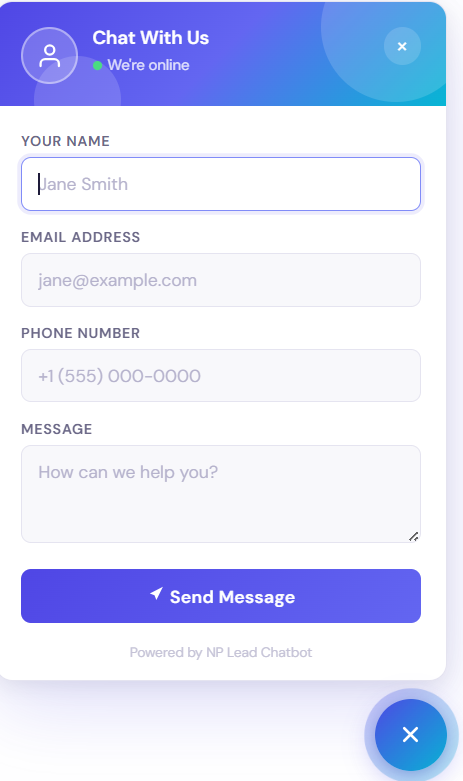
The floating chat widget - gradient header, avatar, animated popup, modern form fields, and a success message

Leads dashboard - view, search, sort, and bulk-delete all captured leads inside WP Admin

Settings dashboard - customize widget content, configure email notifications, enable the floating widget, and manage spam protection settings.

PRO: Leads dashboard (CRM) - the upgraded leads table with status badges, notes preview pills, Last Activity column, pipeline stats bar, status filter tabs, and date range filter

PRO: Status dropdown - clicking a status badge opens the custom dropdown; selecting a new status saves instantly via AJAX and updates the badge colour in place

PRO: Lead detail modal - Notes tab - the full notes activity log showing all notes newest-first with absolute timestamps, a delete button per note, and a clear empty state directing users to the inline quick-note

PRO: Analytics dashboard - the full analytics page showing the KPI summary strip, Leads Over Time bar chart, Conversion Rate Trend line chart, Pipeline Funnel, and Top Source Pages table

PRO: Settings + live preview - the full settings panel showing colour pickers, avatar upload, field toggles, and the live preview sidebar updating in real time as you type

PRO: Custom Field Builder + Spam Protection + Email notifications - Drag-and-drop custom fields with Text, Dropdown, Checkbox & more, reorderable rows, spam protection and email notification
Faq
Yes. It works with Elementor, Divi, Gutenberg, WooCommerce, and all modern WordPress themes.
All leads are stored locally inside your WordPress database. No external servers, APIs, or SaaS services are involved.
Yes. Use the shortcode [npleadchat] anywhere you want an inline form.
Basic CSS customisation is possible in the free version. Full colour, branding, and layout controls are available in WP LeadChat Pro.
Yes. WP LeadChat Pro includes a drag-and-drop Custom Field Builder supporting text, email, phone, dropdown, checkbox, and textarea fields.
Yes. The free version includes simple admin notifications for new leads. Advanced notification templates, custom sender controls, and visitor auto-replies are included in WP LeadChat Pro.
The free version includes lightweight honeypot spam protection. WP LeadChat Pro adds Google reCAPTCHA v3 protection.
Yes. Existing leads are automatically detected and available in PRO – no data migration needed.
No. Assets are only loaded where needed and fonts are bundled locally (no Google Fonts external request).
The plugin makes no external requests and stores all data locally. GDPR compliance ultimately depends on how you handle the collected lead data on your site.
The plugin removes its custom database table on uninstall to keep your database clean.
WP LeadChat Pro is the premium version that unlocks unlimited leads, custom fields, email automation, spam protection, full appearance customisation, live admin preview, and priority support.
Reviews
Awesome plugin
By 
very nice plugin. It's Free version provids many features then other paid plugin. Thank you..
Amaizing
By 
Super easy to add a lead capture form anywhere on the website instead of adding individual forms in the page content, and it makes it easier for customers to fill out.
Great Plugin
By 
Amazing Plugin
Changelog
2.4.5
- New: lead status (New, Contacted, Closed) with a quick dropdown on each lead and status filter links above the leads list
- New: CSV export now includes the lead status
2.4.4
- Tested with WordPress 7.1
- Security: lead form fields now have length limits, and the source page URL must belong to your own site
- Security: rate limiting now applies per visitor IP and per email separately, so changing one of them no longer bypasses the cooldown
- Fixed: lead form no longer fails with a nonce error on cached pages
- Fixed: frontend CSS/JS only load when the floating widget or shortcode is used
- Fixed: floating chat button now opens with Enter/Space keys and announces its open state to screen readers
- Improved: leads list uses database pagination, so large lead lists load faster
- Improved: privacy policy suggestion text added under Settings > Privacy
- Improved: uninstall now also cleans up on multisite and removes the dismissed-notice option
2.4.3
- Fixed: Admin stylesheet now loads correctly on the Settings page
- Fixed: “Upgrade to PRO” admin notice no longer shows redundantly on the Upgrade to PRO page itself
2.4.2
- Added: Full GDPR compliance support – captured leads are now included in WordPress’s built-in Tools Export Personal Data and Erase Personal Data requests.
2.4.1
- Changed demo video url
2.4.0 – Security & GDPR Enhancement
- Added: Comprehensive phone number format validation (digits, spaces, hyphens, +, parentheses, periods)
- Added: Full GDPR/Privacy compliance support with WordPress privacy export/erase hooks
- Improved: REST API nonce header handling for better compatibility (supports both x-wp-nonce and X-WP-Nonce)
- Improved: Email content sanitization – all user data properly escaped before email delivery
- Improved: CSV export with enhanced security headers
- Enhanced: REST API error handling with proper WP_Error responses and HTTP status codes
- Added: Rate limit management function for admin testing and debugging
2.3.4
- Added basic admin email notifications with recipient setting
- Added configurable spam cooldown and duplicate submission protection
- Improved frontend form accessibility by removing duplicate field IDs across shortcode and floating widget instances
2.3.3
- Added basic settings for floating widget visibility and messages
- Added lead source page tracking in the leads dashboard and CSV export
- Added lightweight honeypot spam protection
2.3.2
- Updated plugin tags and improved short description for better discoverability
- Fixed the floating widget close button styling issue
- Tested compatibility with WordPress 7.0
2.3.1
- Add new screenshots of PRO Plugin
- Make some content changes in the admin Upgrade to PRO page
- Minor bug fixes and styling improvements
2.3.0
- Added: In-admin Upgrade to PRO page (WP Admin NP Lead Chatbot Upgrade to PRO) with feature list, Free vs PRO comparison table, and live preview link
- Added: Dismissible admin notice promoting PRO features – permanently dismissible per user with a single click
- Improved: Upsell code is fully i18n-ready, uses proper escaping throughout, and follows WordPress coding standards
- Improved: PRO upsell is automatically disabled when the PRO version is active (no duplicate notices)
- Updated: Version bumped to 2.3.0
2.2.3
- Added PRO landing page links
- Improved upgrade CTAs
- Added comparison table
- Enhanced PRO promotion inside the readme
2.2.2
- Added demo video link for PRO plugin
- Minor readme content changes
2.2.1
- Removed accidentally committed readme backup file
- Minor readme changes
2.2.0
- Added: Pro upsell section in plugin description
- Added: New FAQ entries explaining Pro features and how to upgrade
- Fixed: FAQ entry for colour customisation now correctly points to Pro
2.1.1
- Description update only – no functionality changes
2.1.0
- Plugin renamed from NP Lead Chatbot to Lead Capture Chat for clarity and better searchability
- Updated banner and plugin icon assets
- No database or functionality changes – safe to upgrade
2.0.0
- Complete UI redesign – gradient header, DM Sans font (bundled locally), animated popup, modern inputs
- Added floating button toggle animation (chat icon close icon)
- Added slide-up open / scale-down close popup animation
- Added loading spinner on submit button during form submission
- Added styled success and error response messages with icons
- Added Escape key and outside-click to close the popup
- Added ARIA labels and roles for full accessibility
- Replaced Google Fonts external request with locally bundled woff2 font files
- Refactored frontend PHP – shared form field helper, proper label elements, autocomplete attributes
- Improved inline validation – error state clears as user types
- Added
[npleadchat]inline embed with its own gradient header
1.2.0
- Added Export Leads (CSV) feature in the admin panel
- Improved admin UI
- Minor performance improvements
1.1.0
- Added bulk actions support in admin lead listing
- Added search functionality
- Added column sorting
- Improved UI and performance
1.0.0
- Initial release with lead capture form and admin dashboard