Spotrebiteľské práva pre WooCommerce
Spotrebiteľské práva pre WooCommerce
Description
🇸🇰 Slovenský popis
Tento plugin pridáva do vášho WooCommerce e-shopu online formuláre na odstúpenie od zmluvy a reklamácie, plne v súlade s európskou Smernicou EÚ 2023/2673 a slovenským zákonom č. 108/2024 Z. z. o ochrane spotrebiteľa.
Pre koho je to určené:
Pre slovenských prevádzkovateľov WooCommerce e-shopov, ktorí potrebujú:
- Splniť zákonnú povinnosť podľa EÚ smernice 2023/2673 (účinná od 19. 6. 2026), ktorá vyžaduje aby každý e-shop mal funkciu „Odstúpiť od zmluvy tu” priamo na webe (nie len PDF na stiahnutie).
- Zjednodušiť proces reklamácií — zákazník vyplní reklamáciu online, nemusí tlačiť papierový formulár, môže priložiť fotografie vady.
- Mať poriadok v reklamáciách — všetky odoslané reklamácie sa zhromaždia v administračnom rozhraní, kde môžete vyplniť reklamačný protokol, sledovať stav a vytlačiť oficiálny dokument.
Hlavné funkcie:
- Zákonná záruka EÚ — nový modul zobrazujúci harmonizované oznámenie podľa Nariadenia Komisie (EÚ) 2025/1960 (povinné od 27. 9. 2026). Kliknúteľné tlačidlo + modálne okno s oficiálnym obrázkom v jazyku stránky (SK/CS/DE/HU/PL/EN). Umiestnenie: košík, pokladňa, stránka produktu, päta. Kompatibilné s WooCommerce Blocks. Shortcode
[zakonna_zaruka]pre ľubovoľné umiestnenie. - Odstúpenie od zmluvy — formulár cez shortcode
[withdrawal_form], tlačidlo „Odstúpiť od zmluvy tu” pri každej objednávke v Mojom účte, automatická kontrola 14-dňovej lehoty (po vypršaní sa tlačidlo skryje), HTML potvrdenie s presným dátumom a časom odoslania (zákonný dôkaz na trvalom nosiči). - Reklamácie — kompletný online reklamačný formulár cez shortcode
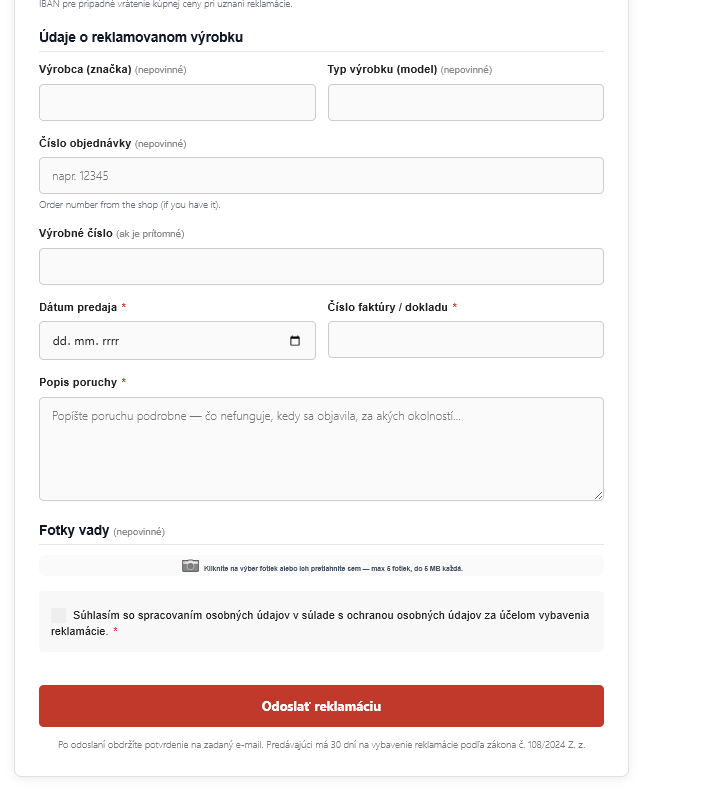
[complaint_form](alias[reklamacia]), všetky polia zo štandardného slovenského papierového formulára: meno/firma, telefón, e-mail, IBAN, výrobca, model, výrobné číslo, dátum predaja, číslo objednávky/faktúry, popis vady. Voliteľné nahrávanie fotografií vady (drag & drop, JPG/PNG/WEBP/HEIC, do 5 MB). - Reklamačný protokol — admin vyplní rozhodnutie (výmena/vrátenie ceny/zamietnutie), dátumy, IBAN na vrátenie. Vytlačiteľný A4 protokol (browser-natívne uloženie do PDF), pripravený na archiváciu.
- 30-dňová zákonná lehota — plugin posiela 5 dní pred uplynutím automatickú pripomienku adminovi (cez WP Cron). Žiadna pokuta od ÚZP za zameškané reklamácie.
- Údaje predávajúceho — vyplníte IČO, DIČ, IČ DPH a adresu raz, zobrazuje sa v hlavičke formulárov aj na tlačenom protokole. Berie sa primárne z WooCommerce Nastavenia Všeobecné, voliteľný override.
- Plne preložené do slovenčiny — formuláre aj admin rozhranie.
Čo plugin NEROBÍ:
- Automatické refundy ani zmenu stavu objednávky vo WooCommerce
- Generovanie dobropisov alebo vratových štítkov
- Napojenie na dopravcov
- Výnimky z práva na odstúpenie (digitálny obsah, hygienický tovar atď.)
Tieto kroky rieši prevádzkovateľ manuálne podľa svojich obchodných podmienok.
Inštalácia v 3 krokoch:
- Aktivujte plugin
- Vytvorte 2 stránky a vložte do nich shortcode
[withdrawal_form]a[complaint_form] - V Spotrebiteľské práva Nastavenia zadajte URL týchto stránok + vyplňte IČO/DIČ ak ste firma
🇬🇧 English description
This plugin adds online forms for both withdrawal from contract and complaints (reklamácie) to your WooCommerce store, fully compliant with EU Directive 2023/2673 and Slovak Act No. 108/2024 Coll. on consumer protection.
Withdrawal from contract
- Shortcode
[withdrawal_form]— embeddable on any page - “Withdraw from contract here” button on every order in My Account (hides after 14 days)
- Automatic 14-day withdrawal-period check — visual and server-side blocking after expiry
- Automatic form pre-fill for logged-in customers
- Order ownership verification: e-mail or postcode for guest checkouts
- HTML confirmation e-mail with submission date and time (legal proof on a durable medium)
- HTML notification e-mail to the shop owner — supports multiple recipients (comma-separated)
- Rate limiting — max 10 attempts per hour per IP (admins bypass)
- Legally exact button wording per Articles 1 and 3 of the directive
Complaints (reklamácie)
- Shortcode
[complaint_form](alias[reklamacia]) - All fields matching the standard Slovak complaint form: buyer details, IBAN, brand, model, serial number, sale date, order number, invoice, defect description
- Brand and model are optional — focus is on the defect description
- Separate “Order number” field — auto-filled from order dropdown for logged-in customers, manual text input for guests
- Optional photo upload with drag & drop (up to 5 photos by default, configurable)
- Secure photo handling — real MIME-type verification (JPG, PNG, WEBP, HEIC), .htaccess protection, random filename hash, realpath safety check
- Auto-fill from order selection for logged-in customers (brand, model, sale date, order number, invoice number)
- Admin complaint list with filter (by status), search (name, e-mail, invoice, order number, ID) and pagination
- Admin “Reklamačný protokol” form — fill resolution (exchange / refund / rejected), expert assessment contact, dates
- Status pipeline: New In progress Resolved / Rejected (coloured badges)
- “Date resolved” is required when closing a complaint (auto-fills today if empty)
- Internal notes field (private) — visible only to admins, NOT included in print or customer e-mails
- Delete action with confirmation and disk cleanup of attached photos
- Optional status update e-mail to customer
- Printable A4 view — buyer-filled form + protocol on one page (browser-native print to PDF)
- Seller info settings — IČO, DIČ, IČ DPH, correspondence address (hybrid: WC Store Address + plugin overrides)
- WP Cron daily reminder e-mail to admin 5 days before the 30-day legal deadline expires (each complaint reminded only once)
- 30-day legal deadline reminder per Act No. 108/2024 Coll.
EU Legal Guarantee (Zákonná záruka EÚ)
Displays the harmonised notice on the legal guarantee of conformity as mandated by Commission Implementing Regulation (EU) 2025/1960 (mandatory from 27 September 2026 per Directive 2024/825).
- Trigger button + modal approach — a clickable button opens a modal overlay with the official WebP notice image
- Language-specific official images included for SK, CS, DE, HU, PL and EN
- PDF download link — links directly to the EUR-Lex Official Journal PDF; custom URL override available
- Configurable placement: cart page (below order total), checkout page (above place order button), product page (below Add to cart), site footer
- WooCommerce Blocks compatible — injected via
render_blockfilter (no JS build step required) - Shortcode
[zakonna_zaruka]— place the trigger anywhere on the site regardless of the automatic placement settings - Admin settings: custom notice image via Media Library, custom PDF URL, configurable trigger text
- Trigger button inherits the active theme’s
.buttonstyles — matches any WooCommerce theme automatically - Full accessibility: focus trap, Esc key,
role="dialog",aria-modal="true", screen-reader text - Page-cache friendly — all output is static PHP, no AJAX calls on page load
Common features
- Dedicated top-level admin menu “Spotrebiteľské práva” (Consumer Rights) with 3 clean submenus: Withdrawals from contract, Complaints, Settings
- Database log of all submissions (separate tables for withdrawals and complaints)
- Full multilingual support (EN, SK, CS, HU, DE, PL) — auto-detected from WordPress Site Language
- HPOS and legacy WooCommerce compatibility
- WordPress Privacy Policy integration in GDPR consent
- Automatic DB schema upgrades — new columns are added on plugin load if missing (no manual SQL needed)
WooCommerce compatibility
The plugin works with both order-storage systems:
- HPOS (High Performance Order Storage) — new
wc_orderstables, WooCommerce 7.1+ - Legacy — classic storage via WordPress posts/postmeta
Switching is fully automatic. HPOS compatibility is declared via FeaturesUtil — the plugin shows a green compatibility badge in WooCommerce > Settings > Advanced.
Legislation
The plugin is designed in compliance with:
- EU Directive 2023/2673 (effective 19 June 2026)
- Slovak Act No. 108/2024 Coll. on consumer protection (replaced Act No. 102/2014 Coll. effective 1 July 2024)
- Commission Implementing Regulation (EU) 2025/1960 — harmonised notice on the legal guarantee of conformity (mandatory from 27 September 2026 per EU Directive 2024/825)
What the plugin does NOT do
- Exceptions from the right of withdrawal (digital content, hygiene goods, etc.)
- Automatic refunds or order status changes in WooCommerce
- Generating credit notes or return labels
- Carrier integration
These steps are handled by the shop owner manually according to their terms and conditions.
Usage
Withdrawal from contract:
- Create a page and insert the shortcode
[withdrawal_form] - In Consumer Rights Settings, enter the URL of that page
- Add a link to that page in your site footer
Complaints (reklamácie):
- Create a separate page and insert the shortcode
[complaint_form] - In Consumer Rights Settings, enter the URL of that page
- Fill in the Seller info section (IČO/DIČ if applicable) — these details appear on the printed protocol
EU Legal Guarantee notice — [zakonna_zaruka] shortcode:
The EU Legal Guarantee trigger button is added automatically on Cart and/or Checkout once you enable the module in Settings. For any other location — a custom page, a widget, a page builder block — use the shortcode [zakonna_zaruka]:
[zakonna_zaruka] — outputs the trigger button; the modal is automatically included in the page footer
No attributes needed. The module must be enabled in Consumer Rights Settings EU Legal Guarantee for the shortcode to output anything.
Withdrawal link in WooCommerce emails (YayMail / email customizers):
Use the [withdrawal_link] shortcode inside any WooCommerce email template (YayMail, Kadence Emails, Email Customizer for WooCommerce, etc.) to insert a pre-filled link to the withdrawal form. The link automatically includes the correct order key so the customer lands on the form with their order pre-filled.
[withdrawal_link] — inserts a link with the default label "Withdraw from contract"
[withdrawal_link label="Cancel order"] — custom link text
[withdrawal_link label="Withdraw" class="btn btn-primary"] — with CSS class(es) on the `<a>` tag
The shortcode only works inside WooCommerce transactional emails (e.g. Order Completed). It reads the current order from the email context automatically. Outside of an email context it returns an empty string. The withdrawal form page URL must be configured in Consumer Rights Settings.
Installation
- Upload the folder
odstupenie-od-zmluvyto/wp-content/plugins/ - Activate the plugin in WordPress Plugins
- Go to Consumer Rights Settings (top-level admin menu, shield icon) and fill in:
- Shop owner e-mail(s) — comma-separated for multiple recipients (for notifications)
- URL of the withdrawal form page
- URL of the complaint form page
- Seller info (IČO, DIČ, IČ DPH) if you are a business
- Contact info for fallback (optional)
- Create a page for withdrawal with the shortcode
[withdrawal_form] - Create a page for complaints with the shortcode
[complaint_form] - Enter both URLs in the plugin settings
EU Legal Guarantee module (v2.8.0+):
- Scroll to the EU Legal Guarantee (Zákonná záruka EÚ) card in Settings and tick Activate EU Legal Guarantee module
- Select where to display it: Cart and/or Checkout are recommended (enabled by default); Product page and Site footer are optional
- No additional pages or shortcodes are required — the module adds a trigger button automatically on the selected pages
- To place the notice somewhere custom (e.g. inside a page builder block), use the shortcode
[zakonna_zaruka]
No extra plugins, libraries or server requirements needed for the EU Legal Guarantee module. The official notice images for SK, CS, DE, HU, PL and EN are bundled with the plugin. If your site uses a language other than those six, the English image is used as fallback.
Screenshots

Withdrawal form with the coloured deadline banner

"Withdraw from contract here" button in My Account > Orders

Complaint form with drag & drop photo upload

Admin complaints list with filter, search and pagination

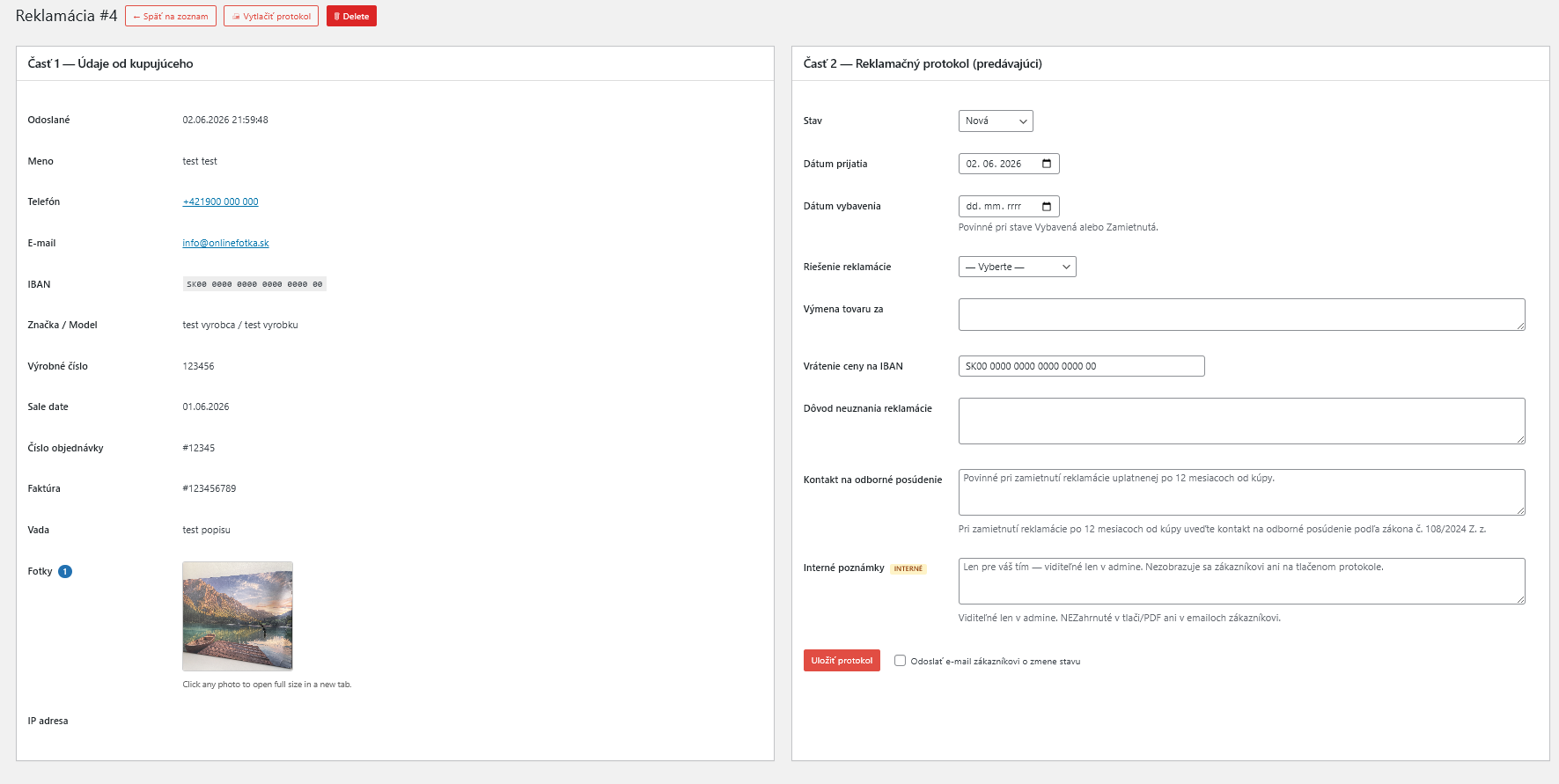
Complaint detail page with Reklamačný protokol (Part 2)
Printable A4 complaint protocol (browser-native PDF)

Plugin settings (Consumer Rights → Settings)
Customer e-mail — confirmation with submission date and time


Faq
It displays the harmonised notice on the legal guarantee of conformity required by Commission Implementing Regulation (EU) 2025/1960, which became mandatory on 27 September 2026 under EU Directive 2024/825. The notice informs customers that they are entitled to at least 2 years of legal guarantee coverage on goods.
Yes, if you sell goods to consumers in the EU. The notice must be displayed on your webshop from 27 September 2026. The regulation applies to all online retailers selling physical goods to EU consumers, regardless of the country of establishment.
A button (styled to match your WooCommerce theme) appears at the configured location(s) — e.g. below the cart total and above the place-order button on checkout. Clicking it opens a modal overlay with the official harmonised notice image for the current site language. A download link to the EUR-Lex Official Journal PDF is included in the modal.
You choose in Consumer Rights Settings EU Legal Guarantee: Cart (below order total), Checkout (above place order button), Product page (below Add to cart), or Site footer. Cart and Checkout are enabled by default; the others are off by default. You can also place it anywhere using the [zakonna_zaruka] shortcode.
Yes. The module injects the trigger via the render_block filter for woocommerce/cart-totals-block and woocommerce/checkout-actions-block, with no JavaScript build step required.
Yes. In Settings Custom notice image, upload your own image via the Media Library. Leave it blank to use the built-in official WebP image that matches the site language (SK / CS / DE / HU / PL / EN; falls back to EN for other languages).
Yes. In Settings Trigger text, enter your preferred text. Leave blank to use the default translated text (“Legal guarantee – minimum 2 years” in English, “Zákonná záruka – minimálne 2 roky” in Slovak, etc.).
Yes. Use the shortcode [zakonna_zaruka] on any page, post, or widget that supports shortcodes. It outputs the same trigger button and the modal is included in the footer automatically.
No. The module’s CSS and JS are enqueued only on pages where the trigger is displayed. The output is static HTML — no AJAX calls on page load — which means it is fully compatible with page caches (LiteSpeed, WP Rocket, W3 Total Cache, etc.).
In a dedicated top-level menu “Spotrebiteľské práva” (Consumer Rights) with a shield icon, located right below WooCommerce. It has 3 submenus: Withdrawals from contract, Complaints (reklamácie), and Settings.
In the admin: Consumer Rights Withdrawals from contract for withdrawals, or Consumer Rights Complaints for complaints (reklamácie).
Yes. The plugin is fully compatible with both HPOS and legacy WooCommerce. Switching is automatic — no configuration required. HPOS compatibility is declared via FeaturesUtil and shown as a green badge in WooCommerce > Settings > Advanced.
English (en_US), Slovak (sk_SK), Czech (cs_CZ), Hungarian (hu_HU), German (de_DE), Polish (pl_PL). The language is auto-detected from your WordPress Site Language setting (Settings General).
Yes. In Consumer Rights Settings, enter multiple addresses in the “Shop owner e-mail(s)” field, separated by commas (e.g. owner@shop.com, support@shop.com). Invalid e-mails are silently ignored.
No. The plugin uses object caching (wp_cache_*) for admin list queries, rate-limiting via WP transients, and only loads its JS/CSS on pages where the shortcode is used. HPOS-native queries are used when HPOS is enabled.
Yes. The entry button uses the exact wording from Article 1, the form submit button uses the exact wording from Article 3, and the customer receives a confirmation e-mail with date and time of submission per Article 4 (durable medium).
On every order in My Account > Orders, provided the 14-day period has not expired. After the period, the button is hidden automatically. The URL of the form page must be set in plugin settings.
Yes. Place the [withdrawal_link] shortcode in any WooCommerce email template using an email customizer plugin (YayMail, Kadence Emails, Email Customizer for WooCommerce, etc.). The shortcode reads the current order from the email context and outputs an <a> link that pre-fills the withdrawal form for that specific order. Attributes: label (link text, default “Withdraw from contract”) and class (CSS class on the link). The withdrawal form page URL must be set in Consumer Rights Settings for the shortcode to work.
The period is counted from the delivery date (order status “Completed” / date_completed). If the order is not completed yet, the creation date is used. The form shows a coloured banner with days remaining. After expiry, the form is blocked both visually and on the server.
The plugin supports fallback verification by billing postcode. The customer enters the order number plus postcode — the system verifies the order without the original e-mail. If they don’t know the postcode either, they must contact the shop owner directly (the contact is configurable in admin).
No. Complaints (defective product claims) are governed by the warranty period, not the 14-day withdrawal period. The plugin tracks the 30-day legal deadline within which the shop owner must respond per Act No. 108/2024 Coll. A reminder e-mail is sent to the admin 5 days before the deadline expires.
By filling in the form on the page where you placed the [complaint_form] shortcode. Logged-in customers can pick the order from a dropdown (auto-fills brand, model, sale date, order number, invoice). Guests fill all fields manually. Photos of the defect are optional.
No. Brand and model are optional — some products (e.g. custom prints) do not have a clear manufacturer label. The mandatory fields are: name, phone, e-mail, IBAN, sale date, invoice number, defect description, and GDPR consent.
Open Consumer Rights Complaints, click the complaint, and fill in the Reklamačný protokol (Part 2) on the right side: date received, date resolved, resolution (exchange / refund / rejected), and any extra details. Save the protocol. Optionally send a status update e-mail to the customer.
In /wp-content/uploads/oodz-reklamacie/YYYY/MM/. The folder is protected against PHP execution via .htaccess and filenames have a random hash prefix to prevent URL guessing.
In Consumer Rights Settings Complaints: set max number of photos per complaint (0 = disable upload entirely) and max size per photo in MB. Defaults are 5 and 5 MB respectively. The plugin verifies real MIME types (JPG, PNG, WEBP, HEIC) — not just file extensions.
Yes. Open the complaint detail page and click 🖨 Print protocol. A printable A4 view opens with Part 1 (buyer-filled form), Part 2 (Reklamačný protokol), legal text (12-month rule, expert assessment, 14-day reimbursement), and signature areas. Use your browser’s Ctrl+P “Save as PDF” — no third-party PDF library bundled.
Yes. The complaint detail page has an Internal notes field with a yellow “PRIVATE” badge. Notes are visible only to admins and are NOT included in the printed protocol, customer e-mails, or status update e-mails.
Yes. Both the complaint list (🗑 row action) and the detail page (red “🗑 Delete” button in the title bar) offer a delete action. A confirmation dialog is shown. Deletion is permanent and removes both the DB record and all attached photo files from disk.
In Consumer Rights Settings Seller info, you can override the company name and add legal info (IČO, DIČ, IČ DPH), phone, and a correspondence address different from your main store address. By default, the company name and address come from WooCommerce Settings General Store Address.
Reviews
Ďakujeme
By 
Vďaka za tento plugin. Skvelá práca, ušetril si nám všetkým kopec roboty 👍
Taký menší zázrak pre moje SK e-shopy
By 
Všetko funguje ako má, pravidelná údržba a rozširovanie funkcionalít, veľká spokojnosť. Podporenie je samozrejmosťou ✌️🫡
Changelog
2.8.0
- New: EU Legal Guarantee module — displays the harmonised notice required by Commission Implementing Regulation (EU) 2025/1960 (mandatory from 27 Sep 2026). Configurable placement: cart, checkout, product page, footer. Trigger + modal approach with the official WebP notice image per language (SK/CS/DE/HU/PL/EN). PDF download link to EUR-Lex. Shortcode [zakonna_zaruka]. WooCommerce Blocks compatible via render_block filter. Admin settings card with optional custom image (media library) and custom PDF URL.
2.7.4
- Fix: reCAPTCHA v3 protection for the withdrawal form was not functional despite the admin setting being present. The token was never requested in JS and never verified in PHP. Added grecaptcha.execute() call with action ‘oodz_withdrawal’ in the withdrawal form submit handler and verify_recaptcha() check in handle_submit().
2.7.3
- Fix: Plugin translations were broken (displayed in English) due to a corrupted .mo binary file generated during the 2.7.0 language file update. The binary offset table in the generated .mo was incorrect, causing WordPress to read from wrong file positions and load no translations. Regenerated all locale .mo files with correct offsets.
2.7.2
- Fix: Plugin displayed in English despite the site language being set to Slovak (or another language). Two root causes fixed: (1) load_plugin_textdomain() uses determine_locale() internally which returns the logged-in admin user’s profile language instead of the site language — replaced with get_locale() (always returns site language). (2) load_plugin_textdomain() path resolution can fail on some hosting setups — replaced with a direct load_textdomain() call using the plugin’s absolute OODZ_DIR path.
2.7.1
- Fix: Plugin admin showed in English despite Slovak (or other language) being set in the WordPress user profile. Root cause: WordPress 6.1+ JIT textdomain loading marks the domain as loaded (with empty translations) before our init hook runs — on admin pages the ‘wp’ hook never fires so there was no second chance to reload. Fixed by calling unload_textdomain() unconditionally at the start of load_textdomain().
2.7.0
- New: Google reCAPTCHA v3 integration for spam protection. Enable in Consumer Rights Settings Anti-spam. Requires a free Site key + Secret key from the Google reCAPTCHA console. Can be enabled independently for the complaint form and/or the withdrawal form.
- Aktualizovana kompatibilita s WordPress 7.1 a WooCommerce 11.1 (HPOS, block checkout).
2.6.4
- Fix: Admin notification emails were always sent to the WordPress admin email instead of the address configured in plugin Settings. Root cause: the “Shop owner e-mail(s)” input field was pre-filled with the WP admin email as its default value — saving the settings page without changing it stored the admin email as the recipient. Fixed: field now shows the admin email only as a greyed-out placeholder.
- Fix: Secondary cause of the same bug: wrong array_merge order in WC_Email form fields could cause the parent’s admin_email default to override our blank default.
- Fix: Withdrawal form rendered in English on sites using Polylang. Two-part fix: (1) load_textdomain moved from init priority 10 to priority 50; (2) added a second reload on the wp hook for old Polylang (≤ 2.x) and WordPress 5.8 which determines the frontend language only after parse_query.
2.6.1
- Fix: IBAN field in the withdrawal form now correctly respects the “IBAN field” setting (Required / Optional / Hidden). Previously it was always required regardless of the setting.
- New: Separate “IBAN field” setting for the withdrawal form (Consumer Rights Settings Withdrawal form). Previously the withdrawal form shared the setting with the complaint form.
- Docs: Added
[withdrawal_link]shortcode documentation to the readme (Usage section and FAQ).
2.6.0
- New: Withdrawal list redesigned to match the complaints list — coloured status badges (red/orange/green), Open button, and Delete (🗑) button per row.
- New: Withdrawal detail page — two-panel layout (customer data on the left, status + email notification on the right), identical pattern to the complaint detail.
- New: IBAN field added to the withdrawal form (required). Stored in the database and shown in the admin list and detail page so the admin knows where to send the refund.
- New: Status-change email now has two distinct variants — “in progress” (we are processing your withdrawal) and “resolved” (successfully processed, refund will be sent to IBAN: …).
- New: Email subject adapts per status: “being processed” vs. “has been resolved”.
- New: Admin can delete individual withdrawal records directly from the list.
- Translations: all 6 locales (sk_SK, cs_CZ, de_DE, hu_HU, pl_PL, en_US) updated with 19 new strings.
2.5.7
- New: Withdrawal list now shows a Status column (New / In progress / Resolved) with inline AJAX update — no page reload needed.
- New: Order numbers in the withdrawal list are now clickable links to the WooCommerce order detail.
- New: Filter bar on withdrawal list — filter by status or search by name, e-mail, or order number.
- Fix: Withdrawal DB table now correctly stores scope type and product list in separate columns, fixing the qty-aware duplicate check introduced in 2.5.6.
2.5.6
- Fix: Partial withdrawal now correctly tracks withdrawn quantities per product. Customers can withdraw individual pieces from a multi-qty line item across multiple submissions (e.g. 1 of 3, then another 1 of 3). The system blocks only when all ordered pieces have already been withdrawn, and shows how many pieces are still available.
2.5.5
- New: IBAN validation — the IBAN field in the complaint form is now validated using the ISO 13616 MOD-97 checksum algorithm with country-specific length checks for 80+ countries. The field shows a green/red border as live feedback on blur, and an invalid IBAN is rejected server-side before the complaint is saved.
2.5.4
- New: Admin sidebar badge — the “Consumer Rights” menu item now shows a count bubble for new (unseen) withdrawals and unresolved (status = new) complaints, the same way WordPress displays pending comments or WooCommerce shows pending orders. The badge refreshes every hour (transient) and clears immediately whenever a new submission arrives.
2.5.3
- New: Quantity selection — when withdrawing specific products, customers can now choose how many pieces to withdraw (e.g. 2 out of 3). A number input appears next to each product when the checkbox is ticked.
- Fix: When “multiple withdrawals per order” is disabled, re-submitting a partial withdrawal for the same product is now correctly blocked. Withdrawing a different product from the same order remains allowed.
2.5.2
- New: Excluded products & categories — admin can select specific products or entire product categories that are not eligible for withdrawal (hygiene products, custom-made goods, digital content, etc.). Excluded products are hidden from the partial-withdrawal checkbox list; if all products in an order are excluded, full-order withdrawal is blocked as well.
- Fix: Multiple partial withdrawals for the same order (covering different products) are now correctly allowed when “Multiple withdrawals per order” is disabled.
2.5.1
- New: [withdrawal_link] shortcode — inserts a link to the withdrawal form with the order pre-filled via order_key. Designed for WooCommerce e-mail customizers (YayMail, Kadence Emails, etc.).
- Changed: “One withdrawal per order” setting renamed to “Multiple withdrawals per order” — logic inverted so the safe default (one per order) requires no configuration.
- Improved: Hidden product selection fields now get tabindex=”-1″ so they are not reachable via keyboard navigation.
2.4.0
- New: Allow partial withdrawal toggle — admin can disable the “Selected products only” option.
- New: Limit withdrawals per order — optionally prevent customers from submitting duplicate withdrawals.
- New: Prices with/without VAT — choose whether item prices in the withdrawal form include tax.
- New: IBAN field mode — set IBAN to Required, Optional, or Hidden in the complaint form (useful for non-EU card payments).
- New: Custom e-mail attachments — attach a PDF or other file to customer confirmation e-mails for withdrawal and complaint via the Media Library.
- New: Admin settings redesign — each section is now displayed as a card for better readability.
- Fix: Prices displayed as raw HTML entities (e.g. €) instead of formatted currency.
- Fix: “From” address in e-mails was always the WooCommerce default, ignoring the plugin’s own e-mail setting.
2.3.1
- New: Configurable withdrawal period — choose 14 days (legal minimum), 30 days, or a custom value (1–365 days).
- New: Delivery offset setting (+0 to +3 days) — shifts the start of the withdrawal period forward to approximate the actual delivery date, as required by EU consumer rights law.
- All deadline calculations, the countdown timer, and the “Withdraw from contract” button visibility are automatically updated based on these settings.
2.3.0
New: GDPR checkbox is now optional, Polylang/WPML support for admin texts, multilingual locale fix.
- Added: GDPR consent checkbox is now configurable (Settings Data retention & GDPR GDPR consent checkbox). Three modes — Hidden (recommended): no checkbox, only a short info text stating the actual legal basis (Art. 6(1)(b) performance of a contract + (c) legal obligation under EU Directive 2023/2673 / Slovak Act 108/2024), with a link to your privacy policy. Optional: checkbox shown but not required. Required: legacy behavior. Existing installations keep “Required” (no surprise on upgrade); fresh installations default to “Hidden”.
- Why: several testers pointed out that processing personal data for withdrawal/complaint is not consent-based — it’s contract performance + legal obligation. A separate consent checkbox is therefore legally unnecessary and arguably misleading (suggests consent is the lawful basis when it isn’t).
- Added: Polylang / WPML support for admin-editable strings. The “Custom notice / warning”, “Fallback contact info” and seller-info fields are now registered with Polylang’s
pll_register_string()and WPML’sicl_register_string(), so they appear in Languages String translations (Polylang) or WPML String Translation. Group name: “Consumer Rights for WooCommerce”. No-op if neither plugin is installed. - Fixed: Form sometimes rendered in English even though the page was Czech (Polylang). The plugin now honors
pll_current_language()andwpml_current_languagefilter when loading translations, so the form follows the current page language even when it differs from the WordPress site locale.
2.2.2
Bugfix: partial withdrawal — checkboxes were not sent to the server.
- Fixed: When a customer selected “withdraw from selected products only” and ticked products via the new checkbox list, submitting the form returned “For partial withdrawal please list the product names.” Two issues: (a) the AJAX submit hand-built the request payload and forgot to forward
produkty_items[], so the server never received the checked items; (b) client-side validation only checked the textarea, ignoring the checkbox list. Both fixed — the form now serialises all its fields and validation accepts either source. - Fixed: When falling back to the textarea (logged-in user without orders, or guest before AJAX lookup completes), the textarea is now also pre-filled with the order’s item names when the user switches the “withdrawal scope” radio to “selected products only” — previously this pre-fill only ran on order-change, leaving the textarea empty if the radio was toggled later.
2.2.1
Bugfix: WC emails not sent from AJAX submit handlers.
- Fixed: Withdrawal and complaint confirmation e-mails were not sent because the WooCommerce mailer was never bootstrapped during custom AJAX actions (
oodz_submit,oodz_complaint_submit). WooCommerce only fires thewoocommerce_email_classesfilter on the firstWC()->mailer()call, so ourOODZ_Email_*listener classes were never instantiateddo_action( 'oodz_email_*' )had no listeners and silently no-op’d. A new internal helper now forcesWC()->mailer()before every trigger.
2.2.0
New: WooCommerce email integration, product-checkbox partial withdrawal, minified assets, smarter dashboard widget.
- Added: All 5 transactional e-mails are now registered as WooCommerce emails. They appear in WooCommerce Settings Emails and can be individually enabled/disabled, have their subject, heading and recipient customised, and use the shop’s native WC email header/footer styling.
- Withdrawal — confirmation to customer
- Withdrawal — notification to shop owner
- Complaint — confirmation to customer
- Complaint — notification to shop owner
- Complaint — status update to customer
- Added: Product checkbox list for partial withdrawal — also works for guests. When a customer chooses “withdraw from selected products only” and has picked one of their orders from the dropdown, a list of products in that order is shown with checkboxes. Guests without an account can use the checkbox list too: once they type the order number and either the order’s billing e-mail or postcode, the products are loaded over a secured AJAX endpoint. The list of selected products is included in the e-mail to the shop owner — no more free-text guessing.
- Security: Guest order lookup verifies that the submitted e-mail OR postcode actually matches the order’s billing details. Failed lookups return a generic “not found” message (no order-number enumeration possible) and the endpoint is rate-limited to 10 lookups per hour per IP.
- Added: Refund amount preview — when “whole order” is selected, the customer sees the exact refund amount (matching the order total) so they know what to expect. Cash-on-delivery (unpaid) orders show a different note instead — there is nothing to refund yet, and the shop owner will agree the next steps with the customer.
- Added: Minified CSS & JS assets. Front-end assets now load as
oodz-style.min.css/oodz-script.min.js. Full unminified versions are loaded automatically whenSCRIPT_DEBUGis enabled (developer convenience). - Improved: Dashboard widget now uses transient caching (5 min) for much faster admin loads, includes “Withdrawals this month” stat, and a “Recent complaints” list with quick links to detail pages. Defensive table-existence checks added so the widget never warns on fresh installs.
- Translations updated for all 6 supported languages.
2.1.0
New: data retention, GDPR tools, WC order linking, dashboard widget.
- Added: Auto-delete after X years setting in Consumer Rights Settings (data retention). Once a day, complaints and withdrawals older than the configured threshold are automatically deleted, along with attached photos from disk. Default: 0 = disabled. Recommended for Slovakia: 5 years (statutory archival period for commercial records per Slovak law).
- Added: GDPR personal data export — plugin now hooks into WordPress native
Tools → Export Personal Data. When a customer requests their data, all matching withdrawals and complaints are included automatically (grouped by type). - Added: GDPR personal data erase — plugin hooks into WordPress native
Tools → Erase Personal Data. Deleting a customer also removes their withdrawal records and complaints (including photos on disk, with realpath safety). - Added: Link to WooCommerce order — if the order number in a complaint matches an existing WC order, the complaint detail page now shows a link to the order edit page with the order status badge, creation date and total. Helps admins jump quickly between complaint order.
- Added: Meta box on the WooCommerce order edit page — “🛡 Complaints (reklamácie)” sidebar widget showing all complaints filed against the current order, with status badges, dates and a short defect excerpt. Shows “No complaints filed for this order.” when there are none.
- Added: Dashboard widget “🛡 Consumer Rights — Overview” — shows at a glance: count of new complaints, in-progress, complaints with deadline ≤ 5 days, this month’s count, all-time totals. With quick links to the admin pages.
- Translations updated.
2.0.0
Major release — full complaint (reklamácia) functionality, dedicated admin menu, brand redesign.
Withdrawal form:
- Added:
wc-pending(Awaiting payment) orders are now also shown in the withdrawal form order dropdown. Previously only completed / processing / on-hold orders appeared, which broke for shops with custom statuses or workflows where orders stay in pending state. - Added: new filter hook
oodz_withdrawal_order_statuses— themes/plugins can customize which statuses appear in the dropdown (e.g. add custom statuses, remove unwanted ones).
Plugin renamed to “Spotrebiteľské práva pre WooCommerce” (Consumer Rights for WooCommerce) — now covers both withdrawal from contract AND complaints under a single product.
Complaints (reklamácie) — entirely new functionality:
- New shortcode
[complaint_form](alias[reklamacia]) for the online complaint form. - All fields matching the standard Slovak paper complaint form: buyer details (name, phone, e-mail, IBAN), product details (brand, model, serial, sale date, order number, invoice), defect description.
- Brand and model are optional — many products do not have a clear manufacturer label and the description of defect is what really matters.
- Separate “Order number” field on the complaint form. For logged-in customers with orders, the order dropdown writes the order number to a hidden input (no duplicate visible field). For guests (and logged-in users without orders), a visible “Order number” text input is shown.
- Optional photo upload of the defect (up to 5 photos, 5 MB each by default — configurable in settings).
- Drag & drop photo upload with live preview, file size info, and per-photo remove buttons.
- Secure photo handling —
wp_handle_upload()with real MIME-type verification (JPG, PNG, WEBP, HEIC), random hash prefix on filenames,.htaccessprotection against PHP execution, realpath safety check before any deletion. - Photo files stored in
/wp-content/uploads/oodz-reklamacie/YYYY/MM/. - New DB table
wp_oodz_reklamacie(21 columns + 3 indexes) — auto-created on plugin load via versioned upgrade routine. - Rate limiting (max 3 complaint submissions per hour per IP) — anti-spam.
Admin — complaint management:
- Dedicated top-level admin menu “Spotrebiteľské práva” (Consumer Rights) with shield icon — replaces the previous scattered submenu items under WooCommerce. Three clean submenus: Withdrawals from contract, Complaints (reklamácie), Settings.
- Complaint list page with filter (by status), search (name, e-mail, invoice number, order number, complaint ID), pagination (20 / 50 / 100 / 200 per page).
- Complaint detail page split in two columns: Part 1 — buyer-filled data (read-only) and Part 2 — Reklamačný protokol form to be filled by the seller.
- Status pipeline: New In progress Resolved / Rejected, with coloured badges in the list.
- “Date resolved” is required when status is Resolved or Rejected — HTML5 required attribute, visual asterisk marker, JS toggles requirement on status change, plus server-side enforcement.
- Auto-fill “Date resolved” with today’s date when admin closes a complaint and the field is empty.
- Internal notes field (private) — visible only to admins, NOT included in print/PDF or in customer e-mails. Yellow “PRIVATE” badge in the UI.
- Photo display: larger thumbnails (140px), photo count badge, lazy loading, fallback “No photos attached” message. Photo count column in the list with badge.
- “Delete complaint” action on both the list (row action) and the detail page (title bar). Confirmation dialog before deletion. Permanently removes the DB row and any uploaded photos from disk (with realpath safety check). Success/warning notices after deletion.
- Optional “Send status update e-mail to customer” checkbox when saving the protocol.
Print / PDF:
- Printable A4 view of the complaint form (Part 1) + Reklamačný protokol (Part 2) on one page, with the legal text on 12-month rule and expert assessment. Uses browser-native print “Save as PDF” (no bundled PDF library).
- Seller info appears in the header of both the online form and the printed protocol.
E-mails:
- HTML confirmation e-mail to the customer with submission date/time and 30-day legal deadline note.
- HTML notification e-mail to the shop owner with photo thumbnails and a direct link to the complaint detail page.
- Status update e-mail to the customer when the admin closes the complaint (optional, sent on demand).
- WP Cron daily check sends a deadline reminder e-mail to the admin 5 days before the 30-day legal deadline (i.e. for complaints 25+ days old that are still open). Each complaint triggers only one reminder. Cron event is cleanly unscheduled on plugin deactivation.
Settings — new “Údaje predávajúceho” section (used in form header + printed protocol):
- Hybrid: company name and address come from WooCommerce Settings General by default; override fields in plugin settings if needed.
- Additional legal fields: Business ID (IČO), Tax ID (DIČ), VAT ID (IČ DPH), correspondence address, phone.
- New complaint-specific settings: URL of the complaint form page, max photos per complaint, max photo size in MB.
UI / readability:
- Larger, more readable font sizes across both forms — title 26px, section titles 18px, inputs 16px, labels 15px. Pixel values used instead of rem to ensure consistent appearance across themes.
- Larger radio buttons and checkboxes (20px instead of 18px).
- More generous input padding (12 / 16 px instead of 10 / 14).
- Added
tel,date,number,urlinput types to the styles selector — they no longer fall back to browser defaults.
Translations:
- All complaint and admin strings translated in all 6 supported languages: EN, SK, CS, HU, DE, PL.
Backward compatibility:
- Existing withdrawal-from-contract functionality is preserved without changes.
- Existing DB table
wp_oodz_logis untouched. - All existing options remain valid.
1.7.0
- Added: support for multiple admin notification e-mails — separate addresses with a comma
- Updated: Slovak translation now references Act No. 108/2024 Coll. on consumer protection (replaced Act No. 102/2014 Coll. effective 1.7.2024)
- Updated: tested up to WordPress 7.1 and WooCommerce 9.5
- Internal: new helper methods
sanitize_emails_list()andget_admin_emails()for robust e-mail list parsing
1.6.0
- Added: admin-configurable “Custom notice / warning” field — shop owner can display product-specific warnings at the top of the form (e.g. exceptions from withdrawal right for personalized or hygiene products)
- Added: notice supports basic HTML formatting (bold, links, lists, paragraphs) and auto-paragraphing for plain text
- Added: notice text translatable in all supported languages
1.5.0
- Added: Polish (pl_PL) translation
- Added: clickable Privacy Policy link in the GDPR consent checkbox — uses WordPress native Privacy Policy page (Settings Privacy)
- Updated: GDPR consent string in all translations (EN, SK, CS, HU, DE, PL) now contains a
%splaceholder for the privacy policy link
1.4.3
- Changed: plugin name renamed to “Odstupenie od zmluvy pre WooCommerce” (fully Slovak) — primary target market is Slovakia
1.4.2
- Fixed: included compiled .mo translation files (previously only .po source files were shipped, so translations did not actually load)
- Fixed: remaining occurrence of old shortcode reference in admin help text
1.4.1
- Added: new English shortcode
[withdrawal_form](recommended) - Kept: original
[odstupenie_od_zmluvy]shortcode as backward-compatible alias — existing installations are not affected - Updated: admin texts and readme now reference the new English shortcode
1.4.0
- Added: Full multilingual support — plugin is now translatable via standard WordPress gettext system
- Added: English (en_US), Slovak (sk_SK), Czech (cs_CZ), Hungarian (hu_HU), German (de_DE) translations included
- Added: All button labels, e-mails, error messages and admin UI fully translatable
- Added: JavaScript strings localized via
wp_localize_script - Changed: Source language changed to English (was Slovak) — required for WordPress.org translation platform
- Changed: Class strings and hardcoded labels wrapped in
__()calls
1.3.1
- Added: order-number existence check before further validation
- Added: full HPOS compatibility — works with both HPOS and legacy WC without configuration
- Added: HPOS compatibility declaration via FeaturesUtil (green badge in WC)
- Added: HPOS-native query for postcode verification (
billing_postcodecolumn in HPOS) - Added: helper
find_order_by_number()for standard and custom order numbering - Fixed: missing
pscfield in AJAX request (postcode fallback did not work) - Fixed: plugin name and slug no longer contain the reserved “WC” prefix
- Fixed: class name no longer uses the
WC_reserved prefix - Fixed: readme rewritten in English per WP.org guidelines
- Fixed:
$_SERVERsuperglobals now usewp_unslash()before sanitization - Fixed: admin log query now uses object caching
1.3.0
- Added: automatic 14-day withdrawal-period check (
date_completedordate_created) - Added: visual deadline information in the form — green / yellow / red banner
- Added: client and server-side form blocking after expiry
- Added: days-remaining counter directly in the order dropdown
- Added: My Account button auto-hides after 14 days from delivery
1.2.0
- Added: fallback postcode verification for guest customers
- Added: contact information setting for error messages
- Added: rate limiting — max 3 attempts per hour per IP
- Fixed: IDOR vulnerability — logged-in users can only submit their own orders
- Fixed: e-mail header injection in subject line
- Fixed: button wording matches the exact text of EU Directive 2023/2673
1.1.0
- Added: “Withdraw from contract here” button in My Account > Orders
- Added: form pre-fill from URL parameter
?objednavka=NUMBER - Added: URL setting for the form page
- Added: informational message for non-logged-in customers
1.0.0
- Initial release — shortcode, form, e-mails, DB log, admin overview, base security