Open Web Analytics for WordPress

Open Web Analytics for WordPress
Description
Adds the Open Web Analytics (OWA) tracking tag to your site’s public pages. Requires an OWA server, 1.14 or later. The plugin does not install one.
OWA 1.x and 2.x
Choose the server version under OWA > Settings.
- 1.x authenticates with an OWA user’s API key and the server’s Secret Auth Key. Tracker options are set in WordPress.
- 2.x (beta) authenticates with an OWA application password and loads the Observation Profile’s tracking bundle. Tracker options are set on the OWA server; the settings page links to them.
What is tracked
- Public pages, with their title and page type.
- The user name of logged-in users, if Track Named Users is on.
- WordPress admin pages, if Track WP Admin Pages is on (1.x only).
Previews, the Customizer and logged-in users are not tracked. Turn off Don’t Track Logged-in Users (on by default) to track logged-in users.
Multisite
With OWA 2.x, Network Admin > OWA sets one OWA server and application password for every site in the network. Then either:
- each site chooses its Observation Profile from those that share its domain, or
- the network sets each site’s Observation Profile and turns tracking on or off per site.
Page caches
A cached page keeps the tracking tag it was rendered with. When a site’s tag changes (tracking turned on or off, another Observation Profile or OWA server), the plugin fires owa_wp_tag_changed with the blog ID, in that site’s context. Proxy Cache Purge purges the whole site on it. Other page caches can hook the same action.
Development
Developed on GitHub. File bugs and feature requests there.
Donate
Open Web Analytics is free. If you need support or find the plugin useful, please donate.
Installation
- Install and activate the plugin.
- Go to OWA > Settings.
- Enter your OWA server’s URL as the OWA Endpoint. Saving checks that OWA answers there and stores the URL it answers at, after any redirect. Without
https://orhttp://, https is tried first, then http. - Enter the credentials:
- 1.x: the API Key (OWA: Settings > Users > Edit) and the Secret Auth Key (
OWA_AUTH_KEYin the server’sowa-config.php). - 2.x: select 2.x and enter an Application Password (OWA: My Preferences > Application Passwords). A read-only password is enough.
- 1.x: the API Key (OWA: Settings > Users > Edit) and the Secret Auth Key (
- Save. Once OWA accepts the credentials, the Observation Profile list appears: select the one to track and save again. The plugin stores its site ID; in 1.x the field is labeled Website ID.
On a multisite network, set up OWA 2.x once under Network Admin > OWA.
Screenshots

Settings for OWA 1.x.
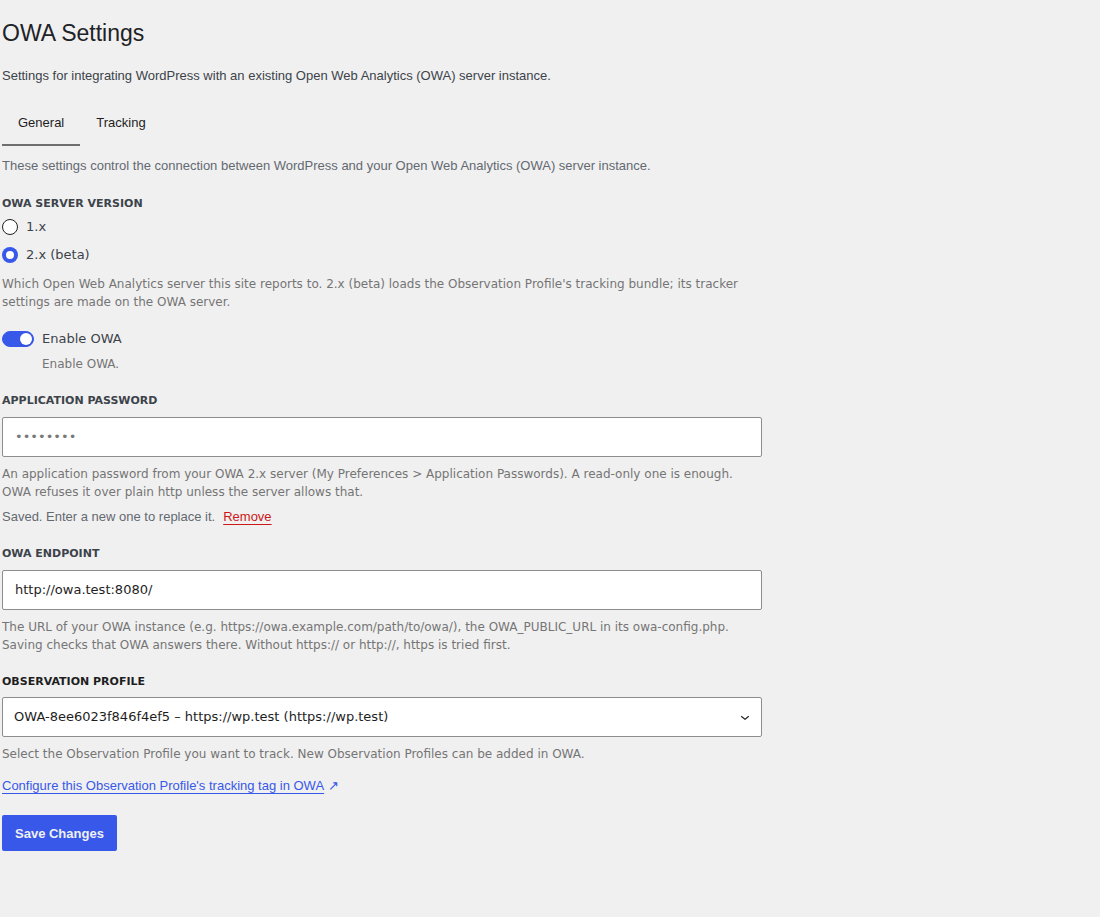
Settings for OWA 2.x.
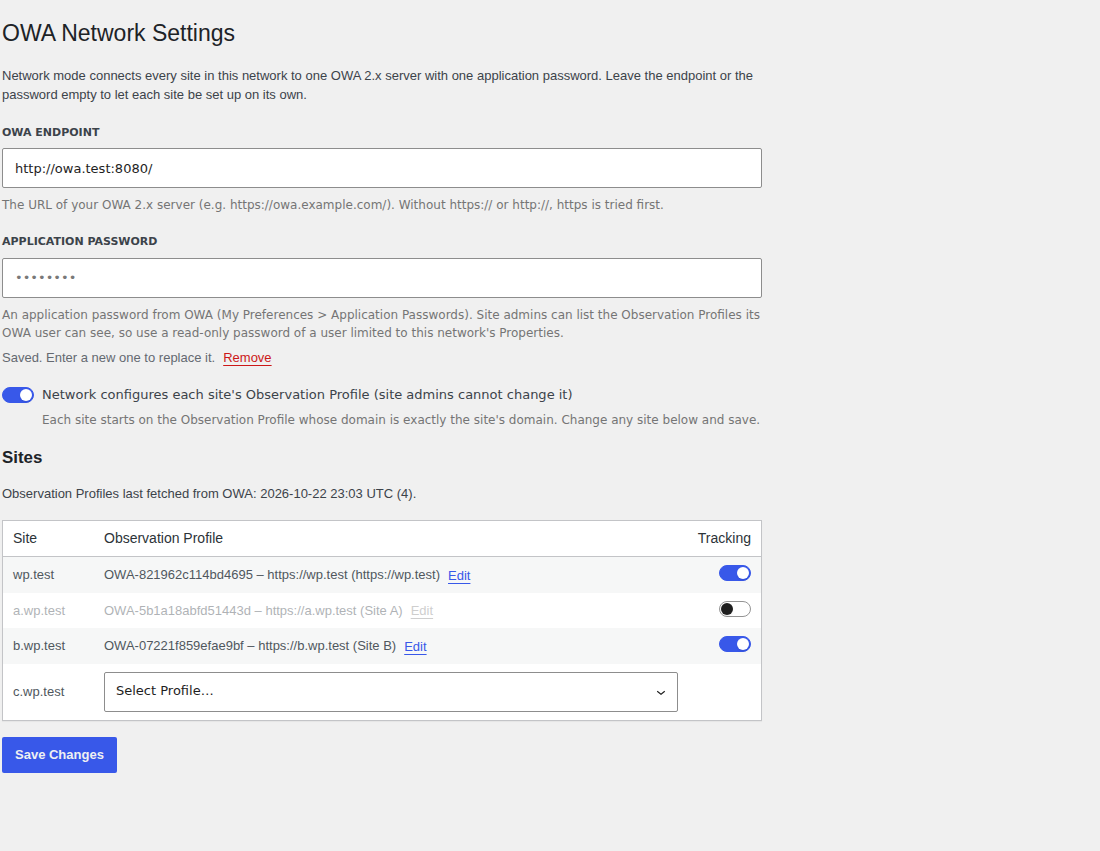
Network Admin > OWA: each site's Observation Profile and tracking switch.
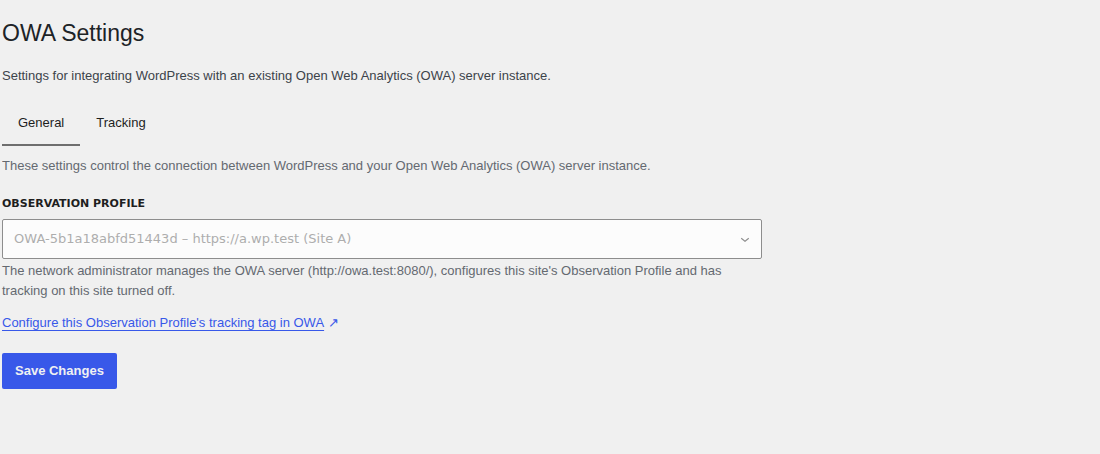
A site whose Observation Profile the network sets.
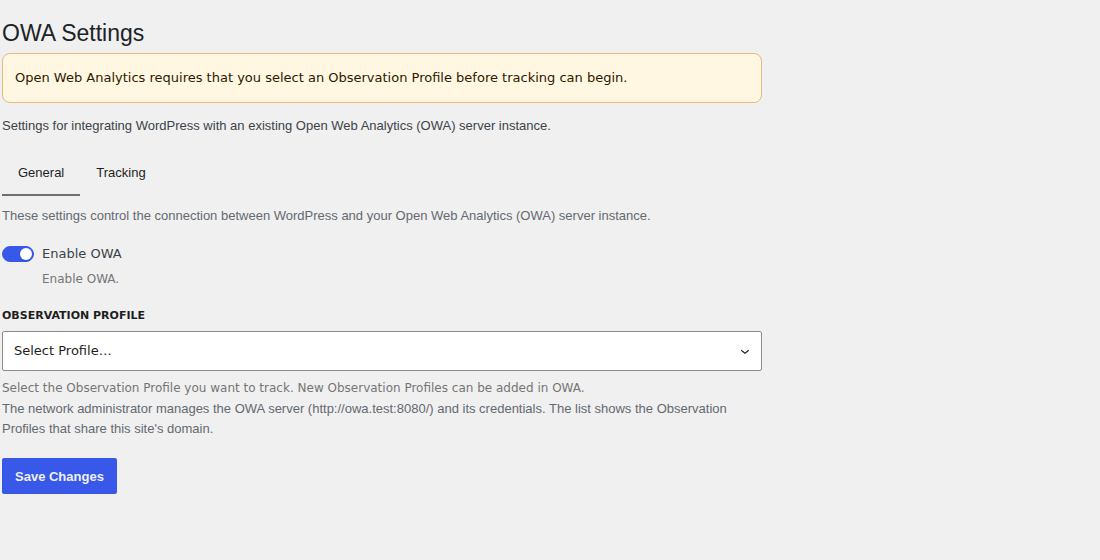
A site choosing from the Observation Profiles that share its domain.
Faq
The tag is added once Enable OWA is on and the OWA Endpoint and Observation Profile are saved. Your theme must call wp_head().
Application passwords are sent only over https. To use an http OWA server, turn off Application Passwords Need HTTPS on the OWA server, and set allow_insecure_app_password through the plugin’s owa_wp_sdk_config filter:
add_filter( 'owa_wp_sdk_config', fn( $config ) => [ 'allow_insecure_app_password' => true ] + $config );
Reviews
Changelog
2.4.0
- Don’t Track Logged-in Users is on by default. A site that never saved this setting (last saved before 2.3.0) stops tracking logged-in users; turn the setting off to track them again.
- The OWA Endpoint is checked with OWA when it changes: the plugin stores the URL OWA’s tracker loads from, after any redirect, with a trailing slash. Without
https://orhttp://, https is tried first, then http. If OWA does not answer, nothing is saved. - The Observation Profile list shows once OWA accepts the credentials. If OWA refuses them, the settings page shows OWA’s error instead.
- Network Admin > OWA: the Sites table shows once OWA has listed the Observation Profiles for the network’s endpoint and application password. Saving a new endpoint or password fetches them again.
2.3.1
- Settings link on the Plugins screen. When the plugin is network-activated, the Network Admin > Plugins link goes to the network settings.
- Observation Profiles are listed as “site ID – domain (name)” on the network page and in each site’s picker, with the name left off when the Profile has none.
2.3.0
- OWA 2.x support (beta), chosen with the new OWA Server Version setting. 1.x stays the default.
- Authenticates with an OWA application password.
- Loads the Observation Profile’s tracking bundle. Tracker options are set on the OWA server; the settings page links to them.
- Tags public pages only.
- Multisite network mode (2.x): one OWA server and application password for the network. Each site chooses an Observation Profile that shares its domain, or the network sets each site’s Observation Profile and tracking switch.
- Fires
owa_wp_tag_changedwhen a site’s tag changes. Proxy Cache Purge purges the site on it. - New setting: Don’t Track Logged-in Users.
- Settings pages rebuilt with WordPress components. Keys and passwords are never sent back to the browser. An invalid entry is reported under its field and nothing is saved.
2.2.3
- No tracking tag until the OWA Endpoint and Website ID are both set. Before, activating the plugin added a tag with an empty endpoint to every page, so each page view also requested a tracker URL that resolved against the page itself and returned a 404.
2.2.2
- Requires OWA PHP SDK 1.1.1, which no longer installs its tests and development files.
2.2.1
- The plugin package no longer includes the OWA SDK’s development files (its tests, test fixtures and CI configuration). 2.2.0 shipped them under vendor/open-web-analytics/owa-php-sdk/, including a test server script that echoes requests back.
2.2.0
- Requires PHP 8.2 and OWA 1.14 or later.
- Updated the OWA PHP SDK to 1.1.0, which no longer bundles Guzzle. Fixes conflicts with other plugins that ship their own copy, and the fatal error when OWA cannot be reached.
- The tracking tag loads the tracker from OWA 1.14’s path (public/base/dist/owa.tracker.js) instead of relying on a redirect.
- The Website ID list reads the site list OWA has returned since 1.10.1. When the list cannot be loaded, the reason is shown under the field and the saved Website ID is kept.
- Removed tracking of WordPress admin actions (logins, posts, comments, etc.) and feed tracking (feed requests and tracking parameters on feed links), with their settings.
- Tracking commands are JSON encoded; page titles are sent as plain text, and an empty title no longer overwrites the page’s own.
- User names are sent only for logged-in users.
- Fixed the endpoint URL scheme check, a fatal error on an invalid On/Off value, and PHP 8 deprecation notices.