Opt-Out for Google Analytics (DSGVO / GDPR)

Opt-Out for Google Analytics (DSGVO / GDPR)
Description
The General Data Protection Regulation (GDPR, German: DSGVO) requires that website visitors can object to the collection of their data by Google Analytics.
Until now, this was only possible with a browser add-on or with complicated JavaScript code on your own website. With this plugin, it is child’s play, and visitors can also undo their objection at any time.
Features
- Support for Google Analytics 4 (GA4)
- Full integration with the privacy features of WordPress
- Regular check (daily, weekly or monthly) whether the settings are still compliant with data protection law
- Compatible with Google Tag Manager
- No other plugin needed to add the Google Analytics code to your website. The plugin can add it for you.
- Visitors can disable Google Analytics tracking for themselves and enable it again later.
- The texts of the opt-out and opt-in link can be customized, also per block or shortcode.
- An optional popup appears after clicking the link. Its texts can also be customized per block or shortcode.
- The GA4 measurement ID (G-XXXXXXXXXX) can be entered manually or read automatically from a Google Analytics plugin (see compatible plugins).
- Local storage fallback: If a visitor deletes their cookies, the opt-out cookie is restored, as long as the browser’s local storage has not been cleared as well.
- Compatible with WordPress Multisite
- Gutenberg block with a preview, a warning if the link is not displayed, and settings for color, typography, spacing and alignment
- Works with page caching: the link always shows the current status of the visitor.
- Compatible with Advanced Custom Fields, Secure Custom Fields, WPML, Polylang and Loco Translate
- Also works on smartphones, provided the browser supports cookies
- Custom CSS to change the appearance. It is only loaded together with the link (optimized loading time).
- Available in English and German
- Full support for PHP 8 (tested up to PHP 8.3)
Regular check whether the settings are still compliant with data protection law
Have you ever edited your privacy policy page and accidentally deleted the opt-out shortcode? Or removed your Google Analytics plugin, reinstalled it later and forgot to set up the tracking code again?
To keep you on the safe side, the plugin checks the settings regularly. If a setting is no longer correct, an error message appears in the WordPress admin or you receive an email.
You can choose how often the check runs: daily, weekly or monthly.
The following settings are checked:
- Opt-out function is enabled
- Opt-out shortcode or block is present on the page
- The page with the shortcode or block is publicly available (published and not password protected)
- A valid GA4 measurement ID was found (only the format is checked)
- The cron job for the status check is active
Built-in compatibility with the following plugins
You do not need any of these plugins! The plugin also works with other plugins, or if you have added the Google Analytics code yourself.
With the built-in compatibility, the current GA4 measurement ID is read automatically and kept up to date, so you never have to correct it manually.
- MonsterInsights Pro
- MonsterInsights – Google Analytics Dashboard for WordPress (Website Stats Made Easy)
- ExactMetrics – Google Analytics Dashboard for WordPress (Website Stats Plugin)
- Analytify – Google Analytics Dashboard Plugin For WordPress
- GA Google Analytics
- Site Kit by Google – Analytics, Search Console, AdSense, Speed
Privacy policy that is AUTOMATICALLY kept up to date
Keeping track of all changes in data protection law is not easy, especially alongside your core business. That’s why we offer a privacy policy generator together with our partner eRecht24.
You create your privacy policy ONCE, and it is automatically kept up to date in WordPress. No more filling out forms and copying and pasting privacy statements: it is completely automated.
More information: https://schweizer.solutions/erecht24
Do you like our plugin?
A positive review motivates us a lot to keep working on our free plugins.
Coded with love by Schweizer Solutions GmbH
This plugin is not made or supported by Google. Google Analytics is a trademark of Google LLC.
Installation
Installation in WordPress
- In the admin, go to
Plugins > Add New Plugin. - Search for
Opt-Out for Google Analytics. - Click “Install Now”.
- Activate the plugin.
Manual installation
- Download the ZIP file and unpack it.
- Upload the folder
opt-out-for-google-analyticsto the/wp-content/plugins/directory of your WordPress installation. - Activate the plugin.
Configuration
- In the admin, go to
Settings > GA Opt-Out. - Switch on “Enable Opt-Out function”, if it is not enabled yet.
- Select the source of the GA4 measurement ID, or enter it manually.
- Save the changes. Done!
Note on the GA4 measurement ID
If you added the Google Analytics tracking code yourself, e.g. in your theme, enter the measurement ID in the input field.
If you use one of the compatible Google Analytics plugins, you can select it as the source. The plugin then reads the current measurement ID automatically, and you do not need to enter it.
Screenshots
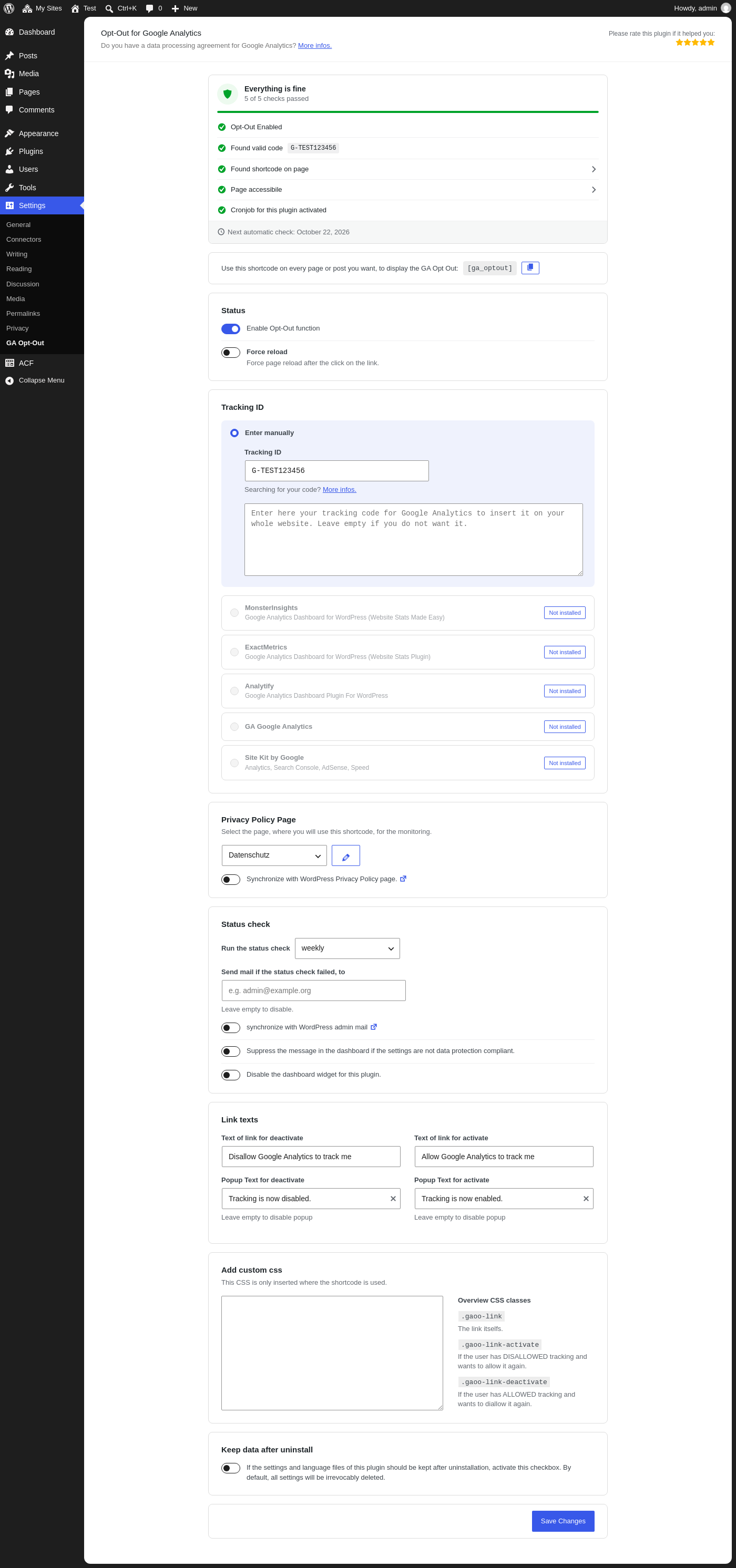
Settings page of the plugin (Settings > GA Opt-Out)

Shortcode inserted in the classic editor

Opt-out link with popup on the website

Example of a status email
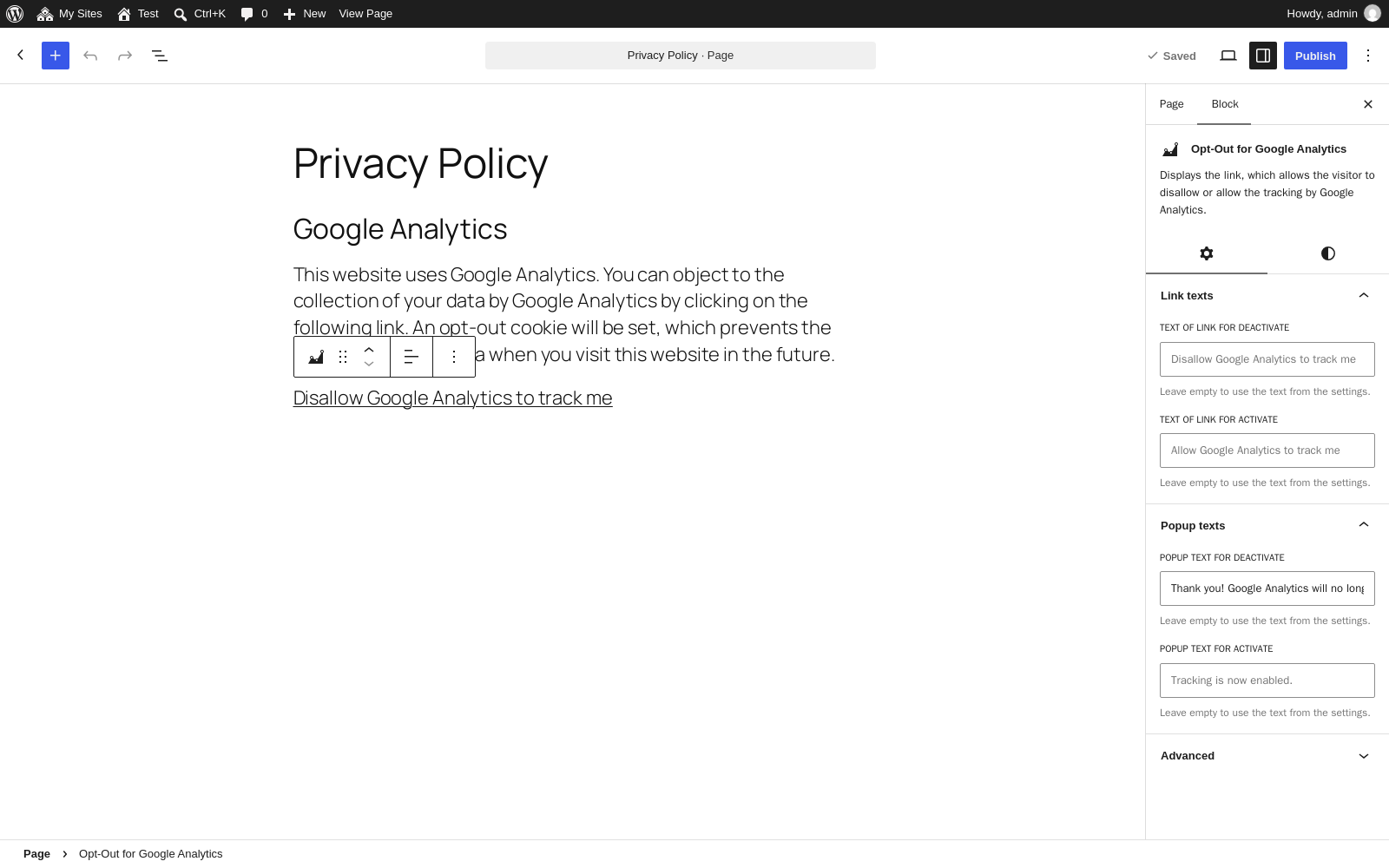
Block in the block editor, with individual link and popup texts
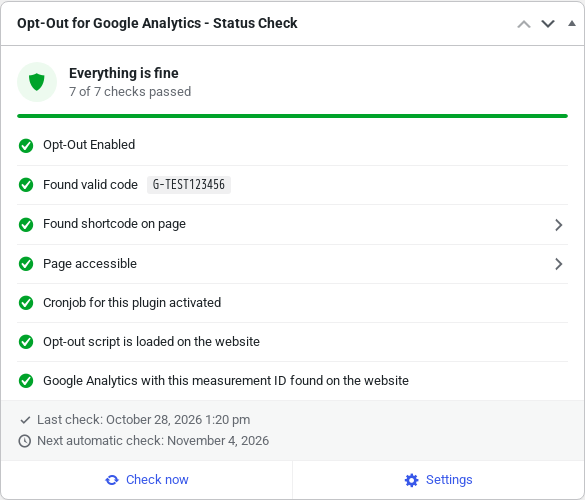
Dashboard widget with the status check
Faq
The General Data Protection Regulation (GDPR, German: DSGVO) requires that website visitors can object to the collection of their data by Google Analytics.
Until now, this was only possible with a browser add-on or with complicated JavaScript code on your own website.
With this plugin, it is very easy, and visitors can also undo their objection.
Yes, because both follow Google’s specifications for Google Analytics 4. More information: https://developers.google.com/tag-platform/security/guides/privacy#turn-off-analytics
Yes. The plugin also works if the tracking code was added to the theme manually or with another plugin.
Yes, we recommend offering the opt-out for Google Analytics in your privacy policy.
Keeping track of all changes in data protection law is not easy, especially alongside your core business. That’s why we offer a privacy policy generator together with our partner eRecht24.
You create your privacy policy ONCE, and it is automatically kept up to date in WordPress. No more filling out forms and copying and pasting privacy statements: it is completely automated.
More information: https://schweizer.solutions/erecht24
When a visitor clicks the opt-out link, a cookie is set. This cookie tells the website not to track this visitor.
The cookie is only valid in the browser in which the visitor clicked the opt-out link. In a different browser, the visitor has to click the link again.
If the visitor clears their browser data (cookies, history, etc.), the cookie is deleted as well, and they have to click the opt-out link again.
To turn off the opt-out function, go to Settings > GA Opt-Out and switch off “Enable Opt-Out function”.
To deactivate the whole plugin, go to Plugins > Installed Plugins and click “Deactivate” below “Opt-Out for Google Analytics”.
After deactivating the plugin, you can remove it completely by clicking “Delete”.
You can use the shortcode [ga_optout] in posts, pages and widgets (text widget). In the block editor, you can also use the block “Opt-Out for Google Analytics”.
Yes. In the Gutenberg block, you can enter individual link and popup texts in the block settings. If you use the shortcode, add the texts as attributes:
[ga_optout link_deactivate="Disallow tracking" link_activate="Allow tracking" popup_deactivate="Tracking is disabled." popup_activate="Tracking is enabled."]
If a text is empty, the text from the plugin settings is used.
Yes. The plugin provides the following actions and filters:
// Before the shortcode is rendered
add_action( 'gaoo_before_shortcode', 'my_before_shortcode', 10, 2);

function my_before_shortcode( $tracking_code, $current_status ) {
    // $tracking_code - The measurement ID in use: "G-XXXXXXXXXX"
    // $current_status - The current status of the visitor: activate or deactivate
}

// After the shortcode is rendered
add_action( 'gaoo_after_shortcode', 'my_after_shortcode', 10, 2);

function my_after_shortcode( $tracking_code, $current_status ) {
    // $tracking_code - The measurement ID in use: "G-XXXXXXXXXX"
    // $current_status - The current status of the visitor: activate or deactivate
}

// Before the JavaScript code that disables GA is output
add_action( 'gaoo_before_head_script', 'my_before_script', 10, 1);

function my_before_script( $tracking_code ) {
    // $tracking_code - The measurement ID in use: "G-XXXXXXXXXX"
}

// After the JavaScript code that disables GA is output
add_action( 'gaoo_after_head_script', 'my_after_script', 10, 1);

function my_after_script( $tracking_code ) {
    // $tracking_code - The measurement ID in use: "G-XXXXXXXXXX"
}

// The GA4 measurement ID in use
add_filter( 'gaoo_get_ua_code', 'my_ga_tracking_code', 10, 2 );

function my_ga_tracking_code( $tracking_code, $ga_plugin ) {
    // $tracking_code - The measurement ID in use: "G-XXXXXXXXXX"
    // $ga_plugin - The selected source of the measurement ID
}

// Whether the page should be reloaded after the click
add_filter( 'gaoo_force_reload', 'my_force_reload', 10, 1);

function my_force_reload( $force ) {
    // $force - "true" = reload the page; "false" = do not reload
}
Some custom themes do not render shortcodes, so the link is not displayed.
In this case, add the following code to your theme at the desired position:
echo do_shortcode('[ga_optout]');
If you changed a setting, e.g. in a compatible Google Analytics plugin, the change is only detected during the next automatic check (daily, weekly or monthly, depending on your settings).
You can run the check right away: go to Settings > GA Opt-Out and click “Save Changes”.
The plugin then reads the new settings and keeps the result until the next automatic check.
The plugin fires the JavaScript event gaoptout on the window object.
If the visitor clicks the link to opt out, event.detail is true. If the visitor opts in again, it is false.
Example:
window.addEventListener(‘gaoptout’, function (e) { console.log(e.detail); });
With jQuery, the value is available in e.originalEvent.detail.
You can change the appearance of the link with custom CSS in the plugin settings. The following CSS classes are available:
The link itself:
.gaoo-link { … }
The ID #gaoo-link still works for compatibility, but please use the CSS class. The ID is not unique if the link is used several times on one page.
The link if the visitor has opted out of tracking:
.gaoo-link-activate { … }
The link if the visitor has NOT opted out of tracking:
.gaoo-link-deactivate { … }
Enter several email addresses, separated by commas, in the email field of the status check.
Example: webmaster@example.org,admin@example.org,dev@example.org
The status check runs at the selected interval and only sends an email if at least one check has failed.
If you still do not receive any emails, there may be the following reasons:
- The email ended up in your spam folder. Please check your spam folder and add the sender address to your contacts, so future emails do not end up in spam.
- You have disabled the WordPress cron in the wp-config.php. Please make sure that a server-side cron job is set up and working.
- You use a caching plugin. Without a server-side cron job, WordPress checks for pending tasks on every page load. If the page is delivered from the cache, this check does not happen, and the cron job is not triggered.
- Your website has only a few visitors, with long gaps between visits. In this case, the WordPress cron is rarely triggered.
We therefore recommend:
- Set up a server-side cron job.
- Add the sender address to your contacts.
The opt-out cookie is set according to Google’s specifications, so Google Tag Manager (GTM) usually does not need to be adjusted.
However, if you want to prevent the Google Analytics code from loading at all, GTM must check whether the cookie or the local storage entry is set.
Based on this, GTM can decide whether to load the code.
If there is no cookie or local storage entry, or if its value is “false”, the visitor has not opted out.
The visitor has only opted out if the value is “true”.
Specific cookie for your measurement ID: ga-disable-G-XXXXXXXXXX
Generic cookie: ga-opt-out
Specific local storage entry: ga-disable-G-XXXXXXXXXX
Generic local storage entry: ga-opt-out
You use this plugin at your own risk. As the website operator, you are responsible for making sure that the plugin works on your website.
Among other things, check whether a cookie in the format ga-disable-G-XXXXXXXXXX is set after clicking the link.
For Google Tag Manager, an additional cookie named “ga-opt-out” is set.
Reviews
Simple 2 use, easy install, PHP8-compatible
By 
Mega ad banner in the whole admin area
By 
Thx for that nice plugin!
By 
Working fine, but needs correct PHP version
By 
Must have plugin
By 
Easy to use!
By 
Easy to use. Works fine with Google Analytics Dashboard für WP. Perfect for people who don't know much about programming.
Changelog
2.5
- Security: Only users with the “unfiltered_html” capability can change the tracking code (relevant for multisite).
- Security: Hardened the output of the custom CSS, the link texts and the promotion data.
- Added: The Gutenberg block shows a preview of the link and a warning if the link is not displayed on the website.
- Added: Settings for color, typography, spacing and text alignment in the Gutenberg block.
- Added: Individual link and popup texts per block or per shortcode: [ga_optout link_deactivate=”…” link_activate=”…” popup_deactivate=”…” popup_activate=”…”]
- Added: Compatibility with Secure Custom Fields. The status check also finds the shortcode in its fields.
- Updated: New, modern design of the settings page.
- Updated: New, modern design of the dashboard widget.
- Updated: The Gutenberg block is now rendered dynamically and is translatable. Existing blocks keep working and are migrated automatically when edited.
- Updated: The link has the new CSS class “gaoo-link”. Please use it instead of the ID “#gaoo-link”, which still works for compatibility.
- Updated: The minimum required WordPress version is now 5.8.
- Updated: Support for WordPress 7.1.
- Fixed: The opt-out link did not work with block themes (e.g. Twenty Twenty-Five), because the JavaScript data was missing.
- Fixed: With page caching, the opt-out link could show the wrong status. The link now always shows the current status, also if it is used several times on one page.
- Fixed: The admin notice was shown when everything was fine, and hidden when there were problems. Thanks to @greenlightsolutions for reporting!
- Fixed: The plugin could not be deactivated with the bulk action or with WP-CLI.
- Fixed: Fatal error if another plugin also loads the CSSTidy library.
- Fixed: Site Kit by Google: the GA4 measurement ID is now read correctly.
- Fixed: The opt-out link no longer depends on a global JavaScript variable from the header script.
- Fixed: The CSS class of the opt-out link is now updated correctly in both directions.
- Fixed: PHP warning in the status check with Advanced Custom Fields if the page has no fields.
- Fixed: Invalid email addresses for the status emails were silently changed or removed. They are now validated, and an error message is shown.
- Fixed: Multisite: the links to install a compatible Google Analytics plugin lost the search query. The links are now only shown if the user is allowed to install or activate plugins.
- Fixed: Multisite: new sites did not get the status check cron job when the plugin is network activated.
- Fixed: The status check cron job was not created when the plugin was activated with WP-CLI.
- Fixed: The status check is now updated when the privacy policy page is saved.
- Fixed: Cached data is now reliably cleared after a plugin update, regardless of the update method.
- Fixed: The admin styles of the plugin affected code elements on all admin pages.
- Removed: Support for Universal Analytics (UA-XXXXXX-Y). Google has shut down Universal Analytics, so only Google Analytics 4 (G-XXXXXXXXXX) is supported.
- Removed: The status check “IP anonymization is enabled”. Google Analytics 4 does not log or store IP addresses.
- Removed: Unused code and files.
2.4
- Updated: Support for WordPress 6.8.1.
2.3
- Updated: CSSTidy library to version 2.1.0.
- Updated: Support for WordPress 6.5.
- Updated: readme.txt.
- Fixed: Analytify: detection of whether IP anonymization is enabled.
2.2
- Updated: Support for WordPress 6.2.
- Updated: Support for PHP 8.1.
- Improved: Optimized code and user experience.
- Fixed: When a tracking code is pasted in manual mode, the GA4 ID is now read from the JavaScript code and inserted into the input field automatically, if the field is empty.
2.1
- Updated: Support for WordPress 6.0.2.
- Updated: CSSTidy library to version 2.0.0.
- Updated: Integration of all supported Google Analytics plugins.
- Updated: readme.txt.
2.0
- Added: Support for Google Analytics 4 (GA4).
- Added: GA4 support for MonsterInsights.
- Added: GA4 support for ExactMetrics.
- Added: GA4 support for Analytify.
- Added: GA4 support for GA Google Analytics.
- Updated: Support for WordPress 5.9.
- Improved: Several code improvements and cleanup.
1.9
- Updated: Support for WordPress 5.8.
- Updated: Compatibility with all supported Google Analytics plugins.
- Changed: Raised the required versions in the dependency check on plugin activation.
- Fixed: The system directory separator was not used in the constants.
1.8
- Added: Dashboard widget with the current status of the website. It can be disabled in the plugin settings.
- Added: The language files of this plugin are removed on uninstall, if the option “Keep data after uninstall” is not enabled.
- Changed: The translation code. The language files were removed from the plugin, the translations are now provided by translate.wordpress.org.
- Updated: Names of the supported Google Analytics plugins.
1.7
- Added: Option in the settings to keep the data after uninstall.
- Added: Close button for the promotion popup, for better usability.
- Fixed: The data was not deleted after the plugin was deleted.
1.6
- Updated: Support for PHP 8.
- Updated: Support for WordPress 5.7.
- Updated: Compatibility with all supported Google Analytics plugins.
- Updated: CSSTidy from version 1.7.0 to 1.7.3.
- Improved: Gutenberg support for the opt-out block.
- Improved: Some links, the design and the mobile usability of the settings page.
- Improved: PHP code and security.
- Changed: If the promotion box is hidden permanently, this now applies to the whole installation instead of per user.
- Fixed: In some cases, the plugin texts were not displayed in the language of the user.
- Fixed: Unexpected changes to the .htaccess file in some cases (thanks to @danielrufde).
1.5
- Added: Support for Site Kit by Google.
- Added: The current UA code is shown in the status check.
- Added: Send the status email to the WordPress admin email address (automatic sync).
- Updated: Compatibility with the new version of “Google Analytics Dashboard for WP by ExactMetrics” (formerly GADWP), with backward compatibility for older versions.
- Updated: Compatibility with the new version of “Google Analytics Dashboard Plugin for WordPress by Analytify”, with backward compatibility for older versions.
- Fixed: German translations.
1.4
- Added: Support for Gutenberg.
- Added: Support for the ACF plugin, to check whether the shortcode is used in its fields.
- Added: An email is sent if the status check detects an error.
- Added: The interval of the status check can now be changed.
- Added: Google Analytics can be added to the whole website if the UA code is entered manually.
- Added: Custom JavaScript event on the window object, so other plugins can react when a visitor clicks the link.
- Added: Custom CSS in the settings, which is only loaded if the shortcode is used.
- Updated: The link to the Google Analytics page about the data processing agreement.
- Improved: The edit link next to the “Privacy Policy Page” selection now opens the currently selected page.
- Improved: Usability and security.
- Improved: The JSON data is now generated by a static function, so developers can enqueue the scripts on any page.
- Fixed: The wrong version variable was used to check whether WordPress has the new GDPR features.
- Fixed: The redirect after activation now only happens if the plugin is activated on its own, not in bulk.
- Fixed: The filter for the link text did not apply on the initial page load.
1.3
- Added: Support for the GDPR features of WordPress 4.9.6: icon for the shortcode on the privacy page and sync of the page ID for the shortcode.
- Added: Check whether the page with the shortcode is accessible.
- Added: Support for MonsterInsights Pro.
- Added: Compatibility with WPML and Polylang.
- Added: Local storage fallback: if the cookies were deleted but the local storage was not, the cookie is restored.
- Added: Option to disable the dashboard notice if the settings are not correct.
- Added: Option to force a page reload after clicking the link.
- Added: “Google Tag Manager” as an option.
- Improved: Support for Google Tag Manager: a generic cookie named “ga-opt-out” is set when a visitor opts out. You can copy the code into GTM without changing the UA code.
- Improved: Several code and usability optimizations.
- Fixed: PHP error on older PHP versions (< 5.3).
1.2
- Added: Backward compatibility with older versions of “Google Analytics Dashboard for WP (GADWP)”.
- Added: Some status checks now link to the related settings page. Enabling IP anonymization is now just one click away.
- Changed: The message about settings that are not compliant with data protection law is now only visible to admins and super admins.
- Fixed: Activating the plugin directly after installation caused a warning message.
1.1
- Added: Integration of “GA Google Analytics”.
- Added: Integration of “Google Analytics for WordPress by MonsterInsights”.
- Added: Validation of the UA code.
- Added: Monitoring: a weekly check whether the settings are compliant with data protection law. If not, a message appears in the WordPress admin.
- Improved: Several code, security and usability optimizations.
- Fixed: Integration of “Google Analytics Dashboard for WP (GADWP)”.
- Removed: Integration of “Google Analytics by Yoast”.
1.0
- Initial release on February 15, 2016.