Order Status & Tracking Emails for WooCommerce

Order Status & Tracking Emails for WooCommerce
Description
OSTE manages the WooCommerce order journey: custom statuses and colors; global or per-product shipment tracking; per-status email templates; a live style editor; delayed customer or admin emails; automatic status changes and status-email resends. Configure each section individually or use an optional wizard and presets. Export settings and rules as JSON for another site.
Existing orders are not changed by the wizard. Generated rules start disabled. Delayed actions use WooCommerce Action Scheduler and WP-Cron; low-traffic stores can configure a server cron using the built-in scheduler guidance.
Main Features:
Create and manage custom WooCommerce order statuses with colored badges and order-list action buttons.
Rename WooCommerce core status labels and customize status colors without writing code.
Assign descriptive operational roles to core or custom statuses without forcing a predefined store workflow.
Use the optional setup wizard and status presets, or map operational roles to existing statuses with the separate advanced mapping tool. None of these tools changes existing orders.
Create optional delayed email automations triggered by an exact order status or an operational role, with paid/tracking conditions and a dedicated event log.
Build separate workflow rules that can change an order to a selected status when tracking is added or after time in an exact status.
Use workflow rules to resend the current status email without changing status, with an explicit warning for immediate duplicate-email risk.
Compose automation messages with the WordPress visual editor while keeping internal rule names private to the administration area.
Preview unsaved automation content with a real order, send it safely to a test address, and inspect a filterable event log with guarded retries for failed mail transport attempts.
Opt custom statuses into selected WooCommerce behavior: paid-order checks, downloads, and product purchase notes.
Keep custom status slugs stable after creation, with protected deletion and order reassignment tools.
Recover orders assigned to orphan custom statuses left behind by old slug changes or deleted statuses.
Configure custom email templates per order status, with subject, heading, intro text, extra content, footer content, and per-product tracking text.
Choose a WooCommerce fallback email for each custom status when the plugin template is disabled.
Add global tracking or per-product tracking to orders, including carrier selection and direct tracking links.
Show tracking information in customer emails and in the customer’s My Account order details.
Resend the current customer status email from the order screen without changing the order status.
Assign icons to carriers and control icon display in Cart, Checkout, Email, and My Account.
Map WooCommerce shipping methods to carriers to show the correct icon in classic Cart/Checkout labels.
Use custom shipping-method icons for Cart/Checkout when a single carrier mapping is not enough.
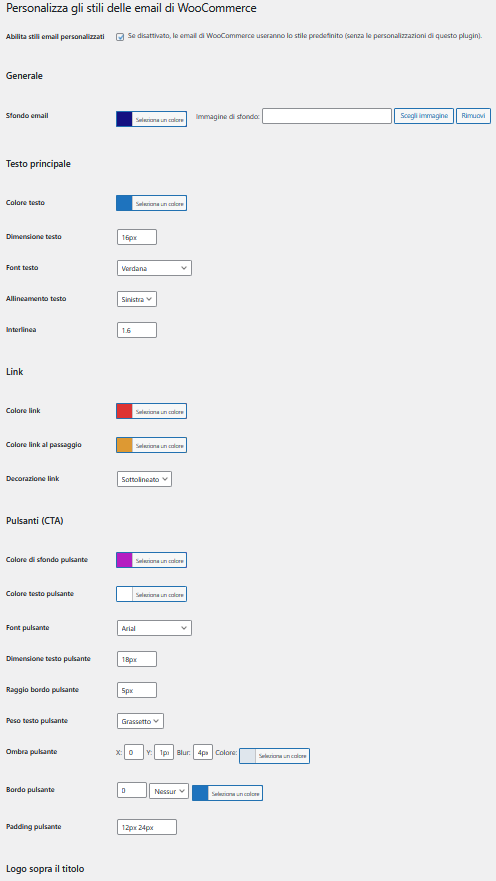
Customize WooCommerce email styles with a live preview and send the preview to a test email address.
Choose among Ordered Classic, Modern Clean and Minimal directly from the email-style screen. Applying a preset replaces only OSTE’s style settings after saving a restorable backup; WooCommerce-owned settings and settings belonging to other plugins are not modified.
The same central preset catalog is also available contextually: status flows from the Statuses screen, email content from Email Templates, workflow suggestions from Workflow, and follow-up suggestions from Email Automations. Suggested rules are created only when their required operational roles exist and always start disabled.
Compatible with HPOS order screens and legacy WooCommerce order tables.
Fully translatable and GPL licensed, with no third-party services required.
Perfect for store owners who want full control over order management and customer notifications.
Installation
Upload the order-status-tracking-emails-for-woocommerce folder to /wp-content/plugins/ or install it via Plugins -> Add New.
Install and activate WooCommerce before activating OSTE.
Activate the plugin.
Go to the OSTE Manager menu to create statuses, configure templates, carriers, icons, tracking, and email styles.
Optionally open Configuration to use the guided setup, apply presets, or import/export settings and rules. Review generated rules before enabling them.
Use the shared navigation buttons at the top of each OSTE screen to move quickly between statuses, templates, carriers, styles, email automations, and workflows.
For low-traffic stores, open Workflow -> Scheduler status to inspect overdue OSTE jobs, copy the external wp-cron.php URL, or request a non-blocking WP-Cron run manually.
Screenshots
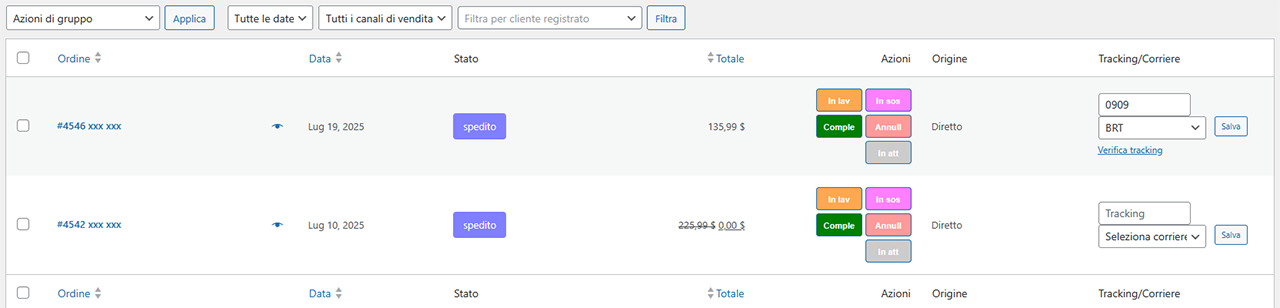
Colored badges in order list - Quick view of custom statuses in the order table.
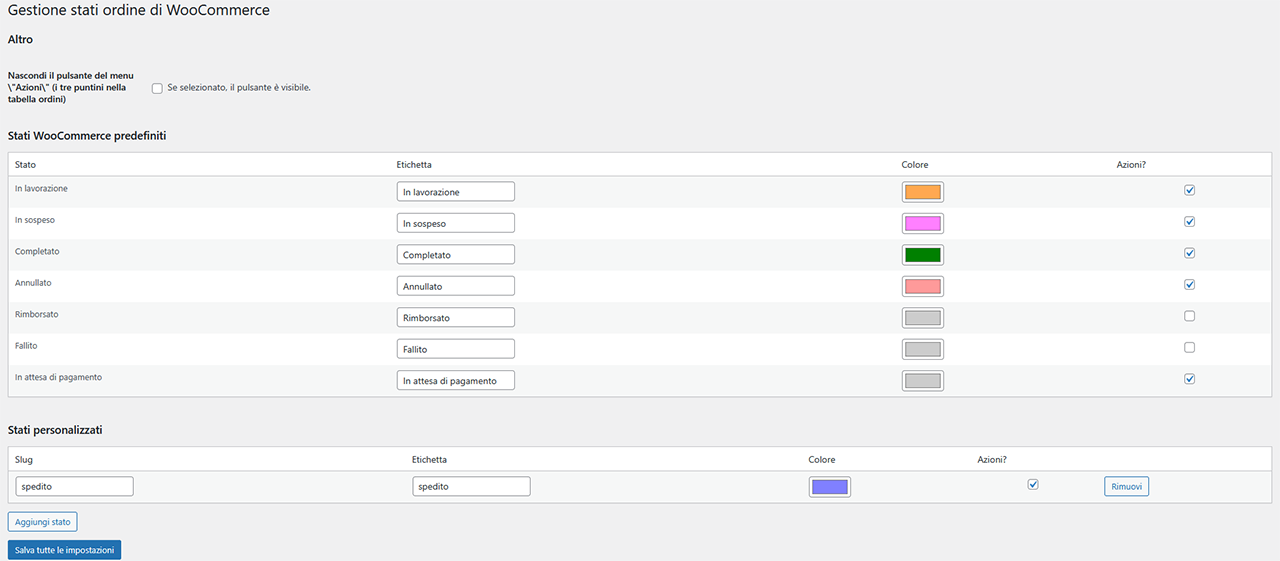
Status editor screen - Configure status name, color, and actions.
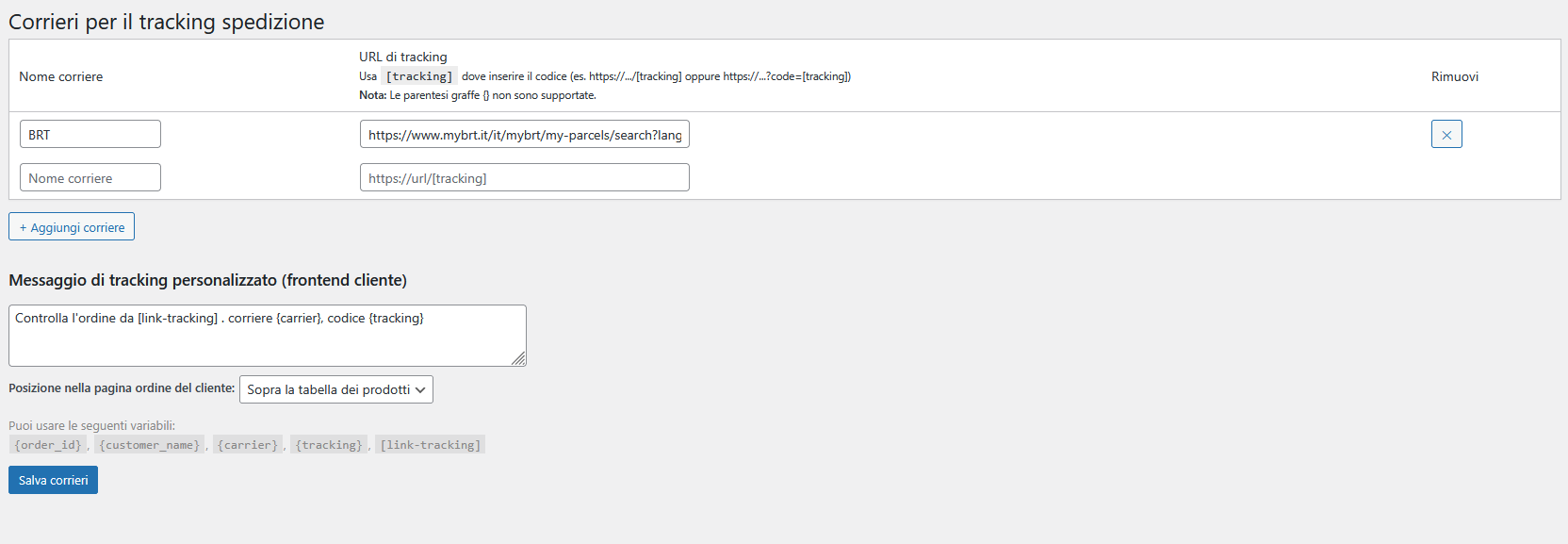
Carriers and tracking links - Define carrier names and URLs.

Carrier icons and display settings - Upload icons, style them, and choose where to show them.
Customer email - Personalized email with tracking info.
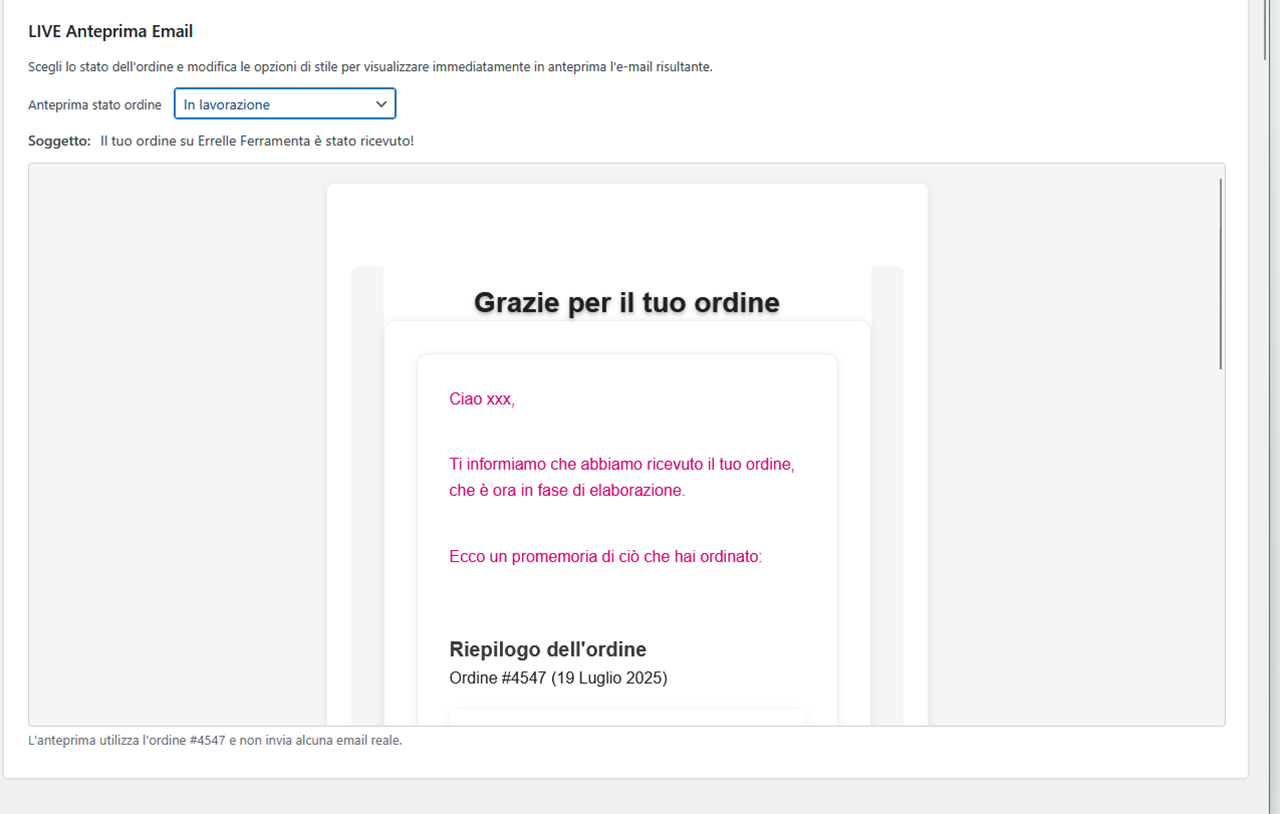
Email CSS Style Settings panel - Set custom styles (background, text, borders, etc.).
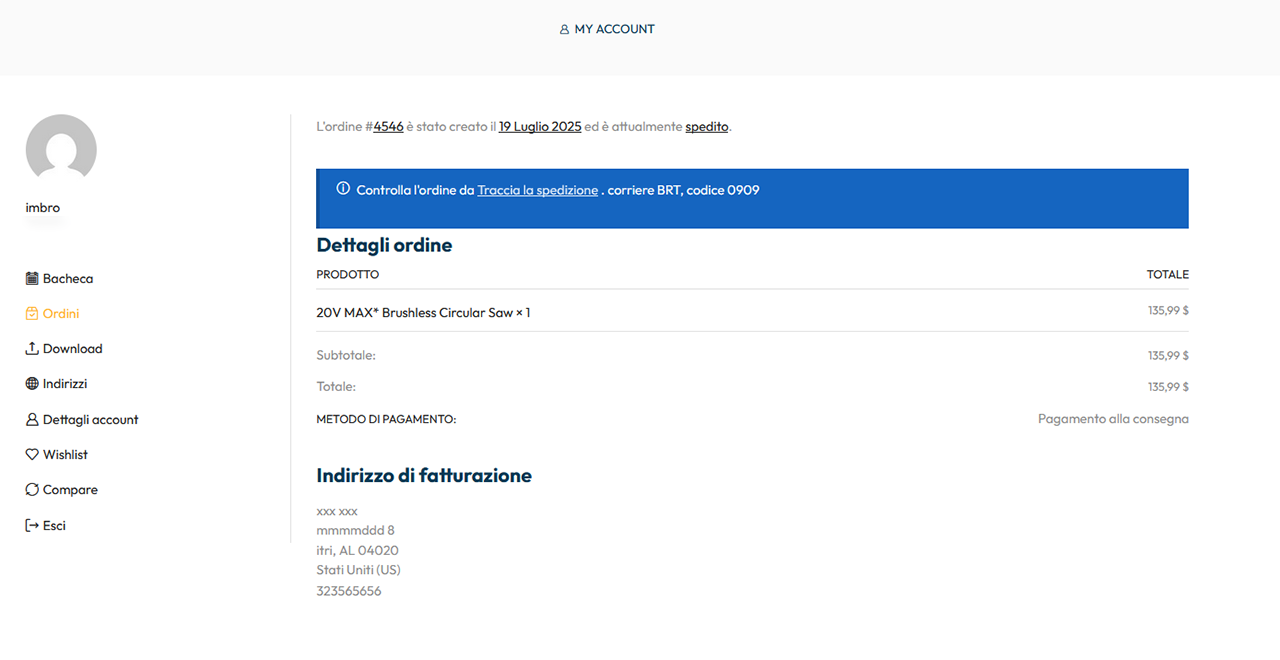
Order page on frontend - Tracking info shown to the customer in customizable positions.
Faq
OSTE preserves email template overrides supplied by themes and other extensions. Those overrides can affect the available layout and style controls.
Yes. The plugin supports WooCommerce HPOS order screens and the legacy order table.
Yes. Plugin strings are translation-ready and custom status labels can be entered in your store language. You can use tools like Loco Translate for plugin translations.
No. Core WooCommerce emails remain available. For custom statuses, you can use the plugin template or choose a WooCommerce fallback email when the plugin template is disabled.
Assigning a role does not itself change native WooCommerce status behavior. Roles are also used by presets and role-based email automations, so changing a role can affect rules that use it. Paid-order, download and purchase-note behavior can be enabled separately for plugin-created custom statuses; core statuses keep their native behavior.
No. Presets and the wizard run only after an explicit administrator action. Status presets can create missing statuses; the advanced role-mapping tool only maps existing statuses. Neither changes existing orders. Suggested workflow and email rules start disabled.
Only after explicit confirmation. OSTE first saves a backup of its current style option and provides a restore action. It does not change WooCommerce email options or options owned by other plugins. No style preset runs during installation, activation, updates, or page loading.
The versioned JSON file contains OSTE settings and rules. It never contains orders, customers, per-order tracking data, automation logs, scheduled jobs, or cron diagnostics.
Email automations never change status. The separate Workflow page can create explicit status-transition rules. Both rule types are disabled by default, revalidated before execution, and use WooCommerce Action Scheduler for delayed jobs.
A workflow rule can react when the first tracking code is entered or when an order enters an exact status. After an optional delay it can move the order to a selected status, or resend the email belonging to the current status without changing it. Adding further per-product tracking codes does not trigger the same event again. Each rule runs at most once per order; cancelled, refunded, and failed orders are protected by default.
No. Automation emails are additional messages. If a customer automation is configured with zero delay on the same status that already sends a WooCommerce or OSTE email, the customer can receive both. For this reason, an immediate customer rule cannot be enabled, scheduled, or executed until the administrator explicitly confirms the duplicate-email risk. Use status templates for the normal transition email and automations for intentional follow-ups or internal notices.
Each rule has its own policy. It can require the order to still match the trigger, continue after every later status change, or continue only while the order is not cancelled, refunded, or failed. New rules use the safest policy by default: the order must still match.
Yes. Choose a reference order to resolve real placeholders and preview the current unsaved editor content. A test email is sent only to the separate test address and never activates, saves, or schedules the rule.
Yes, only when the mail transport rejected the automatic email. The log offers a single-use retry that rechecks the current rule, order status, conditions, and recipient. Scheduling errors, cancellations, and test emails do not expose this retry.
No. The technical wc-completed status keeps its WooCommerce meaning even if its visible label is renamed. The workflow analysis shows the current label, while each store remains free to map operational roles to its own statuses.
Customers can see tracking information in status emails and in the My Account order details page.
Yes. You can use per-product tracking mode and assign a carrier, tracking code, and tracking link to each product row.
The plugin shows how many orders use that status and requires you to move those orders to another WooCommerce status before deletion.
Yes. The States Manager includes an orphan status recovery tool that detects unregistered order statuses and lets you move those orders to a valid WooCommerce status.
No. The slug is locked after creation to keep existing orders valid. You can still change the status label and color.
Yes. The Email Style Settings page includes a live preview and a test email option that sends the current preview to a chosen email address, not to the customer.
Yes. The order screen can resend customer-facing status emails for supported WooCommerce core statuses and plugin custom statuses without changing the order status.
Reviews
Changelog
1.0.10
- New:
- Optional guided setup, four status flows and contextual presets for individual settings pages.
- Three email style presets with a restorable backup, live preview and collapsible style controls.
- Operational roles independent of status labels, plus opt-in paid-order, download and purchase-note behavior.
- Delayed email automations with conditions, recipients, post-trigger policies, preview, test sends and event logs.
- Workflow rules for first tracking insertion, delayed status changes and current-status email resends.
- Scheduler diagnostics and instructions for external server cron on low-traffic stores.
-
Versioned JSON configuration import/export for settings and rules, with validation and merge controls, excluding order and customer data.
-
Improved:
- Tracking persistence and cleanup use WooCommerce CRUD for HPOS and legacy orders.
- Custom status validation, immutable slugs, protected reassignment and orphan recovery.
- Shared admin navigation, active email-template badges and clearer order action buttons.
- Separate styling controls for table headers, products, totals, downloads and logo alignment.
- Consolidated email template resolution while preserving theme and extension overrides.
-
Italian translations and WordPress 7.1 tested-up-to declaration, based on site testing.
-
Fixed:
- Status email sends and manual resends no longer report success when the mail transport rejects the message.
- Reassignment loops without progress and deletion after incomplete order reassignment.
- Overbroad SQL wildcard matching during uninstall cleanup.
- Strengthened per-order permission checks for tracking updates, status changes and manual email resends.
1.0.9
- Fix:
- Restored and extended “Resend current status email” visibility in the order detail screen
- Resend now supports configured custom-status emails, custom-status WooCommerce fallbacks, and supported WooCommerce customer status emails
- Sanitized custom email CSS before saving and rendering to reduce unsafe CSS/script injection risk
- Added cached order-status usage counts in the status admin screen to avoid repeated live count queries on large stores
- Moved the main email resend runtime guard from global variables into an isolated runtime class
- Updated and recompiled the Italian translation files
1.0.8
- Fix:
- Locked custom status slugs after creation to prevent existing orders from becoming orphaned when a status label is renamed
- Added protected custom status deletion: orders using the status must be reassigned to another WooCommerce status before deletion
- Added client-side validation and visible admin notices when deleting a custom status without choosing the replacement status
- Prevented customer emails from being sent during custom status reassignment on deletion
- Added orphan custom status recovery tool to move orders from unregistered old statuses to a valid WooCommerce status
-
Fixed frontend custom tracking message visibility so it appears only when carrier, tracking code, and tracking link are available
-
Update:
- Added order usage summary before deleting a custom status, including the affected order count
- Added per-custom-status WooCommerce fallback email mapping when “Manage email with plugin?” is disabled
- Live preview now respects the selected fallback email mapping, including the “No fallback email” case
- Added Core/Custom badges to the email template status list for clearer status identification
1.0.7
- Fix:
- Plugin Check hardening and escaping refinements
- Minor reliability fixes for per-product tracking save and uninstall cleanup
- Live preview now respects the “Enable custom email styles” toggle (disabled = default WooCommerce style preview)
- Fixed custom-status email trigger: when “Manage email with plugin?” is disabled, plugin custom template is no longer sent
-
Fixed preview behavior for custom statuses with plugin template disabled (uses WooCommerce fallback template)
-
Update:
- Email Style Settings page redesigned with two-column layout and sticky live preview
- Added “Send Test Email” option in Live Preview to send the current preview to a chosen email address
- Added fallback note in preview (shows the WooCommerce fallback status/template used)
- WordPress 7.0 compatibility
1.0.6
- Fix:
- Escaped per-product tracking icon output in order item tracking links
- Added missing
translators:comment for placeholder-based i18n string - Added nonce verification and safer raw input handling for per-item tracking save (
woocommerce_saved_order_items) - Hardened uninstall cleanup for order-item tracking meta and aligned DB calls with Plugin Check expectations
1.0.5
- Fix:
- Restored custom action buttons and inline tracking fields on WooCommerce Orders screen (HPOS / wc-orders)
-
Fixed custom-status email subject fallback to correctly resolve placeholders (
{site_title},{order_number}) -
Update:
- Added tracking mode per order: Global or Per product
- Added toggle UI for tracking mode in orders list and order detail
- Added per-product tracking fields in order detail (carrier, tracking code, tracking link)
- Added per-product tracking output under each product line in customer emails and My Account order details
- Disabled the global custom tracking message on My Account when per-product tracking mode is active (avoids inconsistent single-tracking output)
- Added dedicated email CSS style controls for per-product tracking blocks
- Added orders list summary in per-product mode (tracked products/total products)
- Added optional per-status override template for per-product tracking text
- Added “Resend current status email” action for custom statuses (without changing order status)
- Added custom icon per shipping method for cart/checkout (with media library picker)
- Added toggle to enable shipping-method custom icons (default OFF for backward compatibility)
- Kept carrier mapping as fallback when a method custom icon is not set
- Refactored admin logic into dedicated modules/files and moved inline JS to
assets/js/admin.js
1.0.4
- Fix:
- Restore live preview updates for email styles (color picker updates immediately)
- Email header respects site-name toggle and compacts when hidden
- Email address titles forced to new line
- Tracking message now shown only in My Account order details, hidden on order received page.
-
Replace [tracking] placeholder correctly in carrier links
-
Update:
- Admin UI refresh with brand styling and toggle sliders
- Add preset carrier dropdown with international + Italian lists
1.0.3
- Fix:
- Resolve Plugin Check warnings (prefixed globals, functions, and uninstall queries)
- Tested up to 6.9
- Disable custom email styles by default
- Tracking message hidden on order received page
- Email header respects site-name toggle and compacts when hidden
-
Email address titles forced to new line
-
Update:
- Admin UI refresh with brand styling and toggle sliders
1.0.2
- Fix:
- When uninstalling, orders with custom statuses return to on-hold
1.0.1
- Fix:
- Compatibility with php 8.2
- Improved and streamlined CSS submission for email templates
-
Small corrections
-
Update:
- Viewing the Order Status Template Editor in Accordion
- Added live email edit preview
1.0.0
Initial public release.