OrderBay Lite

OrderBay Lite
Description
OrderBay Lite adds the invoicing tools a WooCommerce store legally needs — free forever, no license key, no account, no phone-home.
- PDF invoice for every order, made on your own server: a Download PDF button on the order screen, the orders list, and the customer’s My Account, plus a printable view (browser Print Save as PDF)
- PDF invoice attached to WooCommerce emails: Completed order and Customer invoice by default; Processing order, Refunded order (credit note PDF), and the admin New order email can be ticked too
- Sequential, race-free invoice numbers with configurable prefix, format tokens ({PREFIX} {YYYY} {MM} {SEQ:5} …), and yearly/monthly counter reset
- Credit note numbers and a printable credit note for refunded orders
- Packing slips: a price-free print view with items, SKUs, quantities, variation details, ship-to address, and customer note
- Customers can download the PDF or print their own invoice from My Account (owner-only, nonce-protected)
- Factur-X / ZUGFeRD PDF invoices (PDF/A-3 with the invoice data inside), made on your own server, for download or attached to emails
- XRechnung 3.0 for German public-sector buyers, as XML or as a ZUGFeRD PDF
- E-invoice XML export: UBL 2.1 (Peppol BIS Billing 3.0) and UN/CEFACT CII (Factur-X EN 16931), with a seller-details readiness checklist. The UBL carries the seller’s and buyer’s Peppol IDs, worked out from their VAT numbers or entered by hand
- EU withdrawal button: a “Withdraw from contract here” link and page, a confirmation step, and emailed acknowledgements, as EU consumer law has required since 19 June 2026 (off until you turn it on)
- Invoice numbers are immutable once assigned and survive plugin updates
- Compatible with WooCommerce HPOS and block checkout
- Help & demo page: one-click demo order with invoice, credit note, UBL, and CII, and a support ticket form
Not tax advice: invoice layout, numbering, VAT lines, and e-invoice files are tools — confirm legal requirements with your accountant or tax adviser. Sample invoices pass the official KoSIT and Mustang validators; check one of your own orders through a validator before relying on it, and note that OrderBay Lite does not transmit anything to the Peppol network.
Bundled libraries
PDFs are made by Dompdf, bundled inside the plugin (lib/vendor/oblt-dompdf) so it works on any host with the PHP mbstring and dom extensions. Remote fetching and embedded PHP are turned off; a logo stored on your site is read from disk. Each library keeps its license file:
- Dompdf 3.1.6 — LGPL-2.1 — https://github.com/dompdf/dompdf
- php-font-lib 1.0.2 — LGPL-2.1-or-later — https://github.com/dompdf/php-font-lib
- php-svg-lib 1.0.2 — LGPL-3.0-or-later — https://github.com/dompdf/php-svg-lib
- masterminds/html5 2.9.0 — MIT — https://github.com/Masterminds/html5-php
- sabberworm/php-css-parser 8.7.0 — MIT — https://github.com/MyIntervals/PHP-CSS-Parser
- DejaVu Sans font (shipped with Dompdf) — Bitstream Vera / DejaVu license (free)
A paid OrderBay plugin (delivery notes, shipping labels, proforma invoices, bulk printing, barcodes/QR, fulfillment desk, and more) is sold separately at https://tillpress.com/orderbay/. It is a different plugin. This Lite plugin is complete and is never locked.
External services
OrderBay Lite has no license check, no telemetry, no account, and makes no outbound requests during normal use. All documents are generated on your own site. The one exception is a support ticket you choose to send.
Support tickets (only when you send one): the Help & demo page has a support form. When an administrator fills it in, ticks the consent box, and presses Send ticket, the plugin sends the name, reply-to email, topic, subject, message, this site’s address, and (if ticked) a system report of WordPress/WooCommerce/PHP versions, theme, and active plugin names to the Tillpress support desk at https://tillpress.com/wp-json/tp/v1/support. Nothing is sent automatically, in the background, or on a schedule, and no passwords, keys, or customer/order data are included. Service provider: Tillpress (Alex Software Holdings LLC). Privacy policy: https://tillpress.com/privacy/ — Terms: https://tillpress.com/terms/ . “Email instead” opens the same ticket in your own email app and sends nothing from the site.
Installation
- Upload the
orderbay-litefolder to/wp-content/plugins/ - Activate through the Plugins menu (WooCommerce must be active)
- Open WooCommerce OrderBay Lite and enter your business name/address, VAT / Tax ID, logo URL, and invoice number format
- Print an invoice or packing slip, or download the invoice PDF, from any order screen (Invoice / Packing slip / Download PDF buttons) or the orders list
- Choose which WooCommerce emails carry the invoice PDF under PDF invoices in emails (Completed order and Customer invoice are ticked by default)
Screenshots
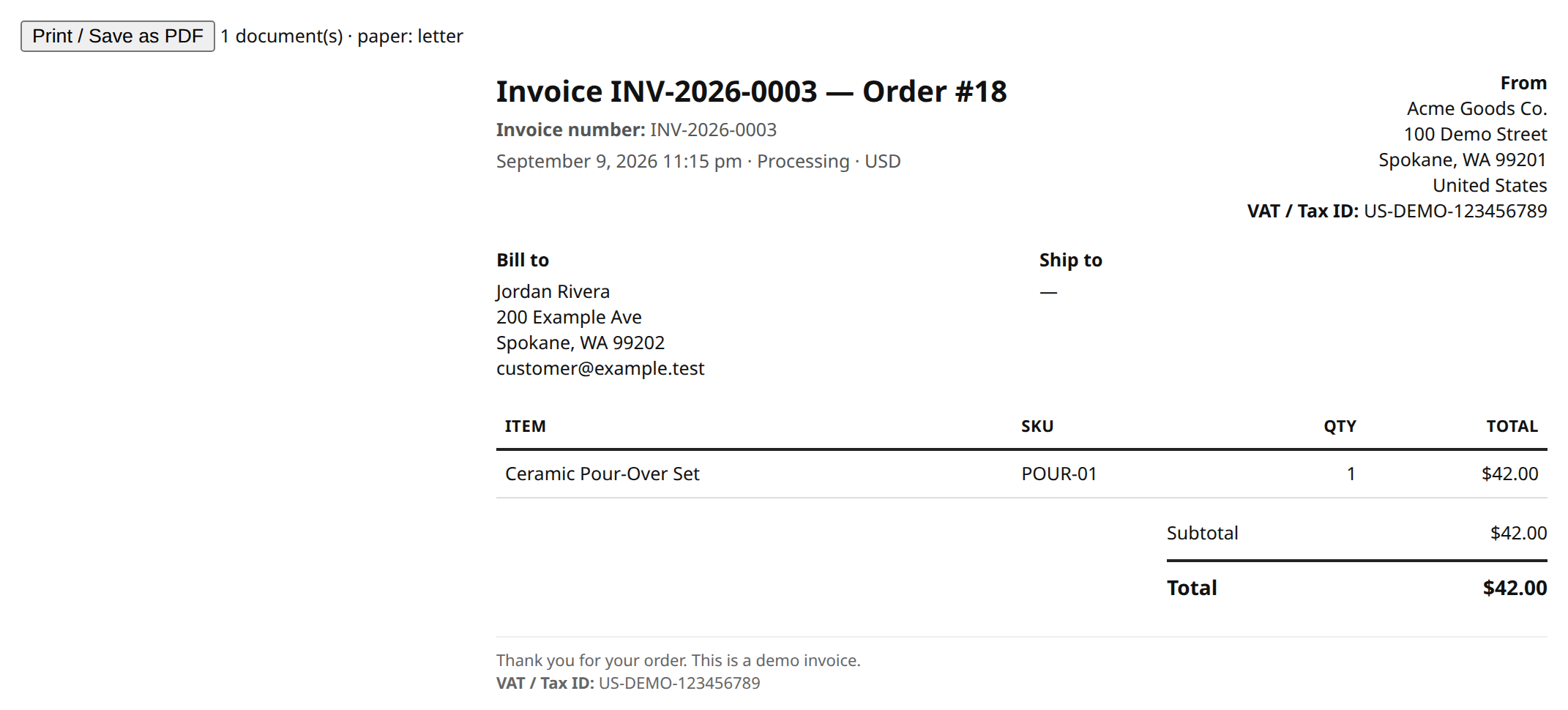
Invoice print view — browser Print / Save as PDF.
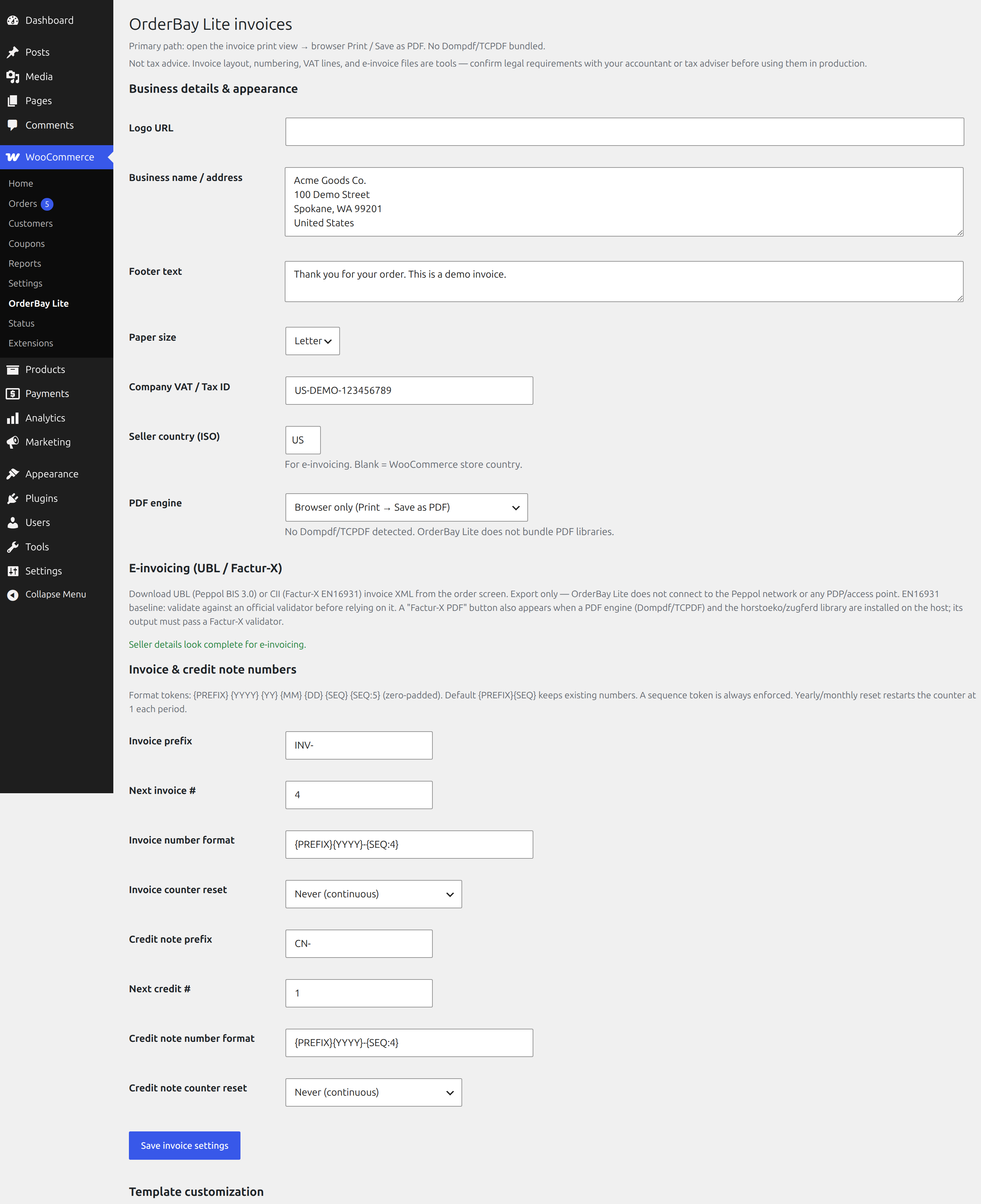
Settings: business details, logo, VAT / Tax ID, and invoice number format with tokens and yearly/monthly reset.
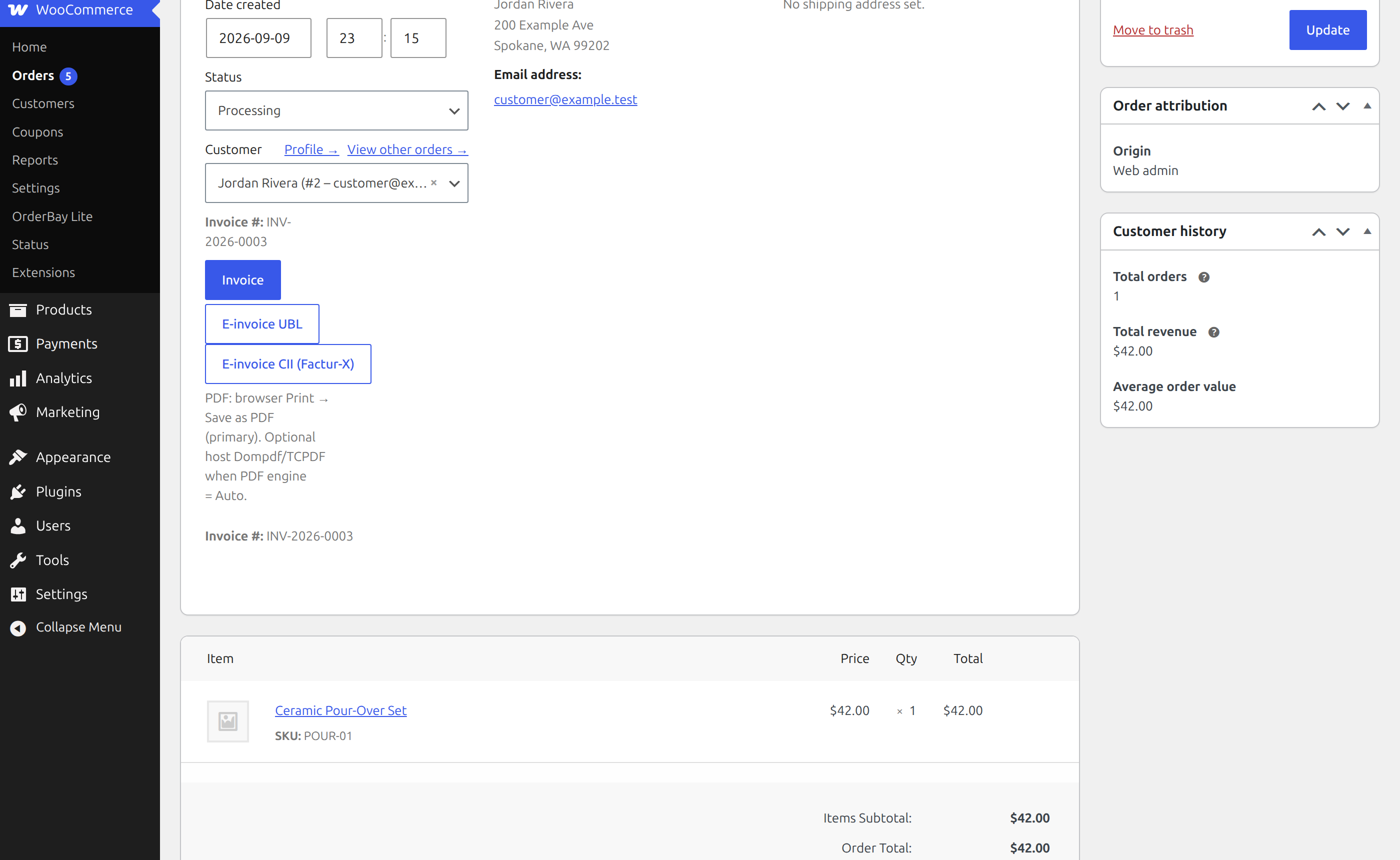
Order screen buttons: Invoice, Factur-X / ZUGFeRD PDF, XRechnung, UBL and CII.
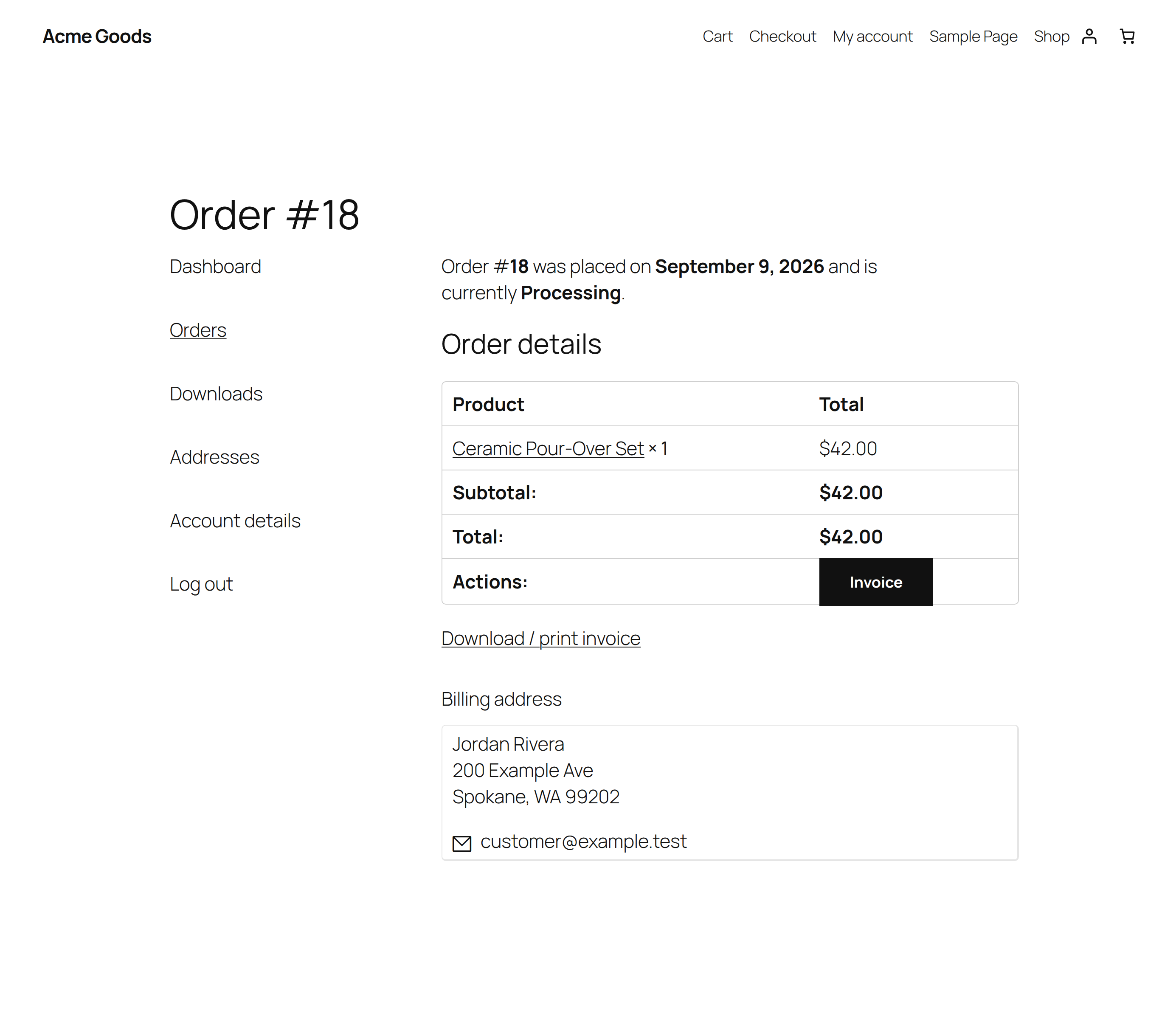
Customer My Account invoice download.
Faq
No. Every feature listed above works without a key, trial, or phone-home to the author.
The first time an invoice is printed, downloaded as a PDF, or attached to an email, the order is assigned the next sequential number. The counter increments atomically in the database, so two simultaneous prints can never receive the same number. Numbers are immutable once assigned.
Yes. Logged-in customers get “Invoice” and “Invoice PDF” buttons on My Account Orders, and “Print invoice” and “Download PDF” on the order view page. Only the customer account that placed the order (or store staff) can open them; guest orders are not reachable from My Account.
Factur-X / ZUGFeRD PDF (EN 16931 profile, or the XRechnung profile), XRechnung 3.0 XML, UBL 2.1 (Peppol BIS Billing 3.0) and UN/CEFACT CII. The PDF is a PDF/A-3b file made by the bundled PDF engine, nothing extra to install. Export only: OrderBay Lite does not send anything to the Peppol network. Check one of your own orders through an official validator before relying on it.
Yes. OrderBay Lite bundles the Dompdf PDF engine, so the Download PDF buttons and email attachments work on any host with the PHP mbstring and dom extensions (standard on almost every host). Nothing else needs installing, and the PDF is made on your own server; nothing is sent to an outside service. The browser Print Save as PDF view is still there.
By default the customer’s Completed order and Customer invoice / Order details emails. Under WooCommerce OrderBay Lite PDF invoices in emails you can turn attachments off, or also tick Processing order, Refunded order, and the admin New order email. Admin emails never get a PDF unless you tick one. The Refunded order email carries the credit note PDF, and only when the order already has a credit note number (Lite never issues one just because an email is sent). If a PDF cannot be made, the email still goes out without it and the reason is logged under WooCommerce Status Logs (source: orderbay-lite).
Only briefly, in wp-content/uploads/orderbay-lite-tmp/ (blocked from web access, random folder names). Each file is deleted as soon as the email is sent or fails, and an hourly clean-up removes anything older than an hour.
Open WooCommerce OrderBay Lite help. The support form there sends your ticket straight to the Tillpress support desk at tillpress.com after you tick the consent box and press Send ticket; you get a ticket number on screen and the reply comes by email. It includes your name, email, message, this site’s address, and (optional) a system report of versions, theme, and active plugins; never passwords, keys, or customer data. Prefer email? “Email instead” opens the same ticket in your own email app. You can also use the WordPress.org support forum for this plugin or https://tillpress.com/support/. Replies Monday to Friday, 09:00 to 17:00 Pacific Time; first reply within one business day.
Yes. On WooCommerce OrderBay Lite help, click Create demo data. It creates one completed order with a partial refund, numbered DEMO-INV-0001 and DEMO-CN-0001, so you can open the invoice, the credit note, and the UBL and CII e-invoice XML. Your real invoice and credit note counters are not touched. Everything is labelled “Demo”, never emailed, and removed with one click (or when you uninstall the plugin).
Only on its own Help & demo page: one box describing the paid OrderBay plugin with an optional 20% discount code. It can be hidden for good with “Hide this offer”. There are no dashboard-wide notices, no tracking, and no referral IDs.
Lite steps aside automatically so you do not get duplicate buttons or a second number sequence. You can deactivate Lite.
Peppol sending through your own Recommand account, delivery notes, shipping labels, proforma invoices, bulk and multi-order packing slips, pick lists, bulk document printing, barcodes and QR codes, custom branding options, a fulfillment desk, CSV tracking import, and more — at https://tillpress.com/orderbay/.
Reviews
Changelog
1.6.0
- New: customers can print or download their credit note as a PDF from My Account (Orders list and the order page) once the store has issued one. Customers never cause a new number.
- German: new strings translated.
1.5.0
- New: tax-free sales to EU businesses. When WooCommerce charges 0% to an EU business with a VAT ID, the invoice and e-invoice say intra-community supply (K, VATEX-EU-IC) with the delivery address, or reverse charge (AE) if you sell services; deliveries outside the EU are exports (G). An issued invoice keeps its category.
- New: optional checkout fields for the buyer’s VAT ID and buyer reference / Leitweg-ID, in the classic and block checkout. Off by default. The VAT ID format is checked.
- New: the invoice PDF is attached to the On-hold email (bank transfer orders) by default.
- New: refunded orders without a credit note show an “Issue credit note” button on the order screen.
- New: complete German translation (de_DE). Credit notes are called Rechnungskorrektur.
- Improved: credit notes name the invoice they correct and show credited amounts as negative.
- Fix: cash on delivery invoices no longer ask for a bank transfer (payment means 10, cash).
- Fix: bank details fall back to the WooCommerce bank transfer account when the e-invoice IBAN is empty.
- Fix: refunded orders no longer show a crossed-out total on the invoice; no empty brackets after “Paid on”.
1.4.1
- Fix: the first invoice made for an order now carries its invoice number. Before, the first print, the emailed PDF and the Factur-X PDF showed no number, and the XRechnung/UBL/CII file used the order number as the invoice ID.
- Fix: cash-on-delivery orders are no longer marked as paid in e-invoices while they are still Processing. An order counts as paid once WooCommerce records a payment date or it is Completed.
- New: printed and PDF invoices show the payment due date and your bank details (IBAN, BIC, account holder, payment reference) for unpaid orders, and when and how a paid order was paid. The internal order status and an empty “Ship to” block are no longer printed.
- New: Buyer reference / Leitweg-ID field on the order’s billing details. It goes into the e-invoice as the buyer reference; German public buyers need it.
- New: the E-invoicing settings show the store address and email that e-invoices use, and warn when the From address on your invoices is a different one.
- Change: stores outside the US and other Letter-paper countries now default to A4 paper (only when no paper size was saved yet).
1.4.0
- New: Factur-X / ZUGFeRD PDF invoices. A new button on the order screen downloads the invoice as a PDF/A-3 file with the invoice data inside, the format French and German buyers’ accounting software reads. It is made on your own server with the bundled PDF engine; nothing extra to install. You can also attach it to emails instead of the plain PDF.
- New: XRechnung 3.0 for German public-sector buyers, as XML or as a ZUGFeRD PDF with the XRechnung profile. The buyer reference (Leitweg-ID) comes from the order’s buyer reference field.
- New: invoice contact name and phone, IBAN, BIC, account holder and payment terms under E-invoicing settings.
- Fix: e-invoices now pass the EN 16931 rules for unpaid orders (they had no due date or payment terms). Paid orders now show the payment as prepaid with nothing due, so the buyer does not pay twice. Business buyers are named by their company.
- Checked: sample paid and unpaid orders pass the KoSIT validator (EN 16931 and XRechnung 3.0.2) and the Mustang validator (PDF/A-3b and Factur-X).
1.3.1
- New: after OrderBay Lite has invoiced at least 10 real orders and been installed for 14 days, administrators see one notice asking for a WordPress.org review, with a Get help button next to it. “Maybe later” hides it for 30 days, once; “Dismiss” hides it for good. Demo orders are not counted, and nothing is sent anywhere.
1.3.0
- New: EU withdrawal button. Turn it on under WooCommerce OrderBay Lite to add a “Withdraw from contract here” link to your site footer and My Account, and a withdrawal page. Customers pick the order (and, if they want, the items), then press “Confirm withdrawal here”. Signed-in customers confirm straight away; guests confirm through a link sent to the order’s email. The customer and the store each get an email with what was submitted and when, and the order gets a note.
- Fix: UBL e-invoices now pass the Peppol validator. They were missing the seller and buyer Peppol IDs and the buyer reference. The IDs are worked out from VAT numbers (Belgian VAT becomes the 0208 enterprise number) or can be set: a Peppol ID setting for your shop, and VAT number and Peppol ID fields in the order’s billing details.
1.2.0
- New: PDF invoices attached to WooCommerce emails, on by default for the customer’s Completed order and Customer invoice emails. Processing order, Refunded order (credit note PDF when the order has a credit note number), and the admin New order email can be ticked under WooCommerce OrderBay Lite. The invoice number is assigned when the first PDF goes out, once. If a PDF cannot be made, the email is sent without it and the reason is logged.
- New: Download PDF buttons on the order screen, in the orders list, and in the customer’s My Account (owner only).
- New: the Dompdf PDF engine is bundled, so PDFs no longer need Dompdf or TCPDF installed on the host. The “PDF engine” setting is gone.
- Change: the My Account “Download / print invoice” button is now “Print invoice”, next to “Download PDF”.
1.1.1
- Security: the My Account invoice button opens only for the logged-in customer who placed the order. The billing-email match for guest orders is removed.
- Fix: shop managers can save the settings page they can open.
1.1.0
- New: packing slips. A Packing slip button on the order screen and a Slip button in the Orders list open a price-free print view with items, SKUs, quantities (net of refunds), variation details, the ship-to address, and the customer note. Printing a packing slip never assigns an invoice number. Theme override: yourtheme/orderbay-lite/packing-slip.php.
1.0.9
- Dev: translator comments on the invoice-number and credit-note order notes.
1.0.8
- Fix: a fresh install whose WooCommerce order tables are not created yet no longer logs a database error when the first invoice number is issued.
- Fix: an expired invoice lock is taken over in one step. A late worker cannot overwrite a newer invoice number or drop the newer worker’s lock.
1.0.7
- Fix: Lite and OrderBay Pro now share one invoice and credit-note sequence, so switching Lite to Pro and back never reissues a number.
1.0.6
- Fix: uninstalling no longer resets invoice or credit-note numbering; new numbers continue above Lite (and paid) history already on your orders.
- Fix: if a number cannot be allocated, the invoice is not saved, printed or downloaded — never fall back to 1.
- Fix: two requests for the same order share one identity; high-water recovery no longer loads every order on each allocation.
1.0.5
- Fix: invoice numbers are allocated atomically on SQLite installs, and the same order always keeps its number.
1.0.4
- Change: invoice and credit-note print styles and the Print button now load through registered WordPress styles/scripts instead of inline
1.0.3
- New: Send support tickets from inside the plugin (Help & demo page). You get a ticket number on screen; nothing is sent until you tick the consent box and press Send ticket. “Email instead” still opens your email app.
1.0.2
- New: Help & demo page (WooCommerce OrderBay Lite help, also linked from the Plugins screen).
- New: one-click demo order with a refund, using separate DEMO- numbers so the real invoice and credit note sequences are untouched. Never emailed; removed with one click or on uninstall.
- New: support ticket form that opens a pre-filled email in your own email app, with an optional system report (no passwords, keys, or customer data). Nothing is sent from your site.
- New: optional, dismissible 20% offer for the paid OrderBay plugin, shown only on the Help & demo page.
1.0.1
- Fix: the printed credit note now lists each refund (reason and amount); it previously showed only the total.
1.0.0
- First public release: printable invoices, sequential invoice numbering with format tokens and counter reset, credit notes, customer My Account invoice download, UBL 2.1 + Factur-X CII e-invoice XML export.