Pago por Redsys

Pago por Redsys
Description
REQUIRES TO HAVE TPV REDSYS CODES WITH YOUR BANK
With this plugin you can have a payment gateway on your website. Your customers can pay you through an online POS.
The plugin sends the user to the Redsys payment gateway with the order number and the amount that the user dials or that you have pre-filled (you can see more in the FAQ)
Installation
These are the steps you must do to install in plugin
- Upload the plugin to WordPress (or via FTP to
/ wp-content / plugins /or through the admin interface) - Activate the plugin through the WordPress ‘Plugins’ menu
- Configure your POS data in Settings> POS Configuration
- Place the following shortcodes on the page you want:
[pago_tpv]Text of the POS form[/pago_tpv] - You can now send your users to that page to make the payment.
Screenshots
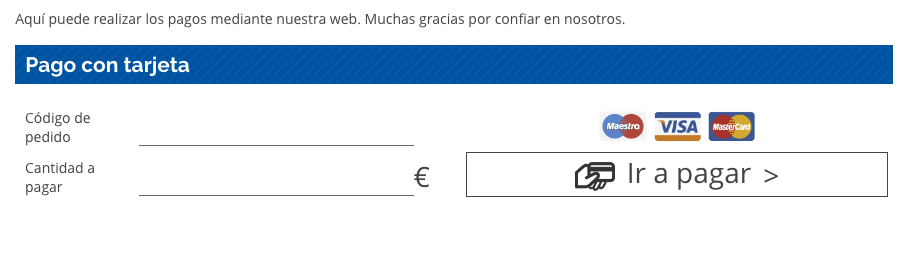
Corresponds screenshot-1.jpg. This is how the contact form is displayed. The title takes it from the h2 styles and the user fills in, if the pre-filled url has not been passed (see the FAQ).

Corresponds screenshot-2.jpg. We send the user to the Redsys gateway with the order number and the amount to pay.

Corresponds screenshot-3.jpg. When the payment has been made satisfactorily, the user returns to our page with the order information and the message that we have written.
Faq
No. In order for the plugin to work, you need the “business identifier” and a terminal configured with your encryption key. This can only be given by your bank.
Yes. The plugin is developed so that the user always goes to the same page where you configure the gateway, making the shortcodes show or hide depending on the payment step you are on.
No. It is a payment gateway, simply the plugin forwards the merchant’s information, the price to pay and the reference to the order.
Yes. The fields search for $ _GET for the values ’np’ and ‘c’.
‘np’: ‘Order number’
‘c’: ‘Amount to pay’
Therefore doing /? Np = 123 & c = 1 we would have the fields “Order number” with “123” and the “Amount to pay” with “1”
No. This is because the bank can only process each order if the order number is different. Therefore it is necessary in case a user fails an order, he could never pay with the same number again.
Each [pago_tpv] can have an url_ko and url_ok attrbute. Also on global configuration can put a url_ko or url_ok for all the return. If you don’t specify, it will return to the same page. It is advisable put and url_ok on shortcode or in config.
Reviews
Gran aportación
By 
Este plugin me ha permitido gestiona los cobros desde wordpress sin necesidad de montar toda la estructura de una tienda virtual... gracias
JUSTO LO QUE NECESITABA
By 
Plugin perfecto
By 
Estupendo
By 
Excelente para integrar pagos manuales SIN Woocommerce
By 
Plugin perfecto para sacar de aprietos
By 
Easy to Install - Worked perfectly! Thank you!
By 
Changelog
1.0.14
Compatibility with WordPress 6.7.2
1.0.13
Fix problem with the return URL
1.0.12
Fix loaded hook and compatibility with 6.7
1.0.11
1.0.10
Fixed problem with tags and uploads
1.0.9
Updated WordPress compatibility to 6.3
1.0.8
Fix undesirable echo
1.0.7
Add field description to the form.
Thanks to Beatriz Lavela
1.0.6
PHP8 Compatibility
1.0.5
Fix problem on send URL_KO and URL_OK to Redsys
1.0.4
Add URL_KO and URL_OK by form and global
Now you can declare a diferent return page from the TPV in every single form or to all. If you don’t specify anything it will return to the same page (and use the old shortcodes)
1.0.3
- Change name for Redsys API Class to don’t conflict with the same class loaded from other plugins.
Thanks to @jconti
1.0.2
- Setting float to int in DS_MERCHANT_AMOUNT, because json_encode adds decimals in case of float
- Translated all plugin to English to be standard with the WordPress Repository
1.0
- Launch of the payment gateway