Payment Gateway Icons For WooCommerce

Payment Gateway Icons For WooCommerce
Description
Customize the payment gateway icons that appear on the WooCommerce checkout page to anything you like or brand that suits your business. You can sizes for desktop and mobile view.
Installation
- Download and Upload
Payment_Gateway_Icon_For_WooCommerce folder to the/wp-content/plugins/` directory. - You may also search in WordPress dashboard directly and install.
- Activate the plugin through the ‘Plugins’ menu in WordPress.
- Go to WooCommerce → Settings → Payments → select the payment gateway you want change its icon → below the settings of every payment method, you’ll see additional settings added below by this plugin. Enter an image URL to the Icon field.
- There is provision for two sizes, mobile and desktop. Format your icons to your desired size before uploading as plugin does not utter size.
Screenshots

This is how the icons appear on checkout
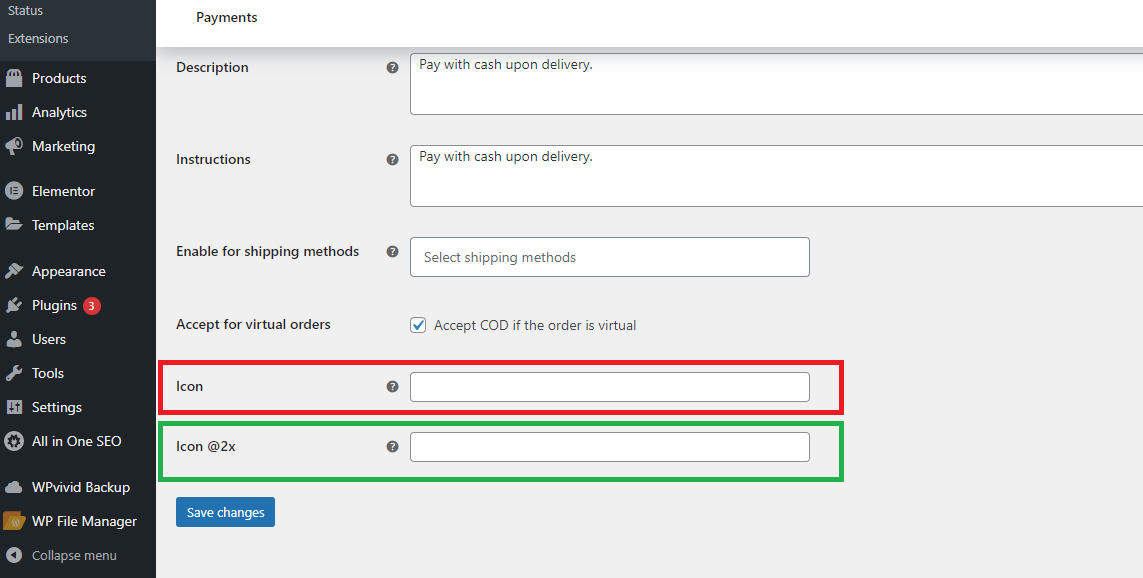
This is the plugin's settings view in WooCommerce
Reviews
Ok
By 
Works fine. Would be good an explanation on the icon sizes but I figured out
Changelog
2.2.0
- Added support for shipping method icons on Cart and Checkout pages.
- Added a new “Shipping Methods” section in the admin panel to assign icons.
- Refactored icon storage structure to support both payment and shipping icons.
- Ensured backward compatibility with existing installations using the legacy icon format.
- Improved sanitization and saving logic for icon URLs.
- Fixed potential undefined index issues when retrieving icons.
2.1.0
- Major architectural refactor of the plugin
- Replaced gateway-dependent settings system with centralized icon storage
- Introduced global icon override using
woocommerce_gateway_iconfilter - Improved compatibility with all payment gateways including Stripe
- Removed dynamic per-gateway form field injection system
- Eliminated loader-based hook registry for simpler WordPress-native initialization
- Improved code structure with separation of concerns (Admin / Public / Core)
- Added support for retina (@2x) icon handling
- Improved security with proper sanitization of icon URLs
- Increased stability and compatibility with WooCommerce 8+ and WordPress 6.8
1.2.3
- Plugin tested successfully with WordPress 6.7.1
- Minor bug fixes and spelling corrections
1.2.2
- Plugin tested successfully with WordPress 6.5
- Minor bug fixes and corrections
1.2.1
- Plugin tested successfully with WordPress 6.3
1.2.0
- Plugin tested successfully with WordPress 6.2
1.1.1
- Minor bug fixes and corrections
1.1.0
- Initial stable release
- Clean up of core functionality