PDF for Elementor Forms + Drag And Drop Template Builder
PDF for Elementor Forms + Drag And Drop Template Builder
Description
PDF Builder for Elementor Forms helps you create custom PDF documents from Elementor Form submissions using a powerful drag-and-drop template builder.
Generate certificates, quotes, contracts, reports, invoices, tickets, and other PDF documents without coding.
Automatically attach generated PDFs to Elementor Form email notifications, allow users to download PDFs after submission, and fully customize your PDF layouts using dynamic form data.
Why Choose PDF Builder for Elementor Forms?
- Drag-and-drop PDF builder
- No coding required
- Dynamic Elementor Form field data
- Attach PDFs to email notifications
- Download PDFs after form submission
- Conditional logic support
- QR codes and barcodes
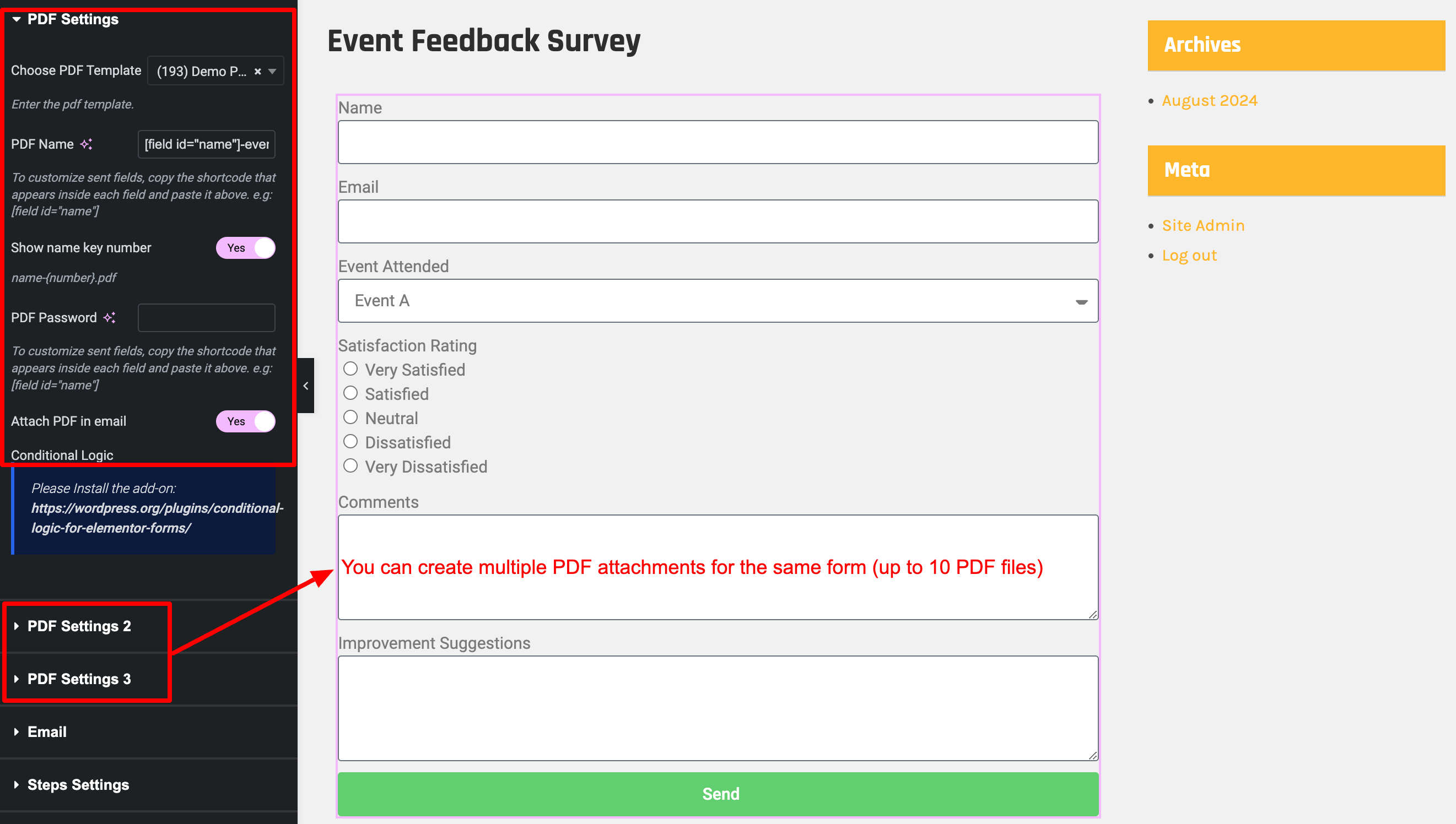
- Multiple PDF templates per form
- Multilingual and RTL ready
DEMO: View Live Demo
UPGRADE TO PRO: Get Advanced Features
DOCUMENTATION: Step-by-step Guide
Key Features
Drag and Drop PDF Builder
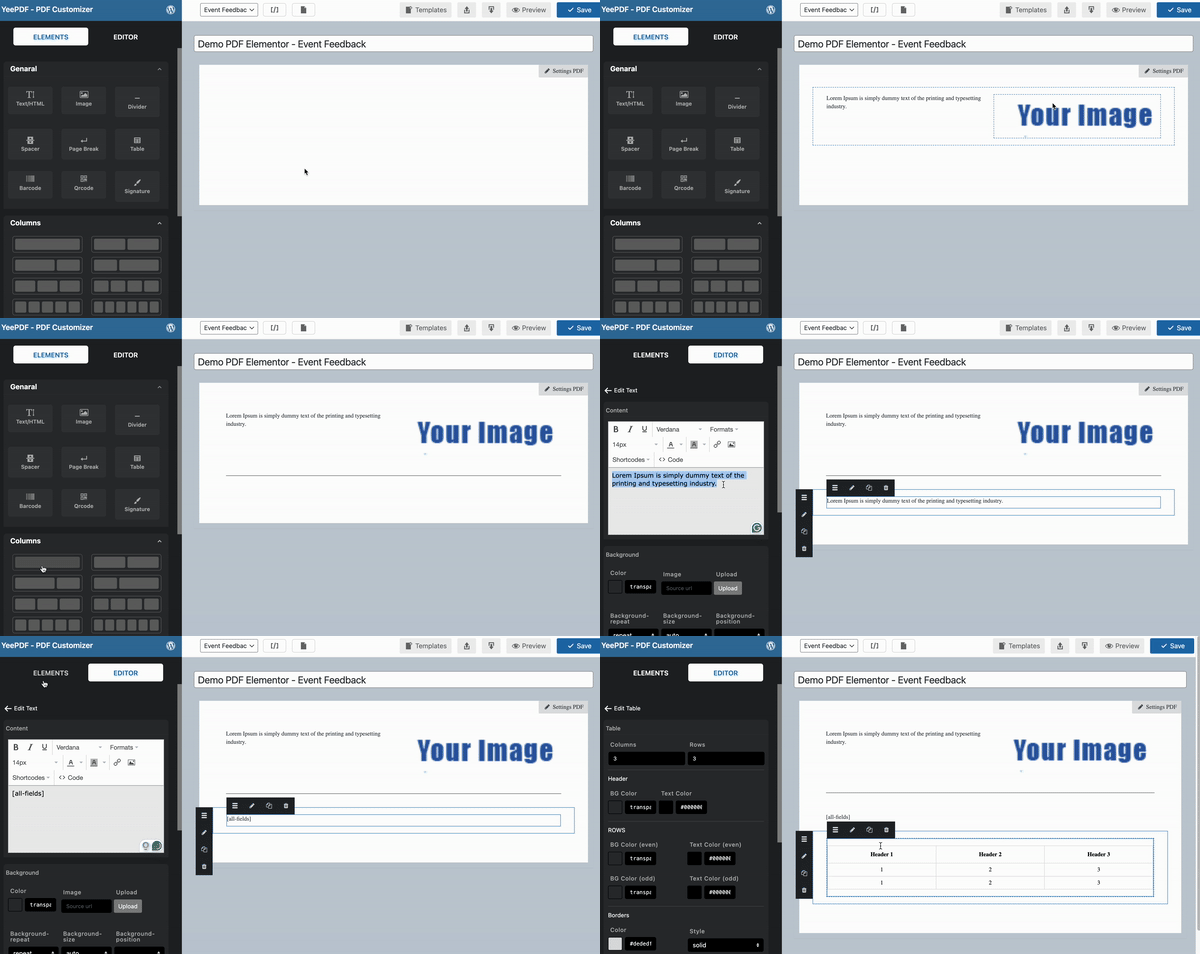
Design custom PDF templates using an intuitive drag-and-drop editor.
Dynamic Form Data
Insert Elementor Form field values dynamically into your PDF documents.
Conditional Logic
Show or hide PDF content and control when PDF documents are generated.
Multiple PDFs Per Form
Generate multiple PDF documents from a single form submission.
Download PDF Files
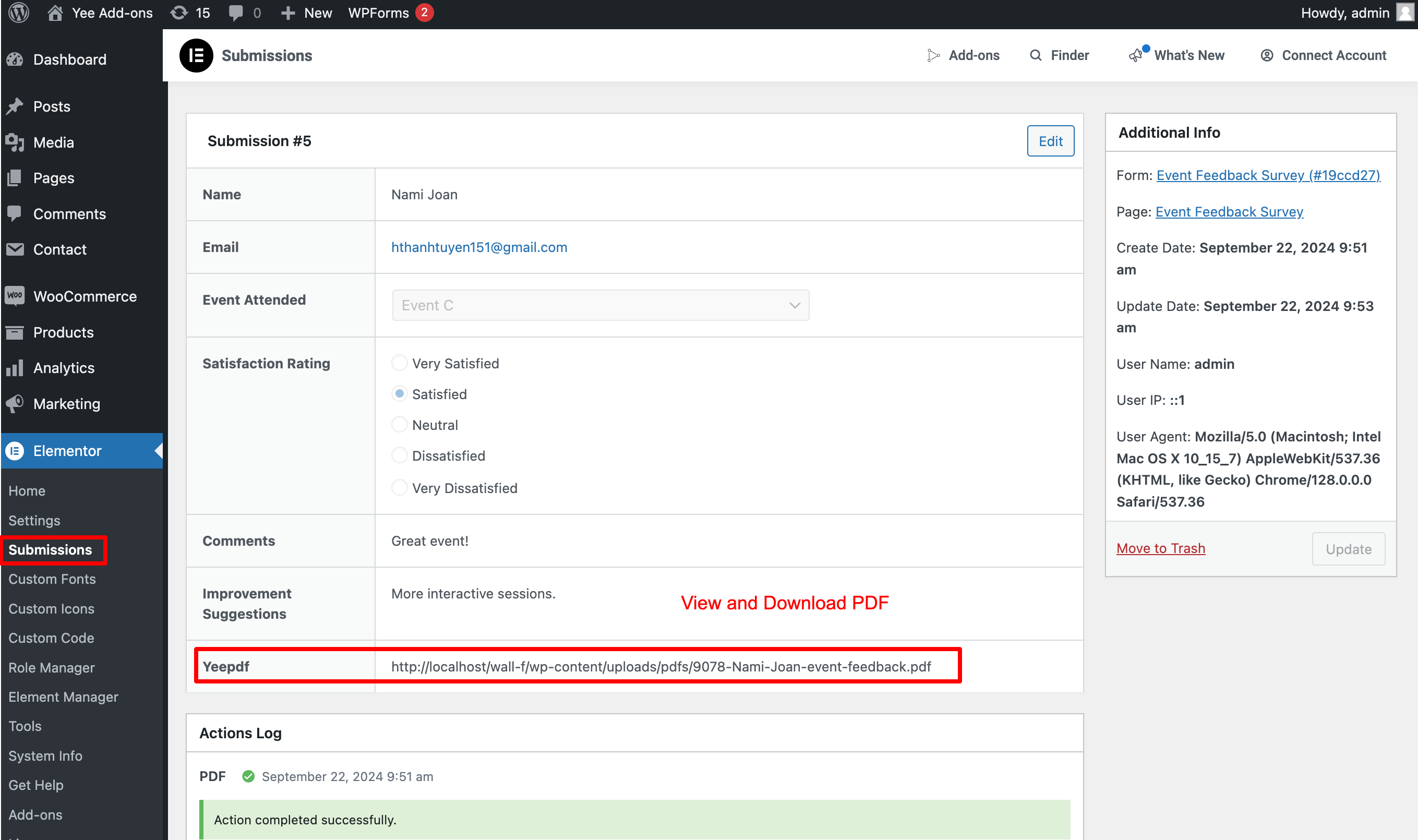
View, download, and manage generated PDF documents directly from your website.
QR Codes & Barcodes
Generate dynamic QR codes and barcodes using form submission data for certificates, tickets, reports, and other PDF documents.
Email PDF Attachments
Automatically attach generated PDF documents to Elementor Form email notifications and send them to users or administrators.
Repeater Field Support
Generate PDF documents using data collected from Elementor Repeater fields.
Shortcodes and Merge Tags
Generate PDF download links using shortcodes and merge tags.
Smart Real-Time Preview
Preview your PDF templates instantly while editing.
Page Break Support
Insert page breaks and organize content across multiple PDF pages.
Custom PDF Paper Sizes
Create PDF templates using custom paper sizes.
Additional Fonts
Upload and use custom fonts to match your brand identity.
Multilingual Support
Generate PDFs in multiple languages, including RTL languages.
Privacy and Security
PDF documents are generated directly on your server without third-party services.
Unlimited Use, No Restrictions
Create and generate as many PDF documents as needed without usage limits.
Popular Use Cases
Certificates
Automatically generate personalized certificates after form submission.
Quotes & Estimates
Create professional PDF quotations and send them directly to customers.
Contracts & Agreements
Generate contracts using submitted form data and attach them to email notifications.
Event Tickets
Create downloadable tickets with QR codes and attendee information.
Reports & Summaries
Convert form submissions into structured PDF reports.
Application Forms
Generate printable PDF copies of submitted applications and registrations.
Invoice & Billing Documents
Create professional invoice-style PDF documents and automatically send them to customers after form submission.
Checkout & WooCommerce Ready
Works perfectly with Elementor Forms used in custom checkout flows, registration pages, and post-purchase thank-you pages.
Upgrade to Pro
- Advanced Table Customization – Create complex, styled tables for orders, reports, and lists.
- QR Codes & Barcodes – Generate dynamic QR codes and barcodes using form data.
- Watermarks – Protect documents with custom text or image watermarks.
- Headers & Footers – Add branding, page numbers, and document metadata.
- Dropbox Integration – Automatically save generated PDFs to Dropbox.
- Conditional Logic Rules – Control when PDFs are generated and what content is displayed.
- Priority Support & Updates – One year of dedicated technical support and updates.
Installation
- Log in to your WordPress Dashboard.
- Go to Plugins > Add New.
- Search for “PDF for Elementor Forms”.
- Click Install Now and then Activate.
- Navigate to PDF Templates in your sidebar to start building your first template!
Screenshots
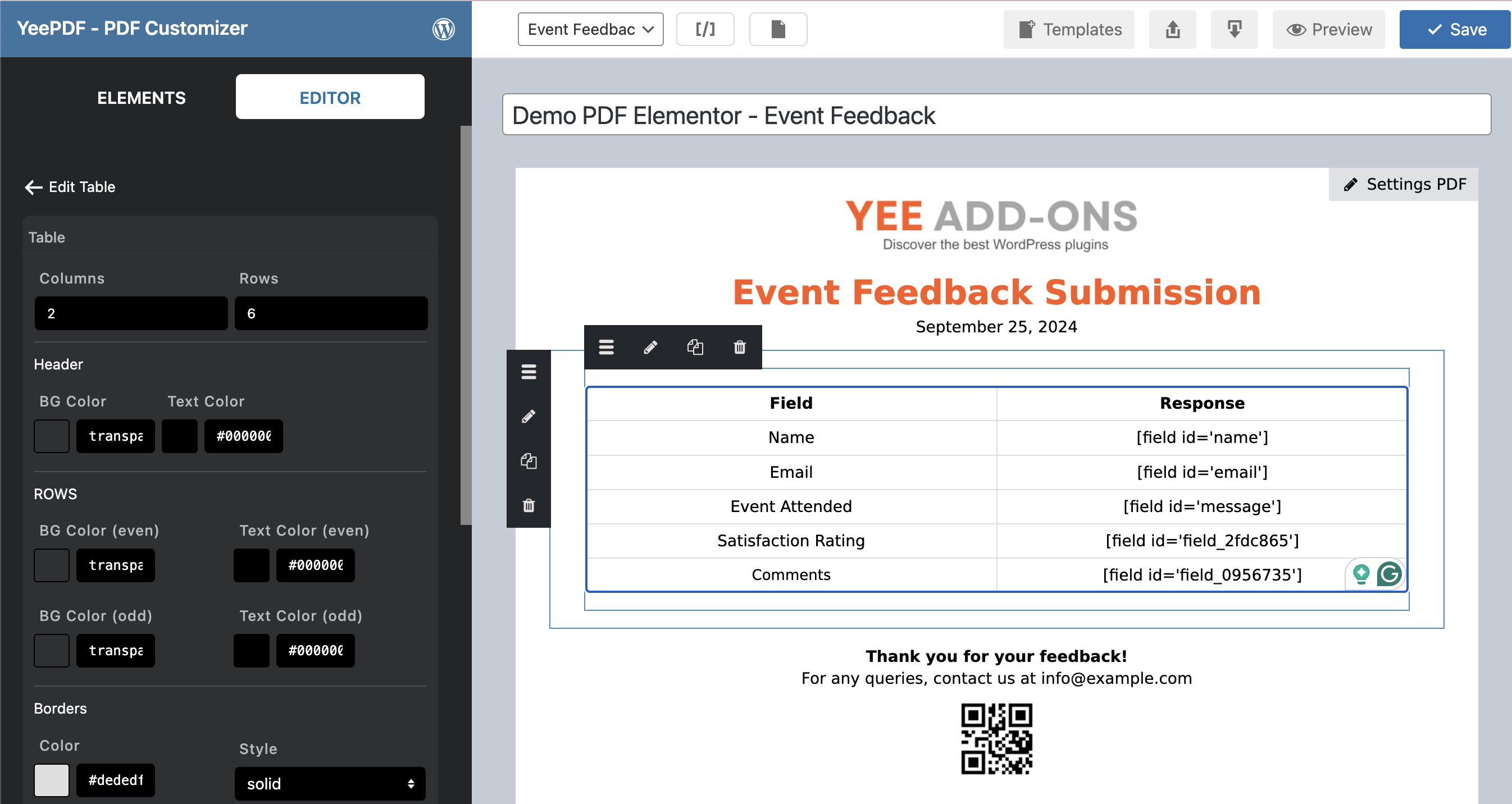
Visual Drag & Drop PDF Template Builder.
Dynamic merge tags and element styling.
Elementor Form Action integration for PDF generation.
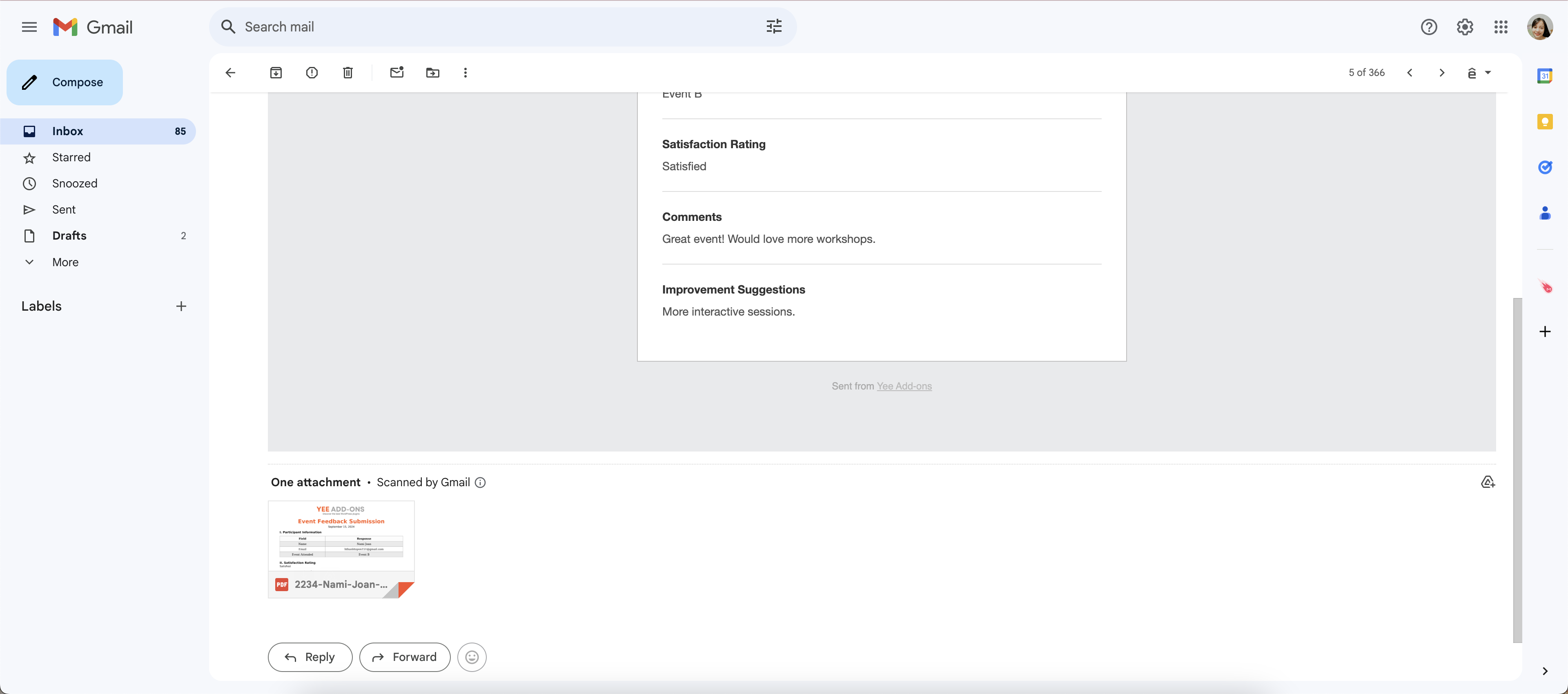
Auto-attached PDF in customer email notifications.
Faq
Yes. The plugin works with Elementor Forms, which is available in Elementor Pro.
Absolutely. Within the Elementor Form actions, you can select “PDF Creator” to automatically attach the generated file to your notifications.
No. You can create unlimited templates and generate as many PDFs as your server can handle.
Yes, the plugin fully supports RTL scripts like Hebrew and Arabic.
Reviews
Shortcodes not working
By 
PDF generator does not see all the available attributes. What is available in Email and in Submissions dashboard is far more then in the PDF generator. Looks like the shortcodes are matrched against the wrong source. Try to look into the code, but that is really .....
Simply Fantastic
By 
This is a really neat plugin very customisable pdf templates very simple to use
Amazin plugin!
By 
It's exactly what I was looking for: a simple PDF generation solution with custom fields. The support team was also very helpful in assisting me with the configuration.
Amazing Plugin!
By 
very flexible with the premium plugin you can add many condisions to different elements for the best results and great support
resets, breaks and doesn't save
By 
while creating a form, the plugin resets all content, had to restart several times in a multipage document. Garbage.
great plugin
By 
great plugin for my personal website
Fantastic plugin and support
By 
This plugin saved so much time by eliminating the need to code Elementor form submissions into a PDF and attaching that PDF to an email. When creating the PDF template, support was responsive and even added requested functionalities. Highly recommend!
It does what it promises and is very easy to use.
By 
Thanks to this plugin we have managed to generate pdfs directly from the form, which makes our work much easier.
The operation is very intuitive, and the technical service solved my only query on the day, which surprised me very pleasantly.
Excellent
By 
Great plugin, really easy to use and style. Excellent customer support. Plugin updated within hours when trouble shooting a problem.
Not working
By 
It breaks the website (Elementor Pro) when PDF activated and assigned to the form.
Changelog
7.2.0
- Added: Fixed name conflicts “qrstr” class
7.1.0
- Added: PDF Embed element in the PDF Builder
7.0.1
UPDATED Important PHP: support php 8.0 and min php 7.0
7.0.0
- NEW: Refactored engine for faster PDF rendering.
- IMPROVED: Enhanced UI for the Drag & Drop editor.
- UPDATED: Optimized readme for SEO and user clarity.
6.5.2
- Fixed: Textarea and Radio input rendering issues.
6.5.1
- Security: Fixed potential PHP Object Injection vulnerability.
6.3.1
- Added: Select emails to attach to the email.
6.2.0
- Added: Installation wizard template
6.0.0
- Added: Font awesome ( [yeepdf_fontawesome unicode=’f2b4′] use Unicode ) https://fontawesome.com/search?o=r&ic=free&s=regular&ip=classic
5.9.1
- Fixed: Edit table
- Added: Hook change format input
5.5.1
- Fixed: Line breaks Textarea
5.3.0
- Added: Rotate text
- Fixed: Background
- Fixed: Broken Access Control
5.2.0
- Added: Save PDF to Dropbox
- Fixed: Background transparent
- Fixed: Custom size
5.1.0
- Added: Preview entry in editor
4.9.0
- Fixed: Check class_exists(‘Yeekitqrcode’)
- Added: Hook yeepdf_format_br
- Added: Show preview entry in enditor
4.8.1
Fixed: Do not save PDFs on the server
4.5.1
- Added: hook attached recipient list
4.5.0
- Fixed: columns
4.4.1
- Added: Action redirect download PDF after submission
4.4.0
- Fixed: Do not save PDFs on the server
- Added: Secure the folder for downloading PDFs
4.3.0
- Added: Random number shortcode
4.2.2
- Fixed: Default Font
- Added: Do not save PDFs on the server
4.1.0
- Fixed: Save Barcode, QRCode
- Fixed: Show all forms
3.9.0
- Added: Width Height 100% or Auto or px
3.8.0
- Fixed: Conditional logic
- Fixed: Option Header Footer
3.7.0
- Added: Active Form
3.6.7
- Fixed: Current date languages
3.6.6.1
- Change: Style Break page
3.6.5.1
- Fixed: Signature field
3.5.0
- Added: Update performance
- Added: Element table
3.0.0
- Fixed: Fixed: Major update (version < 3.0.0 not updated);
2.3.3
- Fixed: File name ASCII
2.3.0.0
- Fixed: QRCode and Barcode
2.2.9.2
- Fixed: add attach upload field
2.2.9
- Added: 7 columns
- Added: Not contains Conditional logic
2.2.8
- Added: Conditional logic create PDF
- Added: Settings remove id name
- Added: Maximun 10 files PDF
2.2.7.1
- Added: 5 + 6 columns
- Fixed: Backend Icon
- Fixed: Conditional Logics
2.2.6
- Compatible with WordPress 6.5
2.2.5
- Add shortcode download pdf [pdf_download]
2.2.0
- Big Update