Delivery & Pickup Date Time for WooCommerce

Delivery & Pickup Date Time for WooCommerce
Description
This WooCommerce delivery date time plugin allows you to set delivery dates, pickup dates, and order dates for WooCommerce. You can manage the delivery and pickup options effectively, providing a better experience for your customers.
Demo link | Buy Pro Version | Pro Admin Demo | Documentation
Delivery Type
- You can offer pickup, delivery, or both.
- You can make any one of them the default delivery type
- This delivery type will change the WooCommerce shipping method if you have the WooCommerce Local Pickup method enabled in the shipping zone*
- You can hide or show the checkout form fields as per the delivery types selected. e.g., you may hide the buyer’s address field from the checkout form if they select pickup as the delivery type. *
- You can change the date from required to not required and vice versa based on the delivery type selected by the user.*
- Pickup Date as required,
- Delivery Date as required,
- Date as required for pickup and delivery both,
- Date as non required for delivery and pickup both.
- You can change the time from required to non-required and vice versa based on the delivery type selected by the user.*
- Time as required for pickup,
- Time as required for delivery,
- Time as required for pickup and delivery both,
- Time as non required for delivery and pickup both.
- Time will always be a non-required field if the date is non-required, as time is dependent on the date
- You can hide delivery date and delivery time fields based on the delivery type selected.
- Enable delivery date and delivery time for both
- Disable delivery date and delivery time for both
- Enable delivery date and delivery time for pickup
- Enable delivery date and delivery time for delivery
- Change the position of the delivery date and delivery time form on the checkout page:
- Before customer detail
- After customer detail
- Add a custom label to the delivery and pickup selection buttons
- Set text and background color of the delivery type buttons
- There is no query string added on the checkout page *
WooCommerce Delivery Date
- Set product preparation days
- Make the delivery date option available for pickup only, delivery only or for both pickup and delivery *
- Set pickup holiday dates
- Set delivery holiday dates
- Overall order limit on a specific date *
- Order limit for pickup on a specific date *
- Order limit for delivery on a specific date *
- Set holidays based on the days of the week
- Day-specific overall order limit *
- Day-specific pickup order limit *
- Day-specific delivery order limit *
- Custom date format *
- Make the delivery field a required field / non-required field *
- If a certain delivery date has reached its order limit, then that delivery date will not be available for selection *
- Set overall quantity limit on a specific date *
- Set quantity limit for pickup on a specific date *
- Set quantity limit for delivery on a specific date *
- Set day-specific overall quantity limit *
- Set day-specific pickup quantity limit *
- Set day-specific delivery quantity limit *
WooCommerce Delivery Time
- Show time as either continuous or time slots
- You can show continuous time or time slots based on the delivery type selected by the user
- Show time slot for pickup and delivery type both
- Show continuous time for pickup and delivery both
- Show continuous time for pickup and time slot for delivery
- Show continuous time for delivery and time slot for pickup
- Set time slot-based order limit: once the limit is reached that time slot is no longer available for selection on that particular date *
- You can have different order limits for pickup and delivery time slots *
- Set time slot-based quantity limit: once the limit is reached that time slot is no longer available for selection on that particular date *
- You can have different quantity limits for pickup and delivery time slots *
- You can set different time slots as per the day of the week *
- If you offer same-day delivery then you can set preparation time in minutes
- If the buyer selects a same-day delivery date and the time slot is past, that slot/time will not be available for selection
- If you are using continuous time, then you can set the gap between the two consecutive times
- You can set the time format from the options given in the plugin *
Pickup Location
- Create unlimited pickup locations *
- Show pickup location as a button or as a drop-down *
- You can show image and map link in each location when you are showing it as button to the user *
- You can assign shipping zones to pickup locations, so that users will only see the pickup locations that are near to their shipping zone *
- Send a new order email to the respective store from which the user will pick up their order *
Custom message
- Add a custom message on top of the delivery type option or below the pickup location *
- You can set the background color and text color of this message *
Disable plugin *
- There is an option to disable the plugin
- if there is any virtual product in the cart
- if there are more virtual products in the cart compared to other non virtual products
- if all the products in the cart are virtual products
- There is a direct filter to disable the plugin option as per your logic “pisol_disable_dtt_completely” (PRO)
Date, Time, Location and Pickup Information Display
- Delivery date, delivery time, location and pickup type information is stored in the order meta
- Delivery type, Delivery date / Pickup Date, Delivery time / Pickup time and Pickup location selected by the user are shown on:
- Order success page
- Order email
- Order details shown on the backend to the admin
- Invoice PDF generated by using the plugin “WooCommerce PDF Invoices & Packing Slips” *
Same day / Next day order cutoff time *
- Set a same day cutoff time: Once the time goes past the cutoff time, users will not be able to place a delivery/pickup order for the same day (today’s delivery/today’s pickup)
- Set a next day cutoff time: Once the time goes past the cutoff time, users will not be able to place a delivery/pickup order for the next day (tomorrow delivery/tomorrow pickup)
- You can specify a different cutoff time for delivery orders and pickup orders
- You can specify a different cutoff time for same day orders and next day orders
Control the payment gateway as per the delivery type selected by the customer *
This option allows you to remove the payment method as per the delivery option selected by the customer
- Remove payment gateway for delivery order
- Remove payment gateway for pickup order
E.g: if you have enabled PayPal, Cash on delivery in WooCommerce,
so now you can remove cash payment for all the delivery orders, so when a customer is opting for delivery, they will have to make payment through PayPal; they can’t opt for cash payment
Whereas if they are opting for a Pickup order then they can either make payment through PayPal or cash
Special working dates *
- This allows you to enable some future delivery date for order placement even when that date is far away in future
- You can start accepting order for Christmas even long time before it comes near to your pre-order date setting
- You can even set the plugin to only allow order for this special delivery date
Points marked with * are available in pro version only
Quantity limit for time slot
Set quantity limit on days, date, and time slot. Say you create a quantity limit restriction for each time slot, that is total quantity of product that can be purchased in that time slot. This even counts the quantity from the order already placed for that time slot.
E.g: say you set a quantity limit of 10 on time slot 9pm-10pm
and now if customer A placed an order with 5 units of product A and 2 units of product B so total quantity was 7 units and they selected date 27th and time slot 9pm – 10pm
so now if another customer comes in and total quantity in their cart is 4 units then if they select date 27th then time slot 9pm-10pm won’t be available for selection as this will breach the limit of that slot
but if they reduce their quantity to say 3 units then they will be given this time slot or if they select some other date than 27th then also they will be able to select this time slot
WooCommerce App support by our Date and time plugin
- You will be able to see the Delivery/Pickup date and time in the Order note section of the WooCommerce App
Addon plugins for PRO
These are the addon plugins:
-
Preparation time master pro (Addon plugin for PRO only)
- Different preparation time for delivery and pickup order
- Different preparation time for each of the product
- Calculate preparation time as Parallel preparation or Sum of preparation time of all products
- Set availability date/day for a product, so if user is buying those product he can only select those date for delivery/pickup for the order (this will overwrite the shop level date)
- Set product as only available at specific pickup location only
-
Delivery/Pickup email alert plugin (Addon plugin for pro and free)
It automatically sends a reminder email to your customer regarding upcoming delivery or pickup for their order, you can configure in the plugin how much time before a reminder email should be sent.
Click to read more -
Advanced report (Addon plugin for pro and free)
This shows you advanced report as per delivery type, time and date
Click to read more -
Delivery date time preference popup (Addon plugin for PRO only)
This allows user to select their delivery preference before they reach checkout page, Watch video -
Cutoff time for each day of the week (Addon plugin for PRO only)
- Set different cutoff time for days of the week
- Set different cutoff time for pickup and delivery
-
Dining at restaurant option (Addon plugin for PRO only)
- Adds extra option of Dining at restaurant apart from the option of delivery and pickup
- Set different time slot for dining option
- Option to select dining locations (the same pickup locations are shown for dining as well)
-
Special Working date & Special Timing Pro (Addon for pro plugin)
- You can set special working dates that are outside your preorder day range
- You can set special timing for this special date as well
- You can use this plugin to change time slot of some normal working date as well
Privacy
If you choose to opt in from the plugin settings, or submit optional feedback during deactivation, this plugin may collect basic technical information, including:
- Plugin version
- WordPress version
- WooCommerce version
- Site URL
- Deactivation reason (if submitted)
This data is used solely to improve plugin quality, compatibility, and features. No personal or user-specific data is collected without consent.
Screenshots

Collecting Date and time on the checkout page

Customer can select exact time by using date and time plugin for WooCommerce
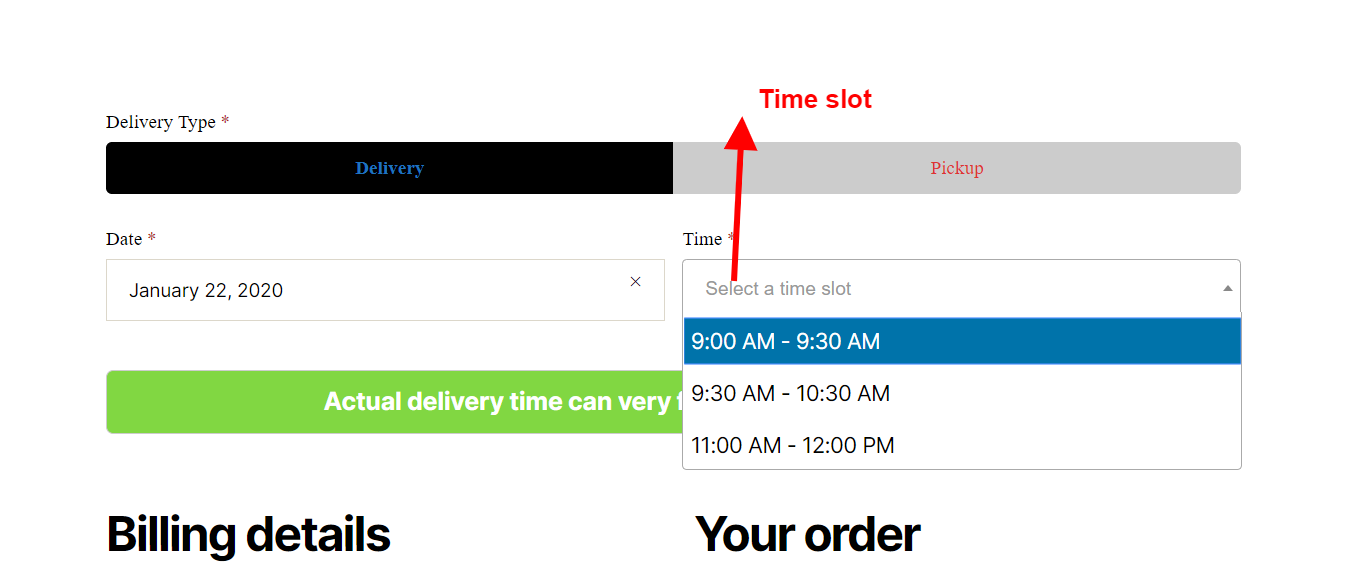
Customer can select Time range between which delivery or pickup can be done
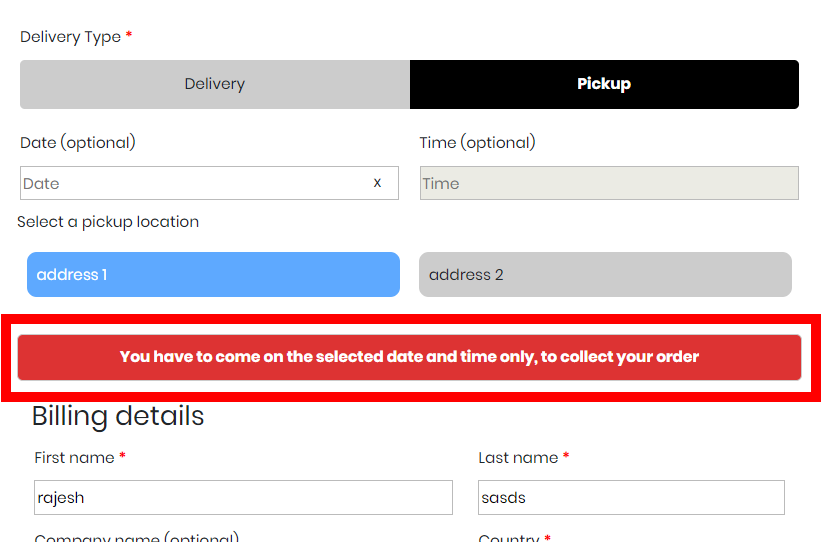
You can show a custom message for delivery or pickup type in the Date and time plugin for WooCommerce
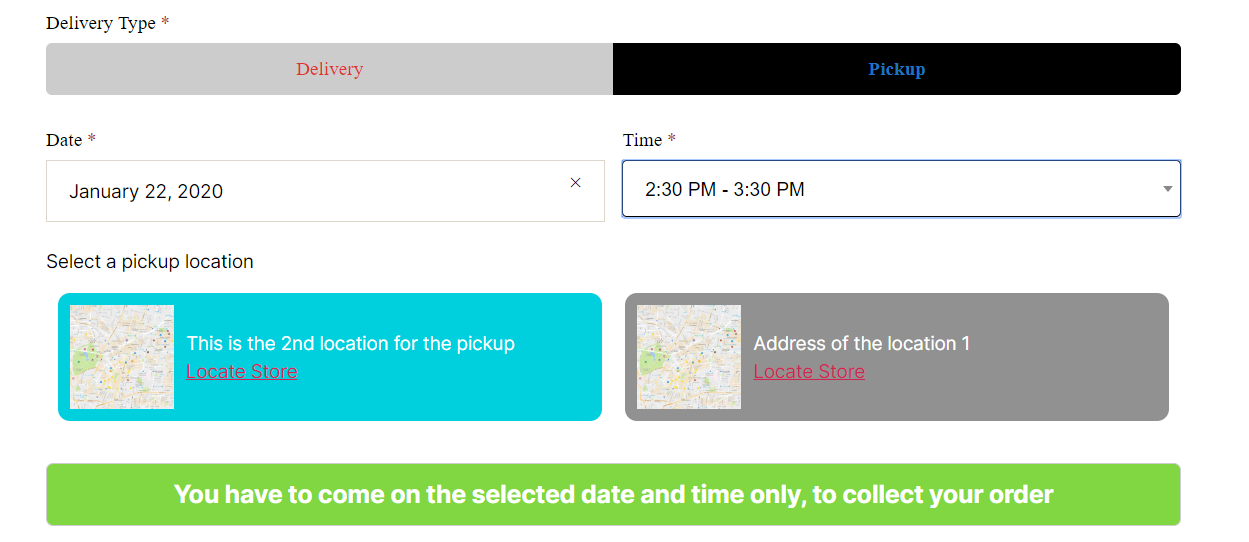
You can show full pickup address so user can select a pickup point by looking at the address
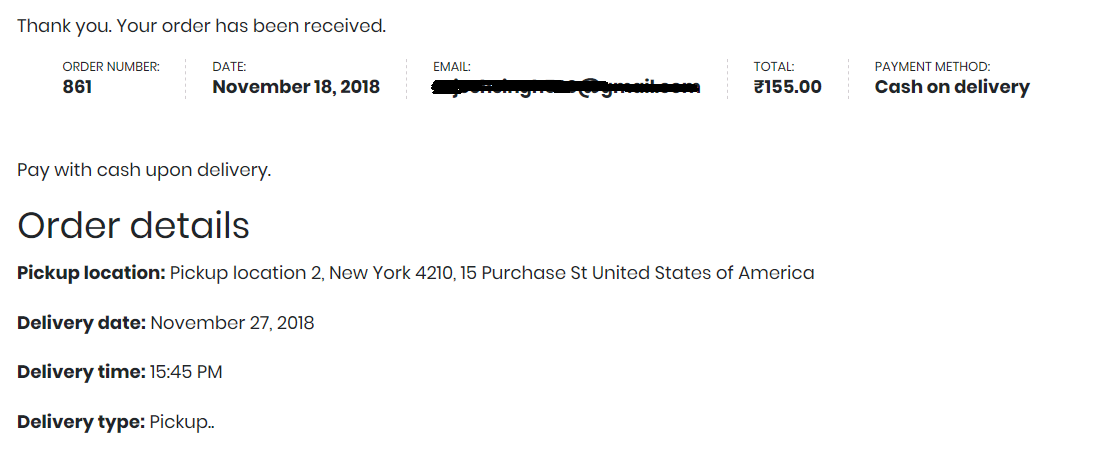
Customer selected date and time are shown in the order details in the My Account section and order success page
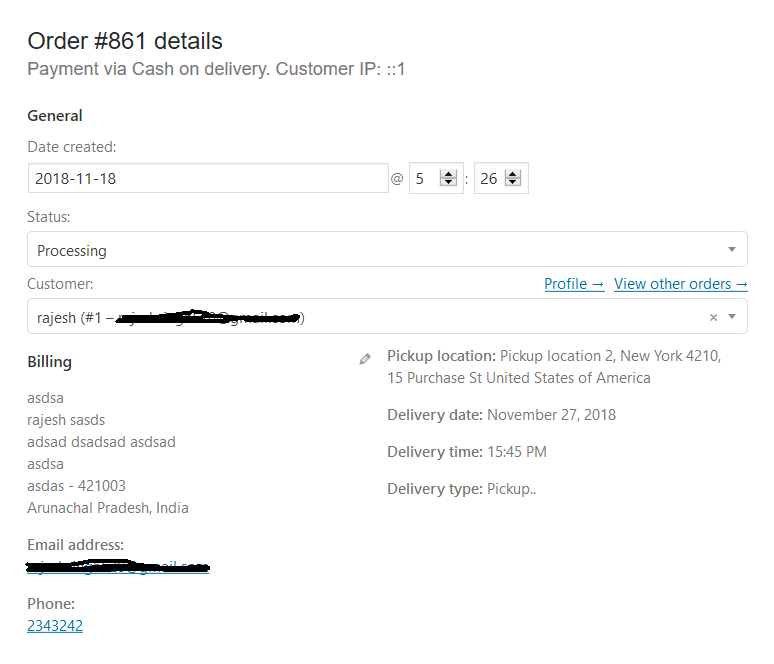
Delivery type date and time shown in the order details page in the backend
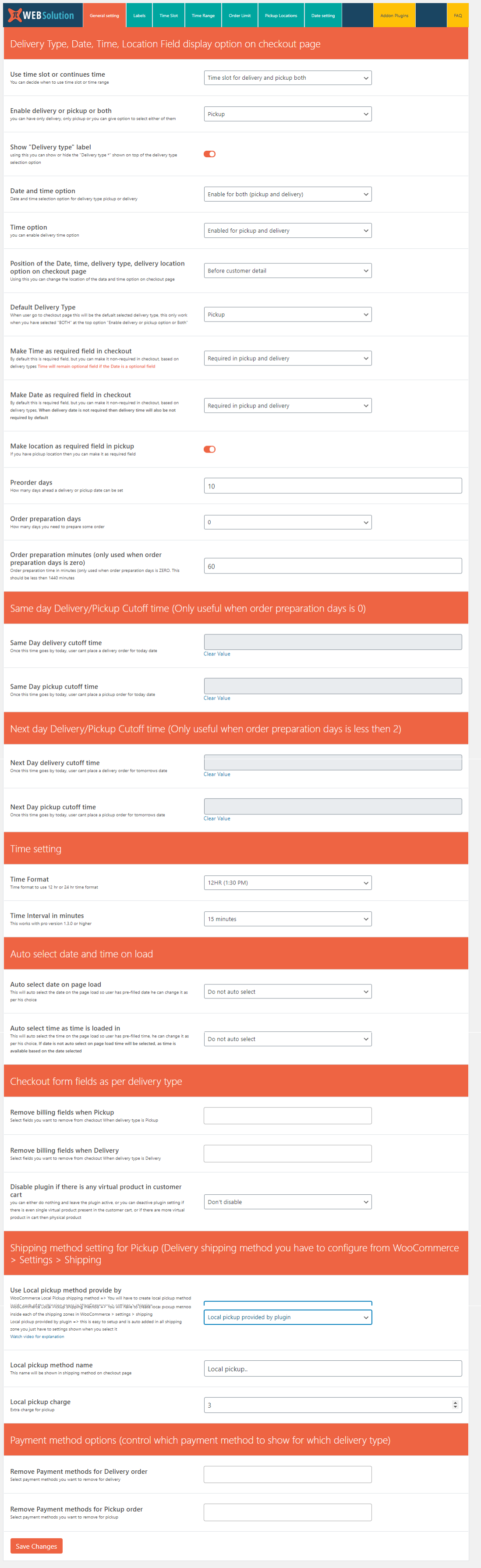
Basic setting page of delivery date and time plugin for WooCommerce, this allows you to control product preparation time
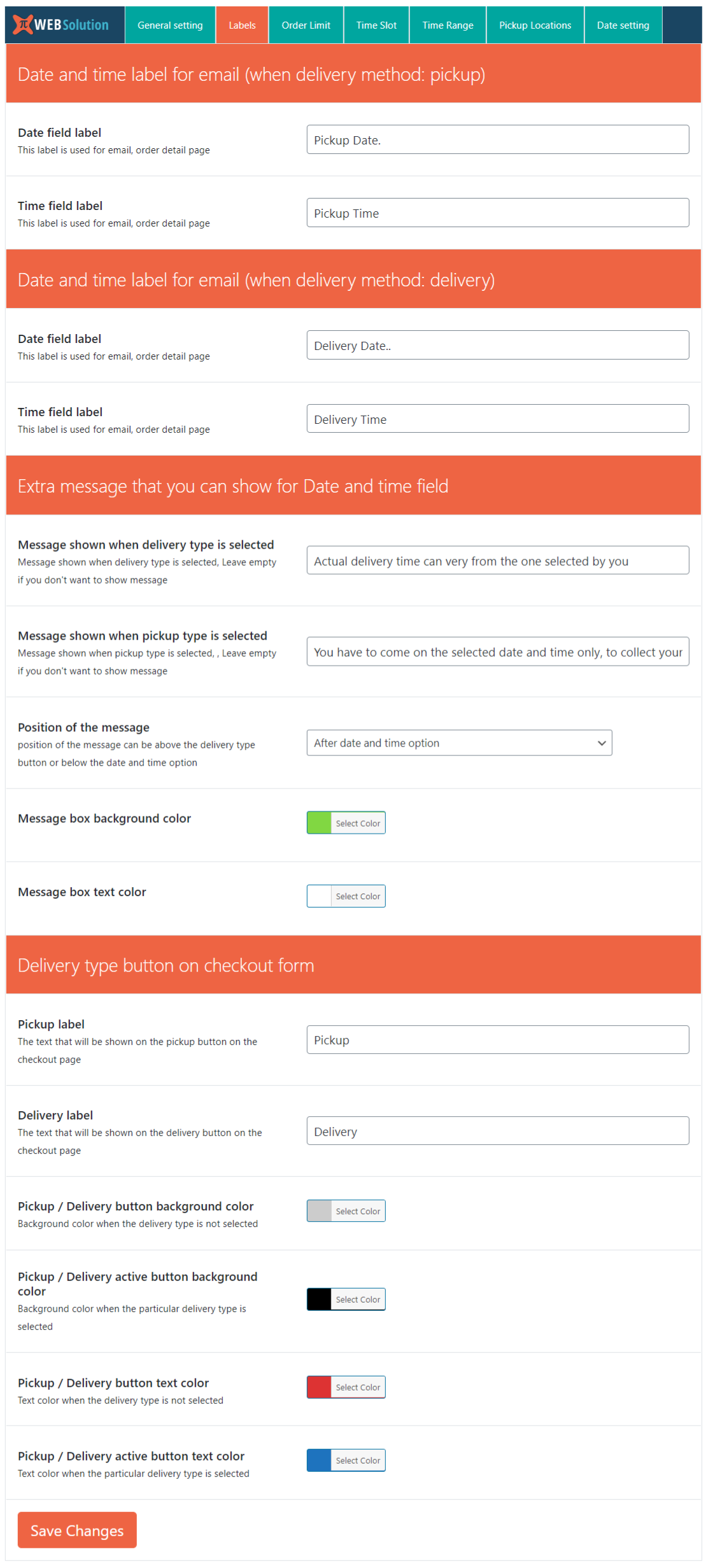
This allows you to control different labels of the plugin
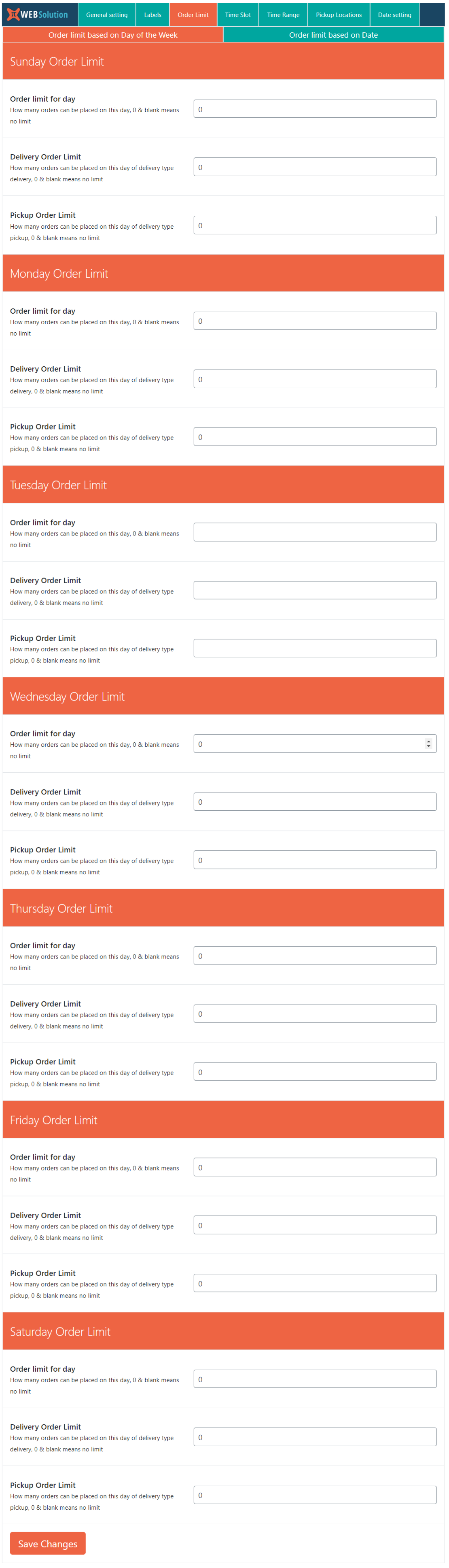
Setting order limit by day or date (PRO)
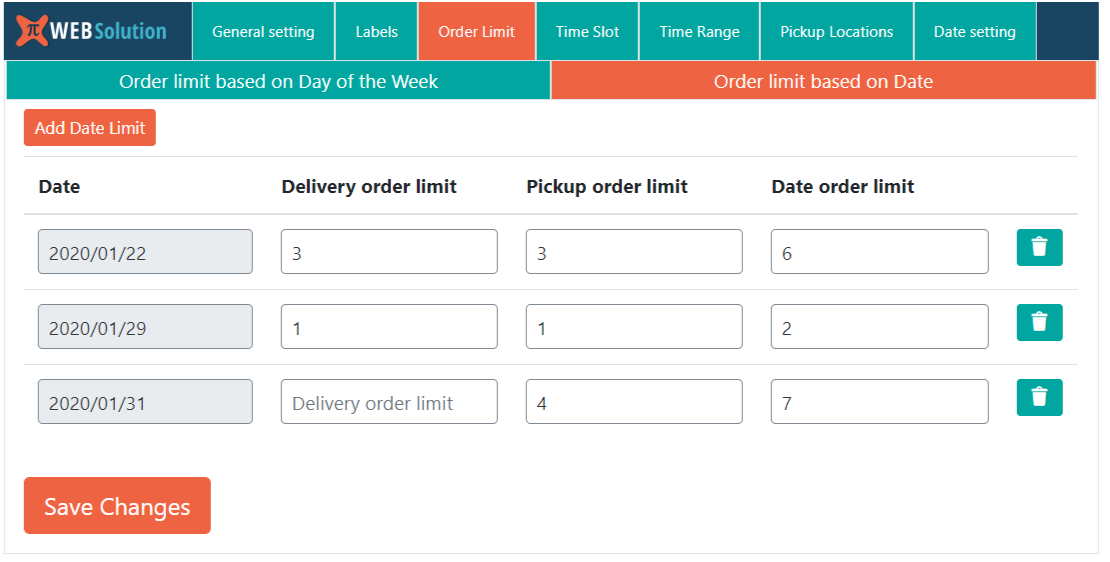
Order limit by date (PRO)
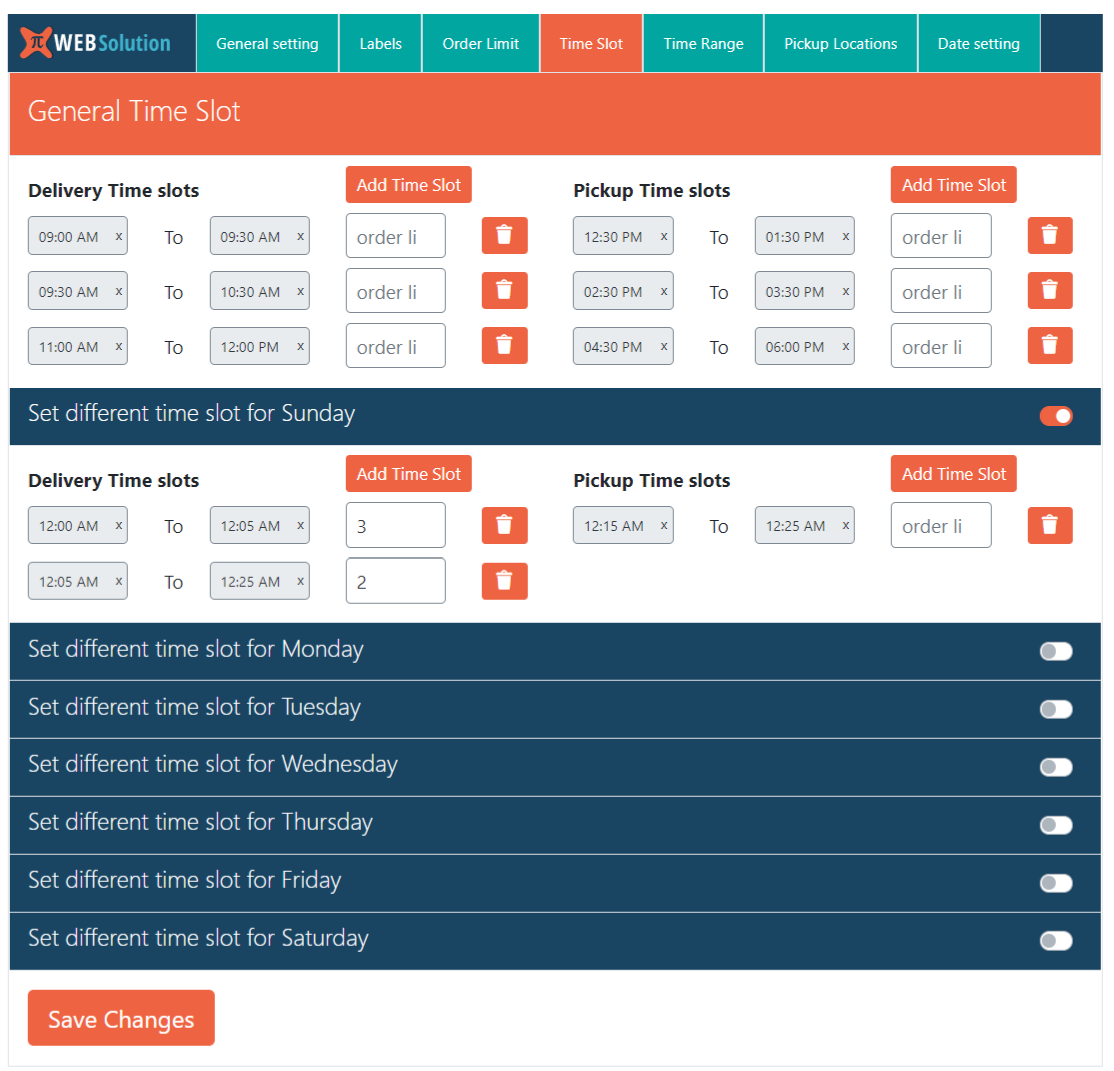
Configuring custom time slot for the delivery and pickup
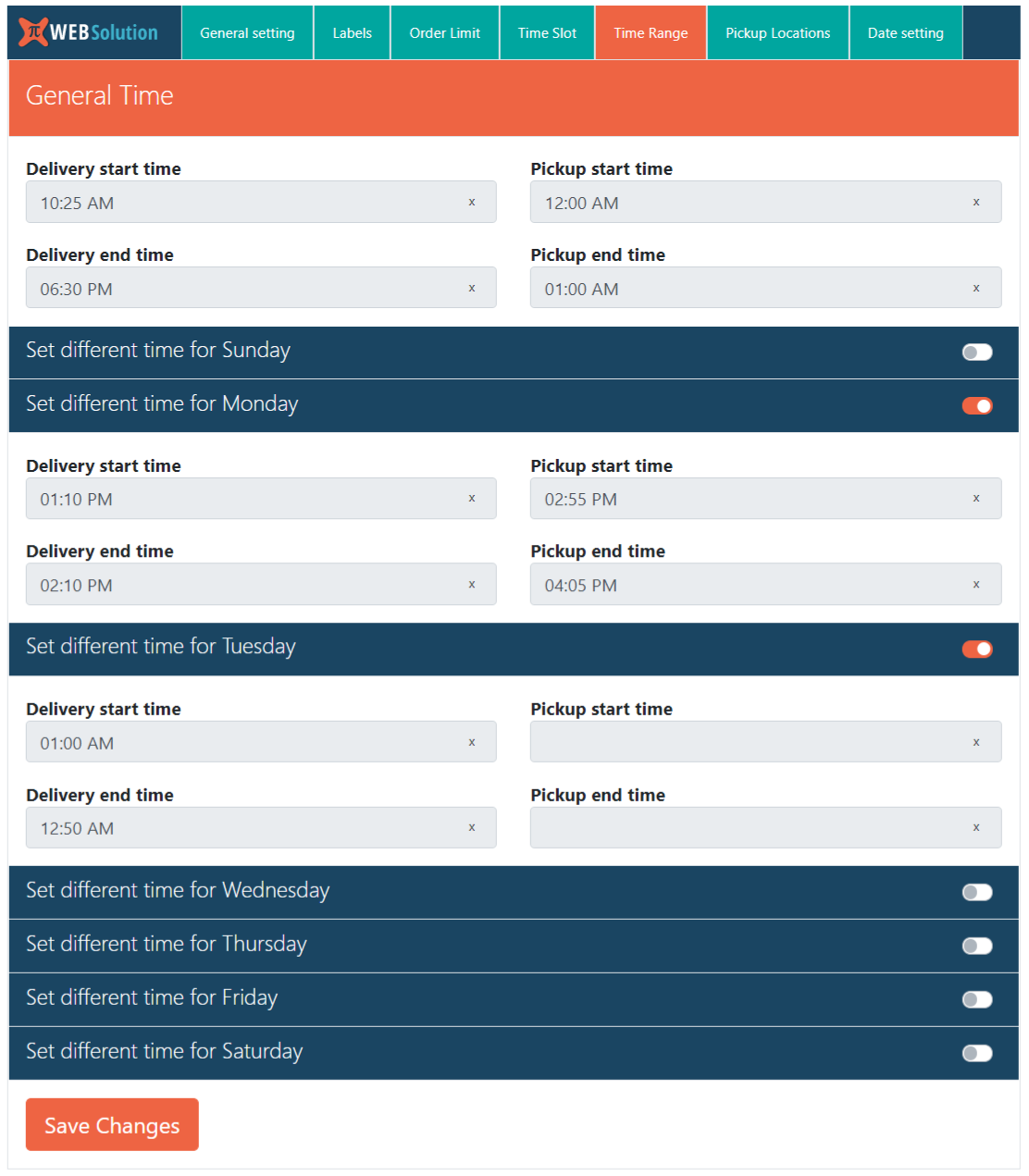
If you want a simple time setting then use the time range option in this you only have to set the start time and end time and it will automatically create the time for you
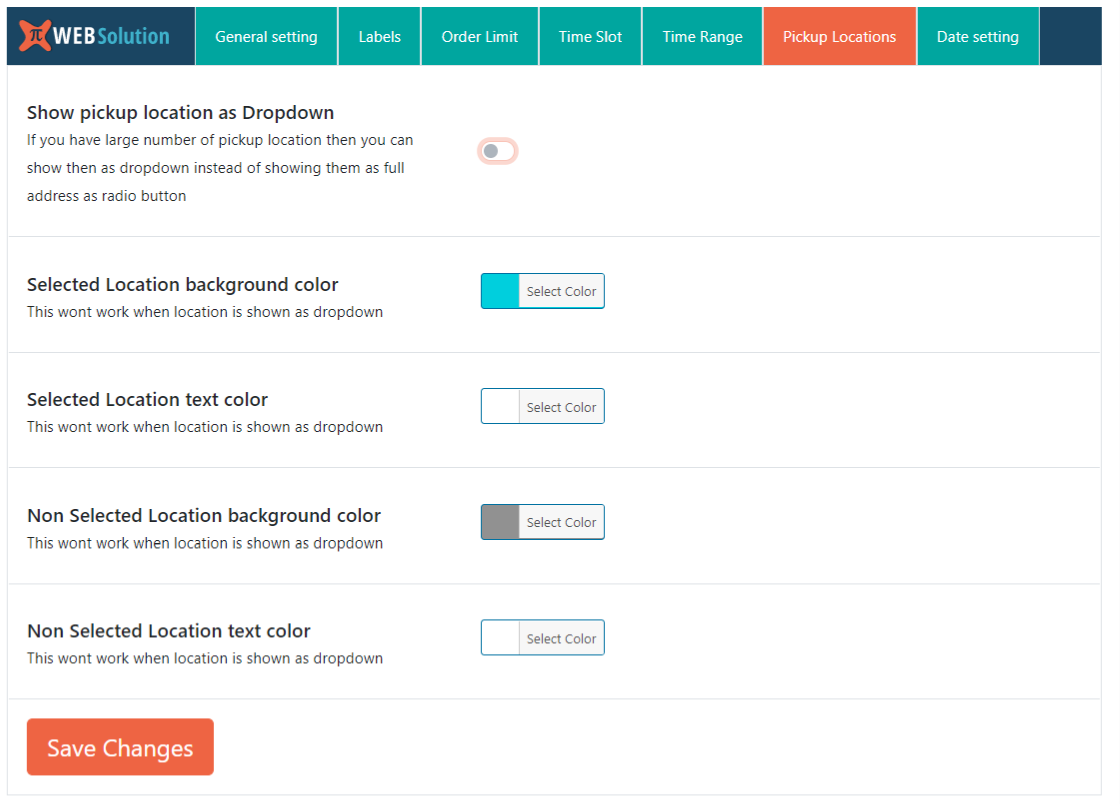
Configuring the pickup location for the pickup date and time plugin

Configure non working days for the delivery and pickup option, and you can configure 5 non working days as well (in pro version you can configure unlimited non working days at once)
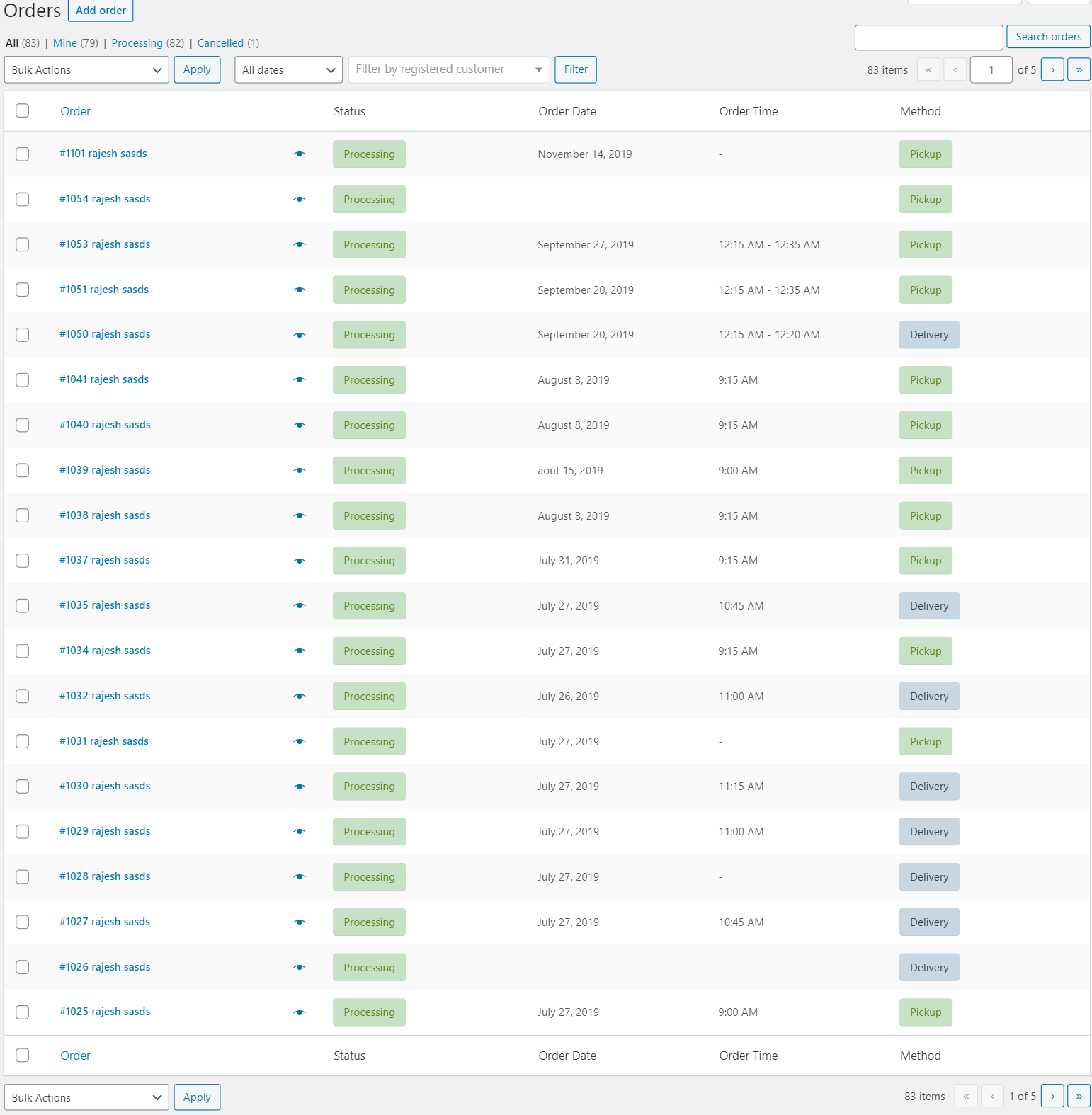
Order delivery date time and pickup location shown in the order list page in the backend
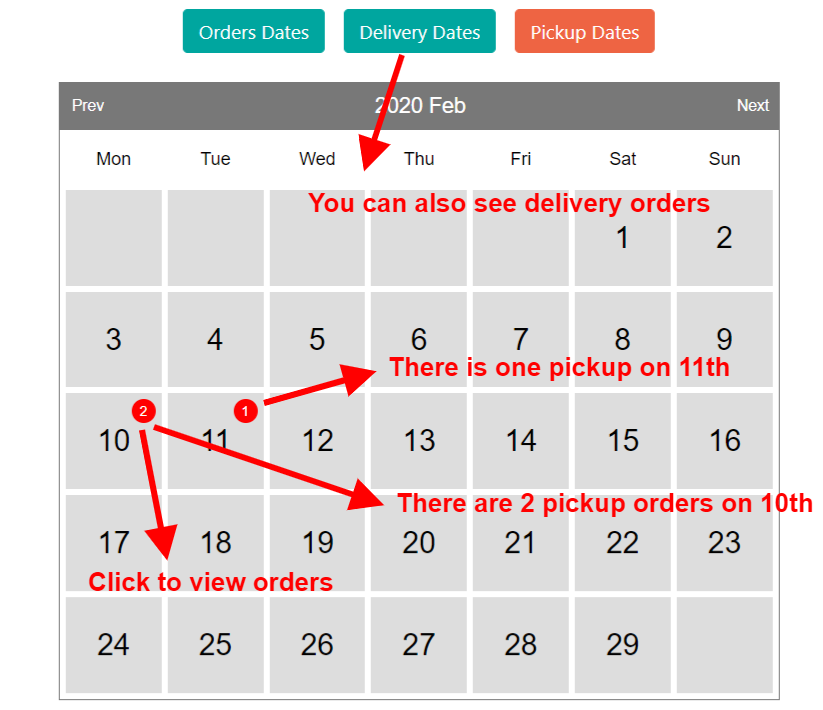
You can install order calendar addon plugin that allows you to see the order to be delivered or picked up on specific date
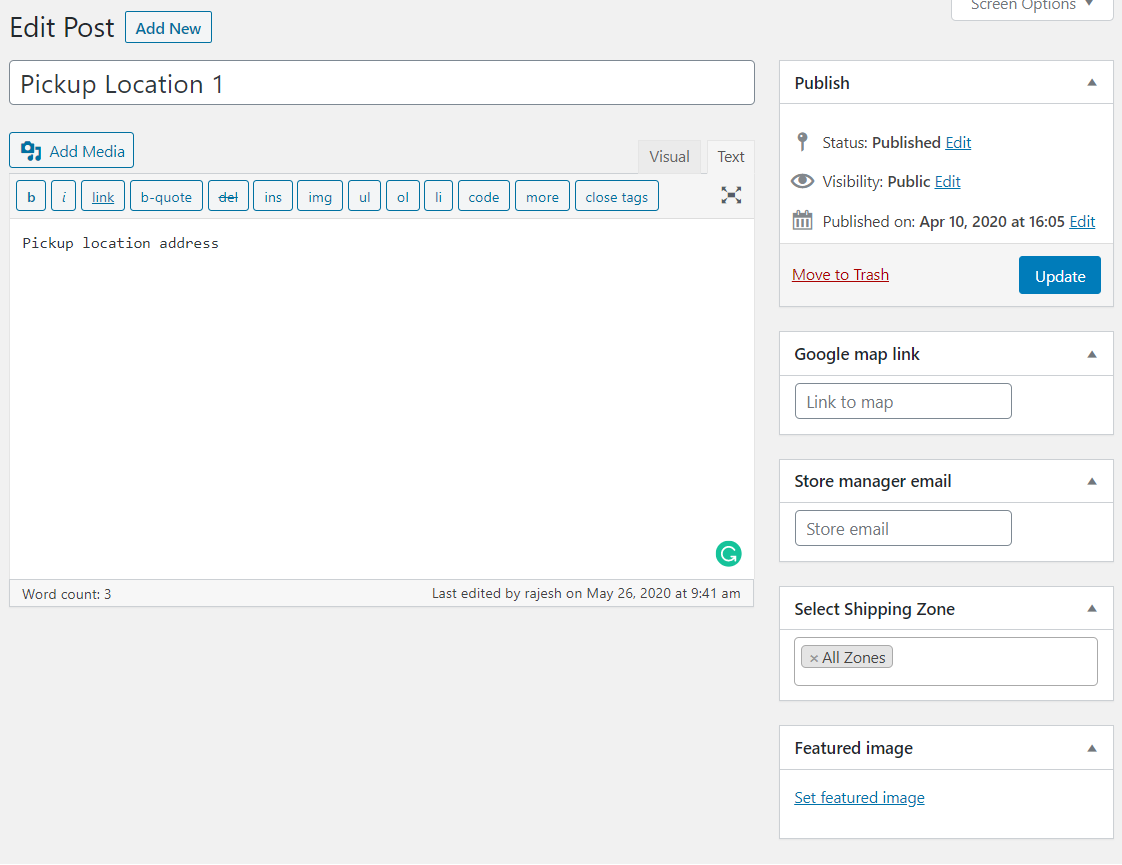
Pro version allows you to configure pickup location more properly
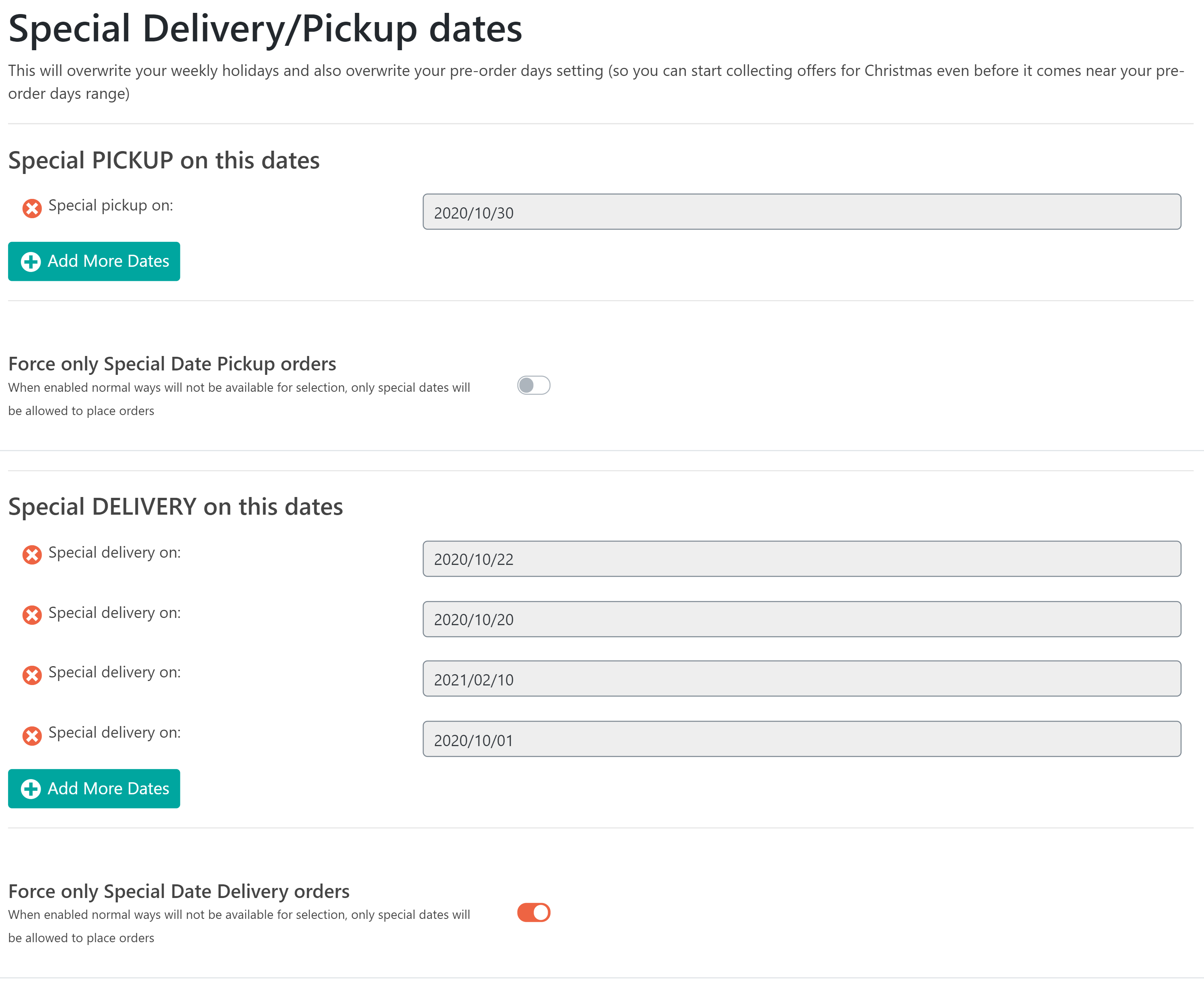
Configure non working days in the pro version (free version only allows 5 non working days)
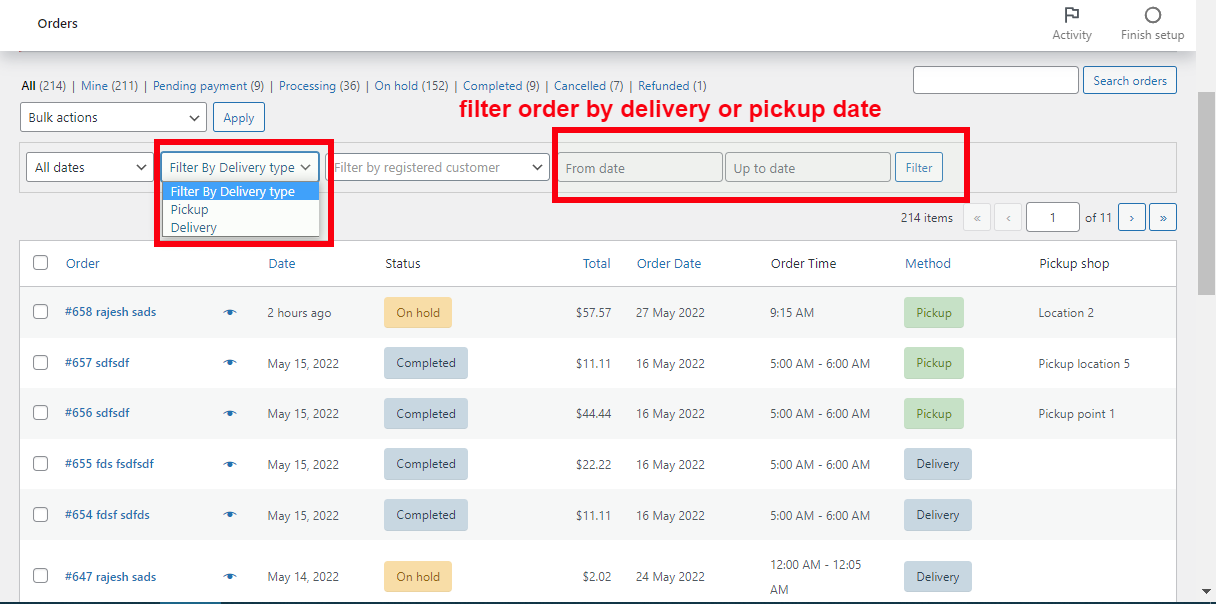
Advanced filtering or order by delivery date and time in the order list page in the backend
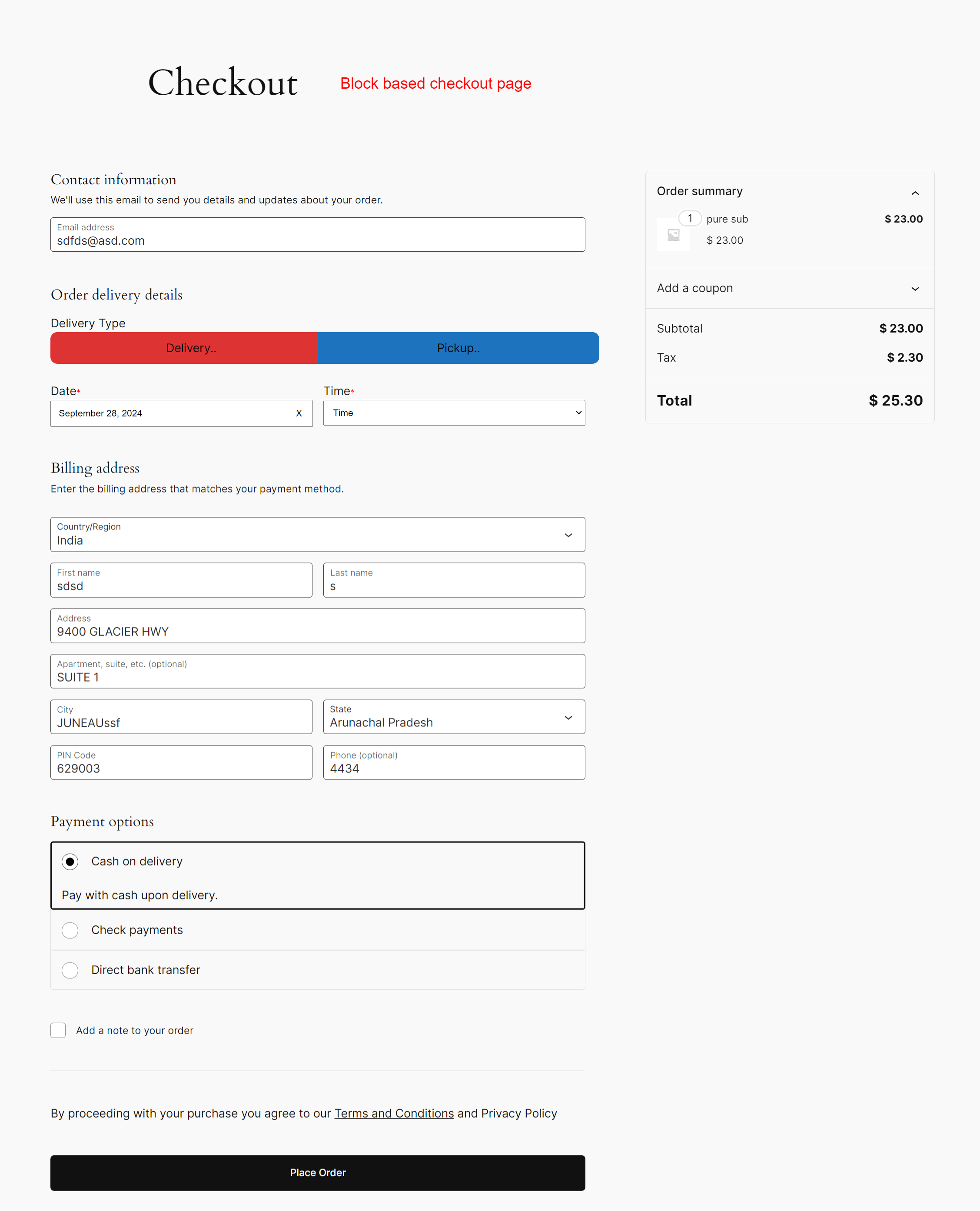
Date and time plugin supports block-based checkout page as well
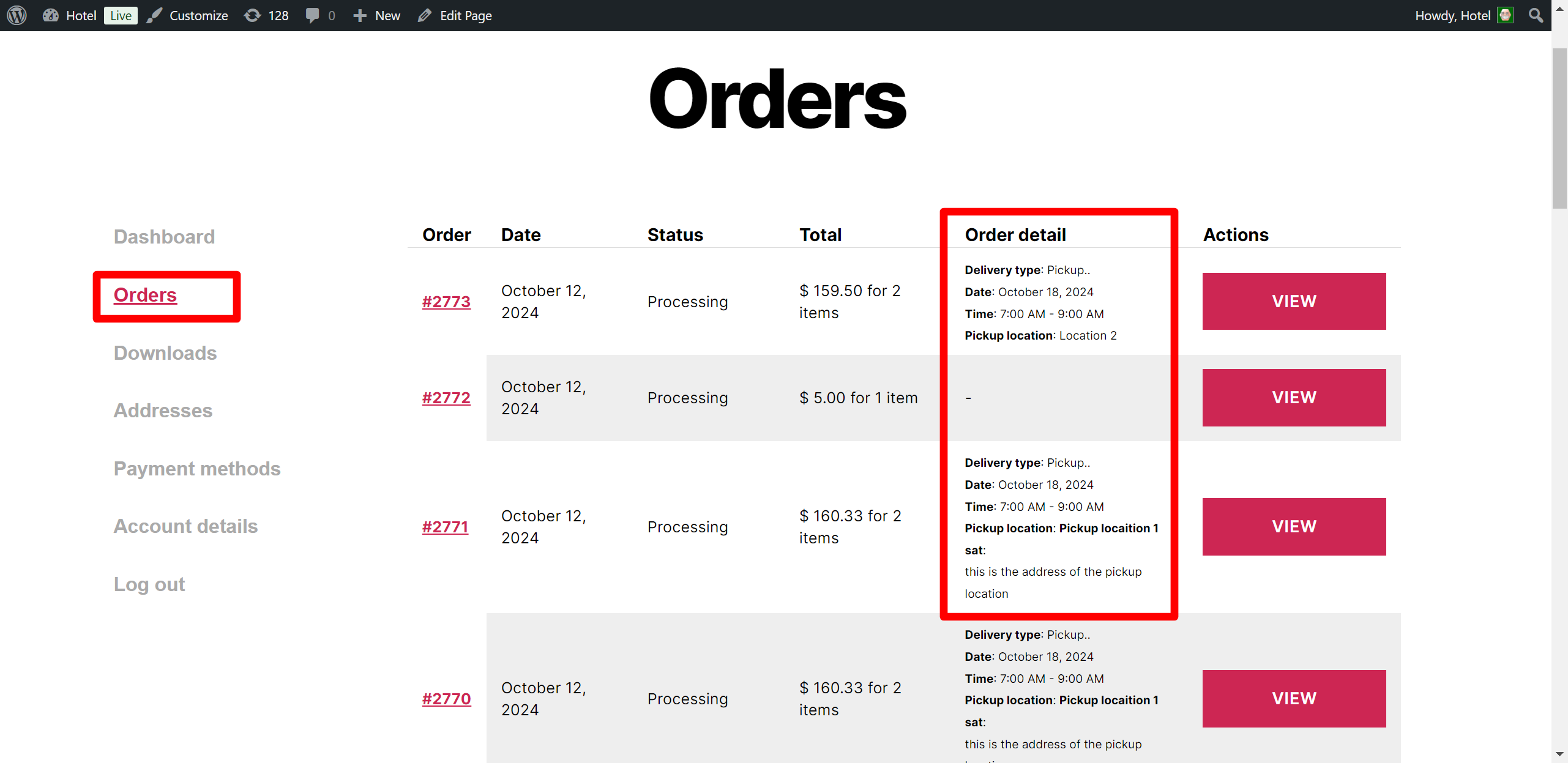
Order date and time are shown in the order list page in the customer My Account section
Faq
You can do that in the pro version, it allows you to disable the date and time option when user opt for delivery
You can disable delivery date and time option for both delivery and pickup, or you can disable for pickup or disable for delivery
You can enable the delivery date and time field only for delivery by setting Enable delivery or pickup or both option to “Delivery”
You can do so using Enable delivery or pickup or both option
You can do that using Enable delivery or pickup or both option
You can do that using this option in the plugin *Enable delivery date and time *
You can disable the pickup & delivery time option in the Pro Version
You can control how long away the delivery or pickup date can be allowed by using *Pre-order days * option, In the free version you can only select this to be 10 days max.
E.g: Say today is 10 March and you only want to allow the buyer to place order 10 days ahead in future then you add Pre-order days as 10, and because of this buyer can only select pickup or delivery date up to 20 March
You can set a number of days you need to prepare an order in Order preparation days. E.g: if today is 10 March, and you need 2 days to prepare order then the buyer can only select dates from 13 March onwards for delivery or pickup
Then you have to set the order preparation days as 0, once you do so you will see a new option below it, Order preparation minutes in this you can specify the time you need to prepare in minutes. This will block the user from selecting the time that has passed away or the time that is not fit based on your order preparation time
You can change them from Delivery label and *Delivery label * option
You can set a default delivery method using this option *Default Delivery Type *
You can do that using this option Time Format
You can do that in the pro version using this option Time interval in minutes
You can do that in the Pro version using this Make delivery/pickup time as required field in checkout
You can do this go to “Pickup Tab”
You can set multiple pickup locations (only 2 in Free version and unlimited in pro version). This pickup location will be shown to the user on checkout field to select one location.
In the pro version, you can set different delivery pickup start and end time for the different days of the weeks
You can disable the days of the week when you don’t do delivery/pickup, you can have different days disabled for pickup and different for delivery. When a day is disabled, the buyer won’t be able to select that date
Yes you can insert holidays, once you insert certain date as a holiday that date will not be available to the user for selection
You can do so in the PRO version
You can do so in the PRO version
Yes you can do that in pro version
Yes you can do that in the pro version
Yes you can do that in the pro version
In the pro version, you can change the location of the date and time field on the checkout page. It offers 2 positions one before the customer detail and one is after the customer detail
You can do that in the pro version, you can hide time field for the delivery type or pickup type
You can do that in the PRO version, in fact you can set a different message for the Delivery and pickup type and you can have that message show up at different position like, above the Delivery type selector option, or below the date and time
Yes, it will remove Specify shipping option from the checkout form when user select pickup as an option
Yes, you can do that in the pro version, in the pro version you can set the time range. and you can set a different time ranges for each day of the week and different time range for delivery and pickup order type
It does that in the Pro version, you will have to create a “local pickup” shipping method in each shipping zone, then it will add that in the shipping method when pickup will be selected and show the rest of the methods when delivery will be selected
Yes, you can do so in the PRO version.
At present our PRO version support “WooCommerce PDF Invoices & Packing Slips” invoice generator plugin, so if you are using it then Date, Time, Pickup Location detail will be added in the Invoice PDF, and Packaging slip PDF as well
Check your Setting > General setting and make sure a date format is set in it
Yes, you can do that in the pro version, it gives you the option to hide the form fields as per the delivery type selected by the customer on the checkout page
Say you want the Sunday to be the first day of the week in the calendar, then you can do that in the Pro version
Yes you can do that in the pro version, you can set order limit for the day of the weeks, wherein you can set an Overall order limit plugin you can set a separate order limit for pickup and delivery
yes you can do that you can set an order limit only on the delivery and leave pickup unrestricted (or you can do that other way around as well)
Yes you can do so, you can set a different order limit for some specific delivery date and that limit will overwrite the order limit set on the week day basis
If you are showing the pickup location as a button then it will show the map link for each location on the front end, and it will also add the location map link in the email
For proper working, you must enable WooCommerce “Local pickup” shipping method. then it will change the shipping method as per the user selection of the delivery type option of the plugin.
In pro version you can assign shipping zone to pickup location, so the buyer will only see those pickup location that you have assigned for there shipping zones, E.g: if you have pickup location in all the states in your country so instead of showing all you will assign each pickup location a shipping zone (zones will be based on city) so the buyer will only see the pickup location near to there city
In pro version their is option to remove the plugin options of date , time , location and delivery type when the customer is buying a virtual product. Plugin offers 3 different kind of option for this
* Remove plugin field if there is any virtual product in the cart
* Remove plugin field if there are more virtual products in the cart compared to other non virtual products
* Remove plugin field if all the products in the cart are virtual products
Yes you can do that in the pro version, it allows you to set, Cutoff time for same day delivery for pickup as well as delivery. You can set different cutoff time for pickup and delivery.
Yes that can be done in the pro version, you can set a cutoff time for next day delivery/pickup order, once that cutoff time is gone user will not be able to select an order for next date pickup or delivery. And you can set different cutoff time for pickup and delivery
Yes you can do so in the Pro version it allows you to remove the payment gateways as per the user selection of Delivery or Pickup
Yes it can be done in the pro version
You can do that in the pro version it allows you to add special date, this special date can be far away in the future
E.g: you can start accepting order for Christmas from October even if your pre-order days are say 10
you can do that using pro version, You will have to enable the option of force special date, then it allow you to set the date that user can select for delivery/pickup apart from those date user can’t pick another date
E.g: Say you only want to allow pickup on 24th Oct 2020 then you can put that date and user will only have that one date to select from
We have an addon that allow you to do that in the pro version
You can do that in the pro version
Pro version gives you the option to allow shop manager to see and modify the plugin settings
Yes you can view those detail in the WooCommerce app inside the Order note section of the order
Yes the Free version and PRO version both are HPOS compatible
Yes in the pro version you can set quantity limit for each time slot.
Yes in the pro version you can set quantity limit for each day of the week.
Reviews
Great Plugin and Equally Great Customer Service
By 
I've used this plugin on several of my clients' sites. They offered responsive customer support.
Exelente plugin
By 
Exelente plugin me ayudo mucho con mi web.
Well Done Team
By 
One of the most useful plug-ins for Woocomm. Well thought out, easy to use and very flexible, works so well. Great job.
Perfect
By 
Great plugin
Amazing Support and Great Plugin
By 
I tried the free version first and almost didn't go to Pro but we need a lot of specialty options for this unique business. Super glad we went to Pro version as it works really well and developer was super responsive on the simple issues we had. They also implemented several simple suggestions we had to make the plugins even better. Very fast response. I wish they had more plugin options as I will definitely look to them first for any plugins in the future. Their pricing is really affordable compared to many other plugins we looked at.
Incredibly useful
By 
Setup was smooth, and the features list is awesome. Sure there are some things I'd like different but then no on satisfy everyone's expectations all the time. With a few workarounds within the plugin itself, we had it up and running just like we needed and it's worked flawlessly so far.
Brilliant! Congrats guys.
Never lets you down
By 
This plugin helps out allot and never lets you down. Ready to purchase the pro version! TY team
Delivery dates.
By 
Hello, we use Estimate delivery date for Woocommerce Pro and we have products with a delivery date between 1 and 2 days, they are not all the products, they are some that we edit the delivery dates when we create them. We want to know if we buy the Order date, Order pickup, Order date time, Pickup Location, delivery date for WooCommerce the same date information is maintained for deliveries.
Thank you
By 
Thank you such an amazing and useful solution
Time and Pickup Plugin for my local customers
By 
I am just starting out and needed this type of plugin desperately! I have sold some products locally and it works beautifully! Thanks for the hard work developing this plugin. I LOVE IT!