Pic-Time Connect

Pic-Time Connect
Description
Pic-Time Connect automatically generates comprehensive image sitemaps for all your Pic-Time photo galleries, helping search engines discover and index your images for better SEO performance.
Key Features
- 🎯 Smart SEO Analysis – Automatically detects and processes Pic-Time galleries
- 📱 WordPress Integration – Seamlessly integrates with WordPress 5.5+ sitemap system
- ⚡ Performance Optimized – Focused data processing for faster sitemap generation
- 🔧 Selective Mode – Choose which galleries to include in sitemaps
- 🌐 Multiple Formats – Supports both standalone and WordPress-integrated sitemaps
- 🛡️ SEO Plugin Compatible – Works alongside popular SEO plugins
- 🔍 Robots.txt Management – Advanced troubleshooting and diagnostics tools
How It Works
The plugin scans your posts and pages for Pic-Time gallery embed codes, extracts image data from the Pic-Time API, and generates XML sitemaps that search engines can easily crawl and index. This helps improve your images’ visibility in search results.
Sitemap Integration
- WordPress Sitemap Integration: Images appear in your main WordPress sitemap index (
/wp-sitemap.xml) - Standalone Sitemaps: Alternative endpoints for maximum compatibility
- Robots.txt Integration: Automatically adds sitemap URLs to your robots.txt file
Robots.txt Management
- Diagnostic Tool: One-click testing and automatic fix attempts
- Platform-Specific Guides: Instructions for WordPress.com, WP Engine, Kinsta, and more
- SEO Plugin Integration: Step-by-step guides for Yoast, Rank Math, SEOPress, and others
- Force Add Option: Override SEO plugin conflicts when needed
Selective Gallery Mode
Control which galleries are included in your sitemaps using the data-pt-sitemap="true" attribute on gallery embed codes. Perfect for:
- Privacy control for personal galleries
- Improved performance with fewer galleries
- Strategic SEO management
Developer Features
- Comprehensive debug logging
- Action hooks and filters for customization
- SEO plugin compatibility detection
- Maintenance tools for troubleshooting
External Services
This plugin connects to external services provided by Pic-Time to function properly:
Pic-Time Update Service
- Service: Pic-Time Plugin Update Server
- URL: https://pictime1system.blob.core.windows.net/pictures/pt_wordpress_plugins/version.json
- Purpose: To check for plugin updates and display notifications to administrators
- Data Sent: Plugin version number and site URL (for compatibility checking)
- When: Once daily via WordPress cron, or when manually checked by administrators
- Privacy Policy: https://www.pic-time.com/privacy-policy
- Terms of Service: https://www.pic-time.com/terms-of-service
Pic-Time Gallery API
- Service: Pic-Time Image Data API
- Purpose: To fetch image metadata from your Pic-Time galleries for sitemap generation
- Data Sent: Gallery IDs extracted from your embed codes
- When: When generating sitemaps or when pages containing Pic-Time galleries are processed
- Privacy Policy: https://www.pic-time.com/privacy-policy
- Terms of Service: https://www.pic-time.com/terms-of-service
This plugin only functions with existing Pic-Time gallery accounts and embed codes. No data is sent without your explicit configuration of Pic-Time galleries on your website.
Support
For support with this plugin, please visit the Pic-Time support forum.
For Pic-Time account and gallery-related questions, please contact Pic-Time support.
Privacy Policy
This plugin does not collect, store, or transmit any personal data. It only processes publicly available image URLs from your Pic-Time galleries to generate search engine sitemaps.
Third-Party Services
This plugin communicates with Pic-Time’s servers to retrieve image metadata for sitemap generation. Please review Pic-Time’s Privacy Policy for information about their data handling practices.
Development
This plugin follows WordPress coding standards and best practices:
- Full internationalization support with proper text domains
- Secure coding practices with proper input validation and output escaping
- WordPress filesystem API usage for file operations
- Proper database query optimization with caching
- SEO plugin compatibility detection and handling
- Comprehensive error handling and logging
Technical Requirements
- WordPress 5.0 or higher (5.5+ recommended for full sitemap integration)
- PHP 7.4 or higher
- Active Pic-Time galleries on your website
- Public site visibility for robots.txt integration
Credits
Developed by Shahaf Wieder with Claude AI assistance.
Special thanks to the Pic-Time team for API support and integration guidance.
Installation
- Upload the plugin files to the
/wp-content/plugins/pic-time-connectdirectory, or install the plugin through the WordPress plugins screen directly. - Activate the plugin through the ‘Plugins’ screen in WordPress.
- Go to Tools Pic-Time Connect to configure settings.
- Your sitemaps will be automatically generated and integrated with WordPress sitemaps (if available).
Screenshots
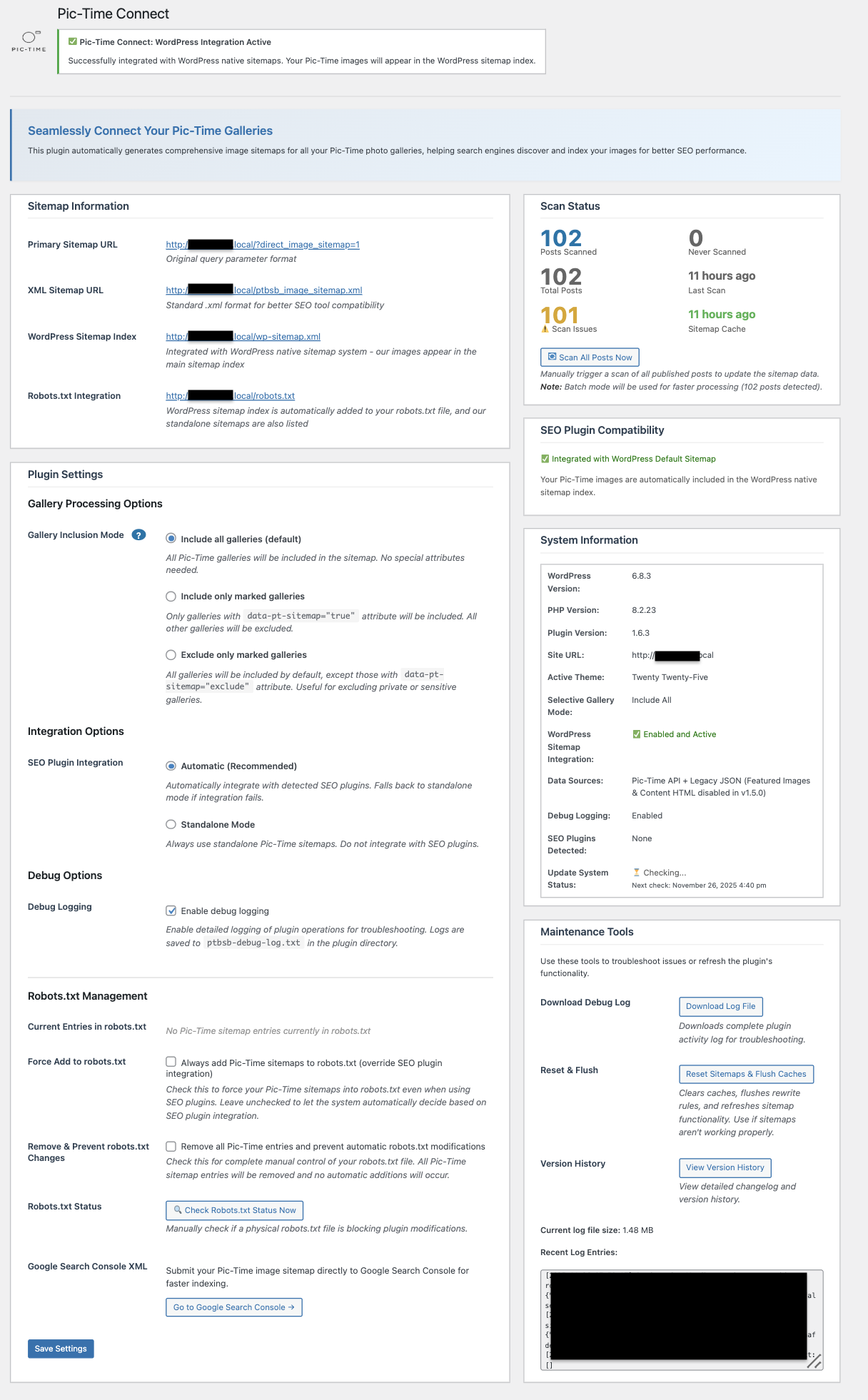
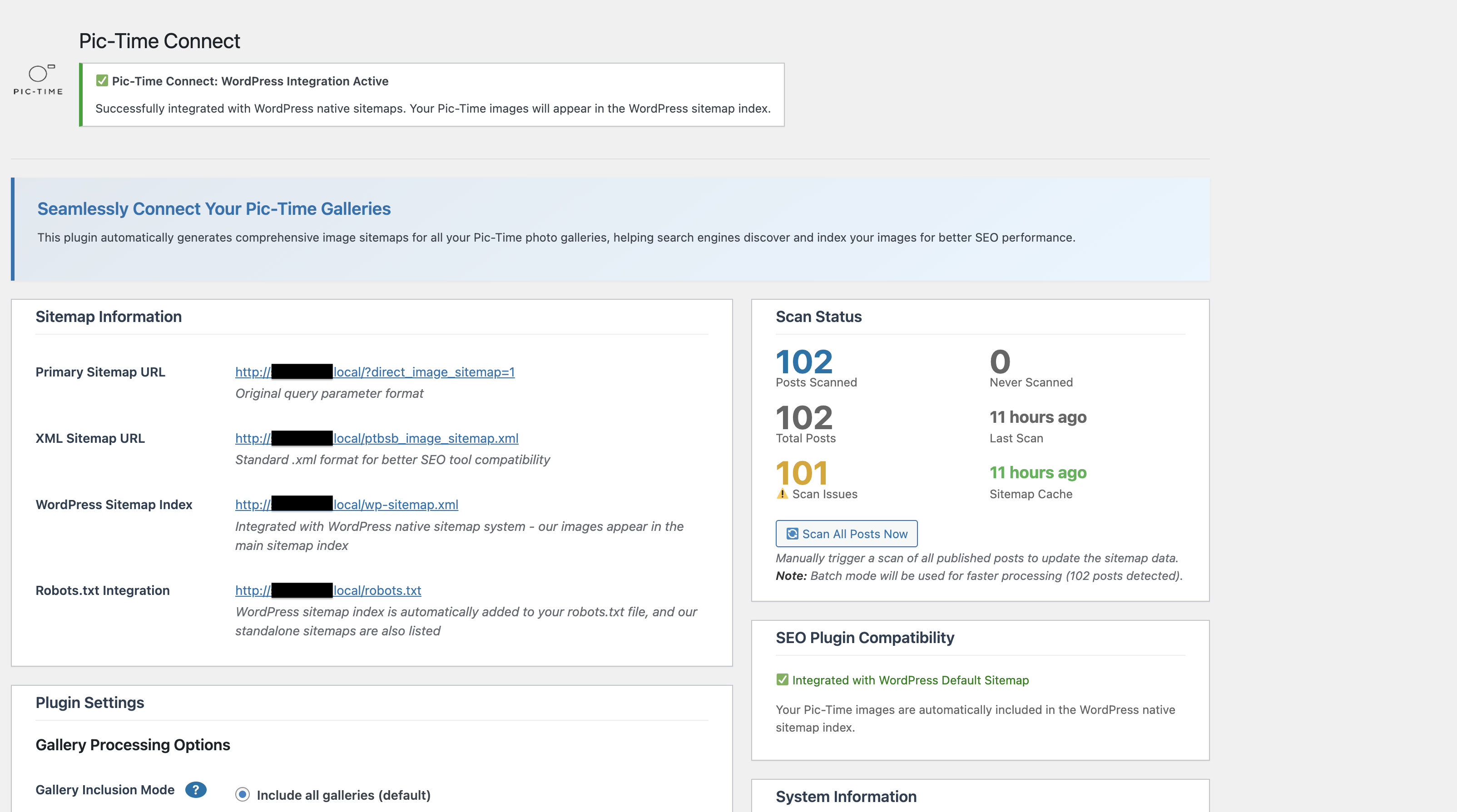
Main admin interface showing sitemap URLs and system information
Plugin settings with selective gallery mode and WordPress integration options

Robots.txt management with diagnostic tools and troubleshooting guides
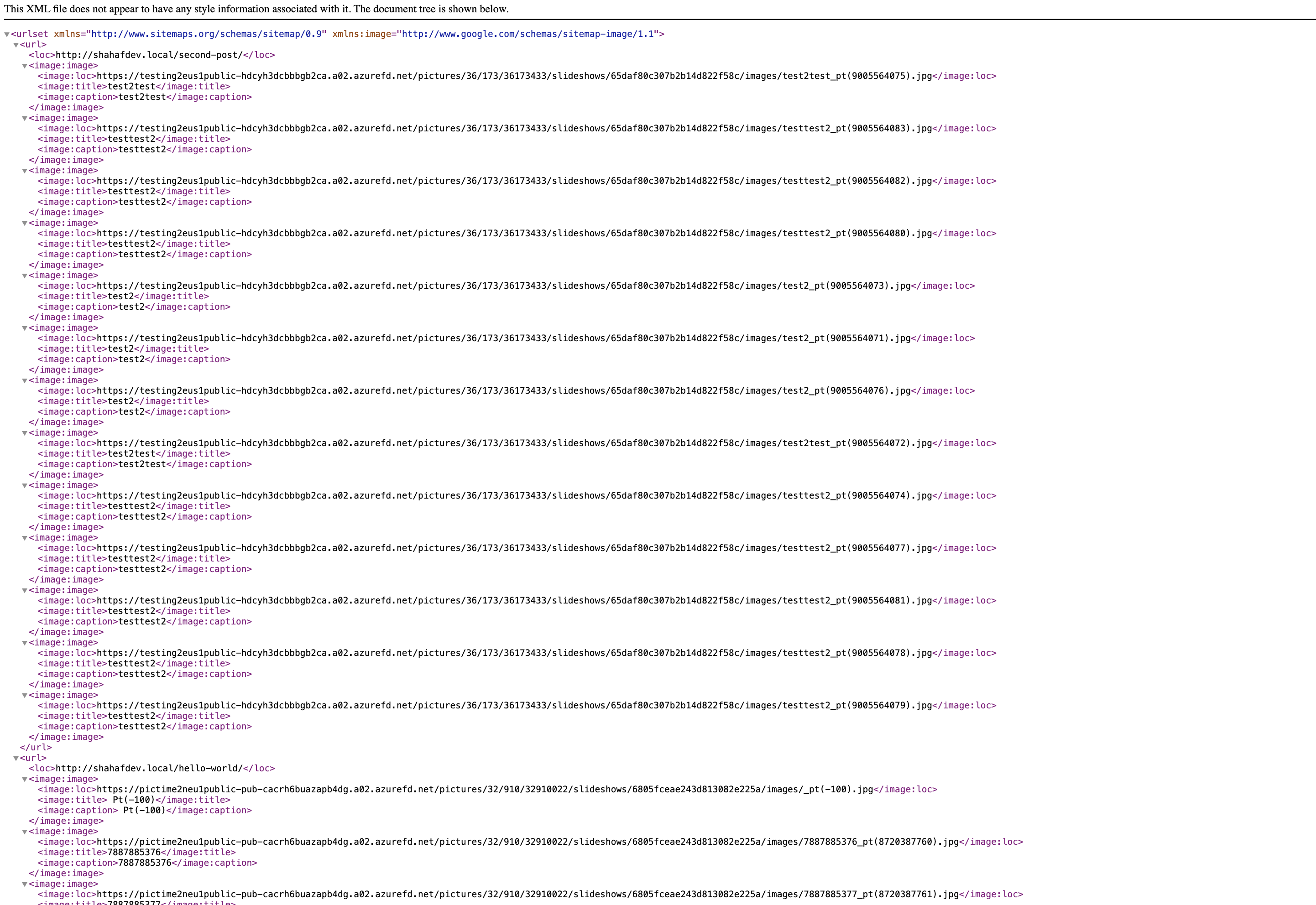
SEO plugin compatibility detection and warnings
Faq
Pic-Time is a professional photo gallery service that allows photographers and businesses to showcase their images with advanced features like client galleries, proofing, and e-commerce integration.
Yes, this plugin is specifically designed to work with Pic-Time gallery embed codes. It extracts image data from Pic-Time’s API to generate SEO-optimized sitemaps.
No, this plugin is specifically designed for Pic-Time galleries. It focuses on optimizing SEO for Pic-Time’s unique gallery structure and API.
- Go to Tools Pic-Time Connect
- Check the “Selective Gallery Mode” option in Plugin Settings
- Contact Pic-Time support to add the
data-pt-sitemap="true"attribute to your gallery embed codes - Only galleries with this attribute will be included in sitemaps
Your sitemaps are available at:
* WordPress Integration: /wp-sitemap.xml
* Standalone XML: /ptbsb_image_sitemap.xml
* Alternative Format: /?direct_image_sitemap=1
Yes, the plugin is designed to work alongside popular SEO plugins like Yoast SEO, RankMath, SEOPress, and others. The plugin includes compatibility detection and will warn you of potential conflicts.
- Go to Tools Pic-Time Connect
- Scroll to “Robots.txt Management”
- Click “Run Diagnostic & Force Add” for automatic troubleshooting
- Click “View Manual Troubleshooting Guide” for platform-specific instructions
- Go to Tools Pic-Time Connect
- Enable debug logging in the Debug Options section
- Use the “Reset & Flush” tool to clear caches
- Download the debug log for detailed information
- Check the System Information section for compatibility issues
Reviews
Great for Boosting SEO performance
By 
Super easy and transparent plugin. Just activate and let it integrate automatically with Pic-time originated blog posts. It instantly creates a secondary sitemap to improve search engines indexing and visibility. In plugin tools some settings can be adjusted easily. It may take a few weeks for the results to show but that's standard duration for search engines crawl.
Changelog
2.0.0 – December 2024
- Major Release: Complete robots.txt management overhaul
- New: Run Diagnostic & Force Add – One-click troubleshooting tool
- New: Manual troubleshooting guide with platform-specific instructions (WordPress.com, WP Engine, Kinsta, etc.)
- New: SEO plugin integration guides (Yoast, Rank Math, SEOPress, AIOSEO, etc.)
- New: Force Add checkbox to override SEO plugin conflicts
- New: Unified caching system for WordPress integration (7-day cache for large sites)
- New: Background cache regeneration for zero user wait time
- Enhanced: Dual JavaScript handlers for improved reliability across platforms
- Enhanced: Copy-to-clipboard buttons for sitemap URLs
- Fixed: Force Add checkbox being overridden by integration checks
- Fixed: WordPress.com and restricted platform button functionality
- Fixed: Cache bypass in WordPress sitemap integration
- Fixed: Admin notice detection for restricted hosting environments
1.6.1 – November 2024
- Fixed: Post count accuracy (now shows only published posts)
- Fixed: Image data persistence (cached images prevent API re-fetch)
- Fixed: WordPress integration fallback mechanism
- Fixed: Multiple SEO plugin detection and handling
- New: Smart cache quality management system
- Performance: 10x faster sitemap generation via image caching
- Performance: Instant response for large sites with background updates
1.6.0 – October 2024
- WordPress.org compliance: Removed all static inline styles
- Code quality: Moved inline styles to CSS classes
- Performance: Optimized CSS loading and organization
1.5.2
- Improved SEO plugin conflict resolution
- Replaced links and text
1.5.1
- Fixed modal functionality issues
- Removed debug console logging
- Fixed WordPress.org compliance issues
- Improved variable escaping for security
- Enhanced modal CSS specificity
1.5.0
- First stable production release
- WordPress sitemap integration enabled by default
- Automatic and manual update checking system
- Streamlined admin interface with modal popups
- Full internationalization support
- Complete WordPress standards compliance
- Rebranded from “Pic-Time Blog SEO Booster” to “Pic-Time Connect”