Pinterest Site Verification plugin using Meta Tag

Pinterest Site Verification plugin using Meta Tag
Description
Simply insert your Pinterest meta tag verification code using this helpful plugin.
Once your blog is verified, you will get Pinterest web analytics feature enabled for you which will show you how people are pinning your pictures.
If you are using caching plugins like WP-Cache or WP Super Cache, you may need to temporarily clear or disable your cache for this plugin to work.
Installation
- Upload Pinterest site verififaction plugin to the ‘/wp-content/plugins/’ directory
- Activate the plugin through the ‘Plugins’ menu in WordPress
- Enter your verification code in plugin settings section as mentioned in screenshot.
- Clear your cache if you are using anay cache plugin.
- All Done.
Screenshots

Go to your profile and click Settings and go to Step 2.
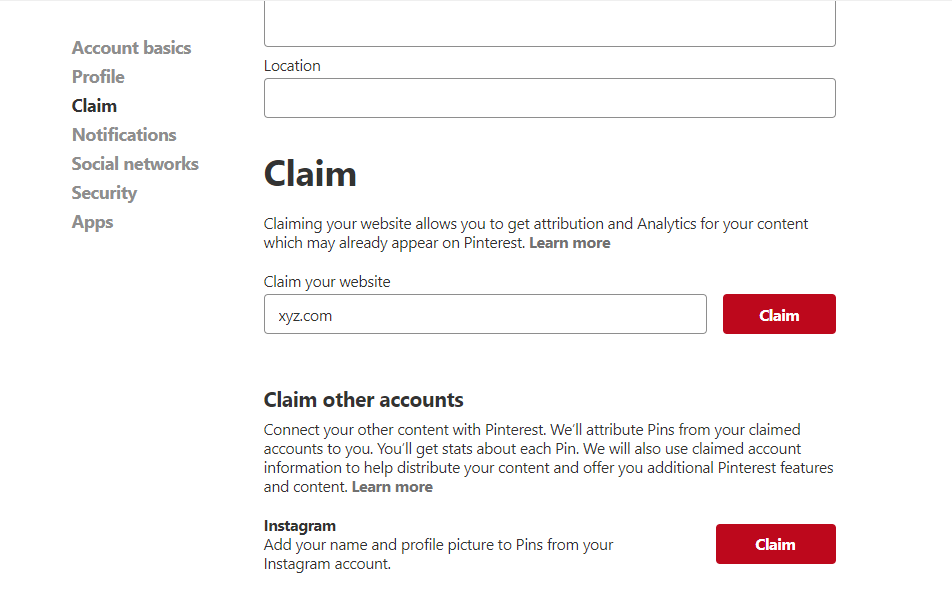
Enter your web address in the Claim section then click Verify Website.
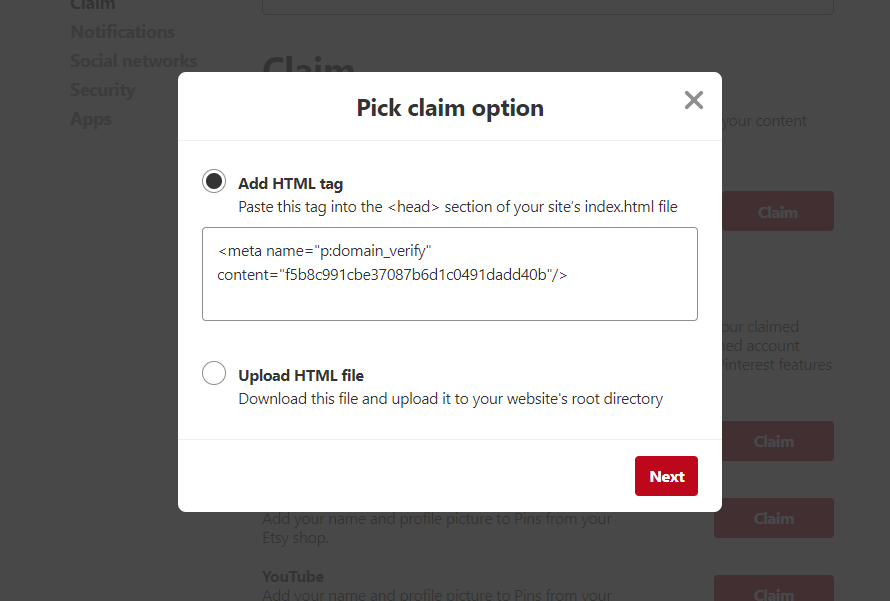
Select Add html tag.
Reviews
Lol
By 
The reason Pinterest verification doesn't work with Jetpack is that Jetpack asks for the full Pinterest verification tag. In fact you only need to enter the code number, not the surrounding html.
So that's what this plugin does, it just asks you for the code number and generates the meta tag. It's what Jetpack should do.
You may as well use it - but if you fill in the Jetpack field as well, you'll end up with two identical tags which could cause problems. Just so you know.
Changelog
1.8
- CRITICAL BUG FIX: Resolved “Missing tag” error with HTML entity encoded input
- Added multiple HTML entity decoding to handle double/triple encoded meta tags
- Fixed issue where copy-pasted Pinterest tags with HTML encoding would fail
- Enhanced input processing to handle all levels of HTML entity encoding
- Comprehensive testing validates support for encoded Pinterest verification tags
1.7
- CRITICAL FIX: Resolved “Missing tag” error with whitespace around equals signs
- Enhanced regex patterns to handle
name = "value"format with spaces - Comprehensive unit testing to validate all meta tag variations
- Now supports all Pinterest meta tag formats including extra whitespace
1.6
- Fixed “Missing tag” error with Pinterest meta tags
- Improved regex patterns to handle various whitespace and attribute ordering
- Enhanced meta tag parsing to support both single and double quotes
- Added multiple fallback patterns for better compatibility
1.5
- Fixed regex pattern for Pinterest meta tag parsing
- Updated meta tag extraction logic
1.4
- Improved security: Added proper input sanitization using sanitize_text_field()
- Enhanced PHP 8.1+ compatibility: Fixed strpos() usage and array handling
- Better error handling in meta tag parsing function
- Code optimization and WordPress coding standards compliance
1.3
- Previous version