Min/Max Quantity & Minimum Order Limits for WooCommerce Products

Min/Max Quantity & Minimum Order Limits for WooCommerce Products
Description
Try pro version front end & back end on demo website | Documentation
-
Activate the plugin, go to the settings page and set global level min or max Product Quantity
-
Set minimum product quantity for each product that must be purchased
-
Set maximum product quantity for each product that can be purchased
-
Set minimum cart total, which is the minimum total at the time of checkout
-
If you don’t want quantity restriction on a certain product you can disable the limit on that particular product quantity
-
Enable minimum amount restriction on the cart total
-
Exclude a product from global minimum amount restriction, in the Free version you can exclude 2 products only
-
Set different messages for the minimum amount restriction based on the cart total as a percent of the minimum amount set in the plugin settings
-
Show minimum amount progress in a circular progress bar
-
Show warning message of minimum amount on top of the pages
-
The following multi-currency plugins are supported:
- CURCY – Multi Currency for WooCommerce
- Price Based on Country for WooCommerce
- FOX – Currency Switcher Professional for WooCommerce
PRO Version
Try pro version front & back end on demo website
-
All the features of Free version
-
Set a different minimum quantity for each product, this will overwrite the global minimum quantity for that product
-
Set a different minimum quantity for each variation
-
Set a different maximum quantity for each product, this will overwrite the global maximum quantity for that product
-
Set a different maximum quantity for each variation
-
Set a different quantity multiple for each variation
-
Customize messages
-
Change the image that is shown inside the circular progress for the minimum order amount WooCommerce
-
Set text and background color of the message box based on the different condition the quantity of product present in the cart
-
Minimum order amount WooCommerce bar get updated by ajax
-
Place minimum order amount needed info bar using short code [pisol_mmq_notification]
-
Pro version update the min max notice message on the category / Shop page with ajax
-
Control the page where you want to show the minimum order amount restriction notification bar
-
You can write custom code to disable minimum order amount notification on custom pages using filter function
-
Show/Hide Min Max quantity message on product archive page, product page, cart page or checkout page
-
Set different position for Min Max quantity message on product archive page and single product page
-
Don’t go inside each product to set Min/Max quantity, instead set it from the category, so all product within this category will inherit this min/max quantity limit
-
Set minimum quantity restriction on the category, so user has to purchase minimum that many unit from that particular category
-
Checkout page will redirect to cart page when the Minimum quantity restriction is not fulfilled for any product
-
Checkout page will redirect to cart page when the Minimum amount restriction is not fulfilled for any product
-
You can set minimum amount restriction per category basis, so if a buyer purchase a $10 product from Category A, and you have set Min amount limit of $20 on that category then he won’t be able to checkout until he purchase $10 more from the same category A
-
You can apply category level min amount restriction even on the sub category products as well
-
Force product to be ordered in a multiple of X units, E.g: you can enable this option on a product and make it to be ordered in a group of 4 unit, then user can order 4, 8, 12, 16 units of that product if they try to order say 3 units they will get an error and will not be allowed to checkout
Example of product to be ordered in multiple of 4 -
Force category product quantity to be ordered in a multiple of X unit, E.g: Category A : you have set quantity to be in multiple of 3 unit, when user will add 2 unit of product xA he won’t be allow to checkout as it is not multiple of 3, now if he adds 1 unit of yA product in the cart then his total quantity from Cat A equals to 3 unit which is multiple of 3 so he can checkout
-
Exclude product from min quantity restriction on the category, the quantity of this excluded product will not be counted for restriction. E.g: Cat A min quantity restriction is 3 and customer added product AA and AB 1 unit each and product AB is excluded product then the customer has to purchase 2 unit more the unit of AB will not count in.
-
Exclude product amount from min amount restriction on the category, E.g: Cat A min amount restriction is 20$, customer added product AA and AB in cart both of 10$ each then customer will still need to buy $10 more as the AB (being the excluded product it won’t be counted for restriction)
-
Disable Min Amount Restriction by product or category: If any selected product or any product from the selected categories is present in the cart, the minimum order amount restriction will not apply to the entire cart.
Example: Minimum order amount = ₹100. If an excluded product (or a product from an excluded category) is in the cart, even with other items, the checkout will still be allowed below ₹100.
Privacy
If you choose to opt in from the plugin settings, or submit optional feedback during deactivation, this plugin may collect basic technical information, including:
- Plugin version
- WordPress version
- WooCommerce version
- Site URL
- Deactivation reason (if submitted)
This data is used solely to improve plugin quality, compatibility, and features. No personal or user-specific data is collected without consent.
Screenshots
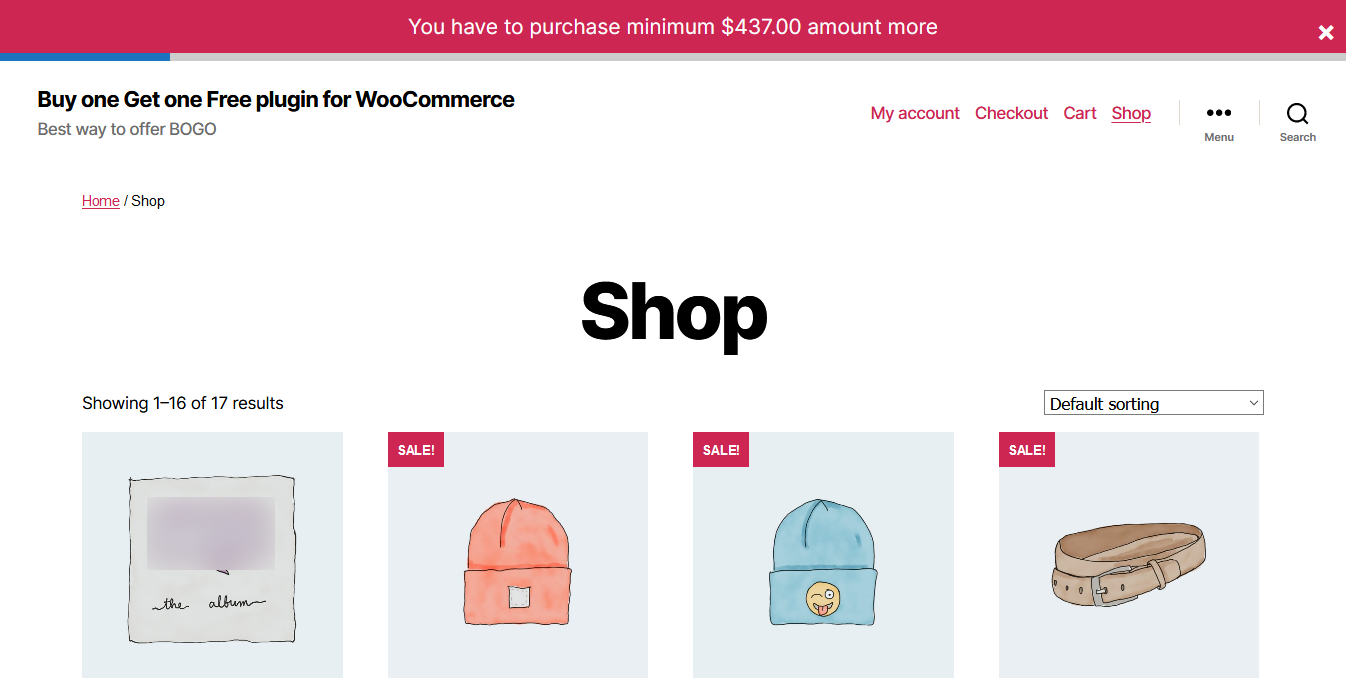
Minimum amount for purchase shown in the progress bar

Minimum quantity per product restriction shown on the product page and category page

Minimum quantity per product restriction shown on the cart page
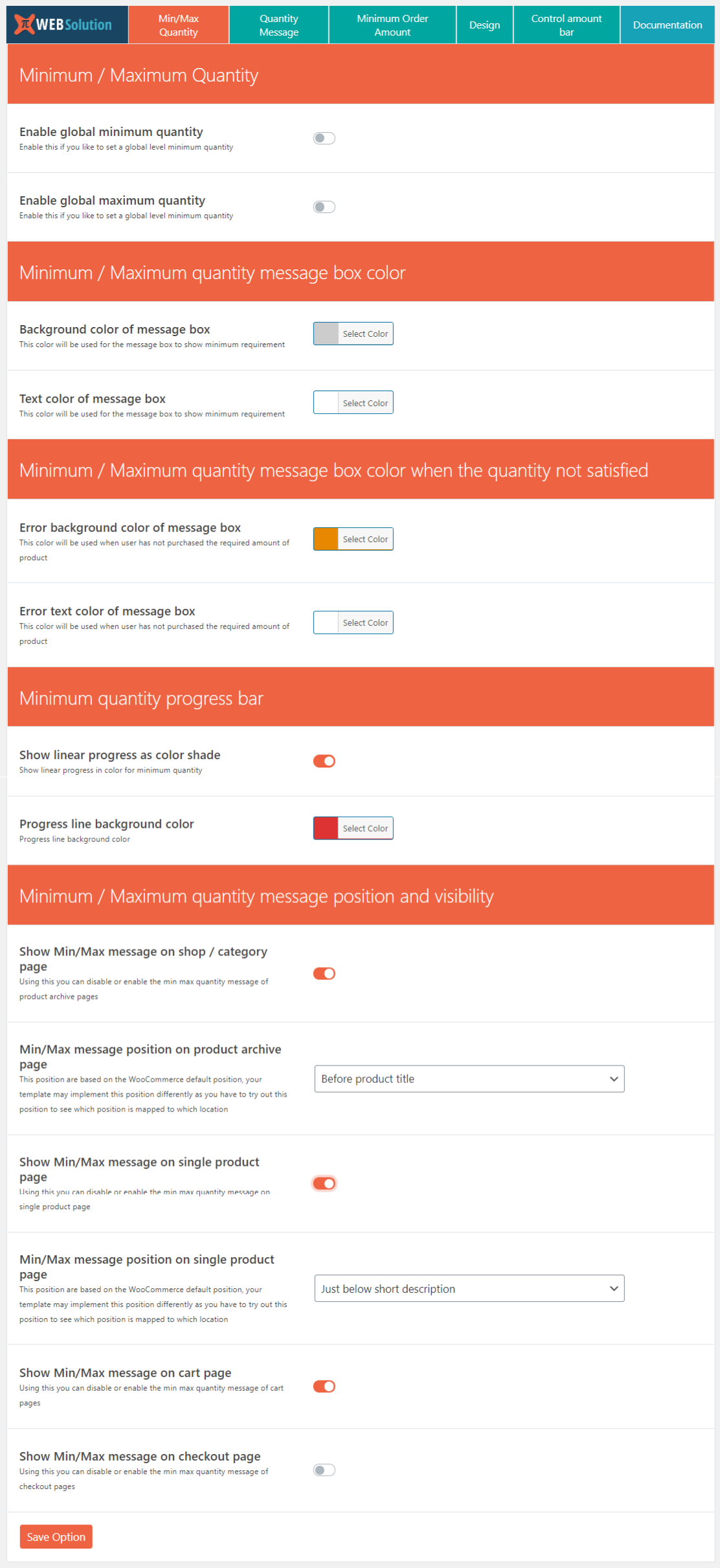
Minimum Quantity restriction configuration page

Configure message to be shown for the Minimum quantity restriction
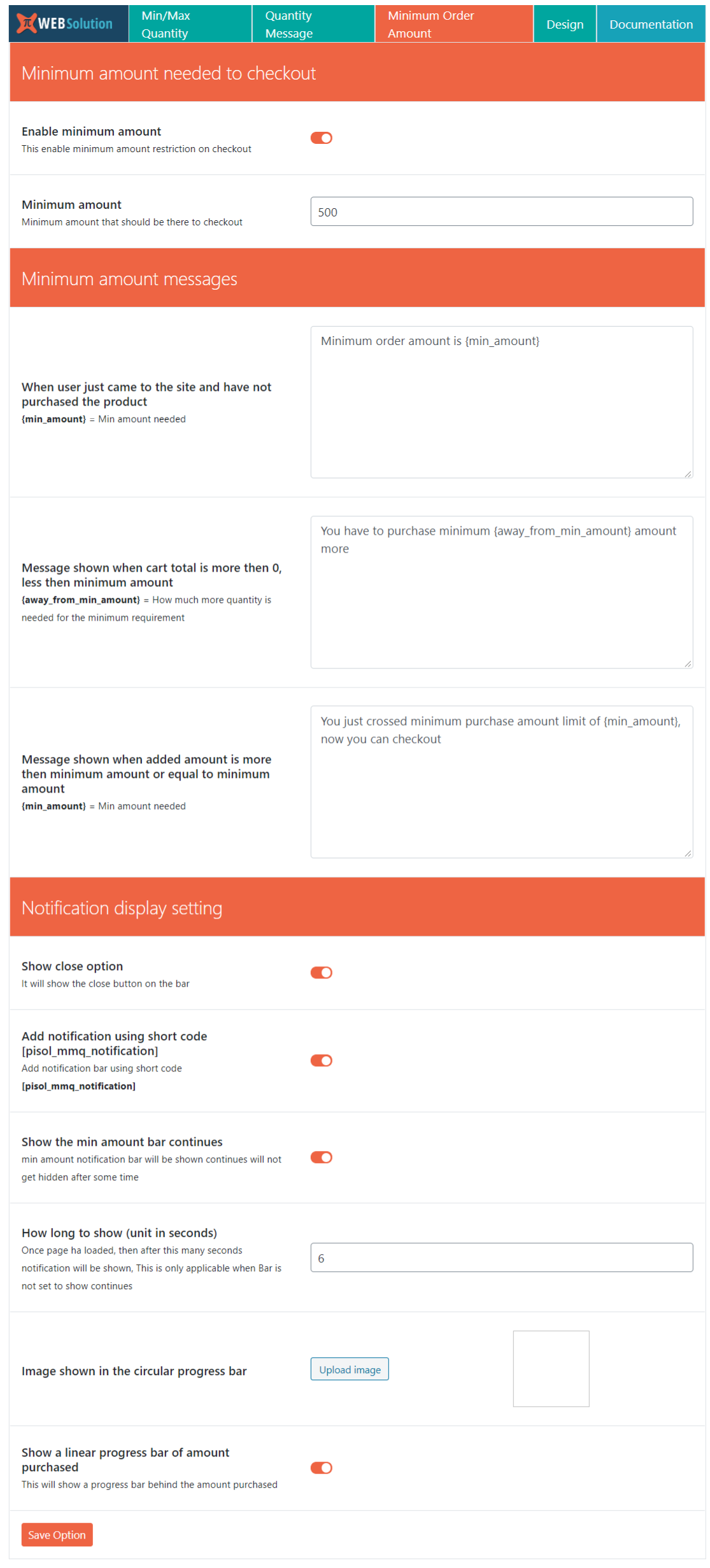
Minimum order amount configuration page

Minimum order amount bar designing option
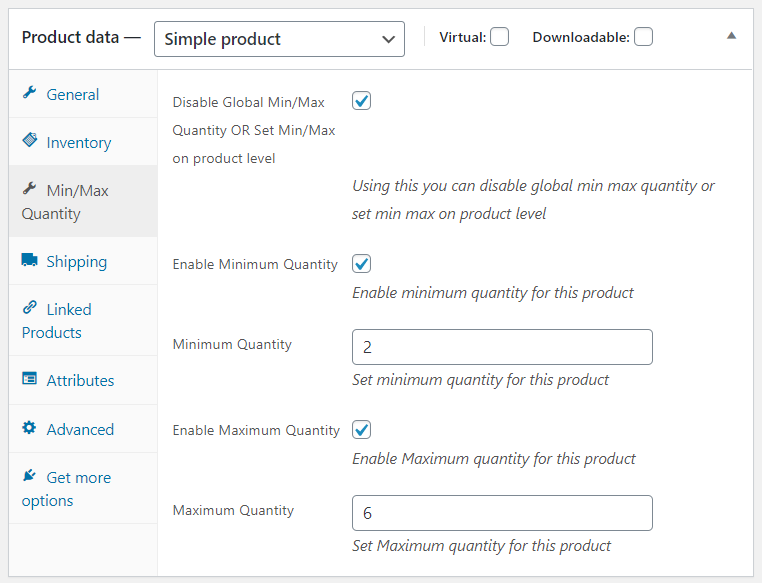
Pro version allows you to configure Minimum quantity for each product and variation separately, you can also configure different quantity multiple for each variation
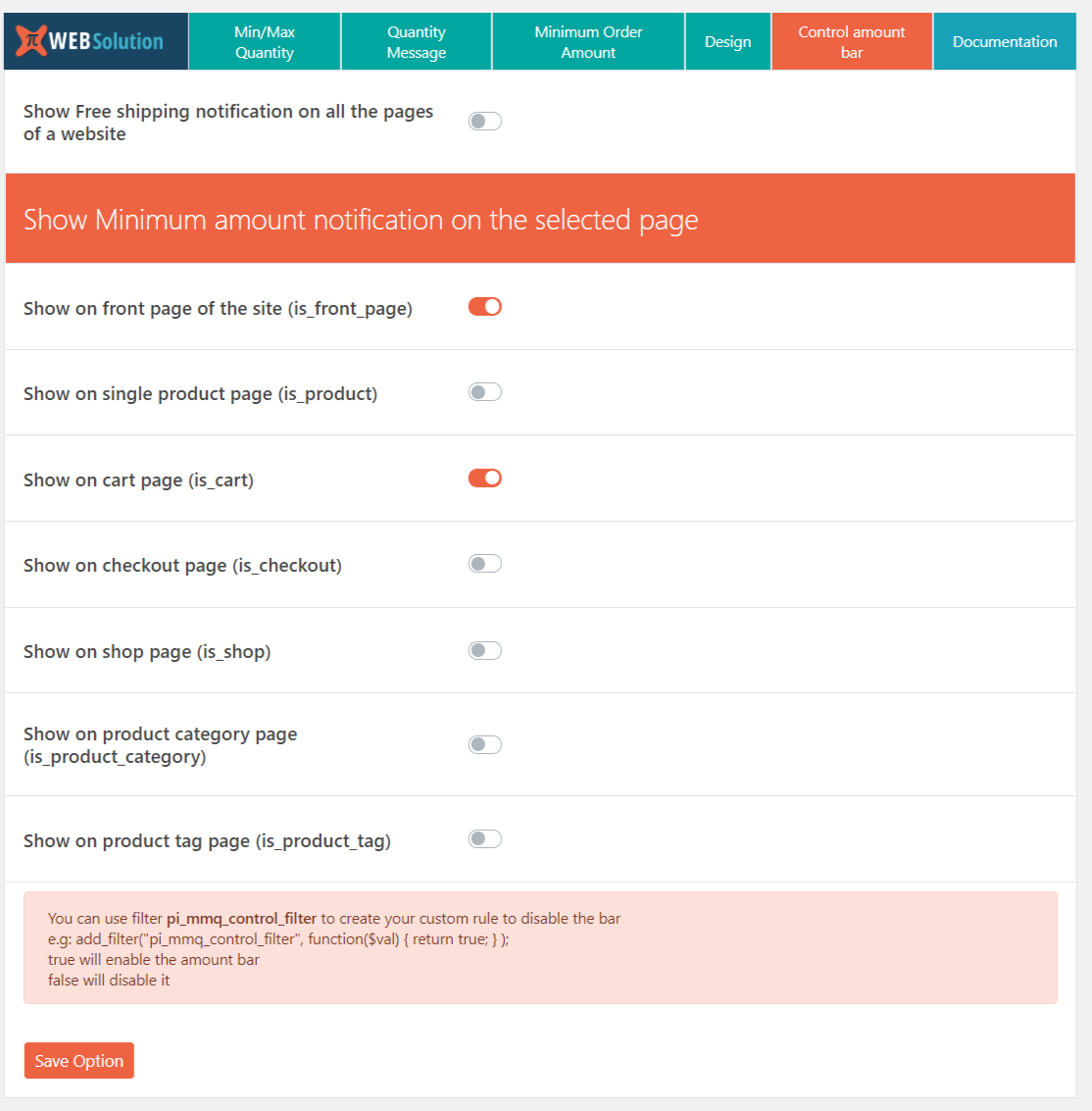
Pro version allows you to control the position of where to show the Minimum order amount progress bar

Pro version allows you to configure Minimum quantity restriction on category level

Pro version allows you to set Minimum amount restriction on category level, so user has to buy minimum that much amount from that category

Product quantity multiple restriction, so user can only buy product in multiple of 2, 3, 4, 5, 6, 7, 8, 9, 10 etc
Faq
Yes, you can set only minimum product quantity on the global level
Yes, you can set maximum product quantity on the global level
Yes, there is an option to exclude products from global min and max quantity
Yes, you can set different messages
It will show the message in the top bar notification
Yes, as the user buys, the message on the top bar updates itself
Yes, in the pro version you can set the color for the message box based on different conditions
Pro version shows a linear progress bar for the minimum quantity required
Yes, you can change the color of the line in the pro version from the backend
Pro version does change the progress message on the archive page with Ajax
Pro version gives you the option to control the page where you want to show the minimum amount restriction
In the Pro version there is a filter available. Using that filter, you can write your custom logic to disable the minimum amount notification bar.
You can use the filter pi_mmq_control_filter to create your custom rule to disable the bar
e.g: add_filter(“pi_mmq_control_filter”, function($val) { return true; } );
true will enable the amount bar
false will disable it
You can do that in the pro version. You can disable it for product archive pages and only enable it for the single product page
Yes, you can set it from the category, and all the products within that category will inherit the min/max quantity limit from the parent category
Yes, you can select the products that you don’t want to inherit the limit set in the category. Or if you want, you can directly add a different min/max quantity limit for those products from the respective product
You can set minimum quantity restriction on the category level in the pro version, so the customer has to buy 3 units. These 3 units can be from one single product or 1 unit each from 3 different products of the same category
In the pro version, the checkout page will redirect the user to the cart page when the min quantity restriction or min amount restriction is not fulfilled
Yes, you can add that using the pro version
Yes, you can do that in the pro version. It allows you to exclude certain products from category level restriction
Yes, you can do that in the pro version. It has the option so you can apply the rule on subcategory products as well. When this option is enabled, it will apply the min amount restriction on the products that belong to its child categories
Yes, you can do that in the Pro version. It allows you to set this restriction on a product, then the user will only be able to order this product in multiples of 2 only
In the free version you can only exclude a maximum of 2 products, in the Pro version you can exclude unlimited products
Yes, you can do that in the pro version. E.g: Category A: you have set quantity to be in multiples of 3 units. When the user adds 2 units of product xA, he won’t be allowed to checkout as it is not a multiple of 3. Now if he adds 1 unit of yA product in the cart, then his total quantity from Cat A equals 3 units, which is a multiple of 3, so he can checkout
You can do that in the PRO version. It allows you to set different min quantity for each variation
You can do that in the PRO version. It allows you to set different max quantity for each variation
You can do that in the PRO version. It allows you to set different quantity multiples for each variation
Yes, the Free version and PRO version both are HPOS compatible
Reviews
Free version doesn't work
By 
Free version features don't work. I'll not be paying for the pro one as I don't feel confident in the creator's ability.
I loved it
By 
best app that do exactly what it claims also the support is amazing, they helped me a lot!
Great Plugin
By 
Not useful for free version
By 
Most flexible plugin for purchase restrictions
By 
Great Support
By 
it works
By 
Solid and very useful
By 
Nice plugin does what it needs to do out of the box!
By 
Excelent !
By 