Plain Custom Login

Plain Custom Login
Description
Nothing fancy, just changes the login screen to reflect your site colours.
Installation
- Upload the plugin files to the /wp-content/plugins/plain-custom-login/ directory, or install the plugin through the WordPress plugins screen directly.
- Activate the plugin through the ‘Plugins’ screen in WordPress
- Use the Settings -> Plain Custom Login screen to set the required colours.
Screenshots
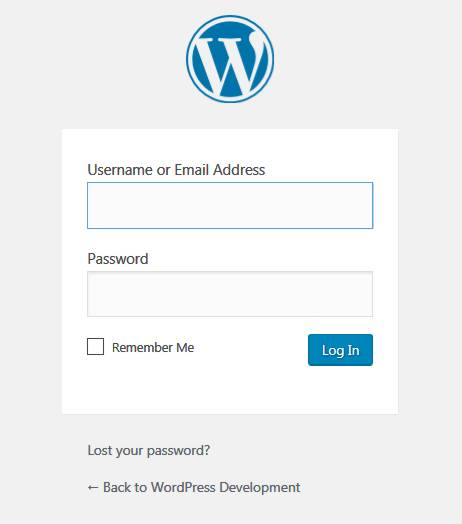
Before...
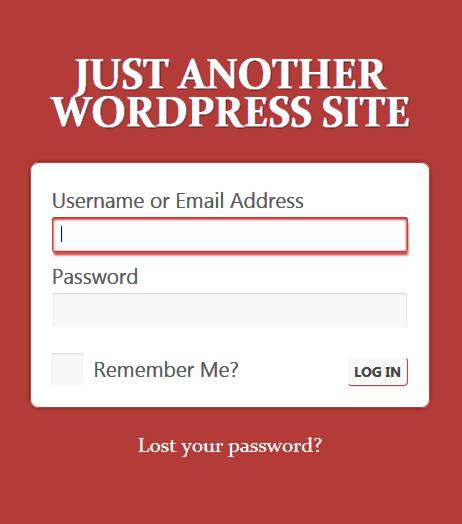
...and after
Reviews
Changelog
0.23.2
- Bugfix: was using deprecated way of getting the login title text
- Added CSS for the new admin email checks
- Slightly more targetted removal of default WP CSS
- Added CSS for the hide/show password icon
- Tested with 5.3
0.23.1
- Bugfix: was using deprecated way of calling the settings page
0.23
- Bugfix: display defaults if you delete the plugin options while the plugin is active
0.22
- Tested with 5.2.1
0.21
- Tested with 4.5
0.2
- Bugfix: added fallback CSS for when the modal popup can’t load the iframe
0.1
- Internal alpha