Pluggix AltGen AI

Pluggix AltGen AI
Description
Pluggix AltGen AI automatically generates ALT text, captions and descriptions for images using AI. The plugin processes images on upload and also offers bulk generation for existing libraries, helping accessibility and SEO. AI generation is performed by the external Pluggix service (server-side), not locally inside WordPress.
Key features:
* Automatic generation on upload.
* Bulk generation with background queue.
* Dashboard with site status and progress.
* Batch cleanup of ALT, caption and description.
* External service account authentication via JWT token.
* Upload batching with debounce to avoid missed images.
* Upload progress with ETA in the dashboard.
* Separate progress tracking for upload vs. bulk.
* Queue reliability improvements with retry on timeouts.
* Automatic connect flow highlighted and manual connect behind a toggle.
External services
This plugin uses external services to generate image text and validate account status. The core generation runs on external servers and depends on service availability for the connected account.
1) Pluggix API (https://alt.cupcode.com.br)
– Purpose: generate ALT/caption/description and validate connected account status.
– Data sent: site host (site_id), request identifier, generation options, and image content (base64 or file URL) when generation runs.
– When sent: during upload/bulk generation and status checks from the admin screen.
– Terms: https://pluggixwp.com/termos
– Privacy policy: https://pluggixwp.com/privacidade
2) Pluggix Web App (https://pluggixwp.com)
– Purpose: optional account sign-in and token retrieval in the plugin connect flow.
– Data sent: authentication/session data handled on the Pluggix site when the user opens the connect/login popup.
– When sent: only when the admin clicks the connect/login button from the plugin settings.
– Terms: https://pluggixwp.com/termos
– Privacy policy: https://pluggixwp.com/privacidade
3) Google Gemini API (https://generativelanguage.googleapis.com)
– Purpose: optional connection test for Gemini API key from plugin settings.
– Data sent: model id, a short test prompt, and the API key in the request header/query.
– When sent: only when the admin clicks “Test API”.
– Terms: https://policies.google.com/terms
– Privacy policy: https://policies.google.com/privacy
4) OpenAI API (https://api.openai.com)
– Purpose: optional connection test for OpenAI API key from plugin settings.
– Data sent: model id, a short test prompt, and the API key in the Authorization header.
– When sent: only when the admin clicks “Test API”.
– Terms: https://openai.com/policies/terms-of-use
– Privacy policy: https://openai.com/policies/privacy-policy
Installation
- Upload the
pluggix-altgen-aifolder towp-content/plugins/. - Activate the plugin from the Plugins menu in WordPress.
- Open the
Pluggix AltGen AImenu in the admin. - Paste your JWT token and save.
Screenshots

Main screen with configuration and status.
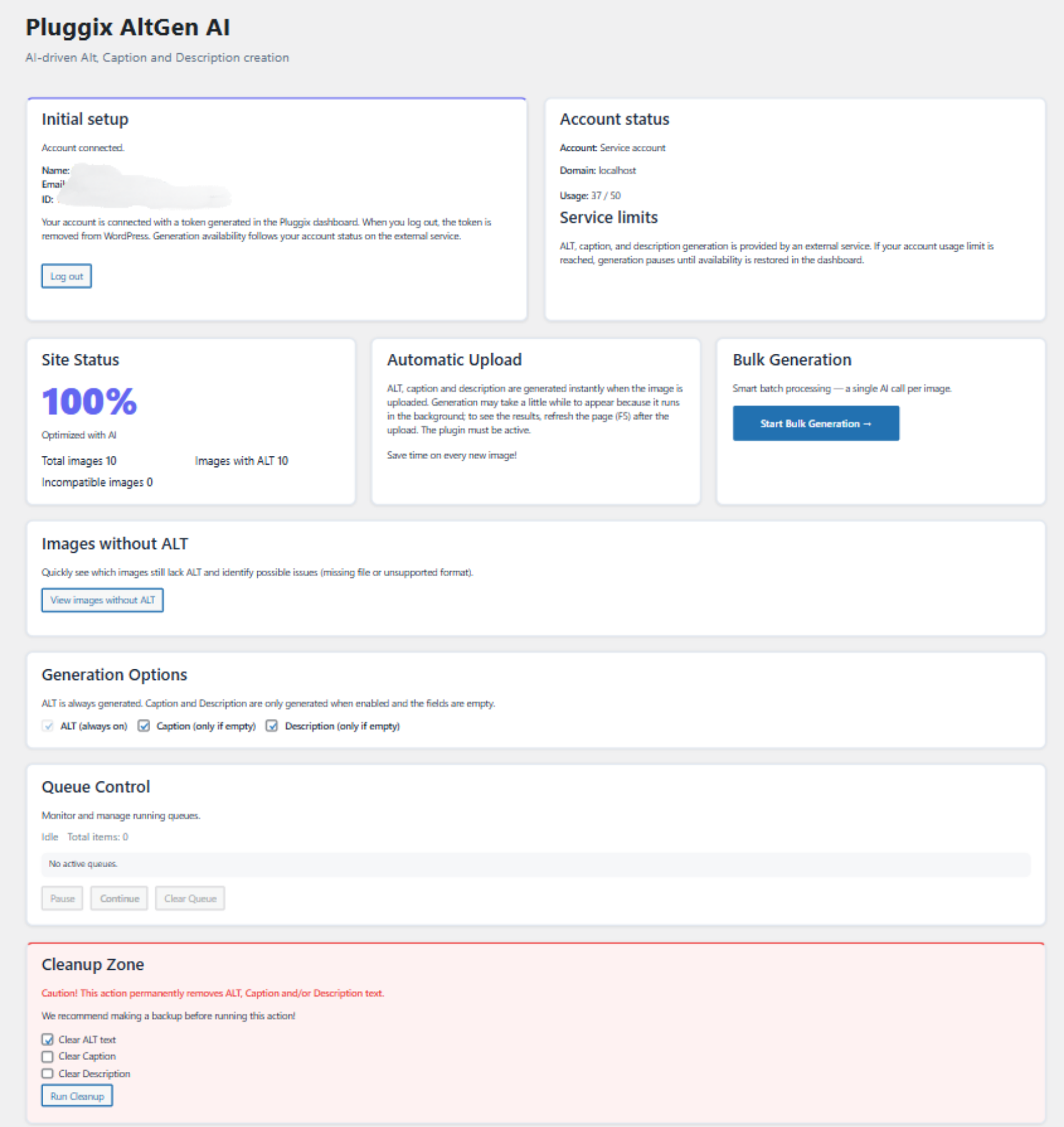
Bulk generation and progress.
Faq
No. A valid token is required because generation is provided by an external service account.
Yes. The plugin only fills empty fields and you can adjust behavior in the dashboard.
No. Bulk generation runs in the background with a queue.
JPEG, PNG, WEBP, HEIC and HEIF.
Reviews
Changelog
1.2.4
- Fixed bundled translation loading so English and Portuguese catalogs are applied consistently in plugins installed from the WordPress.org library.
- Improved localization reliability for sites using English in the WordPress admin.
1.2.3
- Fixed incomplete
en_UStranslations that caused mixed Portuguese and English text in the admin UI. - Improved English fallback text in admin JavaScript messages for queue, connection, and missing ALT states.
- Fixed translation loading so bundled
en_USandpt_BRcatalogs are applied consistently in plugins installed from the WordPress.org library.
1.2.2
- Added Settings action link in the Plugins list.
- Improved admin UI language consistency for pt_BR.
- Fixed i18n text-domain argument issues flagged by Plugin Check.
1.2.0
- Removed direct cURL usage and migrated parallel requests to the WordPress HTTP API (Requests::request_multiple) for Plugin Check compliance.
- Enforced API timeouts via http_request_args filter.
- Line endings normalized to LF.
1.1.1
- Queue control (pause/resume/clear) with automatic pause reset when no jobs remain.
- Automatically clears the queue when the external account usage limit is reached.
- Generation options: ALT is always generated; caption/description are optional and only generated when empty.
- Warning before starting bulk generation if an upload batch is pending.
- Automatically clears the upload batch queue when starting bulk generation.
1.1
- Added upload batching with debounce to avoid missed images.
- Added upload progress with ETA in the dashboard.
- Split progress tracking for upload vs. bulk.
- Improved queue reliability with retry on timeouts.
- UI: manual connect moved behind a toggle and automatic connect highlighted.
1.0
- Initial release.