Podigee for WordPress: Podcast Episodes to Blog Posts
Podigee for WordPress: Podcast Episodes to Blog Posts
Description
Your podcast lives on Podigee. Your website runs on WordPress. This plugin connects the two, so every new episode can become a blog post on your own site in a few seconds, without copying show notes or embed codes by hand.
The plugin lists all episodes from your Podigee podcasts on one page in your WordPress admin. Pick one episode, or many at once, and the plugin creates a draft post for each: the episode title, the subtitle, the full show notes and the Podigee Podcast Player. You review the draft and publish when you are ready.
Who it is for
- Business podcasters and solo creators who use their podcast to win clients, build an audience or sell courses, and want every episode on their own website for search and for their newsletter.
- Marketing teams that run a company podcast and need each episode on the corporate blog quickly, in a consistent format, without a developer.
- Studios, agencies and networks that look after several shows and publish episode pages on the websites of their clients.
What you get
- One-click episode posts. Turn any episode into a WordPress draft with title, subtitle, show notes and player.
- Bulk import. Select several episodes and create all drafts in one go, for example after importing a back catalogue.
- The Podigee Podcast Player on every post. The
[podigee-player]shortcode is added for you. Listeners play the episode, subscribe and share it without leaving your site. - Several podcasts in one place. Connect more than one Podigee podcast, by subdomain or by your own custom domain.
- Shortcodes on demand. Copy the player shortcode of any episode and paste it into any page or post.
- Drafts, not surprises. Nothing is published automatically. You stay in control of every post.
- Block editor and classic editor. Drafts work in both.
How it works
- Install and activate the plugin.
- In WordPress, open the Podigee page in the admin menu. Enter your podcast’s Podigee subdomain (or your custom feed URL) and your plugin token.
- Choose an episode and click turn into post, or select several and use New posts from episodes.
- Edit the draft if you like, then publish.
Requirements
You need a Podigee account. The plugin is included in all current Podigee plans, including the free Launch plan. Some older plans need an upgrade. See Podigee pricing.
New to Podigee? Podigee is podcast hosting from Germany for audio and video podcasts, with analytics, distribution to Spotify, Apple Podcasts and YouTube, and a podcast player for your website. Start for free.
Only need the player on a page, without importing episodes? Use our free Podigee Player Shortcode plugin.
External services
This plugin connects to services run by Podigee GmbH:
- Plugin authorization. When you open the plugin page or save its settings, the plugin sends your podcast subdomain or custom feed URL and your plugin token to
https://app.podigee.io/apps/wordpress-quick-publish/authorizeto confirm that the podcast belongs to your Podigee account. No visitor data is sent. - Your podcast feeds. The plugin loads the public RSS feeds of your podcasts (
https://<subdomain>.podigee.io/feed/mp3or the custom feed URLs you enter) to list your episodes. - The Podigee Podcast Player. Posts that contain the
[podigee-player]shortcode load the player fromhttps://player.podigee-cdn.netwhen a visitor views the post.
Podigee’s privacy policy and imprint apply.
Installation
- In WordPress, go to Plugins > Add New Plugin, search for “Podigee” and install Podigee for WordPress. Activate it.
- In Podigee, go to Account > Data & integrations > Connected apps and copy the plugin token shown under Podigee for WordPress.
- In WordPress, open the Podigee page in the admin menu, enter your podcast’s Podigee subdomain (for
https://mypodcast.podigee.ioentermypodcast) and paste the plugin token. If your podcast uses its own domain, enter its feed URL under Custom feed URL. - Save. Your episodes appear on the same page.
Screenshots
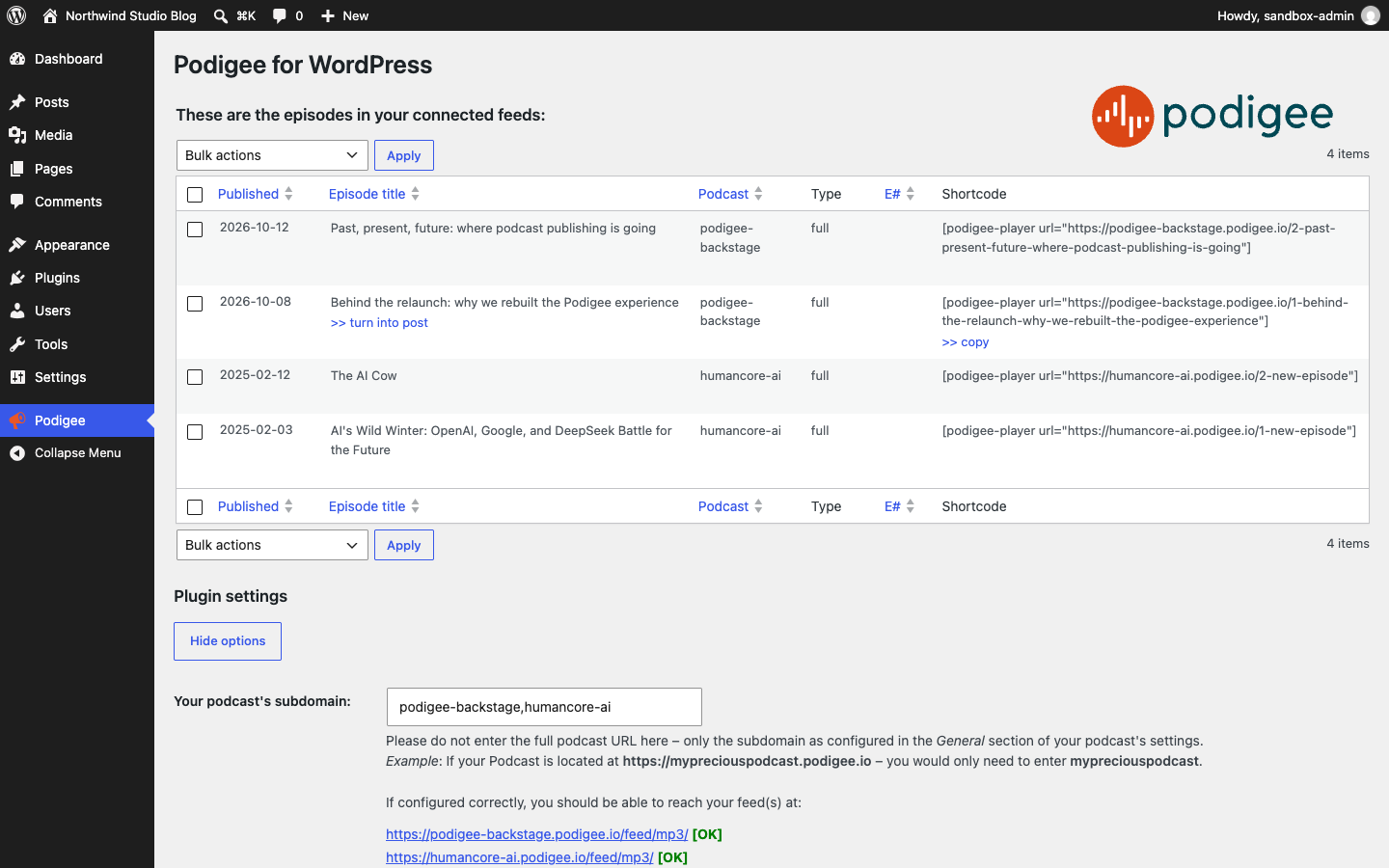
All episodes from your connected Podigee podcasts on one page in WordPress, with one-click and bulk import.

The drafts are ready: preview or edit each new post.
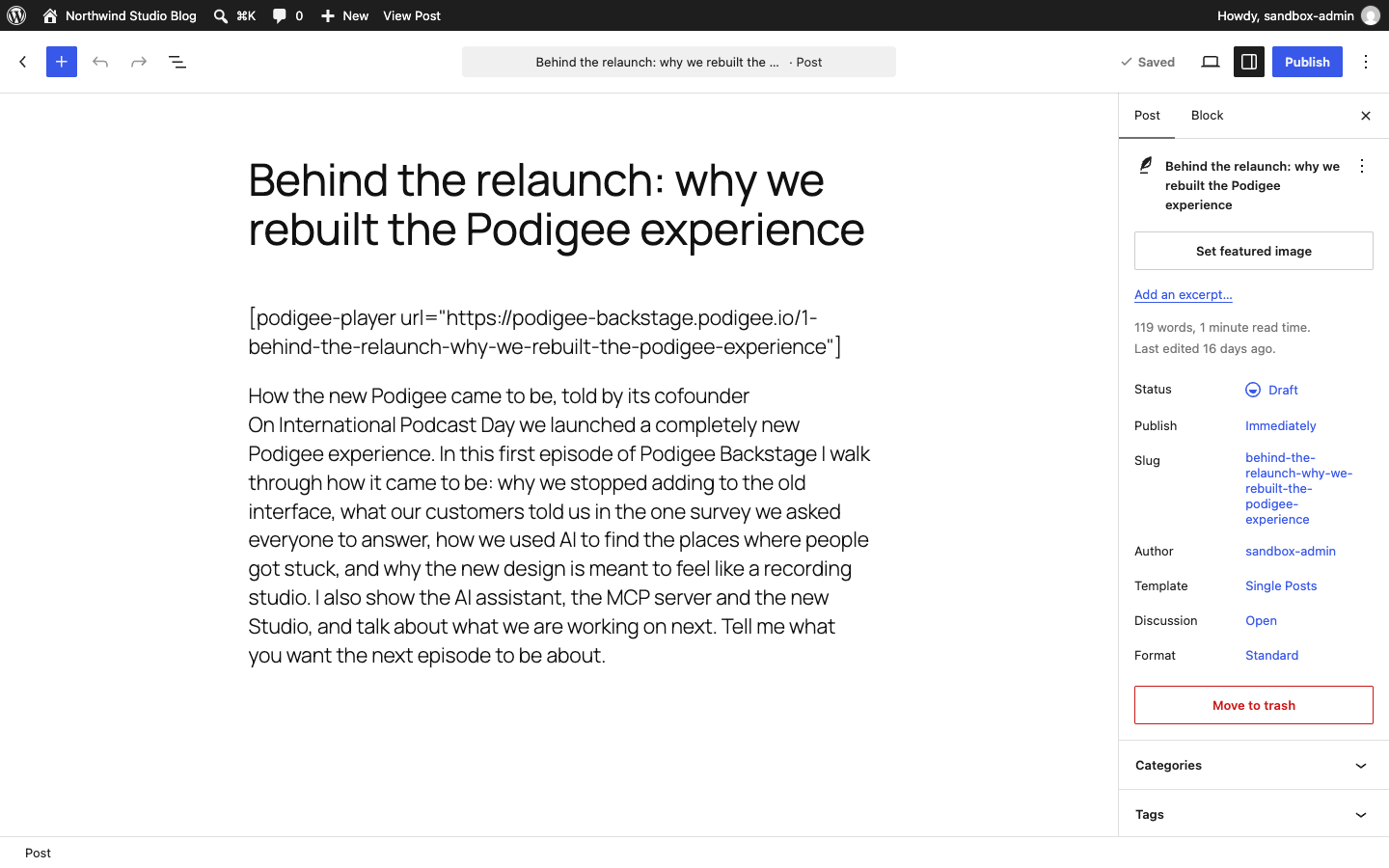
An imported draft in the block editor: title, subtitle, show notes and the player shortcode.
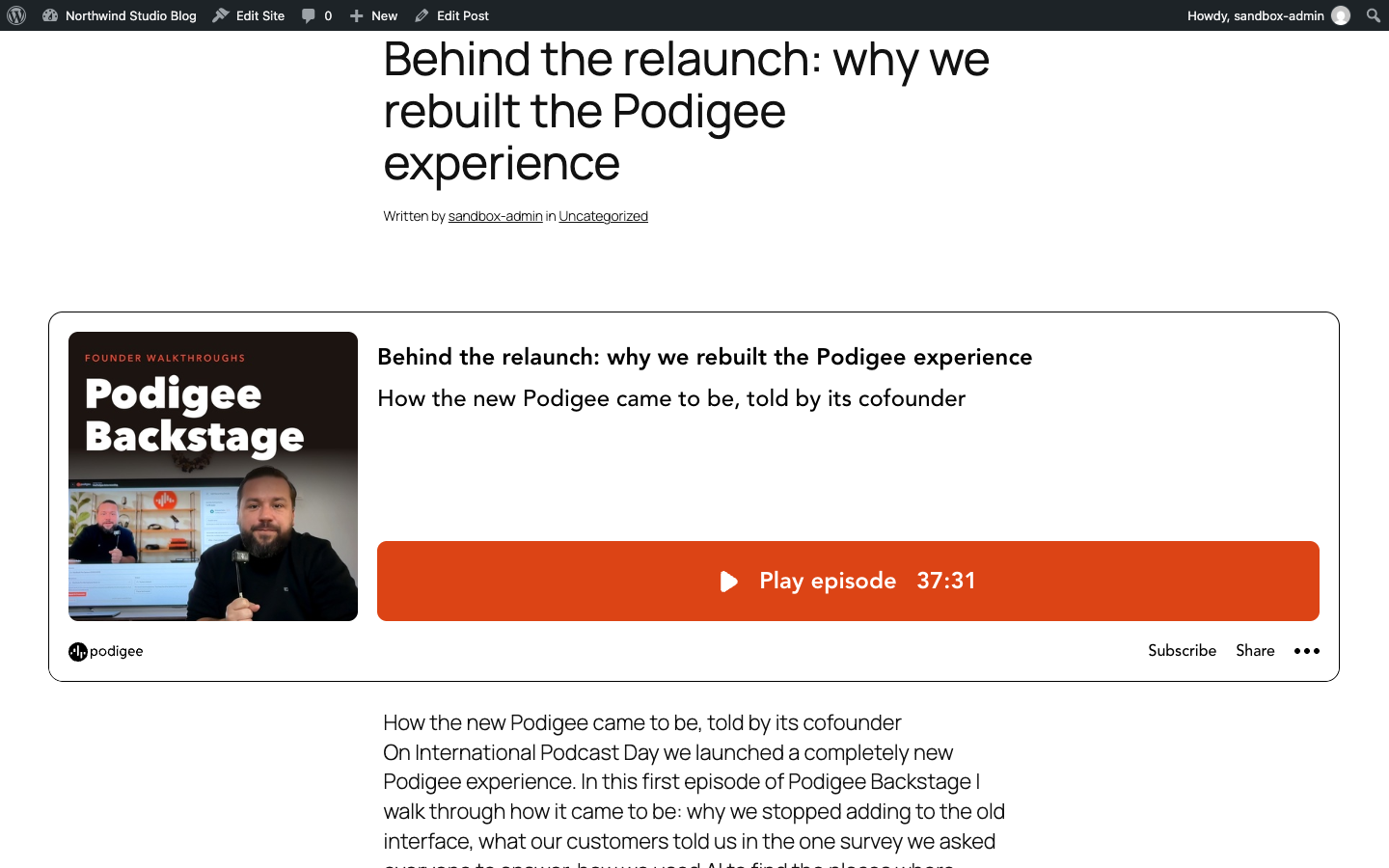
The published post with the Podigee Podcast Player.
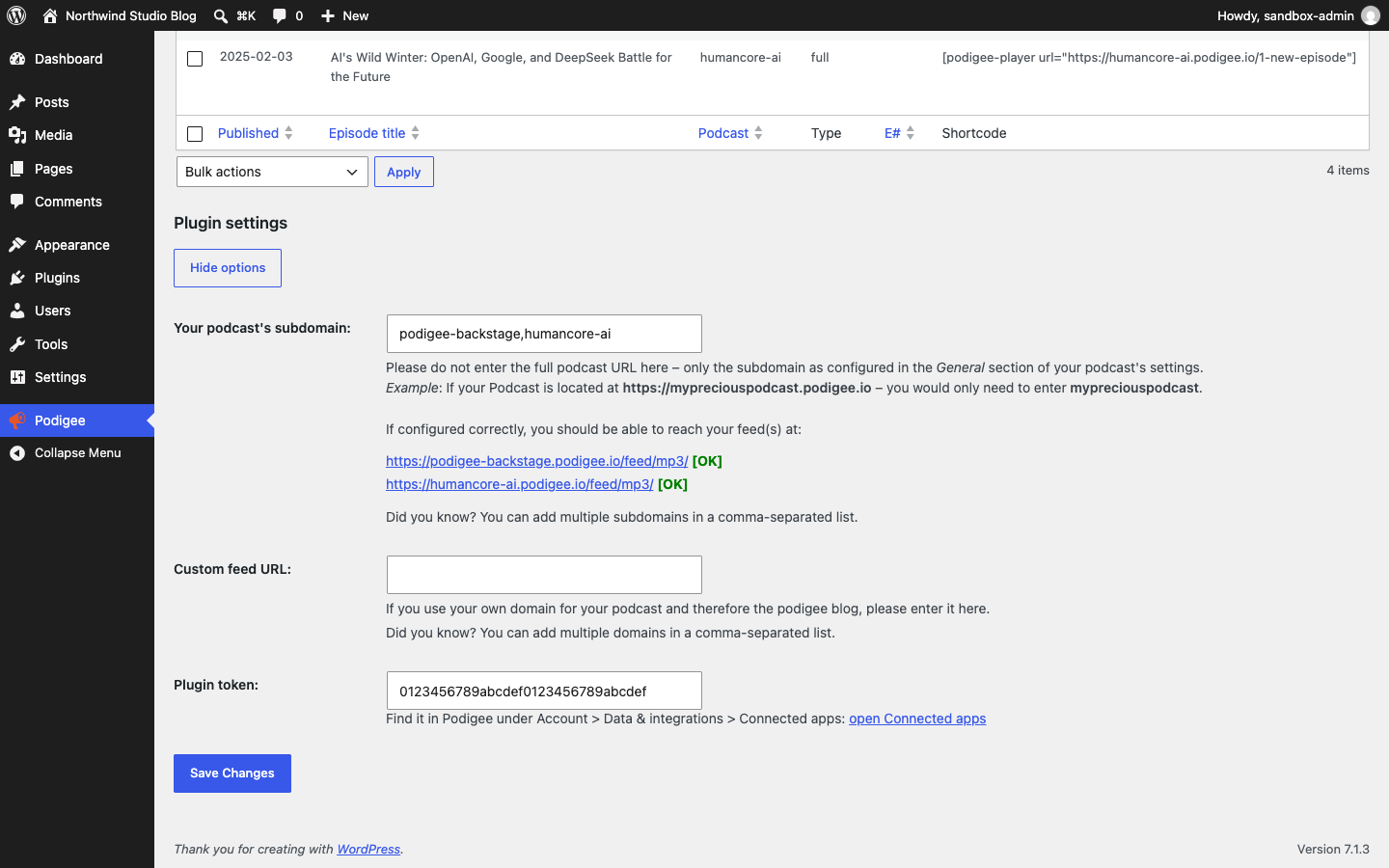
Settings: your Podigee subdomain, custom feed URLs and plugin token.
Faq
All current Podigee plans, including the free Launch plan. If the plugin page says your podcast is not authorized, check your plan on the pricing page or contact Podigee support.
In Podigee, under Account > Data & integrations > Connected apps, in the Podigee for WordPress section.
No. It creates drafts. You decide when to publish each post.
Yes. Select the episodes in the list, choose New posts from episodes and click Apply. You get a list of the new drafts with links to preview and edit each one.
Yes. Enter several subdomains separated by commas. For podcasts on their own domain, enter several feed URLs separated by commas.
Yes. Enter the full feed URL of the podcast under Custom feed URL, for example https://podcast.example.com/feed/mp3.
You can copy the player shortcode of any episode from the list. If you only ever need the player, the Podigee Player Shortcode plugin is smaller.
The draft keeps the episode’s release date, but WordPress sets the publish date when you publish a draft. To keep the episode date, open the publish date in the editor and select the date that is already set before you click Publish. Changing the date of a published post can change its URL, depending on your permalink settings.
Your subdomains, custom feed URLs and plugin token in the option pfex_plugin_options, and the installed plugin version in pfex_version. After an import it keeps a short-lived transient (one minute) for the success message.
Reviews
Works but...
By 
Well where do I start?
It works, yes. (5 Stars)
But:
It says "now with Gutenberg support", well no, not really. It either copies a shortcode into your clipboard, which you need to copy into a shortcode block. Or it creates a new post, which is a classic editor block.
So, it kind of works with Gutenberg, but calling it "Gutenberg Support" is exgagurated. (-1 Star)
Next, if you are a paying customer in the business tier for at least 65€/month, and you are using a custom subdomain, which likely is one of the reasons you're paying a 40€ premium per month. The plugin will not work. (-1 Star) (*)
If you contact the Podigee Support (as paying customer) you'll get the response, it's known not to work with custom domains (which, just to remind us, we paid a lot of money to get in the first place). (-1 Star)
Now, my company has a custom domain, I had the choice of accepting this, or try to fix it.
     curl_setopt($ch, CURLOPT_URL, $Url);
     curl_setopt($ch, CURLOPT_RETURNTRANSFER, true);
+	curl_setopt($ch, CURLOPT_FOLLOWLOCATION, true);
     $output = curl_exec($ch);
     curl_close($ch);
By adding the marked line in the podigee-quick-publish.php, the plugin works with custom domains.
I've sent this patch, among some minor fixes for broken code, to podigee at the 16th March 2023 and well... obviously no update, otherwise I wouldn't be writing this, and worst of all, not even a reply.
This deducts the next star, leaving us at 1 Star.
TLDR: If you are not using a custom domain, or if you are willing to add my patch above, the plugin is ok, and would rather get 3-4 stars at the current state. My biggest complaint is, that Podigee ignores a paying business tier customer and ignores a sent in patch file.
@Podigee: I'm more than happy updating my review, once you update the plugin.
*) EDIT May 2024: Custom Domains are supported roughly 8 Months after I've done my initial review and roughly 10 Months after I've sent them my initial email. Since I can't test it anymore the following update is untested and unverified. But I'll revoke the -1 Star for not working custom subdomain, but I'm still behind the other deductions, leaving us with an updated 2/5 Stars.
Great, but still requires manual work
By 
Changelog
1.4.2
- The plugin is now called Podigee for WordPress in your admin.
- Removed the outdated welcome card and its setting, and the empty “Podigee Quick Publish” box in the post editor.
- The plugin token help now links to its new place in Podigee: Account > Data & integrations > Connected apps.
1.4.1
- Security: importing episodes now requires a logged-in user with permission and a valid nonce (CVE-2026-39695).
- Security: feeds are fetched with the WordPress HTTP API and only from the subdomains and feed URLs saved in the plugin settings.
- Security: admin output built from feed, settings and request data is escaped; imported show notes are sanitized; PHP sessions and the debug log file are removed.
- Fix: custom-domain feeds that redirect now import.
- Tested with WordPress 7.1.
1.4.0
- Custom domain support
1.3.5
- Changed web-player asset address to player.podigee-cdn.net
1.3.1
- Changed the required PHP version to 7.3 in the readme. Note: Within the 1.3 release of this plugin we used syntax from a newer PHP Version, what lead to errors when using the version with a PHP version less than 7. The affected code has been made backwards compatible to work with older versions of PHP.
1.3
- Fixed seasons support for shortcode generation
- Improved handling for configuration edge cases
- Reactivated success notice with quick links to blog post or preview
1.2
- Fixed session handling errors with newer versions of WordPress
- Fixed publishing of episodes without episode numbers in the feed
- Fixed Podigee image location
- Fixed shown warnings on the configuration page
1.1
- Fixed rare error where plugin would only read the first line of a podcast feed
1.0
- Added backend menu item
- Changed method how podcast content turns into wordpress content
- Gutenberg “compatibility”
- Prepared plugin for translation with translate.wordpress.org
- Added German translation
0.7
- Added support for multiple subdomains
0.6.4
- Bug fix to allow hyphens in subdomain
0.6.3
- General bug fix
0.6.2
- Minor change in the licensing description
0.6.1
- Minor fix for relasing plugin to WordPress.org
0.6
- First public beta, yay!
- Options menu added
- Auth token verification added
0.5
- First private beta, yay!