Polylang

Polylang
Description
With Polylang fully integrated to WordPress and using only its built-in core features (taxonomies), keep steady performances on your site and create a multilingual site featuring from just one extra language to 10 or more depending on your needs. There is no limit in the number of languages added and WordPress’ language packs are automatically downloaded when ready.
Features
Depending on the type of site you have built or are planning to build, a combination of plugins from the list below might be of interest.
All plugins include a wizard allowing to setup them in just a few clicks.
Polylang
Polylang and Polylang Pro share the same core providing features such as:
- Translating posts, pages, media, categories, post tags, custom post types and taxonomies, RSS feeds; RTL scripts are supported.
- The language is either set by the language code in URL, or you can use a different sub-domain or domain per language.
- Automatic copy of categories, post tags and other metas when creating a new post or page translation.
- Translating classic menus and classic widgets. Also accessible with Site Editor Classic Features in block themes.
- Customizable language switcher available as a classic widget or a classic navigation menu item.
- Compatibility with Yoast SEO.
Polylang Pro
Helps optimizing the time spent translating your site with some very useful extra features such as:
- Better integration in the new Block Editor.
- Language switcher available as a block.
- Language options available in the widget block editor.
- Template parts translatable in the site editor (FSE).
- Duplicate and/or synchronize content across post translations.
- Improved compatibility with other plugins such as ACF Pro.
- Share the same URL slug for posts or terms across languages.
- Translate URL slugs for categories, author bases, custom post types and more…
- Machine translation with DeepL.
- Export and import of content in XLIFF format for outsourced professional translation.
- Access to a Premium Support for personalized assistance.
Polylang for WooCommerce
Add-on for the compatibility with WooCommerce which provides features such as:
- Translating WooCommerce pages (shop, check-out, cart, my account), product categories and global attribute terms directly in the WooCommerce interface.
- Translating WooCommerce e-mails and sending them to customers in their language.
- Products metadata synchronization.
- Compatibility with the native WooCommerce CSV import & export tool.
- Compatibility with popular plugins such as WooCommerce Subscriptions, Product Bundles, WooCommerce Bookings, Shipment Tracking and more.
- Ability to use the WooCommerce REST API (available with Polylang Pro).
- Access to a Premium Support for personalized assistance.
Our other free plugins
- WPML to Polylang allows migrating from WPML to Polylang.
- Site Editor Classic Features allows to use classic widgets (including the Polylang language switcher) and menus in the site editor (FSE).
Credits
Thanks a lot to all translators who help translating Polylang.
Thanks a lot to Alex Lopez for the design of the logo.
Most of the flags included with Polylang are coming from famfamfam and are public domain.
Wherever third party code has been used, credit has been given in the code’s comments.
Installation
- Make sure you are using WordPress 6.2 or later and that your server is running PHP 7.2 or later (same requirement as WordPress itself).
- If you tried other multilingual plugins, deactivate them before activating Polylang, otherwise, you may get unexpected results!
- Install and activate the plugin as usual from the ‘Plugins’ menu in WordPress.
- The setup wizard is automatically launched to help you get started more easily with Polylang by configuring the main features.
Screenshots

The Polylang languages admin panel
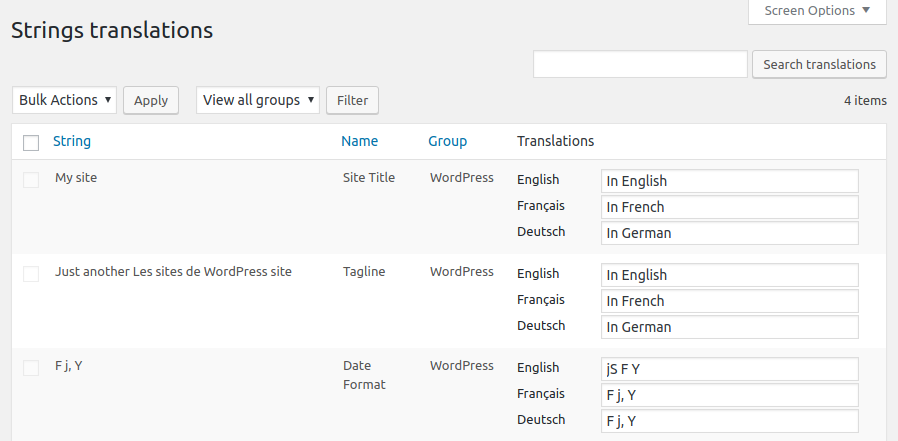
The Strings translations admin panel
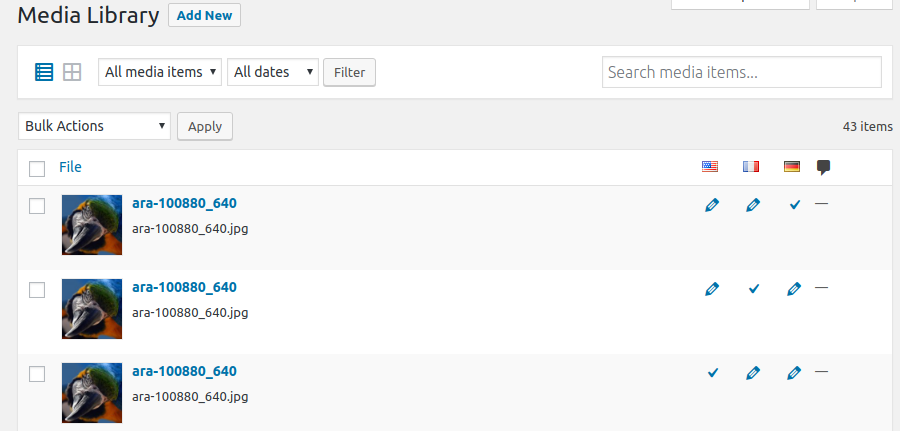
Multilingual media library
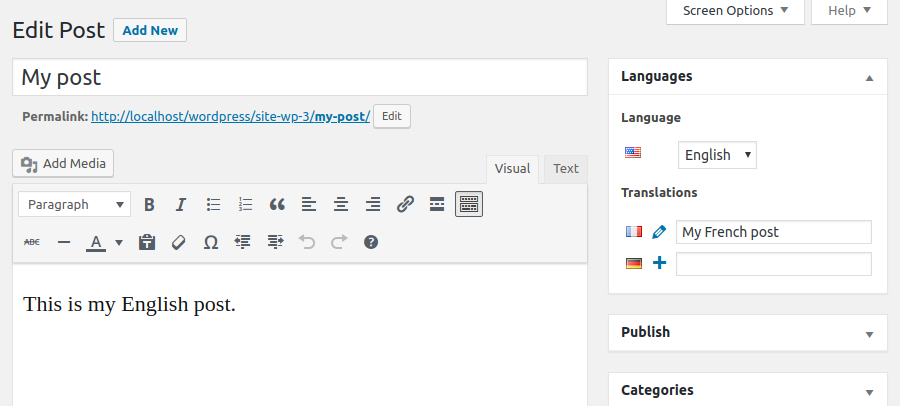
The Edit Post screen with the Languages metabox
Faq
- First time users should read Polylang – Getting started, which explains the basics and includes a lot of screenshots.
- Read the documentation. It includes a FAQ and the documentation for developers.
- Search the community support forum. You will probably find your answers here.
- Read the sticky posts in the community support forum.
- If you still have a problem, open a new thread in the community support forum.
- Polylang Pro and Polylang for WooCommerce users have access to our premium support through helpdesk.
- You need Polylang for WooCommerce, premium addon described above, which will make both plugins work together.
- Please report security bugs found in the source code of the Polylang plugin through the Patchstack Vulnerability Disclosure Program. The Patchstack team will assist you with verification, CVE assignment, and notify the developers of this plugin.
Reviews
Work Correct
By 
Thank you very much your work developers. I am very grateful for your wok and for your helpful plugin <3.
Very good
By 
I recommend for everyone who want to broaden your blog's reach
Very good plugin
By 
It is truly multilingual.
Funziona abbastanza bene
By 
Funziona abbastanza bene, basta impare ad usarlo; qualche volta si fatica a trovare le Stringhe; non è supportato da Extra Product Options che consiglia WPML, comunque tutti e due hanno lati positivi e negativi, dipende dal risultato che si vuole ottenere ...
SO happy about this plugin
By 
Great plugin, with very easy customizations to show your website in several languages. The options of how it shows the available languages on the main menu are perfect.
Does the job, and then some
By 
Been using this for well over a decade now. Its a well built plugin, that has the functionality needed for a multilanguage site. When I had to rebuild the site, I was looking around for alternatives, but noone comes close.
a perfect plugin
By 
I enjoy using it.
The only thing missing is easy use with shortcodes.
Good plug-in
By 
I have been using this for a long time, and it works great.
OK plugin, poor support on Pro plan
By 
The plugin itself is good enough until WordPress finally adds multilang features to core. Echoing what some have mentioned here... note that on the Pro plan, we find that Polylang's support team are can be relatively poor at technical analysis of bugs and don't appear to be able to follow your repros at all. Instead they provide less detailed "repro" videos that follow a completely different approach and say it works fine on their end. Really some of the worst technical support I have experienced.
Not worth installing
By 
This plugin is not worth installing, it's missing basic functions - you can't use it to translate websites built with default theme (or any other FSE theme) and native tools (gutenberg).
Changelog
3.7.8 (2026-02-23)
- Pro: Add ‘pll_create_post_translation’ filter #2890
- Pro: Fix ACF’s layout fields instructions #2889
3.7.7 (2026-01-26)
- Pro: Add DeepL support for 70 new languages. #1793 #2871
- Fix advanced menu properties not displayed in customizer. Props Viktor Szépe. #1722
- Fix incorrect slug when changing the language of a term. #1790
3.7.6 (2026-01-06)
- Pro: Add support for WP 6.9 new blocks #2790
- Pro: Fix insertion of navigation language switcher block in WP 6.9 #2847
- Pro: Fix current post URL in site editor for WP 6.8+ #2843
- Pro: Fix a conflict with Sensei LMS #2845
- Fix categories not filtered per post language in quick edit #1785
3.7.5 (2025-11-10)
- Pro: Updated DeepL supported languages list
- Pro: Fix a regression in cross domain login
- Pro: Fix post object field not correctly translated
- Pro: Fix a fatal error in EDD plugin updater when the request to the server fails
- Pro: Fix locale fallback in WP 6.8+
- Pro: Add
pll_enable_acf_labels_translationfilter allowing to disable the translation of ACF labels - Pro: Fix ACF image field not correctly translated when media translation is active
- Pro: Fix ACF image field in repeater not copied
- Pro: Fix ACF ajax request unexpectedly filtered by language when editing a field group
- Pro: Fix ACF blocks not translated when included inside a non-ACF block
- Pro: Add compatibility of the duplicate tool with Divi
- Fix Undefined array key “terms” in canonical.php #1691
- Fix some regressions in the WPML API used by YITH WooCommerce Wishlist #1684
- Fix LinkedIn site title preview with Yoast SEO #1686
- Fix HTML language attribute on login page #1601
- Fix conflict with WP Job Manager Application #1749
3.7.4 (2025-10-28)
- Pro: Security: Fix a ReDoS vulnerability reported by Janine Moreira.
- Security: Fix deserialization of untrusted data reported by Phat RiO – BlueRock via Patchstack.
3.7.3 (2025-06-16)
- Pro: Always display ACF translation settings for field groups formerly translated in versions older than 3.7
- Pro: Fix translation displayed in child fields of ACF layout fields when they should not
- Pro: Fix translation of the ACF field “Choice” when the translation is set to “Copy once” or “Synchronize”
- Pro: Fix a PHP warning when translating some blocks
- Pro: Fix impossibility to change the language of an empty post in the block editor
- Fix duplicate values in options #1672
- Fix JS error in media library (grid view) #1674
- Fix language dropdown not present in the media modal accessible from the media library grid view #1675
- Fix DB error introduce by WooCommerce 9.9 #1681
3.7.2 (2025-05-27)
- Pro: Require ACF 6.0+ to activate the integration to avoid fatal errors with older versions
- Pro: Add a new ACF field group setting to decide if translations instructions must be displayed
- Pro: Fix a fatal error when using ACF blocks with ACF < 6.3.0
- Pro: Fix regression preventing to translate Oembed, URL and Email ACF fields
- Pro: Fix ACF fields not translated when they have a default value
- Pro: Fix empty ACF fields values not copied when the field has a default value
- Pro: Fix ACF field default values not translated when copying a post
- Pro: Fix possible fatal error if invalid types of data are sent for machine translation
- Pro: Fix term meta removed when a term is machine translated
- Fix nav menu locations not saved if invalid data are stored in database #1659
- Fix parent relationship removed when a new translated term is created without parent #1671
3.7.1 (2025-05-05)
- Pro: Do not display ACF fields translations settings when language location is set.
- Pro: Fix ACF taxonomy field terms not synchronized when “Save Terms” and “load terms” settings are activated.
- Pro: Fix duplicate options when using numeric keys for ACF choice fields.
3.7 (2025-04-22)
- Requires PHP 7.2 as minimum version
- Pro: Add DeepL machine translation for strings
- Pro: Consider Polylang Pro as equivalent to Polylang for plugin dependencies
- Pro: Add the details block and several labels in other blocks to XLIFF files and machine translation
- Pro: Allow to translate metas stored as objects
- Pro: Enhanced multilingual support of archive template hierarchy
- Pro: Wrap the language switcher block in a nav tag
- Pro: Support automatic IDs translation in blocks with new filters
pll_sync_block_rules_for_attributesandpll_sync_blocks_xpath_rules - Pro: Complete rewrite of ACF integration
- Pro: Add support for ACF blocks, post types and taxonomies.
- Pro: Remove the possibility to translate ACF field groups
- Pro: Add languages in ACF locations
- Pro: Add translation of ACF labels in the strings translations page
- Pro: Fix incorrect count of translated strings when importing strings translations
- Pro: Fix incorrect translation when an XLIFF import updates a term sharing its slug
- Pro: Fix term hierarchy with machine translation
- Pro: Fix indented items of a list block not translated with machine translation
- Pro: Fix navigation block inserted in the wrong language
- Update plugin updater to 1.9.4
- Add translation of widgets custom html in strings translations #1423
- Refactor core to manage the plugin options in an object #1451
- Refactor core to give access to languages management in all contexts #1503
- Remove the language set from the content option for new installs #1517
- Allow numbers in language codes #1546
- Display empty fields in the translations table for untranslated strings (instead of duplicating the original) #1574
- Add REST API endpoints to manage options and languages #1505 #1569
- Improve performance by registering the language taxonomy only once #1359
- Add new API functions to insert and update posts and terms in a given language #1500 #1520
- Add compatibility with jQuery 4 (planned in core for WP 6.8) #1612
- Fix translations not loaded when the language is set from the content #1395
- Fix possible term duplication #1490
- Fix sanitization of translated options that may impact other strings #1571
- Fix home link block not translated #1647
- Fix a conflict with WooCommerce Price Based on Country #1638
See changelog.txt for older changelog