Post Export Import with Media
Post Export Import with Media
Description
Post Export Import with Media exports and imports posts, pages, media, users, widgets, menus, themes, plugins, and settings between WordPress sites, with every image and attachment carried across intact. The default WordPress exporter leaves image files behind and only writes a reference to them; this plugin downloads and reattaches the actual files, metadata, so imported content never ends up with broken data, links or missing thumbnails.
Whether you’re moving to a new host, creating staging sites, or backing up your content, this plugin handles everything with professional-grade reliability, user-friendly interface and powerful built-in Batch Processing for high-performance transfers all designed for simplicity and control.
After moving your posts, the real work starts. Audit, compare, repair, clean up, and optimize your imported content, media, links, SEO, and metadata with powerful built in tools.
Everything you need after migration. Find missing images, broken links, duplicate content, orphaned posts, SEO issues, and content changes, then fix them quickly and confidently with the same Post Export Import with Media using the Post Tools & Migration Suite.
✨ Key Features
- Export and import posts with all attached media files, metadata, categories, tags, and custom fields
- Automatic media file detection and download during import
- Real-time progress tracking for smooth migration
- Smart image handling – reuses existing media, downloads missing files
- Media Health & Audit – Scan media library for unused images, view health scores, and filter risk levels
- Media Title & ALT Editor – Bulk optimize titles and ALT text with inline editing and CSV import/export
- Support for featured images and inline content images
- Enable WPML multilingual language support
- Smart Image Matching Strategy
- Verify only fallback matches (fastest)
- Verify all matches (prevents duplicate filename mismatches)
- Always download fresh images
- Link reused media to imported posts by updating the Uploaded to relationship
- Selective Export & Import
- Export specific posts or pages instead of entire content
- Export content by date range
- Filter posts using custom From and To dates before export
- Preview and choose content before importing
- Set status before import (Public, Private, Draft, Pending, or Preserve Existing)
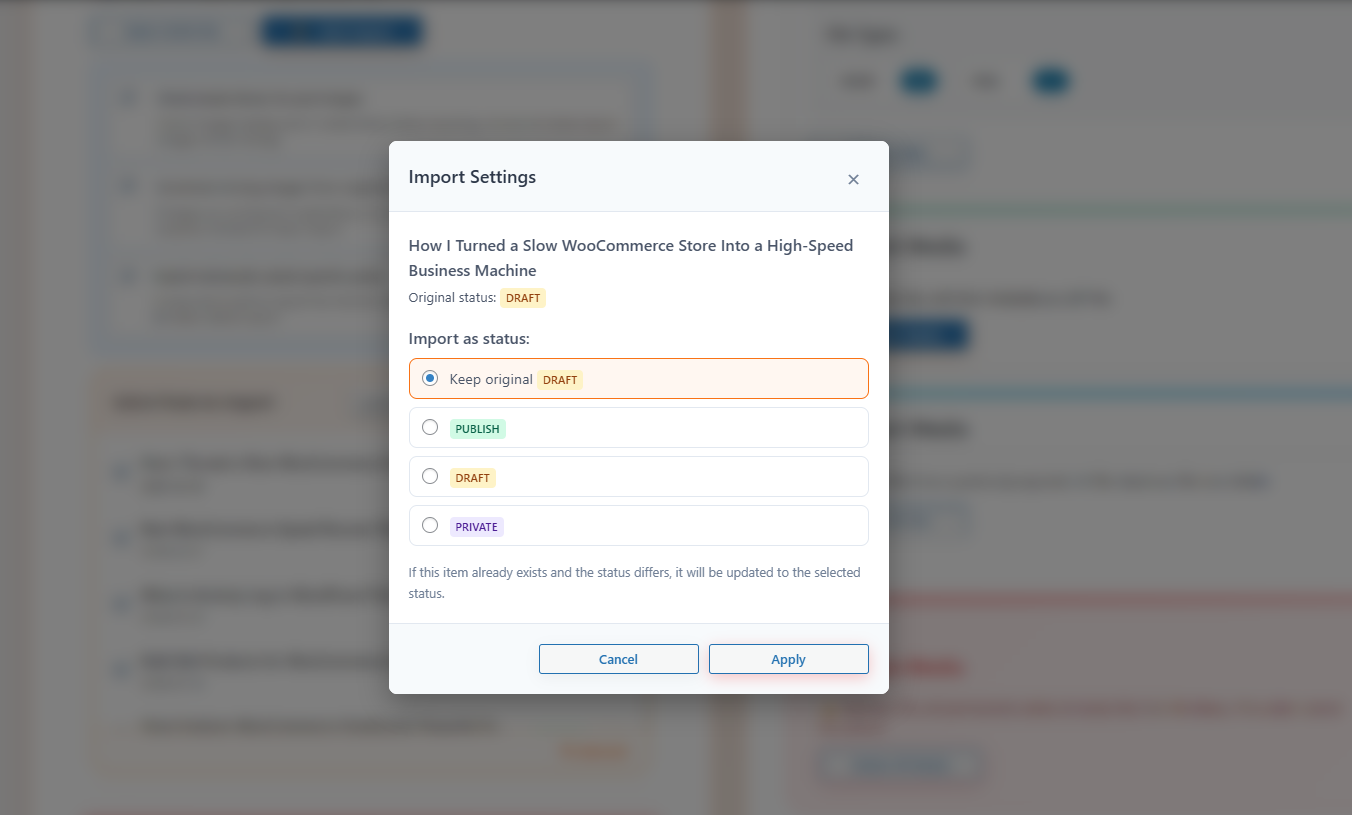
- Import Post Status Control – Flexible status assignment (Draft, Pending, Private, Published, or Preserve Original) to review imported content before going live
- Internal Link Finder & Domain Replacer – Scan and bulk-update outdated domains, staging URLs, and internal links across posts, pages, and meta
- Find & Replace Tool – Search and replace text, shortcodes, and URLs across content, excerpts, and custom fields with dry-run preview and selective execution
- Visual Post Compare & Diff – Side-by-side visual diff comparison between posts or revisions to inspect changes in titles, excerpts, content, and metadata
- Post Health & Cleanup Scanner – Detect unassigned categories, missing tags, duplicate slugs, and broken image URLs with one-click cleanup
- Missing Featured Image Finder – Identify posts lacking featured images and extract images from content to set as thumbnails
- Duplicate Post & Page Detector – Group duplicate content clusters by title, slug, or content hash to clean redundant posts while preserving originals
- Orphaned & Unlinked Post Finder – Discover posts with zero incoming internal links or unassigned taxonomies to improve SEO crawl depth
- Bulk delete functionality with confirmation dialogs
- CPT & ACF Export/Import
- Export Custom Post Types with all associated posts
- Includes ACF fields, taxonomies, and media
- Built-in support for exporting and importing custom ACF meta fields
- Secure data handling to prevent errors or data loss
- Lightweight and beginner-friendly interface
- Works for bloggers, developers, and site administrators
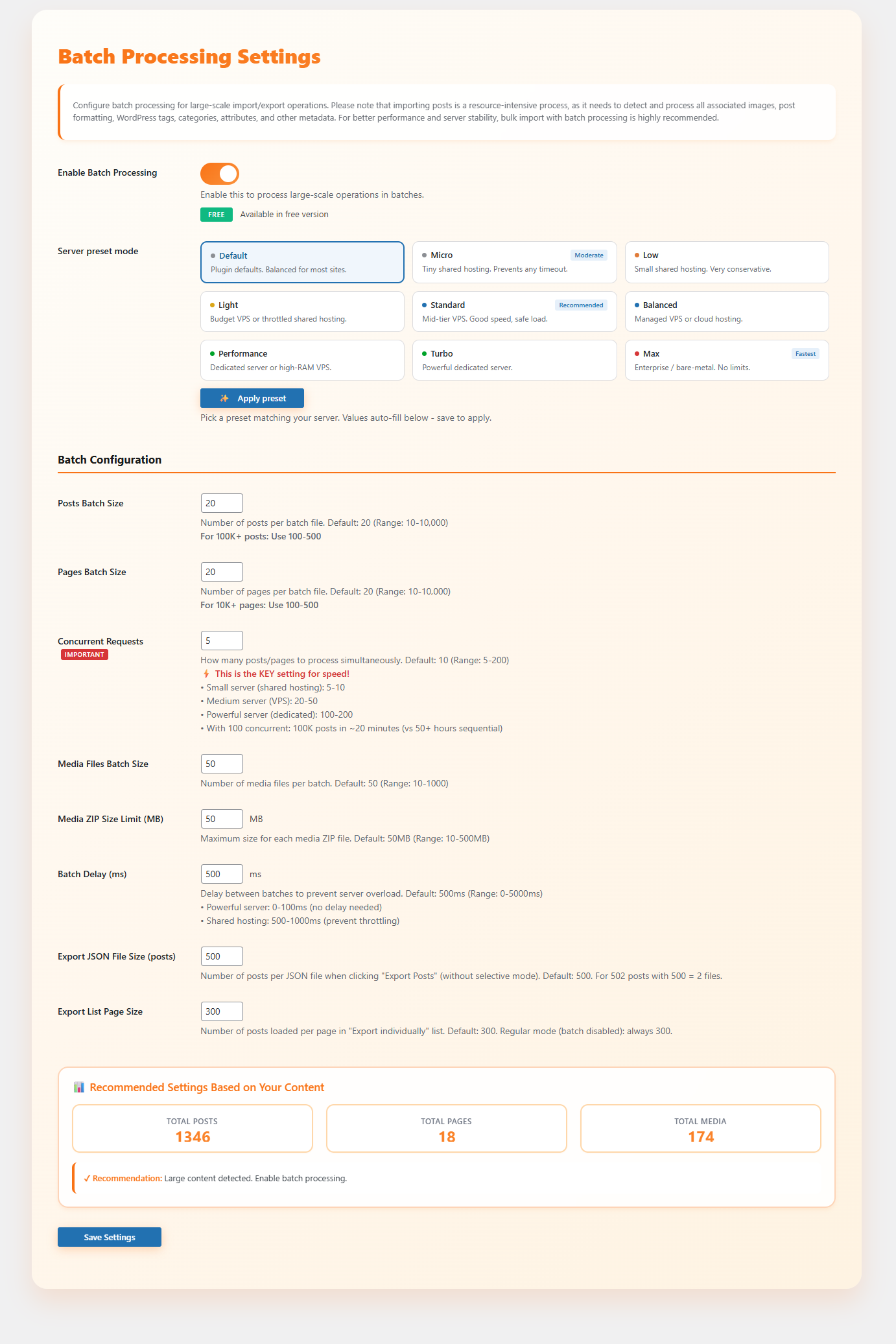
- Batch Processing Settings (Optimized for large-scale websites)
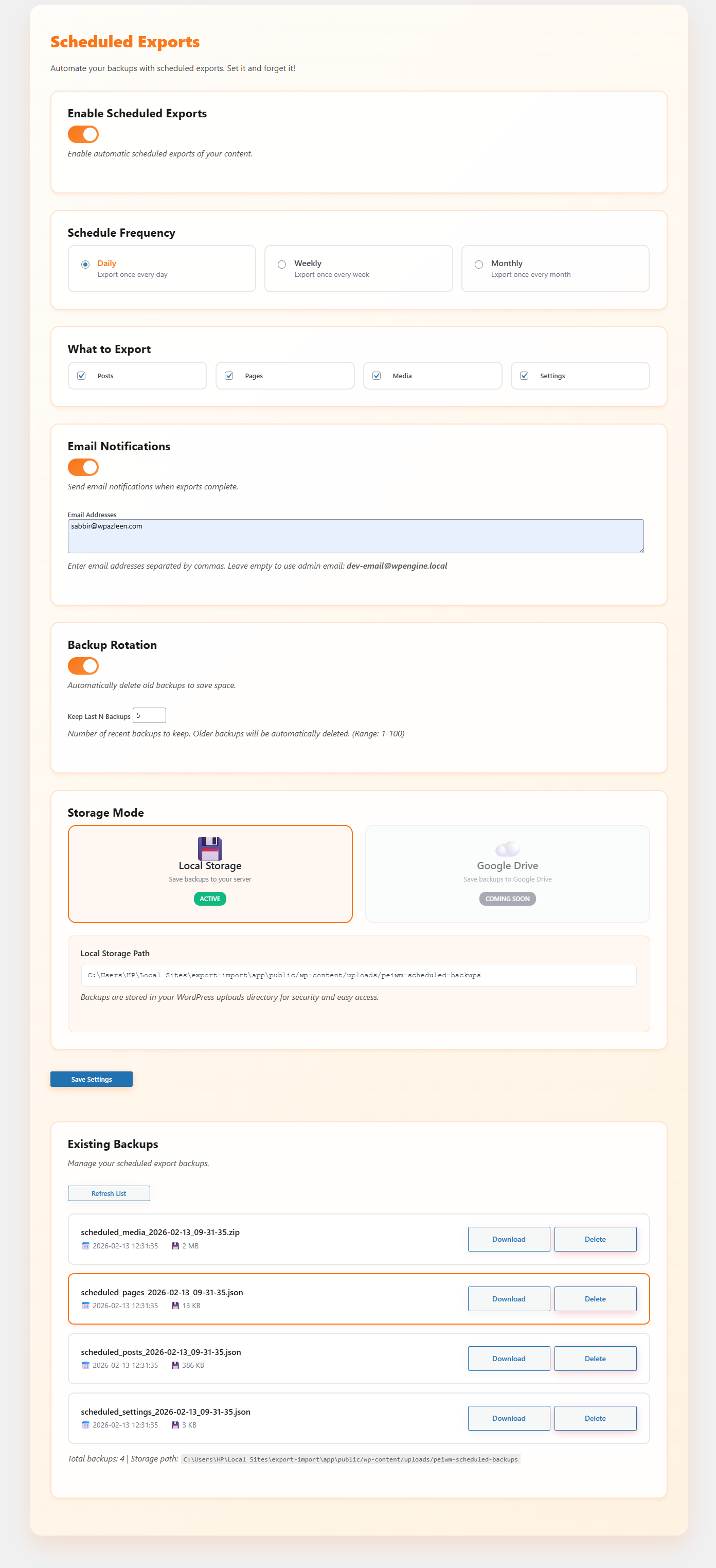
- Scheduled Exports (Automated Backups)
- Post SEO Analysis & Diff Tab (Post Tools & Migration Suite)
- Smart Site-Wide SEO Scan and Compare
- Inspect Post with Google Search Result Snippet
- Instant SEO Quick-Fix & Metadata Editor
- Users Export/Import
- Smart author mapping (match by username or email instead of ID)
- Assign posts to current admin user
- Automatically create missing users
- Export user data (login, email, display name, roles, etc.)
- Includes hashed passwords for instant login after import
- Supports user meta, capabilities, and plugin role data
- WooCommerce user data (billing, shipping, last active)
- ACF user fields support
- CPT authorship mapping for accurate reassignment
- Import options
- Set default password for all imported users
- Send welcome email with login credentials (if email is configured)
- Try to preserve original user IDs (conflicts logged)
Media & Image Handling & Audit
- Automatic media detection and download during import
- Media Health & Audit:
- Complete media library scan to detect unattached and unused images
- 9-Metric Analysis (Health Score %, Unused Count, Total Unused Size, Risk & Confidence Breakdown)
- Dedicated Review Unused Media dashboard with title and filename search
- Filter unused media files by Risk Level (Critical, High, Medium, Low, Very Low) and Confidence score
- Decision controls: Mark Safe (keep in library) and Exclude (exclude from future audit scans)
- Destructive cleanup (single-item and bulk trashing) with PRO license protection
- Media Title & ALT Editor:
- Bulk edit media titles and ALT text with inline editing
- Real-time diff tracking for modified titles and ALT attributes
- Filter images by missing ALT text or title search
- Batch update support via CSV Export and CSV Import
- Smart Image Matching Strategy
- Verify only fallback matches (fastest)
- Verify all matches (verifies file size to prevent duplicate filename mismatches)
- Always download fresh images from the source
- Reuse existing media when possible
- Link reused media to imported posts by updating the Uploaded to relationship
- Full support for featured images and inline content images
Pages Export/Import
- Complete page hierarchy preservation
- Template assignments and page metadata
- Featured images and content images handling
- Parent-child page relationships maintained
- Supports selective export/import for pages
- Custom page attributes and settings
CPT & ACF Export/Import
- Export Custom Post Types with all associated posts
- Full ACF (Advanced Custom Fields) support including field groups and values
- Export and import custom ACF meta fields seamlessly
- Includes associated taxonomies and terms
- Media files linked to CPT content are fully handled
- Maintains relationships between posts, fields, and taxonomies
- Supports selective export/import for specific CPTs
Users Export/Import
- Export core user data (login, email, display name, roles, registration info)
- Preserve access with hashed passwords on import
- Handle user meta, capabilities, and plugin-defined role data
- Includes WooCommerce customer details (billing, shipping, activity)
- Supports ACF fields attached to user profiles
- Maintains authorship mapping across Custom Post Types
- Auto-create users when missing during import
- Flexible import controls:
- Map authors by username or email
- Assign content to current admin if needed
- Set a global password for imported users
- Optionally send welcome emails (if configured)
- Attempt to retain original user IDs (logs conflicts)
WordPress Settings Backup
- 7 settings categories: General, Writing, Reading, Discussion, Media, Permalinks, Privacy
- Site icon export/import with URL information
- Selective import – choose which settings to import
- Detailed import logs showing success/failure for each setting
- Handles deprecated WordPress options automatically
Widgets & Navigation Menus
- Complete widget configuration export/import
- Widget positions and sidebar assignments
- Navigation menu structure with all items
- Menu locations and theme assignments
- Menu item hierarchy and custom properties
- Support for all widget types including custom HTML, media widgets
Themes & Plugins Backup
- Export active theme, all themes, or selected themes
- Export active plugins, all plugins, or selected plugins
- ZIP file creation with proper directory structure
- Import with replace existing or keep both options
- Automatic theme/plugin activation after import
Advanced Admin Features
- Admin Download Buttons – Add download buttons to WordPress themes.php and plugins.php pages
- Media Statistics – Comprehensive media library analysis with file types, sizes, and usage
- System Configuration Test – Check server capabilities and requirements
- Plugin Recommendations – Curated list of useful WordPress plugins
Post Tools & Migration Suite
- Import Post Status Control: Choose how imported content lands on your site (Draft, Pending Review, Private, Published, or Preserve Original Status). Perfect for editorial staging and pre-publish QA.
- Internal Link Finder & Domain Replacer: Scan post content, excerpts, and custom fields to find outdated staging URLs, legacy domains, or broken links. Bulk-replace or update only selected posts with a single click.
- Find & Replace Across Content, Excerpts & Meta: Safely search and replace strings, shortcodes, and URLs across posts, pages, and custom post types. Includes dry-run diff preview and selective execution.
- Visual Post Compare & Diff: Side-by-side visual diff comparison between any two posts or revisions to inspect title, slug, excerpt, content, status, and metadata changes before publishing.
- Post Health & Cleanup Scanner: Run full site diagnostics to find unassigned categories, missing tags, duplicate slugs, and broken images, with one-click cleanup tools.
- Missing Featured Image Finder & Downloader: Scan posts lacking featured images and extract inline images directly from content to set as thumbnails.
- Duplicate Post & Page Detector: Scan content clusters to find duplicate posts by exact title, slug, or content hash, and clean redundant entries while keeping the original.
- Orphaned & Unlinked Post Finder: Identify isolated posts that have zero incoming internal links or unassigned taxonomies to improve site structure and search engine indexing.
🎯 Perfect For
- Web Developers – Quickly clone sites for development and testing
- Site Migrations – Move WordPress sites between hosts seamlessly
- Backup Solutions – Create complete site backups including media
- Staging Sites – Duplicate production sites for safe testing
- Client Handoffs – Package complete sites for client delivery
- Multi-site Management – Sync content between multiple WordPress installations
📊 Real-time Progress & Logging
Every operation provides detailed feedback:
* Progress bars showing completion percentage
* Timestamped logs with success/warning/error indicators
* Detailed statistics (items imported, skipped, failed)
* Clear error messages with actionable solutions
* Import/export summaries with file information
External Services
This plugin connects to a small number of external services, only when the related feature is actually used.
Freemius Checkout
Loads the Freemius checkout script when a user opens the Pro upgrade modal in the WordPress admin. The script is served from checkout.freemius.com. No personal data or form submission data is sent.
Terms: https://freemius.com/terms/ | Privacy: https://freemius.com/privacy/
Media import from external URLs
When importing content that references images hosted on another domain (for example, a localhost or staging URL from the source site), the plugin downloads those specific image files directly from that URL so they can be attached to the imported post. This only happens for media URLs found inside the import file you provide, not as a background or scheduled connection.
WordPress.org Plugin Directory API
The Plugin Recommendations screen calls the official WordPress.org plugins_api (api.wordpress.org) to pull live names, descriptions, and icons for a short list some recommended WordPress plugins. This only runs when you open the Recommendations screen, the results are cached locally for 10 days to avoid repeat requests, and no data about your site or its content is sent.
Terms: https://wordpress.org/about/privacy/
Source Code
The source files for all compiled/minified JavaScript and CSS in this plugin are publicly available at:
https://github.com/wpazleen/post-export-import-with-media
Build instructions:
- Clone the repository.
- Run
npm installin the root to install dependencies. - Run
npm run buildto compile the JavaScript and CSS. - Compiled output is written to /build/js/ and /build/css/, matching what ships in the plugin.
Competitor Analysis
Search the WordPress plugin directory for a way to export WordPress posts with their media, and the results split into two groups: large general-purpose export tools built for spreadsheets, and small single-purpose add-ons built to patch one gap in the native exporter. Post Export Import with Media sits in a third position: a dedicated export and import tool built around content plus media plus the rest of the site.
WP All Export is the closest thing to a household name in this space support for exporting almost any post type or custom field into CSV, XML, or Excel. Its own FAQ is direct about the trade-off: you export one post type at a time, there is no way to export a full site in a single pass, and to get WordPress media specifically you export the post type that the images are attached to rather than treating media as its own export target. Post Export Import with Media treats media as the primary concern rather than a side effect, with automatic detection of featured and inline images, three image-matching strategies, and reuse of existing Media Library files. Where WP All Export pulls ahead is field-level flexibility, letting you rename and reorder every CSV or XML column by hand, which is a real advantage for anyone building a custom data feed rather than migrating a site.
Export media with selected content, by DKZR, is a small, well-loved plugin that solves one specific problem: the native WordPress export screen leaves attachments out by default, and this plugin adds a checkbox to include them. It is a genuinely useful patch for the built-in exporter, but it stops there; there is no image-matching logic, no rewriting of image URLs for a new domain, and no support for users, widgets, menus, themes, plugins, or settings. Post Export Import with Media replaces the native exporter entirely rather than patching it, and covers the rest of a site migration or backup in the same place.
Product Import Export for WooCommerce and Order Export & Order Import for WooCommerce, both are mature, widely installed tools built specifically around WooCommerce products, coupons, and orders moving in and out of CSV files, with the product plugin adding ChatGPT-generated descriptions for products missing one. Both are strong choices if WooCommerce commerce data is the whole job. Post Export Import with Media is not scoped to WooCommerce data types; it is built for general WordPress content, so it handles standard posts, pages, and CPTs alongside the WooCommerce user data (billing, shipping, activity) it picks up when exporting users, rather than orders or coupons themselves.
So of everything that turns up in an “export WordPress posts with media” or “WordPress migration plugin” search, the gap Post Export Import with Media fills is the one in the middle: a plugin that treats content, media, users, widgets, menus, themes, plugins, and settings as one export and import job, with a progress bar and a preview step, rather than requiring a spreadsheet tool for content and a separate backup plugin for everything else.
Installation
You can install the plugin manually or via the WordPress admin panel.
- Upload the Plugin:
– Upload the post-export-import-with-media folder to the /wp-content/plugins/ directory.
– Alternatively, install the plugin through the WordPress plugins screen directly.
- Activate the Plugin:
– Navigate to the ‘Plugins’ section in your WordPress admin panel.
– Click ‘Add New’ and search for “post-export-import-with-media”.
– Click ‘Install Now’ and then activate the plugin.
Screenshots

Dashboard of Export/Import Posts & Media.

Dashboard of Pages Export/Import.

Dashboard of Themes & Plugins Backup.

Dashboard of WordPress Settings Export/Import.




Faq
Yes. Featured images, gallery images, and any media attached to or embedded in a post’s content are detected and imported automatically, with no separate step needed.
Yes. During import, image URLs in the post content are rewritten to point at the new site, including localhost and staging URLs that wouldn’t otherwise resolve.
Yes. Selective Export lets you choose individual posts or pages, or filter by a date range, before you export. On import, you get a preview so you can choose exactly which items to bring in.
No, not by default. The plugin only imports new posts and media. Existing content on the destination site is left untouched.
Yes. You can export user accounts with their roles, capabilities, and user meta, and passwords come across as hashes so people can log in right away on the new site. You can map authors by username or email, auto-create missing users, or assign imported content to your own admin account instead.
Yes. Custom Post Types export with their associated posts, taxonomies, and media, and ACF field groups including Repeater fields come across with them.
Yes. Widgets and their sidebar assignments, full navigation menu structures, your themes (active, all, or selected), and your plugins (active, all, or selected) can all be exported as ZIP files and restored on another site.
Batch Processing Settings let you control how many items are processed per batch, how many requests run at once, and the maximum size of a single media ZIP before it splits. There’s a recommended preset based on your content size if you don’t want to configure it by hand, and anything that fails or times out is listed afterward with a one-click retry.
WP All Export is a general CSV/XML export tool that handles almost any post type or custom field but exports one post type at a time and treats media as a separate concern that its documentation says you must handle through the post export. Post Export Import with Media detects and downloads featured and inline images automatically as part of the same export, and adds users, widgets, menus, themes, plugins, and settings, all in the free version.
Export media with selected content is a small, well-regarded add-on that patches WordPress’s native export screen so linked images are not left out. Post Export Import with Media is a complete export and import tool built around media from the start, with a Smart Image Matching Strategy, a rewrite of image URLs on import, and no dependency on the native exporter’s format.
Yes. Scheduled Exports supports Daily, Weekly, and Monthly frequencies for posts, pages, media, settings, CPT/ACF data, and users, with automatic email notifications and rotation of older backups.
It covers General, Writing, Reading, Discussion, Media, Permalinks, and Privacy, plus your site icon. You choose which categories to import, and you get a log showing exactly what succeeded or failed for each one.
Yes, for both posts and pages. Language assignments are preserved when content is exported and imported between sites running the same multilingual setup.
No. Every screen has its own interface in your WordPress admin with a progress bar, and the built-in System Configuration Test checks your server’s settings before you start a large import so you know what to expect.
The Media Health & Audit tool scans your entire WordPress media library to detect unused, unattached, or orphaned images. It analyzes each media item, calculates an overall Media Library Health Score (%), and assigns Risk Levels (Critical, High, Medium, Low, Very Low) and Confidence scores so you can clean up disk space safely.
Yes. Clicking “Review Unused Media” opens an audit dashboard showing thumbnails, titles, filenames, risk levels, and confidence scores. You can search by title or filename, filter by Risk Level or Confidence score, and mark files as Safe (keep in library) or Exclude (exclude from future audit scans).
The Media Title & ALT Editor provides a bulk editing workspace to optimize image titles and ALT text for SEO. It includes real-time diff tracking for modified attributes, filters for images with missing ALT text, and CSV Export and Import support for external batch updates.
Use the support forum on this plugin’s WordPress.org page. Include your WordPress version, PHP version, and what step failed; the System Configuration Test results are useful to paste in if the issue is import-related.
Reviews
Only Pro
By 
The free version does nearly nothing
Easiest Post Importer I've Used
By 
Very easy to use and works great, also allows pulling over images on free tier unlike the big alternative plugins.
Great plugin, especially for locally hosted WP dev
By 
A number of great features have been added to improve the utility of this plugin. It is great for workflows using WP Studio and other locally hosted development tools. Posts can be pushed to a production, hosted site with images, SEO data, links, etc. The team is also very responsive to user requests.
Great Plugin, Even Greater Support
By 
Quick Export and Import.
By 
Small improvement for import export of media, maybe also add as second option json file import export for media, but i am not sure if that is possible since when i tried it i had issues with wordpress timing out because of how many files needed to be transfered.
Loving it
By 
Great plugin super easy to use for importing and exporting. Best ive used so far.
Worked great
By 
I was hesitant to try this plugin since it seems very new (less than 10 installations) and had no reviews. I installed it on a (small) site that had 10 posts that I wanted to easily copy over to a new site rather than copy/paste.
The export was done immediately (JSON file) and the import took less than 30 seconds. Each post was copied over, along with the featured image from each post that had one.
As it was a small export/import, I can't attest to how well the plugin will work with larger sites, but I can tell you it was quick and easy and worked as expected.
Changelog
1.18.0 – 16 October 2026
- New: Google Drive Storage Mode- Save backups to Google Drive
- Fix: Fix vulnerabilities in themes and plugins import.
- Improvement: SDK updated
1.17.2 – 03 October 2026
- Improvement: Media Import Performance & Timeout Fix
- Fix: Optimized code and strengthened security to address potential vulnerabilities
1.17.1 – 11 September 2026
- Fix: Fixe theme and plugin toolkit missing menu isuses
- Fix: Fixed the Deduplicate Slugs Issues
- Fix: Resolved large media export download failures
1.17.0 – 08 September 2026
- New: Post SEO Analysis & Diff Tab (Post Tools & Migration Suite)
- New: Import Status Logic (Global + Override)
- New: Post Diff & Version Revert
- New: Internal Link Finder & Domain Replacer
- New: Post Compare (Imported vs Existing & Diff)
- New: Post Cleanup Scanner & Fixer
- New: Missing Featured Image Finder
- New: Duplicate Post Detector
- New: Orphaned Post Finder
1.16.1 – 07 September 2026
- Fix: Media Health & Audit Scan Issues.
1.16.0 – 25 August 2026
- New: Media Health & Audit feature to scan media library, detect unused images, analyze risk/confidence levels, and calculate health score.
- New: Review Unused Media dashboard with title/filename search, risk & confidence filters, and Mark Safe/Exclude decision flags.
- New: Media Title & ALT Editor interface overhaul with CSV import/export workflow support.
- Improvement: Gated destructive media operations (single & bulk trashing) to PRO version with seamless modal upgrade triggers.
- Fix: Enqueued and localized peiwm_ajax parameters across all Media Audit sub-pages.
For the full changelog, see changelog.txt in the plugin SVN repository.