Posts to PDF – Backend Batch Export

Posts to PDF – Backend Batch Export
Description
Posts to PDF – Backend Batch Export lets WordPress administrators turn posts, pages and custom post types into PDF files directly from the WordPress dashboard.
It is designed for site owners, publishers, documentation websites, knowledge bases, blogs and content-heavy WordPress installations that need a practical way to archive, download or distribute existing content as PDF.
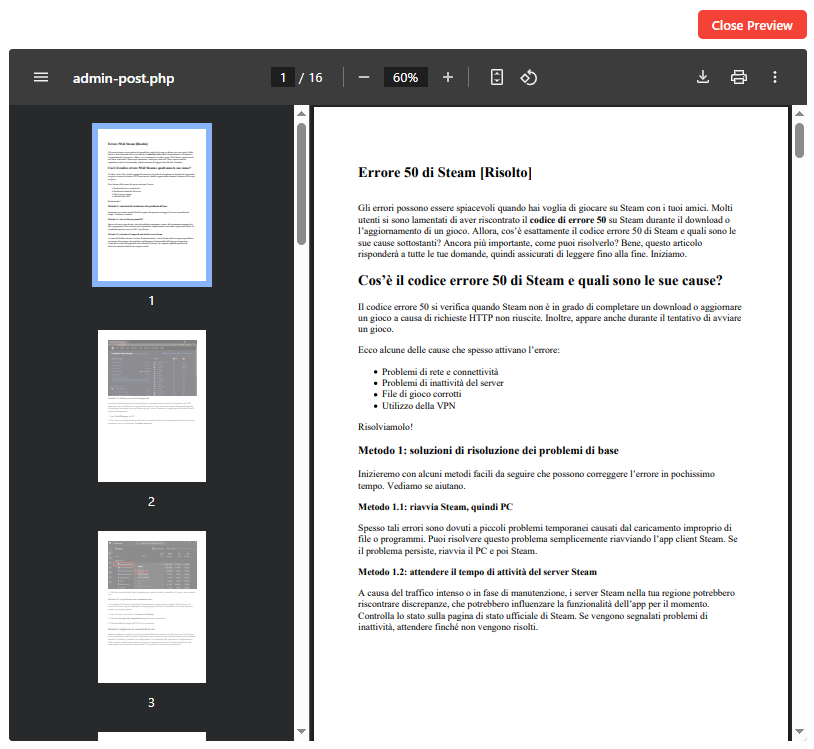
You can search and select content from the backend, preview the PDF output, choose how the document should look and export the selected items either as a single combined PDF or, in PRO, as separate PDF files.
Export WordPress content to PDF
The plugin works directly from the WordPress admin area. There is no need to manually copy and paste articles into another application.
You can export:
- Posts
- Pages
- Custom post types
- Selected content from search results
- Multiple items in a single operation
The plugin first processes WordPress content through the standard content filters and also includes compatibility cleanup for common page builders when builder shortcodes remain visible in the PDF.
PDF export options
Before exporting, you can customize the generated PDF with options such as:
- Featured image
- Author
- Publication date
- Excerpt
- Page size
- Page orientation
- Filename prefix
- PDF preview before export
Images are normalized to fit within the PDF page width, and HTML tables are styled to improve readability in A4 and Letter layouts.
Single PDF or Separate PDFs
Two export workflows are available:
Single combined PDF
Creates each selected post/page as an individual temporary PDF and then merges those PDFs into one final document. This avoids asking Dompdf to render the complete multi-post HTML document in one request.
Separate PDFs
Creates one PDF for each selected post or page. This is the recommended workflow for larger exports because every item is processed separately and requires fewer server resources.
The progress indicator reflects real per-item PDF generation. If one item fails, the interface reports the specific post being processed before the final merge starts.
Free features
- Export selected posts, pages and supported custom post types.
- Create one combined PDF from selected content.
- Export separate PDFs for up to 20 posts/pages.
- Search and paginated content selection.
- PDF preview.
- Include or exclude featured image, author, date and excerpt.
- Choose page size and orientation.
- PDF-friendly image handling.
- Table formatting for PDF output.
- Compatibility cleanup for common page builder shortcodes.
- Free-version watermark on generated PDFs.
PRO features
The PRO version is intended for larger WordPress sites and bulk export workflows.
- Select all posts/pages from the current post type.
- Select all items matching the current search.
- Export each post/page as a separate PDF.
- Unlimited bulk export workflow.
- Progress bar for large exports.
- Remove the Free watermark.
For large sites, Separate PDFs is the recommended export mode because very large combined PDFs may require a high PHP memory limit on the hosting server.
Info & Upgrade: WordPress Posts to PDF PRO
Page builder compatibility
The plugin renders content using the normal WordPress content filters first.
If page builder shortcodes are still present in the output, it applies additional compatibility cleanup for common builders and shortcode systems including:
- Divi
- WPBakery / Visual Composer
- Avada / Fusion Builder
- Themify
- Shortcodes Ultimate
- Similar shortcode-based modules
The goal is to preserve readable article content whenever possible.
Some very complex frontend layouts, dynamic widgets or builder-specific visual effects may not look exactly the same in the generated PDF as they do in the browser.
Images and tables
The plugin includes PDF-oriented handling for WordPress images:
- Large images are resized to fit within the PDF page.
- Fixed width and height attributes that can cause clipping are normalized.
- Browser-only lazy-loading attributes are cleaned before rendering.
- Common Divi image module shortcodes can be converted into normal PDF images when needed.
- Images that cannot be reliably loaded by the PDF engine are removed instead of displaying a broken-image placeholder.
HTML tables are also styled to fit within the available PDF width, with word wrapping for long content.
Built for backend batch export
Posts to PDF is intended for administrators and editors who need to export existing WordPress content without opening every article individually.
Typical uses include:
- Creating PDF archives of website articles.
- Exporting documentation or knowledge-base content.
- Saving posts for offline reading.
- Generating PDFs for clients or internal teams.
- Creating separate PDF copies of large groups of posts.
- Building small combined PDF collections from selected articles.
Installation
- Upload the plugin folder to
/wp-content/plugins/. - Activate the plugin through the Plugins menu in WordPress.
- Click Settings below the plugin name or open Posts to PDF from the WordPress admin menu.
- Search for and select the posts/pages you want to export.
- Choose Single PDF or Separate PDFs.
- Configure the PDF options and start the export.
Screenshots

Faq
Yes. You can select multiple posts or pages from the plugin interface and export them in one operation. PRO also includes Select All for the current post type or current search results.
Yes. Separate PDFs mode creates one PDF for each selected post or page. The Free version supports separate export for up to 20 items, while PRO is designed for unlimited bulk workflows.
Yes. Single combined PDF mode places the selected items into one PDF document.
For very large selections, Separate PDFs is recommended because a single document containing hundreds of pages can require considerably more PHP memory and server resources.
Yes. In the PRO version you can select all posts/pages from the current post type or all items matching the current search.
Yes. The plugin includes PDF preview so you can check the output before starting the final export.
Yes. You can include or exclude the featured image, author, date and excerpt, and choose the page size and orientation.
Yes. The plugin is designed to work with supported public WordPress post types in addition to standard posts and pages.
The plugin renders WordPress content using the standard content filters first. If builder shortcodes are still visible in the PDF, the plugin applies compatibility cleanup for common builders such as Divi, WPBakery/Visual Composer, Avada/Fusion Builder, Themify and similar modules, while keeping readable text content where possible.
Because page builders can generate very complex frontend layouts, the PDF may not reproduce every visual element exactly as it appears on the website.
The plugin includes a fallback that converts common Divi image module shortcodes into normal PDF images when Divi does not render them in the export context.
Yes. HTML tables are styled to fit the PDF page width. The plugin also includes a fallback for some builder/table shortcodes, but very complex frontend builder layouts may not be reproduced exactly in the PDF.
PDFs are downloaded by the browser. The local download folder is controlled by the browser and operating system. WordPress cannot directly choose a folder on the user’s computer.
From version 3.5, Single PDF no longer asks Dompdf to render the full selection in one pass. Each item is rendered separately and the resulting PDFs are merged afterwards with FPDI. Very large exports can still consume disk space and resources during the merge, but peak Dompdf memory usage is substantially reduced.
Separate PDFs remains the recommended fallback if an individual article contains unusually complex HTML, CSS or images.
Yes. The export interface is available in the WordPress administration area and is intended for administrators and editors with the required permissions.
Reviews
Finally I found a simple exporter
By 
This plugin works very well and allows you to export posts directly from the admin, something I hadn't been able to find until now.
What I'm still missing is the ability to add metadata and featured images.
Changelog
3.5.1
- Added Advanced Custom Fields (ACF and ACF Pro) export support.
- Added a setting to include or exclude ACF fields from generated PDFs.
- Supports common ACF field types including images, galleries, relationships, groups, repeaters and nested values.
- Uses ACF field labels and formatted values while avoiding internal ACF metadata keys.
3.5
- Reworked Single combined PDF into a true progressive pipeline.
- Each selected post/page is rendered independently with Dompdf and saved as a temporary PDF.
- Dompdf output is released after every item, reducing peak memory usage.
- The final request merges the already-rendered PDFs with FPDI instead of rebuilding one giant HTML document.
- Temporary PDF parts are removed after a successful merge or when the export is cancelled.
- Progress messages now describe real PDF generation and the final merge step.
- A failing item is identified before the merge begins.
- Separate PDFs workflow is unchanged.
- Added detailed server-side error logging for combined exports.
- Simplified export-mode descriptions and removed obsolete memory warnings.
3.3.4
- Simplified plugin action links in the Plugins screen.
- Added standard Settings and Upgrade to PRO links without custom row-action styling.
3.3.3
- Fixed plugin action links layout in Plugins screen when admin CSS forces row-action spans onto separate lines.
- Uses named action-link keys (Settings / Export and Upgrade to PRO) instead of numeric CSS classes.
3.3
- Changed the default export mode to Separate PDFs, the recommended option for large exports.
- Renamed export modes to make the recommended use case clearer.
- Added an inline warning when Single combined PDF is selected.
- Added a confirmation warning for combined exports over 30 items; users can still continue.
- Kept the 100-item safety limit for a single combined PDF (filterable).
- Retained detailed PHP/server diagnostics for combined PDF rendering failures.
3.2
- Added detailed PHP/server diagnostics for combined PDF rendering failures, including fatal error/exception message, source file/line, peak memory usage and PHP memory_limit.
3.1
- Single PDF export now prepares selected posts one by one and shows the current title and exact progress.
- Combined PDFs are generated as protected temporary files and downloaded through the authenticated handler.
- Reduced peak memory usage by releasing Dompdf document structures before saving or streaming the PDF.
- Added clearer error handling and cancellation for combined exports.
3.0
- Improved cleanup for escaped lazy-load image markup inside noscript blocks.
- Fixed cases where escaped fallback code could be printed as visible text in PDFs.
2.9
- Removed noscript fallback blocks before PDF rendering to prevent lazy-load image markup from being printed as visible text in exported PDFs.
- Cleaned browser-only lazy loading attributes before Dompdf rendering.
2.8
- Improved Divi compatibility for image modules that were missing from exported PDFs.
- Added conversion for Divi/Table Maker frontend table markup into standard HTML tables for better PDF rendering.
- Improved recovery of builder images and tables when builder output is not available in the PDF export context.
2.7
- Improved Classic Editor image handling in PDFs. WordPress caption wrappers and fixed image dimensions are normalized so large images fit within Letter/A4 pages instead of being cut off.
- Removed PDF-unfriendly image attributes such as fixed width/height, srcset and sizes before Dompdf rendering.
2.5
- Improved PDF image sizing so Classic Editor images fit within the PDF page width and are not cut off.
- Added fallback conversion for common Divi image module shortcodes.
- Improved table styling for PDF exports, including better width handling and word wrapping.
- Added extra builder compatibility prefixes for Divi-related table/image modules.
2.4
- Added compatibility cleanup for common page builder shortcodes such as Divi, WPBakery/Visual Composer, Avada/Fusion Builder, Themify and Shortcodes Ultimate.
- Builder shortcode wrappers are removed only as a fallback when they remain visible after normal WordPress content rendering.
- Added FAQ notes about page builder compatibility.
2.3
- Improved export file security.
2.2
- Fixed individual separate PDF downloads when ZIP mode is disabled.
- Added stricter ZIP validation to prevent empty ZIP downloads when files cannot be added by the server.
- Improved temporary export cleanup after individual downloads.
2.1
- Fixed bulk export ID collection so “Select all results/site” exports all matching items instead of being affected by admin pagination or third-party query filters.
- Improved compatibility with security/cache plugins and custom post type admin filters.
2.0
- Fixed Preview when using Select all results/site in PRO mode. Preview now loads the first 5 items from the full selected scope instead of showing the upgrade popup.
- Improved PRO unlock code validation by ignoring spaces and non-alphanumeric characters.
- Bumped admin asset version to avoid cached JavaScript from optimization plugins.
1.7
- Fixed the Free watermark so it is visible again and repeated on every PDF page.
- Added an HTML fixed-position watermark layer plus Dompdf canvas stamping for better compatibility.
- External images that Dompdf cannot reliably load are removed from the PDF instead of showing a broken-image box with an X.
- Fixed ZIP downloads so files are saved with the correct .zip extension.
- Renamed export mode to “Multiple Separate PDF files (1 Post in 1 PDF)”.
- Increased the Free separate PDF limit from 5 to 20 posts/pages.
1.5
- Added preview loading spinner/progress indicator while Dompdf prepares the inline preview.
- Added Free watermark to exported PDFs. PRO removes the watermark.
- Separate PDF export is now available in Free for up to 20 posts/pages.
- Separate PDFs are packaged into a single ZIP download to avoid browser multiple-download warnings.
1.3
- Improved admin interface.
- Added PRO unlock field.
- Added select all results/site workflow.
- Added separate PDFs export mode with progress bar.
- Added settings for filename prefix, page size, orientation and PDF content metadata.
- Improved PDF styling.
1.2
- Corrections and improvements.
1.1
- Minor corrections.
1.0
- Initial release.