pre Tag For WP Editor
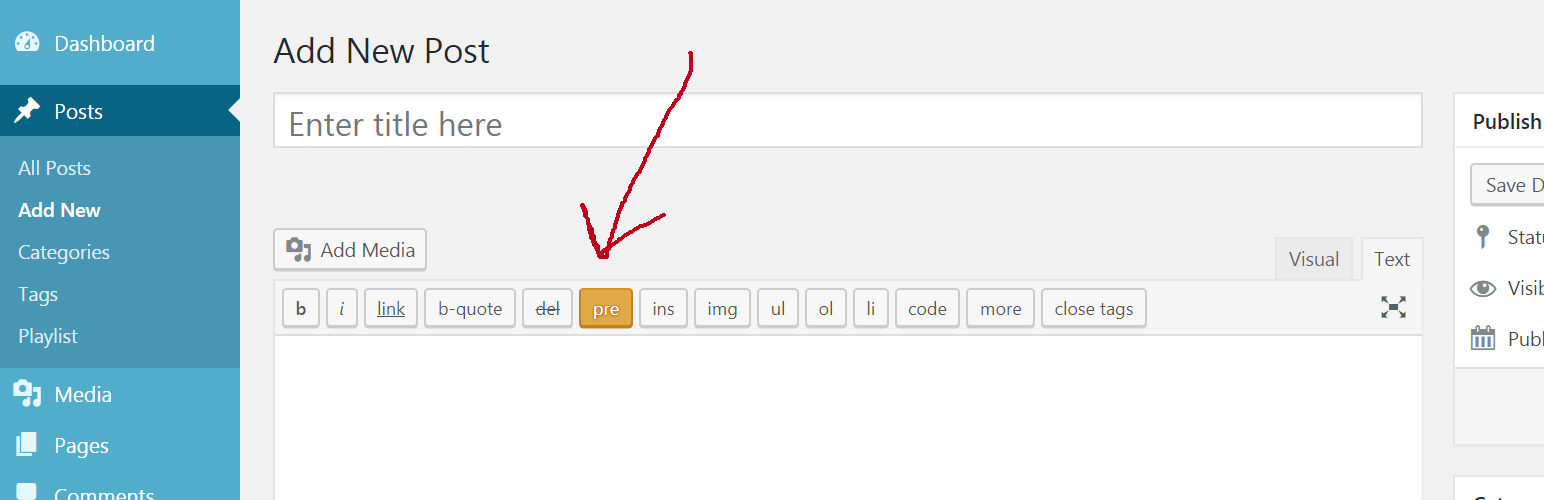
pre Tag For WP Editor
Description
This is a WordPress plugin that will add a “pre” tag functionality to your WordPress editor.
Paste your code first, select it and press pre button from the editor’s toolbar in Text Mode.
Selected text will get formatted and specific pre tags will be added.
Installation
- Upload the plugin folder to the
/wp-content/plugins/directory, or install the plugin through the WordPress plugins screen directly. - Activate the plugin through the ‘Plugins’ screen in WordPress
- That’s it!
Screenshots

The button was added to the editor's toolbar

Added a specific code that will get formatted

After clicking the pre button, text got formatted and pre tags added

After post was saved, we can preview it and see the result
Faq
Installation Instructions
- Upload the plugin folder to the
/wp-content/plugins/directory, or install the plugin through the WordPress plugins screen directly. - Activate the plugin through the ‘Plugins’ screen in WordPress
- That’s it!
Why should I use this plugin?
If you want to insert some code text, this plugin will help you format it and add special pre tags.
Will it break any other plugins?
I don’t think so.
Won’t this conflict with plugins?
Well I can’t tell for sure.
Can you add a feature X?
Depends, if its useful enough and I have time for it.
Reviews
Changelog
1.0
- First release.