Printus – Automatic Cloud Order Printing for WooCommerce

Printus – Automatic Cloud Order Printing for WooCommerce
Description
Printus is your ultimate cloud printing companion, enabling you to effortlessly print customer order receipts, invoices, shipping labels, packing slips, delivery notes, and more on any printer worldwide. Whether you’re a restaurant eager to promptly receive new orders in the kitchen or a logistics business channeling jobs to the office printer, Printus ensures seamless operations.
Automatic Order Printing Plugin for WooCommerce 🚀
Printus simplifies the process by allowing you to choose triggers such as Checkout Complete, Order Complete, or Payment Complete. It effortlessly connects with the PrintNode API, enabling immediate PDF printing of WooCommerce invoices and packing slips as orders come in. No more email checking; orders are printed in seconds.
✅ No Hardware Dependencies
Printus is hardware-agnostic, working with ANY PRINTER you have on hand. It excels with receipt printers, directly printing orders to your kitchen or front-of-house POS, ensuring no more checking emails for received orders.
✅ Print on Demand
Need to reprint an old receipt, invoice, or label? Printus lets you revisit the order in your WooCommerce edit screen and re-print, even to a different printer, template, or paper size.
✅ The Most Extendable Cloud Printing Plugin for WooCommerce
With extensive actions and filters, Printus offers unparalleled flexibility. From crafting custom templates to defining unique print triggers, you can tailor its functionality to your needs with minimal coding knowledge.
✅ Works With Any Printer
Whether you have a receipt printer or an enterprise-level Xerox, Printus adapts to your device, offering versatile printing for WooCommerce orders, invoices, or package labels.
✅ Ready-to-Use Templates
Printus comes with templates for the most common documents, ready to print out of the box:
- Receipt: compact layout for 80mm receipt printers, ideal for kitchens and front-of-house.
- Invoice: full-page invoice (Letter/A4) with billing and shipping addresses, payment method and a complete totals breakdown.
- Packing Slip: full-page slip without prices, showing SKUs, quantities and a tick box for each item so nothing gets missed.
- Delivery Note: full-page note with the delivery address, delivery instructions and “received by” / signature lines.
- Order Summary: a simple full-page overview of the order.
Full-page templates print on your chosen paper size (Letter, A4 or Legal). If your paper size is set for a receipt printer, they print on Letter or A4 based on your store’s country. All text can be translated or changed from the plugin settings.
Need something different? Design your own template with the Printus Template Generator.
✅ Built on Reliability
Printus provides certainty in order printing for your store. Built on a robust foundation that has processed billions of cloud printing jobs, it ensures labels, PDF invoices, and packing slips for WooCommerce are handled with ease.
✅ Supports Low-power Systems
Worried about keeping your computer and printer on? Printus also operates seamlessly with low-power devices like Raspberry Pi, receiving WooCommerce order print jobs even while you sleep.
Printus Works Great with Delivery & Scheduling WooCommerce Plugin!
The plugin works great with Delivery & Pickup Scheduling for WooCommerce. Feel free to try them both out!
Stores That Benefit:
- Online food delivery websites
- Online supermarkets
- Clothing websites
- Pure online restaurants
- Brick & mortar restaurants taking orders online
- And more
🌟 Smart Print Timing (Add-on) 🌟
Need a bit more control over when WooCommerce orders print? Printus – Smart Print Timing is an optional add-on that lets you fine-tune print behavior so your printer outputs match your workflow, not just the moment an order is placed.
With Smart Print Timing, you can reduce unnecessary early printouts, avoid last-minute rush prints, and keep your packing or kitchen process running smoothly during busy periods.
Ideal for: stores that prepare orders ahead of time, handle scheduled delivery or pickup, or want more predictable printing during peak hours. Learn more >>>
Printus is especially beneficial for restaurant-style E-commerce stores requiring immediate notifications for new orders. However, its utility extends beyond this use-case. Regardless of the document you need to print from your WooCommerce store (receipts, invoices, shipping labels, etc.), Printus has you covered.
Want a template that matches your brand? Create one with the Printus Template Generator for an affordable one-time fee.
Printus Works Great with Kikote!
The plugin seamlessly integrates with Location Picker at Checkout Plugin for WooCommerce. Feel free to try them both out!
Configuring Plugin:
- The plugin settings are located in WordPress Admin Dashboard->SoaringLeads->Printus Cloud Printing.
Plugin Documentation
- You can find the plugin documentation Here >>>
Plugin Support
The plugin has support for built-in WooCommerce variations as well as custom product options(product addons) added by the following plugins:
- Product Addons for Woocommerce – Product Options with Custom Fields by Acowebs (Both Lite & Pro)
- WooCommerce Product Addons Ultimate by Plugin Republic.
- Advanced Product Fields (Product Addons) for WooCommerce by StudioWombat (Both Lite & Pro)
- Extra Product Options & Add-Ons for WooCommerce by ThemeComplete
- Extra product options For WooCommerce | Custom Product Addons and Fields by ThemeHigh
- Product Addons & Fields for WooCommerce by Themeisle (PPOM)
- Product Add-Ons by WooCommerce
- WooCommerce Product Add-ons & Extra Options by YITH (Both Lite & Pro)
We’ve tried to add support for the most popular Product Addon plugins for WooCommerce, feel free to use one of the above if you’re creating custom product options, or let us know which plugin you’re using and we’ll try to add support for it. If one of the above plugins does not display its addons on the prints then feel free to let us or the developers of those plugins know.
Misc
Screenshots
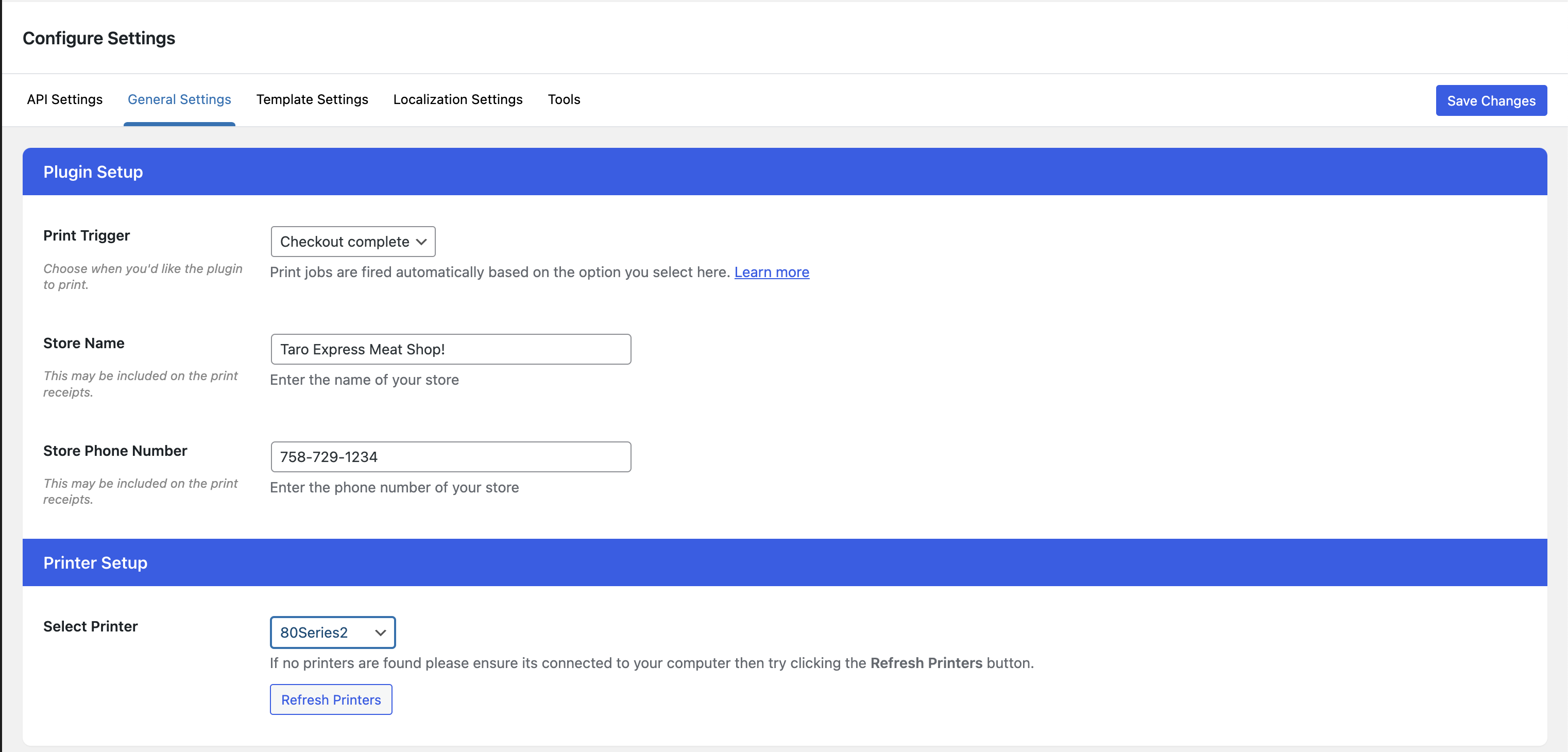
Plugin General Settings.
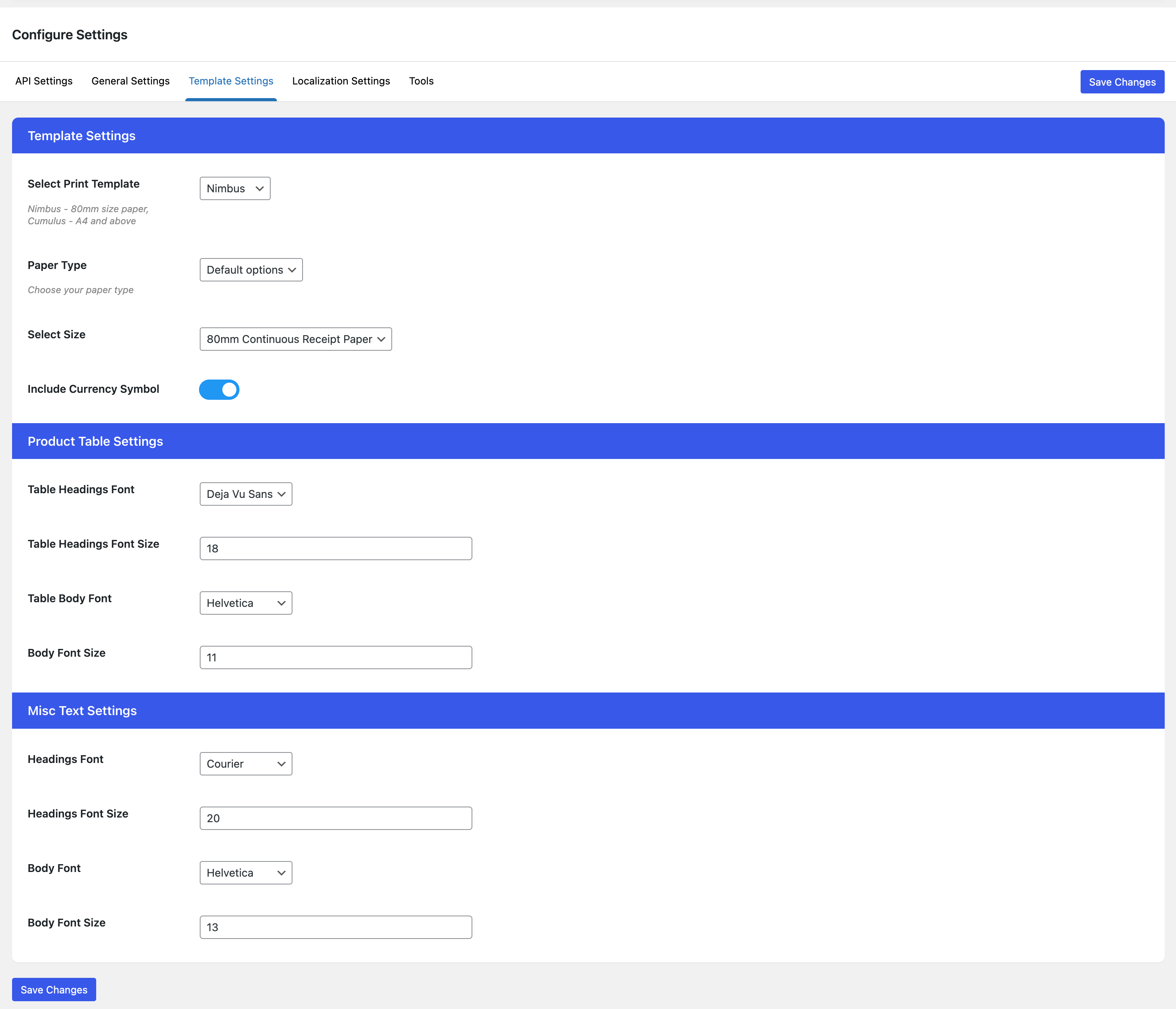
Plugin Template Settings. More settings and changes are available via plugin Action and Filters.
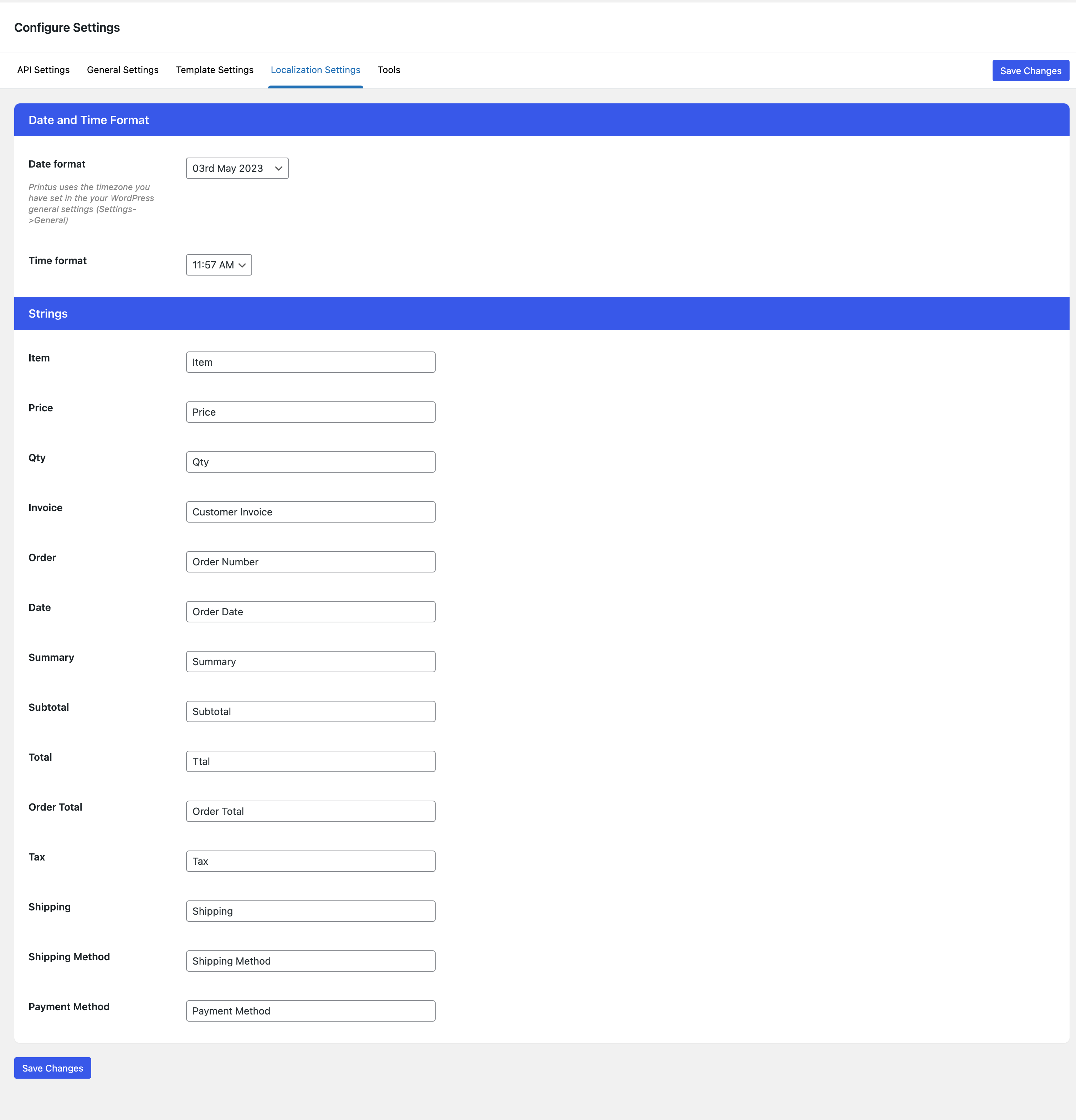
Plugin Localization Settings. These settings allow you to change the different text displayed in the templates, but it is totally possible to show custom text in your custom templates.
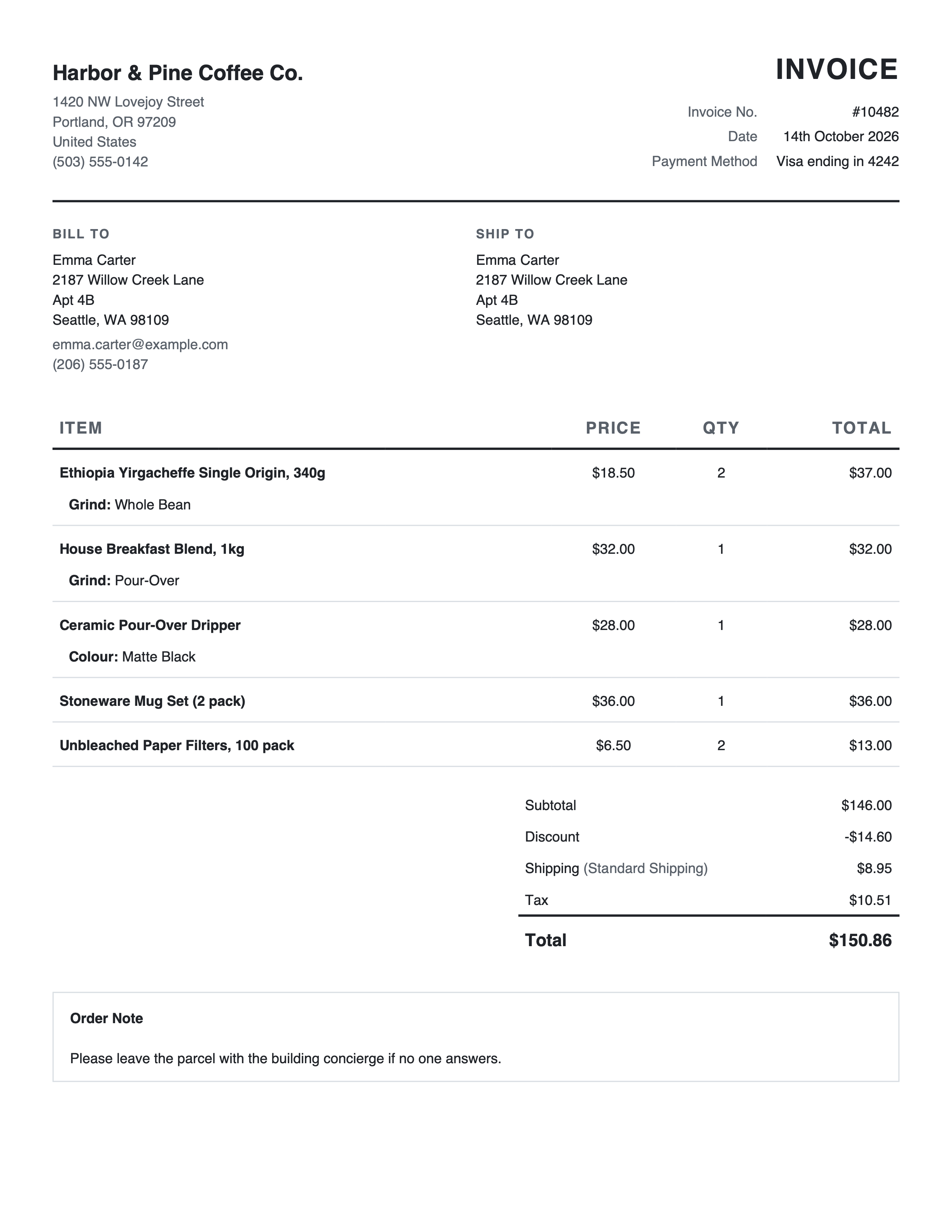
Invoice template.
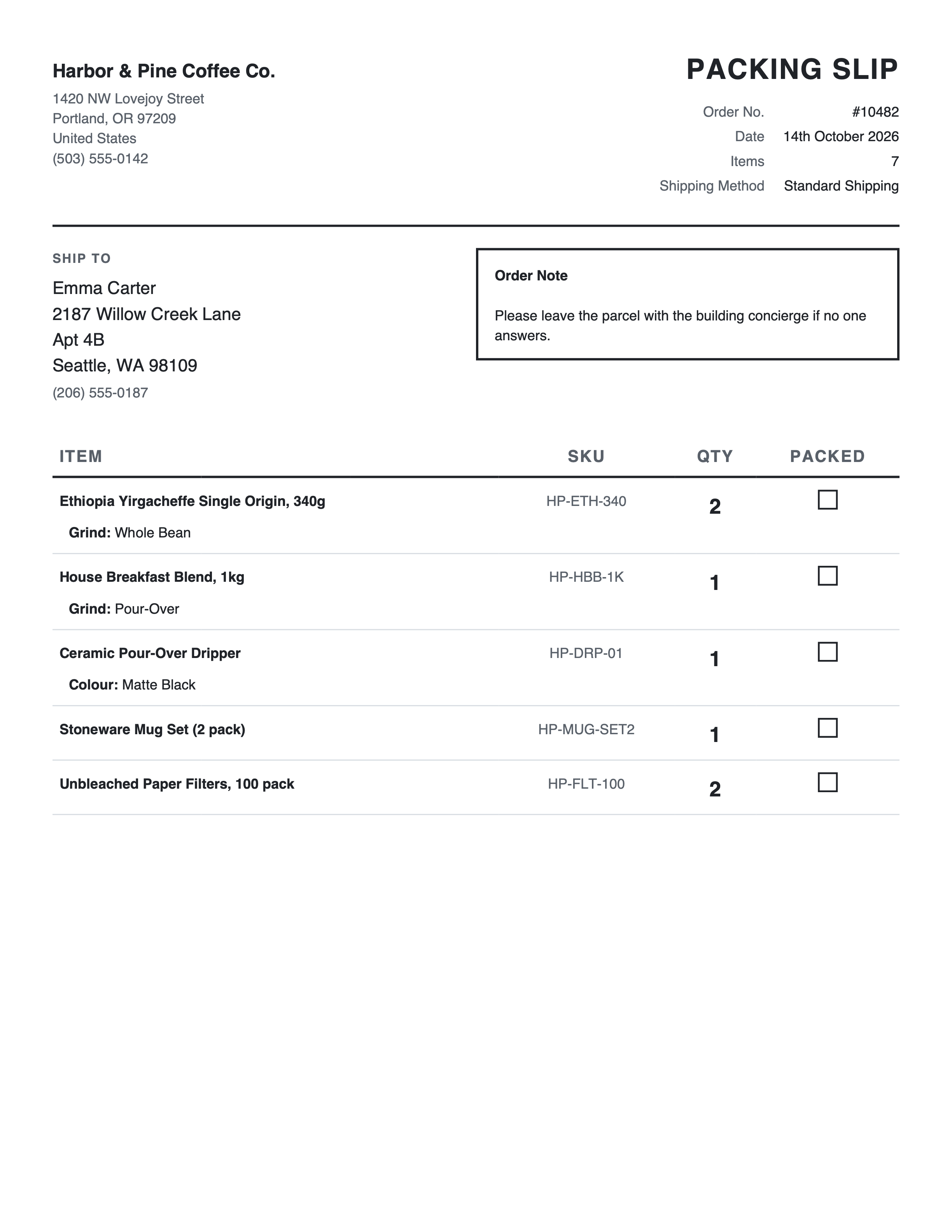
Packing Slip template.
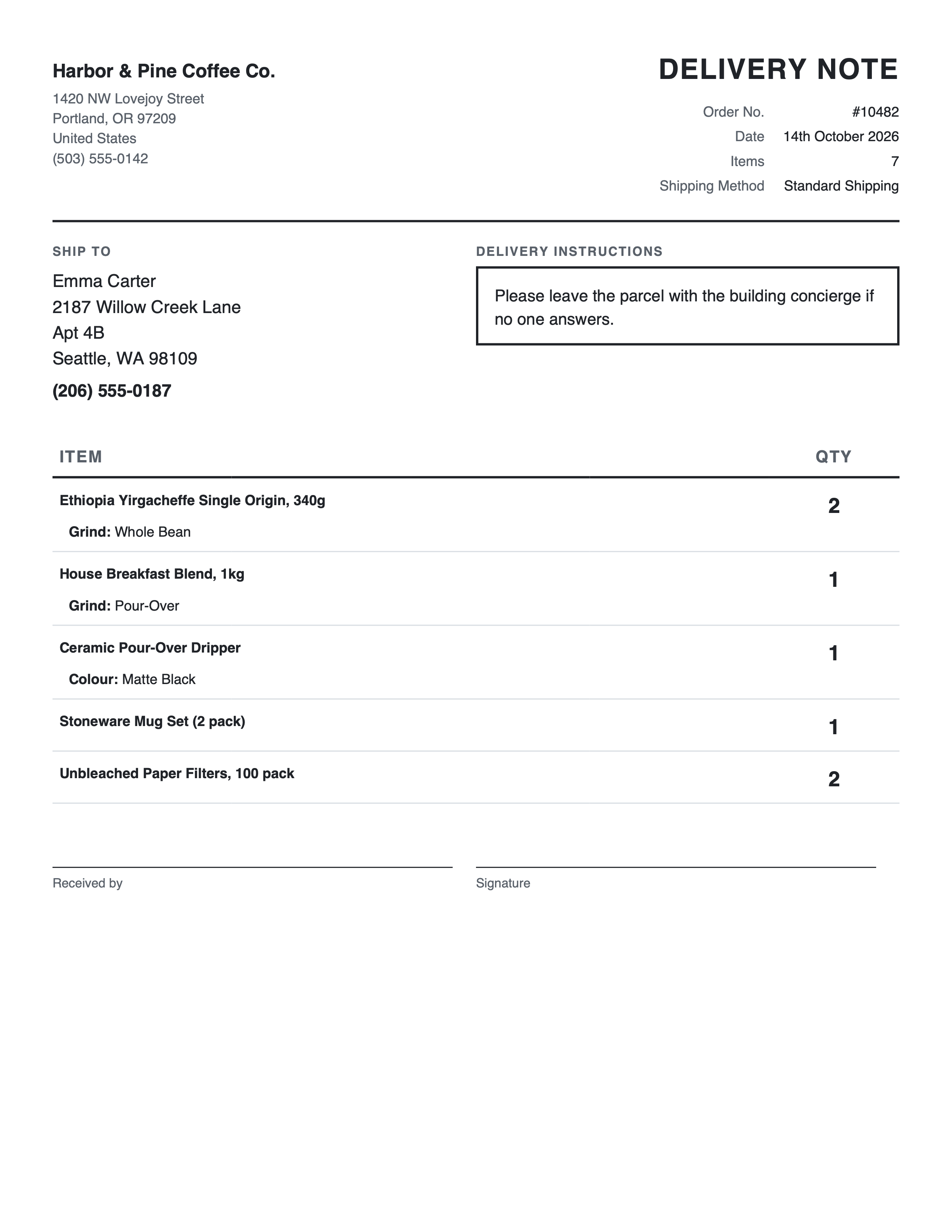
Delivery Note template.
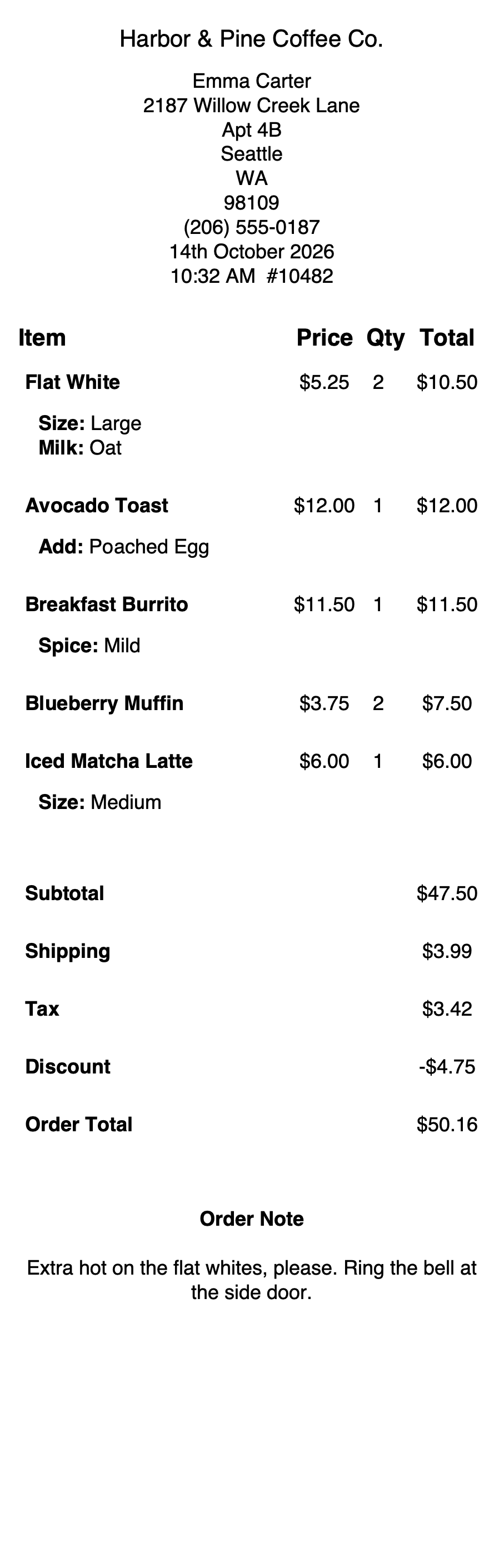
Receipt template for 80mm receipt printers.
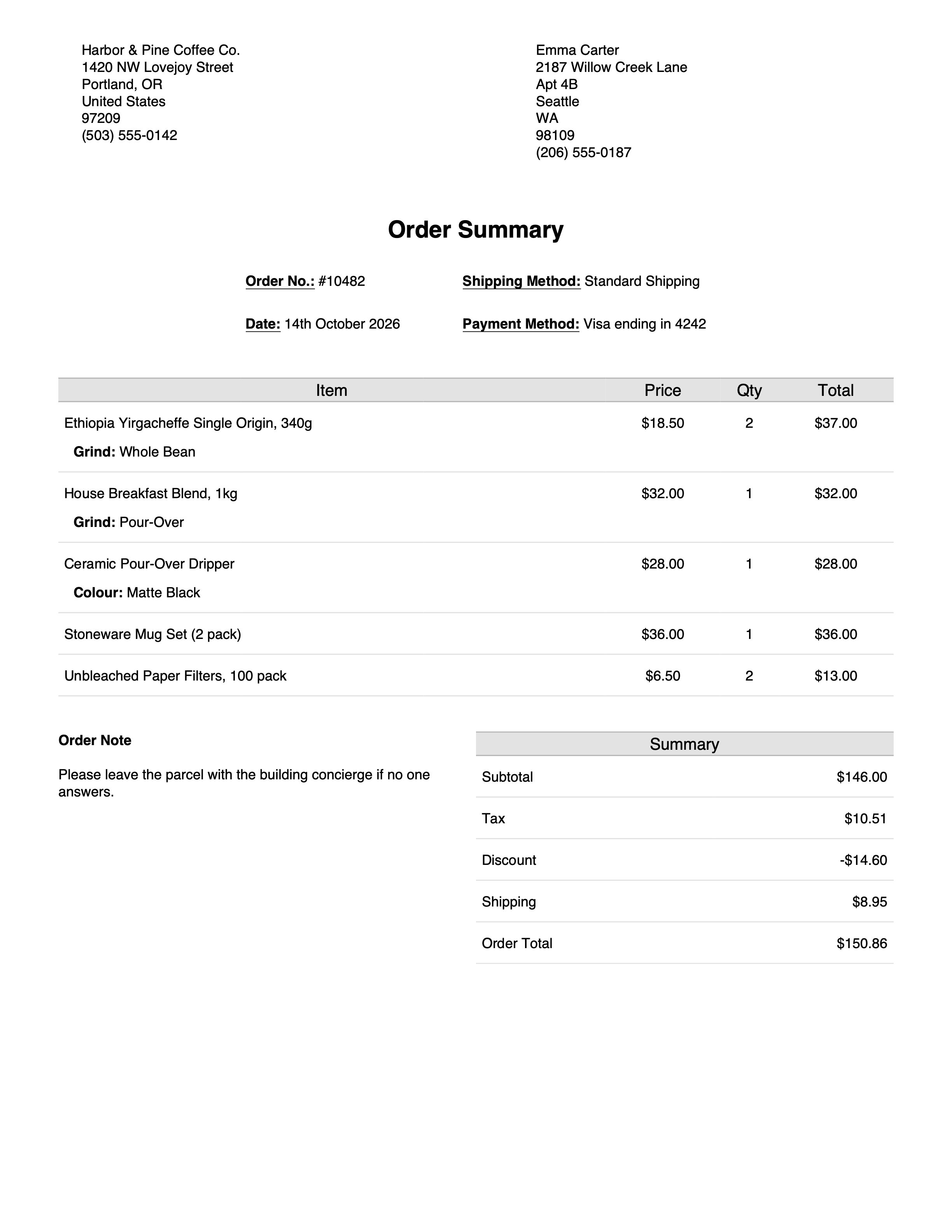
Order Summary template.
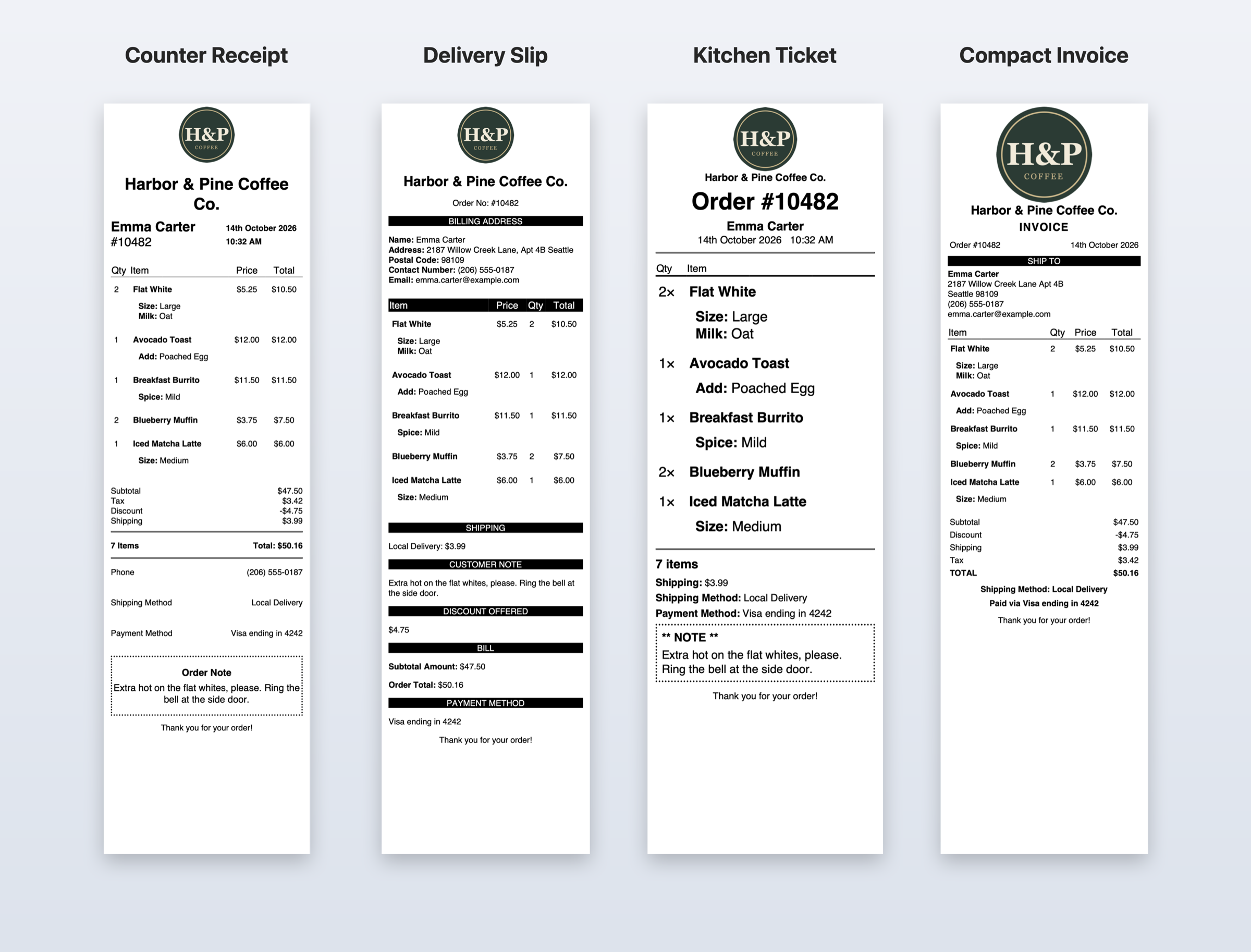
Custom receipt printer templates made with the Printus Template Generator: Counter Receipt, Delivery Slip, Kitchen Ticket and Compact Invoice, with your logo and columns.
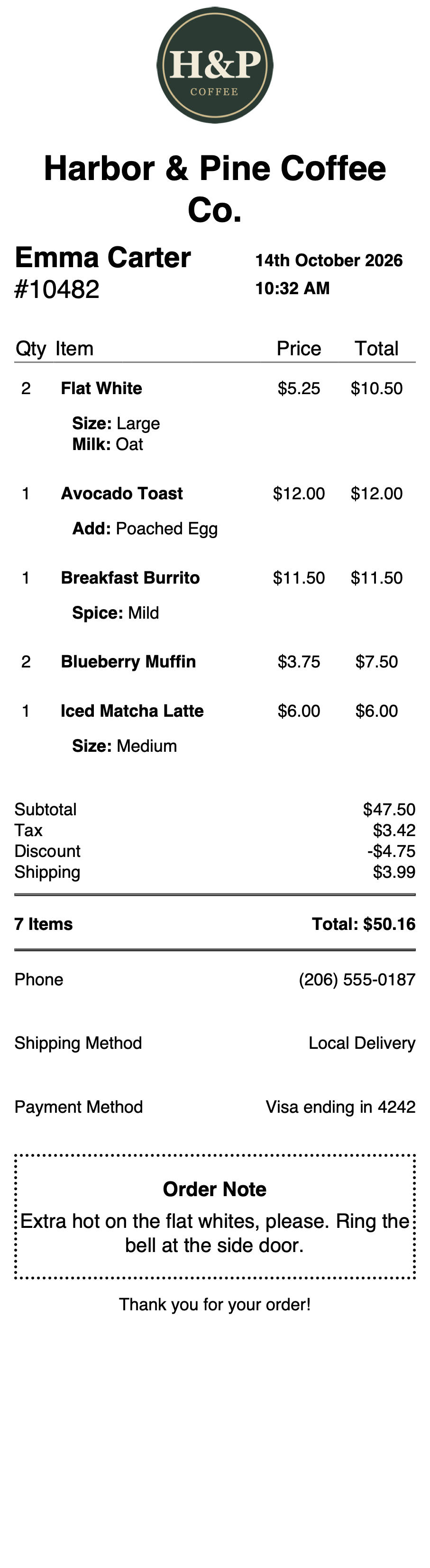
Counter Receipt (Printus Template Generator).
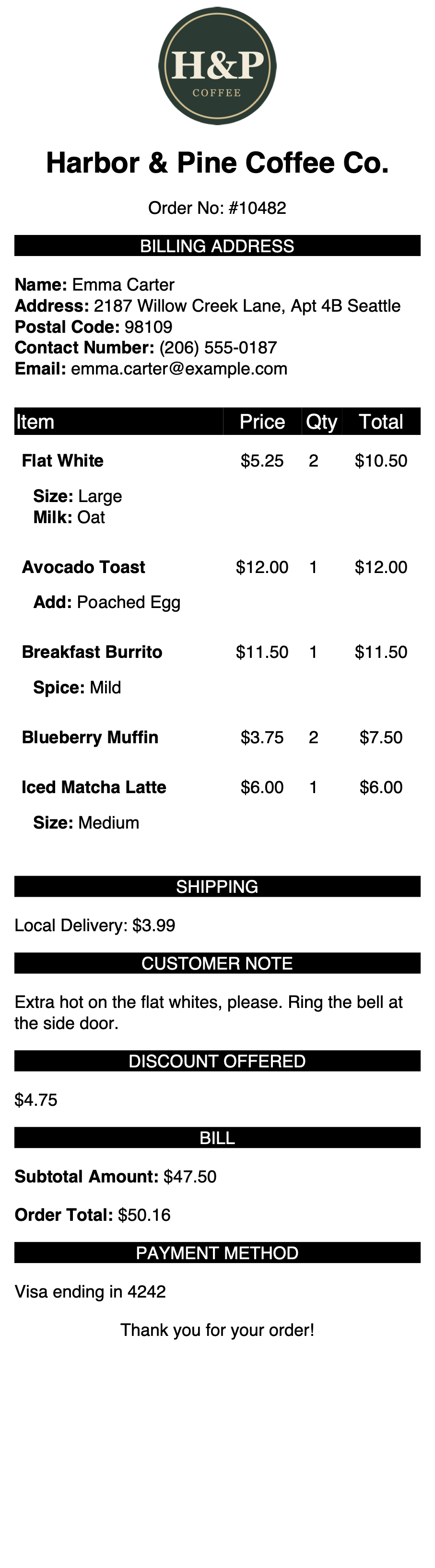
Delivery Slip (Printus Template Generator).
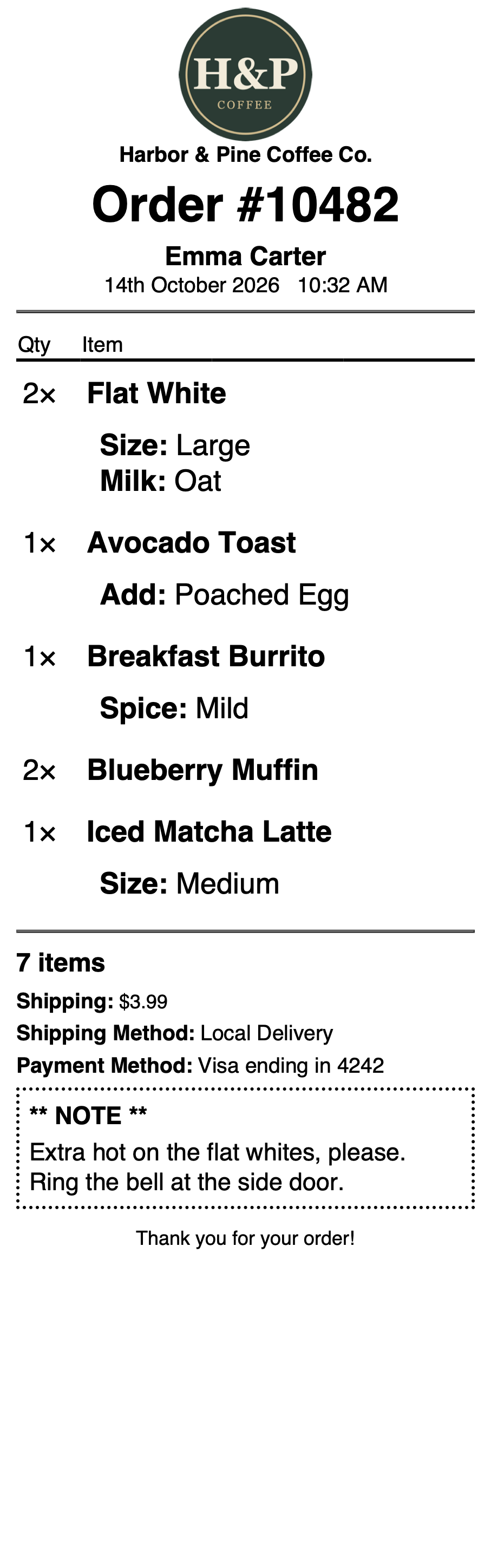
Kitchen Ticket with oversized items for the kitchen (Printus Template Generator).
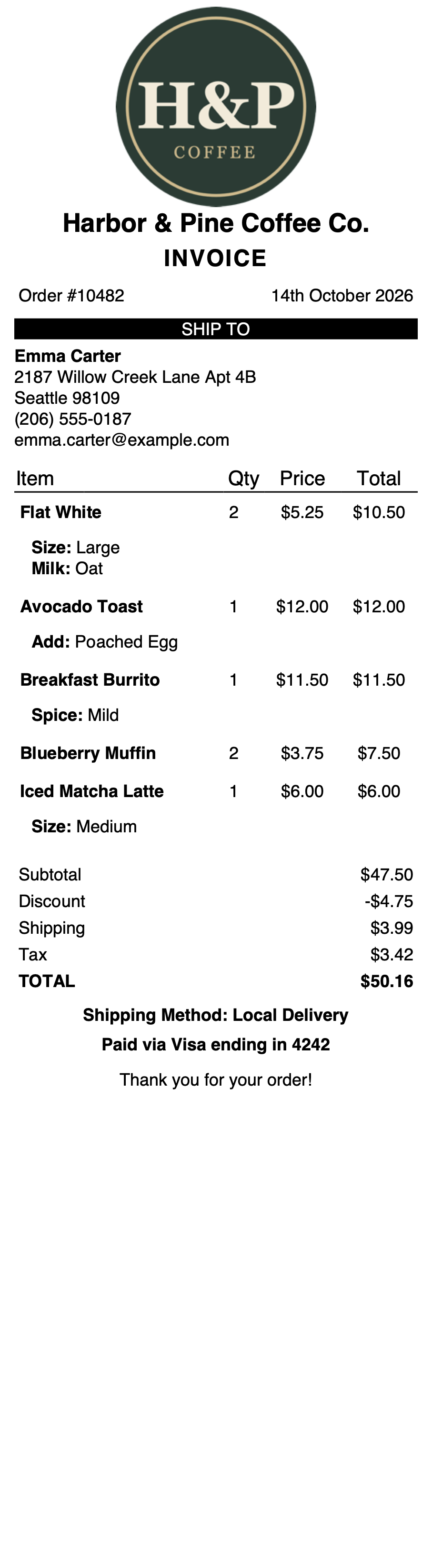
Compact Invoice for receipt printers (Printus Template Generator).
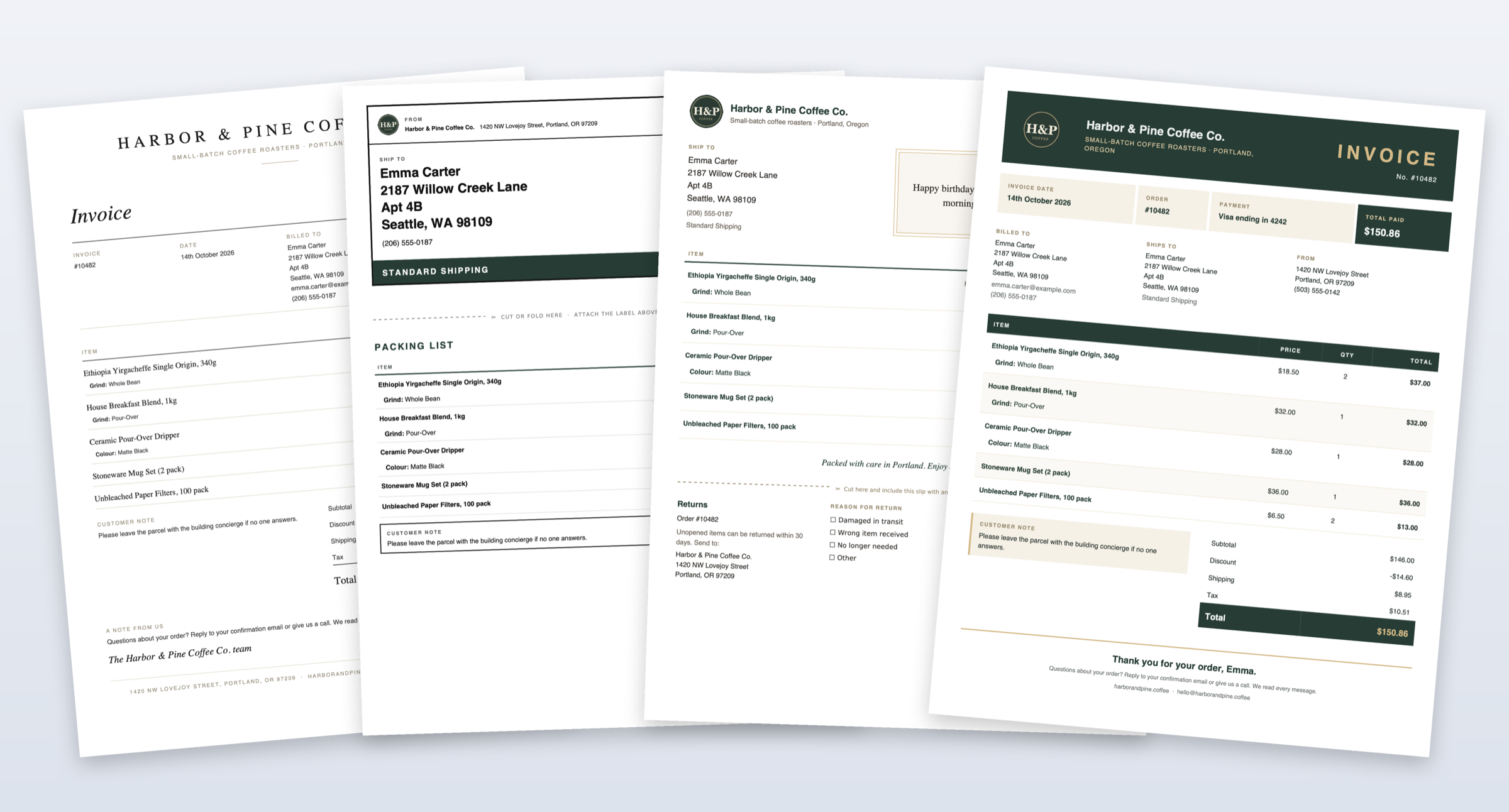
Custom office printer templates made with the Printus Template Generator: Editorial Invoice, Ship & Pack, Gift Packing Slip and Signature Invoice.
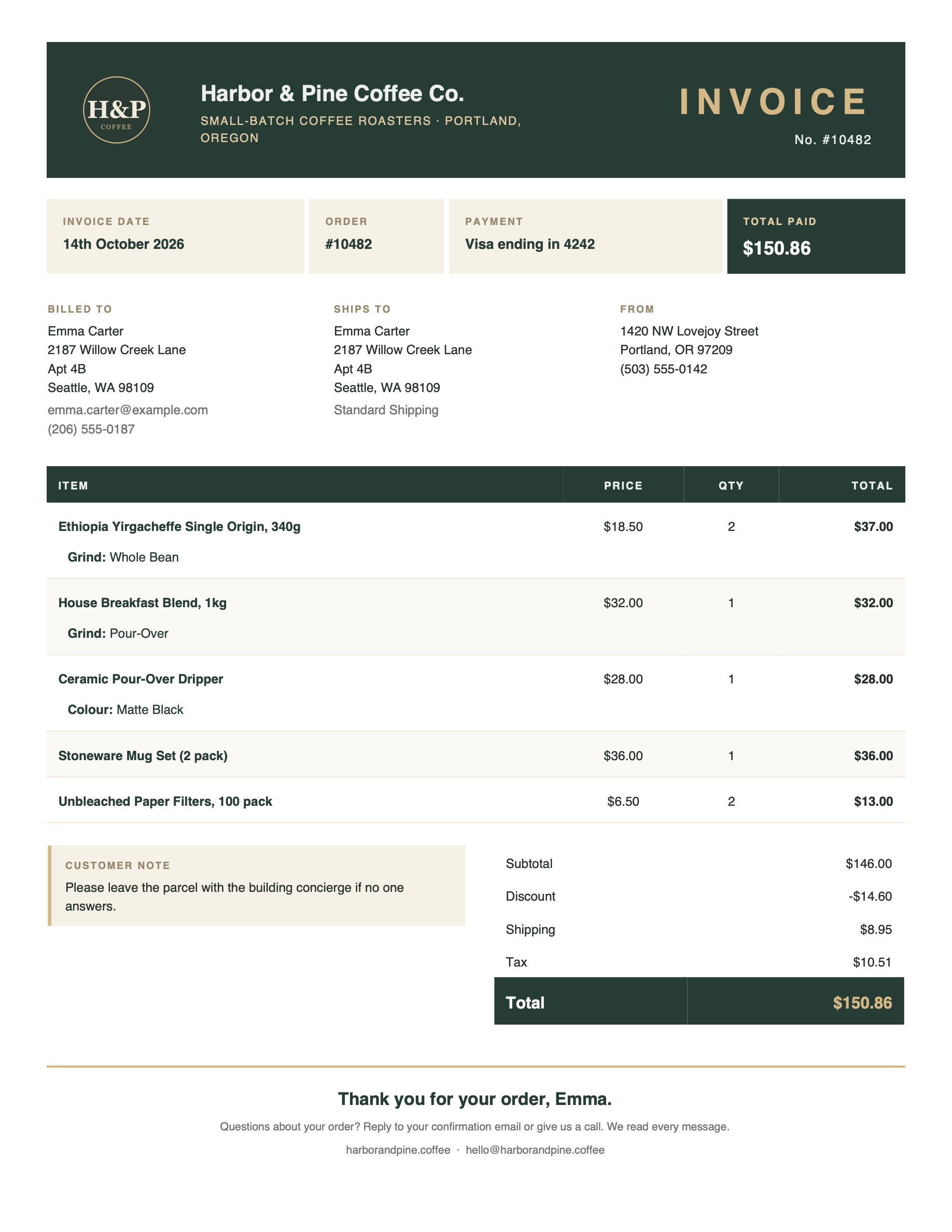
Signature Invoice with your logo and brand colours (Printus Template Generator).
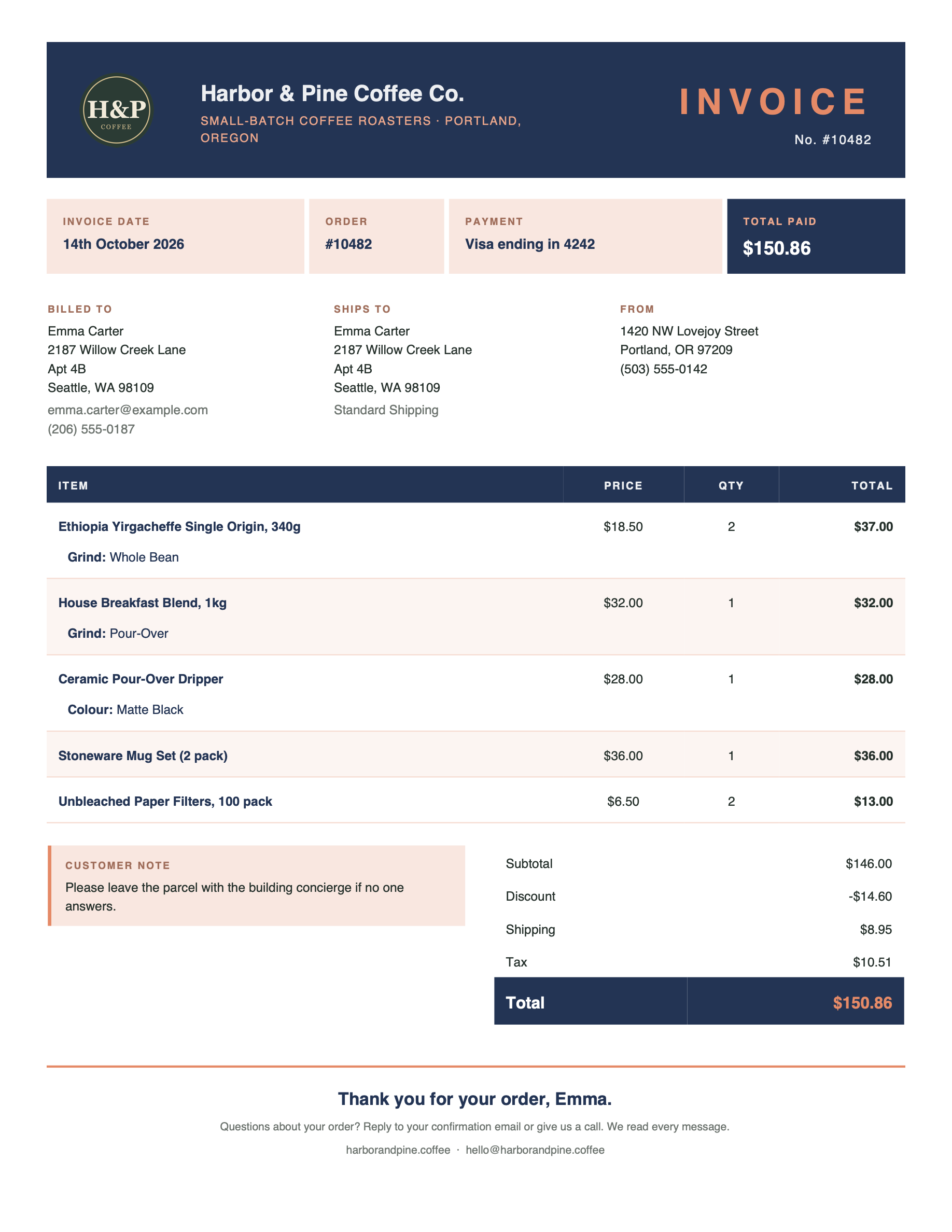
Signature Invoice in a different colour scheme (Printus Template Generator).
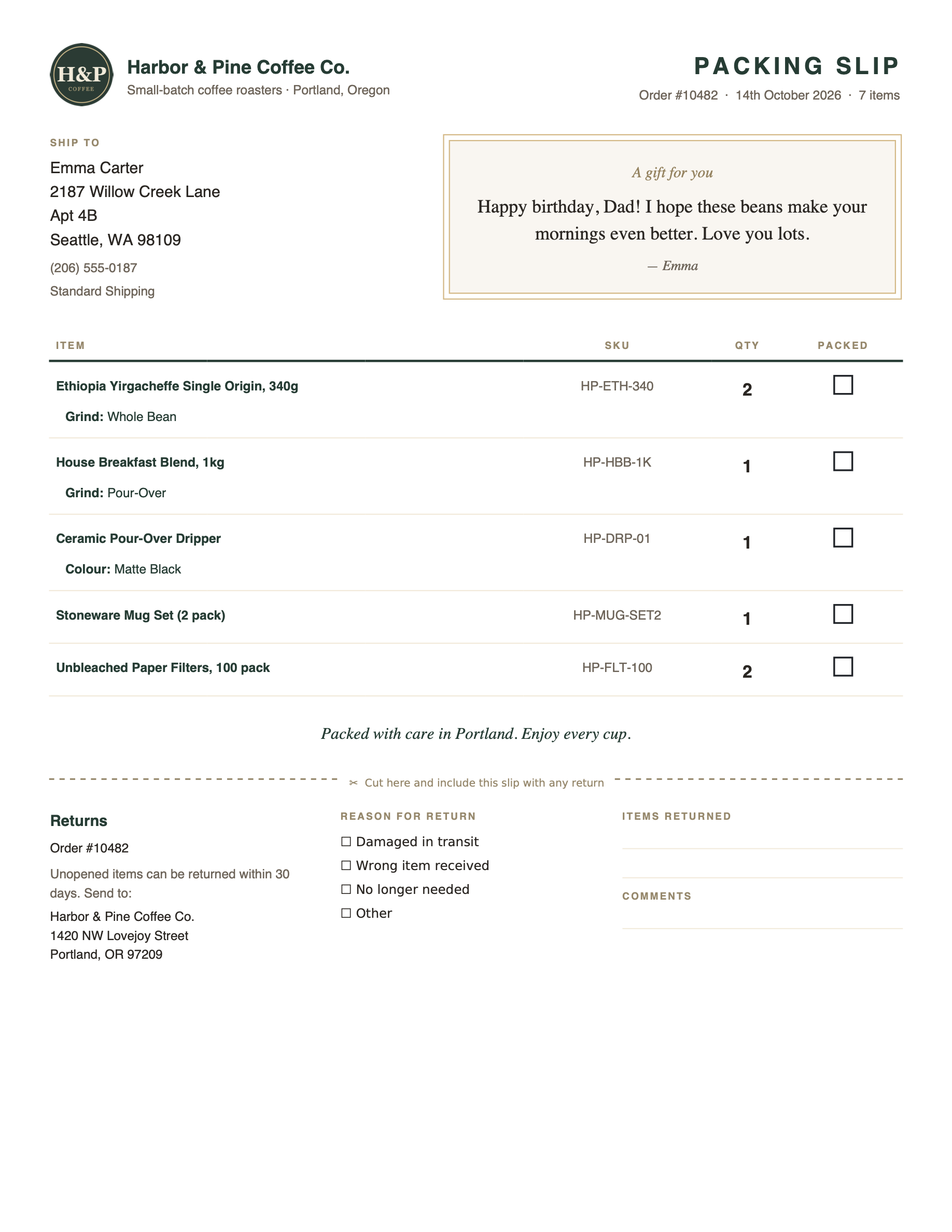
Gift Packing Slip with a gift message card and tear-off returns slip (Printus Template Generator).
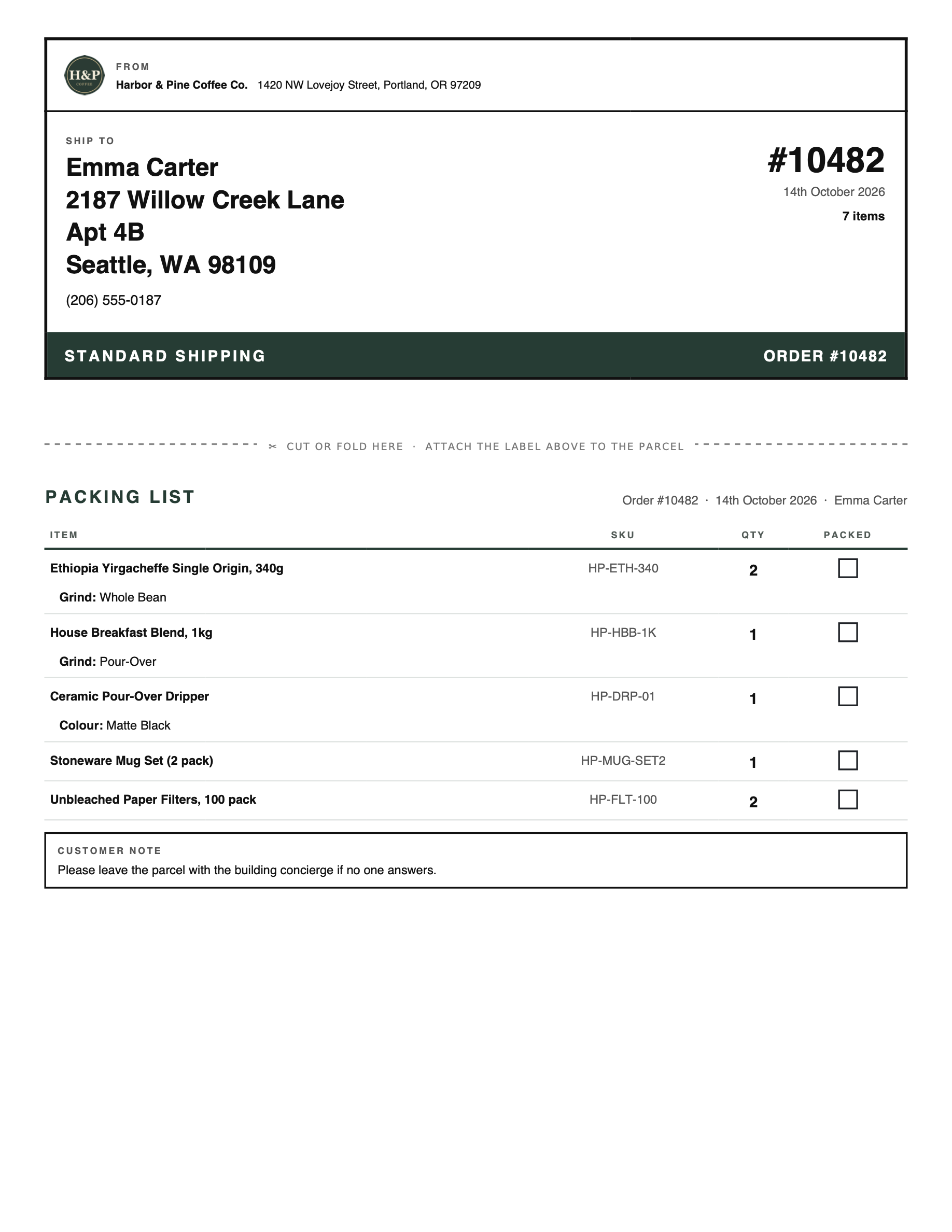
Ship & Pack: a shipping label and packing list on one sheet (Printus Template Generator).
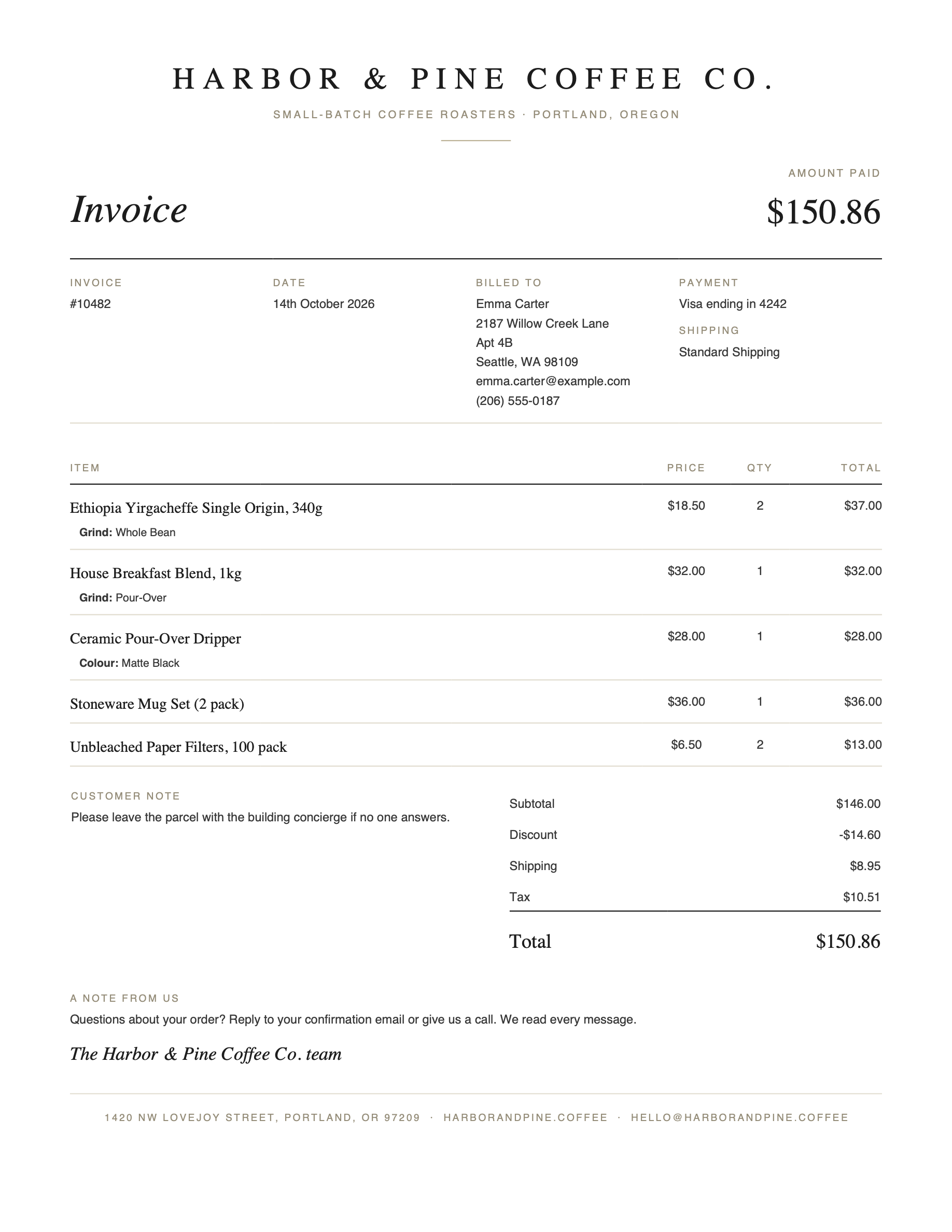
Editorial Invoice (Printus Template Generator).
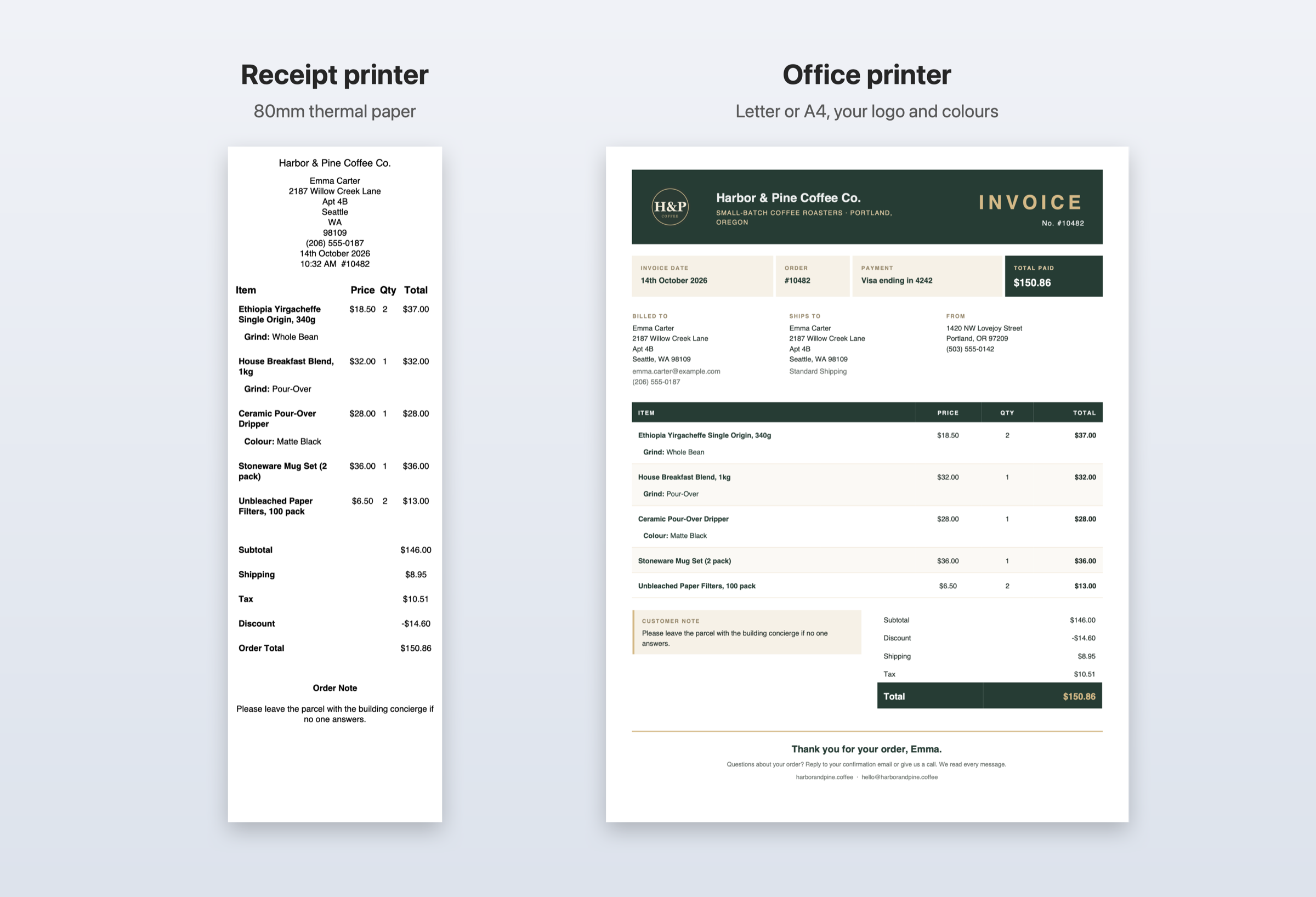
The same order on a receipt printer and an office printer.

Templates in your own colours (Printus Template Generator).
Faq
There can be multiple reasons why the printing doesn’t work. We’ve listed some troubleshooting steps that you can try out here >>>
Yes the plugin is free. PrintNode however is not completely free but offers a free plan. You can learn more about the PrintNode pricing here >>>. We are not affiliated with PrintNode in any way. Any subscription paid to them for use of their service does not get back to us. Printus is completely free to use, if you want to support the plugin then you can purchase a custom template design here >>>.
No, you do not need any special printer. The plugin should work with almost every standard printer as long as the printer is connected to your computer.
Printus includes a Receipt (for 80mm receipt printers), an Invoice, a Packing Slip, a Delivery Note and an Order Summary. Choose one in Printus Cloud Printing > Template Settings, or pick a different one when reprinting an order from the order edit screen. You can create your own templates with the Printus Template Generator.
Yes, with printer mappings (PRO). Send the receipt to your receipt printer and the invoice to your office printer for the same order. PRO also has a Full-page Paper Size setting, so full-page documents can use Letter or A4 while your main paper size stays on 80mm for receipts. In the free version, the Invoice, Packing Slip and Delivery Note use your paper size setting when it’s Letter, A4 or Legal, and otherwise print on Letter or A4 based on your store’s country.
To have more control on when prints happen, checkout the Smart Print Timing add-on here >>>
Reviews
Great Support
By 
The plugin works perfectly as I request. Also great support from the developer.
Outstanding plugin. Feels like it should be paid.
By 
This plugin solved a critical real-world problem for us and has been rock solid in production. The flexibility around print triggers, the integration with WooCommerce and PrintNode, and the overall reliability are excellent.
To be completely honest, this is one of those plugins where you almost feel uneasy that it’s free, not because of missing features, but because the quality easily justifies a paid license, even at a modest price.
Documentation is clear, behavior is predictable, and the developer is responsive and clearly understands real business use cases. Highly recommended.
Great support and functionality
By 
I got great support and the plugin works perfectly.
Nagyszerű szolgáltatás
By 
Nagyszerű printus plugin, gyors ügyfélszolgálat
Great Support Service
By 
We were looking for a plugin to automatically print from woocommerce to print node. Out of 3 other plugins, this is the most professional and responsive team that we found. Completely free plugin, this team created a custom label for us for $100 and was responsive to every concern/issue. Great, fast, and professional.
Awesome Plugin, Great support!
By 
We've been using the Printus plugin for a few months now as part of a core process in our retail business. This plugin has been essential for us, and the support we have received is the cherry on top!
We recently created a new custom receipt template with them. The Dev was patient and polite throughout the whole process of creating the template, and we were able to address any problems and get them fixed right away! We are loving the new setup we have running!
Everyone knows a plugin is only as good as it's support, and these guys have been some of the best by far.
Highly reccomend this plugin!
Extremely nice plugin
By 
Plugin works great. Getting my product add ons printed on an order waiting for me every morning in my printer is awesome. Install this plug in, you will love it. Uriahs is very responsive if you have issues.
It works great!! Dev is very responsive and so helpful!
By 
I downloaded this plugin, but I was having trouble getting the prints to turn out correctly. I'm using Plugin Republic's Ultimate Add-ons and they weren't showing. Uriahs logged in and immediately found the problem. Then he worked with me to get the size of the print to be correct. 10/10 would download again
Great product, even better support
By 
I was looking for a method of getting orders printed as I wanted them on a receipt printer. This is because my site is for an Indian Restaurant online orders. Tried several PlugIns that said they would do the job, but not as I wanted. Stumbled across Printus - didn't quite do what I wanted, so I bit the bullet and invested in a custom template. Uriahs checked with me to clarify exactly what I wanted, and apologised that it would take a couple of days because of the weekend!
He sent my template through as promised. There was a slight issue - because (as I discovered subsequently) I had quoted the wrong paper width. Uriahs quickly changed the setting for me.
The result is EXACTLY what I wanted - and my customer is over the moon with the result.
Can't rate this PlugIn and support highly enough.
Thank you!
By 
This plug in works seamlessly! And Uriahs was so helpful and quick with his responses.
Changelog
2.1.0 (2026-10-17)
- [New PRO] “Full-page Paper Size” setting, so printer mappings can print receipts and full-page documents on different printers at the same time.
- [New] Invoice template for Letter/A4 printers, with bill-to and ship-to addresses, payment method and a full totals breakdown.
- [New] Packing Slip template for Letter/A4 printers: no prices, SKU and quantity per line, and a tick box for each item.
- [New] Delivery Note template for Letter/A4 printers: delivery address and phone, delivery instructions, items and quantities, and “received by” / signature lines.
- [New] The Invoice, Packing Slip and Delivery Note print on your paper size setting when it’s Letter, A4 or Legal, and otherwise on Letter or A4 based on your store’s country, so they never print on receipt paper.
- [New] “Template default” paper size option when printing from the order edit screen.
- [Fix] Printing an order that contains a product that was later deleted caused a fatal error.
- [Fix] Prices and totals on the Receipt template could break across two lines on 80mm paper.
- [Fix] Custom templates in your theme’s
printus/templatesfolder no longer hide templates from the Printus Custom Templates plugin. Both are now available together; a theme template with the same name takes priority. - [Fix] Templates from the Printus Custom Templates plugin are no longer listed, or printed with unfilled placeholders, while that plugin is deactivated.
- [Fix] Blank option in the template dropdowns caused by non-template files in the templates folder.
- [Fix] The Item column heading is now left-aligned like the items below it when it isn’t the first column, e.g. after a Qty column.
- [Fix] Table headings showed their internal name (e.g. “item-text”) if the Localization settings had never been saved.
- [Fix] Improved security when loading the template chosen in the order edit screen’s print box.
- [Fix] Browsers and password managers no longer fill your saved login into the API Key field.
- [Change] Built-in templates now have descriptive names: Nimbus is now “Receipt” and Cumulus is now “Order Summary”, and they’re listed first in the template dropdowns. Existing settings keep working.
- [Change] The Receipt template’s product names, column headings and totals labels are now bold.
- [Change] The Order Summary template’s heading now reads “Order Summary” instead of “Invoice” (editable in the Localization settings).
- [Change] The Order Summary template now shows the customer note beside the totals and uses less spacing, so most orders fit on one page instead of the note moving to a second page.
- [Improvement] Template dropdowns show the paper size a template prints on, e.g. “Invoice (Letter)”.
- [Dev] Templates can declare
Printus Template,Paper(any paper size key, orfull-page) andOrientationin a header comment. A declared paper size takes priority over the global paper setting. - [Dev] New filters:
printus_template__paper_size,printus_template__full_page_paper_size,printus_template__document_replacements,printus_template__item_sku,printus_template__columns(add or remove item table columns on the bundled templates, e.g. remove the Packing Slip SKU column) andprintus_custom_templates_paths.
2.0.6 (2026-10-14)
- [Improvement] Make item quantities filterable.
- [Improvement] Changes to bold styling across various templates.
- [Info] Tested on WP 7.1.
- [Info] Tested on WC 11.2.
- [Dev] Updated Freemius SDK.
2.0.5 (2026-08-18)
- [New] New option to allow for the processing of print triggers on the order edit screen.
- [Dev] Updated Freemius SDK.
- [Info] Tested on WP 7.1.
- [Info] Tested on WC 11.0.
2.0.4 (2026-07-07)
- [New] Template Generator – Create custom print templates for Printus. Learn More.
- [Improvement] Set return type on some methods where they were missing.
- [Improvement] Other code improvements.
- [Dev] Updated Freemius SDK.
2.0.3 (2026-05-21)
- [Info] Tested on WP 7.0.
- [Info] Tested on WC 10.8.
2.0.2 (2026-04-23)
- [Info] Tested on WC 10.7.
2.0.1 (2026-04-17)
- [Change] Remove WC Blocks incompatibility notice.
- [Change] Remove option to process prints immediately or via cron job since plugin now functions using WooCommerce order statuses.
- [Improvement] Edit default font sizes.
- [Dev] Updated Freemius SDK.
2.0.0 (2026-02-09)
- [Change] Print Triggers have been changed to use order statuses (Processing, on hold, and completed). Plugin settings have been updated to reflect this change. Please test your automatic printing after updating.
- [Improvement] Acowebs product addons layout has been improved.
- [Improvement] Add support for Hebrew and Arabic fonts (only visual, RTL not supported).
- [Dev] Updated Freemius SDK.
1.5.1 (2026-01-06)
- [Info] Tested on WP 6.9.
- [Info] Tested on WC 10.4.
1.5.0 (2025-10-23)
- [New] Added a new setting to control when prints are processed. Whether immediately or using a background task. Learn more.
- [Info] Tested on WC 10.3.
1.3.3 (2025-09-30)
- [Fix] Avoid duplicate product addons when Attributes Fix option is enabled.
- [Dev] Updated Freemius SDK.
- [Info] Addressed WP Plugins Team concerns.
1.3.2 (2025-09-01)
- [Improvement] Better handling of product variation names and values when creating print template.
- [Improvement] Added a new “Product Attributes Fix” option in the Tools settings to help in some instances where product attributes do not show on template.
- [Improvement] When a manual paper size is being used in Template settings, it will now show in the on-demand printing metabox on the order edit screen.
- [Info] Tested on WC 10.1.
1.3.1 (2025-07-03)
- [Fix] Incompatible PHP 7.4 code.
1.3.0 (2025-06-05)
- [Change] The Cumulus template has been slightly redesigned.
- [Change] Make Noto Sans the default font.
- [Compatibility] Improve support of StudioWombat’s WooCommerce Product Addons plugin.
- [Improvement] Better logic for adding product variations and addons to templates.
- [Improvement] Log when there was an issue sending the print job to PrintNode.
- [Dev] Change location of
printus__printnode_job_datafilter. Allowing of short-circuiting print jobs using this filter. - [Dev] Updated Freemius SDK.
- [Info] Tested on WP 6.8.1.
- [Info] Tested on WC 9.9.2.
1.2.7 (2025-04-01)
- [Fix] Add nonce check when clearing font cache.
- [Info] Tested on WC 9.8.0-rc.1.
1.2.6 (2024-10-28)
- [Dev] Updated Freemius SDK.
1.2.5 (2024-10-28)
- [Improvement] Better support for product addons created by Acowebs’ product addons plugin.
- [Improvement] Better margins when Page Length Fix option is enabled.
- [Dev] Updated Freemius SDK.
- [Info] Tested on WP 6.7-rc1.
- [Info] Tested on WC 9.4-rc1.
1.2.4 (2024-09-04)
- [New] Add discount and order note to Nimbus and Cumulus templates.
- [New] Add new “Template Settings” option to show product prices inclusive of tax when printing.
- [Fix] Price text wasn’t following font size setting in plugin.
- [Compatibility] Improve support for PPOM plugin.
- [Change] Fixed typo in
pintus_include_formatted_variationfilter, renamed toprintus_include_formatted_variation. - [Change] Add new
pintus_include_formatted_variationfilter to control when to show woocommerce variation on print. - [Dev] Updated Freemius SDK.
- [Info] Tested on WC 9.2.
1.2.3 (2024-07-22)
- [New] Added toggle option for Payment Complete trigger to prevent printing unless the payment was successful.
- [Change] Prices of products in the printed table will no longer show the discounted price of the product. This behaviour can be changed using the
printus_template__item_pricefilter. - [Dev] A new
printus_printnode_restrict_printer_idsfilter makes it possible to restrict the printer IDs that show on a site. This is useful if you’re using one account across multiple websites. - [Dev] Other code improvements.
1.2.2 (2024-07-09)
- [Compatibility] Add support for custom order numbers.
- [Change] Switched around the
printus_template__order_itemfilter. Please test your print after updating, especially if you’ve gotten a custom template in the past. - [Dev] Made it possible to set print triggers as an array to allow for multiple triggers.
- [Info] Tested on WC 9.1.0-rc1.
- [Info] Tested on WP 6.6-rc2.
1.2.1 (2024-05-14)
- [Compatibility] Add support Plugin Republic WooCommerce Add-ons uploads field type.
- [Dev] Add WC Blocks Incompatibility notice – WooCommerce Blocks doesn’t fire “Checkout Complete” Hook.
- [Dev] Updated Freemius SDK.
- [Info] Tested on WC 8.9.0-rc1.
1.2.0 (2024-03-06)
- [Fix] The order item name was being duplicated for items that did not have addons when they were in the same order as items that contained addons.
- [Compatibility] Add support for WooCommerce Product Add-ons & Extra Options by YITH (both Lite & Pro).
- [Compatibility] Add support for Advanced Product Fields Pro for WooCommerce by StudioWombat.
- [Compatibility] Add support for Woocommerce Custom Product Addons Pro by Acowebs.
- [Change]
printus_template__itemfilter has been renamed toprintus_template__order_item. - [Change] Pass entire order item name with variations included to
printus_template__order_itemfilter. - [Change] Add
text-align: centerto text added to templates viaprintus_template__after_template_dataaction. - [Dev] Add
printus_save_pdffilter for saving PDF files to uploads directory inwp-content\uploads\printus-pdfs. Simply returntrueto the filter to enable. - [Info] Tested on WC 8.7.0-rc1.
1.1.10 (2024-02-18)
- [Fix] Built-in WooCommerce product variations were not showing on printed orders.
- [Fix] Bold font-weight was not applying correctly for product addon names.
- [Improvement] Add
printus_template__include_addon_pricefilter to enable showing of product addon prices when using PPOM. Simply return boolean true to filter to enable showing of prices. - [Dev] Updated Freemius SDK.
- [Info] Tested on WC 8.6.
1.1.9 (2023-11-30)
- [Fix] Order Complete print trigger was not working.
- [Improvement] Add “Print Length Fix” option to “Tools” menu which fixes print length issues in some printers.
- [Improvement] Display product addons better on printed templates.
- [Compatibility] WooCommerce Product Addons Ultimate by Plugin Republic.
- [Compatibility] Advanced Product Fields (Product Addons) for WooCommerce by StudioWombat.
- [Dev] Change plugin initialization to fire on
plugins_loadedhook. - [Dev] Updated Freemius SDK.
- [Info] Tested on WC 8.3.
- [Info] Tested on WP 6.4.
1.1.8 (2023-10-15)
- [Improvement] Update Cumulus template data to take a bit less space on paper.
- [Compatibility] With Product Addons & Fields for WooCommerce (PPOM) by ThemeIsle
- [Fix] Product addon labels would always show on receipt when using Product Addons by WooCommerce.
- [Fix] A4, Letter and Legal paper sizes were being converted twice.
- [Info] Compatibility with WC HPOS.
- [Info] Tested on WC 8.2.
1.1.7
- [Compatibility] With Extra product options For WooCommerce | Custom Product Addons and Fields Lite by ThemeHigh
- [Compatibility] With Product Addons for Woocommerce – Product Options with Custom Fields by Acowebs
- [Compatibility] With Extra Product Options & Add-Ons for WooCommerce by ThemeComplete
- [Compatibility] With Product Addons by WooCommerce
- [Info] Tested on WC 8.1.
- [Dev] Updated Freemius SDK.
1.1.6
- [Fix] Prints were off canvas because of turning fit to page option to false. Use
printus__printnode_job_datafilter to add more config data to print jobs if needed.
1.1.5
- [Fix] Converting MM to PT was returning string value instead of float value.
1.1.4
- [Fix] Customer first name showing twice on printed templates.
- [Fix] Error when no height value is entered in height field for manual paper size.
- [Improvement] It is now possible to also load custom templates from a plugin and not just child themes.
- [Improvement] Made PrintNode job data filterable before sending to API.
- [Info] Tested on WP 6.3.
- [Info] Tested on WC 8.0.
1.1.3
- [Dev] Updated Freemius SDK.
1.1.2
- [Dev] Version bump.
1.1.1
- [Info] Tested on WC 7.9.
- [Dev] Updated Freemius SDK.
1.1.0
- [Note] There are breaking changes in this update.
- [New] Option to add store phone number.
- [New] Feature to manually print an order (Print on demand).
- [New] Cumulus Template – for larger sized papers (A4, Letter, Legal +).
- [Change] Moved around some plugins settings.
- [Change] Store details of Basic template has been replaced with Customer details.
- [Change] Made format changes to Basic template.
- [Change] Basic template has been renamed to Nimbus.
- [Change] Customer address details will be shown on Nimbus template.
- [Improvement] More localization string options.
1.0.0
- Initial release.