Products Showcase – Shopify Integration
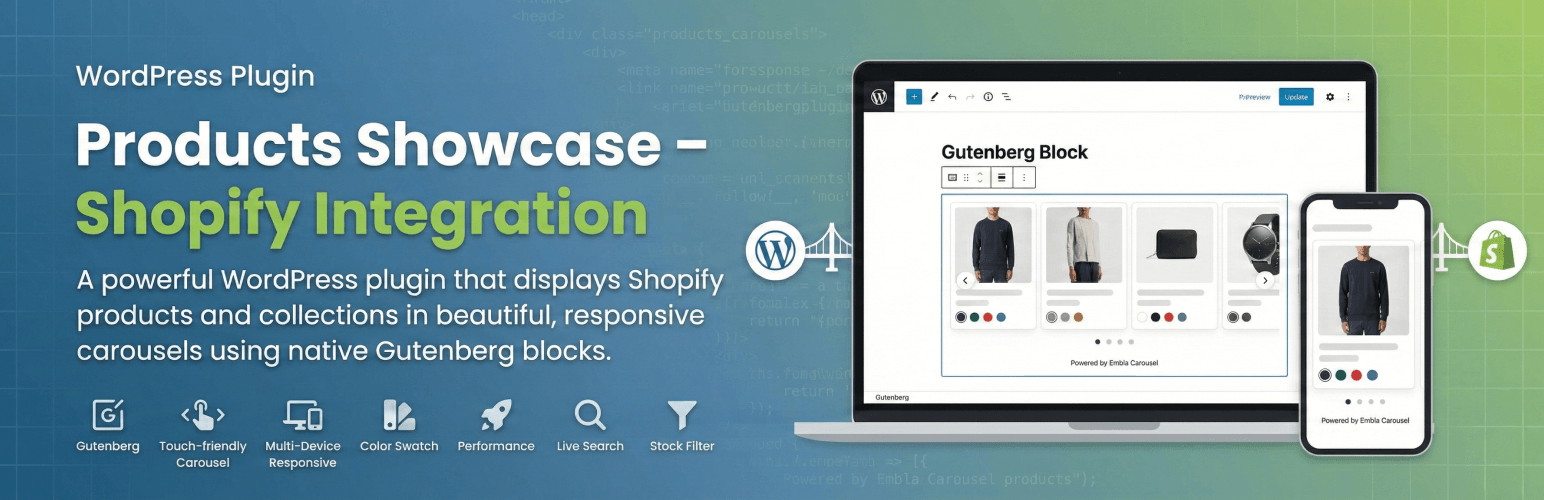
Products Showcase – Shopify Integration
Description
Display your Shopify products on WordPress with beautiful, responsive carousels and grids. Built as a native Gutenberg block with OAuth authentication for easy setup.
Features
- Native Gutenberg Block – Built with React, no jQuery or third-party services on the frontend
- Beautiful Carousels – Touch-friendly product carousels powered by Embla Carousel
- Smart Product Display – Show individual products or entire collections
- Color Swatches – Visual product color options with hover effects
- Carousel or Grid Layout – Horizontal carousel or a responsive grid with 2-6 columns
- Fully Responsive – Optimized for all screen sizes and devices
- Performance Optimized – Smart caching and lazy loading
- Live Search – Real-time product/collection search in block editor
- Sale Badges – Automatic sale badge and struck-through compare-at prices
- OAuth Authentication – Secure one-click connection to Shopify
Use Cases
- Showcase featured products on your blog
- Display seasonal collections on landing pages
- Add product carousels to content-heavy sites
- Bridge content and commerce seamlessly
Requirements
- WordPress 6.3+, PHP 7.4+
- A Shopify store with Admin API access
Links
- Plugin Website – Overview, demos & updates
- GitHub Repository – Source code & developer docs
- Documentation – Full installation guide
External Services
This plugin connects to the Shopify Admin API to fetch your product data.
Service Provider: Shopify Inc.
Data Transmitted: Store URL, OAuth credentials (one-time), and product queries
When: During setup, when searching products in editor, and when displaying products (cached for 1 hour)
Privacy: All Admin API calls are made server-side and the plugin itself sends no visitor data to Shopify. Product data is cached locally. Note that visitors’ browsers load product images directly from Shopify’s CDN (cdn.shopify.com), and product links open on your Shopify store, so Shopify may receive standard request data (such as IP address) from visitors in the same way as any embedded image or outbound link.
Shopify Legal:
* Terms of Service
* Privacy Policy
* API Terms
Configuration
Easy OAuth Setup
- Navigate to Shopify Products in WordPress admin
- Enter your Shopify Store URL (e.g.,
your-store.myshopify.com) - Paste your Client ID from Shopify
- Paste your Client Secret from Shopify
- Click “Connect to Shopify”
- You’ll be redirected to Shopify to authorize the connection
- After authorizing, you’re automatically redirected back – done!
The plugin automatically obtains the access token via secure OAuth and detects the latest Shopify API version.
Usage
- Edit any page or post in WordPress
- Click “+” to add a block and search for “Shopify Products”
- Choose Products Mode (select individual products) or Collection Mode (display a collection)
- Use the live search to find and add products
- Customize title, description, and product limit as needed
The block displays as a touch-friendly carousel on mobile and with arrow navigation on desktop, or as a responsive grid (choose Layout Grid in the block’s Display Options and set the desktop column count). Single products get a special two-column featured layout.
Not using the block editor? Use the [products_showcase] shortcode in the Classic editor, text widgets, or page builders:
[products_showcase collection="123456789"]
[products_showcase products="111,222,333" title="Featured"]
[products_showcase collection="123456789" layout="grid" columns="4"]
Supported attributes: collection, products, limit, layout, columns, title, description, button_text, button_url, button_new_tab, new_tab, hover_image, card_width, disable_padding, and color options. See the GitHub README for the full list.
Customization
For custom CSS classes, template overrides, hooks & filters, and developer documentation, see our GitHub README.
Troubleshooting
Products Not Showing
- Check API credentials in Settings Shopify Products
- Verify connection shows green checkmark
- Clear cache using the button in settings
- Ensure products are set to Active in Shopify (Draft products are hidden)
Can’t Configure Shopify App
- In Dev Dashboard, click “New version” to edit settings
- Add scopes in the “Access” section
- Click “Release” to activate your configuration
For detailed troubleshooting, see our GitHub documentation.
Credits
- Built with Embla Carousel for smooth, touch-friendly carousels
- Powered by @wordpress/scripts
Support
Privacy Policy
This plugin connects to Shopify’s API to fetch product data. Product information is cached locally. The plugin does NOT collect or transmit any visitor data. See Shopify’s privacy policy for their data handling practices.
Installation
Video Tutorial
Watch the complete setup walkthrough on YouTube: How to Connect Shopify to WordPress
Standard Installation
- Upload the plugin files to
/wp-content/plugins/products-showcase/, or install through the WordPress plugins screen - Activate the plugin through the ‘Plugins’ screen in WordPress
- Go to Shopify Products in the WordPress admin menu
- Enter your store URL, Client ID and Client Secret, then click Connect to Shopify (see “Creating Your Shopify App” below)
- Create or edit a page/post and add the “Shopify Products” block
- Search and select products or a collection to display
Development Installation
For active development with hot reloading:
- Clone the repository:
git clone https://github.com/HosseinKarami/products-showcase.git - Navigate to plugin directory:
cd products-showcase - Install dependencies:
npm install - Start development server:
npm start(watches for changes) - Activate the plugin in WordPress
Creating Your Shopify App
Step 1: Create the App
- Go to Shopify Admin Settings Apps and sales channels Develop apps Build apps in Dev Dashboard
- Click the “Create app” button (top right corner)
- In the “Start from Dev Dashboard” section (right side), enter an app name and click “Create”
Step 2: Configure App Version
- In the Versions section, click “New version”
- In the Access section, add
read_productsto the Scopes field - In the Redirect URLs field, paste the Redirect URL from your WordPress plugin settings
- Click “Release”, then confirm by clicking “Release” again in the popup
Step 3: Set Up Distribution
Note: If you created your app from a merchant store (via Shopify Admin Settings Apps Develop apps), your app automatically uses “Custom distribution” and you won’t see other distribution options. This is expected — custom distribution is the correct method for connecting your own store to WordPress. Only apps created from a Shopify Partner account would have multiple distribution options.
- Click “Distribution” in the Right sidebar
- If prompted, select “Custom distribution” and click “Select”
- Enter your store domain (e.g., your-store.myshopify.com)
- Click “Generate link” and confirm
Step 4: Install the App
- Copy the generated install link and open it
- On the Shopify Admin install page, click “Install”
Step 5: Get Credentials
- Click “Settings” in the left sidebar
- Copy the Client ID and Secret from the Credentials section
Screenshots

Product carousel on the frontend with sale badges, color swatches and a call-to-action button

Grid layout with a four-column desktop grid (2-6 columns)

Block editor: Display Options with the Layout and Columns controls

Block editor: live product search and the hand-picked product list

Single product featured two-column layout

Color swatch hover switches the product image to that variant

Settings page with a connected store, cache and UTM options

Carousel and grid on mobile, touch-friendly and responsive
Faq
Yes, you need an active Shopify store to use this plugin. The plugin fetches product data from your Shopify store via the Admin API.
No, this plugin only displays products. When users click on products, they’re redirected to your Shopify store to complete the purchase.
Product data is cached for 1 hour by default (configurable in settings). You can manually clear the cache from the settings page at any time to force a refresh.
Yes! The plugin includes CSS classes that you can target with custom CSS. Advanced users can also override the template files by copying them into a products-showcase/ folder inside their theme (e.g. your-theme/products-showcase/product-card.php).
Yes. Use the [products_showcase] shortcode in the Classic editor, a text widget, or a page builder. For example: [products_showcase collection="123456789"] or [products_showcase products="111,222,333"]. See the Usage section for the supported attributes.
Yes! If you have WPGraphQL installed, the plugin automatically registers GraphQL types for querying product data in headless/decoupled WordPress setups.
No. The plugin uses intelligent caching to minimize API calls and only loads assets on pages where the block is used. Images are lazy-loaded for optimal performance.
Currently, the plugin supports one Shopify store per WordPress installation. If you need multi-store support, please open a feature request on GitHub.
Click the “Disconnect” button in Shopify Products settings, then reconnect using the OAuth flow with your new credentials. The plugin will automatically obtain a new access token.
Products set to Draft status in Shopify are hidden automatically. Developers can use the prodshow_filter_products filter hook to implement custom product filtering logic, and prodshow_product_data to adjust an individual product’s data before display. See the GitHub README for all available hooks.
Reviews
Great Plugin and Even Better (helpful) Developer
By 
I'm semi-coding savvy but I ran into a issue with the code snipper and the developer was extremely helpful; provide the correct code and for my site and it works like a dream. Please use this plugin and support this developer.
Smooth and Simple Product Showcase
By 
Great plugin! Embedding Shopify products is quick and smooth, and the layout looks clean and responsive. Perfect for showcasing items without any hassle.
Great plugin!
By 
Clean design, smooth carousel, and very lightweight. Nice job!
Best plugin to showcase your Shopify products in WordPress
By 
This is the best plugin you can use to showcase your Shopify products in WordPress! The Custom Gutenberg block is amazing!
Changelog
1.6.1
- New: the plugin now has a home at prodshowcase.com – the plugin homepage, help sidebar and admin footer link to it
- Changed: the help sidebar lists the plugin website, the WordPress.org listing and the community forum as separate links
1.6.0
- New: grid layout — display products in a responsive grid instead of a carousel, with a 2-6 desktop column control (Layout setting in the block’s Display Options, or
layout="grid" columns="4"in the shortcode) - Fixed: saving the settings page while the connection check was failing could clear the stored Shopify access token and disconnect the store
- Fixed: block and shortcode color options are now validated as CSS colors before being printed into styles
- Fixed: the review request notice is dismissed permanently with the X button; “Maybe later” snoozes it for 30 days; it never appears on a site that is no longer connected
- Fixed: an unused legacy autocomplete script and jQuery UI stylesheet were loaded on every block editor screen
- Fixed: variant prices and compare-at prices exposed to developers now carry the store’s real currency instead of a hard-coded USD
- Improved: the cache duration setting is clamped to the 15 minute – 24 hour range, so a bad value can no longer create a never-expiring cache
- Improved: the fallback Shopify Admin API version is now 2026-07 (used only until the plugin detects the store’s latest supported version)
- Changed: the minimum WordPress version is now 6.3, which the block’s API version already required
1.5.0
- New: sale badges — products with a compare-at price now show a “Sale” badge and the original price crossed out next to the sale price
- New: theme template overrides — copy
templates/block-template.phportemplates/product-card.phpinto aproducts-showcase/folder in your theme to customize the markup - New:
prodshow_filter_productsandprodshow_product_datafilters for customizing which products display and their data - Improved: hand-picked products are now fetched in batched API calls instead of one request per product — faster first render on uncached pages
- Improved: “Clear Cache Now” now also works on hosts with a persistent object cache (Redis/Memcached)
- Improved: the settings page no longer runs a live connection test on every load; the result is cached briefly and a “Re-check connection” button forces a fresh test
- Improved: all Shopify GraphQL queries now pass dynamic values as GraphQL variables
- Improved: lowered the PHP requirement from 8.1 to 7.4, verified against PHP 7.4
- Improved: refreshed the translation template (languages/products-showcase.pot) with all current strings
- Improved: uninstalling now removes all plugin options and cached data, including on multisite
- New: a review request notice may appear on the Dashboard/Plugins screens after the plugin has been connected and rendering products for a few weeks — dismiss it permanently with one click, or snooze it with “Maybe later”
- Fixed: removed an unused legacy carousel script from the plugin package
1.4.0
- New: product links now use the custom domain connected to your Shopify store (when one exists) instead of the myshopify.com URL, automatically
- New: product card links can now open in the same tab via the “Open product links in new tab” block toggle or the
new_tab="no"shortcode attribute (default remains new tab) - New: the second-image hover effect can be turned off via the “Show second image on hover” block toggle or the
hover_image="no"shortcode attribute - New: set a fixed card/image width via the “Card width” block setting or the
card_widthshortcode attribute (120-600px) - Fixed: “Disable Global Padding” /
disable_padding="yes"now works on classic (non-block) themes, where it removes the block’s built-in vertical padding; block themes keep the existing full-width behavior unchanged
1.3.0
- Redesigned the settings screen to follow the native WordPress admin design system: WordPress-styled buttons, inputs and notices, the admin theme color (so it matches your chosen color scheme), flat cards, and a full-width layout
- New: branded header (logo, title, Support and Donate actions) and a matching admin footer with attribution, support, donate, and the plugin version
- New: native WordPress Help tabs (Overview / FAQ / Support) relocated directly below the header
- Changed: folded the in-page Help & Support cards into the contextual Help tabs
- Removed: the light topbar and tab navigation in favor of the header
1.2.1
- Fixed: the carousel could skip past products (every third card) when the block was placed in a narrow container such as a sidebar column. Navigation arrows now advance one product at a time, so no product is ever scrolled past — at any block width.
1.2.0
- New: [products_showcase] shortcode for displaying the carousel without the block editor (Classic editor, text widgets, page builders)
- Shortcode supports collection or specific products, plus title, description, CTA button, padding, and color options
- Fixed: block stylesheet and carousel script now load correctly when rendered via shortcode
1.1.3
- Added donate link to plugin action links on the Plugins page
1.1.2
- Clarified app distribution documentation for merchant store vs Partner account apps
- Apps created from a merchant store use “Custom distribution” by default — this is now documented
- Updated Distribution location to right sidebar in setup instructions
- Improved Quick Start guide in WordPress admin with clearer distribution notes
1.1.1
- Updated setup instructions for Shopify Dev Dashboard (new app creation flow)
- Improved documentation with step-by-step guidance for Versions, Distribution, and Credentials
- Updated admin Quick Start guide to reflect current Shopify interface
1.1.0
- NEW: OAuth 2.0 Authentication – Easy one-click connection to Shopify using secure OAuth flow
- NEW: Auto API Version Detection – Automatically detects and uses the latest Shopify API version
- NEW: Simplified Setup – No more manual access token copying – just enter Client ID & Secret and click Connect
- NEW: Disconnect/Reconnect – Easy way to change Shopify credentials
- NEW: Refresh API Version – Button to manually refresh the detected API version
- Improved admin UI with better connection status display
- Enhanced security with OAuth state validation
1.0.0
- Initial release
- Native Gutenberg block integration
- Product carousel display with Embla Carousel
- Collection support with product limits
- Color swatches with visual options
- Live search autocomplete in editor
- Intelligent caching system (1 hour default)
- Responsive design for all devices
- Stock filtering (hides out-of-stock items)
- REST API endpoints for product/collection search
- WPGraphQL integration for headless WordPress
- Template override support
- Hooks and filters for developers