Promptor
Promptor
Description
Turn Your WordPress Site Into a 24/7 AI Sales Assistant
Promptor helps founders, businesses, and agencies convert more visitors into leads by answering questions instantly, recommending products or services, and capturing contact information—all through natural conversation powered by AI.
Unlike generic chatbots, Promptor learns directly from your website content. It understands what you offer, provides accurate answers based on your pages and posts, and guides visitors toward taking action—whether that’s requesting a quote, asking about a service, or making a purchase.
Who Promptor Is For:
- Business Owners who lose leads to slow response times or confusing navigation
- Founders who need to qualify and capture leads outside business hours
- Agencies looking to add AI-powered engagement to client websites
- WooCommerce Stores wanting to recommend products through conversation (Pro)
How It Works:
- Connect your OpenAI API key (required for AI functionality)
- Select which pages, posts, or products to train the AI on
- Add the chat widget to your site with a shortcode
- Visitors ask questions, get instant answers, and become leads
The free version is fully functional and ready to use. Pro unlocks scaling features like unlimited knowledge base items, WooCommerce integration, analytics, and automation.
Free Features
✓ AI Chat Widget – Interactive chat interface powered by OpenAI’s latest models
✓ Knowledge Base (3 items) – Train AI on up to 3 pages or posts from your site
✓ Lead Capture – Collect visitor contact information directly inside the chat
✓ Basic Customization – Adjust colors, heading, and subtitle to match your brand
✓ Shortcode Display – Place [promptor_search] anywhere on your site
✓ Lead Inbox – View recent inquiries submitted through the chat
✓ Quick Start Guide – Step-by-step onboarding to get you running in minutes
Pro Features (Available in Pro)
Scale Your AI Assistant:
✓ Unlimited Knowledge Base – Train AI on unlimited pages, posts, products, and PDFs
✓ Website Crawler – Automatically index your entire site from sitemap
✓ Popup Widget – Floating chat button that follows visitors across pages
WooCommerce Integration:
✓ Product Recommendations – AI suggests products with images and pricing
✓ Add to Cart – Visitors add products directly from chat conversation
Analytics & Optimization:
✓ Performance Dashboard – Track queries, leads, conversion rates, and revenue
✓ AI Lead Scoring – Automatically score leads based on conversation quality
✓ Most Asked Questions – Identify content gaps and common visitor needs
Automation & Notifications:
✓ Email Alerts – Instant notifications when new leads arrive
✓ Slack Integration – Send leads to your team Slack channel
✓ Webhook Support – Connect to Zapier, Make, or custom automation
Professional Features:
✓ Advanced Lead Management – Track lead status (Pending, Contacted, Converted)
✓ Full UI Customization – Complete control over colors, fonts, and branding
✓ White Label – Remove “Powered by Promptor” branding
✓ Priority Support – Faster response from our team
Privacy & Data Handling
OpenAI API (Required):
Promptor requires an OpenAI API key to function. User queries and selected content are sent to OpenAI to generate responses. Review OpenAI’s Terms of Use and Privacy Policy.
Telemetry (Optional, Free Only):
The free version includes optional anonymous telemetry to help improve plugin stability. Telemetry is disabled by default and requires explicit opt-in. When enabled, we collect only aggregate usage statistics (setup completion, KB counts, query totals) and no personally identifiable information. Pro users are not subject to telemetry.
See our Privacy Policy for full details.
External Services
This plugin connects to external services to provide its functionality. By using Promptor, you agree to the terms and privacy policies of these services.
1. OpenAI API (Required)
- Purpose: Generate AI chat responses and create semantic embeddings for knowledge base
- Data Sent: User queries, selected page/post content, your OpenAI API key
- When: Every chat interaction and when syncing knowledge base
- Terms: OpenAI Terms of Use
- Privacy: OpenAI Privacy Policy
2. Promptor Telemetry API (Optional, Disabled by Default)
- Purpose: Collect anonymous usage statistics to improve the free version
- Data Sent: Setup status, KB counts, query/lead totals (numbers only), plugin/WP/PHP versions, anonymous UUID
- Data NOT Sent: Site URLs, IP addresses, emails, content, queries, or any PII
- When: Twice daily via WP-Cron, only when you explicitly enable it
- Control: Enable/disable anytime in Settings > Telemetry
- Privacy: Promptor Privacy Policy
Installation
Automatic Installation (Recommended):
- Go to ‘Plugins’ > ‘Add New’ in your WordPress dashboard
- Search for ‘Promptor’
- Click ‘Install Now’ then ‘Activate’
- Follow the Quick Start Guide in the ‘Promptor’ menu
Manual Installation:
- Download the plugin .zip file from WordPress.org
- Go to ‘Plugins’ > ‘Add New’ > ‘Upload Plugin’
- Choose the .zip file and click ‘Install Now’
- Activate the plugin and configure your OpenAI API key
First-Time Setup:
- Get your OpenAI API key from platform.openai.com
- Go to Promptor > Settings > API Settings
- Enter your API key and save
- Select 3 pages/posts to train your AI (Knowledge Base)
- Add
[promptor_search]to any page or post
Screenshots
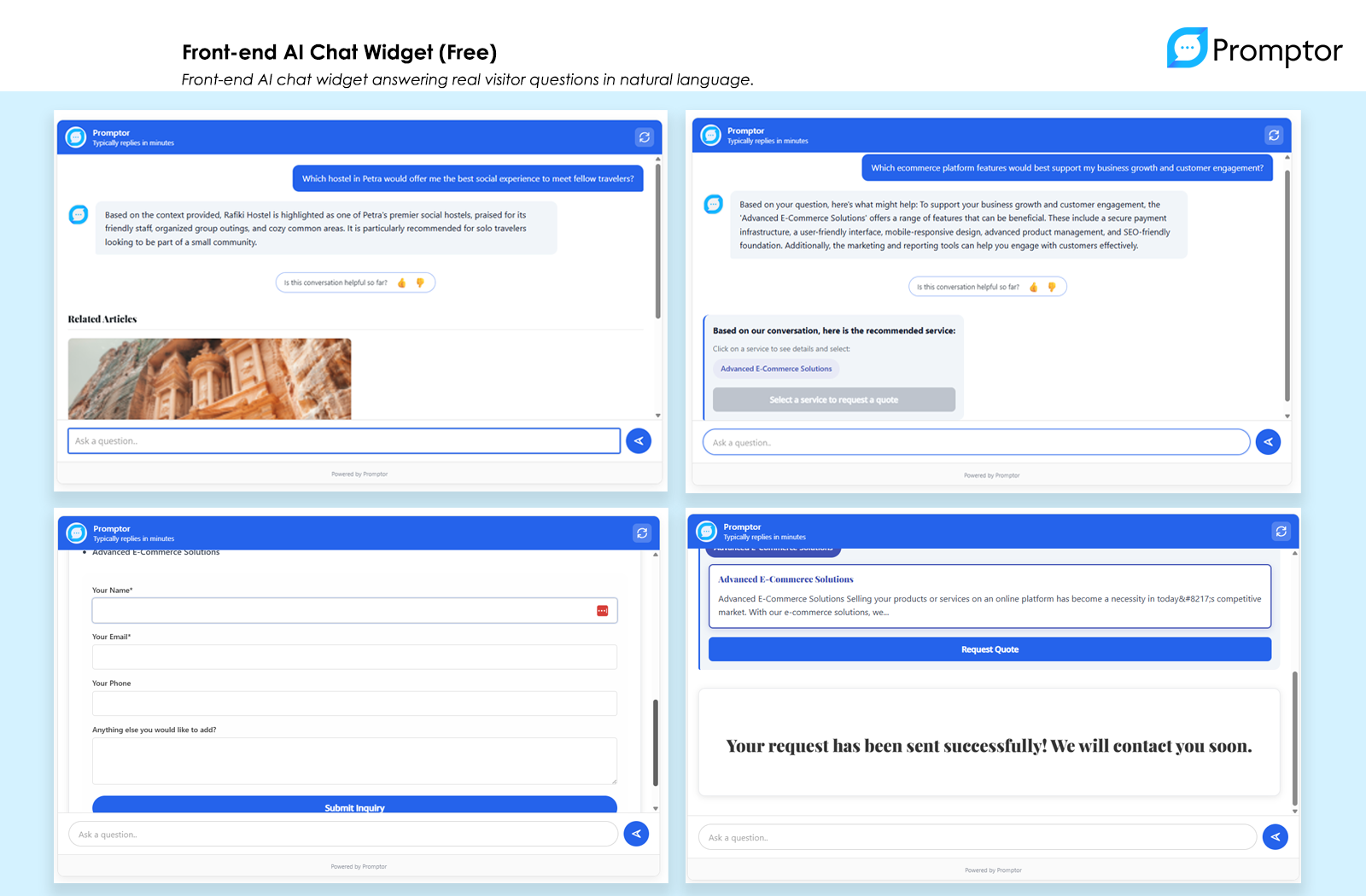
Front-end AI Chat Widget (Free) - Interactive chat interface that engages visitors with natural conversation
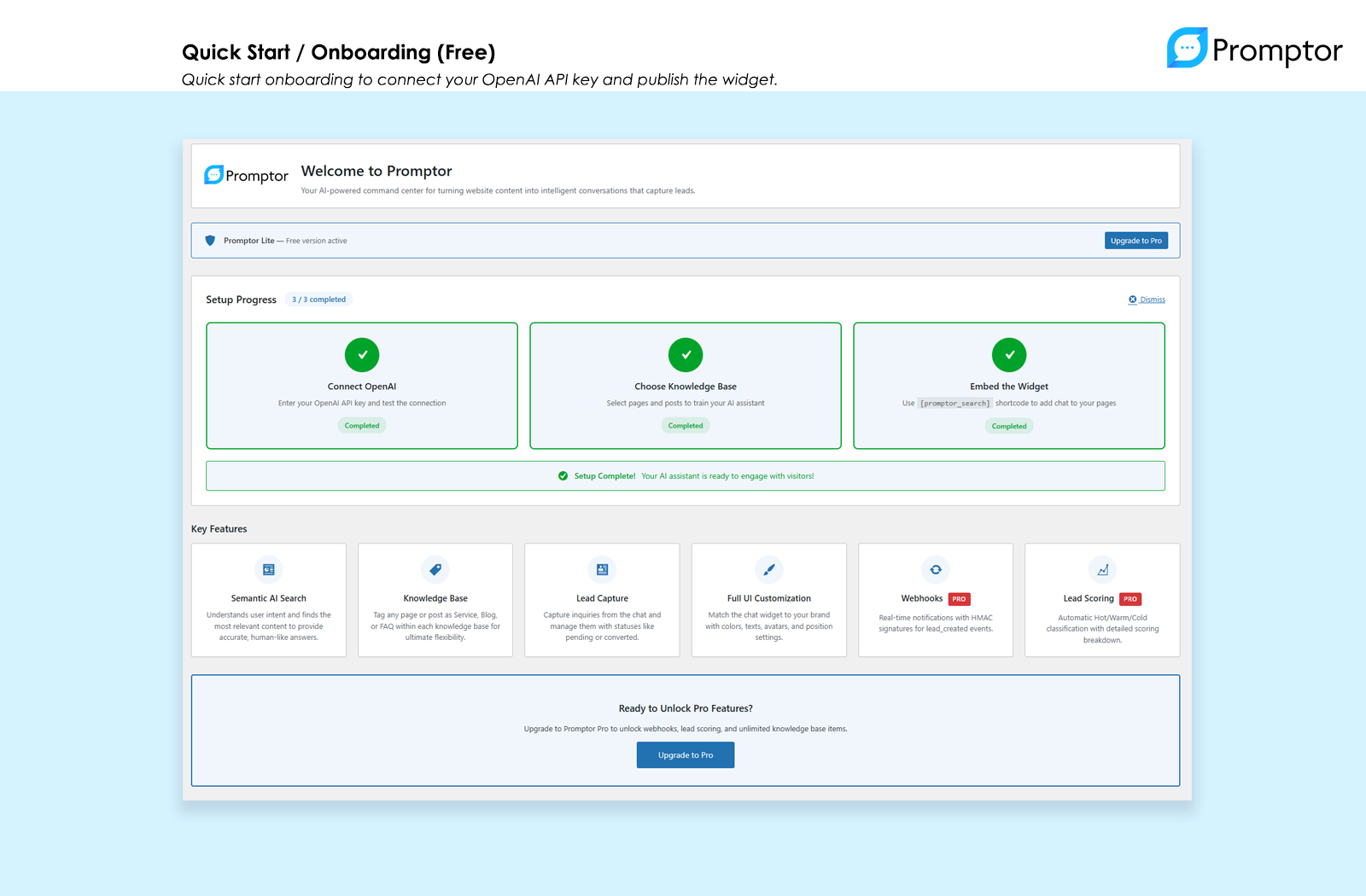
Quick Start / Onboarding (Free) - Step-by-step setup guide gets you running in minutes
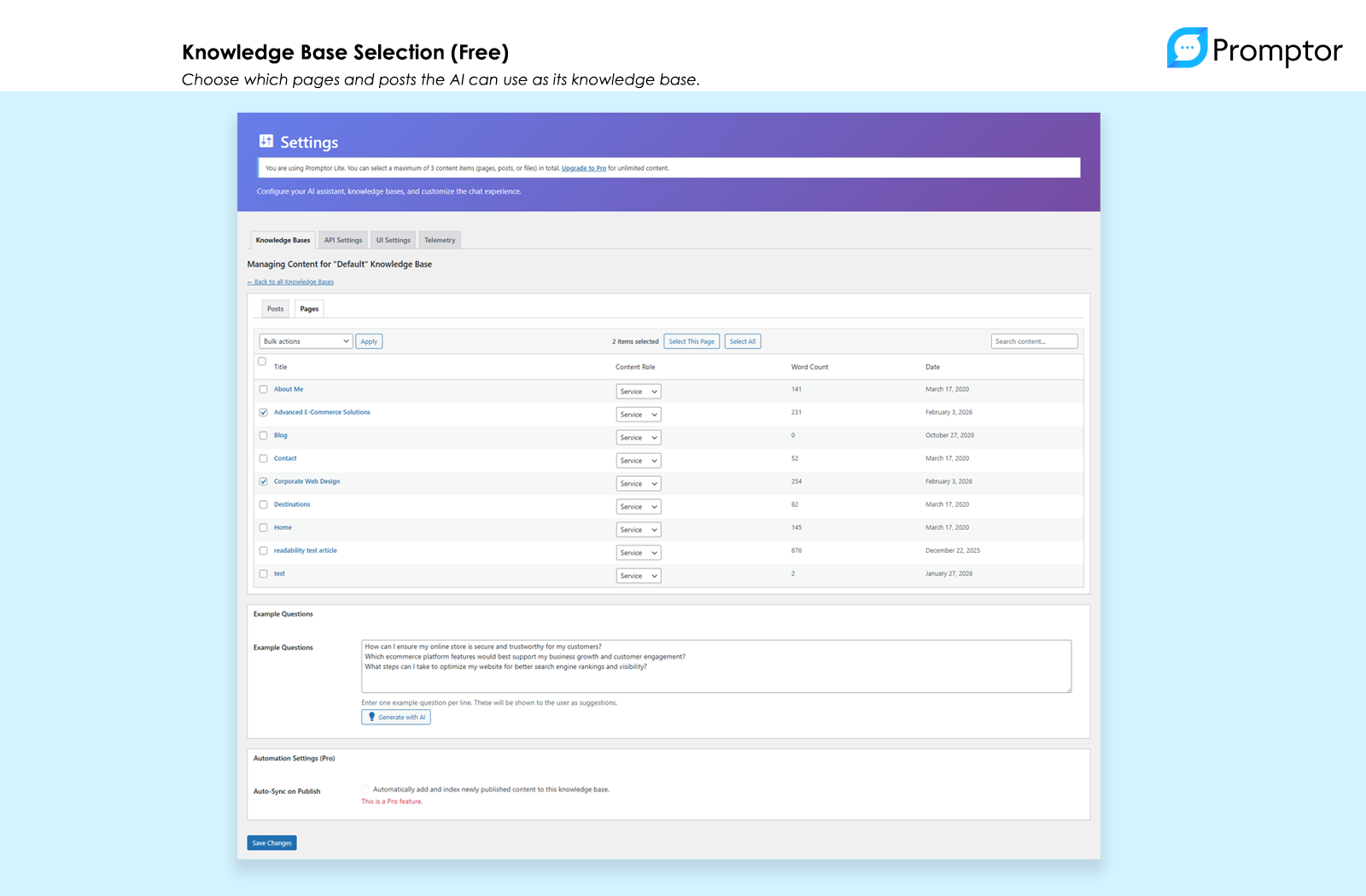
Knowledge Base Selection (Free) - Choose which pages and posts to train your AI assistant on
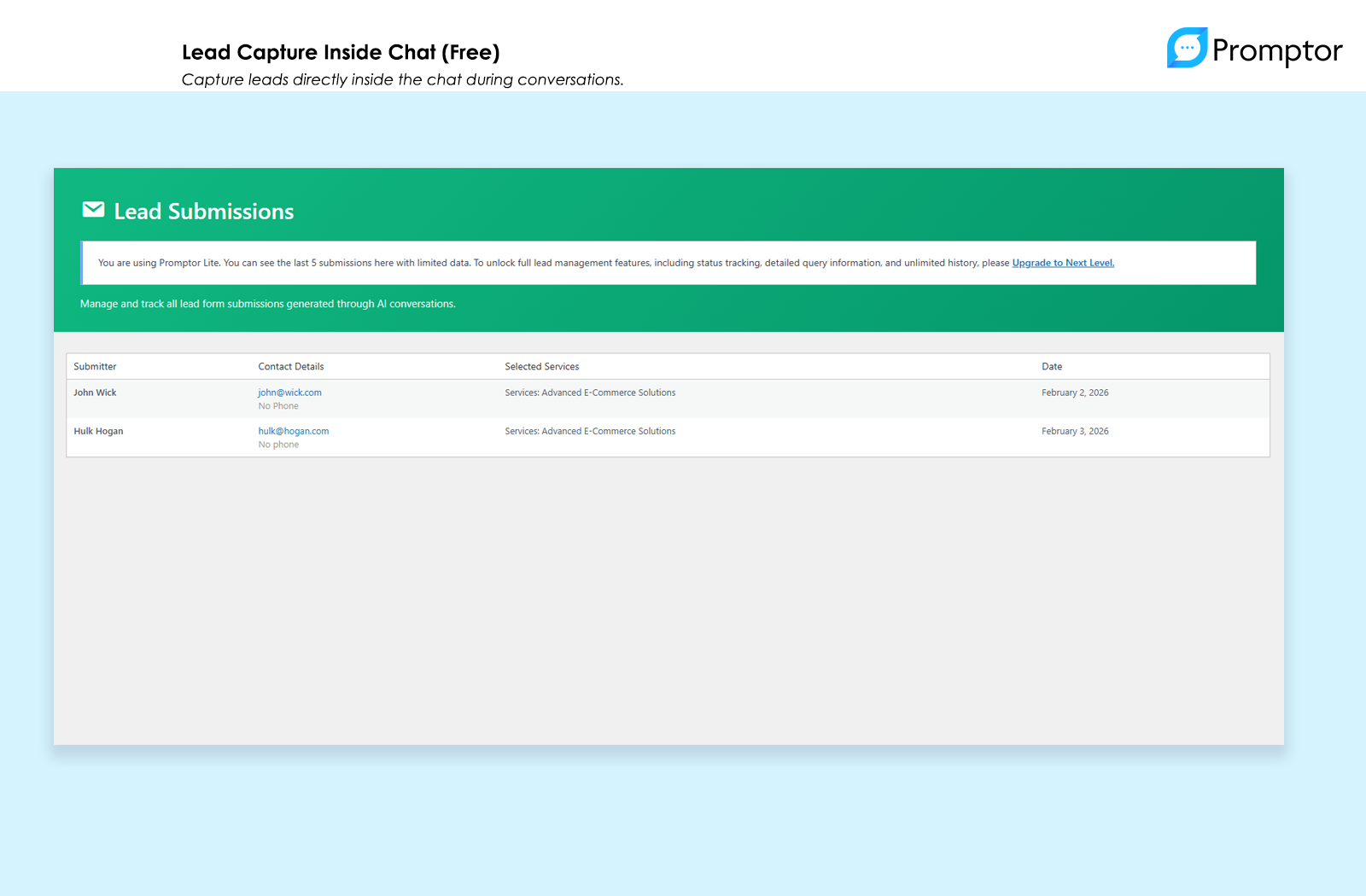
Lead Capture Inside Chat (Free) - Collect contact information directly inside the conversation
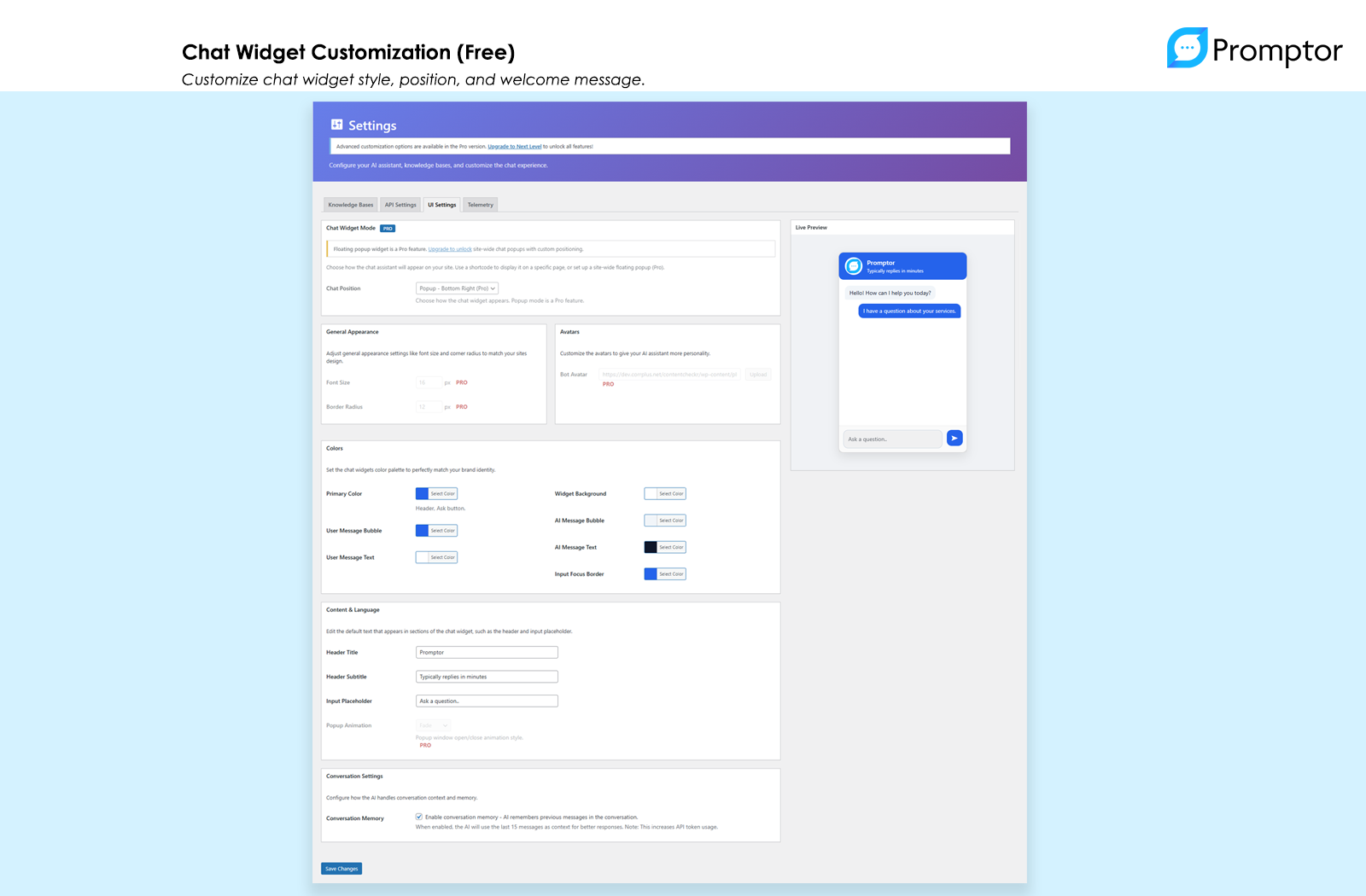
Chat Widget Customization (Free) - Customize colors, heading, and subtitle to match your brand
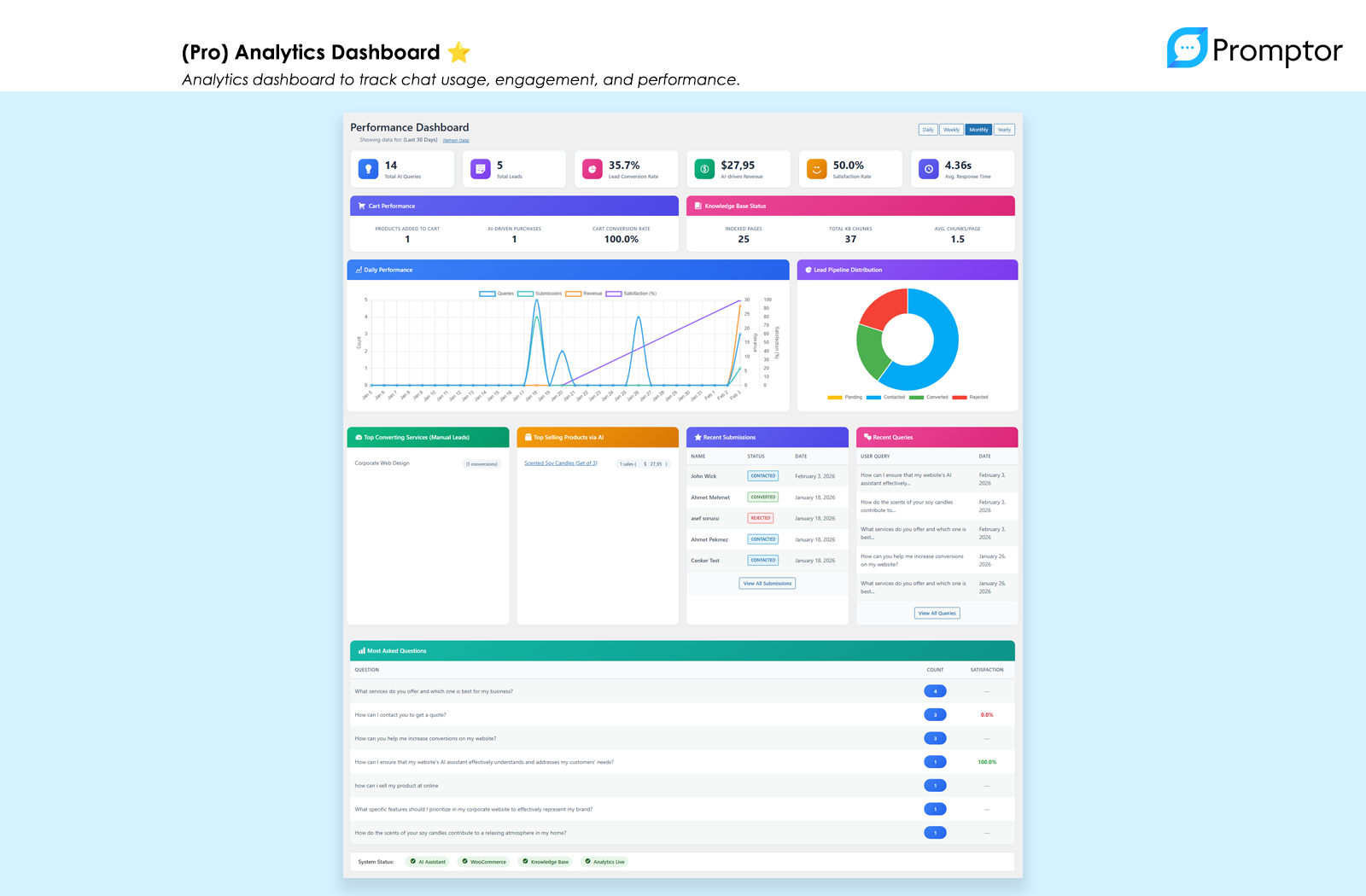
(Pro) Analytics Dashboard - Track queries, leads, conversion rates, and AI-driven revenue
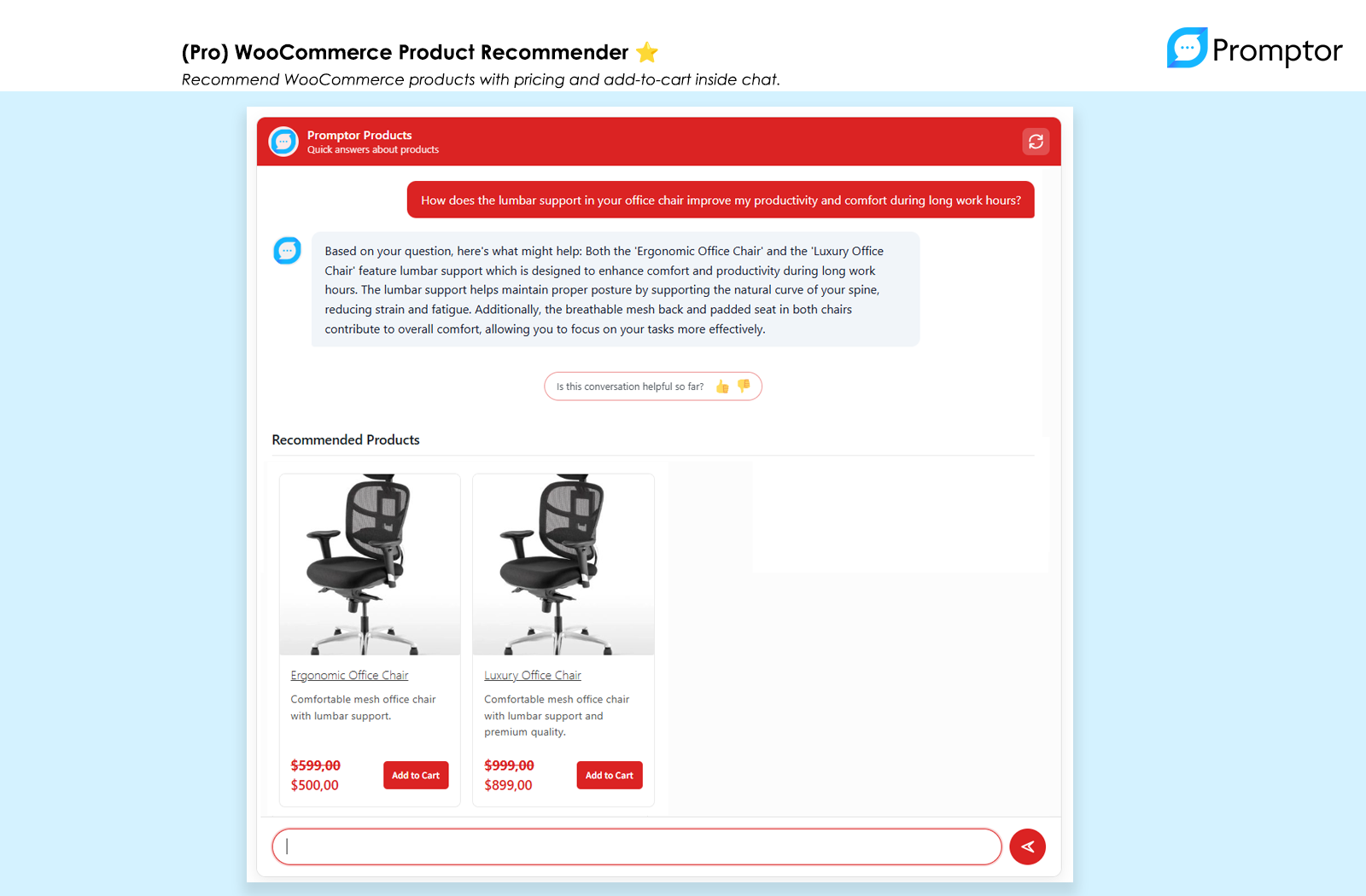
(Pro) WooCommerce Product Recommender - AI suggests products with images and add-to-cart functionality
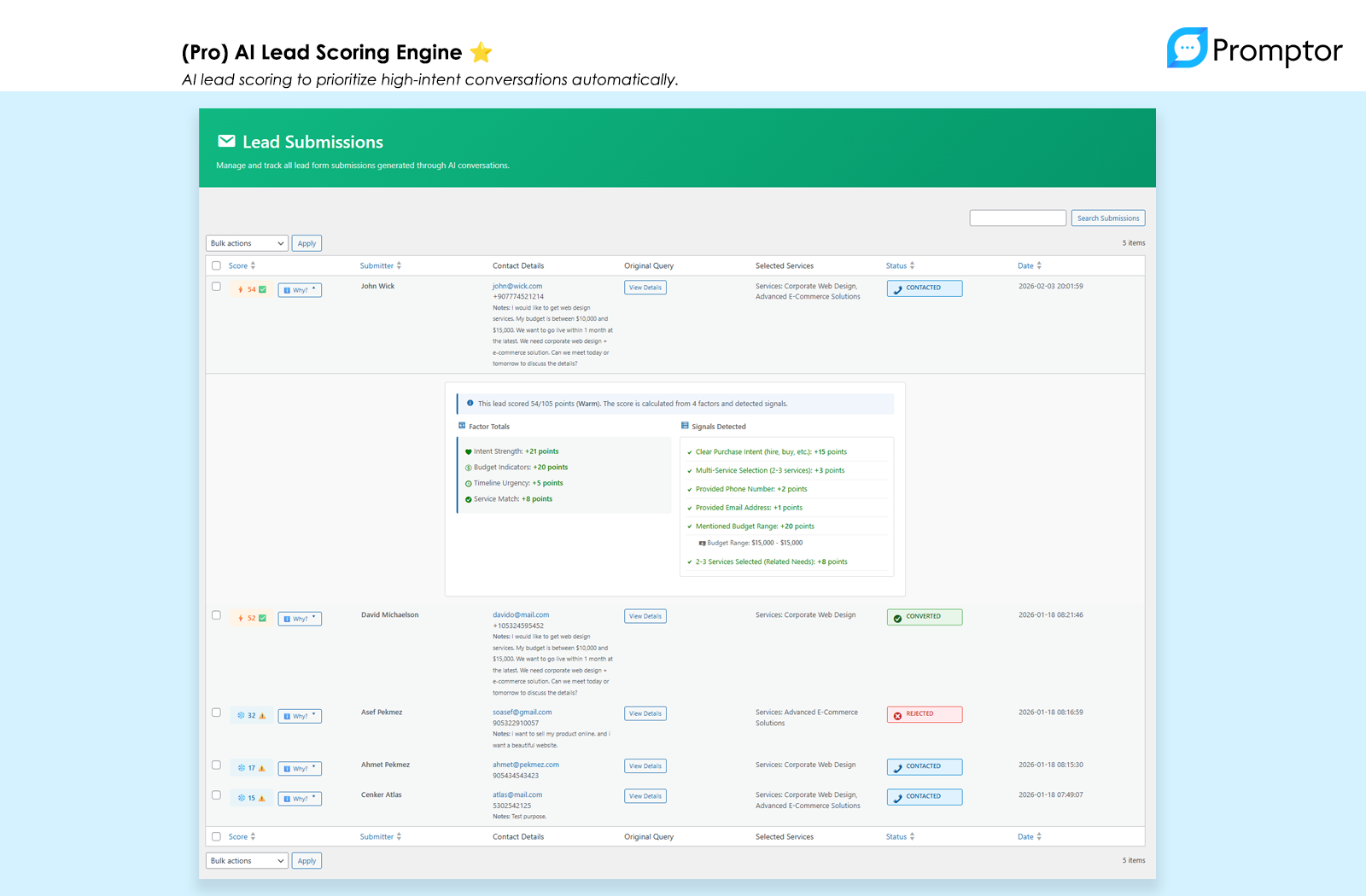
(Pro) AI Lead Scoring Engine - Automatically score and prioritize leads based on conversation quality
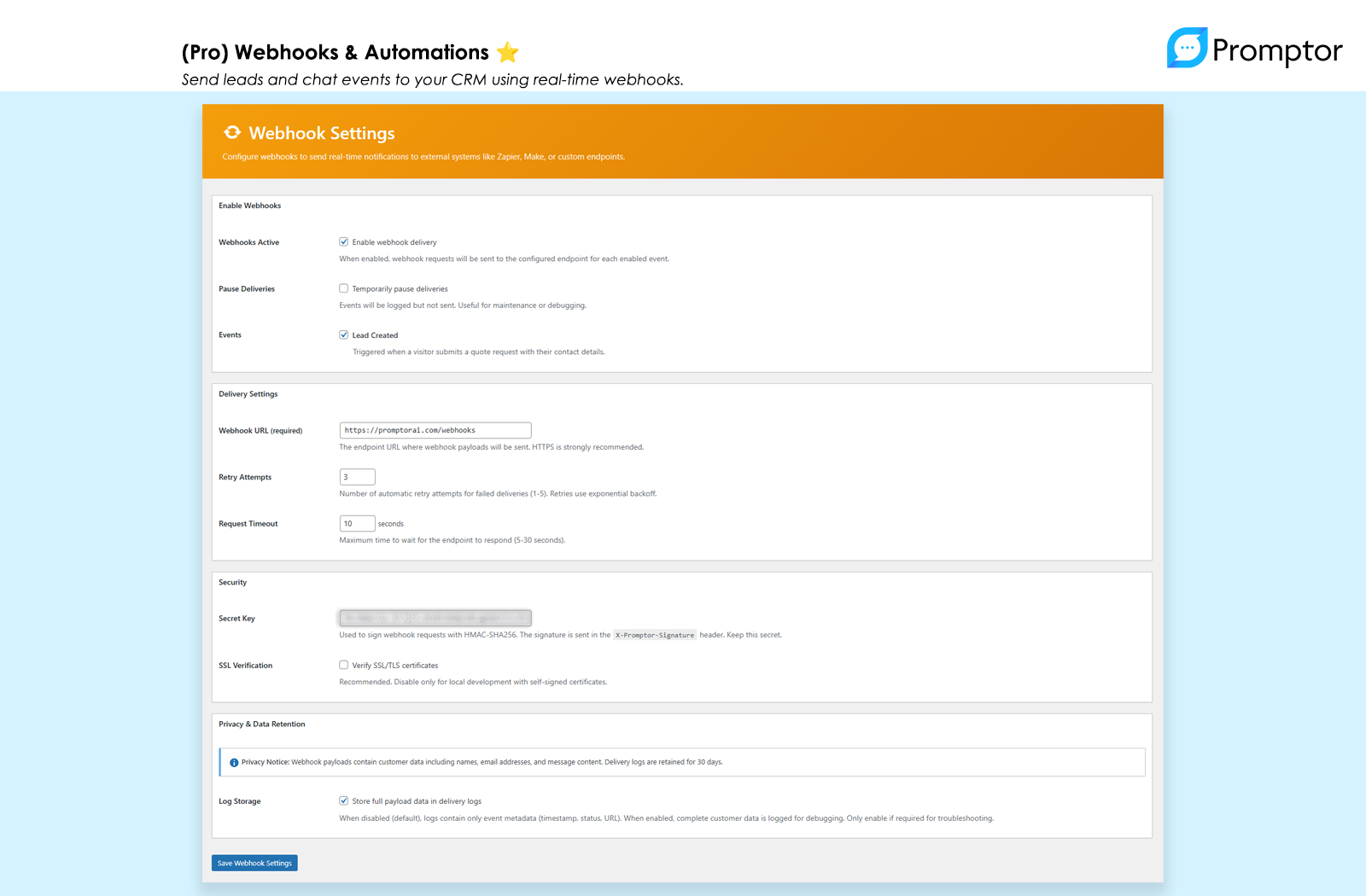
(Pro) Webhooks & Automations - Connect to Slack, Zapier, or custom automation workflows
Faq
You need an OpenAI API key. Create a free account at platform.openai.com and generate an API key. OpenAI charges based on usage—typically $0.01-$0.10 per conversation depending on length and complexity.
Use the shortcode [promptor_search] on any page or post. The Pro version also includes a floating popup widget that appears on all pages.
Yes. Promptor is designed to work with any standard WordPress theme, including Neve, Astra, GeneratePress, Kadence, and default WordPress themes. We use CSS isolation techniques to prevent theme conflicts.
Unlimited. The free version has no restrictions on lead capture. You can view recent leads in the admin panel. Pro adds advanced lead management with status tracking and filtering.
The free version is fully functional with AI chat, lead capture, and up to 3 knowledge base items. Pro removes limits, adds WooCommerce integration, analytics, automations, and white-label branding. Think of Free as “getting started” and Pro as “scaling and optimizing revenue.”
Yes, but only in Pro. The Pro version includes deep WooCommerce integration where the AI can recommend products with images and pricing, and visitors can add items to cart directly from chat.
The AI automatically responds in the visitor’s language. All admin interface text can be translated using standard WordPress translation tools (.po/.mo files).
Telemetry is optional, disabled by default, and helps us understand which features are most valuable so we can prioritize bug fixes and improvements. Pro users provide feedback through direct support channels, so telemetry isn’t needed. You can enable or disable it anytime in Settings > Telemetry.
Only aggregate, anonymous statistics: setup completion status, knowledge base counts, total queries/leads (numbers only), and plugin/WordPress/PHP versions. We explicitly do NOT collect: site URLs, domain names, IP addresses, email addresses, content, message text, or any personally identifiable information. View our Privacy Policy
Pro offers a 14-day money-back guarantee. Install the free version first to test compatibility with your site, then upgrade to Pro if you need advanced features. Learn more about Pro
Reviews
Simple, effective AI assistant for WordPress
By 
Promptor was surprisingly easy to set up and actually useful from day one.
It answers questions using my own site content instead of generic AI replies, which makes a big difference.
Great choice if you want a lightweight AI sales/support assistant without complexity.
Changelog
1.2.2
Release Date: February 12, 2026
New Features:
* Single-screen Setup Wizard – New guided onboarding flow for faster first-time setup, accessible on first activation
Bug Fixes:
* Fixed PHP 8.1 compatibility warnings for a smoother, warning-free experience
* Fixed activation redirect issues that could cause errors on first install
* Fixed potential errors on fresh installs before the database was fully initialized
1.2.1
Release Date: February 3, 2026
New Features:
* Step-Based Onboarding – Guided 3-step setup process for first-time users
* Test Chat Feature – Try your AI assistant with suggested questions after setup
* Optional Anonymous Telemetry – Opt-in usage analytics for free version (disabled by default, no PII)
* WordPress.org Review Prompt – Smart review request that appears only after delivering value
* Modern 3-Column Onboarding Grid – Card-based layout with dismissable progress tracking
Improvements:
* Better First-Time Experience – Reduced distraction during setup with focused UI
* Enhanced Welcome Page – Redesigned with progress tracking and contextual guidance
* Admin Visit Tracking – Enables smart timing for review prompts
* Improved Pro Upsell Timing – Less intrusive, more contextual upgrade messaging
Bug Fixes:
* Frontend UI Settings – Colors and fonts now apply correctly to shortcode widget
* Universal Theme Compatibility – Complete CSS isolation prevents conflicts with Neve, Astra, and all major themes
* Shortcode Display – Free version correctly shows [promptor_search] for default knowledge base
* PluginCheck Compliance – All queries use prepared statements, proper nonce verification, translator comments added
Technical:
* Telemetry Auto-Sync – Existing installations sync current state when telemetry first enabled
* Enhanced CSS Architecture – Theme-proof styling with maximum specificity and explicit element styles
1.2.0
- Improved code quality and WordPress.org compliance
- Enhanced documentation and compatibility
- Performance optimizations
- (Pro) New Lead Scoring System
- (Pro) Webhook Integrations
- (Pro) Diagnostics Panel
1.1.1
- Fixed: Translation system completely rebuilt for reliable multilingual support
- Fixed: All UI text now translates correctly regardless of plugin folder name
- Fixed: “Request Quote” buttons and confirmation dialogs translate properly
- Improved: Faster translation loading with embedded translations
- Improved: Works with Freemius folder renaming
1.1.0
- New: Conversation Memory – Chat history persists across page navigations
- New: “New Conversation” button for clearing chat history
- New: Improved AI responses with clarifying questions and fallback messages
- New: Better empty state handling with clear error messages
- New: (Pro) Most Asked Questions analytics report
- Enhanced: Unified service conversation UI
- Enhanced: Multi-description support for services
- Enhanced: Full-width quote form on desktop
- Enhanced: (Pro) PDF cards with file size and download button
- Improved: Mobile chat experience with smooth animations
- Fixed: Quote form width and duplication issues
- Fixed: (Pro) PDF Files tab visibility in Knowledge Base
1.0.1
- Added: Smart pagination for Knowledge Base content management
- Added: Real-time selection counter and bulk selection tools
- Enhanced: AI-powered example questions generator for multilingual content
- Fixed: Frontend translations now display correctly
- Fixed: Critical – Save preserves previously selected items when using Load More
- Optimized: Better performance with large content libraries
1.0.0
- Initial release
- Core AI Chat powered by OpenAI
- Knowledge Base from Pages, Posts, (Pro) Products & PDFs
- Service and product recommendations
- Built-in lead generation
- (Pro) Performance Dashboard
- (Pro) Advanced Lead Management