Publisima Cache – Page Cache & Speed Optimization

Publisima Cache – Page Cache & Speed Optimization
Description
Publisima Cache is a lightweight page cache plugin that makes WordPress faster with one click. It saves the final HTML of every page and serves it to the next visitors, so your theme, page builder and plugins do not have to build the page again on every visit. The result is a lower server response time (TTFB), less CPU usage and better Core Web Vitals.
It is designed to be safe by default: WooCommerce carts, logged-in users and personalised pages are never cached, and the cache is refreshed automatically when you change your content.
Page cache
- One-click page caching, no server configuration or rewrite rules needed.
- Smart cache clearing: when you publish or edit a post, its categories, tags, author page, archives, pagination and home page are refreshed automatically.
- Background cache preloading for desktop and mobile, in small batches that never slow down your admin.
- Separate mobile cache for themes that show different HTML on phones.
- Tracking parameters (utm_*, fbclid, gclid…) share the same cache entry, so ad campaigns are served from the cache too.
- Browser revalidation with ETag and 304 Not Modified, so changes are visible immediately after a purge.
- Never cache specific URLs, and full support for the DONOTCACHEPAGE constant.
Speed optimization
- Brotli and Gzip compression of cached pages, with a plain HTML fallback for every browser.
- Safe HTML and inline CSS minification: inline scripts are never modified, so JavaScript does not break.
- Lazy load for images and iframes. The first images (logo, hero) always load immediately to protect your LCP.
WooCommerce cache
- Cart, checkout and My Account pages are excluded automatically, in any language and with any slug (e.g. /carrito/, /panier/).
- Visitors with products in the cart always see live content.
- Product pages and the shop page are refreshed when stock changes.
Easy to use
- Clear settings page with cache statistics, hit rate and a server check.
- Clear the whole cache, the current page or start a preload from the admin bar.
- Detects other active caching plugins to avoid conflicts.
- Works with any theme and page builder (Elementor, Gutenberg, Divi…), because it caches the final HTML.
- All cache files are stored in the uploads directory (
wp-content/uploads/publisima-cache/). No changes to your theme, plugins orwp-config.php. - Translated into Spanish, French, German, Italian and Brazilian Portuguese.
- Free, with no premium version, no ads and no account required.
Installation
- Go to Plugins > Add New, search for “Publisima Cache” and click Install, then Activate.
- Open “Publisima Cache” in the WordPress admin menu.
- Turn on “Page caching” and save. Optionally enable compression, minification and lazy load.
Screenshots
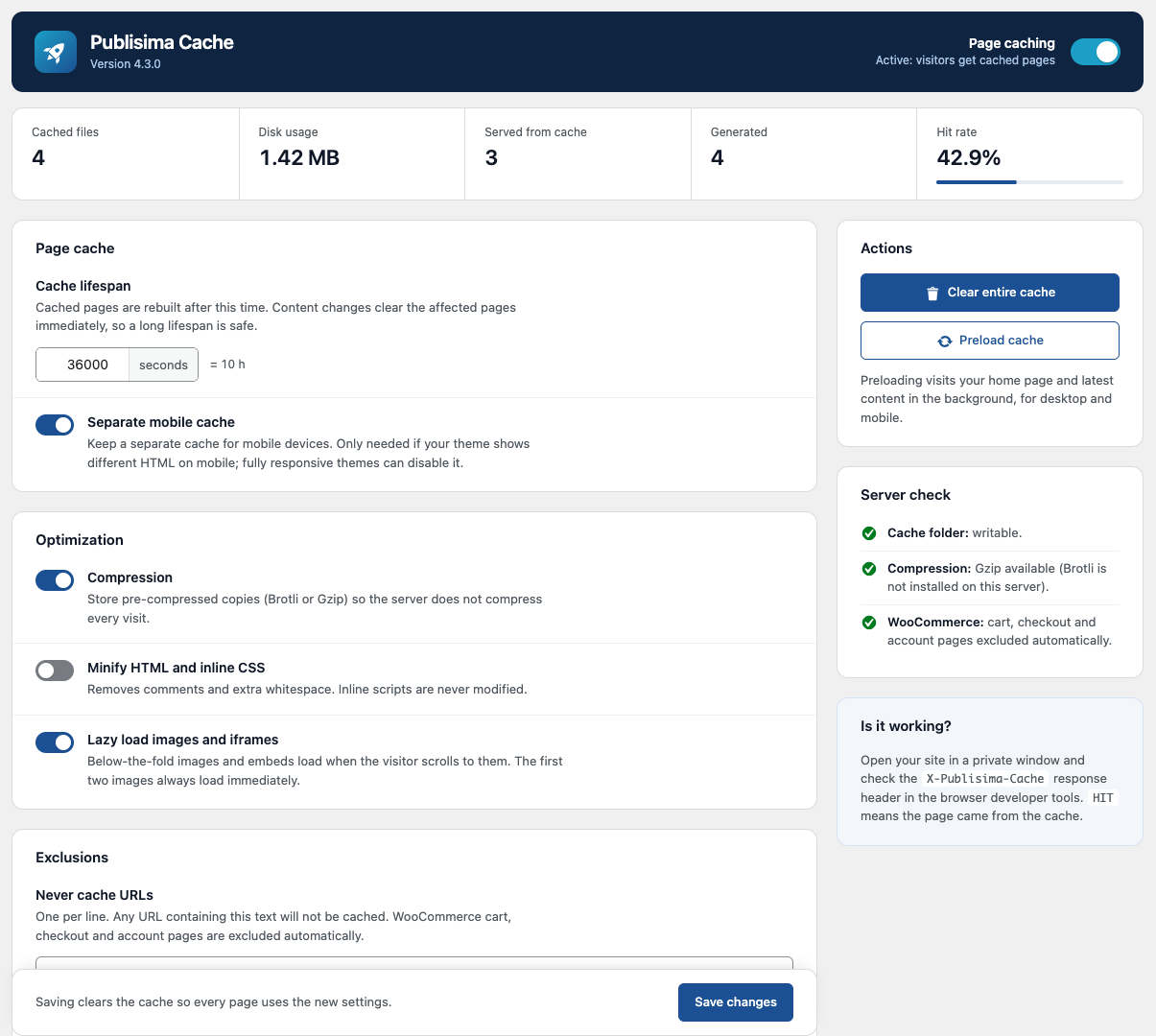
Settings page: cache statistics, page cache and optimization options, quick actions and server check.
Faq
Open your site in a private window and check the X-Publisima-Cache response header in the browser developer tools. HIT means the page came from the cache; MISS means it was generated and saved for the next visitor.
Yes. Cart, checkout and account pages are detected automatically and never cached, visitors with items in the cart always get live pages, and product pages are refreshed when the stock changes.
No. Logged-in users, password-protected posts, searches, 404 pages and visitors who left a comment always see live content.
Use only one page cache plugin at a time. Publisima Cache shows a warning if it detects WP Rocket, LiteSpeed Cache, W3 Total Cache, WP Super Cache or WP Fastest Cache.
Yes. Cached pages are served by PHP, so no server rules are needed. Writing files directly to the uploads folder must be allowed, which is the default on most hosts. The settings page shows a server check.
Add any part of its URL to “Never cache URLs” in the settings, one per line. Developers can also define the DONOTCACHEPAGE constant or use the puca_should_cache filter.
In a dedicated folder inside your uploads directory (wp-content/uploads/publisima-cache/). Everything is removed when you uninstall the plugin.
No. Publisima Cache does not change any theme, plugin or core file.
Reviews
Rápido, sencillo y realmente útil
By 
Publisima Cache hace exactamente lo que promete: mejora la velocidad de carga sin complicaciones. Es fácil de usar, no requiere configuraciones complejas y funciona desde el primer momento. Ideal para quienes buscan optimizar su web sin perder tiempo. Lo he probado en varios proyectos y los resultados han sido siempre positivos. Muy recomendable.
Changelog
4.3.3
- The plugin homepage now points to https://store.publisima.com/plugins-wordpress/publisima-cache/.
4.3.2
- New: French, German, Italian and Brazilian Portuguese translations, and Spanish for Latin America (Mexico, Argentina, Colombia, Chile, Peru, Venezuela, Ecuador, Costa Rica, Guatemala and Uruguay).
- Improved: Spanish translation.
4.3.1
- Fixed: HTML minification could cache an empty page when the HTML contained a very large comment. It now falls back to the original HTML.
- Fixed: the Publisima Cache menu in the admin bar was not shown on the frontend.
- The cache is cleared automatically after updating.
4.3.0
- Fixed: WooCommerce cart, checkout and account pages are now detected by page ID, so they are never cached on stores using translated slugs (e.g. /carrito/).
- Fixed: HTML minification no longer modifies inline scripts, pre or textarea blocks, which could break JavaScript.
- Fixed: unpublished, trashed and deleted posts are now removed from the cache.
- Fixed: the hourly cleanup task caused a fatal error on PHP 8.
- Fixed: browsers without Brotli support now also receive cached pages.
- Fixed: lazy load produced invalid markup on self-closing image tags.
- Security: URLs with unknown query parameters are no longer cached, preventing the cache from filling the disk.
- Improved: smart purge of categories, tags, author, archives, pagination and the shop page.
- Improved: product pages are refreshed when stock changes.
- Improved: preload now runs in the background in batches and includes mobile pages.
- Improved: statistics are stored atomically in the database instead of being written to a file on every visit.
- Improved: cached HTML is revalidated by browsers (ETag / 304), so purges are visible immediately.
- Improved: support for the DONOTCACHEPAGE constant and new “Never Cache URLs” and “Separate Mobile Cache” settings.
- Improved: cache files are organised in one folder per URL.
4.2.1
- Added Spanish translation.
4.2.0
- Security & Compliance: All file operations now use the WordPress Filesystem API. All cache, log, and stats files are stored exclusively in the uploads directory for full compatibility and security.
- Fixed: No files are saved or deleted in the plugin directory or wp-content/cache.
- Improved: All user input is sanitized, validated, and escaped according to WordPress.org guidelines.
- Improved: Nonces and user capability checks added to all AJAX and settings actions.
- Improved: Scripts and styles are enqueued using WordPress functions; inline scripts now use wp_add_inline_script().
- Fixed: Removed cache clearing on theme switch to comply with plugin guidelines.
- Improved: Only required $_GET/$_COOKIE parameters are processed, never the full array.
- Improved: All output is properly escaped before being echoed.
- Documentation: Updated readme and inline comments to clarify compliance and security improvements.
4.1.5
- Compliance: All cache and log files are now stored in the uploads directory. Final implementation of the WordPress Filesystem API to resolve all remaining scanner errors related to direct file access. The plugin is now fully compliant with WordPress.org guidelines.
4.1.4
- Security & Standards: Implemented the WordPress Filesystem API (
WP_Filesystem) to handle all file operations (delete,read,write) in compliance with WordPress.org security guidelines. - Fix: Silenced a
NonceVerificationfalse-positive warning.
4.1.3
- Fix: Corrected Plugin URI and Author URI to be different URLs.
4.1.2
- Fix: Reverted file handling logic to direct PHP functions to ensure functionality.
4.1.1
- Maintenance: Added
Requires PHPheader.
4.1.0
- Major Renaming: Renamed the plugin to “Publisima Cache” to comply with WordPress.org trademark guidelines.