Qthemy Slider Builder

Qthemy Slider Builder
Description
Qthemy Slider Builder lets you create sliders directly from your WordPress dashboard using a visual, layer-based editor. Every feature in this plugin is free and works without a license key or an account. It does not connect to any outside service.
No page-builder plugin is required. Create as many sliders, slides, and layers as you need.
Features
Visual slider editor
Add, arrange, and resize elements directly on a live preview of each slide, with rulers and draggable alignment guides.
Heading, text editor, image, button, shape, and rating elements
Headings fit their text (press Enter for a new line) and take an HTML tag (H1-H6 or paragraph) for SEO. The text editor element writes paragraphs with a toolbar like the WordPress editor: bold, italic, underline, strikethrough, bulleted and numbered lists, links, text color, and highlight; pasted text keeps only that simple formatting. Add images with alt text and opacity, buttons sized by their inner spacing with an optional icon, shapes (rectangle, circle, triangle, diamond, pentagon, hexagon, octagon, star, parallelogram) with a border that keep their proportions on every device, and star ratings with half stars that fill from the right on right-to-left sites, with an optional shine, pulse, or twinkle motion. Any element can be duplicated from the layers list.
Container (Flex and Grid)
Group elements in a container and they arrange themselves: in a row or a column (with wrapping, distribution, and alignment) or in a grid with a set number of columns. Every layout setting, the gap, and the inner spacing can differ per device, for example three columns on desktop and one on mobile. Drag elements into a container, reorder them inside it, or drag them out.
Typography
Every element with text gets the same settings: size, weight, line height, and letter spacing. Text uses your theme’s font, so sliders match the rest of your site.
Sizes that fit smaller screens
Font sizes and button spacing shrink on their own on laptop, tablet, and mobile (80%, 67%, and 53% of desktop) until you set a size for that device.
Content, Style, and Advanced tabs
Element settings are grouped into three tabs, so the setting you need is always easy to find.
Device visibility
Hide any element on desktop, laptop, tablet, or mobile.
Per-device layouts
Set the position, size, font size, and text alignment of every element separately for Desktop, Laptop, Tablet, and Mobile, and choose a slider width and height for each device.
Slide backgrounds
Use a solid color, a gradient, or an image from the Media Library, with an optional color or gradient overlay. Give the slider rounded corners, set for each corner, and a shape on its top or bottom edge (wave, waves, curve, tilt, triangle, mountains, zigzag, arrow, or bumps) in the color of the page around it.
Color picker with gradients
Every color opens one picker with HEX, an opacity bar, ready-made colors, and an eyedropper. Slide backgrounds, text, button backgrounds, and shapes also get a Gradient tab (linear or radial, two colors, angle).
Autoplay and navigation
Slides can play automatically with your own slide time. Visitors can also move between slides with arrows, dots, or by swiping, with a smooth fade transition. Place the arrows in the bottom bar or on the sides, choose line or round dots, and pick their color.
Slider width
Keep the slider at the size you set, stretch it to the width of its container, or stretch it to the full width of the screen. In the wide modes the background fills the width while the elements stay centered, also when a page builder container changes the slider’s width. Inside Elementor containers the slider takes the container’s width automatically.
Fast loading
Images of the other slides load only when they are about to be shown.
Duplicate, export, and import
Duplicate a slider from the Sliders list, export it as a JSON file, and import it on another site.
Block, Elementor widget, and shortcode
Add a slider with the “Qthemy Slider” block in the block editor or the “Qthemy Slider” widget in Elementor, or use the [qthemy_slider id="123"] shortcode anywhere else.
Arabic and English editor
Switch the editor interface between Arabic (right-to-left) and English.
Optional add-on
A separate, paid add-on, Qthemy Slider Builder Pro, is available from qthemy.com/slider-builder. It is not required, and it is not included in this plugin. It adds over 100 Google Fonts (more than 30 Arabic) stored on your own site, text effects (italic, letter case, underline, shadow, outlined text, balanced lines), icon, social-media, countdown, animated text, number counter, before/after, bullet list, and badge elements, element animations with a timeline, additional slide transitions, autoplay extras (play/pause button, progress bar, per-slide timing), video backgrounds, and Ken Burns motion for image backgrounds.
While the add-on is not installed, the editor’s Elements tab lists the names of its elements in a separate section with a “Learn more” link. You can hide that section with one click.
Source Code
All JavaScript and CSS files in this plugin are the original, human-readable source code. They are not compiled, bundled, or minified, and no build tools or build step are used:
assets/admin/js/admin-builder.js– the visual slider editorassets/admin/js/admin-notice.js– remembers when the add-on notice is dismissedassets/admin/js/block.js– the “Qthemy Slider” block for the block editorassets/admin/js/list-actions.js– the “Import” button on the sliders listassets/frontend/js/frontend.js– the front-end sliderassets/admin/css/admin-builder.cssandassets/frontend/css/frontend.css– styles
You can read and modify these files directly.
Developer Notes
Add-ons can extend the plugin without modifying it:
- Front end:
window.QthemySB.registerLayerType(),registerBackgroundType(), andaddLayerDecorator(), plus theqthemy-sb:beforeinit(bubbles to the document),qthemy-sb:ready,qthemy-sb:beforechange,qthemy-sb:change,qthemy-sb:autoplay, andqthemy-sb:userinteractevents on each slider element. - Editor: define
window.QthemySBBuilderExtension(documented at the top ofassets/admin/js/admin-builder.js). - PHP: the
qthemy_sb_render_configandqthemy_sb_sanitize_datafilters and theqthemy_sb_frontend_assets_enqueuedaction.
Installation
- Upload the
qthemy-slider-builderfolder to/wp-content/plugins/, or install the plugin from the Plugins screen. - Activate the plugin through the Plugins screen in WordPress.
- Go to Slider Builder Add New to create your first slider, then click Publish.
- Add the “Qthemy Slider” block (or the Elementor widget) to a page and choose your slider. You can also paste the shortcode from the Sliders list.
Screenshots
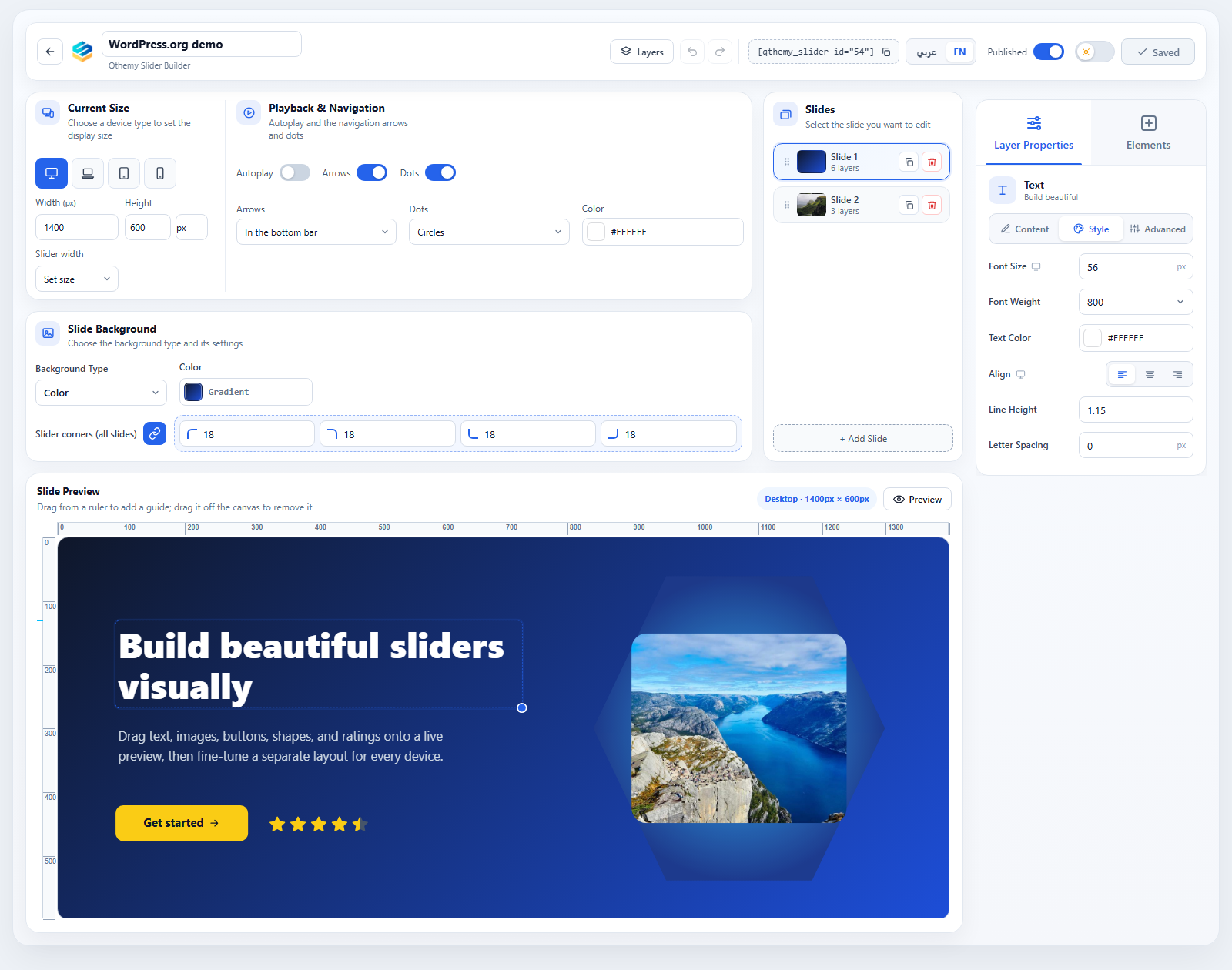
The visual editor: move and resize elements on a live preview with rulers and guides, and find every setting in the Content, Style, and Advanced tabs.
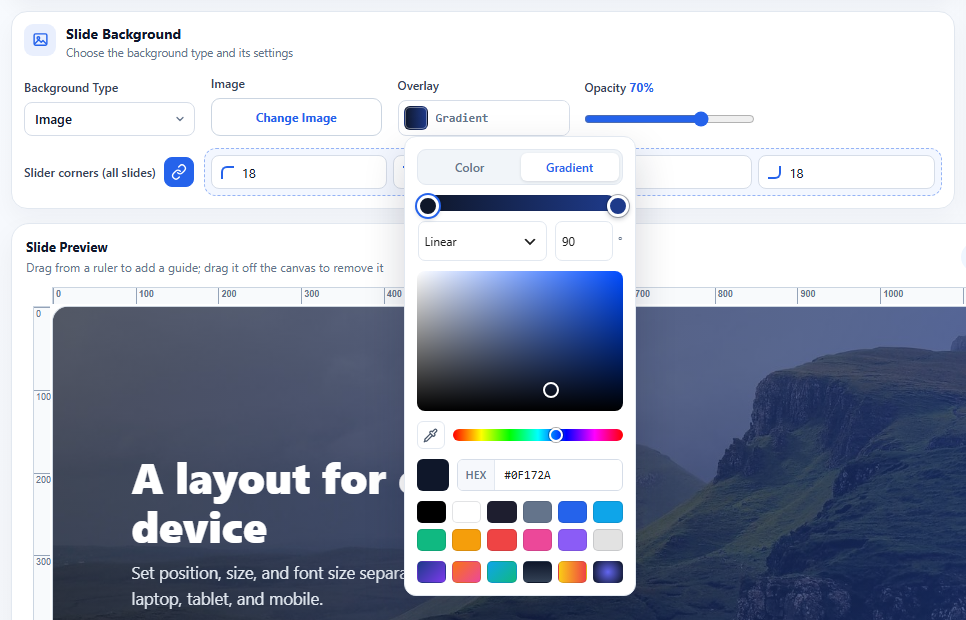
Every color has a Gradient tab. Here a gradient overlay is set on an image background.
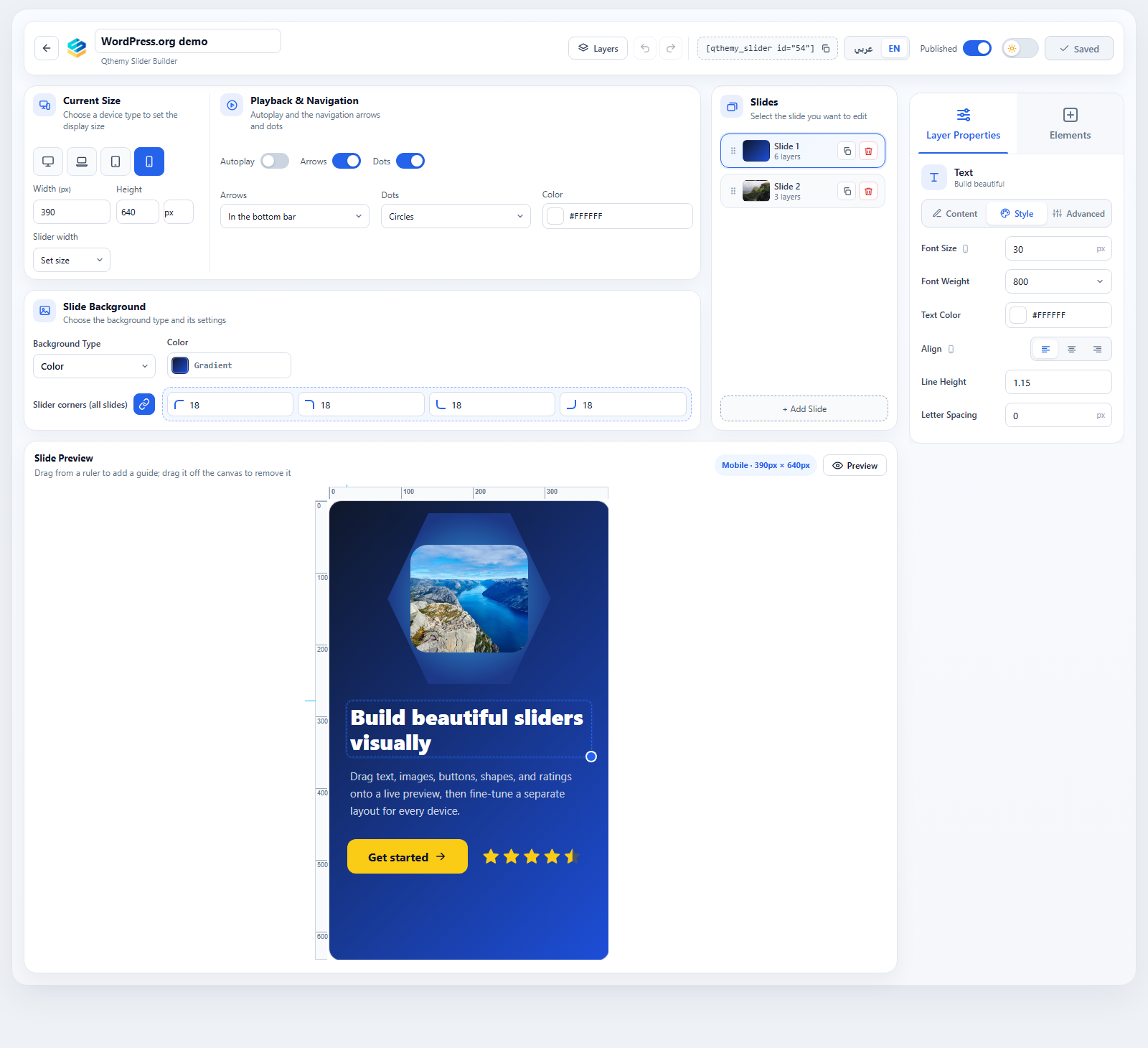
A separate layout for each device: the same slide arranged for mobile.
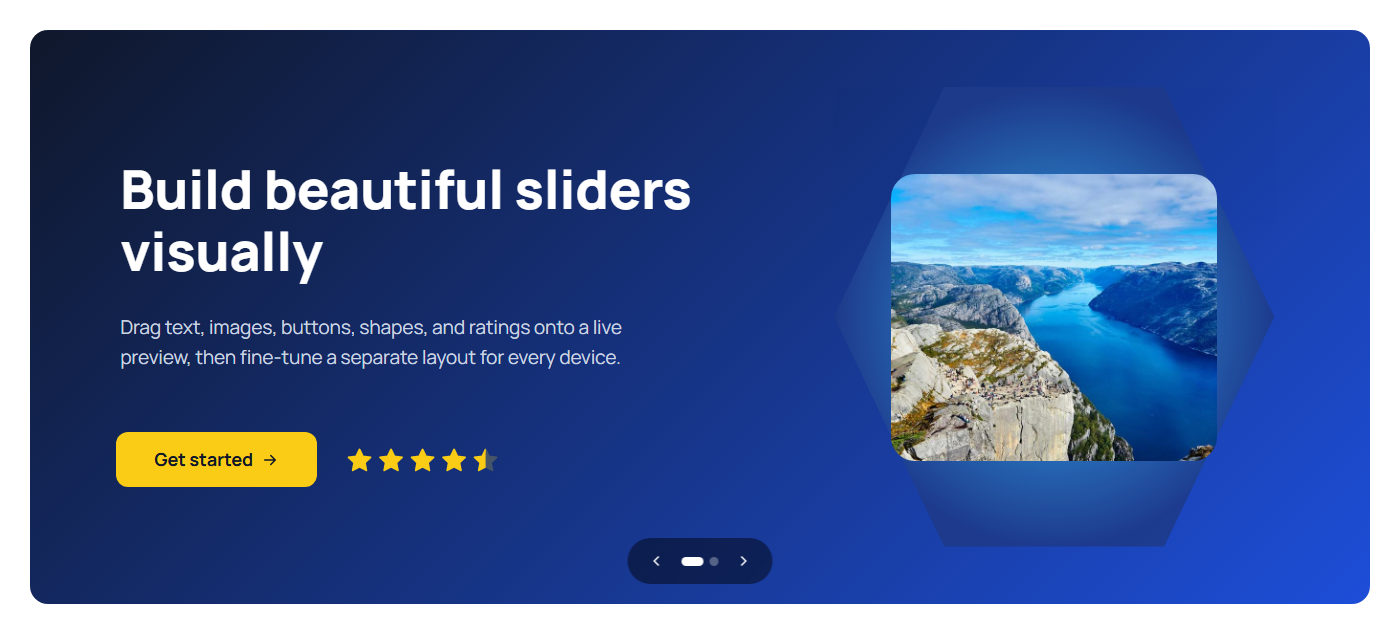
The slider on a page.
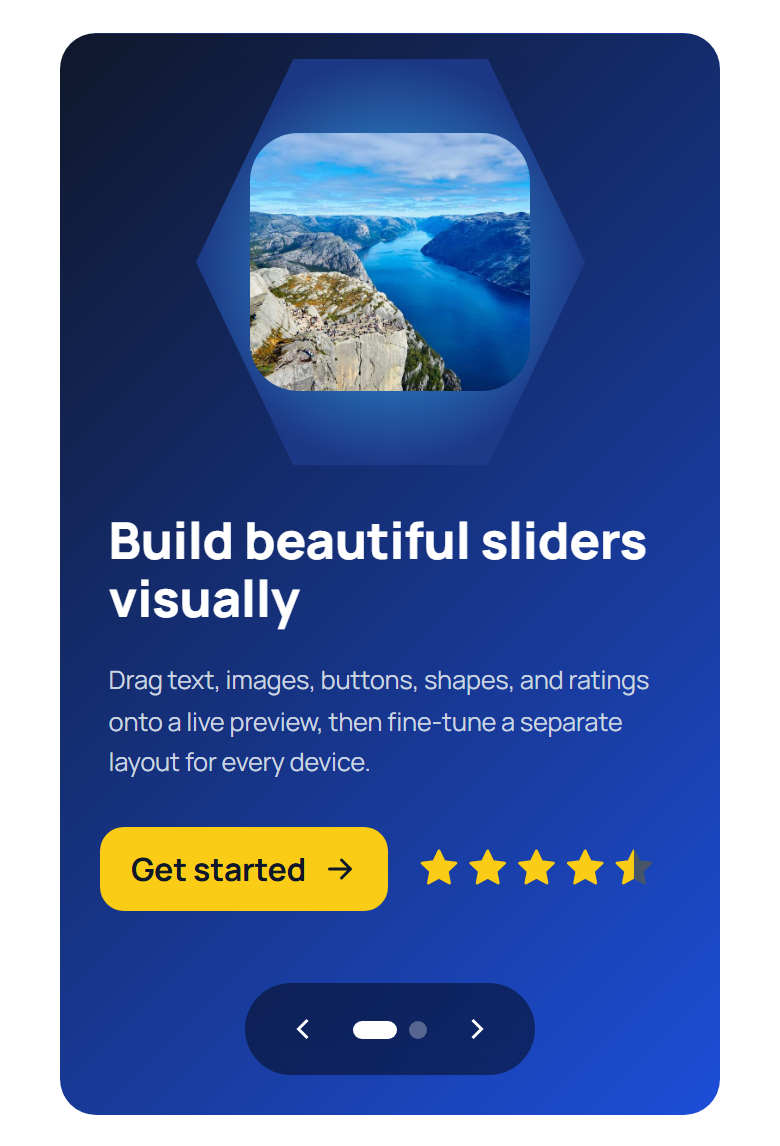
The same slider on a phone, using its mobile layout.
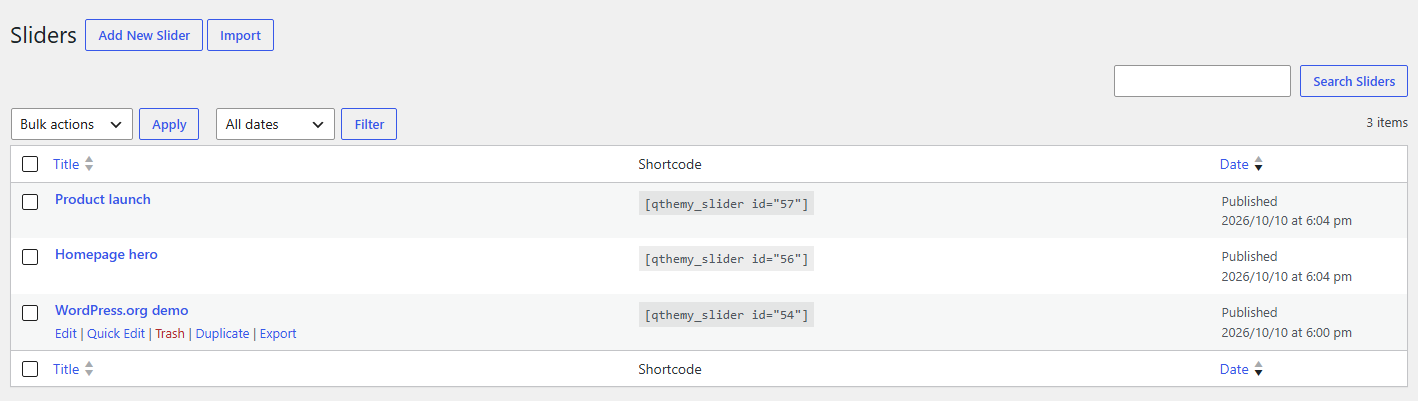
The sliders list with shortcodes, Duplicate, Export, and Import.
Faq
No. The plugin includes its own visual editor. If you use Elementor, a “Qthemy Slider” widget is included.
Publish the slider, then add the “Qthemy Slider” block (block editor) or widget (Elementor) and choose the slider. The shortcode from the Sliders list works everywhere else.
No. Everything runs on your own site, and your visitors only load files from it.
See the “Source Code” section below.
Reviews
This plugin awesome
By 
This one of the best plugins I've used. Clean interface, zero conflicts with other tools, and excellent performance. Thank you so much for your hard work
Changelog
1.3.1
- Fonts and text effects (italic, letter case, underline or strikethrough, text shadow, outlined text, balanced lines) are now part of the Pro add-on. Text uses your theme’s font; size, weight, line height, and letter spacing stay in this plugin. Sliders keep their settings, and with the add-on they look as before.
- Font weight offers Light, Medium, and Heavy, the weights that look right in theme fonts. New headings and buttons start at Heavy; existing elements keep their weight.
- The plugin no longer connects to any outside service.
- Add-ons can add typography settings to the editor and the front end.
- Copyright notice in the plugin files.
1.3.0
- New Text editor element: paragraphs with bold, italic, underline, strikethrough, bulleted and numbered lists, links, text color, and highlight.
- New Container element: arrange elements in a row, a column, or a grid, with its own settings for each device. Drag elements in, reorder them, or drag them out. A container cannot go inside another container.
- Headings fit their text, and Enter starts a new line.
- Fonts and typography for every element with text: over 100 Google Fonts (more than 30 Arabic), stored on your own site, plus italic, letter case, underline or strikethrough, line height, letter spacing, text shadow, outlined text, and balanced lines.
- Font sizes and button spacing shrink on laptop, tablet, and mobile until you set a size for that device.
- Buttons are sized by their inner spacing (each side, each device) and font size, with an automatic or fixed width. Existing buttons keep their size.
- The color picker has an opacity bar, which replaces the separate opacity fields. Existing values are kept.
- Corners can be set for each device.
- Shapes keep their proportions on every device. New shapes start square.
- The slider can have a shape on its top or bottom edge.
- Star ratings can shine, pulse, or twinkle.
- Any element can be duplicated from the layers list.
- Editor: drag elements from the Elements tab onto the slide, snapping guides while moving, a compact bar with the devices and slides while you scroll, and a tidier settings board.
- Editor: while the Pro add-on is not installed, the Elements tab lists its elements by name. The section can be hidden.
- Deleting the plugin now removes the fonts it downloaded. Sliders are kept.
- Fixed: button text and icons shrink with a slider shown narrower than its design, and theme link styles no longer change slider buttons.
- Security: extra checks on values the editor puts into styles.
- Revised Arabic interface text.
1.2.1
- New sliders start at common screen sizes: 1920 × 700 on desktop, 1366 × 600 on laptops, 768 × 600 on tablets, and 390 × 560 on phones. Existing sliders keep their sizes.
- An element hidden on the device you are editing is now shown in grey with stripes and a “Hidden on” label, so it is clear it will not appear there.
1.2.0
- Added rounded corners for the slider, set for each corner.
- Added a gradient option for the slide overlay color.
- Added opacity for image elements.
- The “container width” layout now fills Elementor containers and keeps elements centered when the container width changes.
1.1.1
- Add-ons can mark their own element types as read-only in the editor.
1.1.0
- Renamed the plugin to Qthemy Slider Builder.
- Added button icons.
- Added autoplay with a custom slide time.
- Added a documented extension API for add-ons.
- Added shape (nine outlines) and star rating elements.
- Added HTML tags (H1-H6, paragraph) and letter spacing for text, and alt text for images.
- Added Content, Style, and Advanced tabs to element settings.
- Added per-device element visibility.
- Added gradients to the color picker for slide backgrounds, text, buttons, and shapes.
- Added a block for the block editor and an Elementor widget.
- Added slider duplicate, export, and import.
- Added container-width and screen-width slider layouts.
- Added arrow position, dot shape, and navigation color options.
- Images of the other slides now load only when needed.
1.0.27
- Updated the admin-menu icon.
1.0.1
- First public release.