Quantities and Units for WooCommerce

Quantities and Units for WooCommerce
Description
NOTE: This plugin has been forked from the “Advanced Product Quantities” plugin. It adds decimal quantities support and
units to products. Please don’t attempt to run both plugins simultaneously. It not needed and the universe will
probably implode.
With Quantities and Units for WooCommerce you can easily create rules that restrict the amount of products a user can
buy at once. Set Minimum, Maximum and Step values for any product type and must be valid before a customer can proceed
to checkout. Quantities and Units also bring decimal quantity support to WooCommerce.
This plugin works great with Rapid Order, a fast ordering system for WooCommerce.
New Features
- Allow decimal quantities (configure this in Quantity Rule -> Advanced Rule -> Site Wide Step Value)
- Specify a unit of measurement for the quantity (ie lbs, kg, bag etc)
Features:
- Added Custom Quantity Message Option
- Added Out of Stock Min/Max
- Added Role Support, create rules based on user roles.
- Improved performance / caching
- Improved admin interface
- Allows rules to have a minimum of 0
- Set a Minimum product quantity requirement
- Set a Maximum product quantity requirement
- Sell products by a desired increment ie. by two’s or the dozen
- Create product category based rules
- WooCommerce Validation rules tells users what rules they’ve broken directly on the cart or product page
- Set rule priority to layer multiple rules on top of each other
- Add your rule based input boxes to products thumbnails using WooCommerce Thumbnail Input Quantities
- Easily override rules on a per-product basis
- Integrates with WooCommerce’s Product CSV Import Suite
- See which rule is being applied to an individual product on your edit product page
- Now fully supports ALL PRODUCT TYPES, simple, variable, grouped and affiliate
- Create Site Wide rules that apply to every product unless overwritten on a per-product basis
- Create rules by Product Tags (opposed to just categories)
- Woocommerce +2.0 compatible
Installation
Automatic WordPress Installation
- Log-in to your WordPress Site
- Under the plugin sidebar tab, click ‘Add New’
- Search for ‘Quantities and Units for WooCommerce’
- Install and Activate the Plugin
- Set Rules for categories by clicking the new ‘Quantity Rules’ sidebar option or assign per-product rules by using the new metabox on your product page.
NOTE: to enable decimal quantities you need to define the ‘Step’ value on a per product basis, or globally for the site under Quantity Rule -> Advanced Rule -> Site Wide Step Value.
Manual Installation
- Download the latest version of the plugin from Quantities and Units for WooCommerce WordPress page.
- Uncompress the file
- Upload the uncompressed directory to ‘/wp-content/plugins/’ via FTP
- Active the plugin from your WordPress backend ‘Plugins -> Installed Plugins’
- Set Rules for categories by clicking the new ‘Quantity Rules’ sidebar option or assign per-product rules by using the new metabox on your product page.
Screenshots

Single product page, page loads with it's minimum quantity and notifies the user below.

Create rule page.

Single product 'Product Quantity Rules' meta box. Deactivate or override rules. Even set out of stock min/max values.

Single product 'Product Quantity Rules' meta box. Display of values by user role.
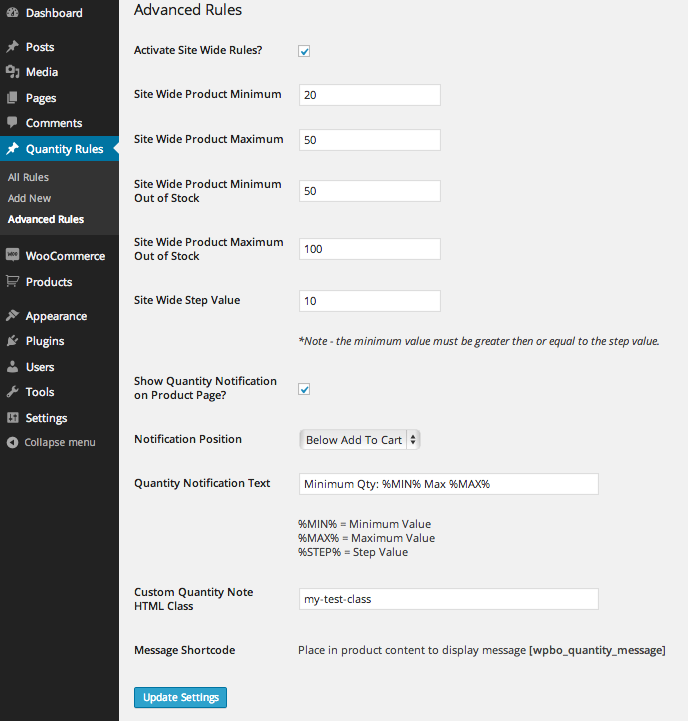
'Advanced Rules' page, set sitewide rules and configure quantity notifications (screenshot 1)

Required configuration for Out of Stock quantities to be displayed.
Reviews
Still works
By 
Was a bit worried due to the age of this plugin, but still works like a charm (for me).
Using it to set qty steps of 3 items.
perfect plugin
By 
Great plugin
By 
no multilanguage support
By 
Exactly what i needed !
By 
Very useful for ecommerce
By 
Great plugin - 1 quick questions
By 
Very good Job
By 
Untranslatable 🙁
By 
Great Plugin !!
By 
Changelog
1.0.13
- Fixed input issue introduced in 10.0.12 release
1.0.12
- Fixed an issue where sometimes the correct value would not display when using decimal quantities.
1.0.11
- Fixed issue with max value causing amount not to increment correctly in some circumstances.
1.0.10
- fixed an issue with role based quantities not working
- fixed bug with sitewide rules
1.0.9
- fixed compatibility with Thumbnail Quantities
1.0.8
- allow decimals on Advanced Rules page
1.0.7
- fixed min step value based min value.
1.0.6
- Min and step rules now work with ajax add to cart functionality in WooCommerce 2.5+
- Added min width css rule on quantity input box
1.0.5
- Fixed issue when trying to save advanced rules.
1.0.4
- Fixed floating point precision errors
1.0.3
- Fixed Call to undefined method WooCommerce::add_error() bug
1.0.2
- Removed admin notice
1.0.1
- Bug fixes
1.0.0
- Forked from “Advanced Product Quantities”
- Allow decimal quantities
- Specify a unit of measurement for the quantity (ie lbs, kg, bag etc)