Quick Ajax Post Loader
Quick Ajax Post Loader
Description
Quick Ajax Post Loader lets you build fast, filterable post grids in WordPress with an AJAX Load More button or infinite scroll – no page reloads, no coding required.
Display posts, pages, or any custom post type (CPT) in a responsive grid with AJAX taxonomy filtering (categories, tags, custom taxonomies), AJAX search, AJAX sorting, and dynamic pagination. Build your grid in the visual shortcode generator, paste the shortcode anywhere, and you’re done.
Perfect for blogs, news sites, portfolios, directories, and content catalogs.
Why choose Quick Ajax Post Loader?
Most plugins do just one thing – only infinite scroll, or only a filter. Quick Ajax Post Loader gives you the complete toolkit in one lightweight package:
- AJAX Load More button – load additional posts on click, with a customizable label
- Infinite scroll – posts load automatically as visitors scroll down
- AJAX taxonomy filter – filter posts by category, tag, or any custom taxonomy without reloading the page
- AJAX sorting – let visitors sort posts by date, title, comment count, or randomly
- AJAX search – a search field that finds posts by phrase, without reloading the page
- Any post type – posts, pages, and any registered custom post type
- Responsive post grid – control the number of columns, templates, and CSS classes
- Shortcode generator & PHP function generator – point-and-click configuration, no code needed
- Overridable templates – customize post layouts directly from your theme or child theme
- Developer-friendly – dozens of action and filter hooks for deep customization
- Lightweight & fast – optimized codebase, assets load only where needed, SEO-friendly output
Perfect for:
- Blogs and news / magazine websites
- Portfolios and creative showcases
- Product and offer grids based on custom post types
- Directories, listings, and content catalogs
- Knowledge bases and resource libraries
Key features
- Load posts dynamically with AJAX – no page reloads
- Load More button or automatic infinite scroll (toggle per shortcode)
- AJAX filter buttons for categories, tags, and custom taxonomies
- Manually select which taxonomy terms appear in the filter
- Optional “Show All” button in the taxonomy filter
- Sort dropdown: date, title, comments, random – ascending or descending
- Search field so visitors can find posts by phrase, inline with the filters or on its own line
- Multiple independent AJAX grids on the same page
- Grid layout control: columns, item templates, custom CSS classes
- Exclude specific posts by ID, ignore sticky posts
- Load the initial set of posts via AJAX – fresh content even with caching plugins
- Customizable “No Posts Found” and “End of Posts” messages
- Custom loader icons with dark variants
- Built-in shortcode generator and PHP function generator for theme integration
- Translation-ready, follows WordPress coding standards
How it works
- Install and activate Quick Ajax Post Loader.
- Go to Quick AJAX Shortcodes Add New in the WordPress admin.
- Configure your grid: post type, taxonomy filter, sorting, layout, Load More or infinite scroll.
- Copy the generated shortcode and paste it into any page, post, or page builder widget.
- Done – your visitors get AJAX-powered filtering, sorting, and loading.
For Developers
qapl_modify_posts_query_args– modify the WP_Query arguments of any AJAX requestqapl_modify_taxonomy_filter_buttons– customize filter button outputqapl_modify_sorting_options_variants– add or change sorting options- Template filters:
qapl_template_post_item_title,qapl_template_post_item_image,qapl_template_post_item_excerpt,qapl_template_post_item_date,qapl_template_post_item_read_more,qapl_template_load_more_button - Message filters:
qapl_template_no_post_message,qapl_template_end_post_message - Layout actions:
qapl_posts_container_before/after/start/end,qapl_filter_container_before/after/start/end,qapl_loader_before/after - PHP functions for theme integration:
qapl_render_post_container(),qapl_render_taxonomy_filter(),qapl_render_sort_controls() - Override any template by copying it to
/quick-ajax-post-loader/templates/in your theme
Full documentation with code examples: Developer Guide on GitHub
Additional Links
-
Developer Guide
A comprehensive guide for developers to leverage hooks, filters, and custom templates. -
GitHub Repository
Access the plugin’s source code, contribute to its development, or report issues. -
Support Forum
Get help, ask questions, or report bugs related to the plugin.
Privacy Policy
Quick Ajax Post Loader does not collect or store any user data.
Credits
Developed by Pawel Grzelkowski.
Installation
Installing via the WordPress admin panel
- Log in to your WordPress dashboard and go to Plugins Add New.
- Search for Quick Ajax Post Loader or upload the ZIP file downloaded from the repository.
- Click Install Now, then Activate.
Manual installation via FTP
- Extract the downloaded ZIP file.
- Upload the
/quick-ajax-post-loader/folder to thewp-content/plugins/directory on your server. - Go to Plugins Installed Plugins and activate Quick Ajax Post Loader.
First steps
After activation, a new Quick Ajax menu appears in the WordPress admin. Go to Quick AJAX Shortcodes Add New to create your first AJAX post grid.
Screenshots

All your AJAX shortcodes in one place, ready to copy and paste into any page or post.

Shortcode creator - choose the post type, taxonomy filter, sorting options and posts per page.

Sorting and additional settings - sorting options, excluded post IDs, sticky posts, initial AJAX load and infinite scroll.

Layout settings - columns, post item template, custom CSS classes, Load More quantity and loader icon.

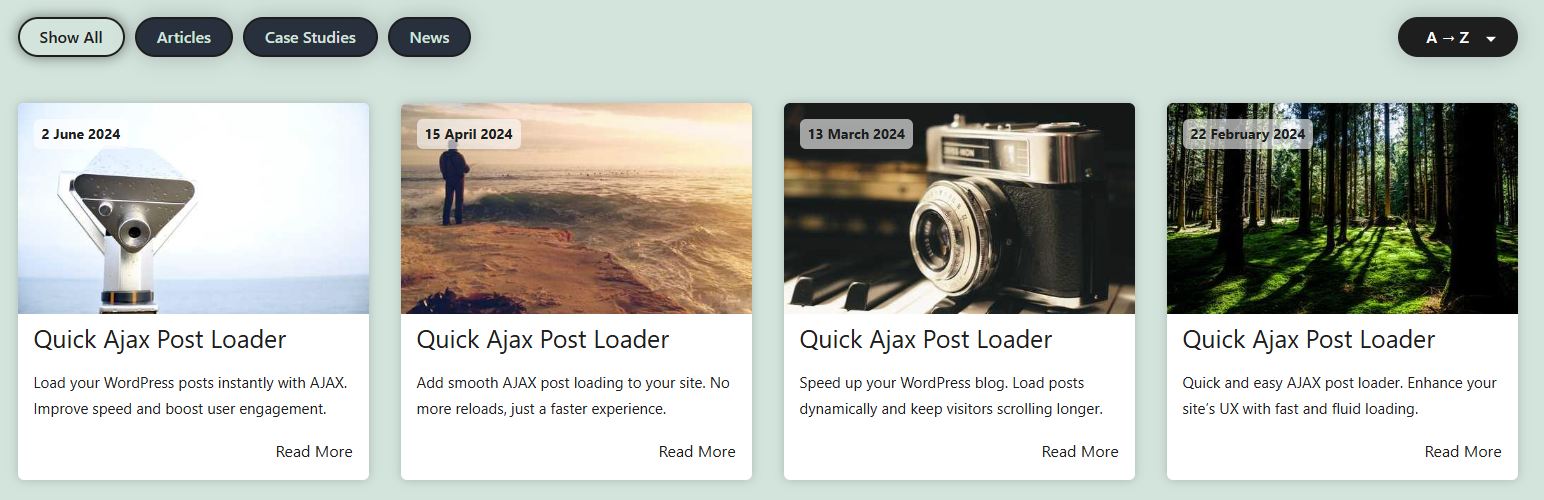
AJAX post grid with taxonomy filter buttons and a sorting dropdown - filter and sort posts without reloading the page.

Full background image post template with a Load More button - load additional posts on click.

Four-column grid with the loader icon while new posts are being fetched via AJAX.

Global options - customize the loader icon and the Read More, Show All, Load More and sorting labels.

PHP Function Generator - generate ready-to-use code for direct integration in your theme.

Built-in Help section with guides on templates, hooks and customization.
Faq
Create a shortcode in Quick AJAX Shortcodes, enable the Load More button, and paste the shortcode into any page or post. You can customize the button label and how many posts load per click.
Yes. Infinite scroll can be enabled per shortcode – posts then load automatically as visitors scroll down the page.
Yes. You can display posts, pages, and any registered custom post type, each with its own taxonomies.
Enable the taxonomy filter in your shortcode settings and choose a taxonomy (categories, tags, or a custom taxonomy). Filter buttons appear above the grid and update the posts via AJAX.
Yes. Enable the search field in your shortcode settings. Visitors can then find posts by title – results update via AJAX, work together with sorting, and the field can be placed next to the taxonomy filter or on its own line. Each shortcode can also use its own placeholder, such as “Search news” or “Search products”.
Yes. Copy a template to the /quick-ajax-post-loader/templates/ folder in your theme or child theme and edit it freely. You can also modify individual elements (title, image, excerpt, buttons) via filter hooks.
Yes. Each shortcode instance works independently, so you can combine several grids with different post types, filters, and layouts on a single page.
Yes. The plugin can load the initial set of posts via AJAX, which ensures fresh content even on aggressively cached pages.
Yes. Paste the shortcode into a Shortcode block in Gutenberg or a shortcode widget in Elementor, Divi, WPBakery, and other builders.
Yes. The plugin exposes dozens of actions and filters – including full control over the WP_Query arguments via qapl_modify_posts_query_args. See the Developer Guide.
Yes. The plugin follows WordPress internationalization standards and can be translated via translate.wordpress.org.
Reviews
Greet Plugins
By 
Great plugins, easy to use. I hope you can add Search Form
Very easy to set up and works perfectly
By 
Excellent plugin. Many similar plugins make it complicated, and the Ajax functionality conflicts with other plugins. I've tried so many! This one works right out of the box. The only thing I wish it had is the ability to choose which categories to display. Right now, it shows all of them. The developer was responsive and may have this built into future releases. Looking forward to it!
UPDATE: The developer was so responsive. He addressed my concerns right away and added the functionality to choose which categories to display and fixed the code so that the plugin automatically uses large images! I wish all the plugin developers on here were as diligent. I'd give it 10 stars if I could! Thank you Pawel!
Excellent AJAX Plugin
By 
I'm really glad I found this plugin. It takes just a minute to setup and solves the problem of trying to sort, reorder, order by taxonomy etc posts without issue. I'd spent a few mornings trying to build this functionality into my site and when I finally went looking for plugins I found Quick AJAX Post Loader in the first 5 minutes and had it doing what I'd been trying to build about 2 minutes later.
Better still is that it supports custom post types right out of the box which many plugins don't without having to put some form of workaround in place. I have a large(ish) archive of posts from an old site that I can never really figure out how to share effectively and this plugin solves that problem for me.
Changelog
1.9.2 – 2026-09-18
- Added per-shortcode search labels – a single shortcode can now use its own search field placeholder and search button label instead of the global ones, for example “Search news” or “Search products”.
- Added a choice of search box layouts – each shortcode can show the search button as a magnifier icon inside the field or as a text button next to it.
- Improved the filter, search and sorting row on narrow screens – when there is not enough room, the search field and sorting move above the filter buttons, and the search field fits small phone screens.
- The PHP Snippet Generator now includes the search box layout and the per-shortcode search labels.
- The search field and its button are now rendered from a single template, so a theme can change the layout of both.
- The
qapl_render_search_field()PHP function now takes an optional$quick_ajax_searcharray, so grids added directly in a theme can set their own placeholder and button label. - Minor code cleanup and coding standards improvements.
Note:
– A search button template copied into a theme in 1.9.0 or 1.9.1 is no longer used. Move it to templates/search-box/ and add the QUICK_AJAX_SEARCH_FIELD token where the search field should appear. Until then the built-in template is used, so the search keeps working.
1.9.1 – 2026-08-25
- Fixed minor CSS issues that could affect the layout of the filter, sorting, and search controls in some themes.
- Improved taxonomy filter buttons – the selected term is now highlighted immediately after clicking and keeps its style while posts are loading.
- Tested and confirmed compatible with WordPress 7.1.
1.9.0 – 2026-08-19
- Added a search option – the AJAX loader can now show a search field, so visitors can find posts by phrase alongside the existing filters and sorting.
- Improved the plugin’s admin menu – the main “Quick AJAX” item now opens your shortcodes list directly.
- Improved reliability of AJAX post loading and filtering on sites using full-page caching or a CDN.
- Improved the Purge Old Data tool with clear status messages after each action.
- Minor code cleanup and coding standards improvements.
- Minimum required WordPress version raised from 5.6 to 6.2.
1.8.14 – 2026-07-20
- Security: hardened capability checks for admin menu access.
- Security: improved sanitization and validation of form inputs and AJAX parameters.
- Added an optional setting to remove all plugin data on uninstall (disabled by default).
- More reliable post loading, filtering, and taxonomy selection thanks to better AJAX error handling.
- Faster rendering of taxonomy filters with many terms (fewer database queries).
- Faster front-end page loads – admin-only files are no longer loaded on the site front end.
- Custom sorting option labels from global settings are now correctly applied on the front end.
- Improved the Purge Old Data tool with required confirmation and clearer status handling.
- Minor code cleanup and coding standards improvements.
- Plugin styles and scripts are now loaded only on pages that actually use Quick Ajax, improving performance across the rest of the site.
1.8.13 – 2026-06-22
- Improved number field handling for more accurate and consistent value processing.
- Enhanced required field support across select, number, and text input fields.
- Minor improvements and refinements to code consistency and standards compliance.
- Improved support for negative numeric values in query parameters for more flexible post display options.
- Improved AJAX response handling for more reliable and consistent frontend behavior.
- Improved internal term selection handling for more reliable and consistent behavior.
For the full changelog of earlier versions, see the CHANGELOG.md file included with the plugin or the GitHub repository.