QuickStock for WooCommerce

QuickStock for WooCommerce
Description
QuickStock for WooCommerce adds a fast, dedicated stock and inventory management workspace to your WooCommerce backend. You get inline editing for every stock-relevant field across the All Products and Reorder tabs — plus a sticky header, configurable columns, density modes and keyboard shortcuts — with a separate Stock History tab that records every change. It is built for shop owners who spend real time on stock control and want to stop bouncing between the WooCommerce product list, individual product screens and external spreadsheets.
Core features:
- Smart Reorder tab that surfaces low-stock and out-of-stock products in one place
- Bulk editing for stock, stock status, prices, sale prices (absolute or %), sale schedules, categories, shipping class, delivery time and post status
- Barcode label designer with multiple named templates, freely positioned product name, barcode and price fields, plus live preview
- Stock history log with source tracking (manual vs. order), filter, CSV export and configurable retention (30 / 90 / 365 days / unlimited)
- CSV export with locale-aware options (delimiter, BOM, date format) — Excel/DE-friendly
- Field library: turn any of the 50+ built-in columns or product attributes into table columns — with compact / normal / comfortable row density and a sticky header for long lists
- Configurable default tab, sort order and rows per page
- Smart stock cells — type a calculation like
2+24straight into a stock field and QuickStock sets the new quantity - Fully translatable (text domain
quickstock-for-woocommerce) - All visual assets and runtime libraries are bundled locally — no external CDN is used
QuickStock is aimed at WooCommerce shops with dozens to thousands of products that need quick, keyboard-driven stock maintenance. Variable products appear as expandable parent rows, and every variation can be edited inline as its own row.
Third-Party Libraries
QuickStock has no build system: every JavaScript and CSS file shipped in this plugin is human-readable source. The bundled third-party libraries below come from the official, unminified distribution packages of their respective upstream releases.
- JsBarcode v3.12.3 — Copyright (c) Johan Lindell, MIT License — bundled at
assets/js/jsbarcode.js, taken unmodified and unminified fromdist/JsBarcode.all.jsof release tag https://github.com/lindell/JsBarcode/releases/tag/v3.12.3 - SortableJS v1.15.7 — Copyright (c) SortableJS contributors, MIT License — bundled at
assets/js/sortable.js, taken unmodified and unminified fromSortable.jsof release tag https://github.com/SortableJS/Sortable/releases/tag/1.15.7 - Plus Jakarta Sans — Copyright 2020 The Plus Jakarta Sans Project Authors, SIL Open Font License 1.1 — bundled at
assets/fonts/; seeassets/fonts/OFL.txtand https://github.com/tokotype/PlusJakartaSans - Freemius WordPress SDK v2.13.5 — Copyright (c) Freemius, Inc., GPL-3.0-only — bundled at
vendor/freemius/(official release). The SDK ships one pre-built asset of its own,vendor/freemius/assets/js/pricing/freemius-pricing.js(bundled and minified by the SDK vendor); its dependency licences are listed alongside it invendor/freemius/assets/js/pricing/freemius-pricing.js.LICENSE.txt. The SDK is included as released upstream and is not modified by QuickStock.
Installation
- Upload the
quickstock-for-woocommercefolder to/wp-content/plugins/, or install the plugin through Plugins Add New in WordPress. - Activate the plugin through the ‘Plugins’ menu in WordPress.
- Go to MLPlugins QuickStock to open the stock manager.
- (Optional) Open QuickStock Settings to configure default tab, density, visible columns, label templates and stock history retention.
Screenshots

Main product table — All Products tab with inline stock editing.
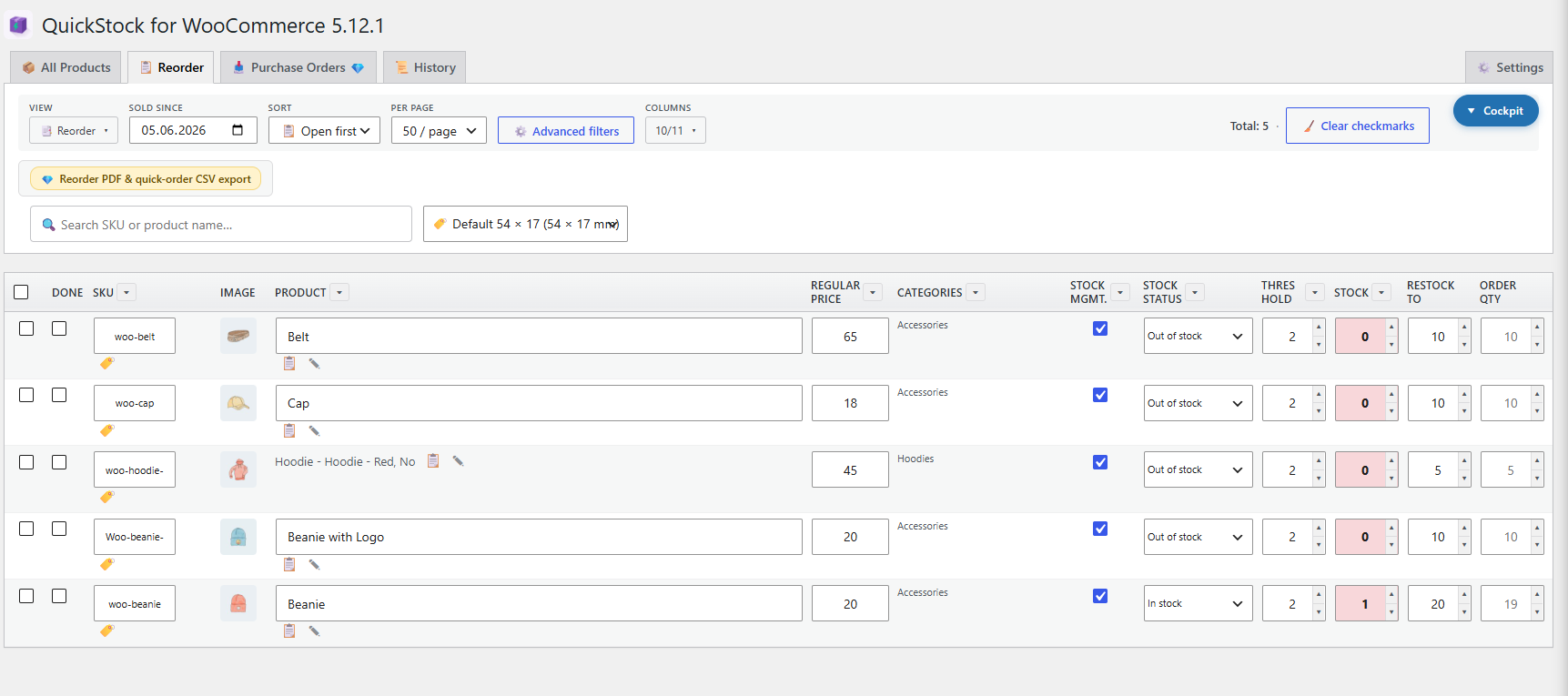
Reorder tab — products at or below their low-stock threshold.

Barcode label designer with live preview and freely positioned product name, barcode and price fields.

Bulk editing toolbar with selection across multiple products.

Manage columns — switch built-in columns on or off and edit each column's display name and width.

Stock history with source filter and CSV export.

Quick column control — show, hide and drag to reorder columns straight from the toolbar, grouped by category.

Advanced filters — narrow the list by status, category, price/margin, stock level and stock status.

Smart stock cells — type a calculation like 2+24, 100-8, 12*3 or 90/4 directly into a field and QuickStock works out the new quantity.

Set sale prices in bulk — as a fixed amount or a percentage off the regular price, with optional rounding to 0.05 or 0.10.
Faq
Yes. Keep WooCommerce active and reasonably up to date. QuickStock also runs on older WooCommerce versions; newer releases simply unlock extra columns such as GTIN and Cost of Goods Sold.
Yes. Variable products appear as an expandable parent row — click the variation toggle to reveal each variation as its own row. Stock and other fields can be edited per variation directly in the table, and variations are included in bulk actions. The parent row shows the combined stock of all its variations.
The free version covers inline stock editing, the smart Reorder tab, bulk editing, the barcode label designer (product name, barcode and price), stock history and CSV export. Pro adds custom fields, additional label fields, supplier management, Cost of Goods Sold, reorder PDFs, purchase orders, the no-label product flag and CSV import.
No. QuickStock only writes the values you enter yourself — nothing is changed in the background. Every stock change is recorded in the stock history, so you can always see exactly what happened and when.
Yes. The product list is built with server-side queries, pagination, sorting and filtering, so it stays responsive from a handful of products up to several thousand.
Barcodes are generated locally with JsBarcode; supported formats include CODE128, EAN-13 and CODE39. Label templates use millimetre-based sizing, so you can match your label stock exactly.
Deactivation keeps all data — your settings, label templates and stock history stay untouched. A full uninstall (Plugins Delete) removes plugin options and the stock-history table. Your WooCommerce products are never modified or deleted by QuickStock.
QuickStock bundles its visual assets and JavaScript libraries locally and does not use a CDN. It includes the Freemius SDK for optional usage analytics, licensing, checkout and updates of the separately distributed Pro version.
The free plugin remains fully usable if you skip the Freemius opt-in. No usage information is sent to Freemius before explicit consent. If you opt in or activate a Pro license, Freemius receives the account, website, plugin and environment information shown on its consent screen. Sharing the installed themes and plugins can be disabled separately.
Freemius service information: https://freemius.com/
Terms: https://freemius.com/terms/
Privacy policy: https://freemius.com/privacy/
Reviews
Changelog
5.13.28
- Maintenance: Updated the bundled Freemius SDK to 2.13.5.
5.13.27
- Bugfix: The reorder list now also counts orders that are “On hold” (e.g. bank transfer awaiting payment). WooCommerce already reduces stock at that point, so such products no longer stay off the list until the order is set to “Processing”.
- Bugfix: The live search in the reorder tab now uses the same “Sold since” period as the list (from Settings) instead of a fixed 14 days, so it no longer misses products that are shown in the list.
5.13.26
- Bugfix: Deleting one copy of QuickStock no longer removes the saved views, columns and other settings while another copy of the plugin is still installed (e.g. an uploaded ZIP next to the existing installation), even if that other copy is not active yet.
5.13.25
- Bugfix: The live search no longer returns rows whose columns do not match the table header when QuickStock was left open while the column view changed in another tab (e.g. by switching to a tab with a default preset).
- Bugfix: The bulk CSV export now uses the columns currently shown in the table and always includes every selected product, regardless of a status filter changed in another tab.
- Improvement: The browser tab title now shows the active QuickStock tab (e.g. “Purchase Orders ‹ QuickStock”), so several open QuickStock tabs can be told apart.
5.13.24
- Improvement: Columns can now be activated and deactivated directly from the “Manage columns” list in Settings Columns, without having to scroll down to the field library.
- Bugfix: “Calculate quantities” in the reorder view now reads the restock target currently shown on screen, so order quantities are correct immediately after editing “Restock to” inline — a page reload is no longer required.
5.13.23
- Bugfix: Column value filters on taxonomy/attribute columns (e.g. manufacturer, categories, shipping class) now apply correctly when narrowing the list with the filter search box.
5.13.22
- Improvement: Bulk editing product variations is now available in the free version.
5.13.21
- Bugfix: CSV exports no longer trigger a PHP 8.5 deprecation notice; their existing delimiters, quoting and backslash escaping remain unchanged.
5.13.20
- Bugfix: Resetting filters now preserves a modified active preset until you deliberately apply a preset again or switch tabs.
- Compliance: Premium JavaScript is stripped from the Free package; view-state POST handling now passes only the expected values; Free/Pro and bundled-library documentation is corrected.
5.13.19
- Maintenance: Internal code hardening to meet the WordPress.org plugin guidelines — stricter output escaping, input sanitisation and prepared database queries, plus moving remaining inline scripts into a separate asset file. No changes to features or behaviour.
5.13.18
- Bugfix: Printing labels could occasionally stall without ever opening the print dialog. The plugin waited for a label image that never reported back, so the click looked as if it had done nothing at all. Printing now starts even when an image fails to load, and the print job always finishes cleanly instead of leaving the page waiting.
5.13.17
- Maintenance: Updated the bundled barcode library (JsBarcode 3.12.3) and drag-and-drop library (SortableJS 1.15.7) to their current releases.
- Maintenance: In the WordPress.org version, translations are now delivered through translate.wordpress.org instead of being bundled with the plugin. Existing translations remain available and are unaffected in the Pro version.
5.13.16
- Maintenance: The shared “MLPlugins” top-level menu now uses the vendor-specific slug
mlplugins-hubinstead of the genericmlplugins. The menu title and its position are unchanged, and old bookmarks to the previous address still redirect to QuickStock.
5.13.15
- Maintenance: Plugin author, author URI and plugin URI now point to MLPlugins, the brand that publishes and supports QuickStock. No functional change.
5.13.14
- Bugfix: Activating one version (Free or Pro) while the other one was still active could crash with a fatal error (“Cannot redeclare”), forcing you to deactivate the other version by hand first. The plugin now uses the official Freemius bootstrap — the whole plugin loads inside a single conditional block, so a second copy is detected safely instead of re-declaring its functions, and Freemius deactivates the other version automatically on activation. Upgrading from Free to Pro no longer requires a manual step.
5.13.13
- Compliance: Free and Pro are now generated from one master codebase; Premium files, PHP methods and JavaScript blocks are removed from the WordPress.org package by the Freemius preprocessor
- Privacy: The FAQ now documents the optional Freemius connection, consent, terms and privacy policy
5.13.12
- Improvement: The stock column is colour-coded again — green above the reorder threshold, orange exactly at the threshold, red below it. The colour coding had been hidden by a generic input-field rule introduced with the redesign.
5.13.11
5.13.10
- Bugfix: Admin notices from other plugins or WooCommerce are now displayed at the very top — above the logo and the main navigation instead of below them. The
.wp-header-endmarker was moved to the beginning of the page for this.
5.13.9
- Maintenance: Updated the bundled Freemius SDK to 2.13.4.
5.13.8
- Bugfix: Column dropdowns (sort/filter) were cut off at the bottom edge of the table when only a few products were listed, because the table used “overflow: hidden” for its rounded corners. The corners are now rounded on the corner cells themselves, so the menu can extend beyond the table again.
- Bugfix: Admin notices from other plugins or WooCommerce sometimes ended up in the middle of the QuickStock interface. A
.wp-header-endmarker now pins them reliably below the main navigation.
5.13.7
- Change: QuickStock is no longer a submenu under WooCommerce. It now lives under the new shared “MLPlugins” top-level menu (in preparation for further ML plugins).
5.13.6
- UI: “Advanced filters” and “Reset filters” now permanently use the accent styling of the active “All Products” tab in the filter bar (purple border, purple text) instead of only on hover.
5.13.5
- Bugfix: In the cost price column, the margin indicator rendered both “green” and “orange” in a yellowish tone because a second CSS block overrode the correct colours. Green and orange are displayed correctly again.
- Maintenance: Cleaned up the admin stylesheet (
admin.css) — the colour palette that had been duplicated during the redesign was merged into a single source, and around 30 mutually overriding or ineffective CSS rules were removed. Internal cleanup only, with no visible layout change.
5.13.4
- Bugfix: In narrow columns with long titles (e.g. “Threshold”), the column heading disappeared behind the neighbouring column and the sort/filter arrow was missing entirely. The arrow now flows inline directly after the title and stays visible at all times without covering the heading; long titles wrap cleanly at word boundaries instead of being clipped.
5.13.3
- Admin redesign polish: The settings sidebar stays visible while scrolling on desktop.
- Sort/filter arrows in table headers are more compact and right-aligned, so they no longer cover narrow column titles.
5.13.2
- The plugin icon is now also shown in the WordPress updates section (set via the
plugin_iconfilter in the plugin code).
5.13.1
5.13.0
5.12.2
- Protection against activating Free and Pro at the same time: instead of a fatal error (duplicate class declaration), a clear notice now asks you to deactivate one of the two versions.
- Updated the Freemius SDK to 2.13.2.
5.12.1
- Removed dark mode: the theme selection (System / Light / Dark) under Settings General Appearance is gone; the plugin area is displayed in a single light theme again.
- Moved the admin.css colour palette from the theme body classes to :root.
5.12.0
5.11.0
5.10.0
5.9.0
5.8.0
- Stock history: every stock change is logged in a dedicated database table.
- Sources: ‘manual’ (inline/bulk editing) and ‘order’ (WooCommerce stock reduction/restore).
- New “History” tab with filters (search, date, source) and CSV export.
- Settings General History: on/off plus retention period (30 / 90 / 365 days / unlimited).
- A daily cleanup cron removes entries older than the retention period.
- The table is created on activation (this also applies when the plugin is already active).
5.7.0
- Dark mode: theme selection under Settings General Appearance (System / Light / Dark).
- “System” follows the operating system setting (prefers-color-scheme).
- Applies to the plugin area (product table, filters, settings, label designer); the WP menu and admin bar are unchanged.
- Moved admin.css to a CSS variable palette system.
5.6.1
- General settings (phase 2): autosave mode (automatic/manual).
- Configurable bulk confirmation dialog (off/always/above a threshold), including the threshold setting.
- CSV export options: delimiter (; / , / tab), BOM, date format.
- Currency override (symbol, position, decimal/thousands separator).
- Configurable scanner cache TTL (1 h / 6 h / 24 h / off).
- Keyboard shortcuts can be switched on and off.
5.6.0
- General settings (phase 1): default tab on opening (All Products / Reorder / last used).
- Configurable default sorting per tab.
- Default “products per page”.
- Row height / density (compact / normal / comfortable).
- Sticky header in the product table.
- Lazy loading for product images.
5.5.0
- Bulk editing: print labels for several selected products at once.
- Global quantity field in the bulk bar (e.g. print every ticked product 3 times).
- Uses the active label template; one label per printed page (same mode as single printing).
- Products without an SKU are skipped and reported at the end.
5.4.0
- Bulk editing in the “All Products” tab: selection checkboxes plus “select all” (current page).
- Sticky action bar with a confirmation dialog and a progress bar.
- Processing in batches; batch size configurable under Settings General.
- Operations: set stock/change it relatively, stock management, threshold, stock status, backorders, post status.
- Set availability, shipping class and delivery time; add/remove category (additive).
- Clear/set sale price (CHF or % discount), sale period, set regular price.
- CSV export of the selection (Excel/DE: UTF-8 plus semicolon).
- Stock operations skip products without active stock management and report them.
5.3.0
5.0.0
- First plugin version (migrated from a snippet).