Quotes llama

Quotes llama
Description
Create a collection of quotes. Share the thoughts that mean the most… display your quotes in block, widget, page, template, gallery or post.
- Searchable
- Categories
- Author and Source Icons
- Backup (export) and Restore (import) in “.csv or .json” formats.
- … among other options.
Installation
How to install via Dashboard
- Go to Plugins -> Add New.
- Search for quotes-llama.
- Click Install Now.
- Activate the plugin through the Plugins menu in the Dashboard.
How to install via .zip file
- After downloading, in the dashboard, go to Plugins -> Add New -> Upload Plugin.
- Click Browse and select the quotes-llama.zip file.
- Click Install Now.
- Activate the plugin through the Plugins menu in the Dashboard.
- You can also extract the .zip file. Then copy the quotes-llama folder to the /wp-content/plugins/ directory.
How to install via FTP
- After downloading and extracting the quotes-llama.zip file. Upload the quotes-llama folder to the /wp-content/plugins/ directory.
- Activate the plugin through the Plugins menu in the Dashboard.
Screenshots
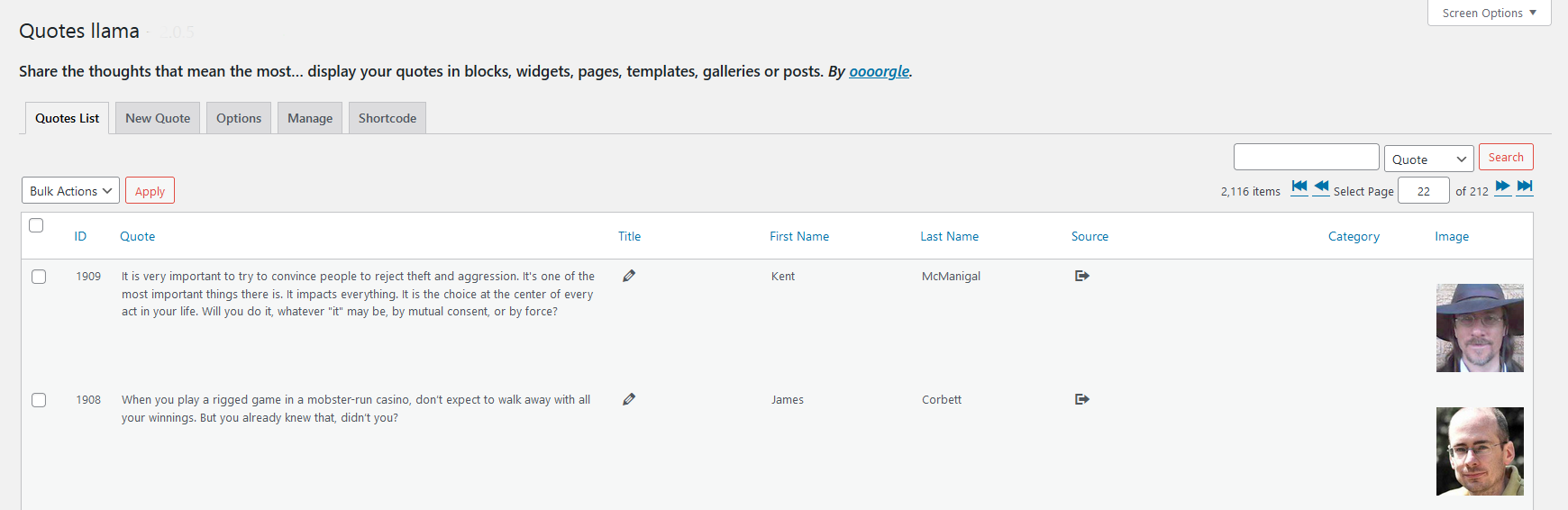
Admin
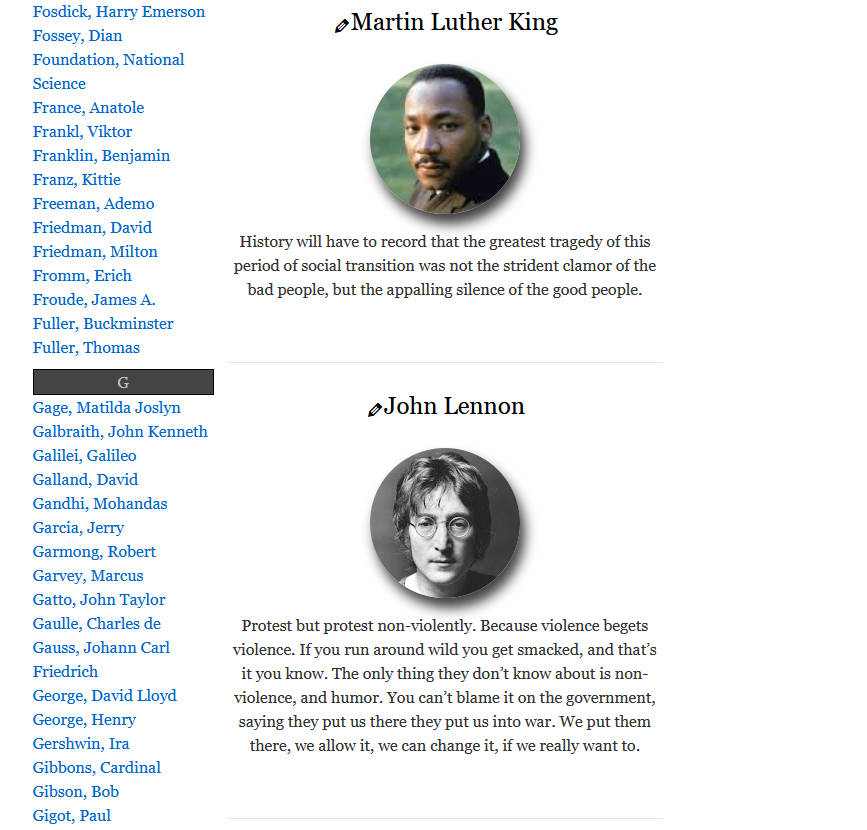
Gallery

Widget
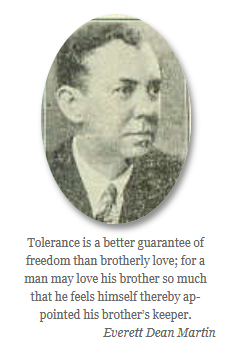
Page
Faq
-
Before submitting a support ticket, please review the troubleshooting section.
-
Describe the problem with as much detail as possible.
-
Describe the steps already taken to resolve the problem.
-
It would be helpful if you can provide any of the following:
-
Console and WP_DEBUG notices, warnings and errors associated with the problem.
-
WordPress version.
-
PHP version.
-
Quotes llama Plugin version.
-
The theme you are using and a link to the theme.
-
The shortcode you are using or widget settings.
-
In an attempt to duplicate your WordPress environment as much as possible, include as much of the above as possible and any other information you think would be helpful in reproducing the error.
If you encounter any problems — thing you can try:
-
Check and Save the options by visiting the options tab and clicking Save at the bottom.
-
Disable caching plugins and clear your browser cache.
-
Check that the shortcode you are using is accurate and formatted correctly.
-
Reset the options: Verify “Reset When Deactivating” is enabled in the plugin options tab, then deactivate/activate the plugin.
-
View the console and enable WP_DEBUG mode to check for notices, warnings or errors. If you find any regarding this plugin, open a support ticket.
-
Re-install: Deactivate and delete the plugin (this does not delete quote data) and re-install from WordPress.
-
If any of the plugin files have been edited or changed try a re-install.
-
Deactivate all other plugins and verify the problem still exists.
-
Test some different themes and verify the problem still exists.
-
Verify the table structure – (quote_id, quote, title_name, first_name, last_name, source, img_url, author_icon, source_icon, category)
-
Import problems: check that the csv delimiter in the options tab is set to match the delimiter you are using.
-
Check the column headers of your import file, which should be: quote, title_name, first_name, last_name, source, img_url, author_icon, source_icon, category
Tag (attribute) – ‘example’
- a (href, target, rel, class, title) –
<a href="http://example.com" target="_blank" rel="nofollow" class="class" title="example">example</a> - b –
<b>Bold text</b> - br (clear) –
<br clear="left"> - del –
<del>This text will have a line through it.</del> - em –
<em>Emphasized text.</em> - i –
<i>Italic text.</i> - mark –
<mark>Highlight text</mark> - small –
<small>Small text</small> - strong –
<strong>This text is important!</strong> - sub –
<sub>Subscripted text</sub> - sup –
<sup>Superscripted text</sup> - u –
<u>Underlined text</u>
- Create a link by entering the url.
- Create a new line in the quotes field with (enter) or (shift+enter).
- The WordPress Dash-Icons set is included by default.
- Custom image icons (png, gif, jpg, bmp, svg) can be copied to the “wp-content/uploads/quotes-llama/” directory.
You can configure the “next quote” link (in the options tab) which is displayed in widgets and wherever you place the shortcode [quotes-llama].
Here are some examples:
- Default:
…(next quote) - Plain Text: next quote >>
- Dash-Icon: next quote
<span class="dashicons dashicons-arrow-right-alt2"> - Unicode: next quote
»
You can also change how the link is displayed using CSS.
Some examples:
.quotes-llama-widget-random hr {display: none;}This will remove the line between the quote and the link..quotes-llama-widget-next {text-align: left; font-style: normal;}This will align to the left and remove the italic.
Navigate to your Dashboard–>Appearance–>Customize–>Additional CSS. DO NOT directly edit any theme/plugin files as they are ALL overwritten when updating.
- Be aware that external linking of sites and images creates the possibility of a (BLH) attack. Broken link hijacking (BLH) is a type of web attack which exploits external links that are no longer valid. Mainly due to an expired domain. The link content can be replaced and redirected, used to deface, impersonate, or even launch cross-site (XSS) scripting attacks.
Use the plugin by including a shortcode or by including the widget in the desired location:
Separate multiple categories and id’s with a comma. e.g. ‘category, category, etc’
Short-codes are informational and for example only. Depending on your encoding, you may experience problems if using copy and paste.
To include this plugin in a Block, Page or Post:
-
Display a random quote.
[quotes-llama] -
Display a random quote from a category.
[quotes-llama cat=’category’] -
Display a number of random quotes.
[quotes-llama quotes=’#’] -
Display a number random quotes from a category.
[quotes-llama quotes=’#’ cat=’category’] -
Display a dynamically positioned gallery. – (auto-refresh)
[quotes-llama mode=’gallery’] -
Display a dynamically positioned gallery from a category. – (auto-refresh)
[quotes-llama mode=’gallery’ cat=’category’] -
Display a indexed and searchable page of quote Authors.
[quotes-llama mode=’page’] -
Display a indexed and searchable page of quote Authors.
[quotes-llama mode=’page’ cat=’category’] -
Display the search bar. Results load below the search bar.
[quotes-llama mode=’search’] -
Display the search bar. Results load into target class.
[quotes-llama mode=’search’ class=’class-name’] -
Display a random quote that will auto-refresh.
[quotes-llama mode=’auto’] -
Display a random quote from a category that will auto-refresh.
[quotes-llama mode=’auto’ cat=’category’] -
Display static quotes.
[quotes-llama id=’#,#,#’] -
Display all quotes by id, random, ascending, or descending. Limit (#) number of quotes per page.
[quotes-llama all=’id’ limit=’#’]
[quotes-llama all=’random’ limit=’#’]
[quotes-llama all=’ascend’ limit=’#’]
[quotes-llama all=’descend’ limit=’#’]
[quotes-llama all='(1)’ cat=’category’ limit=’#’]
(1) = (id, random, ascend, descend)
To include this plugin in a Template File:
-
Display a random quote.
do_shortcode( “[quotes-llama]” ); -
Display a random quote from a category.
do_shortcode( “[quotes-llama cat=’category’]” ); -
Display a number of random quotes.
do_shortcode( “[quotes-llama quotes=’#’]” ); -
Display a number of random quotes from a category.
do_shortcode( “[quotes-llama quotes=’#’ cat=’category’]” ); -
Display a dynamically positioned gallery. – (auto-refresh)
do_shortcode( “[quotes-llama mode=’gallery’]” ); -
Display a dynamically positioned gallery from a category. – (auto-refresh)
do_shortcode( “[quotes-llama mode=’gallery’ cat=’category’]” ); -
Display an indexed and searchable page of quote Authors.
do_shortcode( “[quotes-llama mode=’page’]” ); -
Display an indexed and searchable page of quote Authors by category.
do_shortcode( “[quotes-llama mode=’page’ cat=’category’]” ); -
Display the search bar. Results load below the search bar.
do_shortcode( “[quotes-llama mode=’search’]” ); -
Display the search bar. Results load into target class.
do_shortcode( “[quotes-llama mode=’search’ class=’class-name’]” ); -
Display a random quote that will auto-refresh.
do_shortcode( “[quotes-llama mode=’auto’]” ); -
Display a random quote from a category that will auto-refresh.
do_shortcode( “[quotes-llama mode=’auto’ cat=’category’]” ); -
Display static quotes.
do_shortcode( “[quotes-llama id=’#,#,#’]” ); -
Display all quotes by id, random, ascending, or descending. Limit (#) number of quotes per page.
do_shortcode( “[quotes-llama all=’id’ limit=’#’]” );
do_shortcode( “[quotes-llama all=’random’ limit=’#’]” );
do_shortcode( “[quotes-llama all=’ascend’ limit=’#’]” );
do_shortcode( “[quotes-llama all=’descend’ limit=’#’]” );
do_shortcode( “[quotes-llama all='(1)’ cat=’category’ limit=’#’]” );
(1) = (id, random, ascend, descend)
To include this plugin in a Widget:
- Drag-and-drop the Quotes llama widget located in the Widgets Page to the desired location.
Reviews
Best quotes plugin, great author
By 
This plugin is simple and works great. Its author really listens to comments and is invested into making it an awesome plugin! They proved to offer a very long time support. I can only recommend.
Great plugin!
By 
I like this plugin and I think it is great! Thank you!
Import hat nicht gut funktioniert!
By 
Beim Importieren kamen nur unbrauchbare Daten, und der Aufwand, die zu importierende Datei so nachzubearbeiten, dass das Plugin damit klarkommt, war leider viel zu zeit- und arbeitsaufwendig, so dass ich es abgebrochen habe!
Lets not forget that this is free, people!!!
By 
This is an absolutely great plugin for the cost!! Anybody giving less than 4 stars should be ashamed!!
Many thanks to the author!
Excellent Plugin
By 
Easy to use, nice looking, and superfast to respond to the topics and questions.
Works with 6.5.2
By 
Works as expected on my 6.5.2 installation of WordPress, and is exactly what I was looking for.
quotes with images
By 
Many times, it doesn't show quotes with images and jumps on another quote. , may be because it doesn't work with the latest version of WordPress..
Easy to use, exactly what I was looking for
By 
I especially liked that it has a CSV import option. Saved a ton of time entering my quote collection.
Text is always left aligned
By 
Could be cool, but doesn't integrate well with DIVI : quote text is ALWAYS left align, no matter what I set in CSS.
Great Job!
By 
The perfect alternative for 'Quotes Collection'.
Great job! Thanks!
Changelog
Upgrade Notice
- If you encounter problems, please refer to the Support and Troubleshooting FAQ.
- Version History