RaCar Checkout Manager for Brazilian Stores
RaCar Checkout Manager for Brazilian Stores
Description
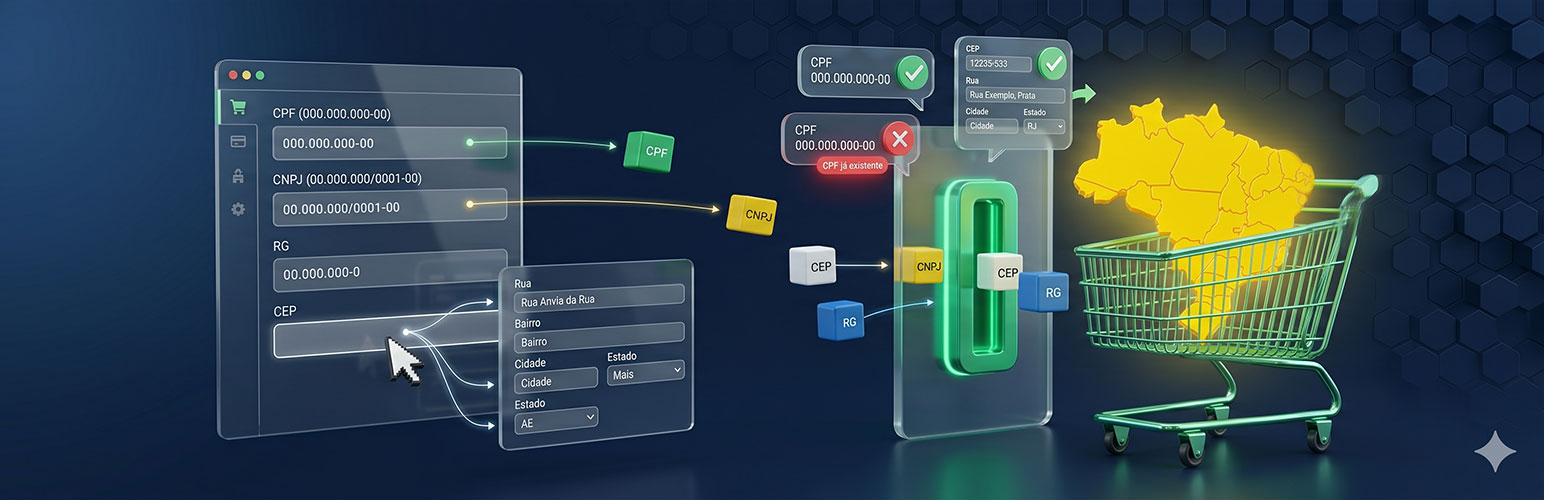
RaCar Checkout Manager for Brazilian Stores is a powerful WooCommerce plugin designed specifically for Brazilian stores. It enhances the WooCommerce checkout experience by adding essential fields like CPF, CNPJ, RG, and more and allowing control of all WooCommerce fields. Additionally, it includes an address autofill feature that uses CEP (Brazilian postal codes) to automatically populate address fields, saving time and improving accuracy.
O Gerenciador de Checkout RaCar para Lojas Brasileiras é um poderoso plugin para WooCommerce desenvolvido especificamente para lojas no Brasil. Ele aprimora a experiência de finalização de compra no WooCommerce, adicionando campos essenciais como CPF, CNPJ, RG e outros, além de permitir o controle de todos os campos do WooCommerce. Adicionalmente, inclui um recurso de preenchimento automático de endereços que utiliza o CEP para preencher automaticamente os campos de endereço e bloquenado-os (à escolha do admin), economizando tempo e aumentando a precisão.
Key Features:
- CPF, CNPJ, and RG Fields: Add and validate these essential fields for Brazilian customers.
- Address Autofill: Automatically fill in address fields based on the CEP entered by the customer.
- Customizable Checkout Fields: Enable, disable, or customize checkout fields to suit your store’s needs.
- Input Masks: Add input masks for CPF, CNPJ, and cellphone fields for better user experience.
- WooCommerce HPOS Compatibility: Fully compatible with WooCommerce’s High-Performance Order Storage (HPOS).
- Admin Interface: Modern and intuitive admin interface for managing settings.
- Translation Ready: Fully localized and ready for translation.
This plugin is free and always will be. If it saves you time, consider buying me a coffee to support its development.
- Campos CPF, RG, CNPJ, IE, número da residência, bairro e telefone: Adiciona e valida esses campos essenciais para clientes brasileiros.
- Preenchimento automático de endereço: Preenche automaticamente os campos de endereço com base no CEP inserido pelo cliente.
- Bloqueio de campos de endereço: Ao preencher os campos de endereço, pode bloqueá-los ao comando do admin.
- Campos do checkout personalizáveis: Habilite, desabilite ou personalize os campos de finalização de compra para atender às necessidades da sua loja.
- Máscaras de entrada: Adiciona máscaras de entrada (pontos e traços) para os campos CPF, CNPJ, CEP e celular para uma melhor experiência do usuário.
- Compatibilidade com WooCommerce HPOS: Totalmente compatível com o High-Performance Order Storage (HPOS) do WooCommerce.
- Interface administrativa: Interface administrativa moderna e intuitiva para gerenciar as configurações.
- No seu idioma: Já vem traduzido para o pt-BR, mas você pode mudar qualquer texto que aparece para o usuário.
Este plugin é gratuito e sempre será. Se ele economizar seu tempo, considere me oferecer um café para apoiar o desenvolvimento deste e outros plugins.
External Services
This plugin connects to external APIs to obtain address information based on Brazilian postal codes (CEP), which is needed to autofill address fields during checkout and registration. These services are used only when the user enters a CEP during checkout and the autofill feature is enabled.
BrasilAPI (Primary Service)
The plugin sends the user’s postal code (CEP) to BrasilAPI when the user enters a valid CEP in the address field ‘postcode’.
This service is provided by “BrasilAPI”: https://brasilapi.com.br/docs (terms of use and privacy policy available on their website).
What is it?
BrasilAPI is a free public API that provides Brazilian address data based on postal codes (CEP).
What data is sent?
– Only the CEP (postal code) is sent via a GET request to https://brasilapi.com.br/api/cep/v2/{cep} (e.g., https://brasilapi.com.br/api/cep/v2/01234567).
– No personal user data (name, email, order details, or IP address) is transmitted.
– Requests are made only when the user enters a valid CEP and triggers the autofill feature (via JavaScript on the frontend).
When is it used?
– When a customer enters a CEP in the billing or shipping address field during checkout.
– Only if the address autofill feature is enabled in the plugin settings (Tab 2: Autofill Addresses).
What data is returned?
– Street name (logradouro)
– Neighborhood (bairro)
– City (cidade)
– State (uf)
Terms and Documentation:
– BrasilAPI Terms of Service: https://brasilapi.com.br/#termos-de-uso
– BrasilAPI Documentation: https://brasilapi.com.br/docs
ViaCEP (Fallback Service)
If BrasilAPI does not return a usable address (network error, HTTP error, invalid JSON, or CEP not found), the plugin tries ViaCEP once as a secondary source.
The plugin sends only the same Brazilian postal code (CEP) in a GET request to https://viacep.com.br/ws/{cep}/json/ (see ViaCEP). ViaCEP is a widely used public CEP lookup service in Brazil. Formal terms of use are not published as clearly as some larger APIs; the plugin documents this connection here for transparency and WordPress.org compliance.
What data is sent?
– Only the CEP digits in the URL path (same scope as BrasilAPI).
– No personal user data (name, email, order details, or IP address) is transmitted by the plugin.
When is it used?
– Only after BrasilAPI fails or returns no valid address for that CEP.
– Only when autofill is enabled and the customer triggers a CEP lookup as described above.
Data Handling
- No data storage: The plugin does not store or track any data beyond the single request to the API.
- Optional feature: The address autofill integration is optional and can be disabled in the plugin settings (Tab 2: Autofill Addresses).
- Fallback mechanism: The plugin tries BrasilAPI first, then ViaCEP. If neither service returns a valid address, the checkout continues with manual entry without fatal errors.
- User control: Users can disable the autofill feature at any time through the plugin settings.
Data Transmission
Data sent: Only the Brazilian postal code (CEP) entered by the user.
When: Every time a user enters or modifies a CEP field (postcode) during WooCommerce checkout or My Account registration.
Conditions: Only when the user manually enters a CEP value. No data is sent if the field is left empty.
Purpose: To automatically populate address fields (street, neighborhood, city, state) based on the provided CEP.
Storage: The CEP and returned address data are stored locally in the user’s browser session and WooCommerce order/customer data. Responses come from BrasilAPI when available, otherwise from ViaCEP; third-party APIs do not retain that payload beyond normal HTTP handling.
License
This plugin is licensed under the GPLv2 or later. See the GNU General Public License for more details.
Installation
- Upload the plugin files to the
/wp-content/plugins/racar-checkout-manager-for-brazilian-storesdirectory, or install the plugin through the WordPress plugins screen directly. - Activate the plugin through the ‘Plugins’ screen in WordPress.
- Navigate to RaCar Plugins > Gerenciador de Campos para Lojas Brasileiras in the WordPress admin menu to configure the settings.
- Customize the checkout fields and enable the address autofill feature as needed.
Screenshots

Checkout Fields Settings - Customize the fields displayed at checkout.

Address Autofill Settings - Enable or disable the address autofill feature.

Frontend Display - Manage settings like priority, classes, label, placeholder, etc. Blocked fields after CEP search.
Faq
Yes, the plugin is fully compatible with WooCommerce’s High-Performance Order Storage (HPOS).
The plugin uses Brazilian CEPs (postal codes) to fetch address data: it calls BrasilAPI first, and uses ViaCEP as a fallback if BrasilAPI does not return a valid address. This data is then used to automatically populate the address fields during checkout.
Yes, you can enable or disable individual fields like CPF, CNPJ, RG, and more from the plugin’s settings page.
Yes, the plugin is fully localized and ready for translation into other languages.
Yes, you can enable input masks for fields like CPF, CNPJ, and cellphone to improve the user experience.
Yes, you can disable the autofill feature entirely from the plugin settings (Tab 2: Autofill Addresses). When disabled, no external API calls are made.
Yes. From 0.6.1 onward, person type is stored on orders and customers as 1 (individual) / 2 (company), matching Brazilian Market on WooCommerce. When checkout ships to the billing address (no separate shipping address), number and neighborhood are mirrored into shipping meta (_shipping_number, _shipping_neighborhood) when those shipping fields would otherwise be empty—matching what many Brazilian carriers expect.
Third-party plugins that read the same meta keys (for example Loggi, Correios Automático Infix, Melhor Envio buyer payloads, Link Nacional improved shipping calculator conventions) continue to work without Brazilian Market installed. Melhor Envio may still show its own admin notice until their plugin explicitly recognizes RaCar—configure shipping fields here regardless.
Classic checkout rows often use form-row-first / form-row-last together with theme CSS floats. The plugin keeps those WooCommerce classes but changes which rows are visible (PF/PJ toggles) and interacts with WooCommerce scripts that can reassign row classes when country or locale rules change (the plugin also restores your configured postcode row classes after country_to_state_changing). That can misalign float pairs even though class names match WooCommerce defaults.
In Checkout Fields (Tab 1), enable Classic Checkout Layout (Float Compatibility) Recover floated checkout columns. It is off by default so normal themes are unaffected; when enabled, it outputs a checkout-only rule (clear: both on form-row-first) with exclusions for wide rows and the plugin’s three-column helpers. Test checkout with your theme after enabling; disable again if anything looks worse.
Use the classic checkout page (shortcode checkout). With the option off, confirm billing/shipping look as before. Turn it on only on stores that showed overlap; recheck billing, shipping, switching PF/PJ (when applicable), and changing country if customers can. Storefront is a good baseline; themes that rely heavily on floats benefit most.
In Checkout Fields (Tab 1) Classic Checkout Layout (Float Compatibility), enable Preserve two-column row layout on small screens (default off). It applies classic shortcode checkout only (not block checkout): under max-width: 768px it outputs scoped CSS on .woocommerce-checkout form.checkout to restore WooCommerce two-column widths/floats and this plugin’s three-column helpers when themes force full-width rows, keeps form-row-wide full width, uses clear: both on form-row-first (with the same exclusions as float recovery), and slightly reduces checkout label size (font-size: 70%) so labels are less likely to wrap and misalign paired fields. Test on real devices; disable if your theme looks worse.
Reviews
Changelog
0.6.1 – 2026-05-16
- Order/customer persistence: read billing/shipping extras from WooCommerce’s sanitized checkout payload (same
billing_*/shipping_*data used to build the order), so new customers and account-creation checkouts save CPF, number, neighborhood, etc. to order meta and user meta reliably for REST (Bling) consumption. - User meta: invalid CPF/CNPJ values no longer block saving all other Brazilian fields — only the invalid document meta is omitted.
- Order/customer persistence: store
billing_persontypeas 1 / 2 (Brazilian Market contract); checkout UI still uses pf/pj viadefault_checkout_billing_persontype. - When shipping to the billing address (no “Ship to a different address?”), mirror billing number/neighborhood into shipping meta (
shipping_number,_shipping_number,shipping_neighborhood,_shipping_neighborhood) if shipping extras are empty—helps carriers and integrations that only read_shipping_*. - Admin order edit: Customer information block shows each label and value on the same line (removed the
addresswrapper class so WooCommerce admin CSS no longer forcesstronglabels todisplay: block). - New pt-BR translations.
0.6.0 – 2026-05-15
- WooCommerce REST API: exposes Brazilian checkout fields on orders and customers (
billing.cpf,billing.cnpj,billing.number,billing.neighborhood,persontypeas F/J, etc.) for Bling and similar integrations — no new public endpoints; uses existing WC REST permission checks. - Order persistence: mirrors extra field meta as
_billing_*/_shipping_*alongside existing keys for compatibility with legacy Brazilian Market data.
0.5.1 – 2026-05-15
- Checkout account field validation: fixed required checks for
account_usernameandaccount_passwordto use WooCommerce account keys (instead of legacybilling_*prefixes), preventing false “required field” errors when those fields are filled on checkout. - CEP autofill (classic checkout): while “searching” or “not found” feedback is shown, the next field row reflows as a full line below the postcode field (Storefront-like behavior) via a temporary row-break element — no changes to
form-row-first/form-row-last/form-row-wideclasses. - CEP autofill: initial lookup on page load waits until checkout layout is ready (
updated_checkoutorwindowload) to avoid a brief broken layout flash. - CEP autofill: manual address lookup runs as soon as 8 numeric digits are entered (
inputevent); non-digits (e.g. hyphen from mask or manual typing) are ignored — lookup no longer waits for leaving the postcode field (blur).
0.5.0 – 2026-05-13
- Checkout Fields (Tab 1): optional Preserve two-column row layout on small screens (default off) for classic checkout — under
max-width: 768px, scoped inline CSS restoresform-row-first/form-row-lastand three-column helper classes when themes stack fields full width;form-row-widestays full width;form-row-firstusesclear: both(with wide / three-col exclusions); checkout labels usefont-size: 70%in that mode to reduce row misalignment; block checkout unaffected; FAQ entry added - When plugin Select2 is disabled: SelectWoo/select2 removal is limited to checkout, My Account, and cart by default so third-party Select2 (theme filters, variations, etc.) keeps working site-wide
- Developer filter
rbsmhao_force_legacy_global_selectwoo_strip(returnsbool, receives settings array): returntrueto restore the previous site-wide strip behavior on stores that depended on it - Checkout Fields (Tab 1) dimensions: when select height is set, inline CSS aligns text-only country rows (themes/filters that remove the country
selectand leave markup inside#billing_country_field/#shipping_country_field.woocommerce-input-wrapper) using scopeddisplay:flex,min-height, and optional select line-height — not a globalspan.woocommerce-input-wrapperrule (avoids breaking other fields) - Same dimension block: checkout
select.country_to_state/select.country_selectand My Accountselect.country_to_stateget native height rules even when the theme dropsrbsmhao-select-fieldon the country row - Checkout frontend CSS: scoped
clear: bothon.woocommerce-checkout .woocommerce-shipping-fieldsso “Ship to a different address?” is not pulled beside floated billing rows (e.g. some Woodmart layouts) - Birthdate: stored and validated as d/m/Y (Brazilian); legacy Y-m-d values in customer meta are normalized on checkout default; input mask treats ISO
Y-m-dprefill before applyingdd/mm/aaaa
0.4.1 – 2026-05-06
- Checkout Fields (Tab 1): added optional field dimension controls for classic checkout (separate height/line-height for all checkout selects and for text inputs); empty values inherit theme defaults
- Checkout frontend: unified select sizing model for native WooCommerce selects and Select2-rendered selects using the same checkout-scoped selectors/tokens (
.woocommerce-checkout,rbsmhao-select-field) to reduce cross-theme mismatch - Select2 frontend CSS: removed broad global overrides and reduced reliance on
!important; styles are now scoped to checkout/plugin context to lower risk of theme conflicts - Checkout layout compatibility: added optional Classic Checkout Layout (Float Compatibility) toggle (default off) with scoped
clear: bothbehavior forform-row-firstplus exclusions for wide rows and plugin three-column helper classes - Documentation: expanded FAQ/troubleshooting with root-cause notes for float layouts (PF/PJ visibility changes, WooCommerce
country_to_staterow-class changes, and postcode class restore flow) - Checkout locale integration: added support for WooCommerce
woocommerce_get_country_locale_baseandwoocommerce_get_country_locale_defaulthooks (priority 20) in addition towoocommerce_get_country_locale - Locale formatter internals: split callbacks by payload type (full locale map vs base/default locale fields) and introduced a shared merge helper to avoid duplicate logic
- Locale field classes: country field class enrichment is now idempotent (
update_totals_on_changeis appended only when missing), preventing duplicate classes in repeated locale passes - My Account: billing/shipping Edit address (
woocommerce_billing_fields/woocommerce_shipping_fields, priority 20) now includes Brazilian extras Number and Neighborhood when enabled in Checkout Fields settings (same visibility rules as checkout viaget_active_fields()) - My Account: Checkout Fields dimension settings (select/input height and line-height) and baseline plugin CSS now apply under
.woocommerce-accountas well as.woocommerce-checkout(registration, edit-address, etc.); Classic Checkout Layout (Float Compatibility) remains checkout-only
0.4.0 – 2026-05-04
- Checkout Fields (Tab 1): optional Classic Checkout Layout (Float Compatibility) toggle (default off) applies a scoped
clear: bothonform-row-firstinside.woocommerce-checkout form.checkout, excludingform-row-wideand three-column helper classes; documented FAQ on PF/PJ visibility,country_to_state, and postcode row class restore - Registration Form Fields (Tab 4):
rfftoggles foraccount_usernameandaccount_passwordfollow WooCommerce Account & Privacy (manual username/password), are read-only in the admin UI with notice + link to WC settings, and are forced on sanitize;updated_option/woocommerce_update_options_accountkeeprffaligned when those WC options change - Registration: user meta for optional account username/password from the extended registration form now uses WooCommerce keys
account_username/account_password(notbilling_*) - Checkout Fields (Tab 1): WooCommerce-synced account username/password (
account_username,account_password) — default settings and the checkout reset action now persistenabled/requiredfrom WooCommerce Account & Privacy (woocommerce_registration_generate_username,woocommerce_registration_generate_password); first-install activation uses the same default merge base instead of schema-onlyenabled => false - When WooCommerce Account settings change, stored checkout field flags are reconciled if
enabled/requiredfor those account fields diverge (hooks:woocommerce_update_options_account,updated_optionon the two registration options above) - One Account Per CPF/CNPJ (Tab 3): “Use CPF or CNPJ as login username” (
cpf_login) is available only when WooCommerce Generate account login is enabled; otherwise the toggle is off, read-only, with notice + link to WooCommerce Settings Account & Privacy, hidden input forcescpf_loginoff on save, and sanitization blocks forged POST values - When WooCommerce disables generated account login (
woocommerce_registration_generate_usernameno),cpf_loginis persisted off (woocommerce_update_options_account,updated_option); turning WC generation back on unlocks the toggle without auto-enabling the plugin option - ROAPC:
cpf_as_usernameand duplicate-login checks honour the same WooCommerce rule; CNPJ path now respectscpf_logininstead of the non-existentcnpj_loginkey
0.3.5 – 2026-05-02
- Uninstall: records an informational entry in WooCommerce Status Logs (log source
racar-checkout-manager-uninstall) with the user performing the uninstall (when available) and which plugin options were deleted; requires WooCommerce active and WC logging enabled per store settings - Uninstall: fires the
rbsmhao_plugin_uninstalledaction so developers can persist an audit trail elsewhere (payload:user_id,user_login,uninstalled_at,options_deleted)
0.3.4 – 2026-05-01
- Checkout: added
RBSMHAO-checkout-frontend-style.css(order notes / additional fields full-width when shipping row float layout breaks) - Restored ViaCEP as a fallback CEP lookup when BrasilAPI fails or returns no valid address (same REST proxy
racar/v1/cep/{cep}) - Documented BrasilAPI + ViaCEP behaviour under External Services for WordPress.org transparency
0.3.2 – 2026-04-30
- Restructure of the RBSMHAO_Checkout_Fields class into smaller files, optmizing the load
- Refactored checkout responsibilities into dedicated modules (schema, settings normalizer, sanitizer, validators, persistence, address formatter, and field filter)
- Standardized boolean operators in PHP codebase (
AND/ORreplaced by&&/||) - Fixed One CPF/CNPJ registration validation flow that could allow duplicate CPF/CNPJ registration in some scenarios
- Fixed registration data persistence for first and last names on account creation flows
- Added
order_commentsmanagement in Checkout Fields Tab with controls for enable/disable, label, placeholder, and required - Improved first-activation migration to import existing WooCommerce field settings from billing, shipping, and order sections (including order notes)
- Registration Form Fields (Tab 4) now lists only billing fields, preventing shipping/order fields from appearing there
- Added safe key handling for ROAPC
rffreads in Tab 4 to avoid PHPUndefined array keywarnings on partial/legacy settings arrays - Added synchronization between Checkout Tab (Tab 1) and ROAPC settings so
rfffollowspersontype, CPF/CNPJ toggles, andcompany_as_name - Added PF-only guard: when
persontypeis PF and Billing Company is disabled,company_as_nameis automatically turned off andrbsmhao_one_cpf_settings[rff][company]is forced to0on save - Added Tab 4 blocked-field behavior and contextual tooltips for:
first_name/last_namewhen PJ-only + Company as Name is enabledcompanywhen PF-only + Billing Company is disabled
- Improved Tab 4 accessibility by associating text labels with their form controls via matching
for/idattributes (fixes DevTools warning: “A<label>isn’t associated with a form field”) - Stopped loading unused Select2 admin stylesheet (
RBSMHAO-select2.css); Select2 styling remains only on the storefront when the option is enabled - Checkout frontend script (
RBSMHAO-checkout-fields-frontend-script.js): when#billing_persontypeis absent (e.g. PF-only/PJ-only checkout), initialization returns immediately so noMutationObserveris attached (this was the main performance fix; previously every DOMchildListmutation still invoked the toggle path and spammed the console). When the field exists,childListupdates are coalesced withrequestAnimationFrame, and the old debugconsole.logwas removed - Fixed
wp_register_scriptURL for the checkout frontend script to use the correct filename casing (RBSMHAO-checkout-fields-frontend-script.js) so the asset loads on case-sensitive hosts (separate from the observer/console issue above) - Improved and standardized the save settings button in all tabs.
- Admin: sticky save bar on every settings tab (checkout fields, autofill, One CPF tabs) so the save row stays visible while scrolling long forms.
- Checkout: Brazilian extra shipping fields are validated only when “Ship to a different address?” is checked (and the cart needs a shipping address), aligned with WooCommerce so empty shipping extras do not block checkout when billing address is used for shipping.
- Checkout Fields (Tab 1): added WooCommerce account username and password as billing-managed fields (
account_username,account_password), relocated from the account fieldset into the billing block for layout; visibility follows WooCommerce Account & Privacy settings (manual username/password); admin toggles for enable/required are locked with a link to WC settings; label, placeholder, priority, and CSS classes remain editable. - Checkout: account username/password use server-side
requiredwhen registration is mandatory (no guest checkout); when guest checkout is optional they stay optional until “Create an account?” is checked; companion script syncs visibility and required markers (asterisk /validate-required) so users are not shown “optional” for fields that must be filled. - Checkout validation: registration-required orders rely on WooCommerce required-field checks for empty username/password; plugin avoids duplicate notices and keeps username format validation when relevant.
0.3.1 – 2026-04-26
- Removed ViaCEP because of lack of documentation/terms of use
0.3.0 – 2026-04-23
- Added option to save Company as Name
- Added option to register CPF/CNPJ as username One CPF tab
- Added registration form fields Manager
- Added option to make all fields wide on registration form
- Fixed several nonces throughout the plugin
- Removed function RBSMHAO_Checkout_Fields::render_user_profile_fields()
-
Removed function RBSMHAO_Checkout_Fields::save_user_profile_fields()
-
Tested on latest and greatest: PHP8.4, WP6.9, WC10.6
0.2.3 – 2026-04-19
- Fixed persontype field (was person_type)
- Fixed the validation logic based on admin settings
- Added funcionality: At activation, it gets data (priority, label, placeholder, required) from actual checkout fields in order to maintain compatibility
- Added the default WooCommerce fields to allow edition by user
- Fixed address display on orders
- Altered plugin slug from racar-brazilian-stores-must-have-add-on to racar-checkout-manager-for-brazilian-stores as per wp.org rules
- Updated translation to pt-BR.
- Tested on latest and greatest: PHP8.4, WP6.9, WC10.6
0.1.0 – 2026-03-15
- Initial release.
- Added CPF, CNPJ, RG, and other essential checkout fields.
- Integrated address autofill using CEP with BrasilAPI and ViaCEP.
- Added input masks for CPF, CNPJ, and cellphone fields.
- Fully compatible with WooCommerce HPOS.
- Translation-ready.