RangerHQ Radio

RangerHQ Radio
Description
RangerHQ Radio adds a tiny, focused internet radio player to your WordPress dashboard so you can have background music while you work in the admin — without leaving the page, opening Spotify, or installing a desktop client.
What you get
- 44 hand-curated stations from SomaFM across 10 genres — ambient, electronic, lounge, rock, metal, jazz, world, reggae, holiday and specials. From coding-focus ambient (Groove Salad, Drone Zone) to drive-time electronic (DEF CON Radio, Beat Blender) to mellow lounge (Lush, Secret Agent).
- Now-playing indicator — small CSS dancing-bars equalizer that pulses while audio is playing. A Web Audio frequency visualizer kicks in automatically when the browser allows it (with a graceful fallback to the CSS bars).
- Track history + favourites — every track that scrolls past is logged to your personal History page (capped at 500); a star toggle promotes the good ones to a separate Favourites tab that doesn’t age out. Each row has four search links (Spotify, YouTube, Apple Music, Bandcamp) so you can find that track on whichever service you use.
- Pop-out mini-player — a 380×560 standalone window that persists across the main tab’s navigation, so background music doesn’t cut when you move between Plugins, Posts, Users, etc.
- OS media keys — F8/headphone buttons/lock-screen widget play and pause the radio (via MediaSession API).
- Mute toggle — the speaker icon is clickable; remembers prior volume.
- Dark theme — explicit dark option for the player surface (
Settings Theme). - Per-user state — your chosen station, volume, theme, history, and favourites all live in
user_meta, so each WordPress user has their own setup.
Third-party service
This plugin streams audio from SomaFM — an independent, listener-supported, commercial-free internet radio network broadcasting from San Francisco since 2000. RangerHQ Radio is a small WordPress wrapper around their public streams; the service itself provides all the music. SomaFM’s terms of use are at somafm.com/legal/. If you enjoy the music, please consider supporting SomaFM directly.
See the dedicated Privacy section below for everything that does and does not leave your site.
Privacy
RangerHQ Radio is privacy-respecting by design:
- No telemetry from the plugin. RangerHQ Radio does not phone home, report usage statistics, or contact the plugin author’s servers in any way.
- No data leaves your site. All per-user state — station choice, volume, theme, listening history, favourites — is stored in your own WordPress database (
wp_usermeta) and never transmitted anywhere. - Audio streams come from SomaFM directly. When you press Play, your browser opens an HTTP stream to
https://somafm.com— the plugin does not proxy, log, or analyse this connection. SomaFM’s own privacy practices apply to the stream; see SomaFM legal. - Current-track display polls SomaFM’s public songs endpoint (
https://somafm.com/songs/{station}.json) every 30 seconds while audio is playing. The plugin sends no identifying information with this request. Polling stops the moment you pause. - Search-provider links (Spotify / YouTube / Apple Music / Bandcamp) are outbound only. Clicking one opens a new tab with a search URL on that service — the plugin sends no data and stores no information about which links you click.
- No third-party JavaScript is loaded from outside your own server. All scripts ship inside the plugin.
- Updates come from WordPress.org through the normal WordPress core update process. The plugin does not contact any other update server.
If you do not want any third-party traffic at all, simply do not press Play.
Installation
- Upload the plugin folder to
/wp-content/plugins/(or install from the WordPress plugin directory). - Activate the plugin through the Plugins menu in WordPress.
- Open Radio My Radio in the admin sidebar and press Play. Your station and volume choice are saved per user.
There is no separate configuration step — defaults are sensible (Groove Salad at 60% volume). Settings are at Radio Settings.
Screenshots

Dashboard widget — compact mini-player on the WordPress Dashboard, sits alongside your usual dashboard widgets.

Settings page — choose default station, default volume, theme; admin-only Updates panel below.
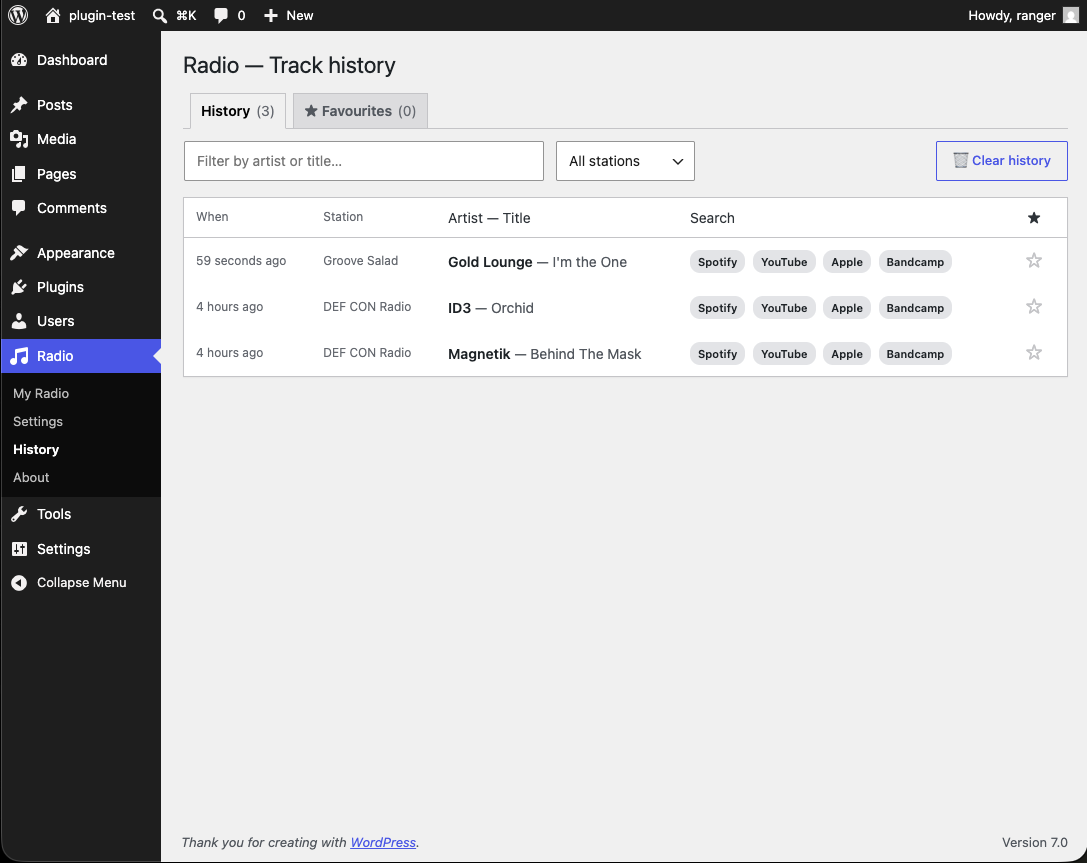
Track History page — every track that scrolled past, star-to-favourite, with Spotify / YouTube / Apple / Bandcamp deep-link search per row.

Pop-out mini-player window — 380×560 standalone window that keeps playing while you navigate the rest of the admin.

About page — what Radio does, who it's for, credits, full version history.
Faq
No — RangerHQ Radio is admin-only. It adds a player to the WordPress dashboard for you (and your other authenticated admins) to use while working. It does not embed a radio player on the public-facing site.
Not via the admin yet. The station list is hard-coded in inc/stations.php (44 SomaFM stations). If you’d like to add custom stations or other internet radio sources, please open an issue on the Gitea repo.
Your browser may be blocking pop-ups. Click the address bar’s pop-up icon to allow pop-ups for this site, then try again.
It shouldn’t. This plugin uses no biometrics or authentication of its own — that’s a different plugin in the RangerHQ family.
Reviews
Changelog
1.0.0
- Stability milestone. Same code as 0.7.6, no functional changes — but the version number now signals what the wp.org listing already shows in practice: the architecture (per-user
wp_usermetastorage shape, 4-button search URL templates, station catalogue format, history dedup rule) is stable. From 1.0.0 forwards, breaking changes go in 2.0.0; everything in 1.x will preserve the public API. Released after five days live on wp.org, 50+ downloads, and the family pattern (per-user storage, four-button search) proven and ported to RangerHQ Tuner (Chrome Web Store) and RangerHQ Buddy (in wp.org review).
0.7.6
- Plugin metadata cleanup following the wp.org pre-review feedback.
Plugin URIheader updated fromhttps://icanhelp.ie/radiotohttps://davidtkeane.com/rangerhq-radio(the canonical project page, now live).Author URIheader updated fromhttps://rangersmyth.xyz/tohttps://davidtkeane.com(both old URLs were returning DNS errors or 404). Ownership of the davidtkeane.com domain has been verified to wp.org via DNS TXT record and a domain-matched account email. No code changes, no user-visible behaviour changes — metadata only.
0.7.5
- WordPress.org slug rename:
a-radiorangerhq-radio. The previous slug was flagged as too generic for the wp.org Plugin Directory (single common functional word, no distinguishing prefix). The new slug matches the public display name “RangerHQ Radio” and lines up with the rest of the RangerHQ plugin family (rangerhq-spatial,rangerhq-glyph). Text Domain renamed to match — all 125 i18n call sites updated. Gitea repository moved to https://git.davidtkeane.com/ranger/rangerhq-radio. No user-visible behaviour change in the player; this is a packaging change only. Plugin Name stays “RangerHQ Radio”; internal constants (RADIO_*) and user-meta keys (radio_state/radio_history/radio_favourites) are unchanged so settings + history + favourites all survive intact.
0.7.4
- WordPress.org submission cleanup. Removed the self-hosted Gitea updater (
inc/updater.php) and theUpdate URIheader fromradio.php. WordPress.org explicitly disallows both for hosted plugins (Plugin Checkplugin_updater_detected), so updates now flow through WordPress.org as the canonical channel. Added a top-levelLICENSEfile with the full GPL v2 text and explicit GPL header blocks toassets/css/radio.cssandassets/js/radio.jsso the licensing of every shipped file is unambiguous. The smallUpdatespanel that used to sit at the bottom of Radio Settings is gone; player behaviour is unchanged.
0.7.3
- WordPress.org guideline 8 compliance + Privacy documentation. Added
Update URI: https://git.davidtkeane.com/ranger/a-radioheader so installs from the author’s Gitea continue to receive updates from there, while wp.org-distributed copies (where the build script strips this line) hand update delivery to WordPress.org — the self-hosted updater short-circuits at load time and the Updates panel hides automatically. Added a dedicated== Privacy ==section to the readme covering every outbound connection (none from the plugin itself; SomaFM audio + 30-second songs.json poll while playing). Added explicit link to SomaFM’s terms of use at https://somafm.com/legal/. No user-visible behaviour changes.
0.7.2
- Screenshots + correct wp.org contributor handle. Five
screenshot-N.pngfiles added at plugin root (Dashboard widget, Settings page, History page, Pop-out window, About page).Contributorsheader updated from placeholder to actual wp.org usernameir240474.
0.7.1
- Plugin Check follow-up —
Tested up tobumped from 6.7 to 7.0 (PCPoutdated_tested_upto_header). Stray.DS_Storefiles re-deleted (macOS Finder regenerated them between PCP runs; they won’t be in the submission zip).
0.7.0
- WordPress.org submission prep — full PCP-clean. Plugin name normalised to RangerHQ Radio (SomaFM stays in the description as the data source). Text Domain renamed
radioa-radioeverywhere (134 i18n call sites updated). Sixprintf/sprintfcalls now carry translator comments. All admin$_POSTaccess nowwp_unslash()+sanitize_*at the access point.Requires at leastbumped to 5.3 (matcheswp_date()usage). Pop-out window now useswp_enqueue_*+wp_print_styles()/wp_print_footer_scripts()instead of raw<link>/<script>tags; popup-specific CSS moved intoradio.cssunderbody.radio-popoutscope..DS_Storefiles removed. Properreadme.txt.
0.6.3
- Discreet “buy me a coffee” support link in the Updates panel and the About-page Credits card. Single
RADIO_SUPPORT_URLconstant; conditional render — silently hidden if the constant is empty.
0.6.2
- Current version badge on the Settings page — small grey pill follows the H1 reading
v{RADIO_VERSION}.
0.6.1
- About page restructure — 3-card top row (What / Who / Credits) + full-width Version history with the latest expanded and earlier releases as one-liners.
0.6.0
- Pop-out mini-player.
Pop outbutton beside Play opens a 380×560 standalone window that persists across the main tab’s navigation, so background music keeps playing while you click around Plugins / Posts / Users.
0.5.0
- Track history + favourites. Every track that scrolls past is logged to a per-user
Radio Historypage (capped at 500). Star toggle promotes tracks to a separate Favourites tab. Four search-provider links per row (Spotify, YouTube, Apple Music, Bandcamp).
0.4.0
- Now-playing visual indicator. CSS dancing-bars equalizer that pulses while audio is playing. Web Audio frequency visualizer kicks in when the browser allows it (with graceful fallback).
0.3.0
- Dark theme, mute toggle on the speaker icon, MediaSession API (OS media keys), SomaFM current-track polling under the station description.
0.2.0
- UI rebuilt to WordPress admin standards — postbox container, native play/pause button with text label, picks up the user’s admin colour scheme via
var(--wp-admin-theme-color).
0.1.0
- First release — 44 SomaFM stations across 10 genres, dashboard widget + dedicated admin page, per-user state, self-hosted Gitea updater.