Rankology SEO and Analytics Tool
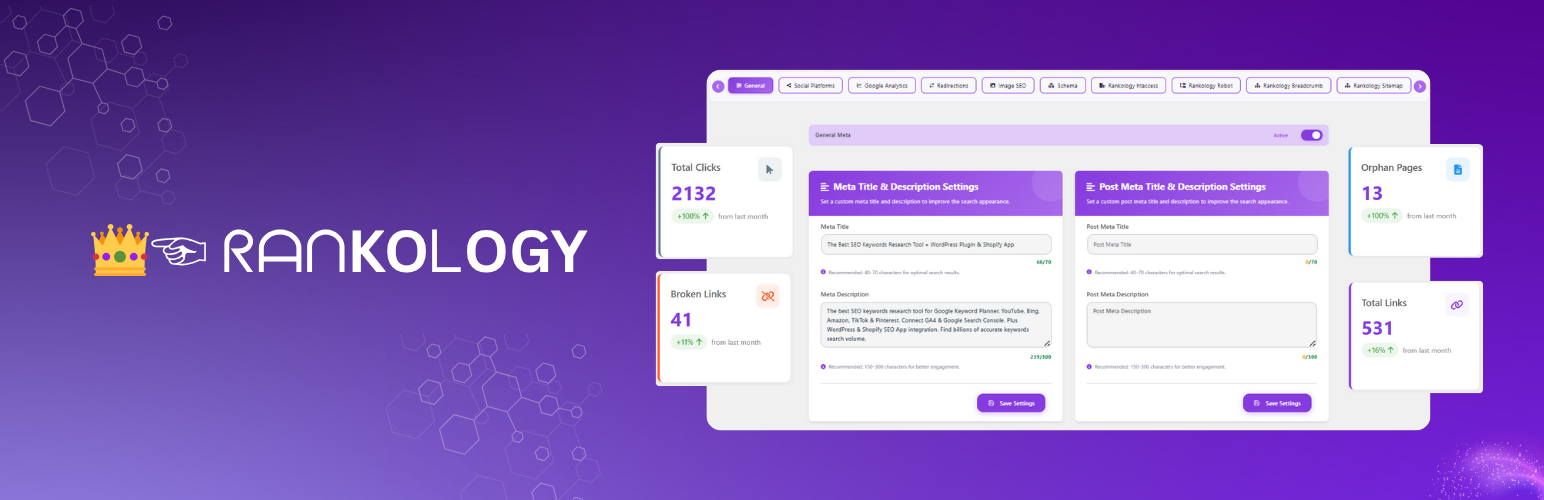
Rankology SEO and Analytics Tool
Description
Rankology SEO and Analytics Tool is a comprehensive WordPress SEO plugin that helps sites rank higher in search engines, built to WordPress.org Plugin Check standards for secure, well-sanitized, and internationalization-ready code. Features include:
AI Content Generator: Generate content using your own OpenAI or Gemini API key, with model selection, streaming output, and usage/cost tracking.
Core & Advanced SEO: Meta titles/descriptions, focus keywords, canonical URLs, content scoring, schema markup (Article, FAQ, Review, Organization, Local Business), robots.txt & .htaccess management, and XML sitemaps.
Rankology LinkFlow: Smart internal linking suggestions, broken/orphan link detection, engagement tracking, and interlinking/sitemap visualizations.
Google Integration: Connect GA4 and Search Console for at-a-glance performance metrics (sessions, clicks, impressions, CTR, position) with filters and reports.
Bing Webmaster Tools: Connect your site via OAuth 2.0 to view Search Performance, Crawl & Index health, and Links reports, plus submit/manage XML sitemaps and individual URLs — all free, with no separate API key required.
Speed Optimization: HTML/CSS/JS minification, full-page caching, image compression & WebP conversion, server cache headers, and GZIP/Brotli compression.
Web Performance & Core Web Vitals: PageSpeed Insights dashboard measuring LCP, FCP, CLS, INP, TBT, TTI, and TTFB, with history, comparisons, and shareable reports.
Settings & Customization: Global meta settings, social sharing, breadcrumbs, header/footer code injection, import/export, and Cloudflare CDN integration.
Technical SEO Controls
- Server Settings: Add custom rules to the
.htaccessfile (Apache servers only) via a manual input field. - Robots.txt Settings: Manually edit robots.txt, plus a dedicated Bot Reference tab listing well-known bots/crawlers you can add or remove with one click, showing each rule’s current Added/Not Added status.
- Sitemap Settings: Auto-generate XML sitemap, exclude specific pages/posts, automatic updates on new content, and direct submission to Google & Bing.
- Image SEO Settings: Auto-use filename as alt text/title on upload, set post title from image metadata, and automatically clean uploaded filenames.
- Crawling Options: Control site visibility, disable link/image indexing, disable descriptions in Google, and exclude paginated or attachment pages from indexing.
- Alerts & Warnings: Notices for “Discourage search engines,” robots.txt status, and sitemap status.
Rankology Speed Booster
Boost your site’s loading speed with advanced optimization tools for performance and Core Web Vitals, organized into 5 tabs:
- Feature Control: Master toggle plus individual switches for HTML, CSS, and JavaScript minification with live status indicators.
- Cache Generation: HTML/CSS/JS minification with automatic AJAX-based cache rebuilding and one-click cache clearing.
- Image Optimization: Multi-method compression (Spatie, Imagick, GD), automatic WebP conversion, lazy loading, and bulk optimization with real-time stats.
- Server Configuration: Cache-Control/Expires headers, GZIP/Brotli compression (Apache/LiteSpeed), .htaccess-based caching, and object cache support.
- Performance Stats: Cache hit-rate metrics, overall performance score, and optimization recommendations.
- Web Performance & Core Web Vitals: PageSpeed Insights dashboard measuring LCP, FCP, CLS, INP, TBT, TTI, and TTFB, with report history, side-by-side comparisons, shareable public report links, email sharing, and automatic mobile analysis — powered by the Rankology API (no Google API key required).
External Services
This plugin connects to the following external services:
- Rankology API Services
- Purpose: Fetch Google Analytics and Search Console data, submit URLs for indexing, provide SEO insights, and analyze PageSpeed performance
- Data Sent: Website URL, API key (encrypted), requested metrics, and PageSpeed analysis requests
- When: When loading analytics dashboards, submitting URLs for indexing, or analyzing page performance
- Endpoints:
- https://app.rankology.io/api/rankology/url-inspection/single
- https://app.rankology.io/api/rankology/submit-urls
- https://app.rankology.io/api/rankology/google-analytics/google-insights
- https://app.rankology.io/api/rankology/google-search-console/google-insights
- https://app.rankology.io/api/rankology/connect-app
- https://app.rankology.io/api/rankology-pagespeed/wordpress/get-site-speedinsight (PageSpeed Insights analysis)
- Rankology Privacy Policy
- Rankology Terms of Service
1a. Rankology Webhook System (Plugin Lifecycle)
* Purpose: Secure communication with Rankology servers for plugin activation and deactivation events
* Data Sent:
– On Activation: Site URL, site name, WordPress version, PHP version, plugin version, timestamp, nonce, and HMAC-SHA256 signature (if webhook secret exists)
– On Deactivation: All activation data plus stored API key (if available)
* When:
– Plugin Activation: Sends blocking request to receive webhook secret and API key from server
– Plugin Deactivation: Sends non-blocking request to notify server of deactivation
* Security Features:
– HMAC-SHA256 signature verification for request authenticity
– Nonce generation for request validation
– Rate limiting (5-second cooldown between requests)
– SSL certificate verification
– Secure storage of webhook secret and API key in WordPress options
* Endpoints:
– https://app.rankology.io/api/rankology-pagespeed/wordpress/plugin-install (activation)
– https://app.rankology.io/api/rankology-pagespeed/wordpress/plugin-uninstall (deactivation)
* Data Storage: Webhook secret and API key are stored securely in WordPress options table and only sent to Rankology API endpoints
* Note: The webhook system ensures seamless integration with Rankology services and automatic API key provisioning upon plugin activation
* Rankology Privacy Policy
* Rankology Terms of Service
-
Cloudflare API
- Purpose: Manage CDN cache, security settings, performance rules, and analytics data
- Data Sent:
- API credentials (API key/token and optionally email address for Global API Key authentication)
- Zone ID (identifier for your Cloudflare zone/domain)
- Cache management commands (purge all cache, purge specific URLs)
- Security settings (WAF status, security level, bot fight mode, browser integrity check)
- Performance settings (cache level, browser cache TTL, auto minify settings, rocket loader, polish, WebP)
- Page rule configurations (URL patterns, cache rules, security rules)
- Analytics queries (time range parameters for performance and security analytics)
- When:
- When testing Cloudflare connection (sends zone ID to verify credentials)
- When purging cache (manually or automatically after content updates)
- When updating security settings (WAF, security level, bot protection)
- When updating performance settings (cache level, minification, optimization)
- When creating or deleting page rules
- When fetching analytics data (performance metrics, security events, top statistics)
- When toggling development mode
- Endpoints:
- https://api.cloudflare.com/client/v4/ (REST API for cache, security, and settings management)
- https://api.cloudflare.com/client/v4/graphql (GraphQL API for analytics and advanced queries)
- Note: All API credentials are stored securely in WordPress options and only sent to Cloudflare API endpoints. No user data or website content is sent to Cloudflare.
- Cloudflare Privacy Policy
- Cloudflare Terms of Service
-
Google Autocomplete API
- Purpose: Fetch real-time keyword suggestions for SEO optimization
- Data Sent: Search queries (keywords), locale, and country data
- When: When using the “Get Suggestions” button in SEO fields
- Endpoint: https://www.google.com/complete/search
- Google Privacy Policy
-
Google Analytics Data API (GA4) & Google Search Console API
- Purpose: Fetch Google Analytics (GA4) reporting metrics and Google Search Console performance data (and URL Inspection, if enabled) inside the Rankology dashboard
- Data Sent:
- Your configured GA4 Property ID and/or Search Console Property URL
- Requested date range, filters (e.g., country/device), dimensions/metrics, and URL(s) used for reporting
- Authentication data required to obtain an access token (service-account based OAuth2 flow)
- When: When you enable Google Analytics / Search Console integration and load GA/SC dashboards, reports, or URL inspection features
- Endpoints:
- https://oauth2.googleapis.com/token (token exchange)
- https://analyticsdata.googleapis.com/v1beta/ (GA4 Data API)
- https://searchconsole.googleapis.com/webmasters/v3/ (Search Console Search Analytics)
- https://searchconsole.googleapis.com/v1/urlInspection/index:inspect (Search Console URL Inspection)
- Note: Rankology uses the bundled Google API Client Library for PHP (
google/apiclient) to handle authentication and requests. - Google Privacy Policy
Source Code
This plugin includes minified JavaScript and CSS files for performance. The source code and build process are available at:
- Plugin Source Code: https://github.com/rankology/rankology-seo-wordpress-plugin
- Third-party Libraries:
- DataTables: https://github.com/DataTables/DataTablesSrc
- Chart.js: https://github.com/chartjs/Chart.js
- vis-network: https://github.com/visjs/vis-network
- cytoscape.js: https://github.com/cytoscape/cytoscape.js
- Select2: https://github.com/select2/select2
- Tagify: https://github.com/yaircohen/tagify
- html2pdf.js: https://github.com/eKoopmans/html2pdf.js
- Google API Client Library for PHP (google/apiclient): https://github.com/googleapis/google-api-php-client
Note: Some JavaScript files (vis-network.min.js, cytoscape.min.js) are minified for performance. The source code is available at the GitHub links above. The plugin uses build tools (npm/composer) to generate production files. To build from source, clone the repository and run the build commands as documented in the repository.
Installation
- Upload the
rankology-seo-and-analytics-toolfolder to the/wp-content/plugins/directory - Activate the plugin through the ‘Plugins’ menu in WordPress
- Navigate to Rankology in your WordPress admin to configure settings
- Connect your Google Analytics and Search Console accounts for full functionality
Screenshots

LinkFlow Overview — central dashboard for monitoring internal/external link distribution, link strength, and crawlability insights.

LinkFlow Stats — visual charts for total links, broken links, and orphan pages, with trend lines over time.

SEO Issue Suggestions — per-page audit of missing titles, meta descriptions, and focus keywords with actionable fixes.
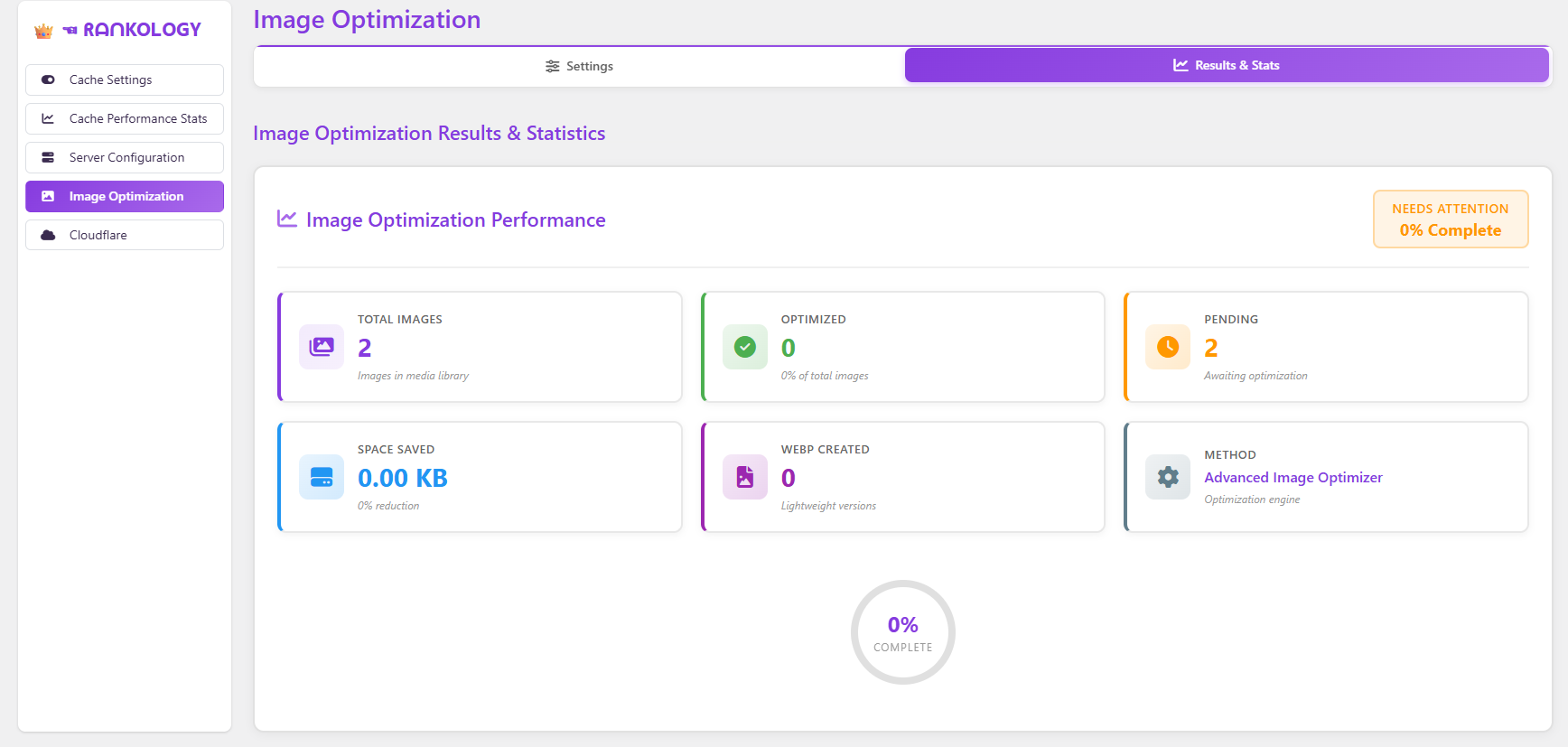
Speed Booster: Image Optimization — compression stats, WebP conversion, and optimization progress for the media library.
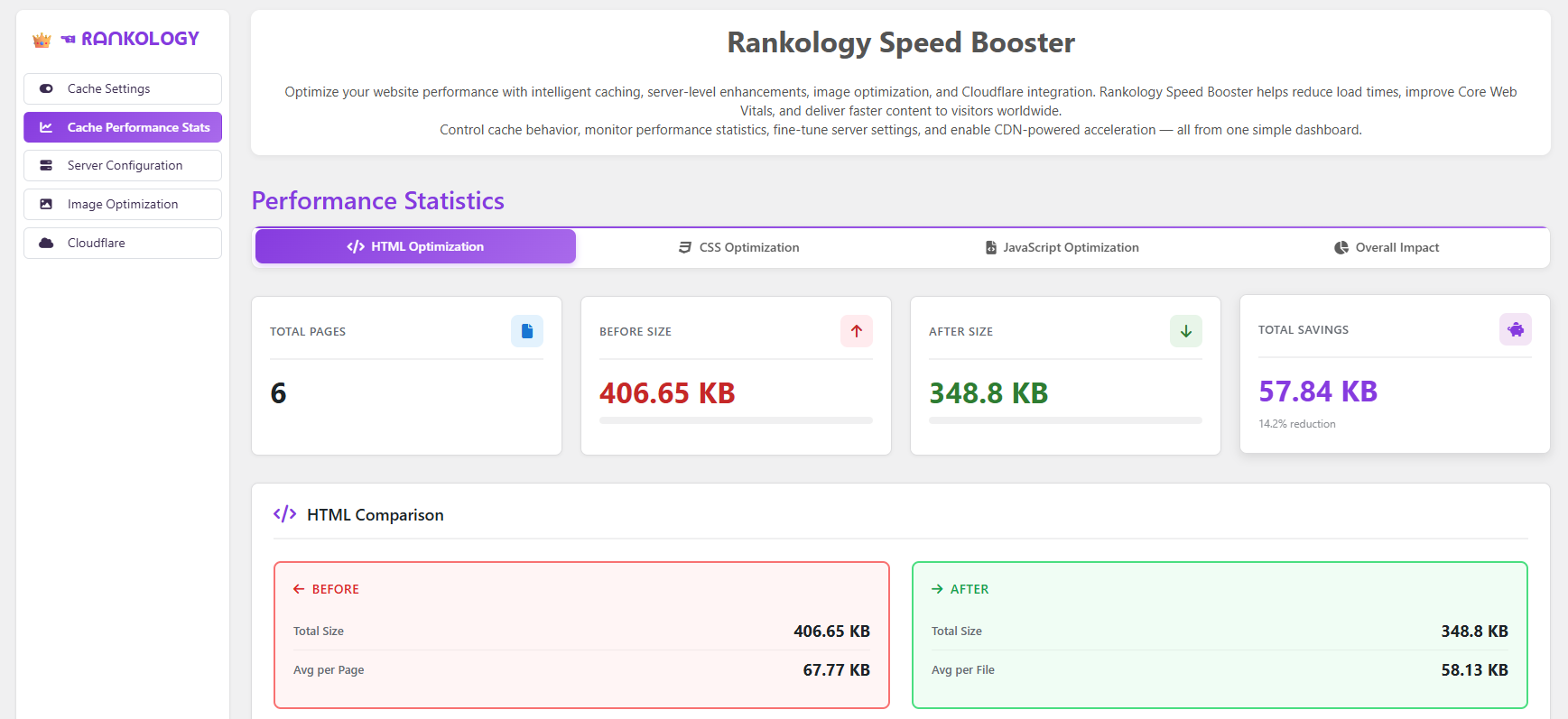
Speed Booster Overview — cache performance dashboard with HTML/CSS/JS before-and-after size comparisons.
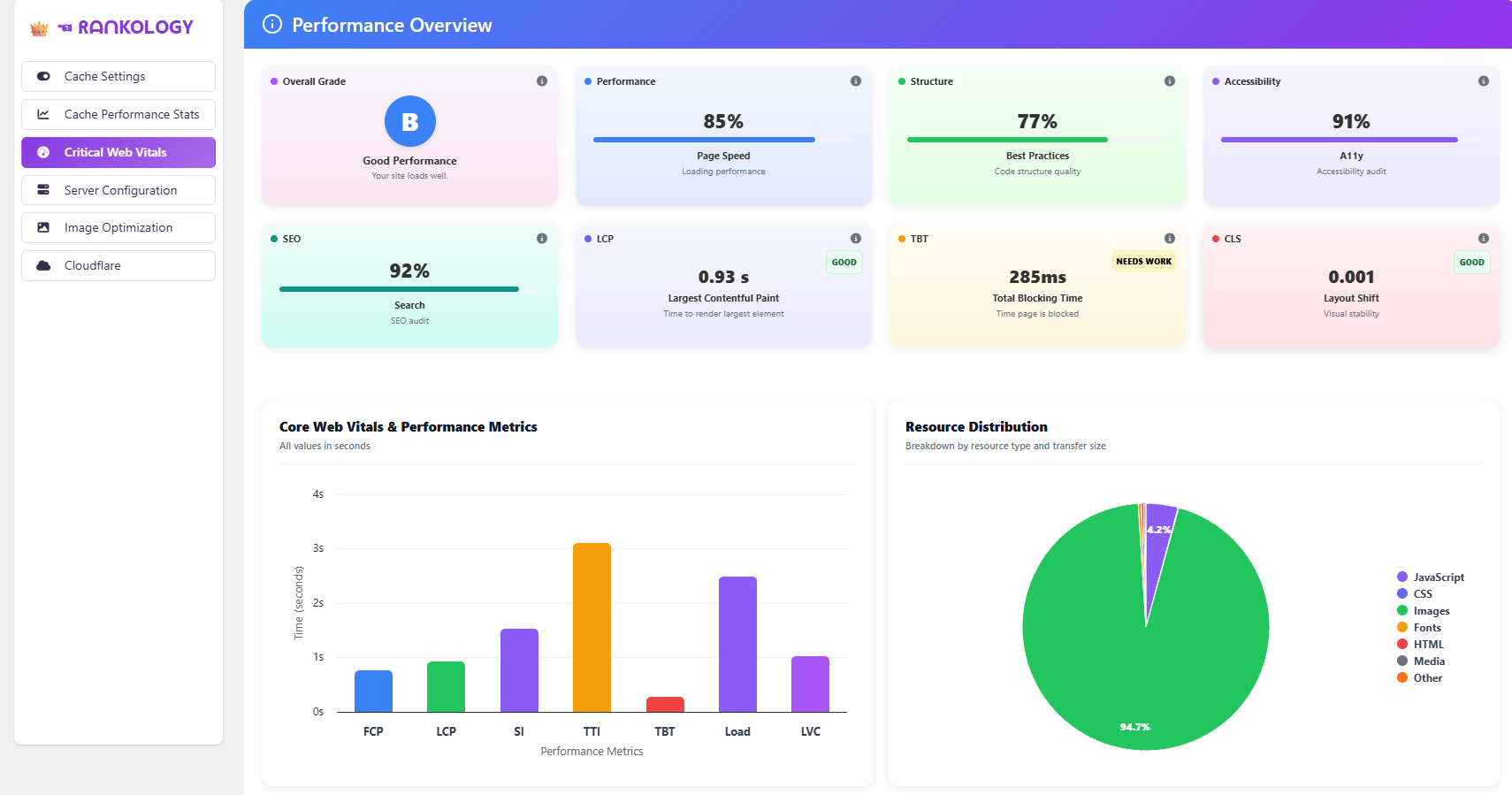
Core Web Vitals Overview — performance grade, LCP/TBT/CLS scores, and resource distribution breakdown.
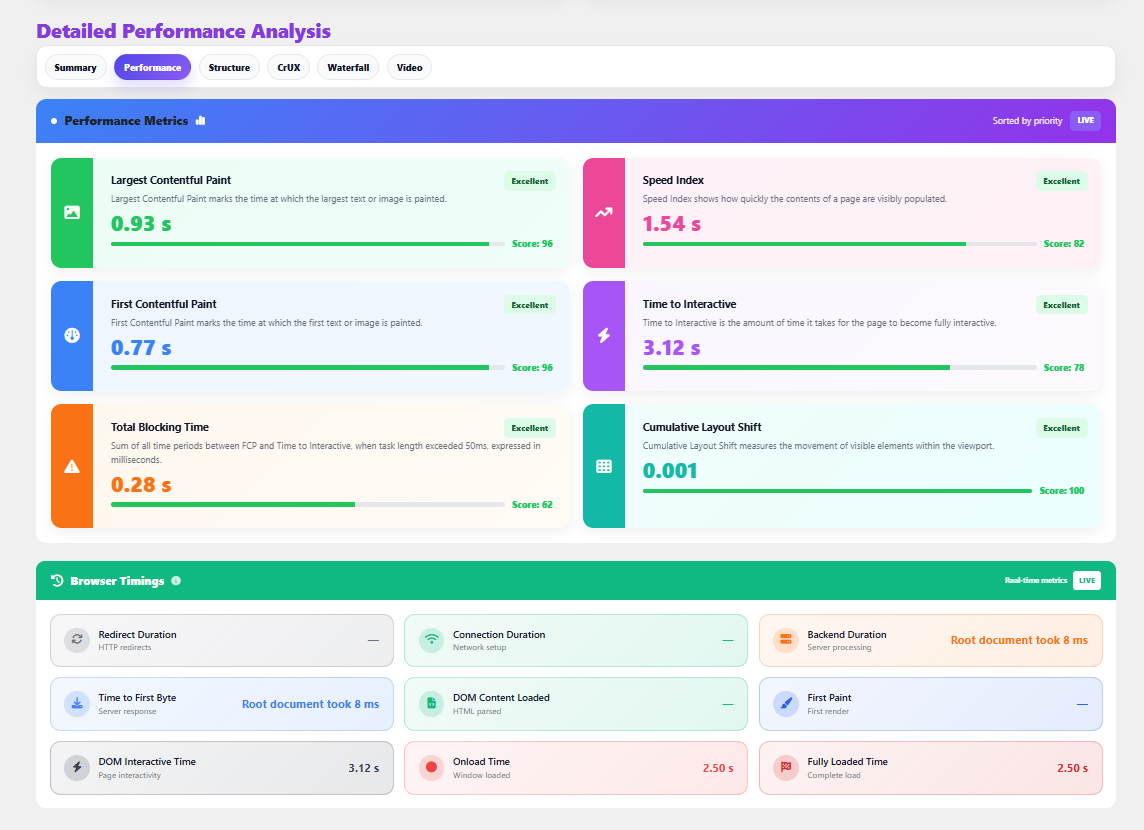
Detailed Performance Analysis — in-depth PageSpeed metrics including Speed Index, Time to Interactive, and browser timings.
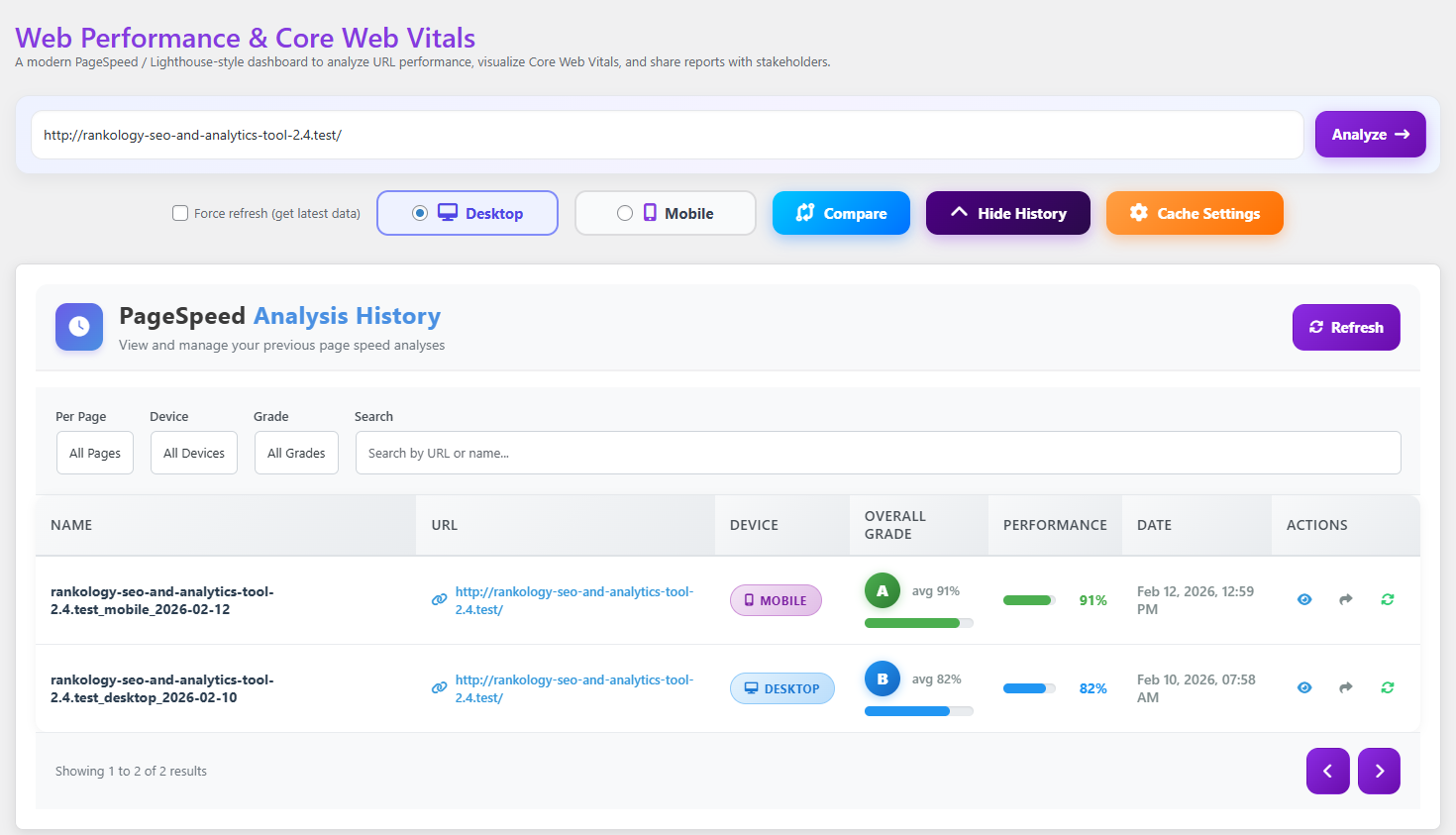
Web Performance & Core Web Vitals — PageSpeed analysis history with device, grade, and date filters.
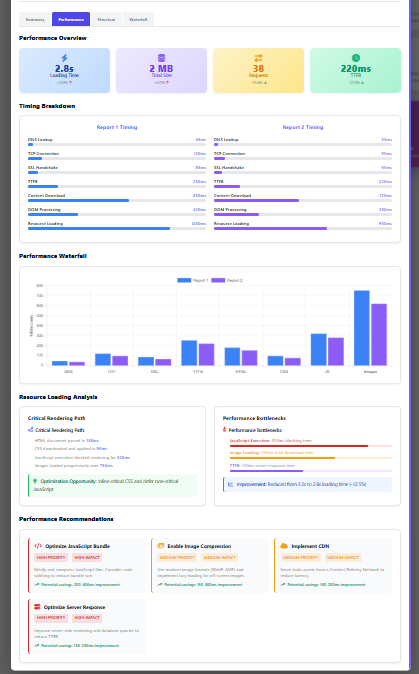
Performance Waterfall & Recommendations — side-by-side report comparison with prioritized optimization suggestions.
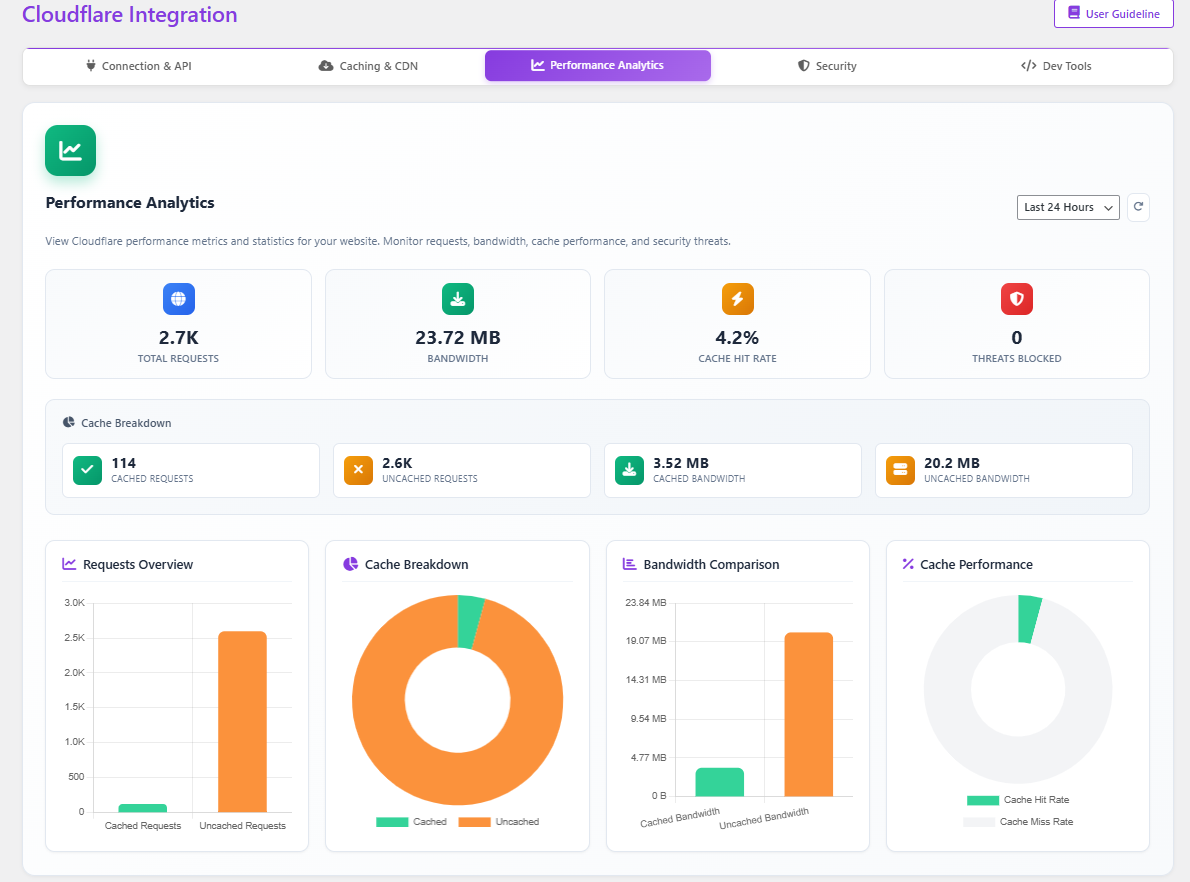
Cloudflare Integration — performance analytics for requests, bandwidth, and cache hit rate.
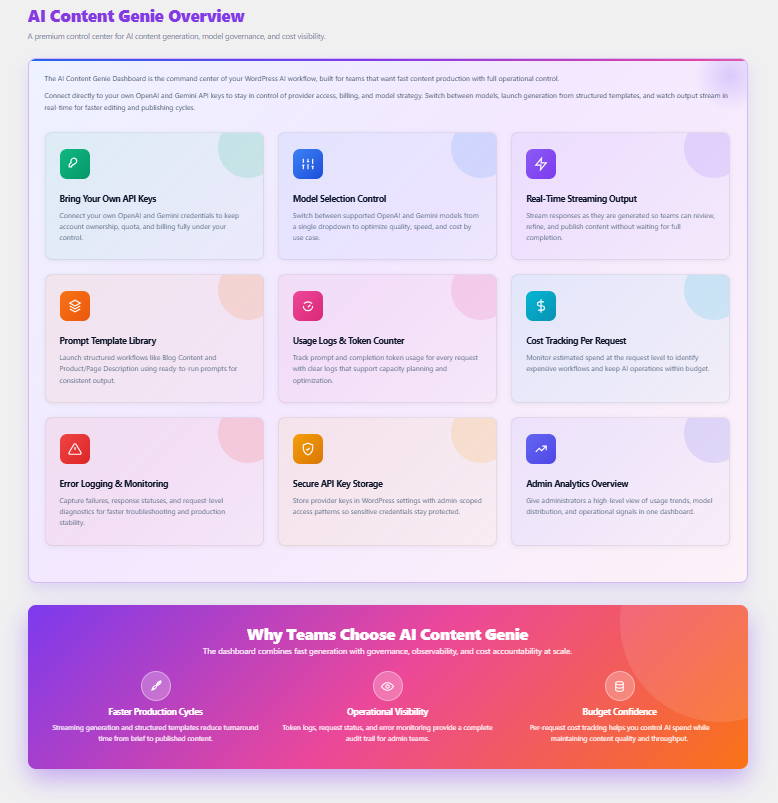
AI Content Genie Overview — AI content generation dashboard with model selection, streaming output, and usage tracking.
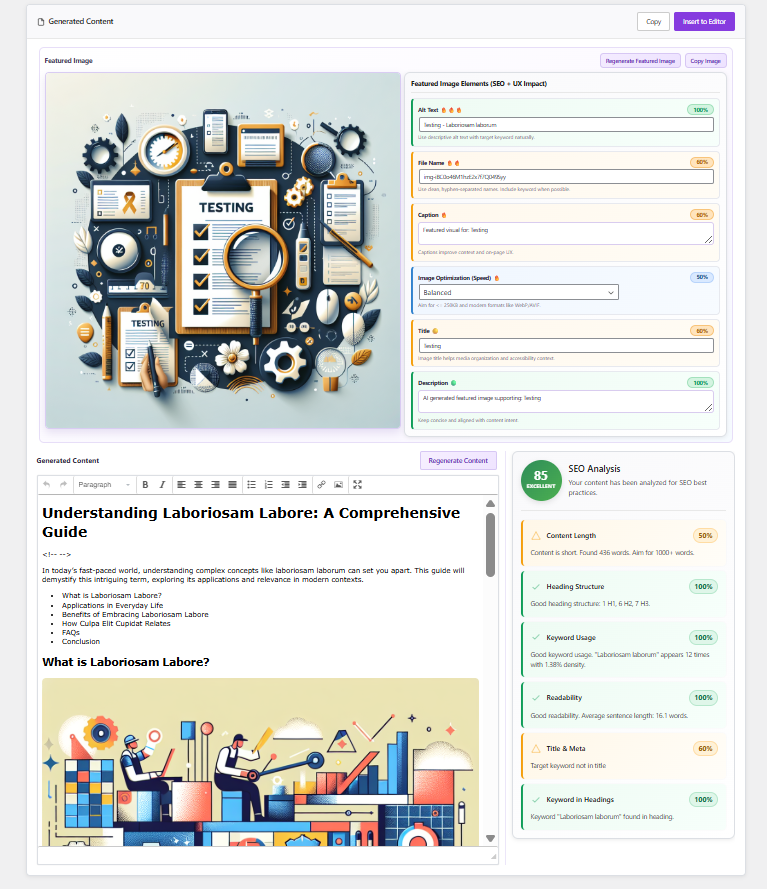
AI Content Genie: Generated Content — AI-generated article with featured image, SEO fields, and real-time content score.
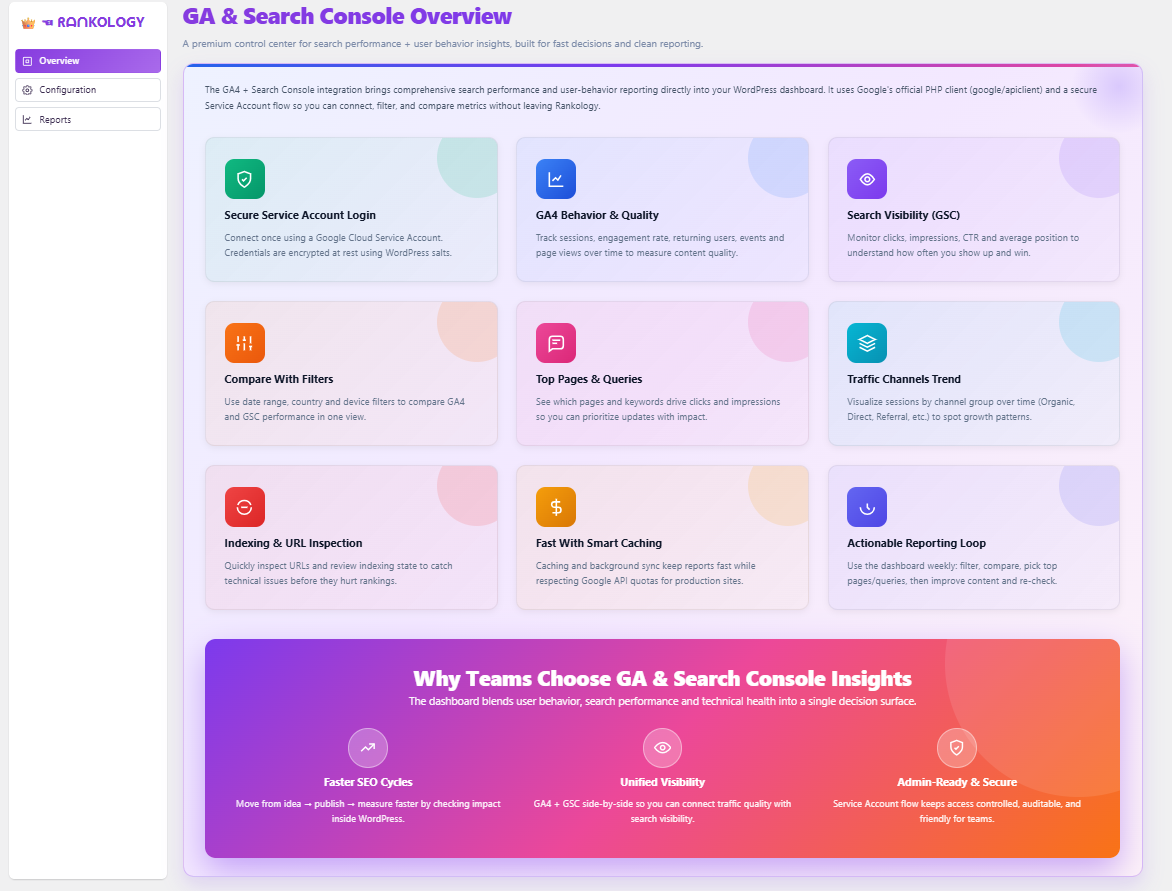
GA & Search Console Overview — unified dashboard for Google Analytics and Search Console reporting.
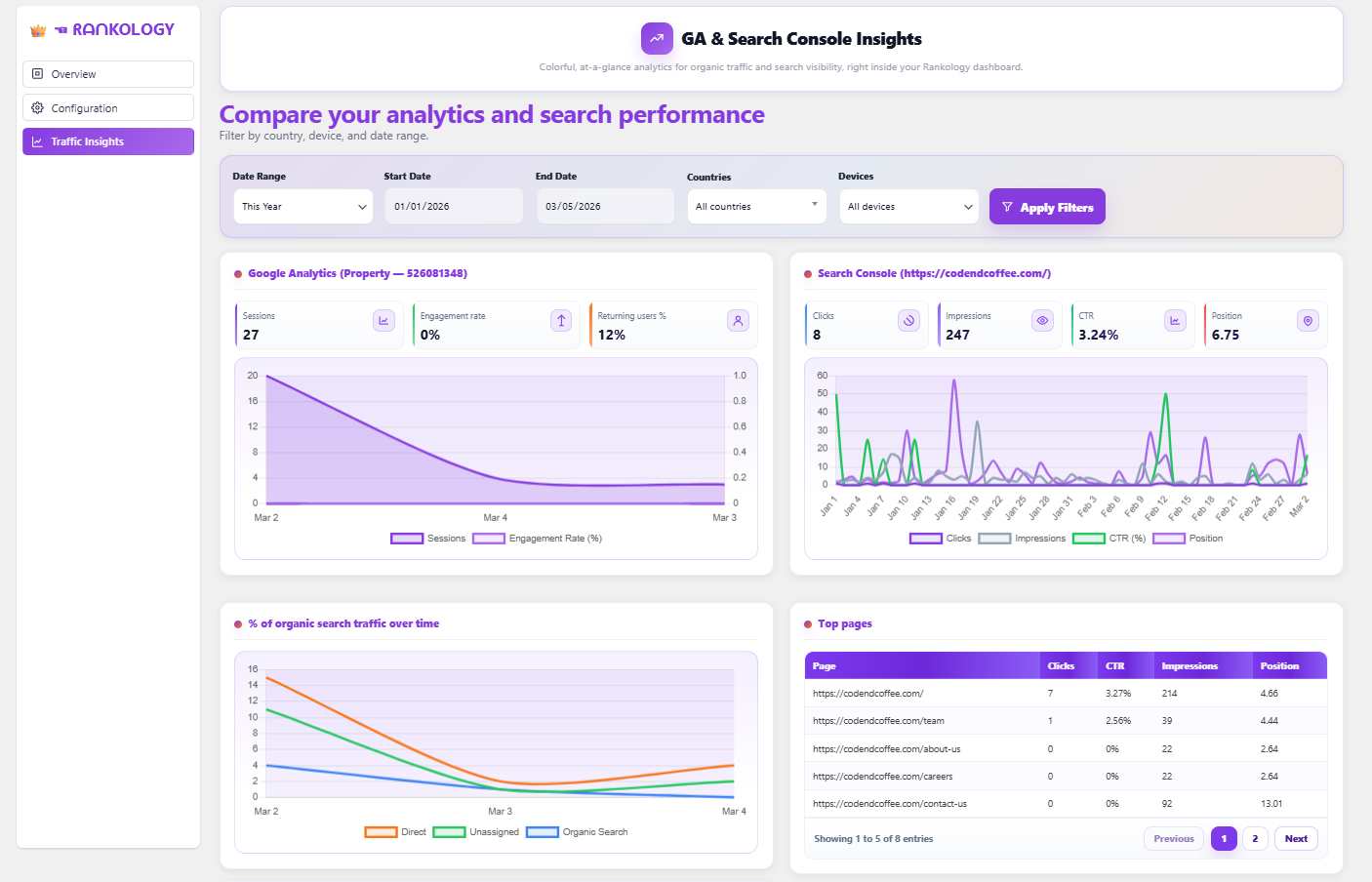
GA & Search Console Insights — traffic and search performance charts with country, device, and date filters.
Faq
Go to Rankology Settings Rankology API Key, enter your API key from rankology.io, and the plugin will automatically fetch your analytics data.
Yes. Rankology bundles the Google API Client Library for PHP (google/apiclient) under rankology-seo-and-analytics-tool/package/vendor/ and uses it for Google Analytics and Google Search Console integration (for example, to authenticate with a Google service account and request reporting data). You do not need to install it separately when installing the plugin ZIP.
Yes! You can enable/disable automatic schema or manually add custom schema for articles, FAQs, reviews, organizations, and local businesses.
Yes, Rankology is compatible with most caching plugins. For best results, clear your cache after making SEO changes.
Use the shortcode [rankology_breadcrumb] anywhere in your theme templates or content.
Reviews
Changelog
3.5.0
- Added the Bing Webmaster Tools module: connect via OAuth 2.0 and view Search Performance, Crawl & Index health, and Links reports, plus submit/manage XML sitemaps and individual URLs — free, no separate API key required.
- Added in-app “Quick Assist” User Guideline modals (searchable, topic-based help) to SEO Configuration, LinkFlow, Speed Booster, GA & Search Console, and Content Genie.
- Added a live Free Dashboard summary widget consolidating Google/Bing/LinkFlow/Speed Booster/Content Genie status in one place.
- Redesigned the Cache Stats tab into two clearer views: Optimization Savings and a new System Overview covering every Cache Configuration feature’s live status.
- SEO Configuration: Split the bot-reference list out of “Manage Robot File” into its own “Bot Reference” tab, with a live Added/Not Added status per bot.
- SEO Configuration: Redesigned the Paid Features page with a clearer feature overview and upgrade call-to-action.
3.4.4
- Speed Booster: Added configurable JavaScript defer and delay-until-interaction options, plus a warning for server-side output buffering that can interfere with caching.
- Speed Booster: Introduced dedicated HTML, CSS, and JS cache minifier classes for more reliable minification.
- Server Configuration: Added configurable cache durations, a Server Overview panel, and an Object Cache connection UI.
- Added shared toast notifications, button-loading states, and navigation-state utilities across admin screens for a more consistent UI.
3.4.3
- GA & Search Console Insights: Added a search-type filter plus new report fields (traffic source/medium, conversions, AI-assistant referrals, ad cost, branded vs. non-branded search).
- Fixed the Configuration save flow so a transient connection-test failure no longer discards a newly uploaded service account key.
- Rebuilt Web Performance & Core Web Vitals on a modern, modular architecture with a redesigned results dashboard.
- Resolved WordPress Plugin Check errors and warnings across the plugin.
3.4.2
- Fixed PageSpeed history so multiple results are preserved instead of overwriting earlier entries.
- Added a load-more experience for browsing additional PageSpeed history rows.
- Refined the public/local PageSpeed report header layout.
3.4.1
- Fixed missing translator comments in the keyword research plan panel for i18n compliance.
- Fixed Speed Booster (CSS, JS, and Image Optimization) issues.
- Improved code quality and WordPress coding standards compliance.
3.4
- Setup Wizard Module: guided setup process for SEO settings, Speed Booster, and GA & Search Console integration, with step-by-step navigation and validation.
3.3
- Implemented full internationalization (i18n) support across both Free and Pro plugins.
- Added and validated multilingual translation files for all supported locales.
3.2
- Improved the design for GA & Search Console Insights.
- Fixed various issues and improved the design of Header & Footer Code.
3.1
- Updated GA & Search Console Insights with a Free vs Pro split.
- Free: Overview metrics, basic graphs, and Top 5 limits for Pages, Queries, and Countries; date filters limited to Last 7/30 days.
- Pro: Unlimited data rows, full pagination, CSV export, advanced charts, custom date ranges, advanced filters (Country, Device), and the SEO Opportunity Finder.
3.0
- Added GA & Search Console Insights module (GA4 + Search Console) in the Rankology dashboard.
- New configuration screen for Service Account JSON (upload/manual) with encrypted credential storage.
- Added reports with date range, country, and device filters.
2.9
- Added support for OpenAI and Gemini API integration (Bring Your Own API Key).
- Model selection, real-time streaming output, and prompt template system (Blog Content & Product Description).
- Usage logs with token tracking, per-request cost estimation, and structured error logging.
2.8
- Enhanced Compare Reports with side-by-side Structure tab comparison.
- Added URL domain restriction to prevent analysis of external sites.
- Fixed SQL injection vulnerabilities by using proper WordPress table prefixes.
2.7
- Introduced Web Performance & Core Web Vitals module with a PageSpeed Insights dashboard (LCP, FCP, CLS, INP, TBT, TTI, TTFB).
- Added report caching, history tracking, comparison, and shareable public report links.
- Implemented secure webhook system for plugin activation/deactivation with HMAC-SHA256 signatures.
2.6
- Added full-page caching with preload support and manual controls.
- Introduced configurable JavaScript defer and delay options.
- Added cache exclusions, WordPress Heartbeat control, and a cache status indicator.
2.5
- Removed shell command execution and hardened input/output sanitization and escaping.
- Updated third-party libraries (DataTables, Chart.js, Font Awesome, Select2, spatie/image-optimizer) to latest stable versions.
- Added a dedicated “External Services” section documenting all third-party API usage.
- Improved i18n compliance and unified the plugin text domain.
2.4
- Added Cloudflare integration: cache/security control center with zone validation and dual auth (email+key or token).
- Manual and automatic cache purging, plus cache-level and browser cache TTL presets.
- Development Mode toggle, security level selector, and WordPress-safe page rules.
2.3
- UI polish and stability fixes across Rankology Settings and Speed Booster screens.
2.2
- Speed Booster workflow improvements, toast notifications, and multi-method image optimization with WebP/lazy loading.
2.1
- Introduced Rankology Speed Booster: HTML/CSS/JS minification, server cache headers, GZIP/Brotli compression, and Object Cache support.
2.0
- Added Rankology API Key integration with Google Analytics & Search Console insights and one-click URL submission.
1.9
- Revamped plugin design: colors, dashboard styling, typography, and layout.
1.8
- UI/UX improvements to LinkFlow tabs and general visual consistency.
1.7
- Added comprehensive LinkFlow Analytics: broken/orphan link tracking, engagement tracking, and interlinking/sitemap graphs.
1.6
- Introduced Rankology LinkFlow for internal linking, plus Header & Footer Code insertion with device targeting.
1.3
- Added crawling options: disable link/image indexing, exclude paginated/attachment pages, SEO alerts.
1.2
- Added global meta fields, dynamic schema (Organization, Local Business, FAQ, Review), breadcrumbs, and import/export.
1.1
- Added XML sitemap, robots.txt customization, .htaccess editor (Apache), and image SEO settings.
1.0
- Initial plugin release with core SEO features.