ReDi Restaurant Reservation – Instant Availability & Confirmation

ReDi Restaurant Reservation – Instant Availability & Confirmation
Description
Restaurant reservations are made easy and quick. Receive and accept online client reservations. Display available spaces at a specific time. Allow instant client reservations, with personalized notifications about the reservation status. In short, convert website visitors into restaurant guests.
Introduction video of the plugin
Focus on your business and don’t waste time reading emails to confirm reservations manually. ReDi Restaurant Reservation is a fully automated reservation system. Everything is done without human involvement.
You may easily handle reservations for your restaurant using the ReDi Restaurant Reservation plugin. This plugin facilitates online customer reservations, your clients can view available space at a predetermined time and make reservations with instant confirmation.
Simply, configure the maximum number of reservations per person, the hours of operation, and the restaurant information. That’s it!
So. looking for the fastest and most simple restaurant reservation WordPress plugin? You are in the right place!
Get the plugin downloaded first. The process is quite simple.
- Go to your WordPress website from the backend.
- Click on Plugins > Add New.
- On the search line, type “ReDi Restaurant Reservation.”
- Click on Install > Activate.
Start your WordPress restaurant reservation page, with 3 steps:
- Register & Generate/Create the API key.
- Check the new Reservation page (it automatically creates a reservation page after registration).
- Make all the necessary configurations and customizations.
It is not unexpected that there is an increase in demand for online restaurant reservations because most of us spend more than 24 hours per week using our mobile devices. So a credible restaurant reservation system is a must for a successful business, don’t you agree?
The benefits of using a restaurant reservation system, such as ReDi, are numerous:
- Increase Conversion Rates: Extensive and catchy CTA’s (calls to action) help to increase conversions and offer visitors immediate restaurant reservations.
- Save Time: As far as ReDi is fully automated it will save a lot of time from your workers, which can be used on other things.
- Additional Analytics: Track the website visitors and reservation data to make more result-based decisions for your business.
- Satisfied Clients: In the age of technology clients prefer to have everything easy and quick at hand. That’s why online restaurant reservations will greatly boost customer satisfaction.
- Capture Abandoning Customers: Without an instant reservation confirmation, a visitor will most probably go to a few more restaurants to make a reservation. Thus, the restaurant may lose that client.
REDI RESTAURANT RESERVATION PLUGIN FEATURES, ADD-ONS, AND ADVANTAGES
KEY FEATURES
The ReDi Restaurant Reservation plugin works well for all types of businesses, including little cafés, bars, and large restaurants. The plugin includes several helpful functions and highlights.
INSTANT CONFIRMATION
Checking and confirming availability in an instant without any delays. This restaurant reservation plugin feature is one in its category, other reservation plugins are missing this availability. That’s why it makes ReDi stand out in the market.
RESERVATION FORM
Reservation form available for all devices (mobile, tablet, PC, etc.), allowing visitors to view all of the available reservations for that day.
RESTAURANT CAPACITY CONTROL
The ability to control and set a maximum number of seats based on the weekday.
Show the restaurant timing: when and how long your restaurant is open and working (also set multiple open/close times a day).
BLOCKED TIME
Establish a specified timeframe from which bookings can no longer be accepted.
EMAIL CONFIRMATION
Fully customizable and multilingual email templates to send instant confirmation letters to clients.
- All these features prove ReDi Restaurant Reservation plugin is not a simple reservation solution, but powerful software that allows checking various aspects before making a confirmation, such as:
- Is the restaurant open on that day/hour?
- Is the restaurant’s capacity enough for receiving guests?
- Can the kitchen serve guests without delays?
- Are there free seats available?
Thus, it provides the fastest availability check and confirmation.
ADDITIONAL SERVICES
Also, the ReDi restaurant booking system offers additional restaurant reservation features and services by request, and the price of those varies from business to business. Some examples of other services include:
FACEBOOK INTEGRATION
Use Facebook for your business and turn your Facebook fans into clients. Moreover, you can further enhance your business experience with Facebook integration, and we will provide you with the profile pictures of your customers if found. When a consumer visits, especially on their first visit, you might impress them by recognizing their face.
WHITE LABELING
Upon request, you can get white-labeled reservation applications for Facebook Application, iPhone/iPad Application, Windows Phone Application, or Android Application.
Please send a request by email: info@reservationdiary.eu or through our contact form: reservationdiary.eu/contact
RESTAURANT FEEDBACK
Do you want to know what your clients think about their last sit? Are they satisfied with your service? We will get that info for you. Our plugin allows feedback collection to know the impressions of your clients from their last visit.
REMINDER EMAILS
Send fully personalized reservation reminder emails to your clients and remind them about upcoming reservations.
PRE-PAYMENT SERVICES
Pre-payment services. Many clients may reserve a seat and forget to show up, even after the reservation reminder email. So, to motivate them to show up or not lose profits if they do not, you can set pre-payment services for reservations.
This plugin emphasizes simplicity. However still offers everything you need, even some additional useful services.
BIRTHDAY PROMOTIONS AND RESERVATIONS
With the integration of MailChimp, you may send birthday promos or invites to return to your restaurant.
FREE VERSION
The free version allows:
- Instant Availability check in a matter of seconds.
- Both instant & manual confirmation.
- Custom fields & Awaiting List System.
- Also, you can easily send confirmation emails.
- Reservations are limited to 100 guests per month.
BASIC VERSION
The Basic Version costs 19 EUR + VAT* per month.
- VAT is applied to businesses and residents of the EU. VAT rate depends on the country where the customer is located. 0% VAT is applied when an EU VAT number is provided.
The basic plan offers features such as:
- Everything listed in the free version
- No reservation limits per months
- Amazing and full-featured, yet simple in-usage dashboard for reservation management
- You can enter multiple working hours per day
- Reports & overall statistics
- More customization options, especially when it comes to email templates
- The dashboard allows you to put daily notes and any other comments inside
- Feedback request that users who visited the restaurant get after their visit. This feature is quite useful as good feedback will motivate you; meanwhile, some construction criticism will give you a basis for further improvement plan implementation.
- Reservation export option (CSV) that can be easily opened with Excel.
- Personal Demo of how the plugin works for clients.
- Also, you get a 30-day free trial period to check the Basic Version’s features.
ADDONS
So, with a one-time payment, you will get the following features:
- Pre-payment for the reservations so that clients feel more responsible.
- Discount functionality.
- Integrations with Facebook, Brevo, Sendinblue, BulkSMS, and others, will work perfectly fine for email marketing and notification campaigns.
Plugins and add-ons can be purchased from our landing page. Open the landing page.
ADVANTAGES AND BENEFITS
Along with the centralized and fully remote restaurant booking system, restaurant owners and managers from more than 90 countries in the world can control everything from any place they wish. Moreover, the Redi Restaurant plugin completely solves the language problems between the customers and restaurant staff.
Now, let’s see other benefits of the Redi Restaurant plugin:
- The plugin is available in multiple languages (including Spanish, Italian, Portuguese, Russian, and many more). Plus, you can add a language on request by contacting info@reservationdiary.eu or through our contact form: reservation diary. EU/contact.
- Reservations are handled entirely automatically by the plugin.
- Create fully customized reservation forms for your website with the CSS code.
- Compatible and responsive reservation form that works perfectly on all devices.
- Easy to install and manage
- Quick automated response to your client
- When a customer’s request is approved, send a copy of the confirmation to them through email.
- Receive alerts each time a new reservation is made.
ADDITIONAL RESOURCES
- You can check more info about us on our website: reservation diary.eu
- See our video tutorials on youtube Video tutorials
- Check out our recent news on a Facebook page
Supported languages
- Català
- Czeck
- Danish
- Deutsch
- English
- Español
- Eesti
- Français, check out video review
- Italiano
- Latvian
- Lithuanian
- Magyar
- Nederlands
- Norwegian
- Polski
- Português
- Türkçe
- Slovak
- Svenska
- Suomi
- Русский
- עברית (Hebrew)
- 日本語 (Japanese)
If you need more languages, please contact us by email: info@reservationdiary.eu or through our contact form: reservationdiary.eu/contact
Basic package functionality
- View your upcoming reservations from your Mobile/Tablet PC and never miss your customer. This page should be open on a Tablet PC and so hostess can see all upcoming reservations for today. Page refreshes every 15 min and shows reservations that in past for 3 hours as well as upcoming reservations for next 24 hours. By clicking on reservation you will see reservation details. Demo version can be accessed using this link: reservationdiary.eu/free-demo
- Setup maximum available seats for online reservation by week day
- Open times. This option will enable you to choose between various working hours whichever is most convenient to you.
- Support for multiple places. Number of places depends on number of subscriptions.
- Blocked Time. Define time range when online reservation should not be accepted. Specify a reason why reservations are not accepted at this time to keep your clients happy.
- Send client reservation confirmation emails from WordPress account
- Email template customization for all supported languages
Plugin and addonds can be purchased from our landing page. Open landing page.
Additional services (by request)
- Use your Facebook account for your business. Make clients from your Facebook fans. View presentation.
- We can offer you white labeled restaurant reservation application for Facebook Application, iPhone/iPad Application, Windows Phone Application or Android Application. Please send request by email: info@reservationdiary.eu or through our contact form: reservationdiary.eu/contact
- Enhance your business experience by using our Facebook integration service where we try to provide you with profile pictures of your customers if found. You can amaze your customer by knowing him by face when he visits you, especially at the time of first visit.
- Do you want to know what your client thinks about his last visit? We will collect it for you.
- Remind your customer about upcoming reservation via Email or by SMS. More information here: reservationdiary.eu/pricing
- Collect pre-payment for reservations
- Discouns per reservation module
- Send birthday promotions or reminders to visit your restaurant again with MailChimp integration. More information here: reservationdiary.eu/pricing
- If you are building a catalogue of restaurants and looking for the perfect reservation plugin for it, we can provide it to you. Just let us know through contact form: reservationdiary.eu/contact
- Do you want to write your own module? We have an API. Contact us to get more information. Contact form: reservationdiary.eu/contact
If you would like to add some new functionality or have any other queries, please contact us by email: info@reservationdiary.eu or through our contact form: reservationdiary.eu/contact
PARTNERS
We proudly collaborate with selected partners who share our vision of helping restaurants grow, simplify operations, and succeed in the digital age.
Mobal
Mobal is our trusted partner in helping restaurants turn online searches into real reservations.
Together, we support restaurants in:
– Getting discovered on Google, Apple, Facebook, and more
– Building trust with powerful review tools
– Keeping online listings accurate and up to date — without the tech stress
Thousands of restaurants use Mobal to stand out online and attract more guests.
🡺 Learn more at https://mobal.io
Installation
- Click on “Install now” to install plugin
- Activate the plugin through the ‘Plugins’ menu in WordPress
- Go to Settings/Redi Restaurant Reservation page
- Follow instructions on the page to setup plugin
When plugin is activated, new page is automatically created and you can make your first reservation straight away. You can also create page manually and enter [redirestaurant] short code. Plugin is based on a public ReservationDiary API. We do not share any of our user’s information with third parties.
In case you have any problems with plugin installation or you need some customization, please don’t hesitate to contact us by email: info@reservationdiary.eu
Screenshots

Example of the plugin's first page installed on a default theme. When the plugin is activated, a new "Reservation" page is automatically created. Step 1: The user selects a restaurant, specifies the number of adults and children, and clicks on the "Next Step" button to proceed.

Example of the calendar control used for selecting available dates.

On this step, the user is requested to select an available time slot if any are available.

Once the user selects a reservation time, they will be asked to fill out a reservation form with contact details and any custom fields required by the restaurant.

Reservation confirmation screen. At this stage, the user receives a confirmation email, while the restaurant owner gets a list of all upcoming reservations.

Cancel reservation page for clients, allowing them to manage and cancel their bookings.

Step 1: Modify reservation. The user can find an existing reservation by entering any available details such as reservation number, phone number, email, or name.

Step 2: Modify reservation. The user can update reservation details as needed.

Modify a reservation from the Tablet PC version, allowing users to adjust bookings conveniently on a tablet.

Setup screen for configuring the number of available seats, the maximum number of persons per reservation, and the restaurant’s opening times and days of the week.

Setup screen for entering restaurant details, including name, address, country, phone number, email, and website URL.

List of upcoming reservations on Mobile/Tablet PC, available only for Basic package users. Demo version can be accessed by this link: Open demo version.

Detailed reservation information on Mobile/Tablet PC, available only for Basic package users. The profile photo is retrieved from the user's Facebook public profile. Additional details such as photo, visit history, and rating are available upon request.

Cancel reservation from the Tablet PC version, providing users with an easy way to manage cancellations on a tablet.

Configuration for setting the maximum number of available seats for online reservations by weekday, available only for Basic package users.

Setting for defining custom fields that users must fill in during the reservation process.

List of time shifts available for reservations, accessible only to Basic package users.

Open and close time configuration for different time shifts, available only for Basic package users.

Time restrictions before reservation for each time shift by weekday, available only for Basic package users.

Blocked time list management, available only for Basic package users.

Edit blocked time settings, allowing changes to restricted time slots, available only for Basic package users.

Step 1: Set up a goal in Google Analytics using the tracking code. Navigate to Google Analytics > Conversions > Goals > Overview > Set up goals > New goal.

Step 2: Configure goal details in Google Analytics with Category set to "ReDi Restaurant Reservation" and Action set to "Reservation Confirmed."
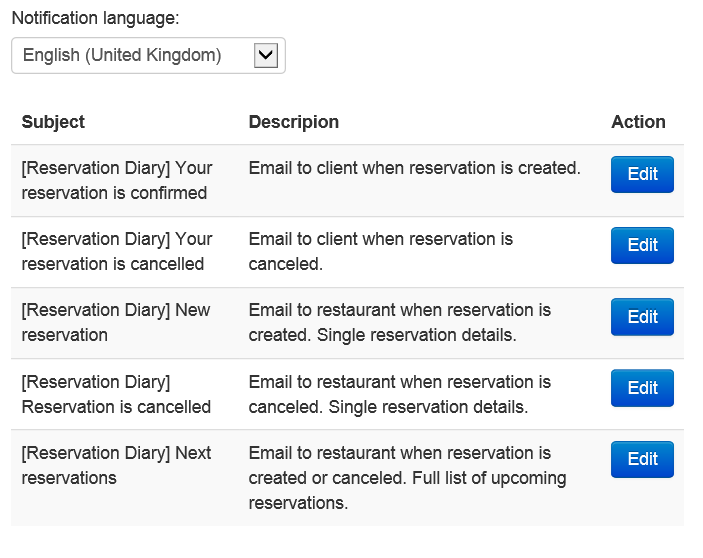
List of all email templates available for customization to fit specific business needs.
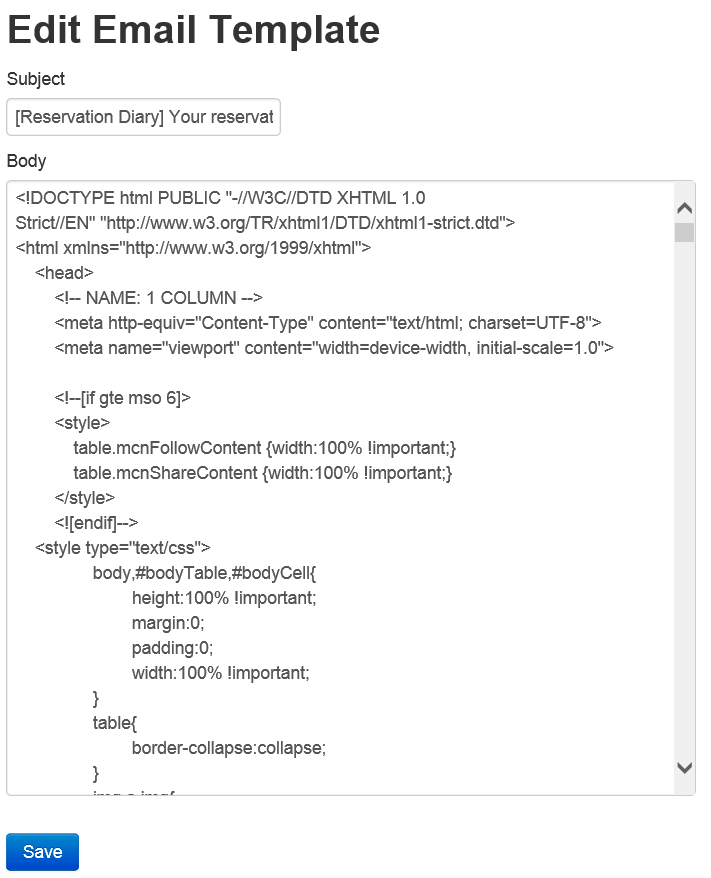
Example of the email customization page, showing how email notifications can be tailored.

Theme React 25: Select the restaurant location for your reservation.

Theme React 25: Choose the number of adults attending.

Theme React 25: Choose the number of children attending.

Theme React 25: Select your preferred reservation date from the calendar.

Theme React 25: Pick a time slot for lunch or dinner.

Theme React 25: Enter your contact details and finalize the reservation.
Reviews
Amazing and very useful!
By 
Great Support!
By 
REQUIRES PAID SUBSCRIPTION TO WORK
By 
Plugins ok
By 
Great plugin - Excellent support
By 
Awesome plugin
By 
Figured it out!
By 
It is working nice
By 
Excellent reservation plugin for restaurants, highly recommended!
By 
A great online booking sytem for a restaurant
By 
The Redi Restaurant plugin is more than just a Booking Form, it's a complete Booking System. It can be used to manage ALL a restaurant's reservations, not just those coming through online. Right from my first pre-sales question the level of service and response I've received from Sergie and his team has been second to none. I cannot speak highly enough of this software and the development team.
Changelog
= 26.0.0
* Added event to google tag manager when reservation is created
* Added protection to json containing elements that is added by the server
* Added webhook when reservation is created for integration possibility
* Fixed function to support older PHP version
* Fixed missing translations for React theme, updated Est/Rus translations, fixed closed restaurant style for React theme, Added Estonian language for emails
* Fixed currency symbols in menu, added select button in menu for React theme
* Default theme: Fixed issue with custom fields when dropdown or options does not have any elements
* Default theme: Add option how adults and guests are selected. Currently it is asking Adults and then Kids, but some customers wants Total Guests and Kids. So depends on option settings, plugin changes behavior
* Zeplin: if there is only one restaurant, do not show drop down and do not show it on reservation details
* Zeplin: Added loading icon when calendar, time is loaded and when reservation created
* Zeplin: Auto scroll to first available date in calendar
* Zeplin: If there is only 1 time shift returned show only one tab where time options are shown
* Zeplin: Phone number pre selects proper country besed on user locations
* Zeplin: Show full address in dropdown and in information box
* Admin: Fixed escaping text with ‘ and \
* Removed custom language folder support
* Fixed GDPR custom field saving with links
* Switched to Semantic Versioning per client request
* Removed red styles from calendar for weekend days in React theme
* Removed scrolling to reservation form on first load
= 25.0918
* Removed nonce check for api calls due to cache issues. Set default Theme R for new installations, updated alternative time stamps, fixed custom fields values passed
* Fixed passing reservation duration for Theme react 25
= 25.0828
* Added new theme: Theme React 25 (BETA)
* Added Save buttons after every section for less scrolling down
* Improved calendar, so it navigates to first month according to late booking, and max date is set in calendar according to early booking
* Added cancel reservation form to Theme react 25
* Added menu-preselection addon support to There react 25
= 25.0513
* Changed language options from generic to locale-specific versions
* Added dropdown for selecting number of children in reservation
* Adults and children values are now sent independently to the reservation API, allowing separate handling
* Added ability to sign up for the waitlist at a specific time
* Added new theme: Theme 25 (BETA)
* Added option to enable/disable the Comments field
* Fixed XSS vulnerability in Admin settings
= 24.1209
* Added filter by open time name when provided as a parameter in the shortcode
* Added the ability to place custom fields in any order on the reservation form, including before the first field
* Fixed issue with the waitlist
= 24.1015
* Changed tooltip styles for disabled times, so that information can be shown on mobiles as well
* Fixed Cross-Site Scripting vulnerability in setup wizard pages
* Added query parameter support select-date to pre select reservation date in calendar
= 24.0902
* Added a parameter for place ID to the discount filter, allowing discounts to be defined for specific places.
= 24.0730
* Bugfux in plugin activation
= 24.0726
* Scroll calendar to first available month
* Fixed loading of alternative time settings
= 24.0712
* Fixed Broken Access Control vulnerability
* Fixed issues when admin page brakes for French translation
* Updated according to Plugin Check recommendations
= 24.0422
* Support for multilingual text in message for large groups and fully booked message
* Updated catalan translation
* Fixed issue with changing and modifying places
= 24.0303
* Fixed XSS vulnerability injection in admin panel
= 24.0128
* Added option to control if reason is required when guest is canceling reservation
= 23.1219
* Added more options to alternative time step, 10 min and 20 min
= 23.1124
* Added open time validation settings
* Hide unnecessary form elements for cancel reservation, when one required fields is filled in
= 23.1106
* Removed nonce check for reservation form
* Improved admin setting form validation
* Added subscribe to newsletter box
= 23.0926
* Email Sending Update: Now, when an email is sent, the plugin will use the email address configured in the plugin settings instead of the WordPress admin email.
* Enhanced Welcome Page: We have enhanced the welcome page to include convenient links for obtaining personalized assistance and connecting with us through our social channels.
* Admin Settings Page Makeover: The admin settings page has been given a fresh, redesigned look for improved user experience.
* Translation Support: We’ve introduced support for a translation folder located outside of the plugin. This means that with each update, your translations will remain intact, ensuring a seamless multilingual experience.
= 23.0907
* Added Lithuanian and Latvian languages. Updated French translation
* Added Select place option when there more than one restaurant
= 23.0629
* Fine tuned registration flow
* Added collecting feedback about reservation experience and plugin usage for future plugin improvements
* Fixed security finding
* Added nonce check for CSRF
* Added permission check for changes in admin settings
* Added page to reconfirm reservation by guest before on a day of visiting restaurant
23.0211
- Added support for reservation duration when there are multiple restaurants on one page
23.0123
- Fixed bug: After first plugin installation generate API Key by email gives an error.
- Fixed bug: When calendar is in popup mode, and dates are loaded, then the user has to open it again.
- Fixed bug: After installation, by default reservation page does not show success page.
- After installation by default calendar is click to show, changed to show always.
- Timeshift normal mode is hidden for new installations
- TimePicker type setting is hidden for new installations
- Fixed bug: Cancel reservation error in wordpress.
- Pre-selection of the country in the settings after the first installation.
- Fixed bug: When saving settings after installing the plugin, an error occurred.
22.1130
- Reverted settings block with time shift
22.1117
- Fixed calendar to disable closed days
22.1018
- Fixed custom fields appearance
- Fixed hide steps setting default value
- Updated Spanish translation
22.1017
- Added support for discount addon
- Changed date parsing from gmdate to date
- Changed the way local time is obtained
22.1016
- fixed date format when submitting waitlist form
- split into multiple files so that loco translate picks files that is less than 100kb
- added separated setting for email via SMTP
- removed session init
- updated calendar to show fully booked days
- check box custom fiels extended to have default values
- changed order between date and guests
- fixed option to collect phone number with country code
- added possibility to define later reservation time in minutes, hours and days
22.0322
- fixed reservation form for iPad and Safari browser
22.0303
- fixed date bug in wait list
- updated local time preview in admin settings
- added video for Reservation Form settings and Reservation settingsadded video for Reservation Form settings and Reservation settings
- added more videos for settings
- added support for flexible reservation duration time per time block
- updated time format on modify reservation page
21.0819
- Added First/Last name enable option
- Added Phone number country flag disable options
- Updated/Shown ‘End reservation time’ front end during reservation
- Added video instructions
- Added link to documentation
- Reorganized place reservation settings
21.0601
- Renamed Upcoming to Waiter Dashboard
- Added return back to WordPress admin dashboard from Basic package settings and Waiter Dashboard
21.0524
- Updated custom fields
- Added new custom field Birthday for using in promotions
- Fixed new key warning
21.0503
- Removed unneeded folders and files
- Removed settings iframes
- Removed diagnostics data collection
- Added data sanitization
- Updated calling of files locations
- Renamed constants to plugin specific
21.0426
- Fixed XSS vulnarability
21.0307
- Added Català language
- Added link to videos
- Updated German translations
- Sorted admin settings
- Added information where reservation was created
- Fixed session creation
20.0810
- Select number of guests instead of pre-selected value
20.0727
- Settings to set max time before reservation in hours and days
- Custom fields as dropdown and options
20.0608
- Fixed date format when changing places
- Added option to show seats left when time is selected
- Extended size in database for custom fields
20.0516
- Added edit reservation form
- Fixed entry to wait list
- Save custom field to local database
20.0402
- Save reservations to local database
- International phone number selection
- Added captcha
- Added children drop down
- Allow to customize fully booked message
- Improved first available date selection
- Allow to enter into waitlist when part of the day is closed
20.0315
- Added login via social network accounts on reservation form
20.0312
- Fixed cancel reservation form
20.0229
- When plugin is not working user can send direct email to restaurant
- Fixed custom fields issue when there are multiple restaurants
- Added option to enable/disable cancel reservation form
- Improved reservation form auto-complete
- Moved logic of showing available times to script
19.1220
- Added support to override default reservation confirmation page
19.1126
- Fixed blocked dates with new line in reason
19.1030
- Added field for time to wait list form
19.1003
- Fixed issue with waitlist and gdpr checkbox
- Fixed blocked dates when ‘ is included in reason
19.0914
- Removed extra slash from path
- Fixed wait list to not pickup custom fields validations
- Blocked wait list for current day
- Added support for overriding frontend file and styles file from current theme directory
- Added phone to wait list
- Added GDPR checkbox to wait list
19.0513
- Added Wait List feature, that allows guests to enter their information when fully busy
19.0302
- Excluded custom fields from printing when specified
19.0224
- Added tool tip to calendar for disabled dates
- Replaced Email field to Email, Phone or Name on cancel reservation form
- Allow to pre-populate fields in reservation form from the link
- Added new parameter to custom fields to exclude parameter from printing
- Added possibility to change API key
18.1003
- Improved reducing number of seats without losing reservations
18.0610
- Fixed updating disabled dates in calendar when place is changed in dropdown
- Changed “allow to contact by SMS”, “Send newsletter and promotion”, “Reminder” checkbox default values to unchecked to comply with GDPR
18.0322
- Fixed issue with missing custom fields
18.0225
- Added specific field types for SMS/Email reminders
- Added more strict validation for Phone number
17.0114
- Fixed check of available time when minimum number of guests is more than one
- Added reservation number to thank you page
- Disabled in calendar non-working days. Limited calendar max time to 1 year.
- Added support for manual reservations
- Added Norwegian translation
- Scroll to top of the form instead of page to support single page sites
- Added no translate directive to fix Google translate issues
15.0422
- Fixed cancel reservation with space in number
- Changed country from free form field to dropdown
- New variation is added to plugin, that displays all possible times for selected date
- Updated list of languages and translation
- Added diagnostics for installation troubleshooting
- Added support for translation to Upcoming Reservations TabletPC version
- Added description to each setting
- Added widget to collect new feature requests
- Disable blocked dates in calendar
- Added list of reservations
14.0904
- Extended view for basic package settings
- Removed warnings
- Improved error handling during first registration
- Added support for Email CC for reservation notifications
14.0630
- Limit maximum time before reservation
- Fixed warnings
- Fixed upcoming reservation list
- New style for upcoming reservation email
- Increased time out for API call
- Added check for comments size
14.0511
- Added settings to select Min and Max party size
- Added message to client when he select Large group
- Added setting to specify alternative time step
- Added Portuguese (Brazil) translation
- Added Swedish translation
- Fixed multi language support
- Fixed time displayed in drop down
- Removed line brakes from javascript to prevent WordPress inserting p elements there when content formatting is turned on
- Removed direct dependency from curl library
- Added Google Analytic Tracking Code to thank you page
- Add extra attribute to br to prevent controls displacement
- Added ability to cancel reservation by client
- Added possibility to override errors returned by API
- New client reservation confirmation email template
14.0221
- Added alternative time picker for better reservation time selection on mobile devices
- Added limits to text areas
- Moved all texts to language files
14.0114
- Added support for multiple places (for basic package users)
- Added better error handling to Admin console
- Changed style of confirmation message
- Scroll up page to confirmation message
- Set calendar style to display on top of all elements
- Moved cancel functionality to separated Tab
- Fixed double click on reservation
- Fixed manual date input
13.1022
- Added setting for maximum persons per reservation
- Added support for custom fields that user should fill during reservation
- Added Polish language
13.0919
- Added Portuguese language
- Added German language
- Refactored calendar localization support to work on PHP 5.2 version
- Improved error handling
13.0817
- Added calendar localization support
13.0815
- Added cancel reservation from admin panel
13.0716
- Added possibility to specify date format in emails
- Added to configuration reservation duration time
13.0625
- Added timezone support
13.0618
- Fixed problem with double escaping of ‘ or \ symbols
13.0530
- Added Dutch translation
- Added Danish translation
- Added Spainish translation
13.0505
- Added support for different time formats
13.0406
- Added French translation
- Added possibility to provide Short and Full description about restaurant
- Added language selection for emails that are sent to administrator
- Added configuration of minimum time in hours before reservation
13.0316
- Fixed incompatibility with plugins that resides on same page
- Added multi language support to reservation form
- Added translations on Russian and Estonian
13.0302
- Fixed incompatibility with some themes
13.0203
- Changed persons from free form text to drop down
- When user changes date, time or number of persons, form is closed and user has to check reservation availability with new form data
- Added required field validation on a client side
- When fully booked added information message
13.0128
- Added settings saved message box to admin page
- Added check box that asks for permission to publish restaurant details into reservationdiary.eu catalogue
- Fixed pre populating of URL field in admin page
13.0119
- Updated reservation confirmation text
- Selected reservation time highlighted with bold style
- Added loading icon
- Applied time zone of the general WordPress settings
- Removed links from confirmation email
13.0114
- Initial version