Remove @User Autocomplete from Block Editor

Remove @User Autocomplete from Block Editor
Description
Removes the @user autocomplete feature from the block editor. By default on Gutenberg, when you type @, the block editor performs a search through the users of your WordPress install to suggest you to “@-mention” them (see animated screenshot below for a demo of the default feature). It can be annoying when you are writing email addresses in the editor. This plugin removes the feature from the editor.
Installation
- Install the plugin and activate it in your WordPress Admin.
- That’s all! No settings needed.
Screenshots
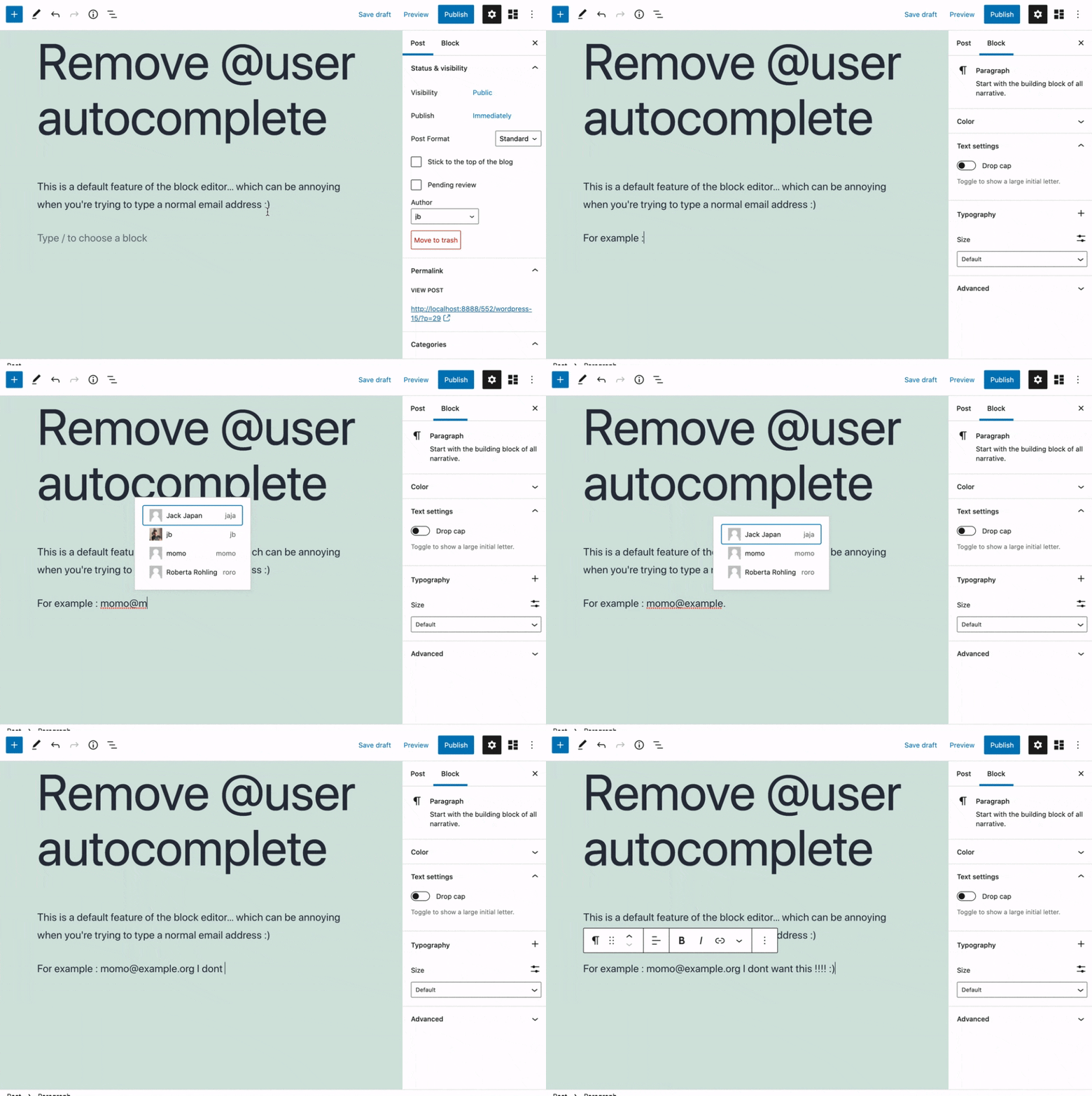
This plugin removes the default Gutenberg user autocomplete feature.
Reviews
Perfect solution to a problem that shouldn't exist
By 
This was exactly what is was looking for.
I think more people are going to be installing this plugin shortly.
And if the WordPress dev team happens to read this.
Why would you come up with this autocomplete nonsense?
I don't get it. Why would I be constantly be adding an email address to text blocks that belong to a site user?
Emails are not that long. There is no reason for the autocomplete feature.
Anyway, thank you to Jb for making this.
EXCELLENT !
By 
Thank you very much, it's perfect !
Changelog
0.1
- Plugin initial release. Works fine 🙂