Reorder Multisite Sites Dropdown

Reorder Multisite Sites Dropdown
Description
Take control of the My Sites menu in WordPress Multisite.
Reorder Multisite Sites Dropdown lets Network Administrators organize the My Sites dropdown in the WordPress admin bar instead of relying on the default site order.
If you manage a WordPress Multisite network with many websites, finding the site you need in the My Sites menu can quickly become frustrating. This plugin gives you a visual Network Admin interface for arranging sites into an order and structure that makes sense for your network.
There is no need to edit WordPress core files or maintain a custom admin-bar snippet. Configure the menu once from Network Admin and the organization is applied to the existing WordPress My Sites menu.
Organize your WordPress Multisite sites
- Drag and drop site ordering – Move sites into the exact order you want.
- Manual ordering controls – Quickly reposition sites using numeric order fields.
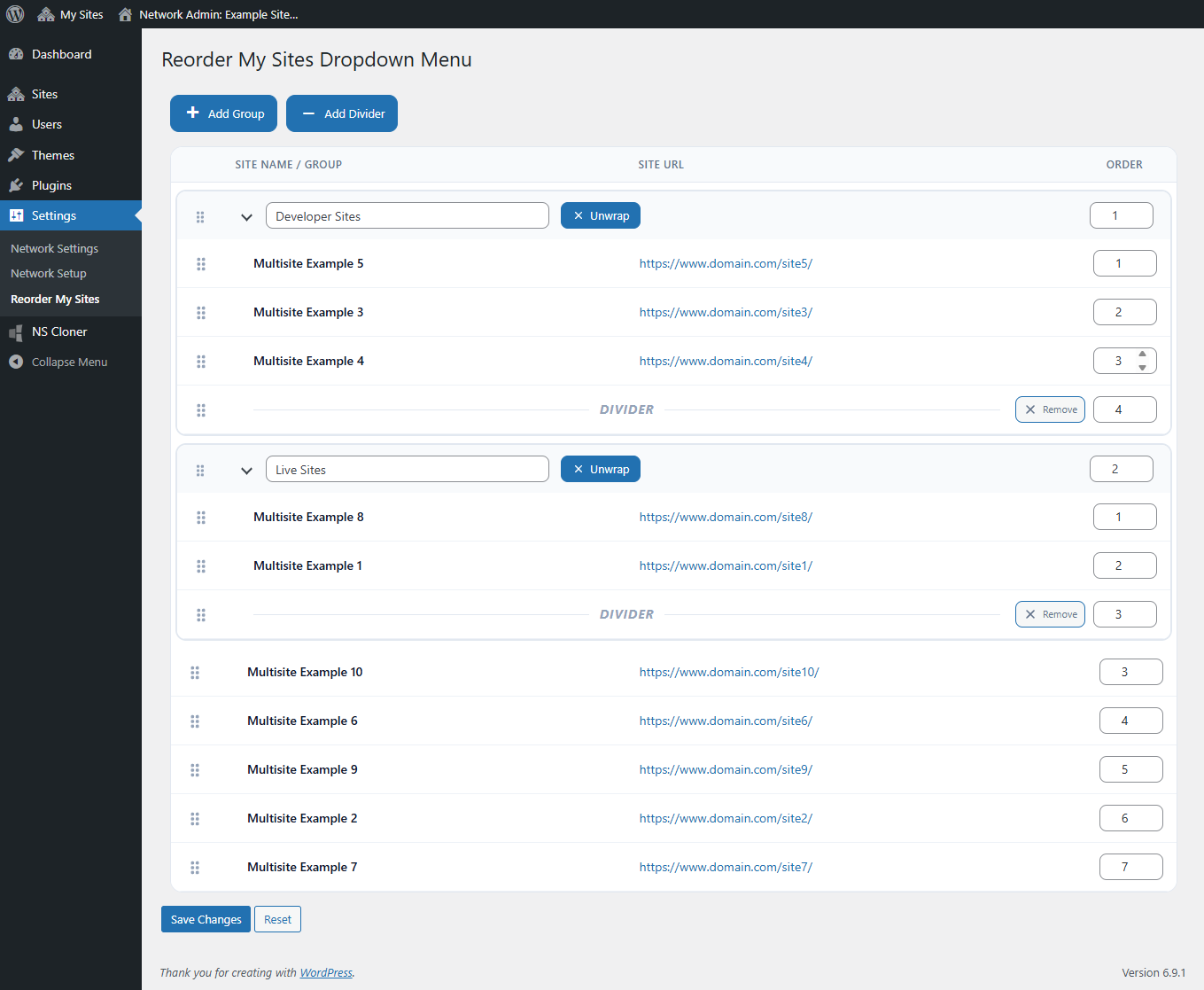
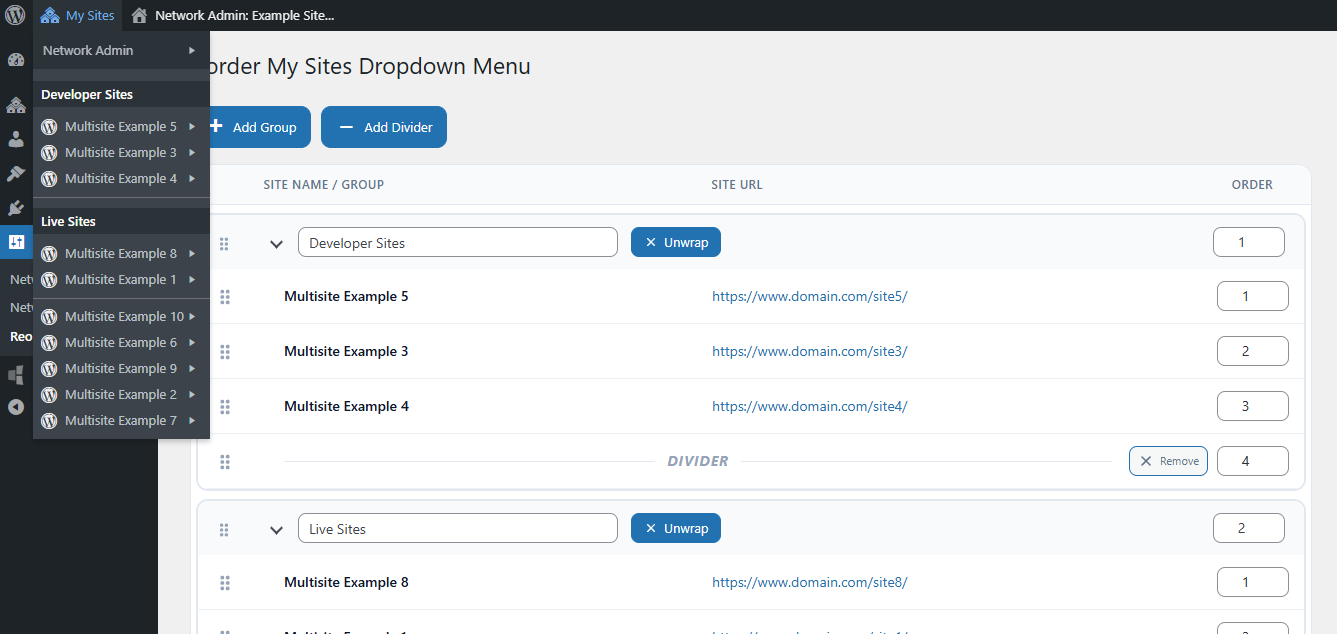
- Site groups – Group related WordPress sites together under custom headings.
- Nested organization – Place sites inside groups to make larger networks easier to navigate.
- Visual dividers – Add separators between sections of your My Sites menu.
- Large network support – Organize networks with more than 100 sites without relying on the default WordPress site-query limit.
- Network-wide configuration – Manage the organization centrally from WordPress Network Admin.
- Native admin bar integration – Keeps the familiar WordPress My Sites menu while making it easier to use.
Built for larger WordPress Multisite networks
The plugin is especially useful for agencies, universities, organizations, franchise networks, development teams, and other WordPress Multisite installations that manage many sites from one network.
Whether you manage 10 sites or hundreds of sites, Reorder Multisite Sites Dropdown helps turn a long My Sites list into a menu that reflects the way your network is actually organized.
Where are the settings?
After network activating the plugin, go to:
Network Admin > Settings > Reorder My Sites
From there you can drag sites into position, create groups, add dividers, and save the organization.
Installation
- Upload the
reorder-multisite-sites-dropdownfolder to the/wp-content/plugins/directory, or install the plugin through WordPress. - Network activate Reorder Multisite Sites Dropdown.
- Go to Network Admin > Settings > Reorder My Sites.
- Drag sites into the order you want and optionally add groups or dividers.
- Click Save Changes.
- Open My Sites in the WordPress admin bar to see the new organization.
Screenshots
Faq
Yes. Reorder Multisite Sites Dropdown is specifically designed for WordPress Multisite and is intended to be network activated.
Go to Network Admin > Settings > Reorder My Sites. The plugin adds a visual interface for organizing the sites shown in the WordPress admin bar.
Yes. You can create named groups and move sites into them. This is useful for organizing sites by client, department, brand, environment, region, or any other structure that fits your network.
Yes. Divider items can be inserted anywhere in the organization to visually separate sections of the My Sites dropdown.
Yes. The plugin supports large WordPress Multisite networks and can organize more than 100 sites without relying on the default WordPress site-query limit.
No. The plugin changes the organization of the existing My Sites admin bar menu. It does not grant users access to sites or change WordPress Multisite roles, capabilities, or site membership.
No. The plugin reorganizes the sites WordPress makes available to the current user in the My Sites menu; it does not provide additional site access.
No. The plugin uses WordPress hooks and Multisite APIs and does not modify WordPress core files.
Yes. The plugin improves handling of larger Multisite installations by supporting more than 100 sites, reducing unnecessary network-wide queries during normal admin-bar rendering, and improving how site information is loaded on the settings screen.
Reviews
Simple and Effective MySites Reordering for WordPress Multisite
By 
This plugin does exactly what it says. It lets you reorder the MySites dropdown in WordPress Multisite. It’s easy to use, works without any hassle and makes managing multiple sites a bit more convenient. Nothing complicated, just a straightforward solution that does the job well.
Works great!
By 
The plugin is easy to use, and does what it says it does.
Thank you for creating and maintaining it.
Works perfectly!
By 
This should obviously be in multisite core but, until it is, this is a 10/10 solution.
Thank you!
Very good!
By 
Does the job!
By 
Changelog
2.1.0
- Added reliable support for WordPress Multisite networks with more than 100 sites.
- Improved large-network performance by avoiding unnecessary network-wide site queries when rebuilding the admin bar.
- Improved settings-screen rendering by loading site display data before rendering the sortable structure.
- Limited plugin CSS and JavaScript loading to the Reorder My Sites Network Admin screen.
- Removed unused jQuery UI Draggable and Droppable dependencies.
- Standardized CSS and JavaScript cache-busting using the plugin version.
- Added an explicit Network Admin capability check when saving settings.
- Added cleanup of stale or deleted site IDs when loading and saving the site organization.
2.0.0
- Added groups for organizing related sites in the My Sites dropdown.
- Added divider lines for visually separating site sections.
- Improved the drag-and-drop interface for sites and groups.
- Improved Network Admin styling and usability.
1.0.2
- Added manual ordering fields as an alternative to drag-and-drop reordering.
1.0.1
- Updated array access for compatibility with modern PHP versions.
1.0.0
- Initial release.