Repeater2Template Widget for ACF Repeater and Elementor
Repeater2Template Widget for ACF Repeater and Elementor
Description
⚠️ Requires Elementor Pro
Tired of ACF Repeater fields that won’t cooperate with Elementor?
Repeater2Template fixes that — instantly. Connect any repeater data source to any Elementor template and watch every row render exactly how you designed it. No PHP. No shortcodes. No workarounds.
Whether you’re working with ACF Repeater fields, a raw JSON array, or a live API endpoint — this widget loops through your data and outputs each item using your own Elementor saved template. Full design control, fully native experience.
🎥 See It In Action:
💡 Key Features
- 🔌 3 data sources, one widget — ACF Repeater, JSON Array, or live data from any JSON URL / API.
- 🎨 Design freedom — pick any Elementor Pro saved template to render each row your way.
- 🗂 Flexible ACF sources — current post, any specific post by ID, or a global ACF Options Page.
- 🏷 Subfield-to-dynamic-tag mapping — keeps your templates clean, reusable, and truly dynamic.
- 🌐 Live API rendering — inject dynamic parameters into JSON URLs for real-time, context-aware content.
- 🔢 Row limit control — display only a set number of items from any data source.
- ✅ 100% no-code — built entirely inside Elementor. If you can drag a widget, you can use this.
🔁 Flexible ACF Data Sources
Real-world projects rarely keep all data tied to the current post. That’s why Repeater2Template supports three ACF source types:
- Current Post repeater data tied to the page being viewed.
- Specific Post (by ID) use any post as a centralized “data hub” — reuse it across unlimited templates without duplication.
- Options Page pull from any registered ACF Options Page for global content like team sections, banners, menus, or footers.
Centralize once. Reuse everywhere.
🌐 JSON Array & JSON URL — No ACF Needed
Not an ACF user? No problem. Repeater2Template handles raw JSON just as powerfully.
Two JSON modes:
-
JSON Array — paste your data directly into the widget. Instant, portable, zero setup.
[
{ “title”: “Book A”, “author”: “Author X”, “image”: “https://example.com/book1.jpg” },
{ “title”: “Book B”, “author”: “Author Y”, “image”: “https://example.com/book2.jpg” }
] -
JSON URL — fetch live data from any internal or external API endpoint.
- Supports dynamic URL parameters (post ID, category, user meta, and more).
- Perfect for product feeds, API-driven testimonials, blog lists, or user-specific content.
- The plugin parses the response automatically and renders each object using your Elementor template.
Example:
https://api.example.com/books?category=fiction&user_id={{user_id}}
⭐ What Builders Are Saying
“Extremely simple and yet so powerful!” — davidedev
“Saves tons of time and just works — super intuitive!” — akhileshtenguriya
“This is literally a gem. All must try this.” — mairaaah
“The support went the extra mile. Excellent plugin.” — indyparker
5 out of 5 stars — every single review.
How It Works
Step 1: Design Your Item Template
- Go to Templates Saved Templates Add New.
- Choose Section or Container.
- Design one item — a team card, a testimonial block, a product tile, anything.
- Save the template.
Step 2: Drop In the Widget
- Open your page in Elementor.
- Search for Repeater2Template and drag it onto the canvas.
- Select your data source:
ACF Repeater— pick your field by key or name.JSON URL / Array— paste your JSON or enter a URL.
Step 3: Connect & Done
Select the Elementor template from Step 1. The widget loops through every item and renders each one using your template — automatically.
No PHP. No shortcodes. No headaches.
Installation
- Upload plugin files to
/wp-content/plugins/or install directly via the WordPress Admin Panel. - Activate the plugin.
- Ensure Elementor Pro is active (ACF Pro only needed for repeater fields).
- Set up your ACF Repeater field — or prepare your JSON array / API URL.
- Create an Elementor Pro Saved Template for how a single item should look.
- Add the Repeater2Template Widget to your page and select your data source:
- ACF Repeater (Current Post, Specific Post by ID, or Options Page)
- JSON Array
- JSON from URL
Screenshots
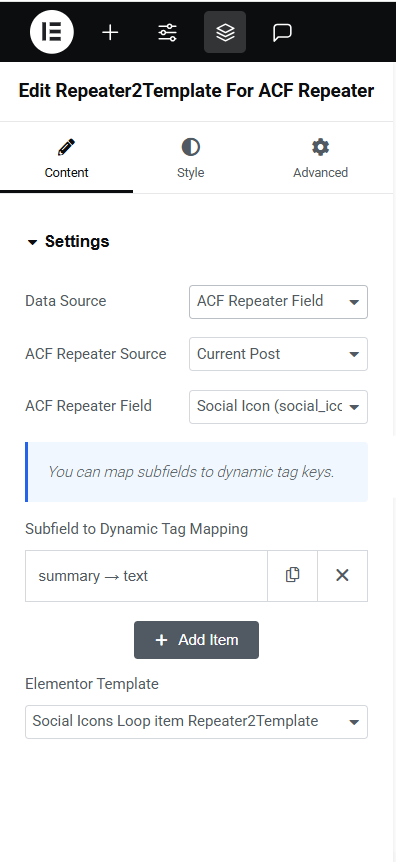
Widget settings panel inside Elementor.
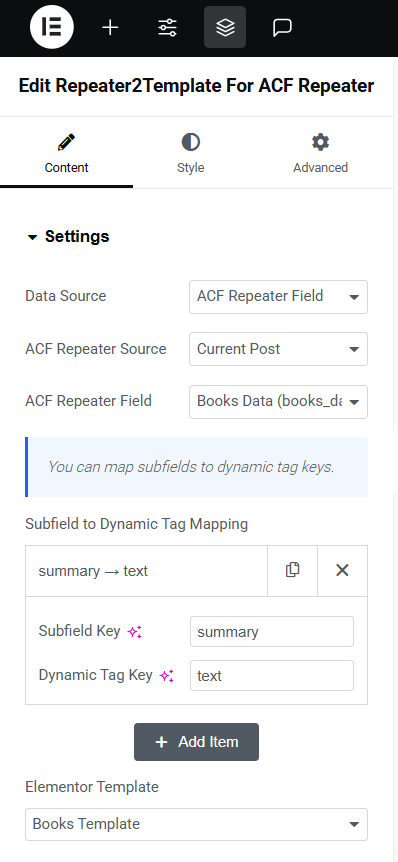
ACF Repeater source with mapped subfields.
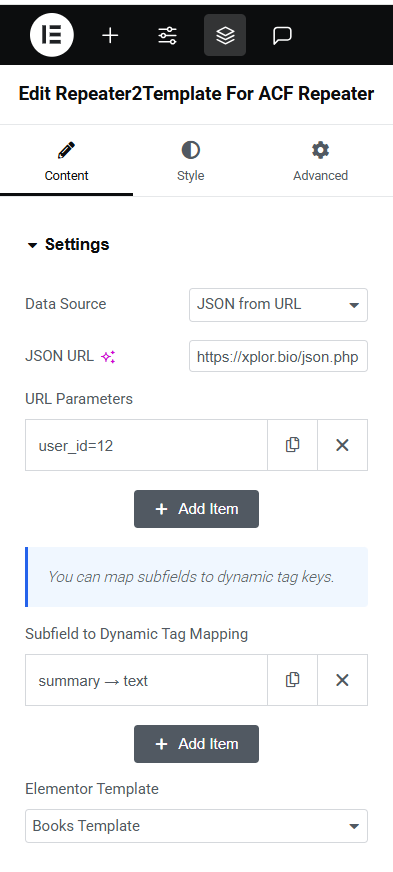
JSON Array and JSON URL mode in action.
Faq
Only for ACF Repeater fields. JSON Array and JSON URL modes work completely independently — no ACF required.
Yes. The JSON URL mode fetches from any API endpoint and supports dynamic parameters, so content updates contextually per page or user.
Data is fetched fresh on every render. Caching options are planned for a future release.
No — Elementor Pro is required for saved template and dynamic tag support.
Text, images, URLs, and media fields. Image URLs are handled automatically with proper <img> tag output.
Reviews
So simple yet effective
By 
This plugin saved me hours of headache — it just works perfectly with ACF Repeater and Elementor without any complicated setup. Highly recommend it to anyone building dynamic pages; wish I'd found it sooner!
AWESOME!
By 
This plugin is extremely simple and yet so powerful!
Sidenote: can you please add also taxonomy as a source? Just edit row 255 as it follows:
$post_id = is_tax() ? 'term_'.get_queried_object_id() : get_the_ID();
Thank you!
Excellent plugin and knowledgeable support
By 
This plugin has what you need to style and present ACF Pro Repeater fields in the way you want to. The support to help with a nested template issue was impeccable and generous. The developer Ab went the extra mile to help with the specific issue I had.
Thanks for a great plugin
Sam
Time Saver Plugin
By 
This plugin makes working with ACF repeaters in Elementor so easy. I can map subfields directly to templates without any hassle. Saves tons of time and just works—super intuitive!
JSON to Elementor template is a nice addition!
So tiny helpful tool
By 
The plugin do the job perfectly & easily and smoothly. It is very easy to use and you can render any template with any repeater field in your ACF fields.
I have some suggestions to developer (who so helpful and welcome man ) to add the other sources to get data from, not just current post/page, but other posts, Option pages, that's it.
Actually i did some a little bit modification on plugin to suit my work, it was so easy and readable code.
Thanks so much man!
Plugin performance
By 
I am literally very happy and satisfied with this plugin ...very simple to use and can be used for every structure you can design the way you want your sections to be designed and just have to set fields names to headings in subfields...i am giving this honest review...literally very happy....All must try this ..This is literally a gem
Changelog
1.0.5
- Tested up to WordPress 6.9.
1.0.4
- Added: Row limit control — display only a set number of items from any data source.
1.0.3
- Added: JSON URL support — fetch and render live data from any API or custom endpoint with dynamic parameters.
1.0.2
- Added: Flexible ACF data sources — Current Post, Specific Post by ID, and Options Page.
1.0.1
- Added: JSON Array as a standalone data source.
1.0.0
- Initial release — full loop and template rendering support for ACF Repeater fields.