Reset – WordPress Database Reset Plugin

Reset – WordPress Database Reset Plugin
Description
Reset is a powerful WordPress reset plugin that allows you to quickly reset your WordPress database to its default state in just one click.
Whether you want to reset your entire WordPress site, clean database tables, or start fresh, this plugin makes the process simple, fast, and secure.
Perfect for developers, testers, and website owners who need to reset WordPress frequently without reinstalling.
Save time and reset your site instantly without manual cleanup or reinstallation.
🚀 Why Use Reset?
- One-click WordPress database reset
- Reset entire site or selected tables
- Fast, lightweight & secure
- Safe confirmation system to prevent accidental reset
- Perfect for developers & testing environments
- No need to reinstall WordPress
🔥 Key Features
- Reset WordPress database instantly with one click
- Selective reset of specific database tables
- Typing confirmation to avoid accidental reset
- Fast & secure process with no manual steps
- Clean database by removing posts, pages, and data
- Developer-friendly tool for testing and debugging
- Lightweight plugin with no bloat
💡 Use Cases
- Reset WordPress site during development
- Clean database after testing plugins or themes
- Start fresh without reinstalling WordPress
- Remove unwanted demo content quickly
- Prepare site for new projects
⚡ Why Choose Reset Plugin?
Unlike heavy reset plugins, Reset focuses on speed, simplicity, and safety.
- No unnecessary features
- No complex setup
- Fast and reliable reset process
- Ideal for developers and beginners
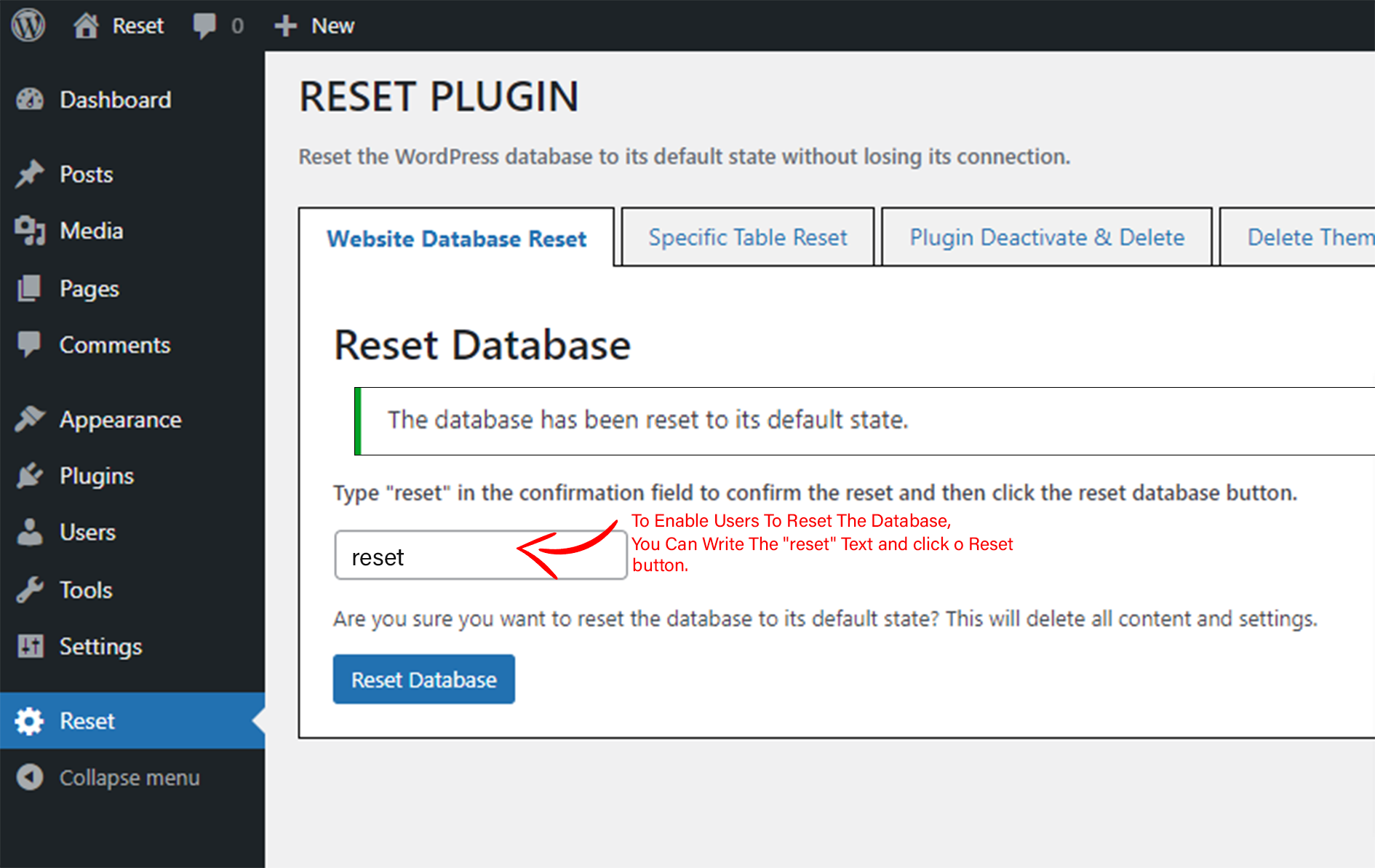
📌 How to Reset WordPress Database
- Install and activate the plugin
- Go to the Reset menu in dashboard
- Enter confirmation text (reset)
- Click the Reset button
- Your WordPress database will be reset instantly
Video Tutorial:
https://www.youtube.com/watch?v=9cnTu5VCRzg
⚠️ What Will Be Deleted
- All posts, pages, and custom post types
- All comments and media entries
- All users and database tables
- All plugins and themes (activated or deactivated)
❓ Frequently Asked Questions
What does this WordPress reset plugin do?
It resets your WordPress database to default settings by removing all content and data.
Can I reset only specific tables?
Yes, you can reset the full database or selected tables.
Is it safe to use?
Yes, the plugin includes a confirmation system to prevent accidental resets.
What happens after reset?
Your site will be cleaned, and you will be logged out and logged back in automatically.
Does it delete plugins and themes?
Yes, all plugins and themes are reset or deactivated.
How fast is the reset process?
The reset is instant and works with a single click.
Minimum Requirements
- WordPress 3.4+
- PHP 5.x
- MySQL 5.x
If any problem occurs, please contact us at support@smartzminds.com
Screenshots




Reviews
Effortless One-Click WordPress Database Reset — Simple, Fast & Reliable
By 
Reset is a lightweight and intuitive WordPress database reset plugin that allows users to instantly return their site to its default state with a single click. Its secure confirmation workflow and selective table reset options make it ideal for developers, testers, and site owners who need a fast way to start fresh without reinstalling WordPress. The plugin is stable, easy to use, and saves significant time during development or cleanup tasks.
Straightforward ❤️
By 
Problem -> Solution 👏🏻
Very Usefull
By 
Very good plugin. Very usefull.
This plugin is really just what I needed
By 
''thank you so much - it's perfect 👌
Simplified Site Management!
By 
I love how easy Reset is to use. One-click reset and multiple options make it ideal for both beginners and pros. Definitely worth it!
Good features
By 
very easy to use and efficient plugin to reset multiple functionalities.
good reset
By 
so good to help us to reset our site ! i really like it
Quick, Easy, Efficient and Time-Saving for Site Reset....
By 
The Reset Database plugin is a fantastic tool for WordPress developers. It quickly restores your site to its original state, deactivating all plugins and clearing data without any complications. Perfect for testing and troubleshooting, it saves me so much time. Highly recommended!
Quick an easy to reset the database tables.
By 
This plugin is an excellent solution for resetting tables directly from the WordPress dashboard. It offers a user-friendly interface, making the process quick and straightforward. The functionality is efficient, allowing you to manage and reset tables with ease, ensuring a smooth and hassle-free experience.
A Developer's Delight: Quick, Easy, and Efficient Plugin
By 
This plugin is exceptional and remarkably user-friendly. As a web developer, I greatly appreciate the significant time savings this plugin affords me, particularly since I frequently need to reset my WordPress websites. Kudos to the developers for creating such a valuable tool!
Changelog
= 2.2 (13th April, 2026)
* Tested with latest WordPress version
* Bug fixes and improvements
= 2.1 (12th January, 2026)
* Tested with latest WordPress version
* Bug fixes and improvements
= 2.0 (24th November, 2025)
* Tested with latest WordPress version
* Bug fixes
= 1.9 (22nd September, 2025)
* Tested with latest WordPress version
* Bug fixes
= 1.8 (18th April, 2025)
* Tested with latest WordPress version
* Bug fixes
= 1.7 (20th February, 2025)
* Tested with latest WordPress version
* Bug fixes
= 1.6 (9th December, 2024)
* Tested with latest WordPress version
* Bug fixes
= 1.5 (25th July, 2024)
* Tested with latest WordPress version
* Bug fixes
= 1.4 (22nd July, 2024)
* Tested with latest WordPress version
* Bug fixes
= 1.3 (12th February, 2024)
* Tested with latest WordPress version
* Bug fixes
= 1.2 (22nd September, 2023)
* Tested with latest WordPress version
* Bug fixes
= 1.1 (13th July, 2023)
* Improvements and fixes
= 1.0 (12th June, 2023)
* Initial release