Reviewfic – Testimonials, Reviews, Google Reviews & WooCommerce Reviews

Reviewfic – Testimonials, Reviews, Google Reviews & WooCommerce Reviews
Description
👉 Official Demo Link: Click Here
👉 Get Support: Click Here
👉 Our Documentation
👉 Join Our Facebook Group
Reviewfic is a lightweight yet powerful WordPress reviews and testimonials plugin. Collect customer reviews directly on your site, pull in live reviews from Google, Yelp, WooCommerce, and WordPress.org, or connect an existing form from Contact Form 7, WPForms, Fluent Forms, or Gravity Forms — then showcase everything with 10 customizable display templates, sliders, pagination, and full design control. Zero coding required.
Reviews are managed as a native WordPress custom post type, making them easy to add, edit, organise, and display anywhere on your site using a simple shortcode.
Core Features
Star Ratings
Add a 1–5 star rating to every review with our Star Ratings feature, including half-star precision (e.g. 4.5). A live visual star preview updates as you type so you always know exactly what will render on the frontend.
Reviewer Details
Our Reviewer Details feature stores the reviewer’s Name, Designation (job title), and Company. These display as “CEO · Acme Corp” beneath the name — gracefully adapting if either field is left empty.
Reviewer Avatars
Upload a circular profile photo for each reviewer directly from the WordPress media library. Show or hide them per shortcode using the show_avatar option. Live sources with no photo available (like WordPress.org) automatically get a generated colored-initials avatar instead of a blank space.
Review Source Badges
Our Review Source Badges feature lets you tag each review with its origin platform — Google, Trustpilot, G2, Capterra, Facebook, Yelp, Amazon, or any custom platform you add. A color-coded badge renders automatically on each card. Known platforms display their brand colors; custom platforms get a neutral dark badge. Review Sources are managed as a WordPress taxonomy under Reviewfic Review Sources. Use the show_source option to hide the badge entirely when you want a cleaner card — note that Google and Yelp’s display terms require their attribution to stay visible when showing their content live.
Review Categories
Organise reviews into categories using a built-in taxonomy. Show only a specific category on any page using the Shortcode Generator.
10 Display Templates
Choose from our 10 Display Templates with ten distinct card layouts for each shortcode.
- Classic — Stars, title, content, and client row at the bottom. Clean bordered card.
- Quote — Reviewer avatar and name at the top, large italic content as the featured quote, decorative quotation mark, orange-left border on a warm background.
- Minimal — No card border; a thin accent top line is the only visual element. Pure typography focus, ideal for editorial sites.
- Dark — Dark card (#111827), white text, gold stars, accent-colored avatar ring, and a subtle radial glow. Drop into any dark-background section.
- Centered — Everything center-aligned: large circular avatar at the top, centered name and designation, centered stars, centered italic quote. The featured testimonial format.
- Split — Two-panel card: a coloured left strip with avatar, name, and source badge, paired with a white content panel showing stars, title, and review text.
- Glow — White card with a soft green glow border, large italic quote, and an avatar + name footer row. Premium, polished feel.
- Score — A prominent circular star-score bubble floats in the top-right corner, paired with a badge, stars, title, content, and client row.
- Magazine — No card background at all — editorial pull-quote style with a large opening quote mark, bold italic body text, and a two-column byline row.
- Neon Dark — A deep dark card with a teal-to-purple gradient header strip, avatar baked into the header, and a stars + badge footer row.
Slider Mode
Turn any shortcode into a swipeable carousel with our Slider Mode feature and customize every slider setting.
- Navigation Arrows — show or hide the prev/next buttons
- Dot Indicators — show or hide progress dots
- Autoplay — auto-advance slides on a configurable interval
- Autoplay Speed — set the interval in milliseconds
- Infinite Loop — wrap around at the end
- Pause on Hover — stop autoplay when visitors mouse over
- Touch & swipe support on mobile
- Keyboard arrow key navigation
Slider mode works identically across your own reviews and every live source — Google, Yelp, WooCommerce, and WordPress.org.
Pagination
Our Pagination feature enables numbered pagination on any grid shortcode — including live Google, Yelp, WooCommerce, and WordPress.org reviews, not just your own. Set how many reviews appear per page. Previous/next arrows, numbered page links, and smart ellipsis for long page ranges are all included. Slider mode is automatically excluded from pagination.
Design Options
Customise the visual style of each shortcode independently with our Design Options feature — no CSS required:
- Card background color
- Content text color
- Reviewer name color
- Designation and company color
- Star color
- Accent color — controls Template 2 left border, Template 3 top bar, and source badge borders
- Card border color
- Box shadow (None / Subtle / Medium / Strong)
- Border radius (0–24px slider)
- Column gap (0–60px slider)
Values are applied as CSS custom properties on the wrapper element, so multiple shortcodes on the same page each maintain their own visual style without conflict.
Shortcode Generator
Our Shortcode Generator feature lets you create and save named shortcode configurations from Reviewfic Shortcode Generator. Each configuration gives you a permanent shortcode like [reviewfic id="21"]. Paste it once into any page or post — then edit the configuration anytime and every instance updates automatically. The same saved configuration can also power any live Google, Yelp, WooCommerce, or WordPress.org shortcode, plus the WooCommerce reviews tab and Tourfic review section replacements, by passing the same id attribute — design it once, reuse it everywhere.
The Shortcode Generator includes:
- Visual template picker with layout preview thumbnails for all 10 templates
- Column toggle (1–4)
- Category and Review Source filters
- All slider options with toggle switches
- Pagination toggle and per-page count
- Show Avatar and Show Source Badge toggles
- Color pickers for card background, text, name, designation/company, stars, accent, and border
- Box shadow selector, border radius slider, and column gap slider
- One-click Copy Shortcode button
Review Collection Form
Collect reviews with our Review Collection Form. directly from your customers using a built-in submission form. Place [reviewfic_form] on any page or post to render a styled form with all the fields your review post type supports: name, designation, company, star rating, review title, review body, platform source, and a drag-and-drop photo upload with live circular preview. New submissions are held as pending by default so you can approve them before they go live — or set require_approval="no" to publish immediately.
Form shortcode attributes:
- require_approval — `yes` (default) or `no`. Controls whether submissions are saved as pending or published immediately.
- success_message — Custom thank-you message shown after a successful submission.
- show_source — `yes` (default) or `no`. Show or hide the platform/source dropdown.
- redirect — URL to redirect to after a successful submission (optional).
Contact Form 7 Integration
Our Contact Form 7 Integration feature connects your existing Contact Form 7 form to Reviewfic. After installing CF7, a “Reviewfic” tab appears in the CF7 form editor. Enable the integration, set the review status (pending or published), and map your CF7 field names to Reviewfic fields — Reviewer Name, Designation, Company, Star Rating, Review Title, Review Content, and Review Source. Every time that form is submitted, a review is created automatically in Reviewfic using the mapped field values. No coding required.
Import / Export
Our Import / Export feature lets you bulk-manage your reviews without touching the database. Export all reviews as a CSV file (opens in Excel or Google Sheets) or as a JSON file for developer use or re-importing. Import a CSV or JSON file to bulk-create reviews on any site — new sources and categories are created automatically if they don’t already exist. Access via Reviewfic Import / Export.
WPForms Integration
Our WPForms Integration feature connects any WPForms form to Reviewfic from the Reviewfic Form Integrations admin page. Enable the integration, choose the review status, select a review source, and map your form fields to automatically create reviews on submission.
Fluent Forms Integration
Our Fluent Forms Integration feature connects any Fluent Forms form to Reviewfic from the Reviewfic Form Integrations admin page. Enable the integration, choose the review status, select a review source, and map your form fields to automatically create reviews on submission.
Gravity Forms Integrations
Connect a Gravity Forms form to Reviewfic from the dedicated Reviewfic Form Integrations admin page. A tabbed interface lists all forms from each installed plugin. Per form: enable toggle, review status (pending or published), review source dropdown, and full field mapping (name, designation, company, star rating, title, content, photo). Connected forms are automatically styled to match the Reviewfic form design on the frontend.
Live Reviews — Google Places
Our Live Reviews — Google Places feature lets you display live reviews directly from Google using [reviewfic_google place_id="ChIJ..."]. Reviews are fetched from the Google Places API, cached for 12 hours, and rendered using any of Reviewfic’s 10 templates with full slider, pagination, column, and design option support. Requires a Google Places API key, configured at Reviewfic Live Reviews.
Live Reviews — Yelp
Our Live Reviews — Yelp feature lets you display live reviews directly from Yelp using [reviewfic_yelp business_id="..."]. Reviews are fetched from the Yelp Fusion API (up to 3 on the free tier), cached for 12 hours, and support all the same display options as Google. Requires a Yelp Fusion API key, configured at Reviewfic Live Reviews. Detailed error diagnostics (invalid Place/Business ID, billing not enabled, key restrictions) are shown to admins to make troubleshooting fast.
Live Reviews — WooCommerce (No API Key)
Our Live Reviews — WooCommerce feature lets you display your existing WooCommerce product reviews. Display them anywhere on your site — homepage, landing pages, sidebars — using [reviewfic_woocommerce product_id="123"]. No API key required; this reads your store’s existing reviews directly and renders them with any Reviewfic template.
Live Reviews — WordPress.org Plugin Reviews (No API Key)
Our Live Reviews — WordPress.org Plugin Reviews feature lets you display live WordPress.org plugin reviews on your site using [reviewfic_wporg plugin="your-plugin-slug"] — no API key needed. Perfect for developers who want their five-star reputation front and center on their own site.
One Click Cache Refresh
Google, Yelp, and WordPress.org responses are cached for 12 hours to minimise API calls. A dedicated Clear Live Review Cache button on the Live Reviews page lets you force a fresh fetch immediately after fixing a Place ID, business listing, or plugin slug — no waiting required.
WooCommerce Integration
Our WooCommerce Integration feature adds a dedicated Reviewfic WooCommerce admin page with four powerful features:
- Post-Purchase Review Request Email — automatically emails customers after order completion with a link to your review form. Choose the delay: immediately, or 1, 2, 3, 5, 7, or 14 days after order completion. Select any published page as the review landing page (with your `[reviewfic_form]` shortcode on it). Customize the email subject and body with placeholders: `{customer_name}`, `{order_id}`, `{site_name}`.
- Replace WooCommerce Reviews Tab — replaces the default WooCommerce product reviews tab with Reviewfic’s templates. Pick any of the 10 templates, column count, slider, and avatar/badge visibility — or point it at a full Shortcode Generator config for complete design control, including pagination.
- Auto-Tag Reviews by Product — when a customer arrives via the review request email and submits a review, it is automatically tagged with the product name as a Reviewfic category. Works for single-product orders and enables product-filtered shortcodes.
- Native On-Site Reviews Shortcode — use `[reviewfic_woocommerce]` to showcase existing WooCommerce reviews anywhere on the site, independent of the tab replacement.
Tourfic Integration
Our Tourfic Integration feature adds a dedicated Reviewfic Tourfic admin page for hotel, tour, and apartment bookings, mirroring the WooCommerce integration:
- Post-Booking Review Request Email — sent after a Tourfic booking completes, with the same configurable delay and customizable subject/body as the WooCommerce email.
- Replace Tourfic Review Section — replaces the listing’s review section with Reviewfic’s templates, fully configurable (template, columns, slider, design) or driven entirely by a saved Shortcode Generator config.
- Auto-Tag Reviews by Service — reviews submitted via the request link are automatically tagged with a prefixed category, e.g. “Hotel: Grand Hyatt” or “Tour: Desert Safari”.
Car rental listings support the email and auto-tag features; the review section replacement is not available for car rentals since Tourfic embeds that block directly into its template.
Built for Speed — On-Demand Asset Loading
Reviewfic never adds weight to pages that don’t need it. CSS and JavaScript are only loaded on pages where a review, slider, or form actually renders — and JavaScript is split by feature, so a static review grid never loads slider code, and a slider never loads the review-submission-form scripts it doesn’t use.
Responsive Grid
Our Responsive Grid feature lets you display reviews in a 1, 2, 3, or 4 column grid. Collapses to a single column on tablets and mobile automatically.
Shortcode Reference
Display reviews — ID-based (recommended):
[reviewfic id="21"]
Create a shortcode configuration in Reviewfic Shortcode Generator, copy the ID shortcode, and paste it anywhere. All options are managed in the generator — no shortcode attributes needed.
Collect reviews — submission form:
[reviewfic_form]
Renders a styled review submission form. Customers fill in their name, star rating, review, and optionally their designation, company, and platform source. Submissions are held as pending until you approve them.
Live Google reviews:
[reviewfic_google place_id="ChIJ..." id="12" max="5"]
Live Yelp reviews:
[reviewfic_yelp business_id="..." id="12" max="3"]
Live WooCommerce reviews (no API key):
[reviewfic_woocommerce product_id="123" id="12" max="10"]
Live WordPress.org plugin reviews (no API key):
[reviewfic_wporg plugin="your-plugin-slug" id="12" max="5"]
The id attribute on any live shortcode points to a saved Shortcode Generator config, giving every live source the exact same template, slider, pagination, and design options as your own reviews.
Example Shortcodes
Display reviews from the Shortcode Generator:
[reviewfic id="21"]
Submission form with auto-approval and a redirect on success:
[reviewfic_form require_approval="no" redirect="https://example.com/thank-you"]
Submission form without the platform dropdown:
[reviewfic_form show_source="no"]
Live Google reviews, 3 columns, Classic template:
[reviewfic_google place_id="ChIJN1t_tDeuEmsRUsoyG83frY4" columns="3" template="1"]
Live Yelp reviews, slider mode:
[reviewfic_yelp business_id="gary-danko-san-francisco" slider="yes" template="2"]
Native WooCommerce reviews, Score template, no source badge:
[reviewfic_woocommerce product_id="123" template="8" show_source="no"]
WordPress.org plugin reviews, Magazine template:
[reviewfic_wporg plugin="contact-form-7" template="9"]
Who Is This For?
- Freelancers and agencies showcasing client testimonials
- SaaS and software products aggregating reviews from G2, Capterra, and Trustpilot
- eCommerce stores displaying WooCommerce product reviews with star ratings
- Local businesses pulling in Google and Yelp reviews
- Travel businesses running Tourfic — hotels, tours, apartments, and car rentals
- WordPress plugin and theme developers showcasing their WordPress.org reviews
- Any WordPress site that needs a clean, fast testimonial section
Bug Reports / Feature Requests / Support
We provide full support on the WordPress.org forums and on Our Website. Check our Support Policy for details.
Installation
- In your WordPress admin, go to Plugins Add New and search for “Reviewfic”. Click Install Now, then Activate.
- Alternatively, download the zip, go to Plugins Add New Upload Plugin, upload the zip, and activate.
- Once activated, go to Reviewfic Add New Review to create your first review. Fill in the title (review headline), body text, star rating, reviewer name, designation, company, photo, and review source.
- Go to Reviewfic Review Sources to manage review platforms. Google, Trustpilot, G2, Capterra, Facebook, Yelp, and Amazon are added automatically on first activation.
- Go to Reviewfic Shortcode Generator and click Create New Shortcode. Configure your options, save, and copy the generated shortcode into any page, post, or widget.
- To pull in live reviews, go to Reviewfic Live Reviews and add your Google Places and/or Yelp Fusion API key — or use the WooCommerce and WordPress.org shortcodes which need no key at all.
Screenshots

Add New Review & Live Preview – Review editor with 1–5 star ratings (half-star precision), reviewer details, avatar upload, and live visual star rating preview.

Review Source Badges & Taxonomy – Manage review origin badges for Google, Yelp, Trustpilot, G2, Capterra, Facebook, Amazon, and custom platform tags.

Shortcode Generator: 10 Visual Templates – Builder with thumbnails for all 10 card templates: Classic, Quote, Minimal, Dark, Centered, Split, Glow, Score, Magazine, Neon Dark.

Slider Mode & Responsive Grid – Configure 1–4 column responsive grid layouts or swipeable carousel slider settings (arrows, dots, autoplay, infinite loop, pause on hover).

Numbered Pagination Controls – Enable numbered pagination with previous/next arrows and smart ellipsis for long review collections.

Design Options & Custom Styling – Visual color pickers for card background, text, name, designation, stars, accent, border, box shadow presets, border radius, and column gap.

Frontend Templates (Light Layouts) – Showcase of Classic, Quote, Minimal, Centered, and Split card designs on the frontend.

Frontend Templates (Dark & Accent) – Showcase of Dark, Glow, Score, Magazine, and Neon Dark card layouts with star-score bubbles and gradient headers.

Touch Slider & Speed Optimization – Swipeable review carousel with touch/keyboard support, navigation arrows, dot indicators, and on-demand CSS/JS asset loading.

Responsive Grid & Pagination – 1 to 4 column responsive grid layout with live numbered page navigation that collapses gracefully on mobile devices.
![Review Collection Form – On-site submission form (<code>[reviewfic_form]</code>) with star rating picker, reviewer details, source dropdown, and drag-and-drop circular photo uploader.](https://ps.w.org/reviewfic/assets/screenshot-11.png?rev=3631809)
Review Collection Form – On-site submission form (
[reviewfic_form]) with star rating picker, reviewer details, source dropdown, and drag-and-drop circular photo uploader.
Live Reviews Showcase – Live review cards fetched from Google Places, Yelp, WooCommerce products, and WordPress.org plugins with fallback initial avatars.

Form Integrations Hub – Connect Contact Form 7, WPForms, Fluent Forms, and Gravity Forms to Reviewfic with status, source dropdown, and field mapping.

WooCommerce Integration Settings – Post-purchase review request emails (0–14 day delay), product auto-tagging, and replacing native WooCommerce Product Reviews tab.

Tourfic Integration Settings – Post-booking review request emails, service auto-tagging (Hotels, Tours, Apartments), and Tourfic listing review section replacement.
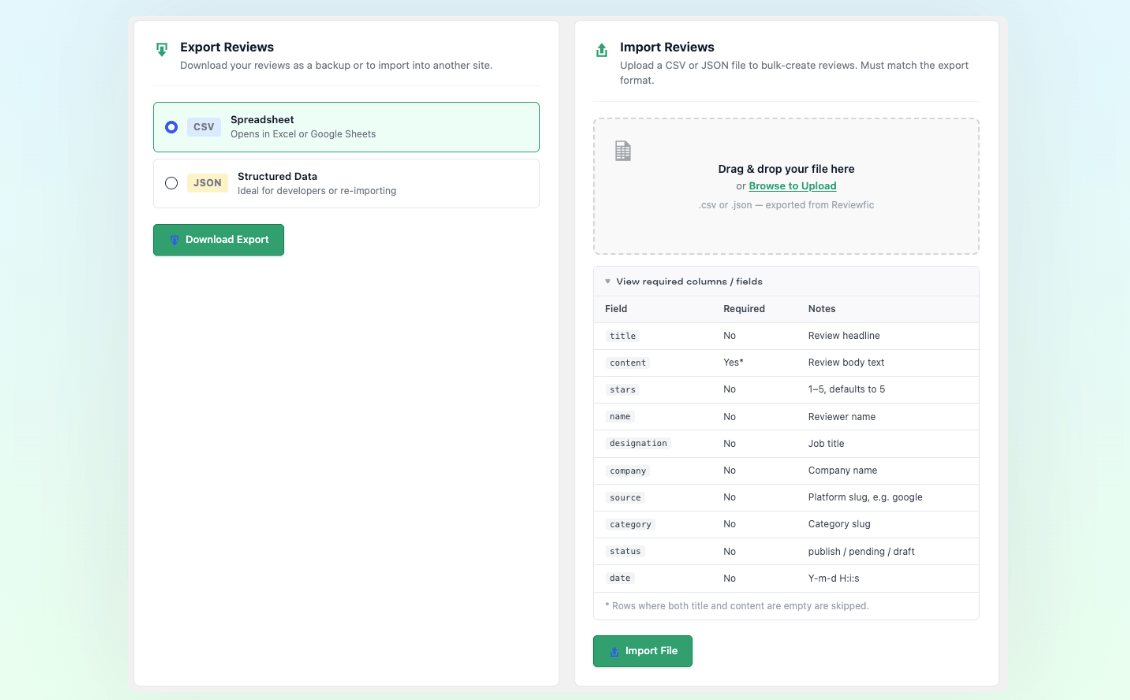
CSV & JSON Import / Export – One-click bulk export and import tool for CSV and JSON format review migration without database lock-in.
Faq
Use the Shortcode Generator (Reviewfic Shortcode Generator Create New Shortcode). You get a permanent [reviewfic id="21"] shortcode. Configure all options in the generator — if you change something later, every page using that shortcode updates automatically. The same config ID also works on any live Google, Yelp, WooCommerce, or WordPress.org shortcode.
Yes. Reviewfic uses standard CSS grid and does not require any page builder. It works with any well-coded WordPress theme.
Yes. Use one shortcode per platform, or leave the source filter set to “All Sources” to mix everything together.
Yes. Go to Reviewfic Review Sources and add any platform name. It appears immediately in the review editor dropdown and the Shortcode Generator. Known platforms (Google, Trustpilot, G2, Capterra, Facebook, Yelp, Amazon) get automatic brand colors; anything custom gets a neutral dark badge.
Template 1 (Classic): Standard card — stars, title, content, client row at bottom. Template 2 (Quote): Avatar and name at the top, large italic quote, orange left border. Template 3 (Minimal): No card border, just a thin accent top line — pure typography. Template 4 (Dark): Dark background card with white text and gold stars. Template 5 (Centered): All content center-aligned with a large avatar at the top. Template 6 (Split): Two-panel card with a coloured side strip. Template 7 (Glow): White card with a soft glow border and italic quote. Template 8 (Score): A circular star-score bubble in the corner. Template 9 (Magazine): Editorial pull-quote style, no card background. Template 10 (Neon Dark): Dark card with a teal-to-purple gradient header.
No. Slider mode and pagination are mutually exclusive. When slider is enabled, pagination is automatically disabled. This applies to your own reviews and every live source.
Any square image works. WordPress crops it to the thumbnail size automatically. For crisp results, upload a minimum of 150×150 pixels.
Yes. The shortcode works in any block that accepts shortcodes, including the core Shortcode block and any Classic Editor block. It also works in widget areas and page builders that support shortcodes.
Place [reviewfic_form] on any page or post. A styled submission form will appear with all the necessary fields. By default, new submissions are saved as pending so you can review and approve them from Reviewfic All Reviews. Set require_approval="no" to publish submissions immediately.
Yes. Install Contact Form 7, then open any CF7 form in the editor. You will see a “Reviewfic” tab. Enable the integration, choose whether submissions go to pending or published, and map your CF7 field names to Reviewfic fields (name, rating, content, etc.). From that point on, every submission of that form automatically creates a review in Reviewfic.
When a customer’s order is marked as completed, Reviewfic schedules a review request email using WP-Cron. The delay is configurable (immediately, or up to 14 days). The email includes a styled CTA button that links to the review page you select in Reviewfic WooCommerce. If the order has a single product, the link includes the product ID so the review is automatically tagged with the product name.
Yes. Go to Reviewfic Tourfic to configure a post-booking review request email, replace the listing’s review section with Reviewfic’s templates, and auto-tag reviews by hotel, tour, or apartment name. Car rentals support the email and auto-tag but not the review section replacement, since Tourfic embeds that block directly.
Yes. Use [reviewfic_woocommerce product_id="123"] anywhere on your site — homepage, sidebar, landing page. It reads your store’s existing reviews directly with no API key needed, independent of the WooCommerce settings page.
Yes. Use [reviewfic_wporg plugin="your-plugin-slug"]. No API key needed — it pulls from WordPress.org’s public review feed and caches the result for 12 hours.
Yes, using show_source="no" on any shortcode, or the matching toggle in the Shortcode Generator and WooCommerce/Tourfic settings pages. Note: when displaying live Google or Yelp content, keep the badge visible — both platforms require their attribution to stay visible per their display terms. It’s always safe to hide for your own reviews, WooCommerce on-site reviews, and WordPress.org reviews.
No. The replacement only changes how reviews are displayed. All existing reviews are rendered using Reviewfic’s templates. No data is lost or moved.
No. All existing [reviewfic id="X"] shortcodes continue to work exactly as before.
Go to Reviewfic Live Reviews, enter your Google Places API key, then use [reviewfic_google place_id="YOUR_PLACE_ID"] on any page. Your Place ID can be found using the Google Place ID Finder tool. Reviews are cached for 12 hours automatically. If you see an error, admins get a detailed diagnostic (invalid key, billing not enabled, wrong Place ID format, or Google simply returning no reviews for that location).
Go to Reviewfic Live Reviews, enter your Yelp Fusion API key, then use [reviewfic_yelp business_id="YOUR_BUSINESS_ID"]. The Business ID is the slug in your Yelp business URL. Yelp’s free tier returns up to 3 reviews.
Live review data is cached for 12 hours. Go to Reviewfic Live Reviews and click Clear Live Review Cache to force a fresh fetch immediately instead of waiting.
Yes. Go to Reviewfic Form Integrations and select the relevant tab. Enable any form, choose the review status and source, and map your form field IDs to Reviewfic fields. Submissions from connected forms automatically create reviews in Reviewfic.
No. Reviewfic only loads its CSS and JavaScript on pages where a review, slider, or form actually renders — never sitewide. JavaScript is also split by feature, so pages only load the specific code they need.
Reviews
Changelog
1.2.48
- Improvement: Overall system stability and performance.
1.2.47
- Improvement: Frontend CSS/JS no longer load sitewide — only on pages where a review, slider, or form actually renders.
- Improvement: Frontend JavaScript split into reviewfic-slider.js and reviewfic-form.js so each feature only loads its own code.
- Fix: Removed a dead, unreferenced duplicate JS file.
1.2.46
- Fix: WordPress.org review cache could never be cleared — the only existing cache-clear mechanism never included it.
- New: Clear Live Review Cache button on the Live Reviews page — clears Google, Yelp, and WordPress.org cached data in one click.
1.2.45
- Fix: WordPress.org’s review feed embeds forum metadata (“Replies: 0 Rating: 5 stars”) directly into review text — now stripped before display.
- New: Generated colored-initials avatar fallback for live sources with no photo available (currently WordPress.org).
1.2.44
- New: show_source attribute and Shortcode Generator toggle to hide the platform/source badge on any shortcode.
1.2.43
- New: Full feature parity for every live review shortcode — all 10 templates, full slider sub-options, pagination, and design colors now available via the same
id="X"saved-config attribute as the regular shortcode. - New: Saved Display Config selector on the WooCommerce and Tourfic settings pages.
- Fix: A settings variable was referenced before being defined in the WooCommerce reviews tab, causing the saved Columns setting to be silently ignored.
1.2.42
- Improvement: Detailed Google Places API error diagnostics — distinguishes invalid keys, billing issues, bad Place IDs, and Google’s own no-reviews-returned limitation.
1.2.41
- Improvement: Live Reviews page copy update.
1.2.40
- Improvement: Import/Export page copy simplified.
1.2.39
- New:
[reviewfic_woocommerce]— display existing WooCommerce product reviews anywhere on the site, no API key required. - New:
[reviewfic_wporg]— display live WordPress.org plugin reviews, no API key required. - New: Display Options (template, columns, slider, avatar) added to the WooCommerce and Tourfic settings pages.
1.2.38
- New: 5 additional display templates — Split, Glow, Score, Magazine, and Neon Dark. 10 templates total.
1.2.37
- New: Tourfic integration — post-booking review request email, replace the listing review section with Reviewfic templates, auto-tag reviews by hotel/tour/apartment name.
1.2.36
- Fix: CF7 photo upload now correctly handles CF7 5.x+ where uploaded_files() returns an array of paths instead of a single string — previously caused a PHP 8 TypeError that corrupted CF7’s JSON response and left the form stuck on the loading spinner.
- Fix: Wrapped media_handle_sideload in an output buffer so any PHP notices from WP image helpers cannot bleed into CF7’s AJAX / REST API JSON response.
1.2.28
- New: WooCommerce integration — post-purchase review request email with configurable delay (0–14 days).
- New: WooCommerce integration — configurable review landing page (any published page) linked in the email CTA.
- New: WooCommerce integration — replace the WooCommerce product reviews tab with Reviewfic templates.
- New: WooCommerce integration — auto-tag reviews by product name (Reviewfic category) when submitted via review request link.
- Improvement: [reviewfic_form] now accepts rwf_product URL parameter for WooCommerce product context.
1.2.27
- Fix: Our Plugins page now shows real plugin icons fetched from WordPress.org with letter-badge fallback.
- New: Live Reviews — [reviewfic_google] shortcode pulls live reviews from Google Places API.
- New: Live Reviews — [reviewfic_yelp] shortcode pulls live reviews from Yelp Fusion API.
- New: Reviewfic Live Reviews admin page for managing API keys and shortcode docs.
- Improvement: Live reviews are cached for 12 hours and rendered using all existing templates and design options.
1.2.26
- New: Reviewfic Get Help page — three cards linking to Support, Feature Request, and Documentation.
- New: Reviewfic Our Plugins page — showcases 6 Themefic plugins with Install Now / Activate / Active status buttons that work directly from the WordPress admin.
1.2.25
- New: WPForms integration — connect any WPForms form to Reviewfic via Reviewfic Form Integrations.
- New: Fluent Forms integration — same per-form field mapping and source selection.
- New: Gravity Forms integration — same per-form field mapping and source selection.
- New: Form Integrations admin page with tabbed UI for all three plugins, showing all forms with enable toggle, status, source dropdown, and field mapping.
- Improvement: Connected WPForms, Fluent Forms, and Gravity Forms forms are styled to match Reviewfic form design on the frontend.
1.2.24
- Improvement: CF7 integration — Review Source is now a dropdown populated from the Reviewfic taxonomy instead of a manual slug input.
- New: CF7 integration — Photo upload field mapping with drag-and-drop uploader on the frontend (same design as the built-in form).
- New: CF7 forms connected to Reviewfic are automatically styled to match the Reviewfic review form design. Style is scoped only to connected forms.
1.2.23
- Fix: Re-enabled column support in slider mode — columns control how many cards are visible per page.
- Improvement: Slider now supports multi-column page-by-page navigation. 3 columns = 3 cards per slide, dots represent pages.
- Fix: data-columns attribute now passed from shortcode to slider wrapper.
1.2.22
- Fix: Slider layout broken from slide 2 onwards — caused by a legacy CSS rule adding margin to track items, making each slide overflow its 100% width boundary.
- Fix: Slider items now have explicit flex-shrink:0 and max-width:100% so adjacent slides can never bleed into view.
- Improvement: Enabling slider in Shortcode Generator now automatically disables pagination, and vice versa.
- Improvement: Column toggle is greyed out when slider mode is active (columns have no effect in slider mode).
1.2.21
- New: Reviewer Name Color option in Design panel.
- New: Designation and Company Color option in Design panel.
- New: Card Border Color option in Design panel.
- New: Box Shadow option in Design panel (None / Subtle / Medium / Strong).
- Improvement: Accent Color hint updated to clarify it controls Template 2 left border, Template 3 top bar, and source badges.
1.2.20
- Fix: Import/Export admin CSS was not loading due to incorrect hook name.
- Fix: Import/Export page design overhauled — removed emoji icons, proper card layout with Dashicons, clean format picker.
- Fix: Shortcode Generator template picker now reliably restores the selected template on edit via JS init.
1.2.19
- New: Import / Export page under Reviewfic admin menu.
- New: Export all reviews as CSV (Excel/Sheets-compatible) or JSON.
- New: Import reviews from a CSV or JSON file. New sources and categories are created automatically. Rows with empty title and content are skipped.
1.2.18
- Improvement: Photo upload on review form replaced with a modern drag-and-drop zone — circular avatar preview, drag-over highlight, and remove button.
1.2.17
- New: Photo upload field on the [reviewfic_form] submission form — reviewers can attach their own profile photo directly. Circular preview shown before submission.
1.2.16
- New: Review Collection Form — add
[reviewfic_form]to any page to let customers submit reviews directly. Submissions are held as pending by default for approval. - New: Contact Form 7 Integration — connect any CF7 form to Reviewfic via a new “Reviewfic” tab in the CF7 editor. Map CF7 field names to reviewer name, star rating, review content, and more.
- Improvement: Removed “Why Choose Reviewfic?” section from readme for a cleaner plugin page.
1.2.15
- Improvement: Plugin name updated to better reflect the full feature set.
- Improvement: Tested up to WordPress 6.9.
1.2.13
- Fix: Reduced wp.org tags to 5 to comply with repository guidelines.
- Fix: Shortened plugin description to under 150 characters.
1.2.12
- Improvement: Header bar CSS refined — cleaner margin approach.
- Improvement: Save Draft and Preview buttons styled with light brand green background.
- Improvement: Top-level admin menu renamed from “Reviews” to “Reviewfic”.
1.2.11
- Improvement: Screen Options panel hidden on all Reviewfic admin screens except Add New Review.
- Improvement: Branded header bar removed from Add New Review screen for a cleaner editing experience.
1.2.10
- Fix: Branded header bar now inserts before .wrap for true full-width rendering.
- Fix: Removed green color overrides from list table row titles, hover backgrounds, current filter links, sortable column headers, and row action links — all reverted to WordPress defaults.
1.2.9
- Improvement: Brand color updated to professional green (#0E9F6E). Distinct from Trustpilot green, applied across all admin and frontend elements.
- New: Branded admin header bar with Reviewfic logo, current page context, and version number on all Reviews and Shortcode Generator screens.
- Improvement: Admin menu parent item renamed to “Reviewfic”.
- Improvement: “Add Post” renamed to “Add New Review” via proper CPT labels.
- Improvement: Primary buttons, title input focus ring, and “Your Shortcode” sidebar box all branded consistently.
1.2.8
- New: Design Options — per-shortcode color pickers (card background, text, stars, accent) and border radius slider. Applied as CSS custom properties — no conflicts between multiple shortcodes on the same page.
- New: Pagination — numbered pagination with configurable per-page count, prev/next arrows, and smart ellipsis.
- New: Designation field — add a job title or role to each reviewer. Displayed as “Designation · Company” beneath the name.
- Improvement: “Sources” taxonomy renamed to “Review Sources” throughout the admin.
1.2.7
- Improvement: Template picker in Shortcode Generator shows visual mini layout preview thumbnails for all templates.
- Improvement: Legacy Shortcode Generator page removed. The ID-based Shortcode Generator is now the only entry point.
- Improvement: “Shortcodes” admin menu item renamed to “Shortcode Generator”.
1.2.6
- New: ID-based shortcode system — create a named config in Reviewfic Shortcode Generator, get a permanent [reviewfic id=”X”] shortcode. Edit the config anytime; all pages update automatically.
- New: Slider options — Navigation Arrows, Dot Indicators, Autoplay, Autoplay Speed, Infinite Loop, and Pause on Hover, all configurable per shortcode.
- Improvement: Template picker redesigned as a clean single-column list.
- Backward compatible: legacy parameter-based shortcodes continue to work unchanged.
1.2.5
- New: Template 3 — Minimal: borderless, accent top line, editorial layout.
- New: Template 4 — Dark: dark card, white text, gold stars.
- New: Template 5 — Centered: center-aligned, large avatar at top.
1.2.4
- New: Slider mode with swipe, keyboard navigation, dot indicators, and prev/next arrows.
- New: Template 2 — Quote style: avatar at top, large italic quote, decorative quotation mark.
1.2.3
- New: README.md added for GitHub.
- Improvement: Admin UI updated with Dashicons and branded styling.
1.2.2
- New: Default Review Sources seeded automatically on first activation.
- Improvement: Meta box redesigned with live star preview and live source badge preview.
- Improvement: Shortcode Generator redesigned with dark code output block and animated copy button.
1.2.1
- Improvement: Review Source is now a proper WordPress taxonomy.
- Improvement: Shortcode supports combining category and source filters simultaneously.
1.1.0
- New: Reviewer Avatar — circular profile photo via WordPress media library.
- New: Review Source Badges — color-coded platform badges with per-shortcode source filter.
1.0.1
- Compatibility check with WordPress 6.8.1.
1.0
- Initial stable release.