Role Based Content Restrictor

Role Based Content Restrictor
Description
Role Based Content Restrictor allows you to restrict access to individual posts, pages, and custom post types based on user roles or login status — now with a simplified and intuitive interface.
Key Features
- Restrict content based on user roles
- Restrict content to logged-in users only
- Restrict content to logged-out users (visitors only)
- Set a custom redirect page per post
- Configure a global fallback redirect from plugin settings
- Clean radio-based UI to avoid conflicting settings
- Fully backward compatible with previous versions
Improved Restriction UI
The plugin now uses a single “Restriction Type” selector instead of multiple toggles:
- No Restriction
- Restrict access to this content for roles
- Restrict to Logged-in Users Only
- Restrict to Logged-out Users Only (Visitors Only)
Only relevant fields are shown based on the selected option, making configuration clearer and preventing conflicts.
Smart & Conflict-Free Logic
The plugin ensures consistent behavior with a clear priority system:
- Visitors Only highest priority (logged-in users are redirected, except administrators)
- Logged-in Only restricts access to authenticated users
- Role-based restriction applies when selected
Visitors Only Behavior
When Visitors Only is enabled:
– Logged-out users can access the content
– Logged-in users are redirected to a selected page
– If no page is selected, the plugin uses the post redirect or global fallback
– Administrators are always allowed access
Backward Compatibility
Existing settings are fully preserved:
– Older saved configurations are automatically mapped to the new interface
– No data loss when switching between restriction types
– Hidden fields are not submitted to prevent accidental overwrites
Perfect for:
* Membership sites
* Learning Management Systems (LMS)
* Intranets and company portals
* Client dashboards or gated content areas
* Login / Register pages (visible only to visitors)
Lightweight, developer-friendly, and works with any theme or builder (Elementor, Gutenberg, etc.).
About the Author
Inzamam Abbasi – Professional WordPress Developer with over 10 years of experience, specializing in custom plugin development and scalable WordPress solutions.
Delivered 1,000+ projects including membership systems, LMS platforms, and enterprise WordPress solutions.
Learn more at https://inzidev.com
Installation
- Upload the plugin folder to
/wp-content/plugins/role-based-content-restrictor/or install directly from the WordPress Plugin Directory. - Activate the plugin from Plugins > Installed Plugins.
- Go to Settings > Role Restrictions to configure the default redirect.
- Edit any page/post and use the Restrict Access meta box to:
- Select restriction type
- Configure roles (if applicable)
- Set redirect behavior
Screenshots

Global settings page for default redirect configuration.
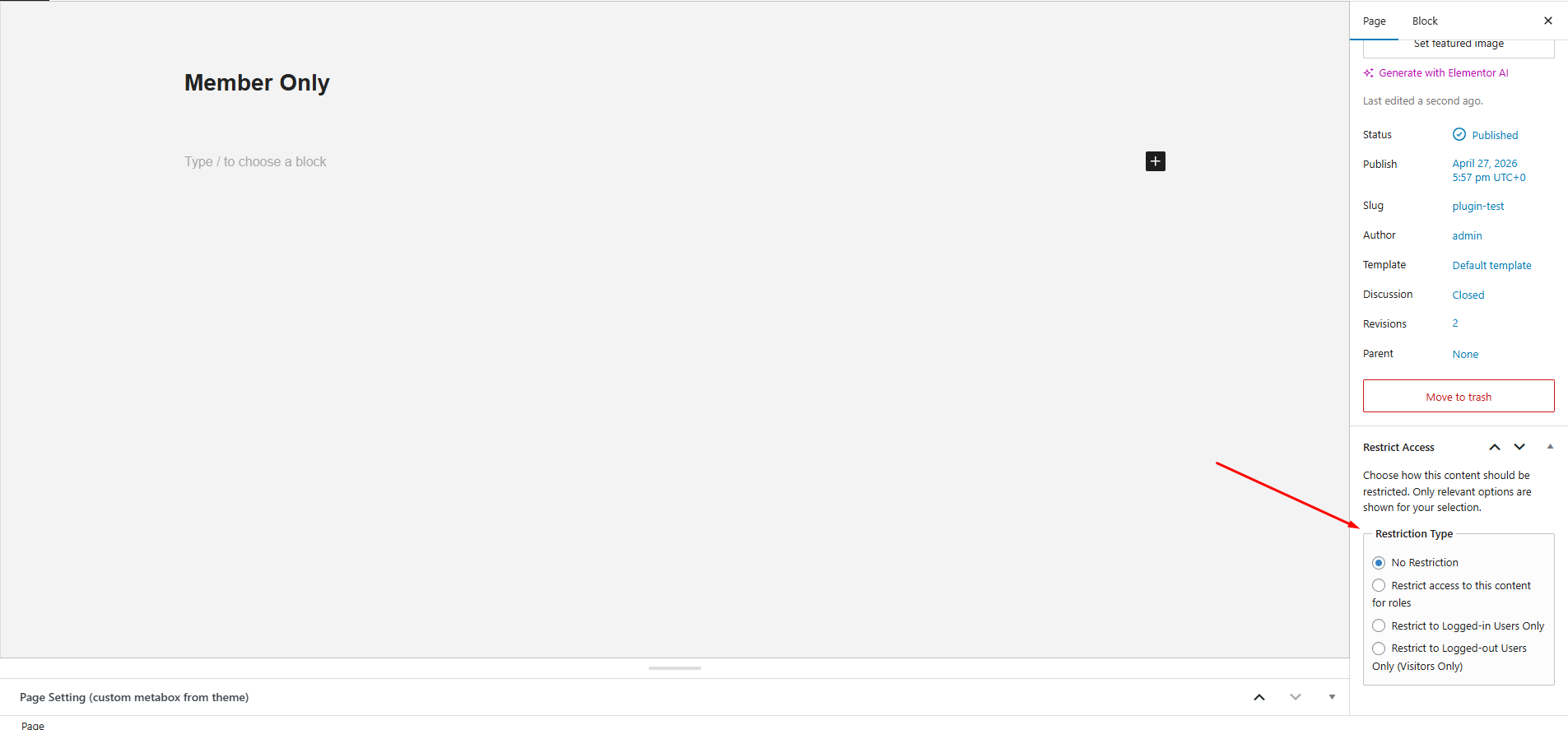
Restriction Type selector with radio-based UI.
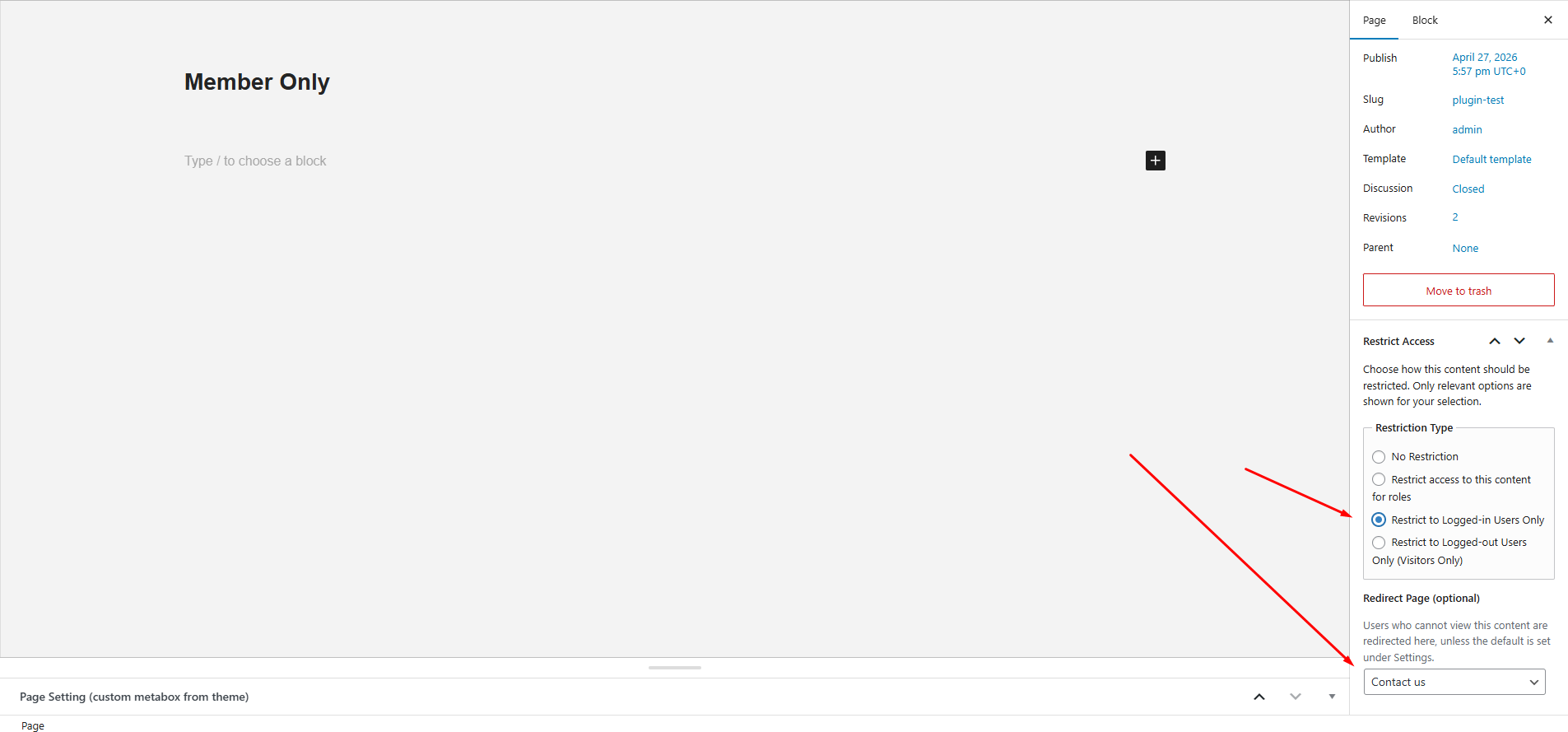
Dynamic fields based on selected restriction type (roles, redirects, visitors-only settings).
Faq
Yes! The plugin works with all public post types registered in WordPress.
Yes, select “Logged-in Users Only” from the restriction type.
Yes, select “Visitors Only”. Logged-in users will be redirected automatically.
The plugin automatically resolves them into a single restriction type using a priority system, ensuring consistent behavior.
Not yet. You can redirect them to a page where you handle the external redirect using a script or shortcode.
Yes, when using role-based restriction, you can select multiple roles.
The plugin will use the global fallback page set in the plugin settings. If that’s not set, users are redirected to the homepage.
Reviews
Effortless Role-Based Access Control for WordPress
By 
A lightweight, powerful plugin that makes restricting content by user role easy and seamless. Perfect for membership sites, LMS, and client portals.
worked great
By 
I was looking for something focused, clean, lighweight and found this great plugin which suited best as per my requirements, so far loving it.. Thanks 🙂
Perfect Solution for Role-Based Content Restriction
By 
I was looking for an easy way to protect specific pages for certain users, and this plugin worked perfectly! It’s simple to use and very effective for restricting access to posts or custom post types. Highly recommended for anyone who needs role-based content control.
Changelog
1.3.0
- Added Logged-in Users Only restriction option.
- Added Visitors Only (Logged-out Users Only) restriction option.
- Introduced radio-based restriction UI for cleaner and conflict-free configuration.
- Implemented priority-based restriction handling (Visitors Only Logged-in Roles).
- Improved meta handling with full backward compatibility.
- Prevented accidental data overwrite using conditional field saving.
- Enhanced admin UI with dynamic field visibility.
1.2.0
- Confirmed compatibility with WordPress 6.9
1.0.2
- Minor fixes for submission and compliance with WordPress.org guidelines.
1.0.1
- Improved compatibility with WordPress.org guidelines.
- Updated text domain and folder structure.
- Minor code cleanups.
1.0.0
- Initial public release.