Rollbar
Rollbar
Description
Rollbar collects errors that happen in your application, notifies you, and analyzes them so you can debug and fix them.
This plugin integrates Rollbar into your WordPress installation.
Features
- PHP & JavaScript error logging.
- Define an environment for each single WordPress installation or Multisite blog.
- Specify your desired logging level.
- Regular updates and improvements!
Please note:
In order to use this plugin, a Rollbar account is required.
Support
- Browse issue tracker on GitHub and report new issues.
- If you run into any issues, please email us at support@rollbar.com.
- For bug reports, please open an issue on GitHub.
You like it?
You can at least support the plugin development and rate it up!
Disclaimer
This plugin is a community-driven contribution. All rights reserved to Rollbar.
Installation
The installation and configuration of the plugin are as simple as it can be.
Through WordPress Plugin directory
The easiest way to install the plugin is from the WordPress Plugin directory. If you have an existing WordPress
installation, and you want to add Rollbar:
- In your WordPress administration panel go to
PluginsAdd New. - Search for “Rollbar” and find
Rollbarby Rollbar in the search results. - Click
Install Nownext to theRollbarplugin. - In
PluginsInstalled pluginsfindRollbarand clickActivateunderneath.
Warning: This installation method might not be suitable for complex WordPress projects. The plugin installed this
way will be self-contained and include all of the required dependencies for itself and the rollbar/rollbar-php
library. In complex projects, this might lead to version conflicts between dependencies and other plugins/packages. If
this is an issue in your project, we recommend the “Packagist” installation method.
Through Packagist
Note: this only works if your WordPress project is managed with Composer.
Read Using Composer with WordPress for more details.
This is a recommended way to install the Rollbar plugin for advanced projects. This way ensures the plugin and all of
its dependencies are managed by Composer.
You can install the plugin by running the following command in the root directory of your WordPress project:
`txt
composer require rollbar/rollbar-php-wordpress:^3.0
`
Through WPackagist
Note: if your WordPress project is managed with Composer, we strongly recommend installing the plugin through
Packagist instead.
Installing the plugin from wpackagist.org instead of packagist.org will result in the plugin being managed by
Composer. However, the downside is that it’s dependencies will not be managed by composer. Instead they will be packaged
in the plugin’s vendor directory not in your project’s vendor directory. This has the potential to cause name
collisions if other plugins or your project use different versions of the same dependencies.
To install the plugin from wpackagist.org run the following steps command in the root directory of your WordPress
project:
`txt
composer require wpackagist-plugin/rollbar
`
Configuration
The plugin can be configured in the WordPress Admin or programmatically.
WordPress Admin
The plugin provides a settings page in the WordPress Admin that allows you to configure the plugin. This settings page
can be disabled by setting the ROLLBAR_DISABLE_ADMIN constant to true in your wp-config.php file.
- In
PluginsInstalled pluginsfindRollbarand clickActivateunderneath. - Log into your Rollbar account dashboard:
- Go to
SettingsProject Access Tokens. - Copy the token value under
post_client_itemandpost_server_item.
- Go to
- In WordPress, navigate to
SettingsRollbar:- Enable
PHP error loggingand/orJavascript error loggingdepending on your needs. - Paste the tokens you copied in step 7 in
Access Tokensection. - Provide the name of your environment in
Environment. By default, the environment will be taken fromWP_ENV
environment variable if it’s set otherwise it’s blank. We recommend to fill this out either withdevelopmentor
production. - Pick a minimum logging level. Only errors at that or higher level will be reported. For
reference: PHP Manual: Predefined Error Constants. - Click
Save Changes.
- Enable
Programmatic Configuration
The plugin can also be configured programmatically. This is useful if you want to configure the plugin in a more
advanced way or if you want to disable the admin settings page.
`php
// wp-config.php
// Configure the plugin.
define( ‘ROLLBAR_SETTINGS’, [
‘php_logging_enabled’ => true,
‘server_side_access_token’ => ”,
‘js_logging_enabled’ => true,
‘client_side_access_token’ => ”,
‘environment’ => ‘development’,
‘included_errno’ => E_ERROR,
‘enable_person_reporting’ => true,
] );
// Optional: disable the admin settings page so the plugin is configured only programmatically.
define( ‘ROLLBAR_DISABLE_ADMIN’, true );
`
Screenshots
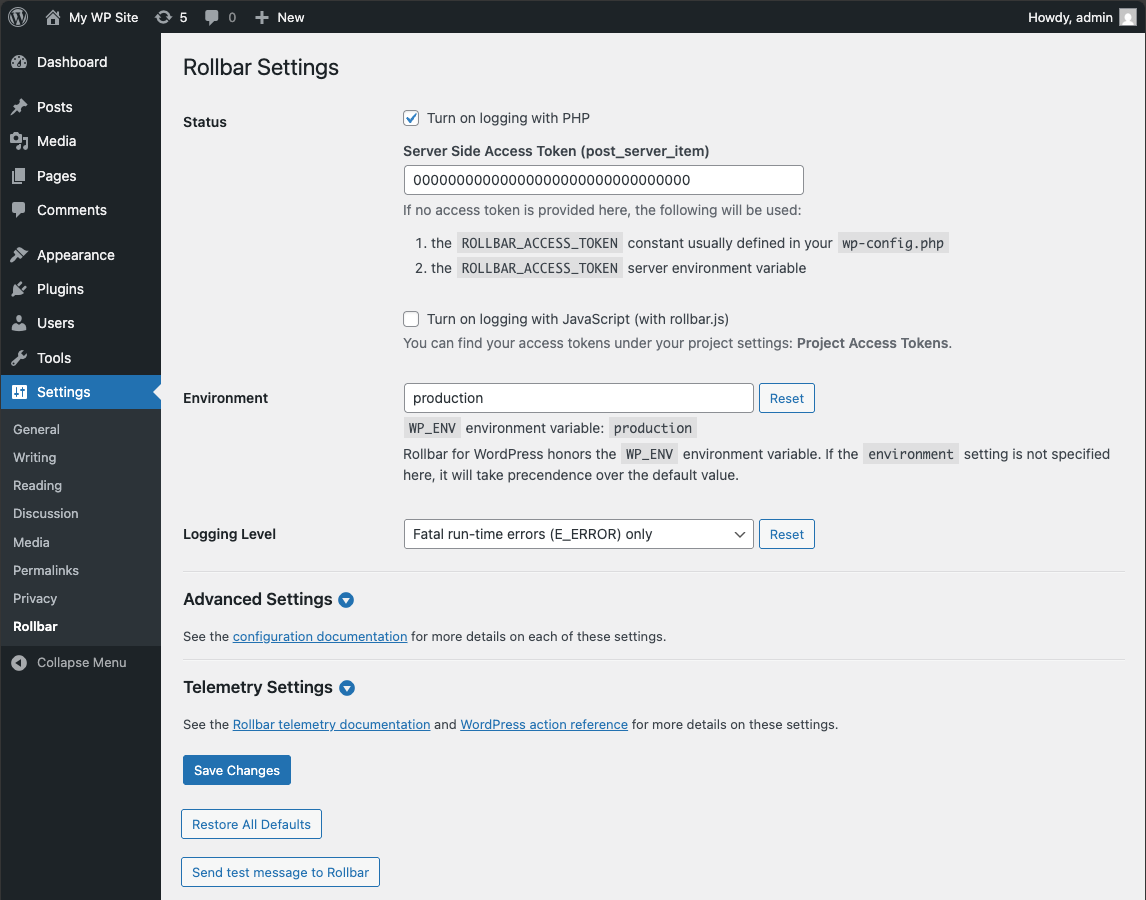
Settings page.
Faq
Yes, of course. Additionally, you can assign different environments to each of your blogs.
Yes. It’s actually the recommended method of installation. You can install the rollbar/rollbar-php-wordpress package
using composer.
Reviews
Works, but outdated
By 
Rollbar should update this plugin because it causes PHP deprecation warnings. I emailed them half a year ago, and they still haven't updated it.
Works a treat; but update rollbar-php
By 
rollbar-php version 0.18.0 is now available. (This project is currently using version 0.15.0).
Set this up to track my errors (roller is reasonable free for personal projects). Works great.
Roller says that a new version is available so would be good to see that shipped with this plugin.
Happy to spread my plugin!
By 
Of course I like it 🙂
Changelog
= Version 3.0.0 (pending)
* Fixed CSRF vulnerability.
* Removed support for PHP 8.0 and below.
* Updated and improved the settings page.
* Updated the Rollbar core PHP SDK to v4.1.
* Updated the Rollbar core JavaScript SDK to v2.26.
* Added support for telemetry and added auto-instrumentation.
* Added support for ROLLBAR_DISABLE_ADMIN to remove the plugin settings page from the admin.
* Added support for ROLLBAR_SETTINGS to configure the plugin without the admin page.
* Added support for ROLLBAR_CLIENT_ACCESS_TOKEN constant or environment variable to set the client access token.
* Added support for WP_PROXY_BYPASS_HOSTS, WP_PROXY_USERNAME, and WP_PROXY_PASSWORD for better proxy management.
* Added rollbar_api_admin_permission filter to allow custom authorization of the admin API.
* Added rollbar_user_can_view_admin filter to allow custom disabling of the admin page.
* Added rollbar_php_config filter to allow more exact control over Rollbar PHP configurations.
* Added rollbar_telemetry_actions filter to allow control of which actions are logged via telemetry.
* Added rollbar_telemetry_custom_handlers filter to allow custom control over what is logged in telemetry messages.
* Added ‘framework’ details with the WordPress version to the item payload.
= Version 2.7.1 (September 13 2023)
* Fix issue that could lead to fatal error with some settings (https://github.com/rollbar/rollbar-php-wordpress/pull/120)
= Version 2.7.0 (September 11 2023)
* Updated PHP Dependencies including loading seperate dependencies for PHP7 and PHP8. (https://github.com/rollbar/rollbar-php-wordpress/pull/114)
* Updated node development dependencies (https://github.com/rollbar/rollbar-php-wordpress/pull/115)
Version 2.6.4 (June 13th 2022)
- Updated admin test results to show a skipped test as a success (https://github.com/rollbar/rollbar-php-wordpress/pull/110)
- Fixed new session being created on every request (https://github.com/rollbar/rollbar-php-wordpress/pull/111)
- Added search for WP_ENV as a constant or the environment (https://github.com/rollbar/rollbar-php-wordpress/pull/108)
- Added a link to settings from the plugins page (https://github.com/rollbar/rollbar-php-wordpress/pull/109)
Version 2.6.3 (April 18th 2022)
- Update the tested WP versions
Version 2.6.2 (March 4th 2020)
- don’t start a session for wp-cron (https://github.com/rollbar/rollbar-php-wordpress/pull/88)
Version 2.6.1 (December 27th 2019)
- fix(initPhpLogging): Moving fetch settings to before settings check. (https://github.com/rollbar/rollbar-php-wordpress/pull/84)
Version 2.5.1 (February 20th 2019)
- Fixed a call to Rollbar\WordPress\Defaults for enableMustUsePlugin (https://github.com/rollbar/rollbar-php-wordpress/pull/75)
Version 2.5.0 (February 19th 2019)
- Moved Rollbar initialization from
plugins_loadedhook to the invocation of the main plugin file (https://github.com/rollbar/rollbar-php-wordpress/issues/73) - Added support for running the plugin as a Must-Use plugin (https://github.com/rollbar/rollbar-php-wordpress/issues/73)
- Added
Enable as a Must-Use pluginsettings (https://github.com/rollbar/rollbar-php-wordpress/issues/73) - UI improvements
Version 2.4.10 (February 5th 2019)
- Added support for ROLLBAR_ACCESS_TOKEN constant and respecting the ROLLBAR_ACCESS_TOKEN environment variable (https://github.com/rollbar/rollbar-php-wordpress/issues/72)
- Fixed tests
- Updated dependencies
Version 2.4.9 (January 24th 2019)
- Fix for issue #69 (https://github.com/rollbar/rollbar-php-wordpress/issues/69)
Version 2.4.8 (January 17th 2019)
- Update rollbar-php to v1.7.4
Version 2.4.7 (August 14th 2018)
- Update rollbar-php to v1.6.2
Version 2.4.6 (August 13th 2018)
- Configuration option custom_data_method doesn’t exist in Rollbar (https://github.com/rollbar/rollbar-php-wordpress/issues/66)
Version 2.4.5 (August 7th 2018)
- Update rollbar-php to v1.6.1
- Remove mentions of IRC channel from README.md and readme.txt
Version 2.4.4 (June 18th 2018)
- Update rollbar-php to v1.5.3
Version 2.4.3 (June 11th 2018)
- Update rollbar-php to v1.5.2
- Use rollbar-php:v1.5.2 new defaults methods to handle restoring default settings.
Version 2.4.2 (25th May 2018)
- Fixed the plugin not always respecting the boolean true settings (https://github.com/rollbar/rollbar-php-wordpress/issues/58)
Version 2.4.1 (19th May 2018)
- Updated rollbar-php dependency to v1.5.1
Version 2.4.0 (17th May 2018)
- Added capture_ip, capture_email, and capture_username to the config options.
- Fixed populating config options from the database to the plugin for boolean values.
- Updated rollbar-php dependency to v1.5.0
Version 2.3.1 (10th April 2018)
- Fixed a bug in strict PHP setups (https://github.com/rollbar/rollbar-php-wordpress/issues/44)
Version 2.3.0 (5th April 2018)
- Added
rollbar_plugin_settingsfilter - Added majority of Rollbar PHP config options to the User Interface.
- Moved the settings from Tools -> Rollbar to Settings -> Rollbar
Version 2.2.0 (4th December 2017)
- Fixed the logging level to correctly inlude errors from specified level and up.
- Changed the default logging level setting.
- Added instructions on tagging the repo to the README.md file.
- Added tests for logging level.
- Set up a PHPUnit test suite.
- Add rollbar_js_config filter for JS config data customization.
- Updated dependencies.
Version 2.1.2 (11th October 2017)
- Use the default rest route instead of permalink /wp-json
- Dynamically build the Rollbar JS snippet URL
Version 2.1.1 (11th October 2017)
- Fixed location of the Rollbar JS snippet
Version 2.1.0 (11th October 2017)
- Added “Send test message to Rollbar” button
- Fixed the plugin’s name inconsistency between WordPress plugin directory and composer.
Version 2.0.1 (6th October 2017)
- Fixed RollbarJsHelper class loading bug in src/Plugin.php (https://github.com/rollbar/rollbar-php-wordpress/issues/23)
Version 2.0.0 (9th September 2017)
- Added support for the WP_ENV environment variable
- Organized the code into namespaces
- Moved helper functions into static methods
- Updated Rollbar PHP library
- Included dependencies to make the plugin self-contained when installing through WP plugin directory
- Rewrote readme files
Version 1.0.3 (12th August 2016)
- Updated rollbar php lib to latest v0.18.2
- Added .pot translation file
- Removed WP.org assets from plugin folder
Version 1.0.2 (28th March 2016)
- Updated rollbar js lib
- Added escaping for setting values
Version 1.0.0 (4th November 2015)
- Initial release!