RSS with Images

RSS with Images
Description
A simple and easy way to add featured images in your site’s RSS feed with customizable sizing options.
Adds featured images to Mailchimp emails, Infusionsoft, Hubspot, Constant Contact, Zoho, Feedburner, Bloglovin’, Feedly, and other services that use RSS feed data.
Works great with Mailchimp’s RSS-to-Email campaigns, allowing you to be more creative and get the most value from your email newsletters. You can even set the xml encoding of your RSS feed. (the default setting is UTF-8).
For more information on setting up and using RSS with Images, view the documentation here.
note: RSS with Images will not add already existing images to your feed. Once the plugin is activated, any new image added to a post will be included in the feed.
Rate this plugin, I would LOVE the feedback!
ENJOY!
Installation
- Simply download the plugin and install.
- Set your image dimensions to that of your mailchimp email template.
- Choose your character encoding type. (Default is UTF-8)
- Save your options!
Screenshots
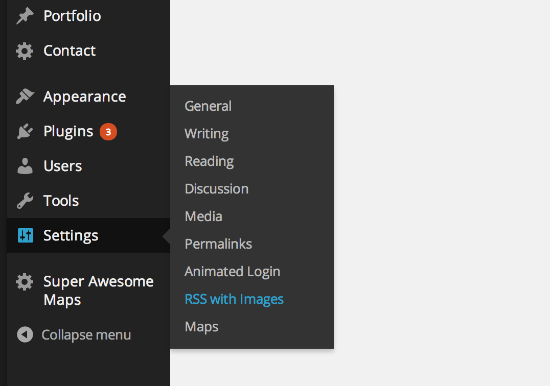
To access the RSS with Images Settings Page, click Settings > RSS with Images.

Here is a screenshot of the Settings Page. The options form is simple to use.
Faq
Q:What are the Differences in encoding types?
A: Refer to http://www.w3.org/TR/REC-xml/ for more information on xml
Reviews
Excellent
By 
Great plugin
By 
Nag line can't be dismissed
By 
While I think it is OK to inform the user once, I don't like, that the Dasboard Notification "Want more features? Upgrade to RSS with Images Premium " can't be dismissed. If I click on the cross to close the information, I comes back after every reload of the page.
I reported this as bug already two month ago and I am annoyed now.
Does what it says on the tin
By 
Had to leave my first ever rating for a WordPress plugin because I felt the current 3/5 star rating was extremely unfair. I've used this plugin on a production site for over a year (to integrate with Mailchimp RSS campaigns) and it's worked flawlessly.
Works great... with minor modifications
By 
After some tweaking in the code to remove the image size limitations and pairing it up with the AJAX Thumbnail Rebuild plugin, this little plugin works great for our custom Mailchimp feed!
I also vote for the ability to have larger images since many RSS fed newsletters are 600px wide. Some clients do prefer a larger featured image option. Our tweak works, but then we have to remember to "fix" the plugin when we run an update.
Errors on character
By 
This page contains the following errors:
error on line 197 at column 25: Input is not proper UTF-8, indicate encoding !
Bytes: 0x03 0x43 0x6F 0x72
I tried changing settings, no fix 🙁
Changelog
1.4.0
- Move addition of media xml and namespaces into hook.
- Cleanup custom RSS template
- Security updates
1.3.6
- Security Updates
- Added Support for WP version 4.7.1
1.3.5
- Added Support for WP version 4.3.1
1.3
- Security Updates
- Added Support for WP version 4.2.4
1.2
- Security Updates
- Feed template updated
- Added Support for WP version 4.1
1.1
- Removed wptexturize filter from RSS content and title
- Added support for WP version 3.9
1.0
- First release.