RumbleTalk Live Group Chat – HTML5

RumbleTalk Live Group Chat – HTML5
Description
WordPress Group Chat Plugin
Live group chat plugin for WordPress. Integrate it into your website in minutes. Create one or multiple rooms effortlessly.
We support 4 chat types:
- Members-only group chat – Integrated with your user base.
- Queued chat – Admins approve every message.
- Social chat – Open chat room for online discussions.
- Experts chat – One-on-one chats (private chats).
792,100 websites and online events are already using the RumbleTalk HTML Chat Platform.
The chat platform is a hosted professional chat room plugin with a quick integration to your WordPress members’ user base.
You may add it to any type of website, blog, or real-time event.
Unique features that can be set in the admin panel:
1) Integrate your users base with one click – your website members will then auto-login to the chat.
2) Moderated chat mode for live events – approve every message before showing it to all.
3) Private video and audio calls for private one-on-one video discussions
The ideal plugin for members chat, live online events, Group chats, live community, radio shows, fans clubs, stocks & forex trading, hobbies, sports, group discussions…and much more
Plug-in Name
rumbletalk-chat-a-chat-with-themes
WHAT IS A LIVE GROUP CHAT FOR WORDPRESS?
RumbleTalk platform is easy to set group chat plugin for WordPress, buddypress and bbpress
1) Members-only website
2) Social website
3) Live online event website
4) Integrated into any platform using our REST API.
Adding one or many rooms is a no-brainer with the RumbleTalk plugin. Add a chat widget to your website in two minutes.
BuddyPress & BBpress Integration
This group chat plugin supports automatic user base integration with WordPress, BuddyPress and BBpress.
Chat Features
NEW - Pin messages, files and videos

* Poll options in the chat
* Bio Description can be added in the username (ex: display name+bio)
* Admin count in plan summary added
* Admin button is added for easy access

* support for avatar integration with different members' plugins.
* Integration with WordPress users base avatar
* Mark text as bold, italic, strike and code.
* Admin mode - mute all users.
* New lines - now you can add more lines in each message
* Font size - increase/decrease the web-based font size
* Private chat - prevents automatic private chat window popup

* support for more currencies
* Paid access, bug fixes
* Experts chat, allows you to advice in a private conversation (with or without payment)
* Control what username will show in the chat
* Keywords feature - automatic text highlights
* login type: Register before logging in

* Better Sound Control
* History search options
* Export chat history to CSV or HTML
* Video chat messages, record 30-second video messages.
* Mobile video calls (android)
* Set Private chats with registered users
* Spam Filter applied also for users name
* Create additional rooms directly from the plugin
* Open settings from the WordPress admin
* Delete Archive messages directly from the chat
* Increase Font Size in mobile

* Full Screen In mobile mode
* Admin user avatar
* BuddyPress integration
* Export Chat Transcript from the chat interface
* Auto login with your own users-base users name (API)
* IP info

* Upload Images from your mobile device
* Take photos from your mobile version
* One on One VIDEO and Audio calls
* Upload Docs, Excel, PowerPoint, PDF files
* Upload Images from your own PC

* Take pictures from your PC camera
* Easily Embed a group chat in your site.
* Chatroom Theme Library
* Talk from Mobile and Tablet.
* Login, Share and Invite
* Private chat

* SSL - new secure channel TLS1.2
* Design your own chat theme.
* Design your chat with css (for advanced users)
* Manage more than one chat.
* Spam filter (create a black listed words).
* Disconnect Trolls.

* Ban users by IP.
* Define moderators and rolls.
* Archive your chat, Save log of your chat history.
* Chat in 30 languages.
* Offline Mode
* Delete single messages
* Flood control
* Control the side of the floating icon
* Advanced dashboard for managing your chat rooms
* Send audio and video messages
* Set your own sound for different types of actions
* In-Chat payment options
BuddyPress Chat Room Integration
These members chat plugin supports automatic integration with BuddyPress plugin.
Languages
English, Español, Bahasa Indonesia, Català, Czech, Dansk sprog
Deutsch, Français, Italiano, Magyar, فارسی, Nederlands, Dutch, Polski
Português, Română, ภาษาไทย, Slovenčina, Suomi, Svenska, Tiếng Việt
Türkçe, ελληνικά, Български, Македонски, Русский язык
Србски, Українська, עברית , عربي
Installation
Rumbletalk includes 3 parts
1) The Chat – this is the actual chat users see on your website
2) The Plugin – this is the plugin you add to your WordPress
3) The admin panel – where you can set your chat preferences.
Note, that the chat settings can be accessed from the plugin. Advanced options
[YouTube https://www.youtube.com/watch?v=xWwsKryTZhU]
First, Install the Plugin:
- Load the plugin from the WP plugin search “RumbleTalk” or download it from the WordPress website, then add it to the rumbletalk-chat directory
/wp-content/plugins/directory - Activate the plugin through the ‘Plugins’ menu in WordPress
- Click ‘Settings’ and then ‘RumbleTalk chat’
Second, Get your chat code:
- Enter your email & choose a password, verify, and create an account.
creation may take up to 20 seconds. - This step is only in case you already have an account with RumbleTalk – Login to the RumbleTalk admin panel https://rumbletalk.com
go to account, then copy the key & secret from the integration tab. Now, click on the “Already have a RumbleTalk chatroom Code”
and add the two token fields.
Add the chat to your chosen page:
- Use the short-code phrase ‘[rumbletalk-chat]’ in your posts (you can do it in visual mode, no
need to switch to HTML view) to position the chat widget exactly where you need it.
Note, if you have more than one chat, use the short-code phrase showing under each chat in the WordPress plugin.
Chat Settings:
7. Click the settings gear button in the RumbleTalk plugin to change specific chat settings (style, history settings, login options and admin behavior).
8. For advanced settings, click on the blue “Administration Panel” button on the top part.
Users base integration – wp, bbpress, buddypress:
- If you want to allow autologin for your registered users, click on the integration checkbox, SAVE and you are done.
Full instructions can be found here:
https://rumbletalk.com/plugins/wordpress/
Screenshots
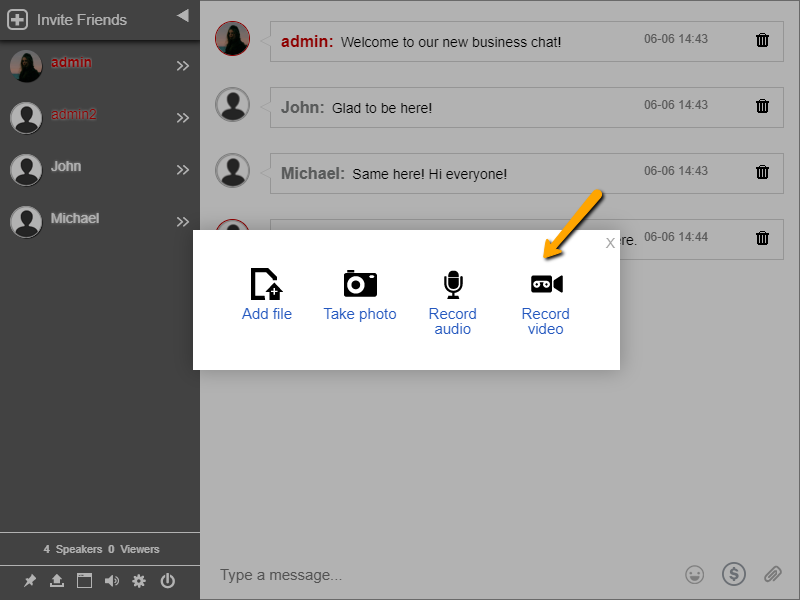
The most advanced chat platform for WordPress with over than 706,000 installations, upload files, images, and docs.
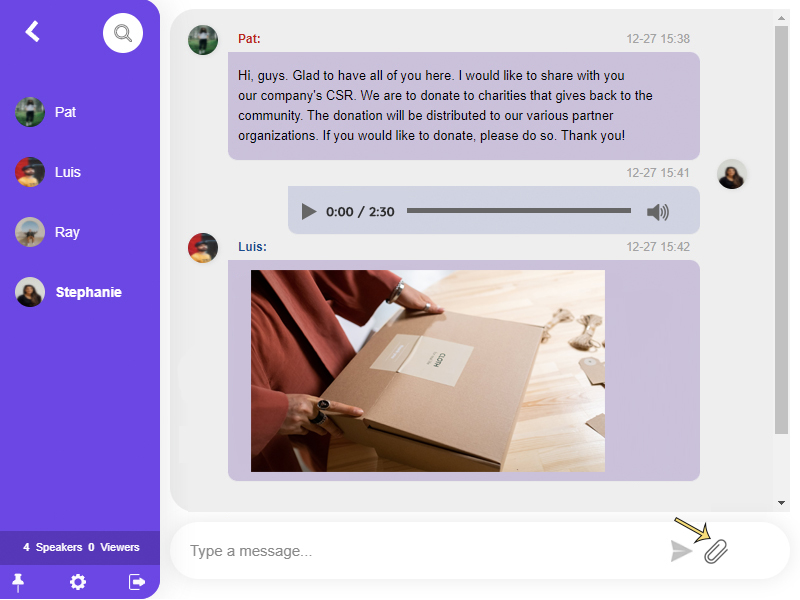
Chat chat skin with advanced design and CSS. You can share any type of file, image, video, link, or emoji to the group chat.

Moderated chat where you approve messages before they show up. Let chat admins perform functions such as screening inbound messages before they go live, limiting the users, banning a specific user, changing the chat type, exporting transcripts, filtering profanity, and more.
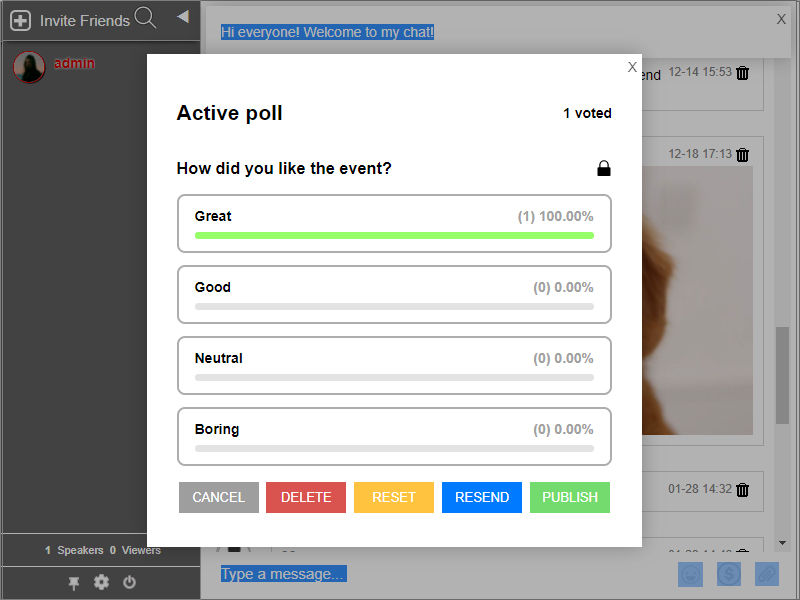
Polls provide streamlined audience feedback in real-time. Let your participants weigh in on the topic by getting their opinions through the polls feature.

Mention a User - Think of the Mentions feature as tagging someone. When you type @ in the chat room, you will see a list of users. This can help you better manage messages in the chat room.

Floating Chat - your messages appear as little popups. The most recent messages will remain in the bubble for users to view, and you can tap the bubble to open the conversation in a popup window.
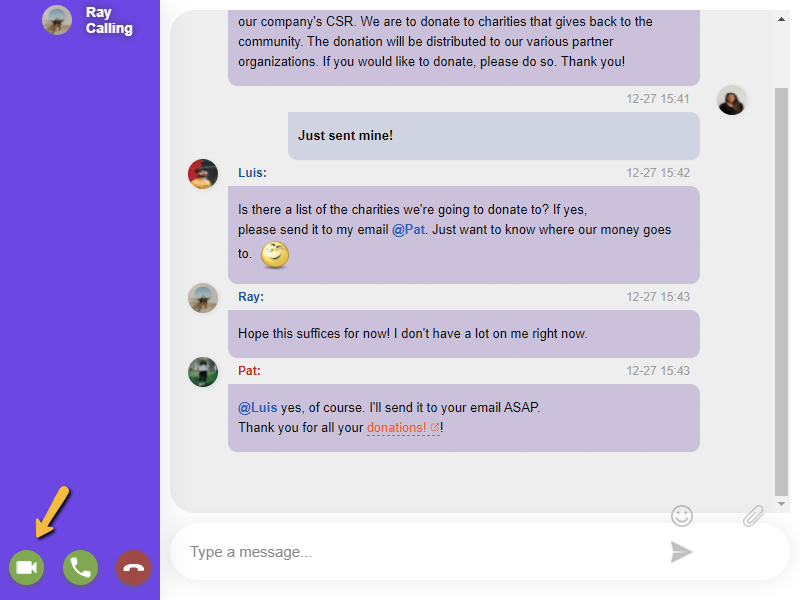
Video and Audio Call - Aside from sending text messages, you can also make private video and audio calls in the chat without having to install anything, making every conversation more personal and less virtual.

Keywords - RumbleTalk Keywords (InTEXT) identify specific words and dynamically turn them into clickable links, allowing you to redirect your audience to any webpage, a downloadable file, an online form, a video instruction, and more.
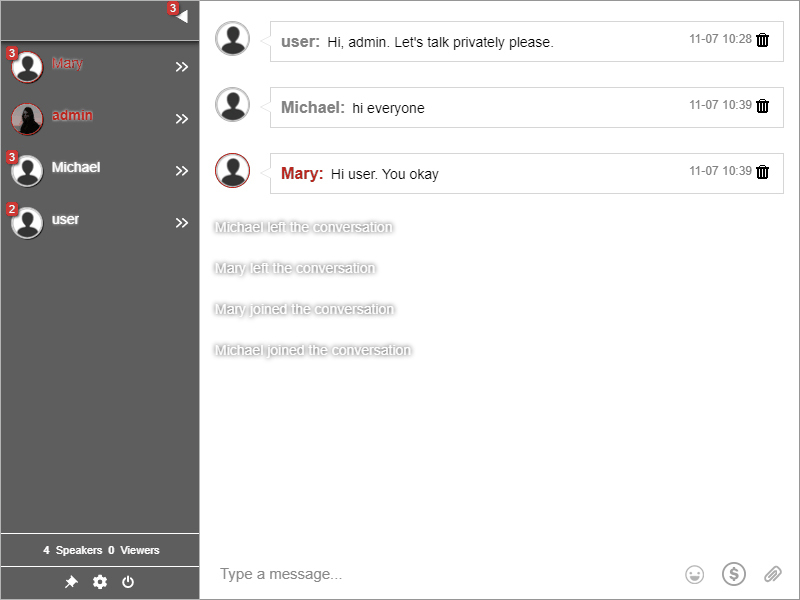
Private Chat - communicate with other users privately, in a one-on-one conversation (you can turn it on/off to your liking)
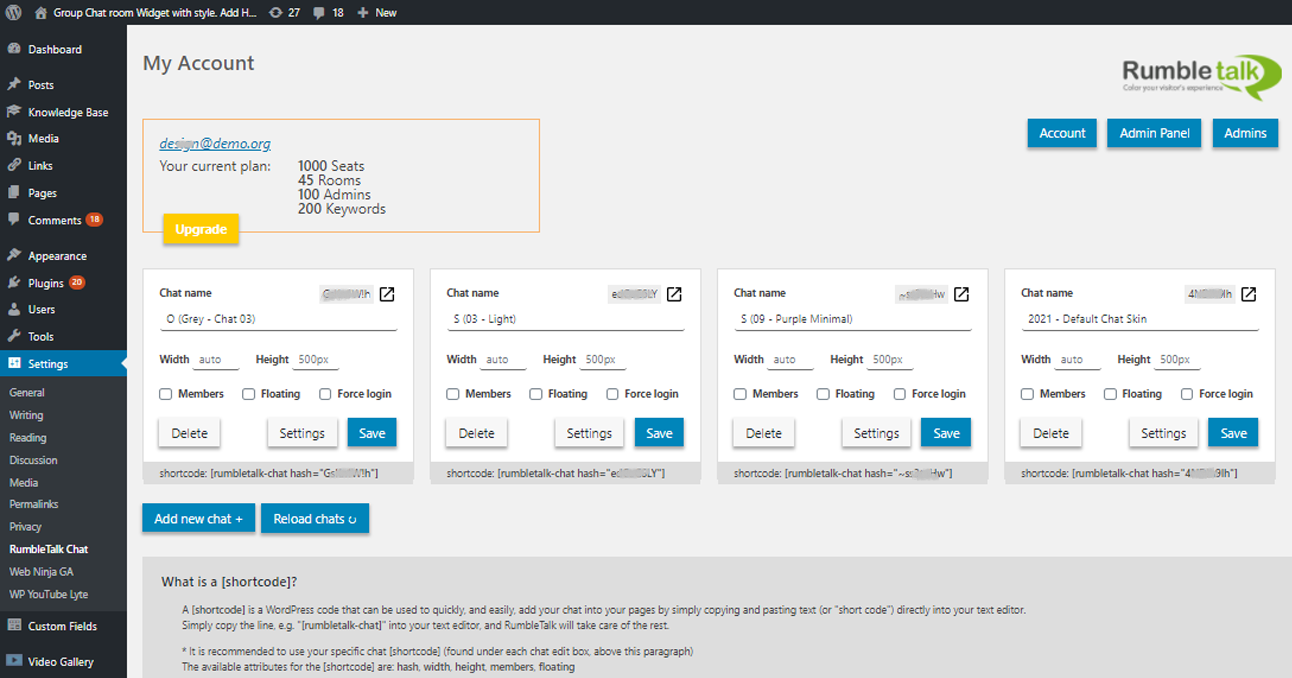
Plugin - create one or many rooms directly from the plugin
Faq
RumbleTalk is a group chat platform for websites. You can create private member-only chats or public “open to the world” chat rooms.
It’s ideal for communities, live events, social trading groups, online radio shows, and more.
[YouTube https://www.youtube.com/watch?v=M2h8UyjzuJU]
Inside a chat room, you can chat publicly in the “lobby” or privately one-on-one.
Note: You can restrict private chat to admins only.
We offer several chat types that can be changed at any time.
You can turn any chat into “members-only” chat by clicking on the members checkbox in the plugin settings.
The 4 main options are:
1) Group Chat – A room where everyone can chat publicly or privately. Admins can moderate by banning, deleting, or disconnecting users.
2) Moderated Chat – Every message must be approved by an admin before being visible. Great for live events and maximum control. (Screening messages is done from the actual chat by logging in as admin)
3) Experts Chat – Admins (experts) can chat privately with multiple participants simultaneously, including one-on-one video calls.
4) Private chats – this is a chat room where everyone can talk to everyone only in a private chat.
Yes! You can initiate private audio and video calls. It works on PCs, laptops, and mobile devices.
Absolutely. If your site is members-only, you can set the chat to be accessible only to logged-in users.
Simply check the “Members” checkbox in the plugin settings, save, and you’re done.
This message means the chat only allows logged-in WordPress users.
1) If you want to allow public access, uncheck the “Members” checkbox in the plugin.
2) If you want members-only access, make sure the “Guest login” option is also enabled in the chat settings.
This doesn’t allow guests to log in but activates the background auto-login module.
Yes! By default, anyone can join the chat. You can choose from several login options:
- Guest – User picks a username and logs in with a default avatar.
- Social Media – User logs in via social account (with avatar).
- Register – User registers before logging in.
- Admins and Users (RumbleTalk Login) – Predefined user list with custom avatars (set in chat settings).
- Members – Auto-login using your WordPress user base.
Yes, RumbleTalk chat works on all modern devices, including smartphones and tablets.
Yes. You can create multiple chat rooms under one account (premium feature).
Each room can be embedded in a different website or domain.
Yes. As the admin, you control login methods. If you enable only social login, users will only see that option.
Yes. Each chat can have its own design. You can choose from ready-made themes or create your own using the chat skin builder or CSS.
RumbleTalk chat is elastic and adapts to its container.
If it’s not displaying properly, consider using the direct embed code from your admin panel.
Yes (though not recommended in WordPress).
Switch to the “Text” tab in the WordPress editor and paste the embed code.
Replace “chatcode” in the example below with your actual 8-digit RumbleTalk code.
Example:

<div style="width: 400px; height: 500px;">
<script language="JavaScript" type="text/javascript" src="https://rumbletalk.com/client/?chatcode"></script>
</div>
Yes. Integration with your WordPress or BuddyPress user base is as simple as checking a box.
When auto-login is enabled (with the “Members” checkbox), click the small arrow next to the checkbox and select how the name should appear in the chat.
To log in as an admin with auto-login, make sure the same username exists in both WordPress and RumbleTalk (case-sensitive).
1) Add the admin user nickname in the RumbleTalk users tab (set as Admin).
2) Create the same user in your WordPress users list.
The system will recognize the user and ask for a password the first time they log in as admin.
Yes. RumbleTalk has a FREE version limited to 5 participants – ideal for small groups and private chats.
The Premium version supports more participants, private chats, live audio/video calls, moderation, and more.
Yes. As an admin, click the tray icon next to a message to delete it.
To clear the entire chat, click the gear icon and use the “Clear All” option.
RumbleTalk InText Keywords uses smart technology to detect and highlight specific words in real-time during chats.
These keywords automatically turn into clickable links that redirect to any page you specify.
See the video: https://youtu.be/u3NBNWVy6fk
Reviews
Great Embed Chat Room Plugin
By 
I've been using RumbleTalk on my members' website, and it's been a smooth experience. Super easy to set up.
Since we have many guests, I really like the unique feature of pre-approved messages (directly approve messages in the chat by admins) + customizing the chat theme/colors.
It works perfectly for our members-only community and our once-a-month live streaming discussions.
Excellent chat for events
By 
Used it for a conference event and it had all the features we needed. Everything went smoothly and we got great participation and feedback on our event.
Great For Recruiting
By 
We implemented this chat room plugin in our WordPress website to enhance communication between recruiters and job seekers. The plugin provided an efficient platform for candidates to interact with potential employers, ask questions, and share their resumes
Great chat for events
By 
During an online event, we used this chat room plugin to facilitate networking and discussions among participants. A good set of features, especially the polls, were great!
great chat plugin with so many features
By 
Easy to add
By 
Former employee (current consultant)
Eh
By 
No support
By 
doesnt work
By 
dont like embeded from remote server!
By 
Changelog
01/Dec/2025
-version update
12/Oct/2025
-version update
29/Aug/2025
– fix a rare XSS vulnerability
– fix an unexpected error message when no users are logged into the chat
– fix the rumbletalk-admin-button button sometimes not loading correctly
05/08/2025
– faq update
28/Jul/2025
-version update
09/Jun/2025
-version update
-admin panel change for uploading images
22/Feb/2025
-version update
21/Jan/2025
-version update
-removed paywall feature
12/Nov/2024
-version update
01/Oct/2024
– version update
– fix for Vul reported for Authenticated Stored Cross-Site Scripting
14/Aug/2024
-version update
02/Jul/2024
-version update
17/Jun/2024
-version update
27/May/2024
-version update
17/APR/2024
-version standards
14/MAR/2024
chore(plugin-check): adjust the code to fit WP standards
08/MAR/2024
– verify AJAX requests with nonce
31/JAN/2024
– Facebook integration with the newest SDK.
– New WP version
21/DEC/2023
– version test
28/NOV/2023
– version set
07/NOV/2023
– fix for captcha error
22/OCT/2023
– token generation fix
– ajax vulnerability fix
– css polls and settings changes
06/SEP/2023
– New WP 6.3.1 support
– New Polls results types
24/APR/2023
– New WP 6.2 support
03/NOV/2022
– New WP 6.1 support
01/SEP/2022
– Add a beta option (need to contact us so we enable these features below)
– Added pin messages – admins will be able to pin a message, image or a youtube/Vimeo video.
– Many more smilies. We added several sets of emoticons.
– A new option to design your own chat with an easy-to-use quick design panel.
– Edit your own chat messages – now you can edit your own messages.
– New skins – several new modern stylish skins.
– checked with new version of wp
30/MAY/2022
-checked with new version of wp
14/FEB/2022
-fixed special char when creating a new account
22/DEC/2021
– Change the SDK to use wp sdk wp_remote_retrieve_response_code
19/DEC/2021
– fix height and width set to 0 when not set in a save operation
18/DEC/2021
– sdk changes
– short tags changes
15/DEC/2021
– removed social oriented images and text
– added missing icons in the plug-ins admin.
30/NOV/2021
– new wp version
08/NOV/2021
– new video explanation in the plugin
16/APR/2021
– remove keywords direct button
– update sdk version
10/APR/2021
– Enabled the redirect from “www.rumbletalk.com” to “rumbletalk.com”
– Disabled old P2P server and enabled only WebRTC video call service
– Fixed Private message disconnect minor bug.
– beta: allow admin to login to other room as a user
27/FEB/2021
– Bio Description can be added in the username (ex: display name+bio)
– Admin count in plan summary added
– Admin button is added for easy access
07/FEB/2021
– chat server loading is faster (3 times faster)
– new feature to allow the user to put themselves as “Away” “Busy” (in beta)
– copy and paste images to the chat (no need to upload, in beta)
02/DEC/2020
– minor arrow display adjustment
– support for new wp version
16/SEP/2020
– added avatar support for various members plugins.
– style bug fix for viewing the login name arrow.
16/AUG/2020
– Added support for avatar integrations with different members plugin.
2/JUN/2020
– added avatar integration so when members log in we take the users images from WordPress.
20/APR/2020
– text adjustments
– bug fix for initial avatar integration
1/JAN/2020
– page image crop and resize option
– bug fix: after export the pagination counter is gone.
20/NOV/2019
– New chat dialog
– Mark text as a bold, italic, strike and code. https://rumbletalk.com/blog/index.php/2019/07/08/text-formatting/
– Admin mode – mute all users. https://rumbletalk.com/blog/index.php/2019/09/16/mute-button/
– New lines – now you can add more lines in each message
– Font size – increase/decrease the web-based font size
– Private chat – prevents automatic private chat window popup.
30/OCT/2019
– added the forceLogin configuration to chat edit
– added the forceLogin attribute to the [shortcode] overwrite ability using force-login=”true/false”
– remove legacy support for the old WP options of the plug-in
12/SEP/2019
– added the [shortcode] for admin button: [rumbletalk-admin-button]; this button links to the chat when there is an admin available
– supports the ‘hash’ – the chat’s hash; can be ignored to use the default chat
– supports the ‘no-admin-text’ – the text to display in cases where no admins are available
– supports the ‘href’ – the URL the user will be directed to when clicked on (in case of admin availability); defaults to the chat public link
– supports the ‘target’ – the target (e.g. _self, iframe name, etc.) defaults to ‘_blank’
– supports the ‘text’ – the text to display in cases where they are admins available
23/JUL/2019
– Changed the login of the members checkbox. Now when disabled, it will enable all the login options.
14/JUL/2019
– added support for new lines in private chat.
24/JUN/2019
– added support for opening the general admin panel from the plugin.
28/MAY/2019
– added support for donations and collecting funds in the chat.
20/MAR/2019
– add apply_filters on the login params with handle “rumbletalk_login_args”
– utilize the new forceLogin to log new users even if old login is in place
– use new upgrade reference of account id
– minor CSS and text fixes
25/FEB/2019
– Paid Access bug fix
– P2P video call new lib
24/JAN/2019
– Added PayWall admin feature (paid access)
16/DEC/2018
– change upgrade URL to new admin
– fix [shortcode] copy attributes bug
28/NOV/2018
– fix account creation troubleshooting bug
– adjust UI to the new admin
15/SEP/2018
– fix invalid token issue
9/SEP/2018
– fixed name change apostrophe issue
18/JUL/2018
– changed Login SDK version from v0.4 to v0.41 for wider browser support
16/JUL/2018
– add [shortcode] explanation
– add [shortcode] overwritten attributes of: width, height, members, floating
– fix a bug that created an empty box on floating chat type
19/JUN/2018
– new members integration option, control your username login name.
15/APR/2018
– Plugin change for once glance status and integration.
26/DEC/2017
– Plugin change for once glance status and integration.
20/NOV/2017
– New Feature – Keywords.
20/NOV/2017
– New SDK – Faster connections.
10/NOV/2017
– New: Export history to csv option
21/OCT/2017
– Server fail-over architecture change
25/SEP/2017
– New: a new login TYPE: Register users
09/JUN/2017
– New: attach files and docs also in private message
02/JUN/2017
– New: send short video messages
– New: Audio and Video calls are now supported also on android devices.
20/JUN/2017
– New: in Beta send video messages
09/APR/2017
– New: Spam filters for users name
15/MAR/2017
– New: Set Private chats for Admins only
01/MAR/2017
– New: Create additional rooms directly from the plugin
13/FEB/2017
– New: Open settings directly from WordPress plugin
8/JAN/2017
– Change: new mechanism to delete Archive messages directly from the chat
18/DEC/2016
– Increase Font size option in mobile view