SaleGen Marketing Toolkit – CRM, Email Marketing, Forms & Popups
SaleGen Marketing Toolkit – CRM, Email Marketing, Forms & Popups
Description
Welcome to SaleGen Marketing Toolkit!
Capture leads, manage contacts, and run email marketing — all inside WordPress.
An all-in-one email marketing and marketing automation plugin for WordPress.
Create forms, popups, manage contacts, and send email campaigns — all from one place, without relying on multiple plugins or external services.
Fast, flexible, and designed for real-world marketing workflows.
Learn more: wpsalegen.com
SaleGen Marketing Toolkit – Contacts, Forms, Popups, Email Campaigns
🚀 What you can do
- Create contact forms, opt-in forms, and lead generation forms
- Build popups with advanced triggers and targeting
- Manage contacts in a built-in CRM with tags and custom fields
- Send email campaigns and automation sequences
- Use your own SMTP or IMAP mail server
- Track submissions, events, and contact activity
📦 Core modules
Contacts (CRM)
Manage contacts with custom fields, tags, import/export, and activity history.
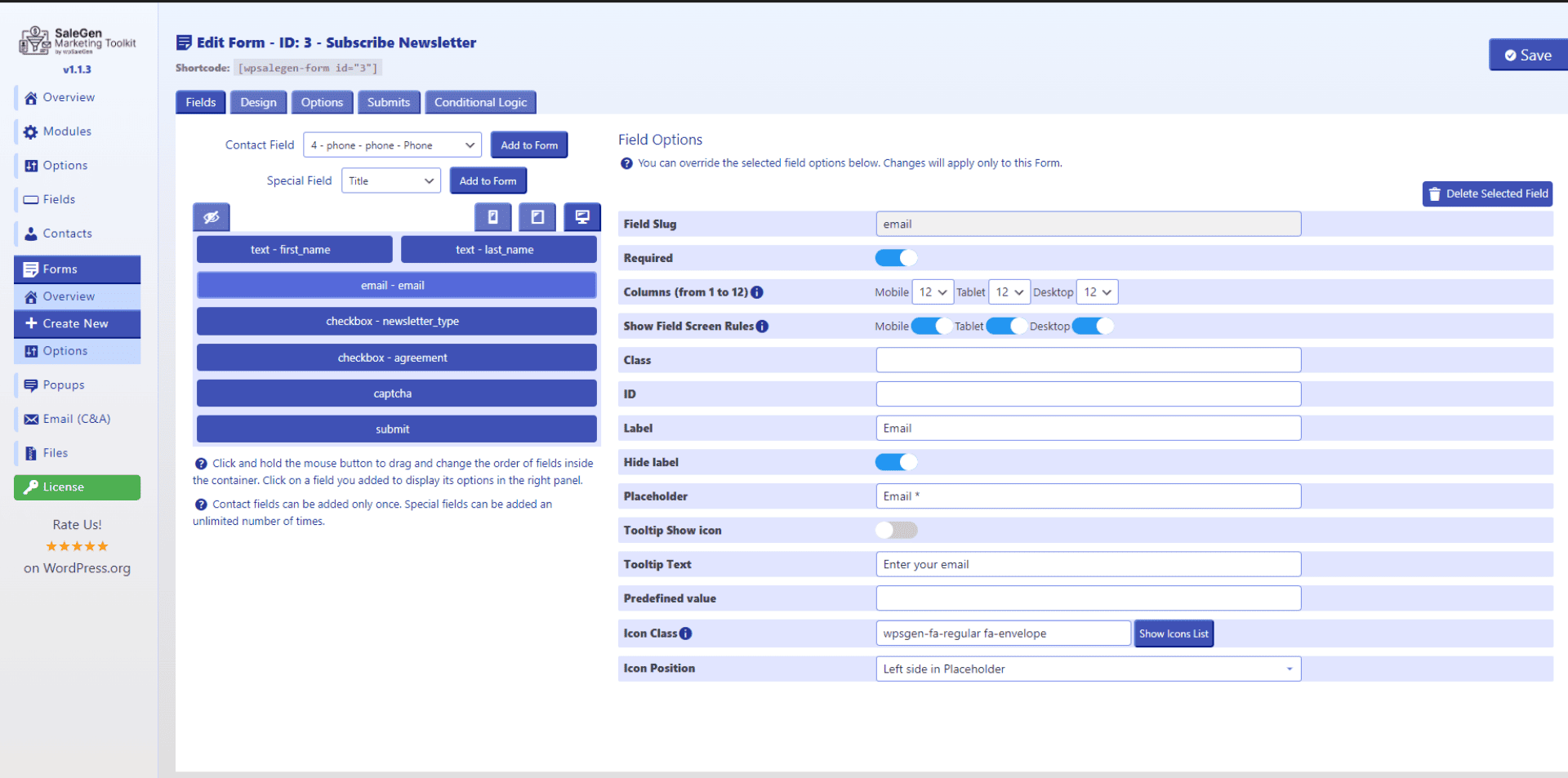
Form Builder
Create contact forms, registration flows, and lead capture forms with validation, anti-spam, and tracking.
Popup Builder
Build popups for lead generation, announcements, and offers using triggers like time, scroll, and exit intent.
Email Campaigns & Automations
Send newsletters, create automation chains, and manage email workflows with reusable templates.
⚙️ Additional modules and tools
Dashboard
Central control panel to manage modules, mail configs, and global settings.
Files Manager
Manage uploaded files linked to contacts, forms, and submissions from one place.
Mail Configs
Create reusable email configurations for different workflows.
✉️ Email and communication
- Custom SMTP configuration
- Optional IMAP mailbox integration
- Reusable mail configs
- Queue-based email sending
- Contact email chat (mailbox-based workflows)
🔌 Supported email providers
Free version:
* Custom SMTP
* Custom IMAP
PRO:
* Mailbox providers: Google Workspace, Microsoft 365, Zoho Mail, Fastmail
* Delivery providers: SendGrid, Mailgun, Brevo, Postmark, Amazon SES
📊 Built for growth
- Track form submissions and popup events
- Monitor email activity and campaign performance
- View contact history, logs, and engagement data
- Use segmentation and conditions in automation flows
🔒 Secure and flexible
- Frontend and backend validation
- Spam protection (Honeypot + Google reCAPTCHA v2)
- Works with Gutenberg and popular page builders
- Lightweight and modular architecture
🔌 PRO features
The free plugin is fully usable. PRO adds:
- Advanced automation and segmentation
- Provider integrations
- WooCommerce integration
- Extended CRM field types and workflows
💡 Why choose SaleGen Marketing Toolkit?
- All-in-one marketing system inside WordPress
- No need for multiple plugins
- No dependency on external SaaS platforms
- Full control over your data and email delivery
- Built for real marketing workflows
External services
Google reCAPTCHA
Service provider: Google LLC
Used for spam protection
Data sent:
* IP address
* reCAPTCHA response
Terms: https://www.google.com/intl/en/policies/terms/
Privacy: https://policies.google.com/privacy
Installation
- Upload the plugin files to the
/wp-content/plugins/salegen-marketing-toolkit/directory, or install via WordPress Plugins screen. - Activate the plugin.
- Open the SaleGen Marketing Toolkit menu in admin and configure modules.
Screenshots



Faq
Yes. The free version includes CRM, Forms, Popups, and Email Campaigns. PRO adds advanced features.
For site owners, marketers, and developers who want a complete marketing system inside WordPress.
Yes. It replaces separate CRM, form, popup, and email plugins.
Yes. Forms map directly to CRM fields.
Yes, via CSV.
Yes.
Yes, including multi-step automation chains.
Yes, SMTP and PHP mail() are supported.
Yes. IMAP can be used for mailbox workflows and replies.
A mailbox-based system to read and reply to contact emails inside WordPress.
Yes, reusable configs can be assigned to different workflows.
Yes, in PRO.
Yes. PRO adds deeper integration and dynamic data.
Yes. Files can be managed in a dedicated module.
Yes. Includes validation and spam protection.
Yes.
No. You can run everything on your own server.
Inside your WordPress database.
Reviews
Surprisingly useful all-in-one marketing plugin
By 
I installed SaleGen on a test WordPress site because I wanted something that could handle forms and email marketing without adding 4-5 separate plugins. After using it for a while, I was pleasantly surprised. The popup builder is easy to set up and the built-in CRM with tags and contact history is actually useful for tracking leads. I also liked that forms can be connected directly to contacts and automation flows without extra integrations. The interface took a little time to explore, but overall it feels like a solid toolkit for lead generation and email campaigns.
Changelog
1.5.1
- New: Manual & Automatic Suspicious Event Detection for Contact Activity in Email Campaigns
- Improved: User Interface and Design Enhancements
- Fixed: Various Minor and Major Issues
1.5.0
- New: Bulk Add Tag(s) Action for Contacts, Campaign Events, and Campaign Contacts
- Improved: Multi-Select Tag Filtering with Strict AND Matching
- Improved: Mail Configuration Diagnostics and Connection Status Reporting
- Improved: Send-and-Read Mailbox Configuration Support
- Fixed: ECA Event URL Filtering with Partial Match Support
- Fixed: Contact Deletion Cleanup for Related Engagement Data
- Fixed: Mail Config Save and Connection Validation Issues
1.4.0 – 1.4.1
- New: Reusable Mail Configs (SMTP / IMAP) with Provider-Based Email Architecture
- New: Contact Email Chat with IMAP Sync, Replies, and Incoming Email Tracking
- New: WooCommerce Contact Import & Auto Import with HPOS Support
- New: Automatic Bounce Processing with Configurable Actions and Auto-Tagging
- New: Contact Activity Tracking, Engagement Indicators, and CRM Timeline
- New: Custom CSS / JS Support in Builders
- New: Dark Admin Theme with Light/Dark Toggle
- Improved: Contact Engagement Statistics and WooCommerce Metrics
- Improved: Forms, Popups, Email Templates, and Automation Builder Experience
- Improved: Dashboard, Navigation, and Overall Admin Interface
- Improved: Automation Management, Contact Filtering, and Unsubscribe Workflow
- Fixed: WooCommerce Import Edge Cases and Data Mapping Issues
- Fixed: Duplicate Tag Creation from Forms, Campaigns, and Automations
- Fixed: Cleanup of Logs, Queues, Events, and Related Records
- Fixed: Builder Preview, Provider Connection, Theme, and UI Issues
1.3.0 – 1.3.2
- New: Dark Admin Theme with Persistent Toggle
- New: Multi-Mailbox Support (SMTP / IMAP)
- New: Contact Email Chat with IMAP Sync and Replies
- New: Contact Analytics, Timeline, Field History, and Tag Tracking
- New: Statistics for Forms, Popups, Automations, and Contacts
- New: Automation Contact Management and Step Statistics
- Improved: Dark UI Consistency Across All Modules
- Improved: Automation Editor Layout and Workflow
- Improved: Forms, Popups, Preview Modals, and Builder Experience
- Improved: General Performance and User Experience
- Fixed: Dark Mode Rendering and UI Consistency Issues
- Fixed: Popup Positioning and Navigation Highlighting
- Fixed: Email Sync, Mail Config, and Builder Edge Cases
1.2.0
- New: Pre-Built Templates for Forms, Popups, and Email Templates
- New: Live Preview in Builders
- Improved: General Improvements
- Fixed: Minor Issues
1.1.0 – 1.1.4
- New: Email Campaigns & Automations Module
- New: Manual Bounce Processing (SMTP / IMAP)
- New: Auto-Tagging for Failed Email Contacts
- Improved: General Improvements
- Fixed: Minor Issues
1.0.0 – 1.0.5
- New: Initial Release (Contacts, Forms, Popups)
- Improved: Plugin Description and Rating Flow
- Fixed: Minor Issues