SDAweb Channels for YouTube
SDAweb Channels for YouTube
Description
SDAweb Channels for YouTube is a lightweight, privacy-friendly way to showcase YouTube content on your WordPress site. Add any number of public YouTube channels and display their videos using shortcodes or a Gutenberg block. Videos are cached locally so visitor page views consume zero API quota.
Layouts & Playback
- Grid — Responsive multi-column grid (1–4 columns)
- Tabs — Channel-tabbed interface with 3 navigation modes: scroll, wrapping pills, and avatar strip
- Slider — Horizontal carousel with arrow navigation
- Auto player (default) — Adapts to screen size: lightbox on desktop and tablet, inline on mobile phones
- Lightbox player — Fullscreen overlay with keyboard shortcuts (arrow keys, Escape), swipe gestures, and prev/next navigation
- Inline player — Play directly inside the video card with expand-to-lightbox
- Link mode — Opens videos on YouTube in a new tab
- Avatar strip — Compact row of channel avatars with labeled names and smart truncation
- Mobile bottom sheet — Touch-optimized player with swipe-to-dismiss
- Landscape mobile — Optimized layouts: horizontal cards for live streams, 2-column grid for regular content
Live & Upcoming Streams
- Automatic detection of live broadcasts and scheduled upcoming streams
- Smart sort order: live streams first, then all streams sorted by proximity to the current time — the most relevant broadcasts always appear first
- Dedicated
[sdawchfo_live]shortcode for live and upcoming content - Live badge with concurrent viewer count and pulse animation
- Upcoming badge with scheduled start time countdown
- Toggleable “Live now” and “Coming up” section headings
- Stale guard: upcoming streams auto-expire 1 hour after their scheduled start, live after 24 hours — no stuck statuses
- 5-minute background polling keeps live status current (1-minute with Broadcast Boost)
- Live Broadcast Boost — configurable day/time window for 1-minute polling during scheduled broadcasts
- Zero-quota RSS feed discovery catches scheduled broadcasts not in the uploads playlist
- Live and upcoming streams are automatically excluded from regular shortcodes
Channel Management
- Add channels by URL, handle (@username), or channel ID
- Drag-and-drop reordering controls tab and section display order
- Custom labels per channel for friendly display names
- Automatic video caching with configurable 1–24 hour refresh intervals (up to 3 channels per cron run)
- Manual refresh per channel or all channels at once
- Import and export channels and settings as JSON
Shortcodes
Four shortcodes cover every use case:
[sdawchfo_channel]— Videos from a single channel (by id, handle, or label)[sdawchfo_channels]— Multiple channels in grid, tabs, or slider layout[sdawchfo_feed]— Combined feed mixing videos from all channels[sdawchfo_live]— Live and upcoming streams with empty-state message
All shortcodes support these attributes: count, columns, layout, sort, player, pagination, per_page, show_stats, show_duration, show_channel, and live_only.
Additional Features
- Gutenberg block with live preview and inspector controls
- Shortcode builder in the admin dashboard — no coding required
- Customizable frontend labels (26 strings) for full translation support
- Customizable appearance: badge styles, button styles, tab colors, and time text colors with color pickers
- Load More pagination with configurable batch size
- Video stats: views, likes, duration, publish date
- Detects and labels YouTube Shorts using the channel’s own Shorts list (covers up-to-3-minute Shorts)
- Up to 100 videos per channel with automatic API pagination
- Import/export for easy migration between sites
- Tab navigation modes: scroll, wrapping pills, or avatar strip
- REST API endpoints for custom and headless integrations
- Server cron setup guidance in the admin settings
- Channel name truncation setting for the avatar strip
- Automatic cleanup of private and deleted videos from cache
- Dark theme support via CSS custom property (–sdawchfo-card-bg)
- Admin settings: tabbed Plugin Overview with 7 sections, quick-access links, and info tooltips explaining technical terms
Privacy & Performance
- All video data is cached in your local database
- Visitor page views make zero external API calls
- No cookies are set and no visitor data is sent to third parties
- YouTube embeds use the privacy-enhanced
youtube-nocookie.comdomain - YouTube embeds load only when a visitor clicks play
- Lazy loading: thumbnail images load only when they scroll into view
Third-Party Services
YouTube Data API v3
This plugin connects to the YouTube Data API v3 to fetch channel information and video data. API calls are made server-side only when:
- An admin adds or refreshes a channel
- The scheduled cron refresh runs (configurable interval, default 6 hours)
- The live status cron runs (every 5 minutes, or every 1 minute during a configured Broadcast Boost window)
No API calls are made during normal visitor page views — all data is served from the local cache.
- Service provider: Google LLC
- API endpoint:
https://www.googleapis.com/youtube/v3 - YouTube API Terms of Service
- Google Privacy Policy
A YouTube Data API v3 key is required. You can obtain one for free from the Google Cloud Console.
YouTube RSS Feeds
This plugin fetches public YouTube RSS feeds (https://www.youtube.com/feeds/videos.xml) to discover recently published and scheduled videos. These requests are read-only, use no API quota, and contain only publicly available video IDs.
- Service provider: Google LLC (YouTube)
- YouTube Terms of Service
- Google Privacy Policy
YouTube Embeds
When a visitor clicks play on a video, an iframe loads from YouTube’s privacy-enhanced domain (youtube-nocookie.com). No embed loads until the visitor initiates playback. No cookies are set by this domain.
- Service provider: Google LLC (YouTube)
- YouTube Terms of Service
- Google Privacy Policy
Installation
- Upload the
sdaweb-channels-for-youtubefolder to/wp-content/plugins/ - Activate the plugin through the Plugins menu in WordPress
- Go to YouTube Channels > Settings and enter your YouTube Data API v3 key
- Click Test Connection to verify the key works
- Go to YouTube Channels > Dashboard or Channels to add your first channel
- Use the Shortcode Builder on the Dashboard to generate shortcodes, or add the Gutenberg block in the editor
Screenshots
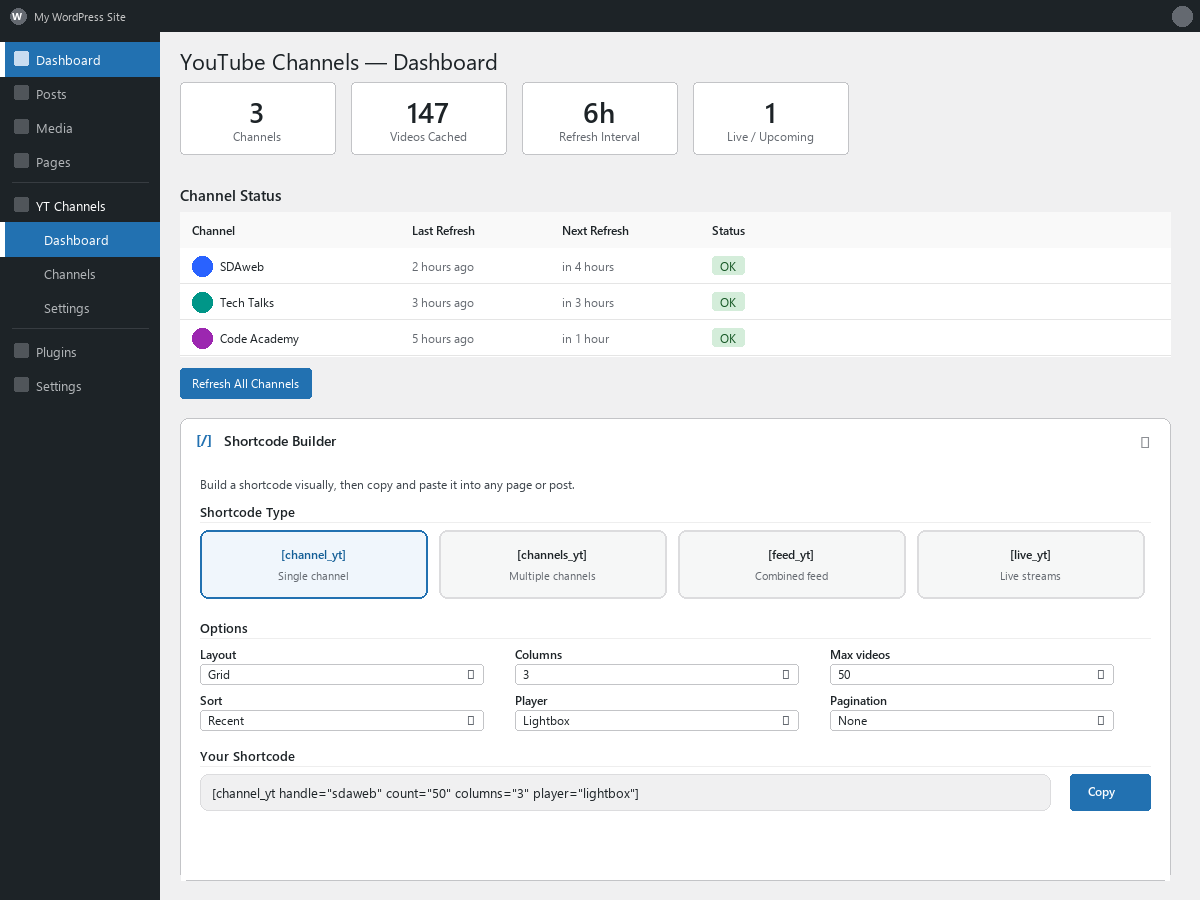
Dashboard with shortcode builder and channel status overview

Grid layout displaying videos from a single channel

Tabbed layout with multiple channels

Lightbox video player with navigation

Live and upcoming stream display with badges

Admin settings page with customizable labels
Faq
Visit the Google Cloud Console, create a project, enable the YouTube Data API v3, and create an API key. Step-by-step instructions are included on the plugin’s Settings page.
Yes. Google provides 10,000 free quota units per day. A typical site with 10 channels uses 300–500 units per day. Visitor page views use zero quota.
By default every 6 hours. You can change this to anywhere from 1 to 24 hours in Settings. Live stream status is checked every 5 minutes automatically.
The plugin checks for live and upcoming broadcasts every 5 minutes using the YouTube API and RSS feeds. Currently live streams show a red LIVE badge with viewer count. Upcoming streams show a blue UPCOMING badge with a countdown to the scheduled start time. Streams are automatically sorted by proximity to the current time, so the most imminent broadcasts always appear first regardless of when they were originally scheduled.
No. Live and upcoming streams are automatically excluded from [sdawchfo_channel], [sdawchfo_channels], and [sdawchfo_feed]. Use [sdawchfo_live] to display them separately, or add live_only="true" to any shortcode to show only live content.
Drag channels into the desired order on the Channels page. This order is used for tabs and sections site-wide. To set a different order on a specific page, list channel IDs in the shortcode: [sdawchfo_channels layout="tabs" ids="UCabc,UCxyz"].
Yes. Set count to up to 100 in the shortcode or Shortcode Builder. The plugin paginates through the YouTube API automatically.
Yes. Use the Import/Export section on the Settings page to download a JSON file with your channels and settings, then upload it on another site. Videos are not included — they are re-fetched automatically.
Yes. The plugin uses WordPress transients for its own internal cache, which is compatible with object caching plugins and page caching plugins.
The plugin offers four player modes, selectable in the Shortcode Builder or via the player attribute:
- Auto (default) — Adapts to screen size: opens a lightbox on desktop and tablet, plays inline on mobile phones. Best for sites with mixed audiences.
- Lightbox — Always opens a fullscreen overlay with prev/next navigation. Best for desktop-heavy audiences.
- Inline — Always plays directly inside the video card with an expand-to-lightbox button. Best for mobile-heavy audiences.
- Link — Opens the video on YouTube in a new tab. No on-site playback.
The plugin automatically detects and removes them. When a channel is refreshed, any cached videos that YouTube no longer returns (because they were made private, deleted, or removed from the uploads playlist) are purged from your local database.
The tabs layout offers three navigation modes, configurable in Settings > Appearance:
- Scroll (default) — A horizontally scrollable tab bar with arrow indicators. Works well with any number of channels.
- Wrapping Pills — All channels are shown as pill buttons that wrap to multiple rows. Best when you have many channels and want them all visible at once.
- Avatar Strip — A compact row of channel avatars with labeled names below. Long channel names are automatically truncated with a configurable truncation direction (show beginning or end).
Broadcast Boost increases the live status polling frequency from every 5 minutes to every 1 minute during a configurable time window. This is useful if your channels have a regular broadcast schedule (e.g. every Saturday from 10:30 to 13:00). Enable it in Settings and choose the day and time range. Outside the boost window, normal 5-minute polling continues. For best results, set up a real server cron that runs every minute.
WordPress uses a pseudo-cron that only runs when someone visits your site, which can cause delays. For reliable scheduling:
- Add
define('DISABLE_WP_CRON', true);to yourwp-config.php(before “That’s all, stop editing!”). - Set up a cron job on your server (via cPanel, Plesk, or SSH) to run every minute:
*/1 * * * * wget -q -O /dev/null https://yoursite.com/wp-cron.php?doing_wp_cron >/dev/null 2>&1
The plugin’s Settings page shows your current cron status and provides the exact command for your site.
As of version 1.4.9, the plugin uses YouTube’s privacy-enhanced embed domain (youtube-nocookie.com) which resolves most Vivaldi playback issues. If you still experience problems, Vivaldi’s built-in tracker and ad blocker may be blocking the embed. Click the shield icon in the address bar and disable the blocker for your site.
Reviews
Changelog
The most recent releases are listed here. The complete history is in changelog.txt in the plugin folder.
1.5.20
- Fix: The two scheduled jobs that fetch new videos and check for live streams were only set up when the plugin was activated. If they went missing — after cloning or migrating a site, after a cron clean-up tool, or on a multisite network where activation ran for one site only — the site silently stopped getting new videos until the plugin was deactivated and activated again. The plugin now puts missing jobs back when it is updated and when an administrator opens the dashboard. On a site where the jobs exist, nothing changes.
- Fix: The “Auto” player was described the wrong way round in the plugin description, on the Overview screen and in the Shortcode Builder. What it does — and has always done — is open a lightbox on desktop and tablet and play inline on mobile phones. Only the texts changed.
- Accessibility: In the lightbox, Tab and Shift+Tab could leave the dialog and move into the page behind it on the first video, on the last video, and whenever the list has a single video. Keyboard focus now stays inside the lightbox.
- Accessibility: The slider now shows a focus ring when it has keyboard focus, and the expand, close and mute buttons — visible only on mouse hover — are now also shown when they have keyboard focus. Nothing changes for mouse and touch.
- The complete version history has moved to changelog.txt in the plugin folder; this section lists the most recent releases.
1.5.19
- Fix: If YouTube (or a proxy in front of it) answered a refresh with something that was technically successful but not video data — an error page, an empty or cut-off response — the plugin read it as “this channel has no videos any more” and deleted every cached video of the channel, leaving an empty feed until the next good refresh. Such an answer is now treated as a failed refresh: the cached videos stay, the channel shows the error on the Channels page and is tried again later. The same applies when YouTube lists a channel’s videos but returns details for none of them. Videos that are removed or made private are still cleaned up individually as before.
- Fix: “Test API key” no longer reports success for an answer that is not YouTube data.
- Fix: Videos added by “Load More” ignored the feed’s display settings and were always rendered with the lightbox player, statistics and duration on, and no description. With player=”link” the added videos did nothing when clicked (they tried to open a lightbox that is not on the page); with “auto” they behaved differently on phones from the videos above them; show_stats, show_duration, show_channel and show_description were ignored. Added videos now look and behave like the rest of the feed. Pages served from a page cache keep working as before until the cache is refreshed.
1.5.18
- Code quality: the scheduled refresh no longer builds part of its database query at run time. 1.5.17 generated a list of placeholders for channels that are temporarily skipped after a failed refresh; the values were always passed safely through the database layer, but the Plugin Check tool cannot verify a generated query and raised a warning. The query now has two fixed placeholders and the skipped channels are filtered out afterwards. No change in behaviour.