SearchFIT

SearchFIT
Description
SearchFIT – AI-Powered Content Automation for WordPress
The easiest way to automate content creation with AI tools 🚀
★★★★★
SearchFIT provides a secure webhook API that allows you to programmatically create WordPress posts from AI assistants, automation tools, or custom applications. Perfect for AI-powered content workflows with ChatGPT, Claude, Perplexity, and other AI systems.
Why SearchFIT?
In the age of AI, content creation is evolving rapidly. Answer Engine Optimization (AEO) and Generative Engine Optimization (GEO) are becoming essential for modern SEO strategies. SearchFIT bridges the gap between your AI content generation tools and your WordPress website.
🔥 Key Features
Secure API Authentication
- Auto-generated API Keys – Cryptographically secure keys generated automatically
- One-click Regeneration – Instantly refresh your API key if compromised
- Multiple Auth Methods – Support for both custom header and Bearer token authentication
Full Content Control
- Create Complete Posts – Title, content, excerpt, and more
- Smart Categorization – Auto-create categories or use existing ones
- Tag Management – Automatically assign tags to your posts
- Draft Mode – Create posts as drafts, pending review, or publish immediately
Advanced Image Handling
- Featured Images – Automatically download and attach featured images
- Content Images – Process inline images with proper WordPress integration
- SEO-Optimized – Support for alt text, captions, and image metadata
- Placeholder System – Intelligent image replacement within content
Developer-Friendly
- REST API – Modern WordPress REST API integration
- Comprehensive Documentation – In-app documentation with code examples
- Health Check Endpoint – Verify API connectivity before sending content
- Activity Logging – Track all webhook submissions
📈 Perfect For
✔ AI Content Generation – Use with ChatGPT, Claude, Perplexity, or any AI
✔ Answer Engine Optimization (AEO) – Create content optimized for AI search
✔ Generative Engine Optimization (GEO) – Stay ahead in generative search results
✔ Content Automation – Build automated content pipelines
✔ Headless WordPress – External CMS and decoupled setups
✔ Content Syndication – Automated content distribution
✔ Marketing Automation – Connect with Zapier, Make, n8n, and more
✔ Custom Applications – Any system that can make HTTP requests
🎯 Use Cases
Bloggers & Content Creators
Automate your content workflow by connecting AI writing tools directly to WordPress.
Digital Agencies
Scale content production across multiple client sites with programmatic publishing.
eCommerce Stores
Generate product descriptions, blog posts, and SEO content automatically.
News & Media Sites
Rapidly publish AI-assisted articles while maintaining editorial control with draft mode.
🔒 Security First
Security is our top priority. SearchFIT uses:
- Cryptographically secure API key generation
- Timing-safe comparison to prevent timing attacks
- WordPress nonce verification for admin actions
- Proper capability checks for all operations
- Sanitization and validation of all inputs
🚀 Quick Start
- Install and activate SearchFIT
- Go to SearchFIT in your admin menu
- Copy your API Key and Webhook URL
- Send a POST request with your content
That’s it! Your AI-generated content flows directly into WordPress.
API Reference
For complete API documentation with code examples in multiple languages, visit searchfit.ai/docs.
Quick Example:
curl -X POST "https://yoursite.com/wp-json/searchfit/v1/articles" \
  -H "Content-Type: application/json" \
  -H "X-SearchFIT-API-Key: YOUR_API_KEY" \
  -d '{
    "title": "My AI-Generated Article",
    "content": "<p>Your content here...</p>",
    "status": "draft",
    "categories": ["AI", "Technology"],
    "tags": ["ai-content", "automation"]
  }'
Privacy Policy
SearchFIT does not collect or transmit any personal data. All operations are performed locally on your WordPress installation. API keys and webhook logs are stored in your WordPress database and are never transmitted to external servers.
Installation
Automatic Installation
- Go to Plugins > Add New in your WordPress admin
- Search for SearchFIT
- Click Install Now and then Activate
Manual Installation
- Download the plugin zip file
- Go to Plugins > Add New > Upload Plugin
- Choose the zip file and click Install Now
- Activate the plugin
After Activation
- Navigate to SearchFIT in your WordPress admin menu
- Your API credentials are automatically generated
- Copy the API Key and Webhook URL
- Start sending content via the API!
Screenshots
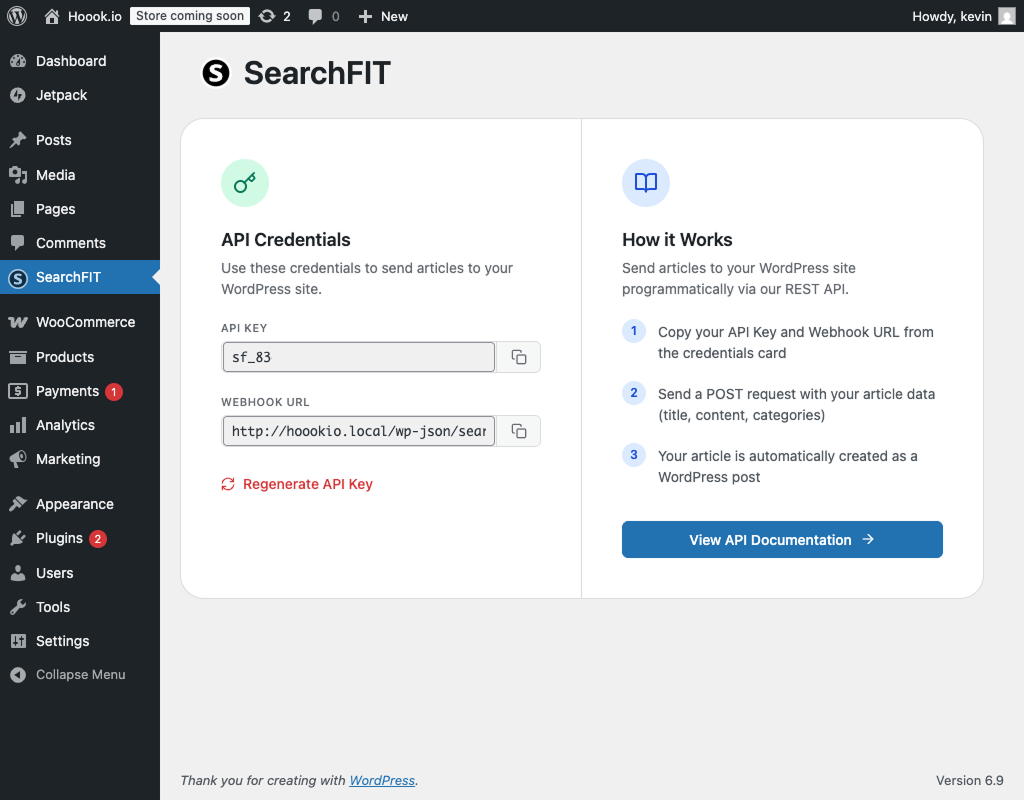
Dashboard Overview – Your API credentials at a glance. Copy your API key and webhook URL with a single click.
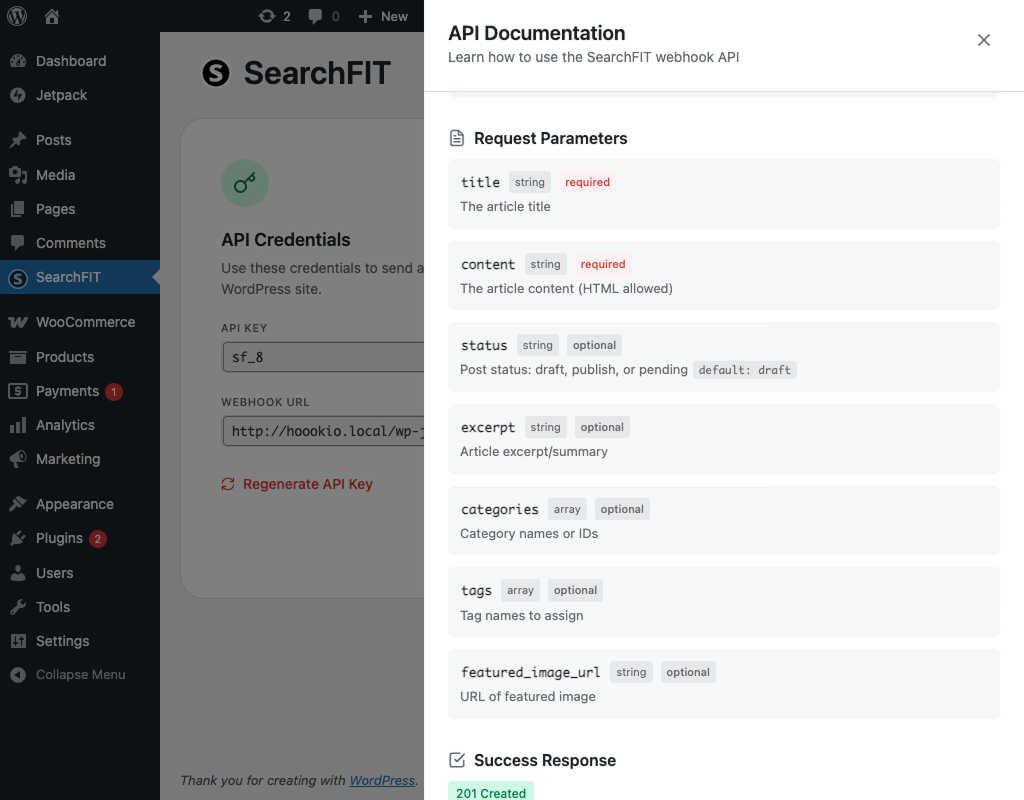
API Documentation Panel – Interactive documentation with code examples and endpoint reference right in your WordPress admin.
Endpoint Reference – View all available endpoints, HTTP methods, and their descriptions.
Faq
After activating the plugin, go to SearchFIT in your WordPress admin menu. Your API key is displayed there and can be copied with one click. The key is automatically generated during plugin activation.
Yes! Click “Regenerate API Key” on the settings page. Please note that the old key will stop working immediately, so update your integrations before regenerating.
You can create posts with the following statuses:
* draft – Saved but not published (default)
* pending – Awaiting editorial review
* publish – Published immediately
Include a featured_image_url parameter with a public image URL, or use the advanced featured_image object with metadata. The plugin will download the image, add it to your Media Library, and set it as the featured image.
Absolutely! All requests require a valid API key. Keys are auto-generated using PHP’s random_bytes() function for cryptographic security. The plugin uses timing-safe comparison to prevent timing attacks.
Yes! SearchFIT is specifically designed for AI-powered workflows. Use it with:
* ChatGPT & OpenAI
* Claude (Anthropic)
* Perplexity
* Google Gemini
* Any AI or automation tool that can make HTTP requests
If you specify a category name that doesn’t exist, SearchFIT will automatically create it for you. You can also use existing category IDs.
Currently, SearchFIT creates standard WordPress posts. Support for custom post types is planned for a future release.
Yes! Use the meta parameter to set custom meta fields. All fields are prefixed with searchfit_ to avoid conflicts.
SearchFIT doesn’t impose rate limits. However, your hosting provider may have their own limits on API requests.
Visit searchfit.ai for documentation and support resources. You can also use the WordPress.org support forum.
Reviews
Changelog
1.1.0
- 🚀 Complete CRUD API – List, Read, Create, and Update articles
- ✅ GET /articles endpoint – List all articles with filtering and pagination
- ✅ GET /articles/{id} endpoint – Get single article by ID
- ✅ PUT/PATCH /articles/{id} endpoint – Update existing articles
- ✅ Advanced filtering – Filter by status, author, search terms
- ✅ Sorting options – Sort by date, modified, title, author
- ✅ Pagination support – Navigate large content libraries
- ✅ Partial updates – Update only the fields you specify
- ✅ Change tracking – See exactly what was updated
- ✅ Featured image by attachment_id – Use existing media library images
- ✅ Custom meta fields support – Add any metadata to posts
- ✅ Default author settings – Configure default post author
- ✅ Enhanced admin interface – Display all CRUD endpoints
- ✅ WordPress revisions support – Track all changes
- ✅ 100% test coverage – Validated with 20 blog posts
1.0.0
- 🎉 Initial release
- ✅ Webhook API for article creation
- ✅ Secure API key authentication
- ✅ Featured image support with metadata
- ✅ Content image processing with placeholders
- ✅ Categories and tags support
- ✅ Draft, pending, and publish status options
- ✅ Health check endpoint
- ✅ Activity logging
- ✅ Beautiful admin interface with copy-to-clipboard functionality