Seat & Table Booking for WooCommerce

Seat & Table Booking for WooCommerce
Description
Seat & Table Booking for WooCommerce is a table reservation and seat booking plugin that
turns any WooCommerce shop into a booking system for a room with a layout: a restaurant’s
tables, a cinema’s seats, a theatre’s rows, a co-working space’s desks, a wedding hall’s
seating plan. It adds a Booking venue product type to WooCommerce, and one product is one
floor plan.
Upload a photo or a drawing of the room, drag the tables to where they really are, give each
one a price and a capacity, and set the timeslots it can be booked in. Customers then pick a
date, a timeslot and a table straight off the seating chart, and the table goes into the cart
like any other WooCommerce product. WooCommerce handles the payment, the order and the emails –
there is no second checkout, no second dashboard, no subscription and no external service.
Every paid reservation gets a QR check-in code, and door staff scan it from a full-screen
scanner page built into the plugin.
Key features
For the shop owner
- A visual floor plan editor: draw tables and seats on an uploaded image and drag them into
place, with a grid, undo, rotation and a row tool for cinema-style seating. - Per-unit price, label, capacity and an internal note.
- Recurring timeslot rules per weekday, with optional first and last dates.
- Blackout dates, for the whole day or for a single timeslot.
- A configurable hold duration, per site or per venue, so an abandoned cart frees the table.
- A Bookings screen: every table against every sitting for a day, with guests, arrivals, a
needs-attention bar, and a staff block per sitting for walk-ins. - A Reservation column on the WooCommerce orders list.
- QR check-in codes, a built-in scanner page, a “Scanner” role for door staff, and an
optional REST API for third-party scanner apps. - Per-venue QR appearance: colours, an optional logo and a caption.
- An Appearance tab with fifteen optional colour overrides, a live preview and a contrast
warning. Left alone the booking controls follow your theme’s own colours, so the card fits a
dark or a branded theme with nothing to configure.
For the customer
- Pick a date, then a timeslot, then a table or seats from the floor plan.
- Only dates and times that can actually be booked are offered.
- Booked tables are visibly unavailable, tables too small for the party are not offered, and
a “find N seats together” button does the searching on a seating chart. - The whole picker works with a keyboard and a screen reader.
- The table, date and time appear on the cart, the checkout, the order and the order emails,
with an optional arrival note.
Who it is for
- Restaurants, cafés and bars – tables of different sizes and prices, sittings per evening,
a table held back for walk-ins. - Cinemas, theatres and concert venues – seat-by-seat booking from a seating chart.
- Events with a fixed layout – a wedding, a gala dinner or a conference is a timeslot rule
whose first and last day are the same. - Co-working spaces and studios – desks and rooms booked by the hour or by the day.
How it works
- Create a product and set its type to Booking venue.
- On the Floor plan tab, upload a picture of the room and draw the tables or seats on it.
- On the Booking times tab, set the weekly timeslots and any closed dates.
- Publish. Customers book from the product page, pay through the normal WooCommerce checkout,
and receive a QR check-in code with their order confirmation.
How double bookings are prevented
Adding a table to the cart creates a short-lived hold on that exact unit, date and timeslot.
The hold is enforced by a database uniqueness constraint, so two customers racing for the last
table cannot both win – the second is told the table has just gone. Holds that are never paid
for expire on their own and the table returns to the floor plan.
Check-in at the door
Every paid reservation gets a QR check-in code, shown on the confirmation email, the thank-you
page and My Account. Staff scan it at /table-check-in/, a full-screen scanner page built into
the plugin, restricted to a “Scanner” role that can check guests in and nothing else. The
scanner has a flashlight toggle and a type-in field for a desk without a camera.
The same check-in also works over a REST API, so a third-party scanner app – a phone app, a
handheld reader, whatever the door already uses – can call it too. The API is off by default;
a shop owner turns it on under Seats & Tables > Settings > Scanner / API, and a scanner app
authenticates with a WordPress Application Password over HTTPS, the same mechanism WordPress
ships for any external app that needs to act as a user.
Compatibility
- WooCommerce High-Performance Order Storage (HPOS) and the classic posts table.
- The Cart and Checkout blocks and the classic shortcode cart and checkout.
- Any theme: the booking form replaces the add-to-cart form on the product page and uses
WooCommerce’s own notices and buttons. - Fully translatable; the plugin ships with a
.potfile.
Third-party code
Bundles Fabric.js 7.4.0 (MIT) for the admin floor plan editor, in
inc/product-type/js/lib/, as published on npm (fabric/dist/index.min.js,
https://www.npmjs.com/package/fabric/v/7.4.0). Unminified source (the project tags this
release v740): https://github.com/fabricjs/fabric.js/tree/v740
Also bundles endroid/qr-code 4.8.2 (MIT) for generating check-in QR codes, together with its
dependencies bacon/bacon-qr-code 2.0.8 (https://github.com/Bacon/BaconQrCode) and dasprid/enum
1.0.7 (https://github.com/DASPRiD/Enum), both BSD-2-Clause, installed with Composer,
unmodified, in inc/qr/lib/qrcodegen/. The MIT licence applies to endroid/qr-code itself only.
Source: https://github.com/endroid/qr-code
And jsQR 1.4.0 (Apache-2.0) for decoding QR codes in the check-in scanner, in
inc/scanner/js/jsqr.js. Source: https://github.com/cozmo/jsQR
No other minified or compiled code is shipped, and no assets are loaded from a CDN.
External services
None. This plugin makes no outbound requests, sends no analytics or telemetry, and needs no
account anywhere. QR codes are generated on your own server by the bundled library, and every
script and stylesheet is served from your own site.
Source Code and Third-Party Libraries
This plugin ships no compiled or obfuscated code. Every PHP, JavaScript and CSS file
written for this plugin is included in readable, editable form, and no build step
(npm, webpack, Composer, etc.) is required to run or modify it.
The following third-party libraries are bundled unmodified. Each is the upstream
distribution file, at the version listed:
-
endroid/qr-code 4.8.2 – QR code generation – https://github.com/endroid/qr-code – MIT
(bundled in inc/qr/lib/qrcodegen/, installed with Composer, together with its
dependencies bacon/bacon-qr-code 2.0.8 and dasprid/enum 1.0.7) -
Fabric.js 7.4.0 – the admin floor plan editor canvas – MIT – bundled minified in
inc/product-type/js/lib/fabric.min.js, exactly as published on npm
(https://www.npmjs.com/package/fabric/v/7.4.0, file fabric/dist/index.min.js).
Unminified source: https://github.com/fabricjs/fabric.js/tree/v740 – the project tags
this release v740, not v7.4.0. -
jsQR 1.4.0 – decoding QR codes from the camera in the check-in scanner – Apache-2.0 –
bundled in inc/scanner/js/jsqr.js. Source: https://github.com/cozmo/jsQR
The highest PHP requirement among these is endroid/qr-code’s “^8.0”, which is the
plugin’s declared minimum.
Installation
- Install and activate WooCommerce.
- Upload the plugin to
/wp-content/plugins/and activate it, or install it from
Plugins > Add New. - Create a product, set its type to “Booking venue”, then use the “Floor plan” and
“Booking times” tabs to lay out the venue. - Optional: set the hold duration, unpaid-order release window, booking notice and check-in
window under Seats & Tables > Settings.
Deleting the plugin removes its settings and the Scanner role. Bookings, floor plans and QR
check-in data are kept, so reinstalling the plugin picks up exactly where you left off –
unless STBK_REMOVE_ALL_DATA is defined as true in wp-config.php before deleting, which
also drops the database tables and the generated QR images. Deactivating it removes nothing.
Screenshots

Rows of seats as the customer sees them: pick a date, a time, then a seat.
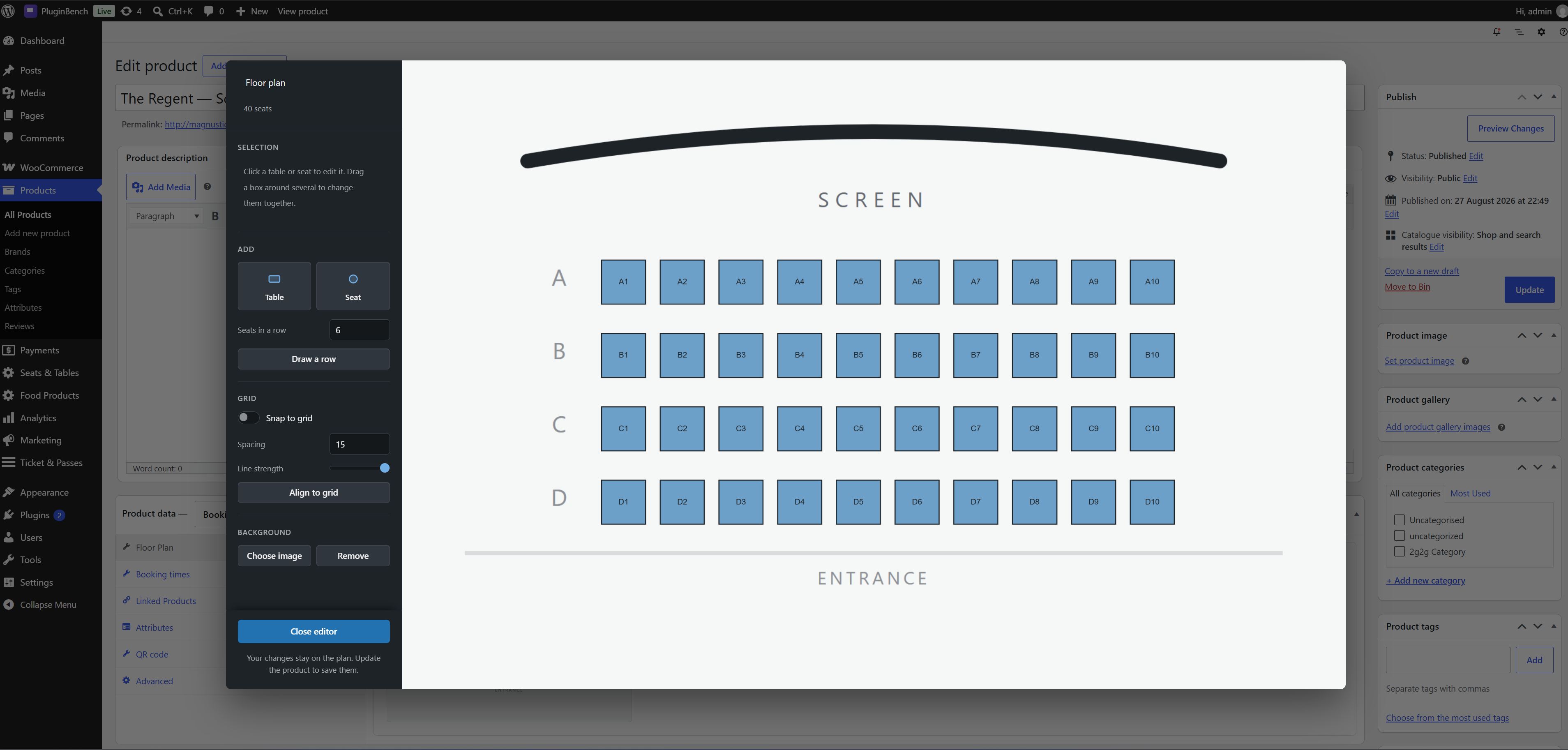
The same room in the editor: lay out rows with the row tool, for a cinema or a theatre.
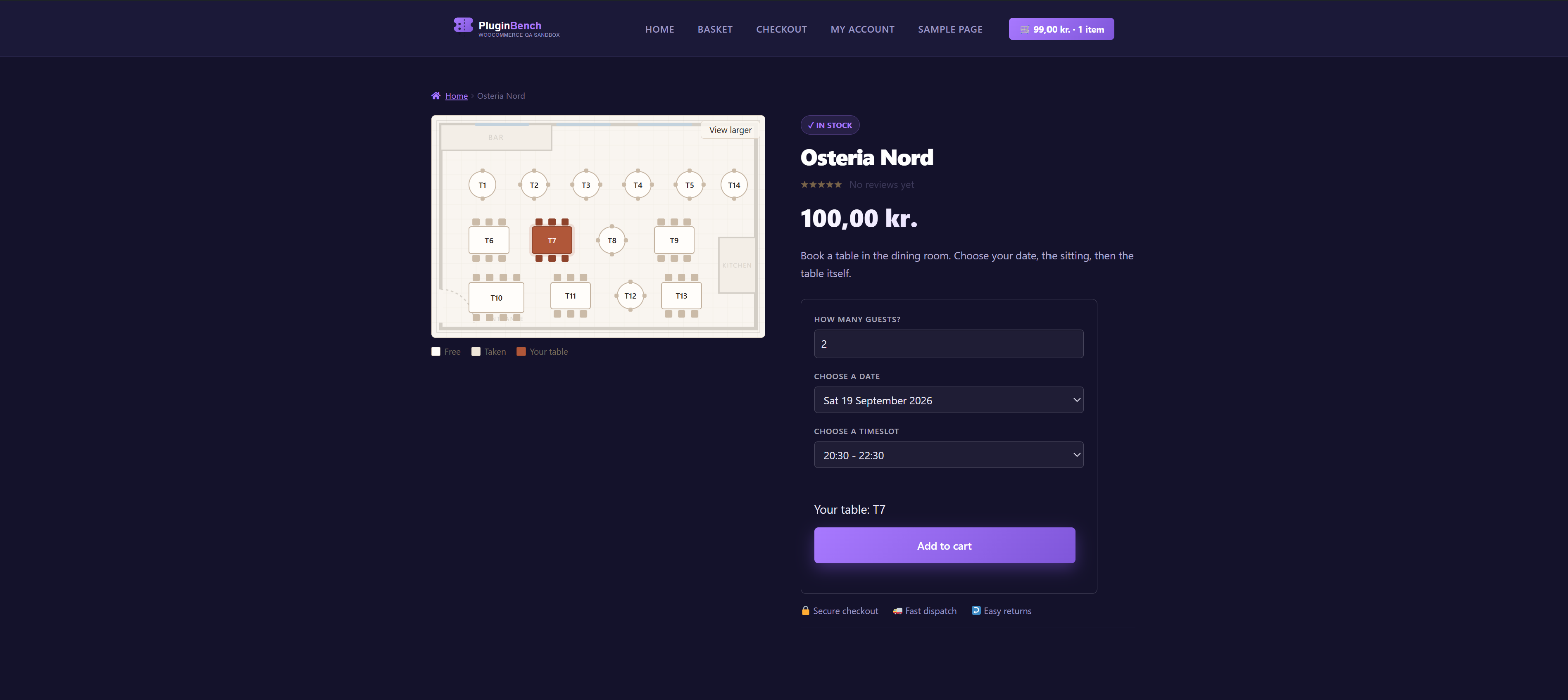
Tables on a picture of your room, and the customer picks the one they want.
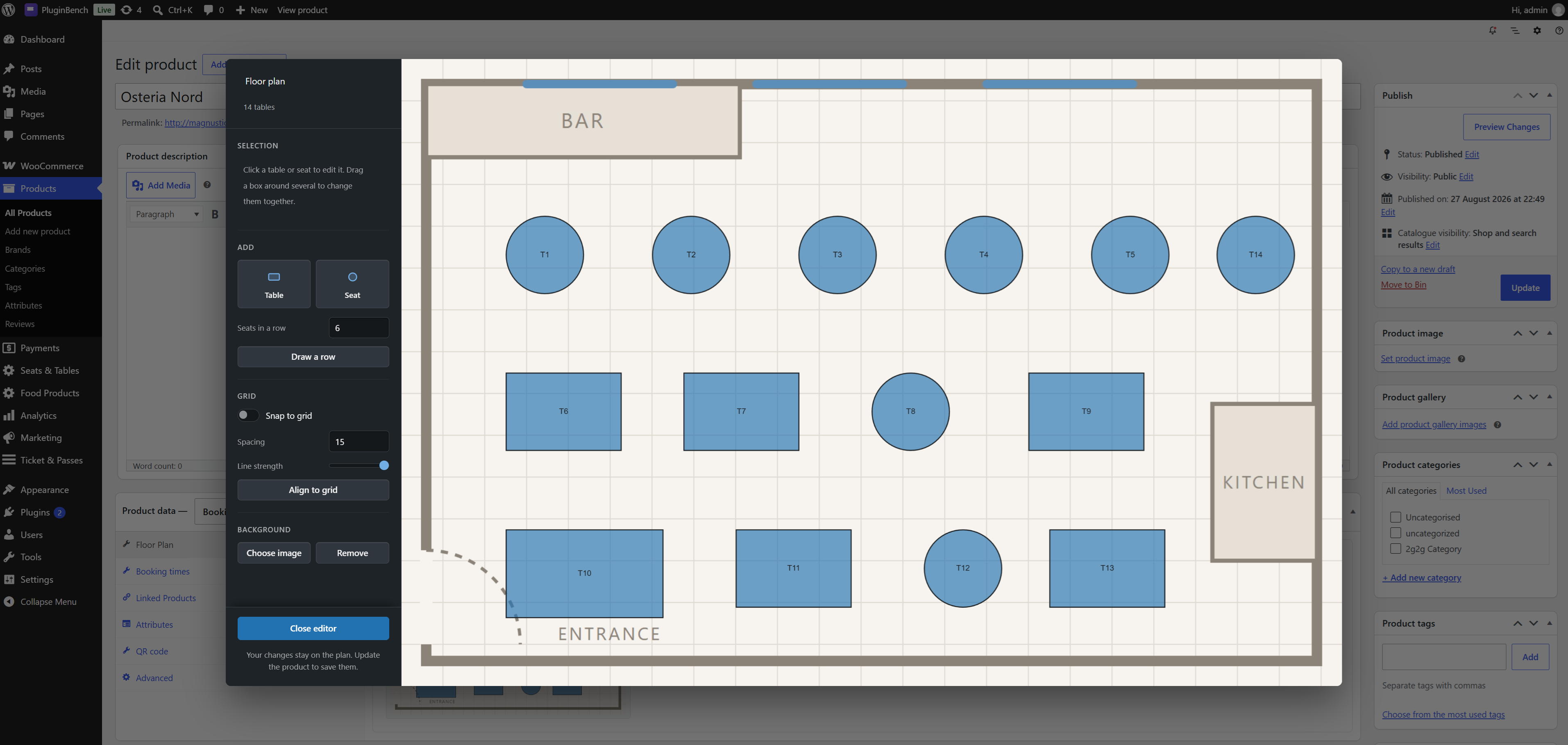
Behind the scenes: drag the tables onto the floor plan and set what each one seats.
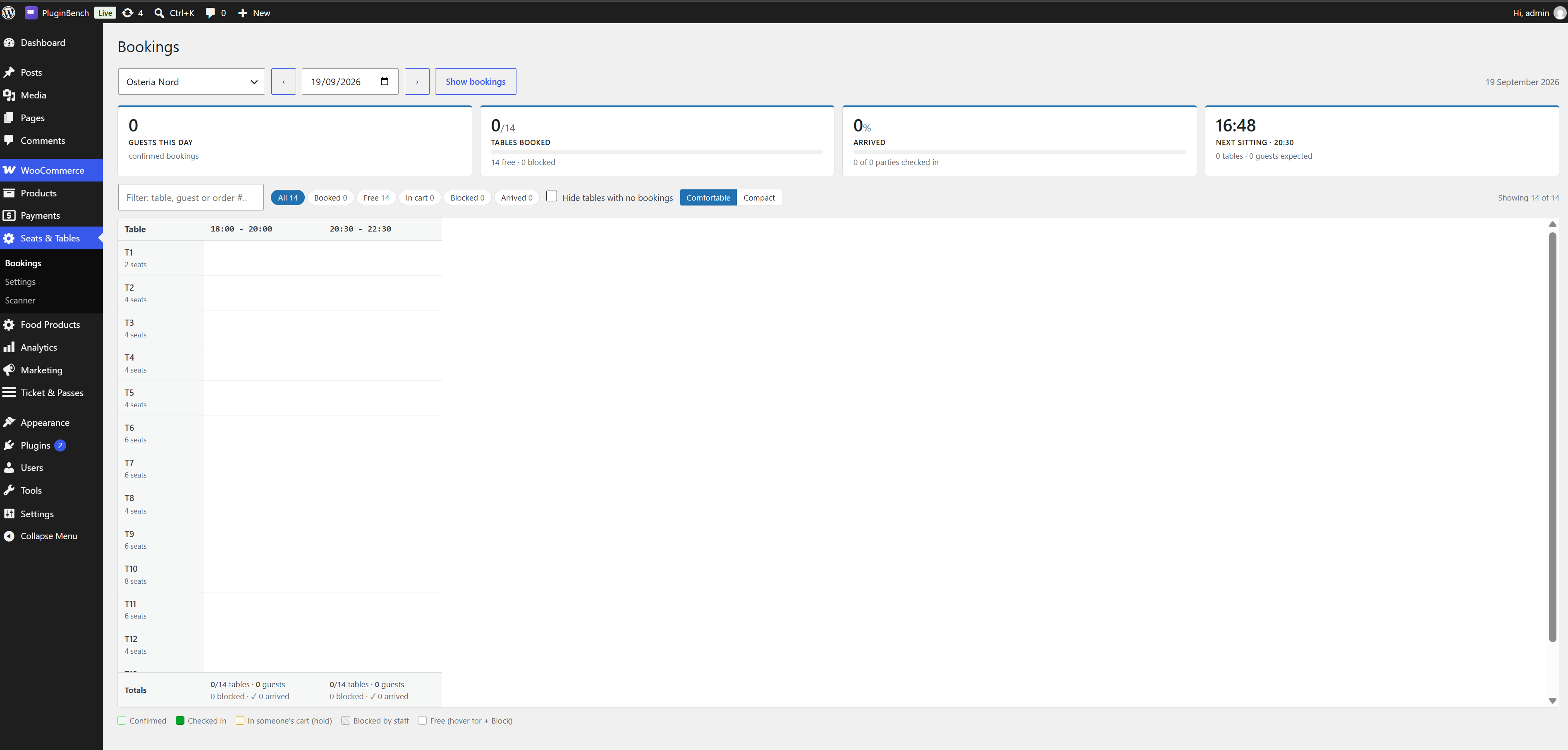
A day view of every booking, with staff blocks per sitting.
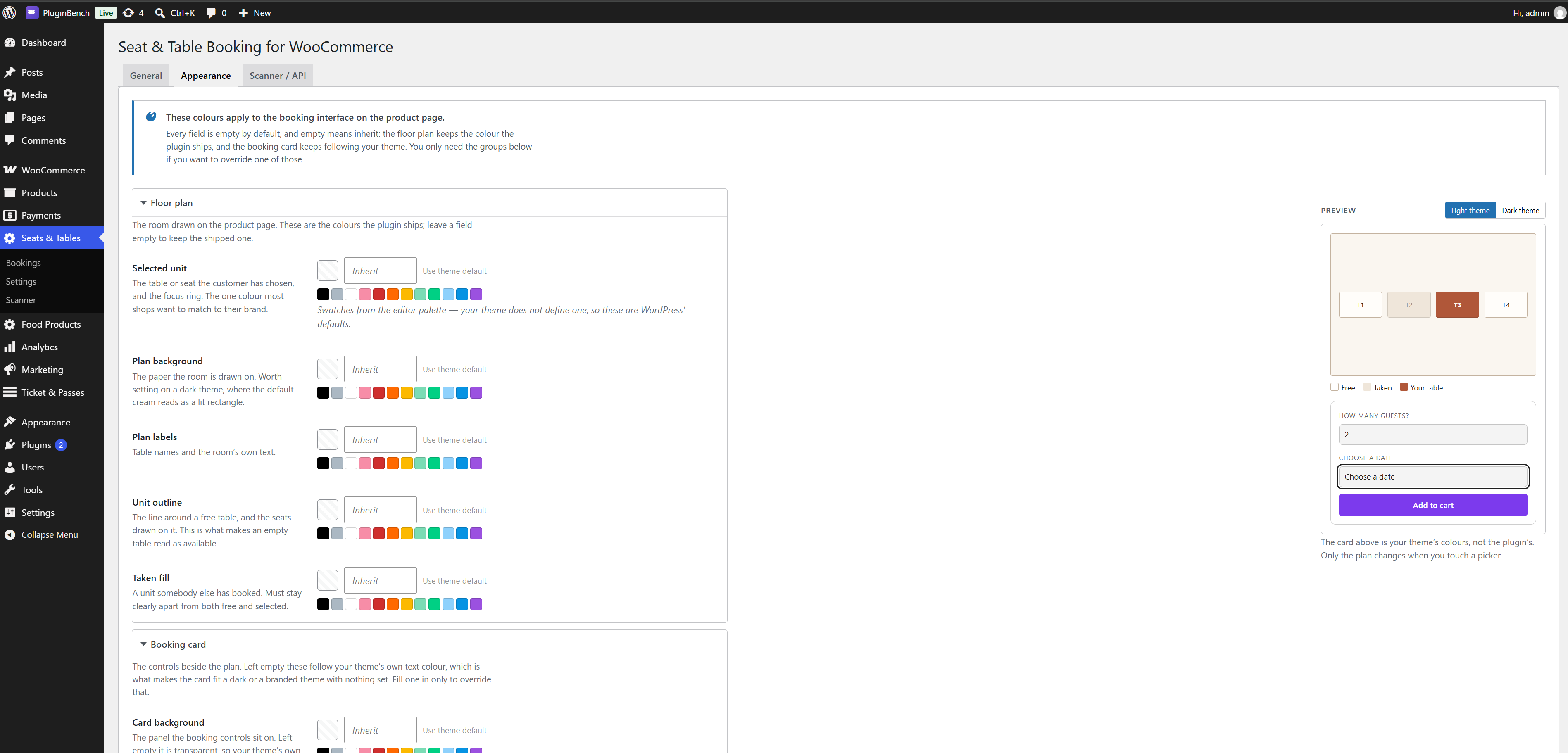
Appearance settings: colours and labels for the picker, without touching CSS.
Faq
Yes. The plugin declares HPOS compatibility and reads and writes orders only through the
WooCommerce order API, so it works with both order storage modes.
Yes, and with the classic shortcode cart and checkout.
Yes. Every Booking venue product is its own floor plan with its own timeslots, prices and
settings, and one order can hold tables at several venues.
The site’s timezone, as set under Settings > General. Timeslots, booking dates, the “booking
notice” cut-off and the check-in window all use it.
The hold expires after the configured number of minutes (15 by default) and the table becomes
bookable again. If the customer returns to a cart with an expired hold, the line is removed and
they are told why. Removing a line and pressing “Undo” takes the hold again if the table is
still free.
The booking is released, its QR code is cancelled and the table is immediately bookable again.
Trashing or deleting an order does the same.
Its tables are released after the window set in Seats & Tables > Settings (60 minutes by
default), the order is cancelled and a note is added to it. Orders on hold awaiting a bank
transfer are never released automatically.
When the payment goes through, and when you mark an order Completed by hand. Processing on its
own is not enough, because cash on delivery sets that status before anyone has paid. If your shop
takes bank transfers and you set orders to Processing yourself once the money lands, add this to
your theme’s functions.php to issue the codes at that point too:
add_filter( 'stbk_issue_codes_on_processing', '__return_true' );
Do not use it on a shop that also offers cash on delivery: those orders reach Processing unpaid,
and the plugin cannot tell the two apart afterwards.
No. A unique index on unit, date and timeslot makes that impossible at the database level.
No. Expired holds are treated as free the moment they expire; a five-minute WP-Cron event only
tidies the rows up. The unpaid-order release also runs on that event, so on a site where
WP-Cron is disabled it runs whenever the system cron calls wp-cron.php.
Yes. Seats & Tables > Bookings, pick the venue and the date, then press “+ Block” in the empty
cell for that sitting. The table disappears from the floor plan for that sitting until the block
is released.
Open /table-check-in/ on a phone or tablet logged in as a user with the “Scanner” role and
point the camera at the guest’s QR code. A valid, unused code within its check-in window is
admitted and marked used; a cancelled, already-used or out-of-window code is refused, with the
reason shown on screen.
Check guests in and nothing else. A Scanner user cannot see orders, products or the dashboard.
Shop managers and administrators can scan as well.
Yes, once a shop owner turns on “Enable API” under Seats & Tables > Settings > Scanner / API –
it is off by default. The app authenticates with a WordPress Application Password and calls
stbk/v1/scanner/checkin/{id} the same way the built-in scanner page does. The settings page
documents every response.
An Application Password is required; a real account password is not accepted, and the site must
be on HTTPS, because that is what WordPress itself requires before it will accept one. The
built-in scanner page is unaffected either way – it uses the staff member’s own login session.
Staff can resend it from the Bookings screen. The code is also shown on the WooCommerce
thank-you page and in the order details under My Account, so a signed-in customer can pull it
up there without waiting on an email at all.
Its settings, the Scanner role and its scheduled event. Bookings, floor plans and QR data stay
unless STBK_REMOVE_ALL_DATA is defined as true in wp-config.php first.
Reviews
Changelog
1.8.1
- Fixed: a refunded table could come back. Refunding part of an order releases its tables and
revokes their codes – but marking that order Completed afterwards re-claimed every table on it
and set every cancelled code back to active, including the refunded ones. The customer had their
money back and a code that still opened the door, and the table was off the floor again. A code
revoked by a refund is now stamped as such and is left cancelled, and re-claiming an order’s
tables skips the lines that were refunded. Cancelling a whole order is unchanged: those codes
still come back if the order turns out to be paid after all, which is what that path is for.
Reset on the Bookings screen clears the stamp, so putting a refunded code back in service by hand
still works. Codes refunded before this update are not reclassified – the plugin has no record of
why they were cancelled – so one of them could still be revived once. - Fixed: cancelling or refunding an order now takes the same database lock that issuing its codes
takes. Both paths read the order’s rows and then rewrite them, so an issue pass arriving in
between could put back a code the cancel had just revoked. Where issuing refuses when it cannot
get the lock – two live codes for one table are worse than none – revoking goes ahead and notes
the order instead: trash and delete fire once and never come back, so a revoke that quietly did
not happen would leave a working code behind for good. - Fixed: drawing a very long row of seats could make the next Update save nothing at all. A floor
plan of more than 2000 units is refused whole rather than truncated, because losing tables
quietly would be worse – but nothing on screen said so, so a mistyped count in “Draw a row” read
as the whole plan having stopped saving. The row tool now stops at 200 seats in one row, far past
any real row of seats and well under the ceiling. - Fixed: the Redraw button on a venue’s QR tab read its product id without the shape check every
other numeric field in the plugin applies, so a crafted request could have aimed it at a
different product. It was already refused for any product the caller cannot edit, so nothing
could be redrawn that they were not entitled to redraw anyway. - Hardening from a full review pass: an error message is now escaped where it is thrown, and two
database annotations in the installer named a rule that does not exist and so had never been
applied. No visible change. - Docs: the bundled Fabric.js and jsQR libraries are now listed in the readme’s source section
alongside the QR library, each with a link to its unminified source.
1.8.0
Check-in is now a POST request. Codes already printed still scan, and the built-in scanner
page is unchanged for your staff. If you use a third-party scanner app that calls the check-in
endpoint, it must send POST instead of GET to the same URL – a GET now answers 405 and says so.
A check-in records an arrival, so any link preview, prefetch or crawler that followed the URL
with a scanner’s credentials used to check the booking in.
- Fixed: tables could be held forever. The job that releases unpaid reservations asked
WooCommerce for the 50 oldest unpaid orders shop-wide and only then looked for bookings among
them. WooCommerce never auto-cancels a failed order, so on a shop with more than 50 old failed
or pending orders the same 50 came back every run, none of them were bookings, and a
confirmed-but-unpaid table was never released. - New: refunding part of an order now releases the tables it covers. Refunding two of five covers
used to give the money back and revoke nothing, leaving both seats blocked and still able to
check in. A money-only refund still changes nothing. A code covering a whole table keeps
working until every unit under it has been refunded. - Fixed: reinstating a cancelled order made its check-in codes work again without restoring the
bookings, so the sitting was missing from the Bookings screen and another customer could buy
the same table. The tables are re-claimed first now, and if one has gone the codes stay
cancelled and the order gets a note saying which. - Fixed: a clash partway through checkout left the earlier tables in that order confirmed against
an order the customer never saw, locked until the cleanup job ran. It also made a retry after
changing the cart report the customer’s own table as taken. - Fixed: check-in codes were no longer issued on the Processing status alone. Cash on delivery
sets that status without any money moving, so a customer who had paid nothing was given working
codes. They are issued on payment, and on Completed for orders you settle by hand. - New: a shop paid by bank transfer, where you set the order to Processing yourself once the money
lands, can have the codes issued at that point too – one line in the theme’s functions.php,
add_filter( ‘stbk_issue_codes_on_processing’, ‘__return_true’ );. It is off by default, and
must stay off on a shop that also offers cash on delivery: those orders reach Processing unpaid.
See the FAQ. - Fixed: check-in times in the scanner’s history are sent with the site’s timezone, so a phone
set to another one no longer shows every scan hours out. - Fixed: two quick date or timeslot changes could leave the floor plan showing the slot you had
just moved away from. - Fixed: a round table dragged into an oval saved as an oval but reloaded as a circle, while the
booking page drew the oval. - Fixed: blocking a table for a sitting the venue does not run wrote a block that never appeared
on the Bookings screen and could not be released from it. - Fixed: choosing a file that is not an image as a venue’s QR logo made every code for that venue
come out with no image at all, silently. - Hardened: check-in codes are now compared case-sensitively in the database. They were not,
which made two codes far likelier to collide than their length suggests. - Hardened: the booking endpoint and outside scanner authentication are rate limited per IP
address. The QR preview now checks that you may edit the product it is asked about, and a floor
plan is bounded in size, so one out-of-range number can no longer make a table vanish from the
plan without a word. - Performance: the bookable-dates list is cached for a minute per venue, the cart stops asking
the database for the same timeslot once per line, and three missing indexes were added. - Changed: the minimum PHP version is now 8.0, down from 8.1. The bundled QR library was the
only thing that needed 8.1, so it is pinned back to endroid/qr-code 4.8.2 with
bacon/bacon-qr-code 2.0.8 and dasprid/enum 1.0.7 – the same versions the author’s other
plugin ships, which is one set of security advisories to follow instead of two. QR codes are
generated exactly as before, logos and all.
1.7.0
- Fixed: a QR code with a centre logo was drawn at the lowest error correction level, and the
logo was sized by its width alone. A portrait photo could therefore cover the finder patterns
of a code that had no redundancy left to lose. Error correction now rises to High whenever a
logo is present, and the logo’s longer side is capped at a fifth of the code, keeping its
aspect ratio. - Fixed: QR images were written straight over their destination, so a renderer that died partway
through left a truncated file – a booking whose code no longer scanned, with no way back. The
image is now written beside its destination and renamed into place. - Fixed: activation now refuses, rather than leaving the plugin half-installed, when the database
tables cannot be created. The schema version is recorded only once the tables are confirmed
present, so a failed upgrade is retried instead of being remembered as done. This matters most
for the bookings table’sUNIQUE KEY unit_slot, which is the plugin’s defence against two
customers taking the same unit for the same sitting. - New: a Redraw control on the product’s QR tab regenerates codes that were already issued.
Changing a venue’s QR colours or logo used to leave every existing code on the old design.
The run is opt-in, processes 25 codes at a time through Action Scheduler, skips cancelled
codes, and reports how many writes failed rather than claiming a clean finish.
1.6.2
- Hardened: the General settings option’s sanitize callback now returns only the keys it knows.
It used to hand back the four minute settings on top of a copy of the raw input, so any other
key reaching the option through the Settings API was stored as it arrived. The four legacy
Scanner / API keys the option can still carry from before 1.2.0 are kept for the one-time
migration, folded to 0/1 and checked withsanitize_hex_color(); everything else is dropped.
The tab’s own save path stores through the same callback.
1.6.1
- Security: on hosts that hand PHP the Basic credentials as PHP_AUTH_USER/PHP_AUTH_PW without
exposing an Authorization header, an outside caller could reach check-in with “Enable API”
switched off. WordPress authenticates such a caller before this plugin runs, so the request
arrived looking like the built-in scanner’s own session – the one path that deliberately does
not consult that setting. The credentials are rebuilt into the header they arrived in, so the
toggle is now checked on every outside request. - Hardened: every numeric value read from a request is now checked by shape before it is cast,
through one shared guard rather than field by field.absint()and(int)answer 1 for an
array instead of refusing it, so a crafted request could turn a product id, a guest count, an
attachment id or a hold duration into a valid 1. The previous round fixed this inside the floor
plan payload; it now covers every request handler in the plugin. - Changed: outside callers are authenticated by WordPress’s own application-password validator
instead of by a credential check inside the plugin. A real account password is no longer
accepted: an Application Password is required, and WordPress only accepts those over HTTPS.
A scanner currently configured with an account password needs an Application Password instead- generate one under Users and paste it in place of the password. The built-in scanner page is
unaffected, as it authenticates with the staff member’s own login session.
- generate one under Users and paste it in place of the password. The built-in scanner page is
- Changed: a non-numeric value in the hold, notice and check-in window fields, or in the QR
lead-time field, now falls back to the setting’s default rather than being read as zero. - Changed: the check-in link in plain-text order emails is escaped with
esc_url()rather than
esc_url_raw(), which is a sanitizer for storage and redirects rather than an escaper for
output. The link that reaches the inbox is byte for byte the same. - Changed: the add-to-cart confirmation closes its output buffer in its own statement instead of
inside the call that consumes it, so the buffer is never held open across another function call. - Changed: the generated Appearance CSS is escaped where it is handed to WordPress rather than
trusted from the builder four files away. It emits only fixed selectors and validated colours,
so nothing renders differently. - Performance: the check-in block in order emails, on the thank-you page and in My Account no
longer reads the venue’s whole day of bookings once per check-in code. An order carrying
several codes ran one venue-wide query per code and discarded almost every row it fetched; the
lookup is now scoped to that order and its sitting, so the work no longer grows with how busy
the restaurant is on the day. - Fixed: losing the race for the last table during checkout with the Cart and Checkout blocks now
answers with a conflict instead of a server error. The step that promotes a hold to a booking is
shared by both checkout paths; the classic one has always shown the explanation as a notice, but
the blocks turned it into “unknown server error” with HTTP 500 – which makes an ordinary booking
collision look like an outage to uptime monitoring and to any client that retries on 5xx. The
sentence the customer reads is unchanged. - Fixed: on the Bookings screen, opening a booking’s details now moves the keyboard to the panel
that just opened, and closing it puts the keyboard back on the booking it came from. The panel
sits after the whole day’s table, so reaching it previously meant tabbing past every remaining
booking, and closing it left the keyboard nowhere at all. Nothing changes for mouse users. - Changed: when a settings screen cannot save, it now says so in a normal WordPress notice at the
top of the screen instead of a browser alert box. The message is usually about one field – which
colour was not read, for example – so it belongs next to the fields rather than in a dialog you
have to dismiss before you can look at them.
1.6.0
Booking times
- The Booking times tab is now a month calendar of what customers will actually be offered,
rather than two tables of bare inputs. Pick a day to see its sittings, close it, or add one;
every rule is reachable from any day it lands on, and the calendar redraws as you edit rather
than only telling the truth after an update. - Sittings are no longer added by saving the product to get a blank row – and deleting the last
one now saves, which it previously did not. - Weekdays are toggles instead of checkboxes, date bounds are picked as “always / from a date /
between two dates / one date only” instead of two raw fields, and the tab warns before the save
handler quietly drops a zero-length sitting or swaps date bounds that are the wrong way round. - The calendar shows existing bookings per day for a year ahead and a month back.
Appearance
- The booking controls now take their colours from your theme instead of bringing their own.
The card, the fields, the captions and the five message tones are all derived from whatever
text colour your theme sets, so they follow a dark palette or a branded one with nothing to
configure – and the confirmation line no longer forces its own serif over your theme’s font. - New Settings > Appearance tab: fifteen colour overrides in three folding groups, all shut by
default. Five for the floor plan – selected unit, plan background, plan labels, unit outline
and taken fill; eight for the booking card – background, text, captions, borders, field fill,
focus ring, and the background and border of the field being used; and two for the Add to cart
button. Every field is empty by default and empty means inherit, so a shop that never opens the
screen keeps the shipped plan and keeps the card following its theme. - On the card, setting the text colour is usually all you need: the captions, borders and field
fills are mixed from it, so they move with it. The rest are there to override that. - The Add to cart button is the one setting that overrides your theme outright, including any
gradient it paints the button with, because that button otherwise belongs to your theme by
design. Left empty it still does. - Setting one colour carries the tokens that belong with it: a brand-coloured selected table
gets a matching rim and halo rather than the shipped terracotta, and darkening the plan
background carries the free-table fill, the wall and the hatching with it. - The tab measures the three contrast pairs that carry text and warns when one drops below
4.5:1. It warns rather than blocks – matching a brand colour exactly is often worth one
borderline ratio, but it should not be a surprise.
Storefront
- The date dropdown is grouped by month. With a 90 day horizon a venue open six days a week
offers around eighty dates, which as one flat list is a long scroll with nothing to navigate
by – especially on a phone. The month headings come from the site’s own locale. - Fixed: on a narrow screen a unit’s tooltip was drawn outside the floor plan and clipped away,
so its capacity, price and note could not be read on a phone at all. - Fixed: the booking form and floor plan no longer inherit a theme’s button styling – uppercase
transforms, minimum widths, gradients and hover transforms were moving tables off their own
coordinates on Divi, Flatsome, Woodmart and several block themes. - Fixed: fields no longer overflow the booking card on themes that do not set border-box.
- Added: the floor plan gets a usable minimum size in the full-screen view on phones, tooltips
open on tap, and fields no longer trigger Safari’s zoom-on-focus.
Performance and isolation
- Performance: the floor plan editor, Fabric.js and the three product data panels no longer
load on product edit screens that are not booking venues – roughly 370 KB of script, styles
and markup off every simple, variable or grouped product screen in the shop. - Changed: the Scanner / API screen’s “.hide” helper and the QR tab’s colour tokens are scoped
to this plugin, so neither reaches another plugin’s markup on a shared admin screen.
Review round
- Removed the “Tested up to” line from the main plugin file. It is not a plugin header, and
carrying it in two places is how a plugin ends up advertising a compatibility version nobody
meant; the readme is the only place it belongs. - Hardened: every field of a posted floor plan payload is now checked by shape before it is cast.
Crafted JSON could hand a label, a note or an id an array instead of a value, andabsint()
answers 1 for one of those rather than refusing it – which on the id field pointed a row at
whichever unit happened to be id 1. - Hardened: the same check on the posted unit id list behind add-to-cart.
- Changed: escaping moved to the point of output everywhere markup was built into a variable
first – the confirmation email’s QR block and plain-text body, the cart’s floor plan thumbnail,
the floor plan viewer’s background image and tooltip hints, the Floor Plan tab and the
Appearance tab’s swatches. Nothing renders differently; the escaping is now visible where the
value is written rather than argued for in a comment above it.
1.5.1
- Security: every admin-ajax endpoint, including the public read-only ones and the cart
thumbnail, now requires a nonce; the product-screen saves verify the plugin’s own nonce. - Security: a venue can no longer be added to the cart without a reservation via
?add-to-cart=, a draft or private venue is bookable only by users who can edit it, and a
crafted request can no longer hold several tables at once under one party size. - Changed: admin page slugs, script handles and the JavaScript settings objects are all
prefixedstbkliterally, as the wordpress.org prefix scanner requires. - Fixed: a check-in window that crosses midnight is honoured on both sides of it.
- Fixed: an order released for non-payment is now cancelled (and its QR codes with it) rather
than left pending with no tables. - Fixed: trashing or deleting an order releases its tables, and “Undo” after removing a cart
line takes the hold again. - Fixed: on a seating chart, changing the timeslot keeps the seats that are still free rather
than dropping the whole pick; a failed slot request now says so with a retry instead of
reading as a closed day. - Fixed: a venue with no floor plan yet shows a short notice instead of an empty booking form.
- Fixed: the floor plan editor – Enter in a field no longer submits the product, a unit can no
longer be scaled to nothing, a circle stays a circle when resized, a unit at the top-left
corner is no longer moved, two quick background picks no longer race, and the grid preference
survives a browser that blocks local storage. - Fixed: timeslot rules with the same start and end, duplicate weekdays or reversed date
bounds are cleaned up on save, and a blackout can only point at one of the venue’s own rules. - Fixed: the floor plan, timeslot and QR tabs only save for a Booking venue, so a product
changed to another type stops writing venue data. - Performance: a venue’s units and timeslot rules are read once per request rather than once per
caller, and the floor plan save updates rows in place instead of deleting and re-inserting. - Changed: the check-in scanner idles while its tab is in the background and recovers when the
camera is unplugged; the check-in REST route accepts GET as well as POST. - Changed: readme rewritten with a fuller feature list, compatibility notes and FAQ; every
function and class carries a docblock.
1.5.0
- Fixed: the Bookings screen showed check-in times shifted by the site’s UTC offset – a guest
admitted at 18:04 read as 20:04 on a UTC+2 site. - Fixed: the Bookings, Settings and Scanner / API screens each closed one
<div>more than they
opened, which could push the admin footer out of place. - Fixed: a venue whose QR colours were entered in three-digit form (
#abc) silently produced no
QR image at all. - Fixed: the Scanner role is now created on sites upgraded by copying files over, not only on a
fresh activation, and the Scanner / API options are removed when the plugin is deleted. - Changed: on a seating chart, a party larger than one booking can hold is told so at the guests
box instead of after picking every seat. - Performance: the Bookings day view reads its check-in codes and its orders in one batch each
rather than once per booking, so the query count no longer grows with the size of the room. - Fixed: the Reservation column, the order emails and the check-in codes matched to them read the
timeslot from the booking rule rather than from a translated meta key, so an order placed while
the site ran in one language still shows its time when read in another. - Fixed: deleting the plugin now removes every product setting it wrote – hold duration, arrival
note and QR appearance – not only the floor plan background. - Fixed: the “still has bookings” warning in the floor plan editor counts from the site’s own
calendar day rather than UTC’s. - Changed: the floor plan editor runs on Fabric.js 7.4.0, up from 5.1.0.
- New: the check-in scanner gained a flashlight toggle (shown when the camera has one), a
type-or-paste code field in its menu for a desk without a camera, and refusals now stay on
screen for six seconds or until tapped, so staff can read the reason. - Changed: the check-in API only accepts the Basic authentication scheme; a Bearer or Digest
header is ignored rather than decoded as if it were Basic credentials. - Security: the generated-QR folder in uploads gets an index.php and an .htaccess that turns
directory listing off (the images themselves stay reachable, as the emails need them to be), so
a server with directory listing enabled cannot hand out every live check-in code at once. Sites
upgrading get the two files on the next QR render.
1.4.0
- New: the Bookings screen is a day matrix – every table against every sitting, with a KPI
strip (guests, tables booked, arrived %, next-sitting countdown), a needs-attention bar for
expiring cart holds and late parties, and a details drawer with all check-in actions. - New: filter the matrix by search, status, hide-empty and density – built for venues with
many tables; seat venues start with empty seats hidden. - New: block a unit straight from its empty cell instead of a separate dropdown form.
1.3.0
- New: the date field on a venue page is a dropdown of only the dates that can actually be
booked – closed and fully booked days are simply not offered. - New: a “View larger” button opens the floor plan full screen, on any device.
- Changed: guests are asked for before the date, the plan stays dimmed until date and timeslot
are chosen, and adding to the cart shows a standard WooCommerce notice while the button stays
an ordinary add-to-cart button. - Changed: the admin menu is named “Seats & Tables”; General is the first settings tab, the
Bookings screen left the tab bar (it lives in the submenu), and the Scanner / API page is
reached from the settings tabs instead of its own submenu row. - Fixed: the floor plan editor no longer closes on a stray backdrop click, no longer shifts its
view when focus lands low in the tool rail, and hides the seats box for seats (a seat is
always one person). Chairs drawn around a stretched table keep their proportions. Raw _stbk
meta keys are hidden on the admin order screen.
1.2.0
- New: every paid reservation gets a QR check-in code, shown on the confirmation email, the
thank-you page and My Account. - New: a full-screen
/table-check-in/scanner page and a “Scanner” role for door staff. - New: a REST check-in API for third-party scanner apps, off by default, plus check-in
management from the Bookings screen (manual check-in, resend, reset). - Changed: deleting the plugin no longer drops its database tables by default – bookings, floor
plans and QR data are kept unlessSTBK_REMOVE_ALL_DATAis defined astruebefore deleting.
1.1.0
- New: a Bookings screen in wp-admin showing every reservation for a venue on a date.
- New: staff can block a table for a sitting, and release a block or a lapsed hold.
- New: customers say how many guests are coming, and tables too small are not offered.
- New: per-venue hold duration, a required booking notice, and an unpaid-order release window.
- New: a Reservation column on the orders list, and a reservation summary in customer emails.
- Fix: a booking line can no longer have its quantity raised in the cart.
- Fix: a failed payment no longer releases the table before the customer can retry.
- Fix: orders that are never paid for release their tables instead of holding them forever.
- Fix: timeslots that have already started are no longer offered for today.
- Fix: deleting a venue product now removes its floor plan, rules and bookings.
1.0.0
- Initial release.